Details
Product prices and availability are accurate as of the date/time indicated and are subject to change. Any price and availability information displayed on Amazon.co.uk at the time of purchase will apply to the purchase of this product.Performance analysis
Final Fantasy XV (2018): what it takes to run it
Measured on 292 gaming laptops at 1920×1080, High preset, upscaling off.

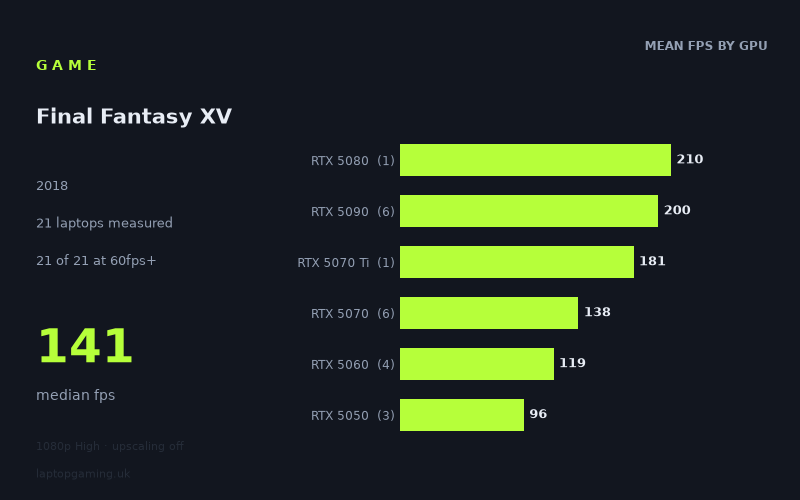
Every laptop we have figures for
Frame rates measured by Notebookcheck.
What it asks of a laptop
Very little, by the standards of anything currently shipping on a gaming laptop. Notebookcheck's figures put all fifteen tested machines above 60fps at 1920x1080 on the High preset with upscaling switched off, and fourteen of the fifteen above 100fps. The slowest result in the set — 86fps from an HP Victus 15-fa2160ng on an RTX 5050 — is a figure most games would be delighted to post on a mid-range card, and that's the floor here, not the average.
The interesting part is where the numbers stop scaling. The fastest machine, an Asus ROG Strix Scar 18 with a 175W RTX 5090, manages 214fps. A Lenovo Legion Pro 7i 16 Gen 10 with a 175W RTX 5080 sits at 210fps. That's a four-frame gap between two GPU tiers that are separated by a large amount of silicon and, typically, well over a thousand pounds. When two adjacent tiers land within 2% of each other, the graphics card has stopped being the limiting factor — the game is running into some other ceiling, most likely CPU and engine throughput, somewhere around the 210fps mark at these settings.
Below that ceiling, the tier separation is real but modest. Averaging Notebookcheck's results by GPU: 96fps for the RTX 5050 across three laptops, 118fps for the RTX 5060 across three, 134fps for the RTX 5070 across three, then the jump to roughly 199fps for five RTX 5090 machines. Moving from the bottom of the stack to the RTX 5070 buys you about 40% more frames. Moving from the RTX 5070 to the top of the range buys you roughly another 50% — but that 50% lands entirely above 144Hz, in territory where it changes your refresh-rate headroom and nothing else.
The other thing worth noting is the spread within a single tier. The five RTX 5090 laptops range from 176fps to 214fps — a 22% variance on nominally identical hardware. The Razer Blade 16 Core Ultra 9 at 176fps is the outlier, and it's the thinnest chassis in that group. That's the familiar pattern: in a game that isn't stressing the GPU particularly hard, sustained power limit and cooling determine where a machine lands more than the model number on the box does.
What runs it
60fps: everything tested. All fifteen laptops clear it, and the slowest does so by a margin of 43%. There is no configuration in this data set that struggles to hold a 60Hz panel at native 1080p on the High preset. If your laptop has any current-generation discrete GPU in it, this is a solved problem.
100fps: fourteen of fifteen. The RTX 5050 machines are the ones sitting on the line — the Medion Erazer Scout 17 E1 at 102fps and the Acer Nitro V 16 AI at 100fps just clear it, while the HP Victus 15-fa2160ng at 86fps doesn't. That's a 16fps range across three laptops with the same GPU, which again points at power delivery and cooling rather than the part itself. Every RTX 5060 and above is comfortably past 100: the HP Omen 16-ap0091ng manages 111fps, the Lenovo LOQ 118fps, the Lenovo Legion 5 15AHP G10 126fps.
144fps: six of fifteen, and the cut-off is sharp. The fastest RTX 5070 result — 141fps from an HP Omen 17z-db100 — falls three frames short. The Razer Blade 14 on a 115W RTX 5070 is at 138fps, the ASUS TUF Gaming A18 at 123fps. So in practice, feeding a 144Hz panel consistently means an RTX 5080 or RTX 5090, all of which clear it with room to spare, the slowest being the Razer Blade 16 at 176fps.
240fps and above: nothing here reaches it. The 214fps ceiling suggests that even the fastest hardware in this data set won't saturate a 240Hz panel at these settings, and the flat scaling between the RTX 5080 and RTX 5090 implies more GPU won't get you there either.
The cheapest laptop that handles it
Of the machines with prices attached in the measured set, the ASUS TUF Gaming A18 at £1,489 is the cheapest, and it returns 123fps on a 115W RTX 5070. That is well past any reasonable definition of comfortable at 1080p High — it clears 100fps by 23%, and the only thing it doesn't do is fully feed a 144Hz screen.
The other priced entries are all in a different bracket entirely and none of them are justified by this workload. The Lenovo Legion Pro 7i 16 Gen 10 at £3,662 posts 210fps, the Medion Erazer Beast 16 X1 Ultimate at £4,884 posts 205fps, and the Razer Blade 16 Core Ultra 9 at £4,979 posts 176fps. You are paying roughly £3,500 more than the TUF for 87 extra frames on the best of them — and paying nearly £5,000 for the Blade 16 to be the slowest RTX 5090 in the set.
What this means if you're buying
Don't let this title influence a purchase decision. It runs on everything Notebookcheck tested, and the unpriced budget machines — the Lenovo LOQ, the HP Omen 16-ap0091ng, the Acer Nitro V 16 AI — all sit between 100 and 118fps, which is more than enough.
If you already own something with an RTX 5050 or above, you're done. If you're shopping, the useful reading of this data is as a diagnostic rather than a requirement: the fact that a 175W RTX 5080 and a 175W RTX 5090 land four frames apart tells you this game will not distinguish between high-end cards, so any money spent at the top of the stack has to be justified by other titles. The RTX 5050 results are the ones to pay attention to, because the 86-to-102fps range across three laptops with the same GPU is a clean illustration of how much chassis and power limit matter at the budget end — and that gap widens, not narrows, in heavier games.
The one genuine buying consideration is your panel. If you've bought a 144Hz or 165Hz screen and want to actually use it here, the measured numbers say that starts at the RTX 5080 tier. If you're on a 120Hz panel, an RTX 5060 gets you there for a fraction of the money.
How these numbers were produced
Frame rates here are not measured by us, and we label how each one was arrived at. A figure marked measured comes from a published run on that exact machine. A figure marked representative is derived from the GPU and its power limit (TGP) and cross-referenced against published reviews - a sound estimate of what that configuration delivers, but not a measurement of that specific laptop. Unless stated otherwise, numbers are 1920x1080, High preset, upscaling off. Where a laptop ships in several power configurations we use the wattage of the exact SKU listed, because a 140W RTX 5070 and a 115W one are not the same product.