Details
Product prices and availability are accurate as of the date/time indicated and are subject to change. Any price and availability information displayed on Amazon.co.uk at the time of purchase will apply to the purchase of this product.Review
Acer Nitro 17 review
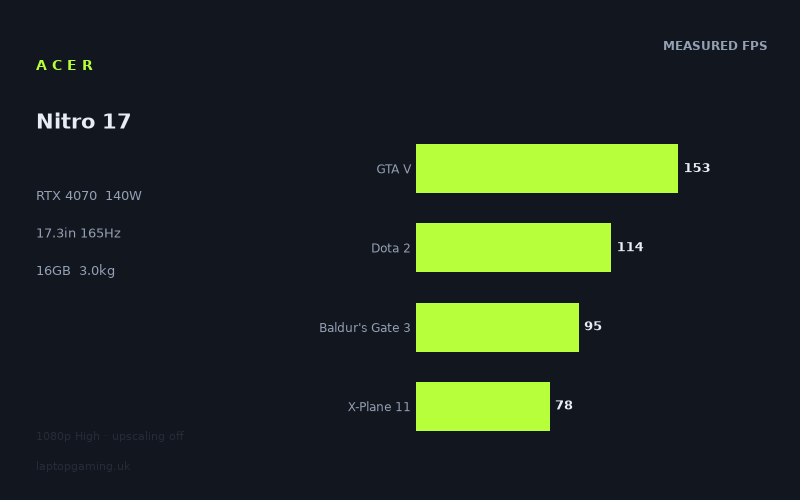
Frame rates
1920×1080, High preset, upscaling off.
Measured on this machine. Source: Notebookcheck, 2023-09-08.
Not scored: incomplete benchmark suite
Every scored laptop on this site is averaged over the same 5 games, and this one is short of Cyberpunk 2077. A mean over 4 games is not comparable to a mean over 5, so we publish the figures we have and leave the score blank rather than rank it against machines tested on a different set. The numbers below are real - the suite is just incomplete.
How these numbers were produced
Frame rates here are not measured by us, and we label how each one was arrived at. A figure marked measured comes from a published run on that exact machine. A figure marked representative is derived from the GPU and its power limit (TGP) and cross-referenced against published reviews - a sound estimate of what that configuration delivers, but not a measurement of that specific laptop. Unless stated otherwise, numbers are 1920x1080, High preset, upscaling off. Where a laptop ships in several power configurations we use the wattage of the exact SKU listed, because a 140W RTX 5070 and a 115W one are not the same product.
In use
The short version
The Acer Nitro 17 in this configuration is a machine whose specification sheet promises considerably more than its benchmark record delivers, and the gap between the two is the whole story. Our record lists an RTX 4070 running at a 140W power limit — a generous configuration by the standards of this GPU generation, the sort of number that normally separates a proper gaming chassis from a thin-and-light making compromises. Paired with a Ryzen 7 7735HS, 16GB of memory, a 1TB SSD and a 17.3in 2560x1440 panel at 165Hz, it reads like a machine that should comfortably outrun anything carrying a smaller GPU.
Notebookcheck's measured frame rates do not describe that machine. Across four shared games it finishes dead level with a Dell XPS 16 carrying the same RTX 4070, which is unremarkable, and dead level with a Schenker Key 14 carrying an RTX 4060 at 100W, which is not. A 140W RTX 4070 should not be tied with a 100W RTX 4060. That result demands an explanation rather than a shrug, and the explanation — worked through properly below — is that the shared games in question are not asking the GPU the question we want answered.
The evidence that the benchmark can separate machines is sitting in the same table. Against an MSI Thin GF63 with an RTX 4050 the Nitro 17 is 28fps ahead across four shared games. Against an Asus ROG Strix Scar 17 with an RTX 4090 it is 84fps behind across three. Those are enormous margins. A benchmark suite that produces an 84fps deficit at the top and a 28fps surplus at the bottom is plainly capable of resolving hardware differences; when it returns a tie, the tie means something specific, and it usually means the graphics card was not the thing being measured.
Taken on its own terms the raw performance is fine. The mean across our four scoring-suite games here is 110fps. Strange Brigade runs at 225fps, GTA V at 153fps, Atlas Fallen at 120fps. At the other end, Immortals of Aveum manages 57fps and Ratchet & Clank Rift Apart 60fps. That is a competent 1080p gaming laptop across a demanding 2023 test set, and nobody buying it would find it slow.
The problem is the £1,946 our record holds for this configuration. At that price the question stops being "is it fast enough" and becomes "what am I paying for that a cheaper machine wouldn't give me", and the comparison data makes that a genuinely awkward question. None of the four rivals has a confirmed UK price in our record, so this is not a claim that a specific alternative is better value — it is a claim that the performance argument for the premium is not present in the measurements.
There is also no score on this page, and the reason is procedural rather than damning. Our scoring suite is five games, and we hold four of them for this machine: GTA V, Dota 2, Baldur's Gate 3 and X-Plane 11. We have no Cyberpunk 2077 figure. Averaging four games and ranking that against every other laptop's five-game average would quietly corrupt the leaderboard, so we do not publish a number.
Buy it if you want a 17.3in screen, a large battery and a machine that will hold 60fps or better in essentially everything measured, and you can find it well below the price in our record. Look elsewhere if you are paying that price specifically for the 4070 badge, because the benchmark data does not show you getting 4070-class separation from cheaper hardware.
Performance
What a 140W power limit is supposed to buy
Nvidia's laptop GPUs are not fixed products. The same silicon is sold to manufacturers with a configurable power limit, and the manufacturer chooses where in that band to run it based on the cooling the chassis can support, the noise they are willing to accept and the price bracket they are chasing. The consequence is well known and worth restating because it drives everything below: the gap between a conservatively configured GPU and an aggressively configured one of the same model is routinely larger than the gap between adjacent model numbers. A well-fed RTX 4060 beating a starved RTX 4070 is not an anomaly. It is the normal behaviour of this product stack.
Our record puts the Nitro 17's RTX 4070 at 140W. That is at the upper end of how this GPU gets configured, and it is consistent with the physical machine described elsewhere in the specification: a 17.3in chassis weighing 2.99kg. Volume is what buys cooling — fan diameter, heat pipe cross-section, exhaust area, the sheer thermal mass available to absorb a transient — and a 17in machine approaching 3kg has considerably more of all of it than a 14in machine at half the weight. A 140W configuration in a chassis of that size is a coherent engineering decision rather than a marketing number, and there is no obvious reason to doubt it.
So the specification is internally consistent. The benchmark results are where it stops being consistent, and the resolution is not that the power limit is wrong. It is that a 140W GPU cannot demonstrate its advantage in a game that is waiting on the processor.
The measured spread, from top to bottom
The full set of measured figures, all at 1920x1080 on the High preset with upscaling off, runs from 225fps down to 57fps — a spread of just under four to one across twelve games. That range is itself informative, because it tells you the test set is not homogeneous. It contains titles that barely tax a modern GPU and titles from the heaviest end of 2023 releases, and the machine's character changes depending on which group you actually play.
At the top sit Strange Brigade at 225fps and GTA V at 153fps. Strange Brigade is a Vulkan title that has been in benchmark suites for years precisely because it scales cleanly and puts almost no unusual load on the processor; a result of that order is what a healthy modern GPU produces there, and it is a useful sanity check that nothing is badly wrong with the machine's power delivery or thermals. GTA V at 153fps is a different signal entirely, and a more interesting one. GTA V is an old game with a rendering path that leans heavily on single-thread processor performance. At 1080p on High it stopped being GPU-limited on hardware of this class some time ago. A 153fps result there is substantially a statement about the Ryzen 7 7735HS, not about the RTX 4070.
The middle band — Atlas Fallen at 120fps, Dota 2 at 114fps, Final Fantasy XV at 106fps, Atomic Heart at 95fps, Baldur's Gate 3 at 95fps, Armored Core 6 at 91fps — is where most of the practical experience lives. Every one of those is comfortably above 60fps and every one of them is well clear of the threshold where a game stops feeling responsive. Dota 2 at 114fps deserves a note of its own: Dota 2 is not a demanding game for any RTX 40-series card, and a figure of 114fps is far below what the GPU is theoretically capable of producing. It is another processor-bound result, and it matters because Dota 2 is one of our scoring-suite titles.
X-Plane 11 at 78fps follows the same pattern with even less ambiguity. X-Plane 11's simulation loop is famously processor-heavy and famously indifferent to how much graphics hardware you throw at it. It is in the scoring suite because it represents a genuine category of software people buy these machines to run, not because it is a GPU test.
The bottom of the table is where the RTX 4070 is actually doing the work. Sons of the Forest at 72fps, Ratchet & Clank Rift Apart at 60fps and Immortals of Aveum at 57fps are the heaviest titles in the set, and they are the only results in which a 140W power limit has room to express itself. Immortals of Aveum in particular was one of the most punishing releases of its year and 57fps at 1080p High with upscaling off is a respectable showing — it is the sort of result that separates a properly powered GPU from a throttled one. That the machine holds 57fps in the worst case measured is a genuine strength and should not be lost in the comparison argument.
Why four of these numbers matter more than the other eight
Our scoring suite exists so that machines can be compared on identical software. For this laptop we hold four of the five: GTA V at 153fps, Dota 2 at 114fps, Baldur's Gate 3 at 95fps and X-Plane 11 at 78fps, averaging 110fps. Look at that list against the analysis above and a problem announces itself immediately. Three of those four titles are substantially processor-bound at 1080p on this class of hardware. GTA V, Dota 2 and X-Plane 11 all sit in that category. Only Baldur's Gate 3 is asking the graphics card a serious question, and even Baldur's Gate 3 has a well-documented dependence on processor performance in its later act.
This is not a criticism of the suite, which has to include the games people actually play and cannot consist solely of graphical showcases. But it is essential context for the comparison section, because it means the four-game average is heavily weighted towards a component the specification sheet is not selling you on. When the Nitro 17 ties a machine with a smaller GPU across those games, the honest reading is that the two machines have comparable processors and the games did not reach far enough into the graphics hardware to distinguish them.
The Cyberpunk gap
We have no Cyberpunk 2077 figure for this machine, and its absence costs more than one data point. Cyberpunk 2077 is the closest thing the suite has to a pure graphics test at 1080p — a game that will consume whatever GPU power is available and where a 140W configuration would have the clearest opportunity to separate itself from a 100W one. It is precisely the missing number that would settle the argument this review has to leave open.
The consequence is that we publish no score. A four-game average cannot be ranked against five-game averages without introducing a systematic bias, and given that the missing game is the one most likely to flatter this particular machine, publishing the partial average would understate it. We would rather show our working and leave the number blank.
What the frame rates mean in practice
Strip out the comparison argument and the practical picture is straightforward. Every game measured runs above 57fps at 1080p on High with no upscaling. Nine of the twelve run above 90fps. If your library is competitive shooters, older titles, strategy games or anything that predates the 2023 crop of heavy single-player releases, this machine will produce frame rates well beyond what its panel or your eyes will resolve, and it will do so with headroom to spare.
If your library is the heavy end — the Immortals of Aveum, Ratchet & Clank, Sons of the Forest tier — you are looking at the 57 to 72fps band at 1080p, which is a perfectly playable experience but not a comfortable one for the 165Hz panel, and one that will require settings compromises or upscaling as games continue to get heavier. That is the normal position for this GPU tier in this generation and it is not a mark against the machine. It simply means the panel's refresh rate is aspirational for anything but light titles.
The screen
17.3in at 2560x1440
The panel is a 17.3in IPS unit at 2560x1440 with a 165Hz refresh rate, and it is one of the better-judged parts of the machine. At that diagonal, 1440p is the right resolution: 1080p stretched across 17.3in produces visibly coarse text and aliased edges, while 4K on a laptop panel at this size costs an enormous amount of GPU performance for a difference most people cannot see at normal viewing distance. 1440p on a 17in screen is a sensible engineering choice and Acer has made it.
It does, however, create a measurement problem that is worth being explicit about. Every frame rate in this review was measured at 1920x1080. None of them was measured at the panel's native 2560x1440. Those two resolutions are not close: 1440p carries roughly 1.8 times as many pixels as 1080p. The scaling is not linear, because the processor-bound titles discussed above will lose little or nothing when the resolution rises — the GPU has spare capacity in exactly those games — while the heavy titles at the bottom of the table will lose a great deal, because they were already GPU-limited.
We do not hold native-resolution figures and we will not estimate them. What can be said with confidence is directional: the games that are comfortable at 1080p and are processor-bound will remain broadly comfortable at 1440p, and the games at the bottom of the table will not. Anyone buying this machine intending to play the heaviest releases at native resolution with upscaling off should plan on either lowering settings or accepting frame rates below the 57fps floor recorded at 1080p. In practice that means using DLSS, which this GPU generation supports and which was designed for exactly this situation.
165Hz against what the GPU actually produces
The refresh rate is the part of the specification that the measured data undermines most clearly. Of the twelve games in the record, exactly one — Strange Brigade at 225fps — exceeds 165fps at 1080p. GTA V at 153fps comes close without getting there. Everything else is well below, and eight of the twelve are below 110fps.
That is at 1080p. At the panel's native 1440p the situation only gets worse. So the honest position is that the 165Hz refresh rate is largely unused by this machine in the games measured, and it will be almost entirely unused at native resolution.
This is not the failure it might sound like, and it is worth being precise about why. High-refresh panels do two useful things. The first is the one everyone talks about: displaying frames above 60fps, which requires the GPU to produce them. The second is reducing the persistence blur and input latency floor that a 60Hz panel imposes, which happens at any frame rate — a game running at 95fps on a 165Hz panel with variable refresh is noticeably smoother and more responsive than the same game at 95fps on a 60Hz panel, where it would be tearing or capped. Almost every result in this table sits in that middle band, and the panel is doing real work there.
What the refresh rate is not doing is justifying a premium on its own. If you play competitive shooters at low settings, the headroom exists and the panel will be fed. If you play the games in this test set at the settings they were measured at, you are buying a panel with more capability than the graphics card will use.
IPS, and what our record does not say
Our record identifies the panel as IPS. That is meaningful — it rules out the poor viewing angles and contrast shift of a TN panel, and it sets expectations for colour behaviour and off-axis stability that are broadly good. It also rules out OLED, which by this generation had started appearing in gaming laptops and which offers contrast an IPS panel structurally cannot match.
Beyond the panel technology, our record holds no brightness figure, no measured colour gamut coverage and no response time. Those are real gaps and they matter — a bright, well-covered IPS panel and a dim, narrow-gamut one are very different products behind the same three letters, and 165Hz on a slow panel produces visible ghosting that undermines the point of the refresh rate. We are not going to guess at any of them. Anyone for whom colour accuracy or outdoor brightness is a deciding factor should treat those as open questions and seek measurements before buying.
Build, size and portability
2.99kg, and who that rules out
At 2.99kg the Nitro 17 is a desktop replacement in the original sense of the phrase: a machine that replaces a desktop, in a room, and moves occasionally rather than daily. That figure is for the laptop alone. A machine feeding a 140W GPU and an eight-core-class processor needs a substantial power adapter, and the adapter's weight is not in our record but will not be trivial. The realistic carrying weight is meaningfully above 3kg.
This is not a criticism — it is a description of the category, and the weight is directly connected to the machine's best quality. The 140W power limit that gives the Nitro 17 its 57fps floor in the heaviest games measured exists because there is a 17.3in chassis of nearly 3kg to dissipate the heat into. You cannot have the cooling without the volume, and you cannot have the sustained GPU power without the cooling. A buyer who wants both a 140W GPU and a machine they can carry across a city every day is asking for something that did not exist in this generation at any price.
What it does rule out is genuine mobility. Three kilograms plus an adapter in a backpack is unpleasant over any distance, and a 17.3in chassis will not fit comfortably on an economy tray table or a small desk. If the machine is going to live on a desk and move between a bedroom and a living room, or into a car for a LAN event, the weight is irrelevant. If it needs to commute, this is the wrong machine.
The 90Wh battery
The battery is 90Wh, which is at the large end of what laptops carry and close to the practical ceiling imposed by aviation rules on lithium batteries in cabin baggage. Acer has fitted about as much capacity as it is allowed to.
Our record holds no measured battery runtime for this machine, so we will not state one. What the capacity means structurally is this: on battery a gaming laptop of this class does not run its GPU anywhere near a 140W configuration, because no reasonable battery could sustain that draw for a useful length of time. Unplugged gaming on this machine will be a substantially reduced experience regardless of capacity. Where 90Wh genuinely helps is everything else — browsing, video, document work, the ordinary use that a 17in laptop with a good screen is perfectly capable of. A large battery attached to a machine that idles efficiently is a real quality-of-life feature and it is worth having.
Memory and storage
16GB of memory and a 1TB SSD is the standard configuration for this class in this generation, and both figures are defensible without being generous. 16GB is enough for gaming today and is the point at which a handful of recent titles start pressing; it is the specification most likely to feel dated first. Whether it can be expanded is not something our record establishes, and it is worth checking before purchase — on a machine of this size and price the answer is usually yes, but "usually" is not a fact about this model.
1TB fills faster than people expect. Two or three current large installs and the drive is under pressure. Again, a 17in chassis normally has room for a second drive, but our record does not confirm it for this model and we are not going to assert it.
How it compares
Four rivals, all from the same GPU generation, all compared only on games both machines hold, with the scoring suite preferred where available. None of the four has a confirmed UK price in our record, so every comparison below is about performance alone. That is a real limitation and it should be kept in view: a performance tie against a machine that costs half as much is a very different result from a performance tie against a machine that costs the same, and we cannot tell you which of those we are looking at.
MSI Thin GF63 (RTX 4050) — 28fps ahead across four games
This is the comparison that behaves exactly as the specification sheet predicts. The GF63 carries an RTX 4050, two tiers below the Nitro 17's 4070, and it loses by an average of 28fps across four shared games. That is a decisive margin — not a rounding error, not a within-run variation, but a clear and consistent separation.
Its importance is as a control. It establishes that the shared game set can distinguish between graphics hardware, and by a wide margin, when the graphics hardware differs enough. Any argument that "the benchmark just does not separate machines" dies here. The benchmark separates these two machines emphatically. That makes the two ties below considerably more interesting than they would otherwise be, because it means they are not artefacts of a blunt instrument.
It also gives the Nitro 17 a genuine claim. Against the bottom of this GPU generation it is unambiguously the faster machine, and by an amount you would notice. If the alternative under consideration is a 4050 laptop, the Nitro 17 is meaningfully better and the specification sheet is telling the truth.
Dell XPS 16 (RTX 4070) — level across four games
Same GPU tier, no measurable difference across four shared games. Taken alone this is the least surprising result in the set: two RTX 4070 machines producing the same frame rates is what you would expect if both are adequately fed and the games are not stressing the GPU hard enough to expose configuration differences.
It becomes interesting when you consider what the XPS 16 is. It is a thin premium 16in machine, not a 3kg gaming chassis, and our record holds no power limit for its GPU. If the Nitro 17 really is running its 4070 at 140W, it ought to be beating a thin-chassis 4070 rather than tying it. That it does not is the first indication that the shared game set is not measuring what we want it to measure — and given three of the four shared games are the processor-bound titles identified above, that indication is well supported.
The practical reading for a buyer is narrow but useful: in the games measured, these two machines perform identically, and any choice between them should be made on screen, chassis, portability and price rather than on frame rates.
Schenker Key 14 (RTX 4060 at 100W) — level across four games
This is the result that should make a prospective buyer pause. The Key 14 is a 14in machine with an RTX 4060 configured at 100W. On paper the Nitro 17 has a superior GPU running at a substantially higher power limit in a chassis with far more cooling capacity. Across four shared games there is no measurable gap between them.
The explanation is the one this review has been building towards, and it is not a hedge. At 1080p, in a shared set dominated by titles whose frame rate is set by the processor rather than the graphics card, both machines hit the same ceiling and the ceiling has nothing to do with the GPU. GTA V, Dota 2 and X-Plane 11 will produce similar numbers on any competent modern processor paired with any competent modern GPU, because the graphics card finishes its work and waits. A tie in those games tells you the two processors are comparable. It does not tell you the two graphics cards are.
Two consequences follow. The first is that this result should not be read as "the Nitro 17's 4070 is no better than a 100W 4060" — that conclusion does not follow from processor-bound data, and the 57fps Immortals of Aveum result argues against it. The second, and more uncomfortable, is that we cannot demonstrate the opposite either, because the missing Cyberpunk 2077 figure is precisely the number that would have shown the GPU gap. A buyer paying a premium for the 4070 is buying an advantage that is real in principle and unproven in our data.
There is also a straightforward practical point. If a 14in laptop matches this machine's frame rates in the games both were measured on, and portability matters to you at all, the 17.3in 2.99kg chassis needs to be earning its place through the screen size and the heavy-title performance rather than through raw numbers in ordinary games.
Asus ROG Strix Scar 17 (RTX 4090) — 84fps behind across three games
The Scar 17 carries an RTX 4090 and beats the Nitro 17 by an average of 84fps across three shared games. Our record holds no power limit for the Scar 17's GPU, so we cannot say how aggressively it is configured; that field is not populated and we are not going to invent it.
Two things are worth drawing out. First, the sample is three games rather than four, so it rests on a slightly narrower base than the others — worth noting, not worth discounting, because an 84fps average gap is far too large to be an artefact of which three games were chosen.
Second, and more importantly, this is the strongest evidence in the entire comparison set that the benchmark is a functioning instrument. An 84fps deficit is not a subtle result. In a shared game set that supposedly cannot separate a 140W 4070 from a 100W 4060, the top of the GPU stack pulls out an enormous margin. Both things are true at once and they are not in conflict: the shared games compress differences at the bottom and middle of the range because the processor becomes the limit, but a GPU fast enough to raise that ceiling in every title still shows a huge gap. A 4090 is fast enough to be GPU-limited in almost nothing at 1080p, which is exactly why it runs away.
For a buyer, the practical meaning is about expectations rather than shopping. The Nitro 17 is not a flagship and does not price itself as one. It is a mid-tier GPU in a large chassis, and the flagship machines of its generation are far ahead in a way the measurements make unmistakable.
What the four comparisons say together
Read as a set rather than individually, the pattern is coherent. Against a much weaker GPU, a decisive win. Against much stronger hardware, a decisive loss. Against two machines of broadly similar capability — one the same tier, one a tier below but well fed — no measurable difference at all. That is the signature of a test set that resolves large hardware gaps cleanly and compresses small ones, which is precisely what a 1080p test set containing several processor-bound titles should do.
The conclusion a buyer should take is not that the Nitro 17 is slow. It is not. The conclusion is that the specific advantage it is charging for — a 4070 at a high power limit — is visible in the heavy titles at the bottom of its own results table and invisible in the shared-game comparisons, and that at £1,946 the burden of proof sits with the machine.
Who it's for
The case for buying it
The Nitro 17 makes sense for someone who wants a large screen and does not want to think about it. A 17.3in 1440p panel is genuinely more pleasant to work and play on than a 15in or 16in one, and it is the single thing this machine offers that most of its rivals structurally cannot. If the laptop is going to sit on a desk and act as your only computer, the extra screen area is worth real money and the weight costs you nothing.
It also makes sense for someone whose games are at the heavy end. The 140W configuration in our record is the reason Immortals of Aveum manages 57fps and Sons of the Forest 72fps at 1080p High with upscaling off — the results at the bottom of the table are the ones where GPU power is genuinely being spent, and they are good for this tier. If your library is 2023-and-later single-player releases rather than competitive multiplayer, the machine's strengths are pointed in your direction.
And it makes sense for anyone upgrading from a 4050-class machine, where the 28fps average margin is a real and noticeable improvement rather than a specification-sheet distinction.
The case against
Do not buy it at £1,946 on the strength of the GPU name. That is the central caution of this review. Across four shared games it is level with a 100W RTX 4060 laptop and level with another 4070 laptop, and while there are good technical reasons for both ties, a buyer paying a premium is entitled to see the premium in the numbers. In this data set, they cannot.
Do not buy it if you need to carry it. 2.99kg plus an adapter, in a 17.3in footprint, is a machine that moves between rooms rather than between cities. The competition includes 14in and 16in laptops producing comparable frame rates in the shared games at a fraction of the bulk, and one of them is in the comparison set above.
Do not buy it primarily for the 165Hz panel. Only one measured game exceeds that refresh rate at 1080p, and the panel's native resolution is 1440p, where the situation is worse. The refresh rate does useful work in the middle band where most of these results sit, but it is not the reason to choose this machine over a cheaper one.
Do not buy it if you intend to play at native 1440p with upscaling off and expect the frame rates in this review. Those numbers are 1080p numbers, the panel carries roughly 1.8 times the pixels, and the heavy titles will lose the most. DLSS exists precisely for this and works well on this GPU generation, but that is a compromise you should choose deliberately rather than discover.
What we would want to know before recommending it outright
Three gaps in our record would change the analysis if filled. A Cyberpunk 2077 figure would let us score the machine and, more usefully, would show whether the 140W RTX 4070 pulls away from the 100W 4060 when a game actually asks it to. Native 1440p measurements would tell buyers what the panel's real-world performance looks like rather than requiring them to reason from 1080p. And confirmed UK prices for the rivals would turn four performance comparisons into four value comparisons, which is what anyone spending £1,946 actually needs.
Until then the summary stands. It is a capable, well-cooled 17in gaming laptop with a sensible screen, a large battery and a floor of 57fps across a demanding measured test set. Whether it is worth its price depends on evidence our data does not currently contain, and a buyer should treat the price in our record as the thing to negotiate rather than the thing to accept.