Review
Acer Aspire Nitro 5 review
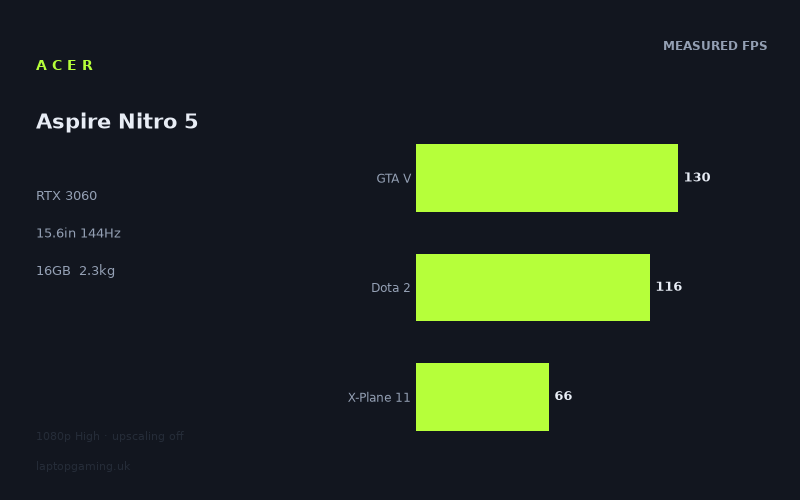
Frame rates
1920×1080, High preset, upscaling off.
Measured on this machine. Source: Notebookcheck, 2021-05-24.
Not scored: incomplete benchmark suite
Every scored laptop on this site is averaged over the same 5 games, and this one is short of Cyberpunk 2077, Baldur's Gate 3. A mean over 5 games is not comparable to a mean over 5, so we publish the figures we have and leave the score blank rather than rank it against machines tested on a different set. The numbers below are real - the suite is just incomplete.
How these numbers were produced
Frame rates here are not measured by us, and we label how each one was arrived at. A figure marked measured comes from a published run on that exact machine. A figure marked representative is derived from the GPU and its power limit (TGP) and cross-referenced against published reviews - a sound estimate of what that configuration delivers, but not a measurement of that specific laptop. Unless stated otherwise, numbers are 1920x1080, High preset, upscaling off. Where a laptop ships in several power configurations we use the wattage of the exact SKU listed, because a 140W RTX 5070 and a 115W one are not the same product.
In use
The short version
The Acer Aspire Nitro 5 AN515-55-57GF is a straightforward 1080p gaming laptop built around an RTX 3060, a Core i5-10300H, 16GB of memory and a 144Hz IPS display. The benchmark data gives it a clear role: it is capable of very high frame rates in several established games at 1920x1080 on High settings without upscaling, while more demanding titles remain comfortably playable but do not approach the panel’s full 144Hz refresh rate.
Notebookcheck’s measured figures range from 143fps in Strange Brigade to 58fps in Cyberpunk 2077 1.0. That is a meaningful spread, and it matters more than a single headline average. This is not a laptop that delivers the same experience in every game simply because it has an RTX 3060 badge. In lighter or better-scaling titles it can make strong use of the 144Hz screen. In heavier games, particularly Cyberpunk 2077 1.0 and Final Fantasy XV, it is more accurately described as a capable 60fps-class High-preset machine at native resolution.
The five-game scoring-suite mean is 105fps, which is a good indication that this Nitro 5 has substantial 1080p gaming ability across a mixed set of titles. But the average should not be mistaken for a promise of 105fps in every game. Dota 2 reaches 116fps, GTA V reaches 130fps and Strange Brigade reaches 143fps, while X-Plane 11 records 66fps and Final Fantasy XV records 72fps. The individual game figures are more useful than the mean when deciding whether this is the right machine for the games you actually play.
There is no confirmed UK price for this exact configuration, so a value assessment cannot be calculated. That is not a criticism of the machine or a suggestion that its benchmark position is incomplete: the benchmark suite is complete and it ranks normally on frame-rate performance. It simply means there is no sound basis for saying whether this particular Acer is good value in the UK.
Buy this Nitro 5 if your priority is a conventional 15.6in 1080p gaming laptop with a 144Hz IPS panel and you play a mixture of esports-adjacent games, older large-budget games and moderately demanding modern titles. The measured figures support that use well. It is especially suited to someone who values high frame rates in games such as Strange Brigade, GTA V and Dota 2, but who is also content with more modest results in the most demanding games at High settings.
It is less convincing for a buyer whose main aim is to run every demanding release as close as possible to 144fps at native 1080p on High settings. The screen is capable of showing that level of motion, but the measured figures show that the GPU and CPU combination does not sustain it across the whole game set. The distinction is important. A 144Hz display is a useful asset here, but it is not evidence that every game will reach 144fps.
Performance
What Notebookcheck’s figures show
All of the published game results here are Notebookcheck measurements, recorded at 1920x1080 using the High preset with upscaling off. That test method is useful because it matches the Nitro 5’s native panel resolution and does not rely on image reconstruction techniques to lift the frame-rate result. These are direct native-resolution High-preset figures, which makes the results relatively easy to interpret against the laptop’s 144Hz display.
The strongest recorded result is Strange Brigade at 143fps. That is extremely close to the display’s 144Hz refresh rate and shows that the Nitro 5 can provide a high-refresh experience in the right game. It does not quite establish a consistent 144fps result, but it is close enough to show that this display is not wasted on the laptop’s hardware. For a title with this level of measured performance, the panel can show substantially more motion than a standard 60Hz screen.
GTA V follows at 130fps. That is another very strong result at the stated settings, and it places the game clearly in high-refresh territory even though it is below the screen’s full 144Hz maximum. For a buyer playing GTA V, the useful conclusion is not that the laptop exactly matches the panel refresh in every scene. Rather, the measured result indicates that the Nitro 5 has enough performance to make the 144Hz panel materially worthwhile in this game.
Dota 2 records 116fps. This is below the figures for Strange Brigade and GTA V, but it remains a high frame rate and is well beyond the conventional 60fps target. It should be read as evidence that the Nitro 5’s display is a sensible match for fast-moving competitive or competitive-adjacent games, even where the result does not fill all 144 refresh cycles each second. A game running at 116fps can still benefit visibly from a 144Hz panel, provided the frame rate remains in that region during the parts of the game that matter to the player.
The Witcher 3 reaches 133fps. Although it is not part of the five-game scoring suite, it is one of the most useful results in the wider list because it sits near the top of the measured spread. At 133fps, it is another example of a game where the Nitro 5 can take serious advantage of the 144Hz display at native resolution with High settings selected. The result also makes clear that this laptop is not limited to high frame rates only in the least demanding game on the list.
Far Cry 5 records 96fps. That is a different class of result from the 130fps-plus games, but it remains a strong native-1080p High-preset figure. The screen’s 144Hz ceiling is no longer the likely limiting factor; the game performance is. Even so, 96fps is clearly above 60fps and supports a smoother experience than a 60Hz display can fully present. It is a good example of the middle ground this laptop occupies: it can push well beyond 60fps in many games, but it should not be assumed to hit 144fps merely because the display refreshes at 144Hz.
Final Fantasy XV measures 72fps. That is still a playable result at the stated settings, but it is far from the high-refresh figures seen in Strange Brigade, GTA V and The Witcher 3. The 144Hz panel remains a quality advantage in general use and in lighter games, but the published figure indicates that Final Fantasy XV is not using most of the panel’s available refresh range under this test configuration. For a player whose main game is Final Fantasy XV, the more relevant headline is that the Nitro 5 clears a conventional 60fps target at High settings and native resolution, rather than that it has a 144Hz panel.
X-Plane 11 comes in at 66fps. Like Final Fantasy XV, it is above 60fps but not close to 144fps. This is a useful warning against treating a GPU name as a complete performance description. Different games place different demands on the system, and the Nitro 5’s results vary accordingly. In a simulation title represented by X-Plane 11, the machine’s measured performance is more appropriately paired with expectations of a solid 60fps-class result than with expectations of high-refresh operation.
Cyberpunk 2077 1.0 is the lowest result in the list at 58fps. It is also the clearest evidence that the Nitro 5 should not be bought on the assumption that its RTX 3060 will make every demanding game a 144fps proposition at 1080p High with upscaling disabled. The benchmark data says the opposite: at these settings, this title is just below 60fps. That does not make the laptop unsuitable for Cyberpunk 2077 1.0, but it does define the compromise. Native 1080p and High settings are demanding enough here that the measured result is far below the capability of the panel.
The 105fps mean is useful, but not sufficient on its own
Across the five scoring-suite games, the Nitro 5 has a mean of 105fps. That is a strong aggregate result for a laptop aimed at 1080p gaming, and it gives a fair broad picture of the system’s ability across Strange Brigade, GTA V, Dota 2, Final Fantasy XV and X-Plane 11. The average is notably above 60fps and within the range where a 144Hz display has practical value.
However, the 105fps mean should not be used as a substitute for the game-by-game data. It sits between games that are close to the panel’s ceiling and games that are much closer to 60fps. Strange Brigade at 143fps, GTA V at 130fps and Dota 2 at 116fps pull the average upwards. Final Fantasy XV at 72fps and X-Plane 11 at 66fps show the other side of the machine’s performance profile. A buyer who mostly plays the latter type of game should not buy on the strength of the mean alone.
This is why the Nitro 5 is best described as a broadly capable 1080p laptop rather than a universal high-refresh machine. Its average performance is strong, but its strength is spread unevenly. It can produce very high frame rates where the game and hardware pairing allow it. It can also fall into a much more conventional performance band where the title is more demanding or where other parts of the system become more important to the result.
The data also shows why a panel refresh rate should be treated as an opportunity rather than a guarantee. The 144Hz panel gives the laptop room to display 143fps in Strange Brigade, 133fps in The Witcher 3, 130fps in GTA V and 116fps in Dota 2. In those cases, the display specification is well chosen. Yet the same screen does not turn 66fps in X-Plane 11 or 58fps in Cyberpunk 2077 1.0 into high-refresh performance. The panel is ready for more frames than those games deliver at the measured settings; it cannot create them.
GPU power limit: what can and cannot be concluded
The fact sheet identifies the Aspire Nitro 5’s GPU as an RTX 3060, but it does not provide a GPU power limit for this exact Acer configuration. That means it would be wrong to assign a specific wattage to the laptop or to claim that its results are explained by a particular power setting. GPU power limits can matter greatly when comparing laptops with the same GPU name, but the relevant limit for this Nitro 5 is not available here.
What can be said from the published results is that this particular RTX 3060 implementation is capable of high frame rates in several 1080p High-preset games. The results are not theoretical and do not need a guessed power figure to be useful. Notebookcheck records 143fps in Strange Brigade, 133fps in The Witcher 3, 130fps in GTA V and 116fps in Dota 2. Those figures establish the practical outcome for these games: the Nitro 5 has enough performance to make a 144Hz screen meaningful.
At the same time, the lower results show why the GPU name cannot settle every buying decision. Final Fantasy XV at 72fps, X-Plane 11 at 66fps and Cyberpunk 2077 1.0 at 58fps demonstrate that a native 1080p High-preset workload can still be substantial for this configuration. The laptop does not have the same performance reserve in every title. Without a published power limit, the responsible conclusion is based on the outcome rather than a presumed cause: it is fast in some games, solid in others, and not a blanket answer for 144fps gaming.
Why the spread between games matters
The spread from 143fps in Strange Brigade to 58fps in Cyberpunk 2077 1.0 is not a flaw in the data. It is the point of using a suite of games rather than presenting one favourable result. A gaming laptop is experienced through the games it runs, not through its fastest benchmark alone. The Nitro 5’s range shows that its performance changes substantially depending on the workload.
Strange Brigade, GTA V, The Witcher 3 and Dota 2 are the titles that make the strongest case for pairing this hardware with a 144Hz panel. Their figures sit at 143fps, 130fps, 133fps and 116fps respectively. In those games, the player is likely to benefit from a display that can refresh more frequently than 60Hz. The exact frame rate will vary within a game, but the published measurements show that the machine can operate well above a standard 60fps target.
Far Cry 5 at 96fps sits between the two performance groups. It is not close to the top results, but it is also not in the 60fps-class region occupied by Final Fantasy XV, X-Plane 11 and Cyberpunk 2077 1.0. This makes it a useful reference point for what the laptop can do in games that are neither especially light nor at the extreme demanding end of the tested list. It is a strong result, but not one that makes the display’s full 144Hz refresh rate the realistic target at the stated settings.
Final Fantasy XV, X-Plane 11 and Cyberpunk 2077 1.0 underline the difference between “playable” and “high refresh”. At 72fps, 66fps and 58fps respectively, they remain close to or around the familiar 60fps level, but they do not exploit the full panel in the way that Strange Brigade or GTA V do. A buyer who spends most of their time in demanding open-world games, simulations or similar heavy workloads should read these figures closely. The Nitro 5 can run these games at native resolution and High settings according to the benchmark data, but it does not turn them into 144fps experiences.
The Core i5-10300H should also be kept in view when interpreting the broader performance picture. The published results describe the whole laptop, not the GPU in isolation. In some games, especially lighter titles at 1080p, processor limits can compress the difference between otherwise different graphics implementations. That matters particularly when looking at the comparison results against other laptops. A close result is not necessarily evidence that every part of the machines is equivalent; it can mean that the shared games are less able to expose a wider graphics gap at 1080p.
The screen
A sensible native resolution for the measured performance
The Aspire Nitro 5 uses a 15.6in IPS display with a resolution of 1920x1080 and a 144Hz refresh rate. On the evidence available, 1920x1080 is the correct resolution for this laptop’s measured performance. The frame-rate data was collected at the panel’s native resolution, and the results show that the system can deliver anything from 58fps to 143fps at High settings with upscaling off.
A higher-resolution panel would demand more from the system for a given setting level, while the measured results here already show a wide range at 1920x1080. The Nitro 5’s strongest games can approach the screen’s refresh limit at native resolution. Its more demanding games settle far lower. That makes the 1080p screen a practical pairing with the available hardware rather than an obvious compromise made only to reduce cost or chase a specification sheet.
The IPS panel type is also relevant. The fact sheet confirms IPS, although it does not provide measured brightness, colour coverage, contrast, response times or any other display-quality figures. It would therefore be wrong to make claims about colour accuracy, outdoor use, black levels or motion clarity beyond what the resolution, refresh rate and panel type establish. The safe conclusion is that this is a 15.6in 1080p 144Hz IPS display, and that the benchmark data shows the laptop can make meaningful use of 144Hz in some games.
When 144Hz is genuinely useful here
The display’s refresh rate is particularly well matched to Strange Brigade, which reaches 143fps in the measured test. That is the closest result to the panel’s full 144Hz capability. The practical significance is clear: this is one of the games where the laptop can produce frames at almost the same rate as the panel can refresh.
The Witcher 3 at 133fps and GTA V at 130fps also support the case for a 144Hz screen. Neither result reaches 144fps, but both are high enough that a 60Hz display would leave a substantial amount of the available frame-rate output unshown. A 144Hz panel gives the system room to present those frames rather than placing a 60Hz ceiling in front of them.
Dota 2 at 116fps is similarly well served by the display. The result is not at the panel maximum, but it is high enough to sit firmly in the range where a 144Hz screen is more appropriate than a 60Hz alternative. For a buyer who plays Dota 2 regularly, this is one of the more encouraging figures in the list.
Far Cry 5 at 96fps is still a good match for a 144Hz display, although it does not use as much of the available refresh range as the games above. A 96fps result remains well beyond 60fps. The benefit of the panel is therefore still relevant, just less complete.
When the screen is ahead of the game performance
Final Fantasy XV at 72fps, X-Plane 11 at 66fps and Cyberpunk 2077 1.0 at 58fps are different cases. In each, the display can refresh more frequently than the laptop is measured to deliver frames at the stated settings. The 144Hz panel is not a disadvantage in these games, but it is not the central performance benefit either. The limitation is the game result, not the screen specification.
This distinction should influence buying expectations. The display is versatile because it supports both high-frame-rate and lower-frame-rate gaming. But buyers should not pay attention only to the “144Hz” label. The key question is whether their games resemble Strange Brigade and GTA V, or whether they resemble Cyberpunk 2077 1.0 and X-Plane 11. The answer changes how much practical benefit they will get from the panel’s refresh rate.
For mixed libraries, the screen is still a sound specification. The Nitro 5 can use it properly in several measured games, while the native 1080p resolution keeps demanding games within a playable range without requiring upscaling in the published tests. That balance is more useful than a screen specification that looks impressive but is consistently out of reach of the installed hardware.
Build, size and portability
The Acer Aspire Nitro 5 weighs 2.27kg. That places it firmly in the category of a laptop that can be moved, but should not be viewed as an effortless all-day carry machine. The 15.6in display already signals that this is intended as a full-size gaming notebook rather than a compact ultraportable system, and the weight reinforces that impression.
At 2.27kg, the Nitro 5 makes most sense as a laptop that travels between a desk, a home setup, a student room, a workplace or occasional destinations rather than something carried continuously with minimal burden. It is portable in the literal sense: it is a laptop, and it can be taken with you. But its size class and weight suggest that buyers should want a larger gaming display and conventional gaming-laptop format more than they want the lightest possible bag.
The fact sheet does not provide physical dimensions, battery-life figures, charger weight, keyboard information, port selection, chassis materials, cooling behaviour, surface temperatures or fan-noise measurements. Those are important parts of ownership, particularly for a 2.27kg gaming machine, but there is no basis here for making claims about them. A buyer for whom quiet operation, battery endurance, desk footprint or precise carrying dimensions are decisive should seek confirmed measurements for this exact configuration before treating it as a final choice.
What is clear from the available specification is that the machine combines a 15.6in display, a 2.27kg weight and 512GB of SSD storage. That combination points towards a conventional gaming-laptop role: a machine intended to provide a proper native 1080p gaming screen and a substantial internal configuration rather than the smallest possible device.
The 512GB SSD capacity deserves a practical mention because the laptop is aimed at modern PC gaming. The fact sheet confirms the capacity but does not state how much of that capacity is available to the user, whether additional storage can be fitted, or how the drive performs. It is therefore sensible to treat 512GB as the stated storage capacity, not as a guarantee about the number of games a buyer will keep installed or the upgrade options available later.
The 16GB memory figure is likewise a useful baseline specification, but the available information does not confirm memory speed, layout, expansion options or user-accessible slots. There is no reason to infer those details. The measured game results already reflect the supplied 16GB configuration, which is the most relevant point for this review: the frame rates listed above are not hypothetical figures for a differently equipped Nitro 5.
How it compares
Against the MSI Prestige 15 with RTX 3050 Ti at 105W
The widest positive comparison in the supplied rival set is against the MSI Prestige 15 with an RTX 3050 Ti at 105W. Across four shared games, the Acer averages 42fps ahead. That is a substantial gap, not a rounding difference and not something that needs elaborate interpretation. On the shared-game evidence, the Aspire Nitro 5 offers clearly stronger gaming performance.
The result is useful because it demonstrates that the Nitro 5’s RTX 3060 is not merely trading close blows with every lower-tier alternative. There is a pronounced separation here. A buyer choosing between these two specific machines for gaming should treat the Acer as the more capable option on the available frame-rate evidence.
Neither machine has a confirmed UK price in the supplied information, so this comparison should remain about performance rather than value. The Acer is decisively faster across the shared games, but it would be irresponsible to turn that into a judgement about which is the better buy without confirmed pricing for either exact configuration.
Against the Asus Zephyrus G14 with RTX 3060 at 80W
The comparison with the Asus Zephyrus G14 is much closer. Across five shared games, the Acer averages 2fps ahead. That is a near-zero difference in practical terms, particularly across a set that includes games where 1080p performance can become CPU-bound and compress genuine GPU differences.
This does not mean the Acer and Asus are identical laptops. The G14 is listed with an RTX 3060 at 80W, while the Nitro 5’s GPU power limit is not supplied. It would be wrong to fill in the missing Acer figure or to claim a direct explanation for the close outcome. The reliable conclusion is simply that, in the five shared games used for the comparison, the two machines are effectively tied on the published average.
The close result also illustrates why laptop GPU comparisons should not be made solely from labels or power numbers. The G14’s RTX 3060 is identified at 80W, yet the Acer is only 2fps ahead over the shared set. At 1080p, lighter titles in the shared games can be CPU-bound and can compress genuine GPU gaps. In other words, a small benchmark difference can be real while still failing to establish a meaningful practical lead.
The Asus is listed at GBP 2,132. That price is confirmed for the rival, but there is no confirmed UK price for this exact Acer. As a result, the comparison can establish performance parity across the shared games, but it cannot establish whether the Acer is cheaper, more expensive or better value.
Against the HP Victus 15 fa0020nr with RTX 3050 Ti at 75W
The HP Victus 15 fa0020nr produces the most awkward comparison result for the Nitro 5. Across five shared games, the Acer averages 2fps behind. Again, this is a near-zero difference rather than a meaningful performance defeat in the normal buying sense. The two machines are effectively tied across that shared set.
It is tempting to assume that an RTX 3060 must always establish a clear lead over an RTX 3050 Ti, but the shared-game result says that no such lead appears here. The HP is specified with an RTX 3050 Ti at 75W, and the Acer’s GPU power limit is not provided. Yet the measured average across the games both machines hold places the Acer 2fps behind.
The explanation supplied with the comparison set is important: at 1080p, lighter titles in the shared set can be CPU-bound and compress genuine GPU gaps. That means the result should not be rewritten as proof that the two GPUs are inherently equivalent. It means that, in these particular shared 1080p tests, the laptop-level outcome is extremely close. For someone buying specifically on the basis of these games, the Acer does not show a clear performance advantage.
There is no confirmed UK price for the HP either, so no value conclusion is possible. The useful lesson is narrower and more practical: a laptop with a nominally lower GPU tier can still land very close in a selected 1080p game set, especially where the games do not fully expose the graphics difference.
Against the MSI Raider GE77 HX with RTX 3080 Ti at 175W
The MSI Raider GE77 HX with an RTX 3080 Ti at 175W is the machine that beats the Aspire Nitro 5 by the largest margin in the supplied comparison group. Across five shared games, the Acer averages 64fps behind. Unlike the 2fps comparisons with the Asus and HP systems, this is a major gap.
The Raider comparison sets a useful upper boundary for expectations. The Nitro 5 is a capable 1080p gaming laptop, but it is not positioned to match a machine with the Raider’s published RTX 3080 Ti at 175W on shared benchmark performance. The 64fps deficit is large enough that it should be expected to change the gaming experience in titles where frame rate is the priority.
That does not make the Acer a poor machine. It simply prevents an unrealistic reading of the Nitro 5’s strong results in games such as Strange Brigade and GTA V. A 143fps result in one game is impressive, but a stronger laptop can still open a much wider lead across a broader shared set. The Raider shows the level of performance available from a substantially different class of graphics implementation.
There is no confirmed UK price for the Raider in the supplied information, so this remains a performance comparison only. The Acer is much slower across the five shared games, but no statement about comparative value should be made without prices for both exact configurations.
What the rival spread says about the Nitro 5
The rival set is more informative than a single nearest comparison because it places the Nitro 5 between several distinct outcomes. It is clearly ahead of the MSI Prestige 15 with RTX 3050 Ti at 105W, effectively tied with the Asus Zephyrus G14 with RTX 3060 at 80W, effectively tied but fractionally behind the HP Victus 15 fa0020nr with RTX 3050 Ti at 75W, and well behind the MSI Raider GE77 HX with RTX 3080 Ti at 175W.
That pattern is a reminder that laptop gaming performance depends on the entire implementation and the games used, not only on the GPU family written on the specification sheet. The Acer’s RTX 3060 gives it a clear advantage over one RTX 3050 Ti laptop, but not over another in the supplied shared-game set. It is almost level with another RTX 3060 laptop. It is substantially behind a far more powerful RTX 3080 Ti machine.
The practical result is that the Aspire Nitro 5 should be judged as a competent middle-ground 1080p gaming system. It is not an automatic winner over every laptop with a lower-tier GPU label, and it is not remotely in the same performance bracket as the Raider comparison. Its own measured figures remain the best guide: high-refresh performance in some games, strong sub-144fps performance in others, and approximately 60fps-class results in the most demanding examples listed.
Who it’s for
Buy it if your game library suits the benchmark profile
The Acer Aspire Nitro 5 is best suited to a buyer who plays at 1920x1080 and wants High settings without relying on upscaling in the tested games. That is exactly the condition under which the Notebookcheck figures were measured, and the results show that the machine is broadly capable.
It is a particularly sensible fit for players who spend significant time in Strange Brigade, GTA V, The Witcher 3 or Dota 2. The measured results of 143fps, 130fps, 133fps and 116fps show that these games can make substantial use of the 144Hz IPS display. If high frame rates in this kind of game are the priority, the Acer’s screen and measured performance are well aligned.
It also suits someone who plays a mixed library and accepts that different games will occupy different performance bands. Far Cry 5 at 96fps is still strong, while Final Fantasy XV at 72fps and X-Plane 11 at 66fps remain on the playable side of the data. A mixed-library buyer can benefit from the fact that the laptop is not restricted to one narrow use case: it can produce high-refresh results where possible and sensible native-resolution results where the workload is heavier.
The Nitro 5 is also suitable for someone who wants a full-size 15.6in gaming laptop and is comfortable with a 2.27kg system. That buyer is likely prioritising screen size and gaming capability over ultra-light portability. The 144Hz 1080p IPS specification is a practical fit for that role, especially because the GPU can genuinely approach or exceed 100fps in several of the measured games.
Buy something else if your priority is demanding-game headroom
Buy something else if your main requirement is to run demanding games at native 1920x1080 on High settings close to 144fps. Cyberpunk 2077 1.0 at 58fps is the clearest reason. Final Fantasy XV at 72fps and X-Plane 11 at 66fps point in the same direction. The screen has the refresh rate, but the benchmark data does not show the system delivering the frame rate required to fill it in these games.
A buyer focused primarily on the most demanding titles should look for a machine with more performance headroom than this Acer demonstrates. The MSI Raider GE77 HX comparison makes that especially clear: the Nitro 5 trails the RTX 3080 Ti at 175W Raider by 64fps across five shared games. That is the scale of difference available when moving to a much stronger performance class.
Buy something else if you need a laptop whose portability credentials are fully documented. At 2.27kg, this Acer is not the lightest kind of laptop, and the fact sheet does not provide dimensions, battery-life measurements or charger information. Someone carrying a machine every day, working away from mains power regularly or fitting it into a tightly constrained bag should not make assumptions from the available data.
Buy something else if colour work, display brightness, display response behaviour, fan noise or thermal performance are deciding factors. The screen is confirmed as IPS, 15.6in, 1920x1080 and 144Hz, but there are no measurements for those other characteristics. The same applies to chassis feel, keyboard quality, connectivity and upgradeability. None should be guessed from the Nitro name or from the gaming results.
Finally, do not choose this exact configuration on the basis of a supposed bargain. There is no confirmed UK price. The frame-rate data tells a coherent performance story, but it cannot tell you whether this machine is competitively priced against the Asus Zephyrus G14 at GBP 2,132, against the unpriced MSI Prestige 15, against the unpriced HP Victus 15 fa0020nr or against the unpriced MSI Raider GE77 HX.
The right conclusion is therefore specific rather than sweeping. The Acer Aspire Nitro 5 AN515-55-57GF is a capable 15.6in 1080p gaming laptop whose RTX 3060, Core i5-10300H and 16GB memory configuration delivers a 105fps mean across the scoring suite. It can come close to the 144Hz panel limit in Strange Brigade, produce very high results in GTA V and The Witcher 3, and remain playable in much more demanding games at the stated settings. It is a good fit for buyers whose expectations match that measured spread. It is not the laptop to choose if every game must be a high-refresh showcase, if low carry weight is the overriding priority, or if buying value cannot be assessed without a confirmed UK price.