Review
Schenker XMG Fusion 15 (Early 24) review
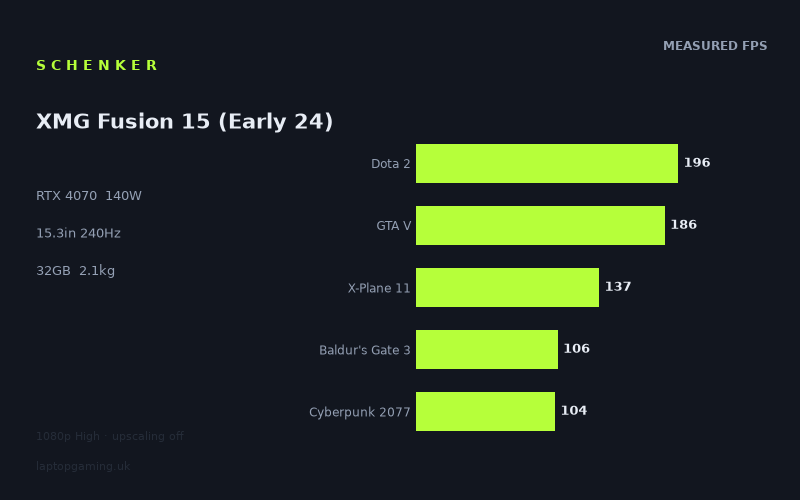
Frame rates
1920×1080, High preset, upscaling off. Averages 145fps across the 5 core benchmark games.
Measured on this machine. Source: Notebookcheck, 2024-05-04.
Not scored: no confirmed UK price
We have the full benchmark suite for this machine, so it ranks on the frame rate leaderboard like any other. What we don't have is a UK listing for this exact configuration - it's sold as a European review unit, or only in specifications that differ from the one tested. Since 30% of our score is value for money, scoring it would mean pretending price is no object, which would flatter it against every laptop you can actually buy. The frame rates below are real and comparable; there is just no buying recommendation to make yet.
How these numbers were produced
Frame rates here are not measured by us, and we label how each one was arrived at. A figure marked measured comes from a published run on that exact machine. A figure marked representative is derived from the GPU and its power limit (TGP) and cross-referenced against published reviews - a sound estimate of what that configuration delivers, but not a measurement of that specific laptop. Unless stated otherwise, numbers are 1920x1080, High preset, upscaling off. Where a laptop ships in several power configurations we use the wattage of the exact SKU listed, because a 140W RTX 5070 and a 115W one are not the same product.
In use
The short version
The Schenker XMG Fusion 15 (Early 24) is a performance-led 15.3in gaming laptop built around an RTX 4070 running at a stated 140W GPU power limit, a Core i9-14900HX and 32GB of memory. The benchmark data is strong where it needs to be strong: at 1920x1080 on the High preset with upscaling off, Notebookcheck recorded a mean of 146fps across the five-game scoring suite. That is the sort of result that makes high-refresh competitive games, older demanding games and many mainstream single-player releases feel appropriately fast rather than merely playable.
Its best results are genuinely quick. Notebookcheck recorded 246fps in The Witcher 3 and 245fps in Strange Brigade, effectively matching the screen’s 240Hz refresh rate in those particular 1080p High tests. Dota 2 reached 196fps, GTA V managed 186fps, and The Witcher 3 v4 delivered 176fps. These are not marginal results from a nominal gaming GPU: they show an RTX 4070 configuration capable of producing very high frame rates when the game engine and workload permit it.
The important qualification is that the laptop’s display is a 2560x1600 IPS panel, while the published frame-rate figures are at 1920x1080. There is no measured 2560x1600 gaming data in the fact sheet. It would therefore be wrong to take the 1080p results and present them as native-resolution figures. The screen has substantially more pixels than the benchmark resolution, so buyers specifically intending to play every game at the panel’s native resolution need to treat the supplied numbers as a useful indication of the machine’s underlying performance tier, not as a promise of the exact frame rate they will see at 2560x1600.
That distinction matters most in the modern heavy games. Cyberpunk 2077 was measured at 104fps, Baldur’s Gate 3 at 106fps, Dragon’s Dogma 2 at 80fps and Alan Wake 2 at 70fps, all at the stated 1080p High settings with upscaling off. Those are good 1080p results, particularly because no upscaling was used, but they also show why a 240Hz display should not be mistaken for a guarantee of 240fps in every new demanding release. This is a machine that can exploit a very high refresh rate in some games; it is not one that makes the most demanding current games run at that level under the published test settings.
There is no confirmed UK price for this exact configuration. That means Laptop Gaming cannot calculate a value result for it, because price is part of that calculation. This is not a shortcoming in the benchmark record: the suite is complete and the machine ranks normally on the frame-rate leaderboard. It simply means the sensible buying verdict has to be conditional. If it appears at a sensible level relative to other RTX 4070 laptops, the performance specification is compelling. Until there is a confirmed UK price, however, it is not possible to say whether the configuration is a good deal rather than merely a fast one.
Buyers who should be interested are those who want a relatively compact 15.3in machine with serious 1080p High performance, a fast 240Hz panel and the CPU headroom implied by the Core i9-14900HX. It is especially credible for players mixing esports-oriented games with conventional single-player games, because its results range from very high frame rates in lighter workloads to clearly playable figures in the difficult titles. It is less straightforward for someone whose only aim is maximum native-resolution performance in the newest graphically punishing games, because the available data does not measure that use case and the 1080p figures already show that the heaviest titles fall well short of 240fps.
Performance
A strong 1080p High result, with important limits
Notebookcheck’s figures were recorded at 1920x1080, using the High preset and with upscaling off. That is a useful test method for judging the underlying hardware without allowing upscaling to disguise the direct rendering performance, but it is also a specific scenario. The XMG Fusion 15’s 146fps mean across the five scoring-suite games is the clearest broad indicator available. The five games contributing to that mean are Dota 2 at 196fps, GTA V at 186fps, X-Plane 11 at 137fps, Baldur’s Gate 3 at 106fps and Cyberpunk 2077 at 104fps.
The shape of those results is more useful than the mean alone. A mean can make two very different machines appear similar: one might be consistent across every title, while another might be extremely fast in a few lighter games and far slower in demanding ones. Here, the Fusion 15 is clearly not delivering one flat level of performance. Dota 2 and GTA V are far above the mean. X-Plane 11 sits between the very fast and more demanding results. Baldur’s Gate 3 and Cyberpunk 2077 are close together, both a little above 100fps. The result is a broad spread from 104fps to 196fps within the scoring suite itself.
That spread is normal for a gaming laptop, but it is particularly relevant to a machine paired with a 240Hz screen. At the faster end of the suite, the display’s high refresh ceiling is useful. At the slower end, the laptop is still producing frame rates above 100fps in the measured 1080p High tests, which remains substantial performance, but the display cannot be fully saturated. Buyers should think of the 240Hz panel as headroom for suitable games rather than a performance target that every title reaches.
The published results outside the scoring suite reinforce that point. The Witcher 3 was measured at 246fps and Strange Brigade at 245fps. These are the two results that exceed the 240Hz refresh rate. Alone in the Dark reached 196fps, matching Dota 2’s result. The Witcher 3 v4 delivered 176fps and Far Cry 5 reached 166fps. Final Fantasy XV was measured at 125fps. Then the more demanding end arrives: Dragon’s Dogma 2 reached 80fps and Alan Wake 2 recorded 70fps.
There is no contradiction in a laptop producing 246fps in one game and 70fps in another. The benchmark data is showing exactly why a single advertised GPU name is not enough to predict the experience in every title. Different games place different demands on the graphics hardware and processor, and some are simply much heavier workloads at the same nominal resolution and preset. The Fusion 15 is fast, but its results make clear that game selection remains more important than headline specifications when deciding whether a 240Hz panel will be fully utilised.
What the 140W RTX 4070 means in this configuration
The RTX 4070 in the XMG Fusion 15 has a stated 140W GPU power limit. That is an important part of the configuration, because the RTX 4070 label by itself does not describe the complete laptop implementation. The power limit is one of the specifications that helps distinguish one RTX 4070 machine from another. In this case, the measured results give the practical evidence: this is not an RTX 4070 setup struggling to reach high frame rates at 1080p High. It delivers 196fps in Dota 2, 186fps in GTA V, 176fps in The Witcher 3 v4 and 166fps in Far Cry 5, while still recording 104fps in Cyberpunk 2077.
It would be a mistake, however, to turn the 140W figure into a universal prediction. The benchmark data does not show that 140W translates into a fixed advantage in every game, nor does it provide direct like-for-like measurements against every other RTX 4070 power limit. What it does show is that the overall implementation is capable of very strong 1080p High results. The correct conclusion is not that a particular wattage automatically produces a particular number of frames. The correct conclusion is that this 140W configuration has benchmark evidence to support its high-performance positioning.
The usefulness of that performance depends on the game. In The Witcher 3 and Strange Brigade, the machine is at or beyond the panel’s 240Hz limit in the published test. In Dota 2, Alone in the Dark and GTA V, it is below 240fps but still at 196fps, 196fps and 186fps respectively. In The Witcher 3 v4 and Far Cry 5, it is at 176fps and 166fps. These are the kinds of figures that make a high-refresh screen meaningful even without reaching its maximum in every moment.
By contrast, 104fps in Cyberpunk 2077, 80fps in Dragon’s Dogma 2 and 70fps in Alan Wake 2 show the limits of treating the 140W RTX 4070 as a route to universal ultra-high-refresh performance. The laptop is not weak in those games: the measured figures remain far above a basic 60fps target at the stated settings. But the difference between 70fps and 245fps is enormous, and it is the central reason that a review should not reduce this machine to “an RTX 4070 laptop with a 240Hz screen”. The display specification and the game performance are not interchangeable claims.
The games that suit the hardware best
The XMG Fusion 15 looks particularly well matched to games where high frame rates are a realistic aim. The 246fps result in The Witcher 3 and 245fps in Strange Brigade demonstrate that the hardware can reach the level required to fill a 240Hz display in the published 1080p High test. Dota 2 at 196fps is also a strong fit for the panel, even if it does not reach the refresh ceiling in this result. GTA V at 186fps and Far Cry 5 at 166fps belong in the same broad category: they provide a clearly high-refresh experience according to the measured figures, rather than simply crossing a basic playability threshold.
The 196fps result in Alone in the Dark is worth noting because it sits alongside the very fast Dota 2 figure rather than alongside the more demanding modern results. The Fusion 15 is therefore not only quick in older or traditionally lighter games. It has enough performance to generate high frame rates in a varied selection of workloads, though individual game behaviour still matters. The Witcher 3 v4 at 176fps also underlines that a revised version of a game can perform differently from the original benchmark entry: the older The Witcher 3 result is 246fps, while The Witcher 3 v4 is 176fps.
That 70fps gap between the two Witcher 3 entries is a useful warning against casual comparisons. A game title alone is not always enough context. The published benchmark list contains both The Witcher 3 and The Witcher 3 v4, and they should be treated as separate measured workloads because the figures are separate. The Fusion 15 is very fast in both, but the difference illustrates how quickly assumptions can fail if benchmark labels are treated as interchangeable.
Final Fantasy XV at 125fps is another useful middle-ground result. It is not close to 240fps, but it sits clearly above the 104fps in Cyberpunk 2077 and the 106fps in Baldur’s Gate 3. It supports the overall picture of the machine as a laptop that often has substantial performance in reserve at 1080p High, but whose actual result remains title dependent. For a buyer choosing between a conventional 60Hz or lower-refresh display and the 240Hz panel in this machine, results in the 125fps to 196fps range are precisely where the faster panel can have practical relevance even when its maximum refresh rate is not reached.
The games that expose the gap between “fast” and “240Hz fast”
Cyberpunk 2077 at 104fps and Baldur’s Gate 3 at 106fps are the most useful scoring-suite figures for setting expectations. They are close enough that neither should be treated as a clear outlier. In both cases, Notebookcheck’s measured result is just over 100fps at 1920x1080 High with upscaling off. That is strong performance in absolute terms, but it is less than half of the display’s 240Hz refresh rate. A buyer who mainly plays games in this performance class should not choose the Fusion 15 on the assumption that its screen will always be driven close to its maximum.
X-Plane 11 at 137fps sits between those heavier results and the faster Dota 2 and GTA V figures. It is a useful reminder that the mean of 146fps is not an artificial number inflated entirely by the two quickest scoring-suite games. There is at least one result in the middle of the range, and it remains well above 100fps. Still, it does not turn the machine into a 240fps laptop for the whole suite. The difference from Dota 2’s 196fps is 59fps, while the difference from Cyberpunk 2077’s 104fps is 33fps. The benchmark spread is broad enough that buyers should prioritise the games they actually play rather than relying on the average alone.
Dragon’s Dogma 2 at 80fps and Alan Wake 2 at 70fps are the clearest signs that the latest demanding games can pull this configuration much further down the range. Neither result is a failure under the stated test conditions. Both are still above 60fps at 1080p High with upscaling off. But they are materially different from the performance seen in The Witcher 3, Strange Brigade and Dota 2. For someone buying a 240Hz laptop principally for demanding single-player releases, these two results should carry more weight than the 246fps headline from The Witcher 3.
There is also a resolution issue that cannot be avoided. The display is 2560x1600, but Dragon’s Dogma 2 and Alan Wake 2 were measured at 1920x1080. We do not have native-resolution figures for either game. It would be irresponsible to invent them or to assume a simple conversion from the published numbers. The available evidence says that the XMG Fusion 15 can run those games at 80fps and 70fps in Notebookcheck’s 1080p High, no-upscaling test. It does not tell us the exact performance at the screen’s native 2560x1600 resolution.
CPU and memory context
The Fusion 15 pairs its RTX 4070 with a Core i9-14900HX and 32GB of memory. The published benchmark figures do not separate CPU and GPU contributions title by title, so it would not be justified to assign a precise proportion of any frame rate to the processor or memory. What can be said is that this is not a configuration built around an entry-level processor or a minimal memory allocation. It is a high-specification pairing aimed at supporting the RTX 4070 rather than obviously compromising it on paper.
This is also relevant when interpreting the comparison results. The XMG Fusion 15 records a near-zero average difference against both the Lenovo Legion 7 16 IRX G9 with an RTX 4070 and the Eurocom Raptor X17 with an RTX 4090 at 175W in their relevant shared-game comparisons. The supplied comparison note explains why such results can occur: at 1080p, lighter titles in the shared set can be CPU-bound and compress genuine GPU gaps. In other words, a near-zero result does not prove that the GPUs are equivalent; it shows that, in those specific shared 1080p games, the available performance was constrained in a way that reduced the visible difference.
That is why the performance story should be read as a set of measured outcomes, not as a hierarchy inferred solely from GPU names. The Fusion 15’s RTX 4070, 140W limit, Core i9-14900HX and 32GB memory combine to produce a 146fps scoring-suite mean at the published settings. That is the robust conclusion. It is backed by five scoring games and further results ranging from 70fps to 246fps. It is much more useful than assuming every RTX 4070 laptop will behave identically, or assuming an RTX 4090 must always show a large lead in every 1080p result.
The screen
A high-specification panel with a performance mismatch in some games
The screen is a 15.3in IPS display with a 2560x1600 resolution and a 240Hz refresh rate. On specification alone, that is an ambitious pairing: the resolution is higher than the 1920x1080 benchmark setting, while the refresh rate is far above conventional 60Hz gaming displays. It gives the machine the potential to serve two different priorities, namely a sharper native-resolution desktop and game image, and very high refresh in games capable of supplying enough frames.
The measured figures show that the second priority is fulfilled selectively rather than universally. At 1080p High with upscaling off, The Witcher 3 at 246fps and Strange Brigade at 245fps are above the 240Hz refresh rate. In these tests, the machine has enough performance to reach the panel’s ceiling. Dota 2 and Alone in the Dark at 196fps, GTA V at 186fps, The Witcher 3 v4 at 176fps and Far Cry 5 at 166fps do not reach 240fps, but they are still high enough to make a 240Hz display more relevant than it would be on a machine limited near 60fps.
Moving down the list, the relationship changes. X-Plane 11 at 137fps, Final Fantasy XV at 125fps, Baldur’s Gate 3 at 106fps and Cyberpunk 2077 at 104fps are all well below 240fps. Dragon’s Dogma 2 at 80fps and Alan Wake 2 at 70fps are further away again. The display does not make those frame rates worse, and a high-refresh panel can still be useful below its maximum. But buyers should be clear about what they are purchasing: the 240Hz rating is available capacity, not evidence that every game will deliver 240fps.
Native resolution is not measured here
The key caution is simple. Notebookcheck’s published frame rates are at 1920x1080. The panel’s stated resolution is 2560x1600. No native 2560x1600 frame-rate figures are provided in the fact sheet. Therefore, the benchmark data cannot answer the exact question of whether Cyberpunk 2077, Alan Wake 2, Dragon’s Dogma 2 or any of the other listed games will reach a particular frame rate at the display’s full resolution.
This is not a small technical footnote. The laptop’s screen is one of its defining specifications, and buyers of a 2560x1600 panel often intend to use that resolution. The 1080p numbers remain valuable because they show what the hardware achieved under a consistent measured workload, with upscaling disabled. But they should not be presented as native-panel performance. Anyone who considers native resolution non-negotiable should see the absence of those measurements as an information gap rather than fill it with optimistic assumptions.
The practical implication is that this laptop can be discussed with confidence as a fast 1080p High machine based on the benchmark data. It can also be discussed with confidence as a laptop carrying a 2560x1600 240Hz IPS panel. What cannot be claimed is that it delivers 240fps at 2560x1600, or that it reaches any particular native-resolution result in the games listed. The data does not establish that.
IPS and refresh rate: what is known and what is not
The panel type is IPS, and the refresh rate is 240Hz. Those are the display characteristics supplied. There are no measured figures in the fact sheet for brightness, contrast, colour coverage, response times, backlight behaviour or any other panel quality metric. As a result, this review cannot make claims about image quality beyond the panel’s stated type, resolution and refresh rate.
For gaming purposes, the known part of the specification is still meaningful. The combination of 240Hz and the published 1080p results makes sense in the faster games. The Witcher 3 at 246fps and Strange Brigade at 245fps can reach the screen’s maximum refresh rate in the stated benchmark. Dota 2 at 196fps and GTA V at 186fps can still make substantial use of a high-refresh display. In heavier games, the screen’s refresh headroom is greater than the measured frame rate, but that is a limitation of the workload rather than a reason to dismiss the panel specification outright.
Build, size and portability
Weight is known; dimensions are not
The XMG Fusion 15 weighs 2.13kg. That is the available portability figure, and it places the machine’s physical expectations in a more useful context than marketing labels do. This is a 15.3in laptop with a Core i9-14900HX, 32GB of memory, a 140W RTX 4070 configuration and a 2560x1600 240Hz screen. A weight of 2.13kg means it is not a lightweight ultraportable, but neither is the supplied figure in the territory of a machine that can only be discussed as a static desktop replacement.
For a buyer carrying a laptop between home, university, work or occasional travel, 2.13kg is a real part of the purchasing decision. It is substantial enough that the machine should be chosen primarily for its gaming capability rather than because it is exceptionally light. At the same time, it is a figure that makes the 15.3in format more practical for movement than a much larger gaming system would be. The key point is that portability here is a compromise made in favour of performance specifications, not the core selling point of the machine.
No chassis dimensions are provided in the fact sheet. That means we do not have a published width, depth or thickness to assess, and it would be wrong to imply otherwise. Weight alone cannot tell us exactly how much space the laptop occupies in a bag or on a desk. It can only establish that the machine is 2.13kg. Buyers for whom bag fit, desk footprint or thickness is decisive should seek those dimensions before buying rather than infer them from the screen size.
No basis for claims about build quality, battery, heat or noise
The specification and benchmark data provide no measured information about chassis materials, keyboard quality, trackpad quality, port selection, battery life, surface temperatures, internal temperatures or fan noise. Those are all important buying considerations for a gaming laptop, particularly one with a Core i9-14900HX and a 140W GPU power limit, but they are not covered by the supplied facts.
Accordingly, this is not a machine that can be recommended for quiet operation, long battery use, a particular build feel or a particular thermal result on the evidence available here. The performance figures show what Notebookcheck measured in games. The weight tells us something useful about portability. Beyond that, claims about daily use would be speculation.
That uncertainty should influence the buying decision. Someone choosing purely on frame rates can place the Fusion 15 among the stronger 1080p High performers represented by its 146fps scoring-suite mean. Someone whose priorities include low noise, battery endurance or exact physical dimensions should not assume that those areas are equally strong merely because the gaming results are. The fact sheet does not support that leap.
How it compares
Against the MSI Thin GF63: a clear performance advantage
Against the MSI Thin GF63 with an RTX 4050, the XMG Fusion 15 averages 69fps more across five shared games. This is the clearest comparison in the supplied rival set. A 69fps average advantage is large enough that it should materially affect the buying decision for someone choosing between these two performance tiers.
The comparison is also useful because it demonstrates what the Fusion 15’s stronger specification achieves in practical benchmark terms. The XMG has an RTX 4070 running at 140W, while the MSI Thin GF63 is listed with an RTX 4050. The available comparison does not require guesswork about the significance of the different GPU names: across the five shared games, the measured average advantage is 69fps in favour of the Fusion 15.
That does not automatically settle a purchase, because neither machine has a confirmed UK price in the supplied data and there are no shared facts about battery, dimensions, screen quality beyond the Fusion 15’s listed panel, or build characteristics. But for the buyer focused on game performance, this is the rival that the Fusion 15 beats most decisively among those listed. The difference is not a near tie caused by a narrow benchmark spread. It is a substantial lead across five games.
Against the Lenovo Legion 7 16 IRX G9: essentially level in the shared data
The Lenovo Legion 7 16 IRX G9 is listed with an RTX 4070, and the XMG Fusion 15 averages +0fps against it across five shared games. That is a real result, not missing data and not an invitation to invent a winner. In the measured shared-game comparison, neither laptop establishes an average lead.
A +0fps average should not be read as proof that the two machines are identical in every respect. The supplied comparison note explains that at 1080p, lighter titles in the shared set can be CPU-bound and compress genuine GPU gaps. That is particularly important when comparing laptops around the same GPU generation and performance class. If the workload is limited elsewhere, GPU differences that might matter in another game or setting may not appear clearly in the shared 1080p result.
For a buyer, the sensible conclusion is that the Fusion 15 does not have a measured average frame-rate advantage over this Lenovo across their five shared games. If these were the only two options and their prices were known, the decision would need to turn on price and the unmeasured practical factors rather than a claimed gaming-performance lead. At present, no confirmed UK price is provided for either exact configuration, so the data supports a performance tie in the shared set, not a complete buying verdict.
Against the Eurocom Raptor X17: why an RTX 4090 does not automatically win every 1080p comparison
The Eurocom Raptor X17 is listed with an RTX 4090 at 175W. Despite that higher-tier GPU specification, the XMG Fusion 15 averages +0fps against it across three shared games. This is the most striking reminder that benchmark interpretation must start with the actual shared results, not with GPU names alone.
The right reading is not that the RTX 4070 in the Fusion 15 is generally equivalent to an RTX 4090 at 175W. The comparison covers only three shared games, and the supplied note specifically warns that lighter 1080p titles can be CPU-bound, compressing genuine GPU gaps. A near-zero difference in this context means that the shared tests did not expose a measurable average separation. It does not erase the difference in the listed GPU specifications.
This matters because it prevents two opposite mistakes. The first would be dismissing the Fusion 15 because an RTX 4090 laptop must necessarily be faster in every published game. The shared data does not support that statement. The second would be claiming that the Fusion 15 matches an RTX 4090 laptop generally. The limited three-game, 1080p shared result does not support that either. The evidence supports a narrower and more useful conclusion: in these three shared measured games, the average difference is effectively nil.
Against the Schenker XMG Neo 16: the stronger rival pulls ahead
The Schenker XMG Neo 16 (Early 24) is the listed rival that beats the Fusion 15 by the largest margin. It has an RTX 4090 at 175W, and the Fusion 15 averages 27fps behind it across five shared games. Unlike the near-zero comparisons with the Legion 7 and Eurocom Raptor X17, this result establishes a clear average advantage for the Neo 16 in the relevant shared set.
The 27fps deficit is useful because it puts the Fusion 15 in its proper place. The Fusion 15 is a very capable RTX 4070 laptop, as its 146fps scoring-suite mean and individual 1080p figures demonstrate. But the supplied data also shows that a higher-tier RTX 4090 configuration can create a meaningful lead across a five-game shared comparison. Buyers looking for the maximum available performance should not treat the Fusion 15’s strong lighter-game results as evidence that it closes every gap to the fastest systems.
There is still no confirmed UK price for the exact XMG Neo 16 configuration listed, so the comparison cannot become a value judgement. The Neo 16 may be faster in the shared benchmarks, but without prices it is not possible to say whether that lead represents sensible value for a particular buyer. What can be said confidently is that the Fusion 15 gives up 27fps on average in the five shared games, while offering a different 15.3in, 2.13kg configuration.
What the rival set says overall
The rivals form a useful spread. The Fusion 15 is substantially ahead of the RTX 4050-based MSI Thin GF63 by 69fps on average across five shared games. It is level in the shared results with the RTX 4070 Lenovo Legion 7 16 IRX G9. It is also level across three shared games with the RTX 4090 at 175W Eurocom Raptor X17, though the limited shared set and potential CPU-bound behaviour make that a narrow result rather than a broad equivalence claim. Finally, it trails the RTX 4090 at 175W XMG Neo 16 by 27fps across five shared games.
That is a more informative position than simply calling the Fusion 15 “mid-range” or “high-end”. It is capable of a large lead over a lower GPU class, competitive shared results against some much more imposing-looking rivals, and a measurable deficit to a stronger RTX 4090 configuration. In other words, it belongs in the serious gaming-laptop category, but the benchmark data does not support presenting it as the fastest option in every comparison.
Who it’s for
Buy it for strong measured 1080p High gaming
The best fit is a buyer who wants strong, attributable gaming performance at 1920x1080 High with upscaling off. Notebookcheck’s figures make that case well. The 146fps scoring-suite mean is backed by 196fps in Dota 2, 186fps in GTA V, 137fps in X-Plane 11, 106fps in Baldur’s Gate 3 and 104fps in Cyberpunk 2077. Outside that suite, there is performance as high as 246fps in The Witcher 3 and 245fps in Strange Brigade.
This is also a sensible choice for someone who plays a mixture of game types rather than one narrow genre. The results show the machine can run some games at or above the 240Hz screen limit, while still maintaining 80fps in Dragon’s Dogma 2 and 70fps in Alan Wake 2 under the stated test conditions. A buyer who alternates between faster games and graphically demanding single-player titles gets a laptop that has a credible answer to both, even though the experience will not be equally high-refresh in every title.
It should also appeal to someone who values a 15.3in format and can accept a 2.13kg laptop in return for the stated hardware. The 2560x1600 240Hz IPS panel is a high-specification display on paper, and the Core i9-14900HX with 32GB of memory avoids the appearance of an obviously cut-back supporting configuration. The caveat is that the published gaming numbers are not native 2560x1600 figures.
Buy something else if native-resolution proof is essential
Buyers who require measured native 2560x1600 gaming performance should look for a machine with that specific data available. The Fusion 15’s screen is 2560x1600, but Notebookcheck’s published figures here are 1920x1080 High with upscaling off. There is no basis for claiming what Cyberpunk 2077, Baldur’s Gate 3, Dragon’s Dogma 2, Alan Wake 2 or the other listed games achieve at the panel’s full resolution.
This matters especially for someone buying primarily to play the heaviest releases. Alan Wake 2 at 70fps and Dragon’s Dogma 2 at 80fps are respectable measured 1080p results, but they are not near the 240Hz panel limit even before discussing the higher native resolution. A buyer whose expectation is maximum refresh in the newest demanding games should choose on measured data that directly reflects those settings and resolution, rather than assuming the 240Hz label will translate into 240fps.
Buy something else if the strongest rival performance matters more than portability
The XMG Neo 16 (Early 24) is the specific listed alternative for the buyer whose priority is higher shared-game performance. Its RTX 4090 at 175W puts it 27fps ahead of the Fusion 15 on average across five shared games. That is the clearest performance step above the Fusion 15 in the supplied comparison set.
There is no confirmed UK price for either exact configuration, so this cannot become a blanket recommendation for the Neo 16. Faster does not automatically mean better value without a price. But if budget is secondary and the buyer wants the strongest measured shared-game result among these two Schenker options, the Neo 16 has the evidence-based advantage.
Wait if price, battery, noise or dimensions decide the purchase
There is no confirmed UK price for the XMG Fusion 15 (Early 24), so there is no sound basis for calling it good value or poor value. The performance data is complete, but the commercial judgement is not. A buyer who can wait for confirmed pricing should do so before deciding whether this configuration deserves to be chosen over another RTX 4070 or RTX 4090 laptop.
The same caution applies to practical use beyond gaming. The fact sheet gives a weight of 2.13kg, but not dimensions. It lists no battery-life figure, no noise measurement, no temperature data and no build-quality assessment. Buyers who need a particularly quiet system, long unplugged use, precise bag compatibility or verified thermal behaviour should not make those assumptions from the gaming results.
On the available evidence, the Schenker XMG Fusion 15 (Early 24) is best understood as a powerful 1080p High gaming laptop with a broad but favourable frame-rate profile, a 240Hz 2560x1600 IPS screen, and a meaningful 2.13kg portability compromise. It is demonstrably excellent in some games, convincingly strong in many others, and clearly more limited in the newest demanding titles than the display’s refresh rate might suggest. Its final recommendation must wait for a confirmed UK price, but its benchmark performance does not need any qualification beyond the one that matters: these are Notebookcheck’s measured 1080p High figures with upscaling off, not promises for every game or every resolution.