Review
Asus Zenbook Pro 15 OLED review
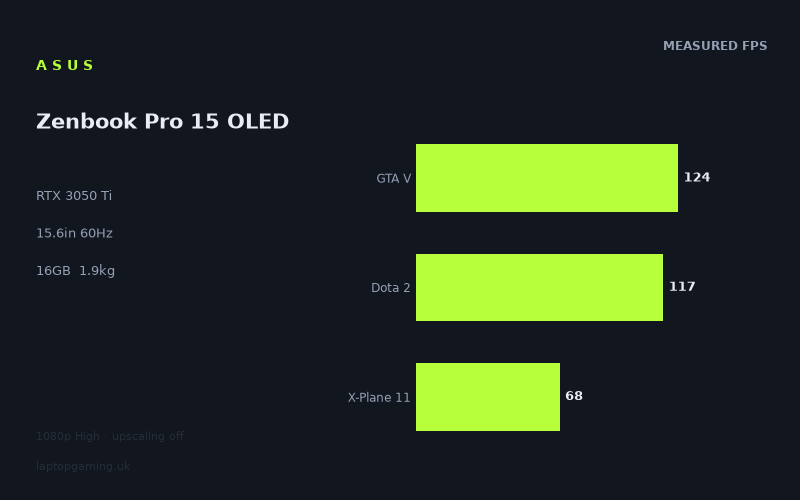
Frame rates
1920×1080, High preset, upscaling off.
Measured on this machine. Source: Notebookcheck, 2022-05-14.
Not scored: incomplete benchmark suite
Every scored laptop on this site is averaged over the same 5 games, and this one is short of Cyberpunk 2077, Baldur's Gate 3. A mean over 5 games is not comparable to a mean over 5, so we publish the figures we have and leave the score blank rather than rank it against machines tested on a different set. The numbers below are real - the suite is just incomplete.
How these numbers were produced
Frame rates here are not measured by us, and we label how each one was arrived at. A figure marked measured comes from a published run on that exact machine. A figure marked representative is derived from the GPU and its power limit (TGP) and cross-referenced against published reviews - a sound estimate of what that configuration delivers, but not a measurement of that specific laptop. Unless stated otherwise, numbers are 1920x1080, High preset, upscaling off. Where a laptop ships in several power configurations we use the wattage of the exact SKU listed, because a 140W RTX 5070 and a 115W one are not the same product.
In use
The short version
The Asus Zenbook Pro 15 OLED is a 15.6in OLED laptop built around an RTX 3050 Ti, Ryzen 9 5900HX and 16GB of memory. Its gaming results are more capable than the slim Zenbook name might suggest, but they need to be read in the context of its 60Hz screen. Notebookcheck’s measured figures at 1920x1080 on the High preset, with upscaling off, show that it can exceed the panel refresh rate in several games and remains usable in substantially more demanding titles. It is not, however, a machine that turns every modern game into a 60fps experience at High settings.
The best case is clear. GTA V reaches 124fps, Dota 2 reaches 117fps and Strange Brigade reaches 102fps. Those are all well beyond the screen’s 60Hz refresh rate. The Witcher 3 also comes in strongly at 92fps, while X-Plane 11 reaches 68fps. In that group of games, the Zenbook Pro 15 OLED has enough performance to make the 60Hz panel look like the limiting part of the combination rather than the RTX 3050 Ti.
The difficult games are just as important. Final Fantasy XV is measured at 50fps, while Cyberpunk 2077 1.6 reaches 44fps. Those results are not a disaster for a laptop of this class, but they are a clear warning against assuming that the high numbers in GTA V or Dota 2 will transfer to every newer or heavier game. This is a laptop that can play demanding titles, but it is not a laptop whose published benchmark data supports a blanket “High settings at 60fps” promise.
The overall benchmark picture is therefore mixed in a useful way rather than confused. The five-game scoring suite averages 92fps, but that average is pulled upwards by very strong results in lighter titles. It tells you that the machine has real 1080p gaming capability. It does not erase the fact that Final Fantasy XV and Cyberpunk 2077 1.6 sit below the screen refresh rate. Buyers should make their decision from the individual game figures, not from an average alone.
This is best understood as a laptop for somebody who wants one machine to cover general high-end laptop duties, OLED viewing and creative work, with gaming as a meaningful part of the package rather than the sole purpose of the chassis. The Ryzen 9 5900HX, 16GB of memory, 96Wh battery and 1.865kg weight point to a configuration intended to be used away from a desk as well as at one. The RTX 3050 Ti gives it respectable gaming reach, especially in the games where the measured figures climb far above 60fps, but the 60Hz panel keeps it from being an obvious choice for buyers prioritising high-refresh competitive gaming.
There is no published value result for this exact configuration because its UK price is not confirmed. That is not a judgement on the laptop itself; it simply means a price-led recommendation cannot be made from the available information.
The strongest argument for the Zenbook Pro 15 OLED is not that it dominates every other RTX 3050 Ti laptop. It does not. Its strongest argument is that it combines a 15.6in 1920x1080 OLED screen, a relatively portable 1.865kg weight, a large 96Wh battery and gaming results that range from excellent in several established games to workable, but clearly more constrained, in harder titles. It is a sensible fit for a buyer who values the OLED panel and portability as much as raw gaming headroom.
The weaker argument is for anyone buying primarily for the highest possible frame rates. A 60Hz display cannot show more than its own refresh rate, and several of the Zenbook’s best benchmark results substantially exceed that threshold. That is good news for performance margin, but it also means that a buyer who plays mainly Dota 2, GTA V, Strange Brigade or The Witcher 3 may be paying for frame-rate capability that this particular panel cannot fully present as additional refreshes. Conversely, the screen is not fast enough to make this laptop an especially natural choice for a player who regards a high-refresh display as essential.
Performance
The benchmark results
All of the gaming figures discussed here are Notebookcheck measurements from 2022-05-14. They were recorded at 1920x1080 using the High preset with upscaling off. That matters because these are directly attributable figures rather than estimates, and because the settings are demanding enough to expose meaningful differences between games. The laptop is not being judged from an assumed RTX 3050 Ti performance level: it is being judged from published results for this Ryzen 9 5900HX and RTX 3050 Ti configuration.
- GTA V: 124fps
- Dota 2: 117fps
- Strange Brigade: 102fps
- The Witcher 3: 92fps
- X-Plane 11: 68fps
- Final Fantasy XV: 50fps
- Cyberpunk 2077 1.6: 44fps
The five scoring-suite games produce a mean of 92fps. That is a healthy headline result for a laptop with a 60Hz 1920x1080 display, but the spread from 124fps in GTA V to 50fps in Final Fantasy XV is the more informative part of the data. The Zenbook Pro 15 OLED is not delivering one fixed level of performance across every title. It is delivering strong results where the game is relatively favourable to this hardware and much tighter results where the workload becomes more demanding.
GTA V at 124fps is the highest published result here. That makes it a comfortable fit for the machine from a pure performance perspective: the GPU and CPU combination can produce far more frames than the panel refresh rate. For a GTA V player, the key limitation is not whether the laptop can reach 60fps on these settings. It can exceed that figure substantially. The relevant buying question is whether a 60Hz OLED screen is preferable to a higher-refresh display for the rest of the laptop’s intended use.
Dota 2 is similarly strong at 117fps. This is another result where the laptop is well beyond the screen’s 60Hz refresh rate. For Dota 2, the measured figure gives the Zenbook Pro 15 OLED a considerable performance margin at the stated settings. It is also a useful reminder that an RTX 3050 Ti label alone does not tell the whole story. The measured result is strong, but it does not automatically mean every game will behave in the same way, as the figures for Final Fantasy XV and Cyberpunk 2077 1.6 show.
Strange Brigade reaches 102fps. Again, this is decisively above 60Hz. In practical buying terms, that puts Strange Brigade in the group of games where the Zenbook’s gaming hardware has room to spare relative to its display. The laptop is not merely reaching the panel refresh rate in this benchmark; it is producing a published frame rate well above it. If this kind of game makes up a large part of your library, the RTX 3050 Ti is doing enough work that the screen specification becomes the main compromise.
The Witcher 3 is measured at 92fps. That remains a strong result and continues the theme seen in GTA V, Dota 2 and Strange Brigade: the laptop has no difficulty clearing 60fps in several prominent games at 1920x1080, High settings and no upscaling. The fact that The Witcher 3 is below the three highest results does not make it weak. It instead shows why the average alone should not be treated as a target. The game-by-game spread is already visible even among titles that all remain above the panel refresh rate.
X-Plane 11 comes in at 68fps. This is an important result because it is much closer to the screen’s 60Hz refresh rate than the four games above it, while still remaining above that level. It is the point at which the Zenbook’s performance stops looking excessive for the display and starts looking appropriately matched to it. There is less surplus than in GTA V or Dota 2, but the published figure still supports a 60fps-oriented expectation at the tested settings.
Final Fantasy XV is measured at 50fps. That places it below the panel refresh rate and below the results in the scoring-suite games that make up the 92fps mean. This is the result that stops the Zenbook Pro 15 OLED from being described as a consistently 60fps High-settings laptop. It can approach that target, and it is not far away, but the benchmark data does not support claiming that it reaches it here. Buyers for whom this type of game is central should treat the 50fps figure as a more relevant guide than the much higher figures in Dota 2 or GTA V.
Cyberpunk 2077 1.6 reaches 44fps. It is the lowest published result in the list and the clearest expression of the RTX 3050 Ti’s limits in this chassis. At the stated 1920x1080 High setting with upscaling off, the Zenbook can run the game, but it does not reach the screen’s 60Hz refresh rate. That is not unusual behaviour to hide or soften; it is the exact reason attributable benchmark data matters. A buyer can see before purchase that this machine is substantially more comfortable in some games than in others.
What the spread between games tells you
The frame-rate range is not an inconsistency in the measurements. It is the useful result. Different games place different demands on the CPU and GPU, and the same laptop can be limited in different ways depending on the title. The Ryzen 9 5900HX and RTX 3050 Ti combination is clearly capable of very high figures in the lighter or less demanding games in this set, while the harder games bring the average frame rate down much closer to, or below, 60Hz.
GTA V, Dota 2, Strange Brigade and The Witcher 3 form a very strong upper group. Every one of them is above 90fps, and three are above 100fps. Those results make the Zenbook Pro 15 OLED look considerably more capable than a machine that merely targets console-like 60fps gaming. But the data also shows that this impression should be qualified. The same laptop records 68fps in X-Plane 11, 50fps in Final Fantasy XV and 44fps in Cyberpunk 2077 1.6.
That matters when selecting settings expectations. The published data supports confidence in 1920x1080 High settings for the lighter group of games. It supports a more cautious approach for the more demanding group. If your regular games resemble GTA V, Dota 2, Strange Brigade or The Witcher 3 more closely than Cyberpunk 2077 1.6, the Zenbook should feel well provisioned relative to its 60Hz display. If Cyberpunk 2077 1.6 and Final Fantasy XV are the kind of workload you expect most often, the machine is better seen as capable rather than abundant.
The 92fps mean across the scoring suite is useful as a broad ranking indicator, but it is not a promise of 92fps in an unlisted game. Nor should it be read as meaning that the OLED panel will display 92 individual refreshes each second, because the screen itself is specified at 60Hz. The mean tells you that the machine has strong aggregate results across the scoring suite. The individual numbers tell you where that strength comes from and where it does not.
There is also a clear distinction between having performance headroom and having screen headroom. In games measured above 60fps, the Zenbook’s hardware has performance beyond the panel refresh rate. In Final Fantasy XV and Cyberpunk 2077 1.6, the screen has more refresh capacity than the published frame rate can fill. This is why the machine’s gaming proposition cannot be reduced to either “the RTX 3050 Ti is enough” or “60Hz is too low”. Both statements miss the way the parts interact across the actual benchmark list.
GPU power limits: what can and cannot be concluded
The supplied specification identifies the Zenbook Pro 15 OLED as using an RTX 3050 Ti, but it does not provide a GPU power limit for this exact configuration. That means there is no responsible basis for assigning a wattage figure to the Zenbook or presenting a power-limit explanation as if it were confirmed. The benchmark data is available; the specific GPU power limit is not.
This is important because RTX 3050 Ti branding does not, on its own, make two laptops interchangeable. The rival list illustrates that point. The MSI Prestige 15 is identified as an RTX 3050 Ti at 105W, while the Zenbook is not given a corresponding power figure in the available information. It would be tempting to predict the outcome from those labels alone, but the published shared-game comparison goes the other way: the Zenbook averages 36fps ahead of the Prestige 15 across four shared games. The result is more useful than an assumption based on the GPU name.
The same caution applies in the other direction. The Lenovo Yoga Slim 7 Pro X 14IAH7 is listed with an RTX 3050 at 35W, yet the Zenbook averages 1fps behind it across five shared games. The Schenker Vision 14 2022 also uses an RTX 3050 Ti, and the Zenbook again averages 1fps behind across five shared games. These are near-level outcomes despite different model names and, in the Lenovo’s case, a different GPU label and stated power figure.
The correct reading is not that GPU power does not matter. The correct reading is that the information available here does not permit a simple wattage-led explanation of every result. The specific power limit for the Zenbook is not stated, and the shared-game results demonstrate why measurements remain more valuable than assumptions. A buyer comparing this machine with another RTX 3050 Ti laptop should look for attributable figures from games they actually play rather than relying on the GPU badge.
At 1920x1080, lighter games in a shared set can also become constrained by the wider platform rather than revealing a clean GPU gap. The near-zero differences against the Lenovo Yoga Slim 7 Pro X 14IAH7 and Schenker Vision 14 2022 are real results, not missing data or an error to be ignored. In games where the GPU is not the sole limiting part of the system, performance can compress between machines that look quite different on paper. That is particularly relevant here because several of the Zenbook’s own results are already well above 60fps.
The practical lesson is straightforward. The Zenbook Pro 15 OLED should be bought for the published performance it demonstrates, not for an assumed performance tier attached to the RTX 3050 Ti name. Its best results are genuinely strong for its screen specification. Its difficult-game results are visibly lower. No unconfirmed GPU power figure is needed to reach that conclusion, and none should be invented to make the story look neater.
The screen
The Zenbook Pro 15 OLED has a 15.6in OLED panel with a 1920x1080 resolution and a 60Hz refresh rate. Those four details define much of the laptop’s identity. The display is large enough to make it a different proposition from the 14in rivals in this comparison, while the OLED panel gives the machine a clear non-gaming focus. At the same time, the 60Hz refresh rate is a deliberate limitation for a buyer whose priority is high-refresh gaming.
The 1920x1080 resolution is well matched to the benchmark method used here because Notebookcheck’s measured figures are also at 1920x1080. There is no need to guess how the RTX 3050 Ti behaves at the panel’s native resolution: the available gaming data is already taken at that resolution. That makes the results unusually easy to apply. GTA V at 124fps, Dota 2 at 117fps, Strange Brigade at 102fps, The Witcher 3 at 92fps and X-Plane 11 at 68fps all describe performance directly at the screen’s stated pixel count.
For those five games, the screen is not demanding more than the laptop can generally deliver. Every measured result is above 60fps. The surplus is very large in GTA V, Dota 2 and Strange Brigade, remains substantial in The Witcher 3, and becomes narrower in X-Plane 11. This makes 1920x1080 a sensible resolution choice for this hardware. The panel is not pushing the RTX 3050 Ti into a resolution class that the benchmark data cannot support.
Final Fantasy XV and Cyberpunk 2077 1.6 show the other side. At 50fps and 44fps respectively, they do not reach 60fps at the same 1920x1080 High preset with upscaling off. The resolution is still appropriate in the sense that the games are running at the display’s native setting, but the data does not support treating the Zenbook as a universal 60fps machine at that preset. The OLED screen does not change the benchmark outcome; it simply presents the native 1920x1080 image while the GPU performance varies from game to game.
The 60Hz refresh rate deserves direct attention because it is the point where this laptop differs most sharply from a gaming-first design. When GTA V reaches 124fps, Dota 2 reaches 117fps or Strange Brigade reaches 102fps, the system is generating figures well beyond the panel’s 60Hz specification. That is useful as performance margin and may matter to someone who values the ability to maintain a high measured frame rate. But it does not make the screen a high-refresh gaming display.
That distinction matters particularly for competitive players. The Zenbook has more than enough published performance for Dota 2 to exceed 60fps at the tested setting, yet it still has a 60Hz panel. If you want a laptop because you specifically want a display with a refresh rate higher than 60Hz, this is the wrong screen specification regardless of how strong that Dota 2 number is. A strong GPU result cannot alter the refresh rate of the fitted panel.
For a buyer who puts image presentation, general use and gaming into the same decision, the OLED specification is central. This is not a laptop that presents itself only through its frame-rate figures. The OLED panel is a major reason to consider it, especially when the measured gaming data shows that the RTX 3050 Ti can drive 1920x1080 effectively in many of the listed games. The trade-off is transparent: a 60Hz OLED screen rather than a high-refresh gaming panel.
The screen and the benchmark data therefore align best for someone who sees 60fps as a useful target rather than a minimum that must be exceeded in every title. In GTA V, Dota 2, Strange Brigade, The Witcher 3 and X-Plane 11, the Zenbook clears that target. In Final Fantasy XV and Cyberpunk 2077 1.6, it does not. This is not a display-and-GPU pairing that makes every game equivalent, but it is a coherent pairing for a buyer who understands that different games will need different expectations.
Build, size and portability
The Zenbook Pro 15 OLED weighs 1.865kg and uses a 15.6in screen. That places it in a more portable position than a large desktop-replacement gaming laptop, while still giving it a screen size associated with working and gaming without immediately reaching for an external display. The weight is meaningful because the laptop combines that 15.6in OLED panel with a Ryzen 9 5900HX and RTX 3050 Ti. It is not simply a small, low-power machine with a gaming badge attached.
A 1.865kg laptop is not weightless, and buyers should not pretend that it will behave like a very small ultraportable. It is still a 15.6in model with discrete graphics and a 96Wh battery. But it is also not defined by the size and weight expectations of the MSI Raider GE77 HX, a machine in this comparison built around an RTX 3080 Ti at 175W. The Zenbook’s specification points in another direction: enough graphics performance for genuine 1080p gaming, but within a machine intended to be moved rather than treated solely as a fixed gaming station.
The 96Wh battery is a substantial capacity figure in the supplied specification, but no battery-life measurement is available here. It would be wrong to turn capacity into an invented runtime, whether for gaming, video playback or general work. What can be said is that the Zenbook includes a 96Wh battery alongside a 1.865kg weight, making portability part of its specification rather than an afterthought. How long it lasts in any particular workload is not established by the available data.
Likewise, no chassis dimensions are provided. There is no responsible basis for claiming that it fits a particular bag, has a particular footprint, or is thinner than a named competitor. The available portability facts are the 15.6in screen size and 1.865kg weight. Those are enough to say that it is a machine you could plausibly choose for mixed desk and travel use, but not enough to make detailed claims about physical volume.
The 16GB memory configuration is also worth viewing in the context of the laptop’s mixed role. It supports the supplied Ryzen 9 5900HX and RTX 3050 Ti specification, but there is no information here on memory speed, slots or upgrade options. Buyers who require a particular memory arrangement should seek confirmation before purchase rather than assuming anything from the capacity figure alone. The same discipline applies to storage, ports, keyboard design, cooling noise and temperatures: none of those measurements or specifications are supplied here.
This restraint is useful rather than evasive. A gaming laptop review should not claim a thermal character, fan-noise level or upgrade path without attributable information. The Zenbook can be assessed confidently on its published game performance, screen, weight, battery capacity, CPU, memory capacity and GPU. It cannot be assessed responsibly on noise, temperatures, internal access or battery runtime from the facts available.
What the available specification does support is a clear usage picture. The Zenbook Pro 15 OLED is for someone who wants a 15.6in machine that remains portable at 1.865kg, has a 96Wh battery, and offers measured 1080p gaming performance beyond a basic casual level. It is less obviously for someone who wants the biggest screen, the heaviest GPU specification or a panel designed around refresh rates beyond 60Hz.
How it compares
Against the MSI Prestige 15
The MSI Prestige 15 is the closest comparison in one respect because it also uses an RTX 3050 Ti. It is listed with that GPU at 105W, while no GPU power limit is provided for the Zenbook Pro 15 OLED. Despite the apparent similarity in GPU branding, the published shared-game result is emphatic: the Zenbook averages 36fps ahead across four shared games.
That is the largest positive rival result in the supplied comparison set. It gives the Zenbook a strong case against this particular RTX 3050 Ti alternative on demonstrated gaming performance. A buyer comparing the two should not assume that the shared GPU label makes them equivalent. The data says the Zenbook is substantially faster in the shared games used for this comparison.
The fact that the Prestige 15 is identified at 105W makes the result especially useful as a reminder not to build a buying decision around one specification line. The Zenbook’s own power figure is not confirmed in the supplied information, yet its measured shared-game advantage is clear. The practical conclusion is not an attempted explanation of unseen chassis behaviour. It is simply that the Zenbook has the better published game results in this head-to-head comparison.
Against the Lenovo Yoga Slim 7 Pro X 14IAH7
The Lenovo Yoga Slim 7 Pro X 14IAH7 is listed with an RTX 3050 at 35W. On the face of it, that may look like a straightforward win for the Zenbook’s RTX 3050 Ti. The shared-game comparison is not straightforward at all: the Zenbook averages 1fps behind across five shared games.
A difference that small should not be exaggerated into a meaningful gaming gap. It is a near-level result. The more useful explanation is that at 1920x1080, lighter games in a shared set can become CPU-bound and compress genuine GPU differences. That does not make the Zenbook’s RTX 3050 Ti unimportant; it means that the shared results do not reveal a material advantage for it against this Lenovo.
This is exactly why the full benchmark list matters. The Zenbook’s own results show both very high figures and much more limited figures, depending on game. Comparing two machines only through GPU naming would miss the fact that performance can converge in a selection of titles. A buyer choosing between these two should not expect the Zenbook’s RTX 3050 Ti badge alone to guarantee higher frame rates in every game.
Against the Schenker Vision 14 2022
The Schenker Vision 14 2022 also uses an RTX 3050 Ti. Against it, the Zenbook averages 1fps behind across five shared games. As with the Lenovo comparison, this is a near-zero difference and should be treated as such. There is no evidence in this shared-game result of a meaningful gaming-performance separation between the two laptops.
The key point is not that the Zenbook loses by 1fps. The key point is that the shared results are effectively level. This is a case where the broader specification becomes more important than trying to force a performance narrative from a tiny average difference. The Zenbook brings a 15.6in 1920x1080 OLED screen, 60Hz refresh rate, 1.865kg weight and 96Wh battery to the comparison. The gaming data says it is not meaningfully ahead of the Schenker in the shared games.
That makes the Zenbook a specification-led choice rather than a clear performance-led win against the Vision 14 2022. If the OLED panel, 15.6in size or battery capacity matter most, the Zenbook has a distinct identity. If gaming performance alone is the deciding factor, the available shared-game data does not justify treating one as clearly superior.
Against the MSI Raider GE77 HX
The MSI Raider GE77 HX represents the opposite end of this generation’s laptop GPU range. It uses an RTX 3080 Ti at 175W, and it beats the Zenbook by an average of 77fps across five shared games. That is the largest negative comparison for the Zenbook and it is not a close result.
The Raider’s advantage is a useful reality check on what the Zenbook is and is not. The Zenbook Pro 15 OLED can post 124fps in GTA V, 117fps in Dota 2 and 102fps in Strange Brigade, so it is plainly not short of gaming ability in every title. But it is not competing with a high-power RTX 3080 Ti machine for maximum frame-rate output. Buyers seeking the largest possible performance margin in demanding games should look to the Raider class rather than trying to make the Zenbook fill that role.
The comparison also helps explain the Zenbook’s positioning. The Raider is the machine for somebody prioritising a high-power GPU. The Zenbook is the machine for somebody who values a 15.6in OLED display, 1.865kg weight, 96Wh battery and capable 1080p gaming in the same package. Neither is a substitute for the other if the primary requirement is clear.
Who it’s for
The Zenbook Pro 15 OLED is for the buyer who wants gaming performance without choosing a laptop defined only by gaming. Its RTX 3050 Ti and Ryzen 9 5900HX produce strong published figures in GTA V, Dota 2, Strange Brigade and The Witcher 3, with X-Plane 11 also above 60fps. Its 15.6in 1920x1080 OLED display, 1.865kg weight and 96Wh battery make it particularly appealing to someone who wants one portable machine for several kinds of use.
It is a good fit for a player whose library includes games similar in demand to GTA V, Dota 2, Strange Brigade and The Witcher 3. Those results are all above 90fps, and three are above 100fps. The hardware has enough measured performance there to exceed the 60Hz panel specification comfortably. If those are the games you play most, the Zenbook’s gaming capability is more than adequate at the tested 1920x1080 High setting without upscaling.
It also suits someone who values an OLED panel more than a high-refresh panel. The screen is 60Hz, so it is not aimed at buyers who want a display built around frame rates beyond 60fps. But the OLED specification is a genuine reason to choose this laptop over a gaming-first alternative if image presentation and general laptop use matter alongside game performance.
It is also a sensible option for someone who wants a 15.6in laptop without moving into a much heavier gaming-machine category. At 1.865kg, it is not a tiny laptop, but it is far removed in intent from the RTX 3080 Ti at 175W class represented by the MSI Raider GE77 HX. The Zenbook’s 96Wh battery further reinforces that it is designed to have a life away from a permanent desk, even though no battery-life measurement is available.
It is not the best choice for the buyer who demands 60fps or more in every demanding game at the stated 1920x1080 High preset with upscaling off. Final Fantasy XV reaches 50fps and Cyberpunk 2077 1.6 reaches 44fps. Those are the figures to take seriously if your priorities are newer, heavier games rather than the lighter titles that lift the overall mean.
It is not the best choice for a competitive player who regards a refresh rate above 60Hz as non-negotiable. Dota 2 reaches 117fps in the benchmark data, but the panel remains 60Hz. The laptop has gaming performance that can exceed the display’s refresh rate, yet the display does not become a high-refresh panel because of that performance. A buyer focused on fast-panel gaming should choose a machine with the screen specification they actually want.
It is not the right choice for someone whose sole goal is maximum performance from this GPU generation. The MSI Raider GE77 HX is dramatically faster in the five shared games, with a 77fps average advantage. That is a different category of laptop, built around an RTX 3080 Ti at 175W rather than an RTX 3050 Ti, but the distinction is exactly the point. The Zenbook should be selected for balance, not for the highest attainable frame rates.
It is also not automatically the best choice against every laptop with an RTX 3050 or RTX 3050 Ti. The Zenbook is decisively ahead of the MSI Prestige 15 in the four shared games, averaging 36fps more. But it is effectively level with the Lenovo Yoga Slim 7 Pro X 14IAH7 and Schenker Vision 14 2022 in their five-game shared comparisons, averaging 1fps behind each. The right rival depends on what matters beyond the GPU name: display type, screen size, weight, battery capacity and the games you actually play.
The final judgement is straightforward. The Asus Zenbook Pro 15 OLED is a credible 1080p gaming laptop with a particularly appealing specification for buyers who want an OLED screen and portability alongside a discrete GPU. Notebookcheck’s results show that it is excellent in several games, suitable but tighter in X-Plane 11, and below 60fps in Final Fantasy XV and Cyberpunk 2077 1.6 at the tested settings. Buy it for that balanced profile. Do not buy it expecting a high-refresh esports display, universal 60fps High-settings performance in demanding modern games, or RTX 3080 Ti-class frame rates.