Review
Gigabyte G5 KF5 review
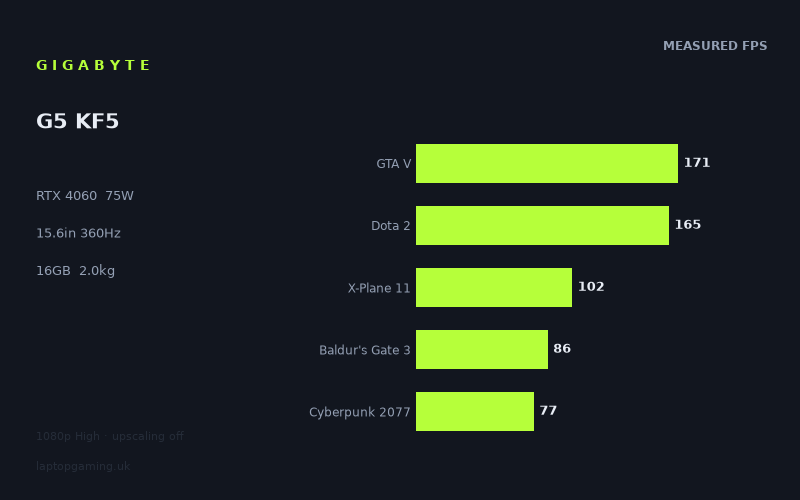
Frame rates
1920×1080, High preset, upscaling off. Averages 120fps across the 5 core benchmark games.
Measured on this machine. Source: Notebookcheck, 2024-10-23.
Not scored: no confirmed UK price
We have the full benchmark suite for this machine, so it ranks on the frame rate leaderboard like any other. What we don't have is a UK listing for this exact configuration - it's sold as a European review unit, or only in specifications that differ from the one tested. Since 30% of our score is value for money, scoring it would mean pretending price is no object, which would flatter it against every laptop you can actually buy. The frame rates below are real and comparable; there is just no buying recommendation to make yet.
How these numbers were produced
Frame rates here are not measured by us, and we label how each one was arrived at. A figure marked measured comes from a published run on that exact machine. A figure marked representative is derived from the GPU and its power limit (TGP) and cross-referenced against published reviews - a sound estimate of what that configuration delivers, but not a measurement of that specific laptop. Unless stated otherwise, numbers are 1920x1080, High preset, upscaling off. Where a laptop ships in several power configurations we use the wattage of the exact SKU listed, because a 140W RTX 5070 and a 115W one are not the same product.
In use
The short version
The Gigabyte G5 KF5 is a budget-bracket 15.6in gaming laptop with a specification that is more interesting than its position in the market suggests, and one number in it explains most of what the benchmark data shows. Our record lists an RTX 4060 running at a 75W power limit, paired with a Core i7-13620H, 16GB of memory, a 1TB SSD, a 1920x1080 IPS panel at 360Hz, a 54Wh battery and a 2.018kg chassis.
Seventy-five watts is well down the band this graphics card is sold in. It is not a broken configuration and there is nothing wrong with it, but it is a long way from the aggressive end, and the honest way to read every figure below is as the output of a deliberately conservative GPU in a deliberately light chassis at a deliberately low price.
What that produces is a machine that is genuinely competent at 1080p. Notebookcheck's measured figures, all at 1920x1080 on the High preset with upscaling off, run from 192fps in Strange Brigade down to 77fps in Cyberpunk 2077. That bottom number is the one worth dwelling on: Cyberpunk 2077 at native 1080p on High with no upscaling and no frame generation is the hardest question in our scoring suite, and 77fps is a comfortable answer to it. Baldur's Gate 3 at 86fps sits just above. Every single measured title clears 75fps. For a machine at this end of the market, that is a solid, unglamorous result and it is exactly what most people buying a gaming laptop actually need.
Unusually for the machines we cover, the benchmark suite here is complete. We hold all five scoring-suite games — GTA V at 171fps, Dota 2 at 165fps, X-Plane 11 at 102fps, Baldur's Gate 3 at 86fps and Cyberpunk 2077 at 77fps, averaging 120fps — which means this laptop ranks normally on our frame-rate leaderboard against every other machine on identical software. There is nothing provisional about the performance data.
There is nonetheless no score on this page, and the reason is narrow: we hold no confirmed UK price for this exact configuration. Value accounts for 30% of how we score a laptop and it cannot be computed without a price. That is a gap in our record, not a criticism of the machine, and we are not going to speculate about what it might cost.
The one thing that does not add up is the panel. A 360Hz refresh rate on a machine whose fastest measured game reaches 192fps is a specification the hardware cannot come close to exercising, and the section below argues that fairly bluntly. Buy this if you want a light, capable 1080p gaming laptop that clears 75fps in everything measured, including the heaviest title in our suite. Look elsewhere if the 360Hz figure is what attracted you, because on this GPU it is largely a number on a box.
Performance
What 75W means for an RTX 4060
Nvidia's laptop graphics cards are not fixed products. The same silicon goes to every manufacturer with a configurable power ceiling, and the manufacturer chooses a point in that band based on how much heat the chassis can move, how much fan noise they will tolerate and what price bracket they are targeting. The result, restated because it drives everything that follows: the performance gap between a generously configured GPU and a conservatively configured one of the same model routinely exceeds the gap between adjacent model numbers. A well-fed RTX 4060 beating a starved RTX 4070 is not surprising. It is how this product stack behaves.
Our record puts this RTX 4060 at 75W. That is comfortably below the top of the band the card is offered in, and it is the defining specification of the machine. It is also entirely coherent with the rest of the record rather than being an oddity. The chassis weighs 2.018kg across a 15.6in footprint, which is light for a gaming laptop — most 15.6in machines with a card of this class sit above 2.2kg, many above 2.4kg. The battery is 54Wh, which is small. Both figures point the same way: this is a compact, cost-controlled design with limited internal volume for heatsinks, heat pipes and fans, and limited power delivery hardware. A 75W GPU configuration in that chassis is an engineering decision that follows from the chassis, not a corner cut for no reason.
The practical consequence is that this machine will not behave like a 115W RTX 4060 in a heavier body, and buyers comparing model numbers across the market should not expect it to. What it will do — and the measurements bear this out — is deliver frame rates that are entirely sufficient for 1080p gaming across a demanding modern test set, in a package that is easier to carry than most of its competition.
There is a second, less obvious consequence. A conservatively configured GPU tends to hold its clocks more consistently, because it is not fighting a thermal ceiling as hard. We hold no temperature or noise measurements for this machine and cannot demonstrate that here, so it remains a general property of low-TGP designs rather than a claim about this specific laptop. But it is worth knowing that a 75W configuration is not simply "a 4060 with less performance"; it is a different operating point with its own characteristics.
The measured spread, top to bottom
Notebookcheck's figures for this machine, dated 23 October 2024, cover seven games and run from 192fps to 77fps — a spread of roughly two and a half to one. That is a noticeably narrower range than many machines produce, and the narrowness is itself informative. It means this GPU is doing real work in a larger proportion of the test set than a faster card would be, because it runs out of headroom sooner and therefore becomes the limiting component in more of the games.
At the top, Strange Brigade at 192fps. Strange Brigade has been in benchmark suites for years because it is a clean, well-optimised Vulkan title that scales predictably and asks very little unusual of the processor. It functions here as a sanity check on the graphics configuration, and 192fps is what a healthy 75W RTX 4060 should produce. It also sets the ceiling for the whole data set — nothing measured on this machine goes faster.
GTA V at 171fps and Dota 2 at 165fps follow, and both need reading carefully because both are in the scoring suite. GTA V is an old game whose renderer leans heavily on single-thread processor performance; at 1080p on High it stopped being limited by the graphics card on hardware of this class some years ago. A figure of 171fps here is substantially a statement about the Core i7-13620H, not about the RTX 4060. Dota 2 is the same category of result: it is not a demanding game for any RTX 40-series card, and 165fps is far below what the GPU could theoretically produce in it. Both titles are in the suite because enormous numbers of people play them, which makes the figures genuinely useful — but they are not measurements of graphics performance.
X-Plane 11 at 102fps is the purest example of the phenomenon in our suite. X-Plane 11's simulation loop is famously processor-heavy and famously indifferent to graphics hardware. One hundred and two frames per second is a good result for the platform as a whole, and it is another figure in which the RTX 4060 is largely a bystander.
Final Fantasy XV at 93fps begins the transition. It is a mid-weight GPU test with some well-documented engine quirks, and at 93fps the graphics card is starting to be the thing that matters.
The last two are where the GPU is unambiguously the constraint. Baldur's Gate 3 at 86fps is a strong result for a card at this power level; Baldur's Gate 3 is not the heaviest game ever made but it is a proper modern renderer and it does have a well-known processor dependence in its later act, so 86fps represents both components doing their job. Cyberpunk 2077 at 77fps is the headline. Cyberpunk 2077 at native 1080p on High with upscaling off will consume every scrap of graphics performance available to it, and it is the closest thing our five scoring games have to a pure GPU test. Seventy-seven frames per second from a 75W RTX 4060 is a genuinely good number, and it is the single measurement that most deserves to influence a buying decision.
A complete suite, and why that is worth more than it sounds
Our scoring suite is five games, identical for every laptop we rank, and for this machine we hold all five: GTA V 171fps, Dota 2 165fps, X-Plane 11 102fps, Baldur's Gate 3 86fps and Cyberpunk 2077 77fps, averaging 120fps. A great many of the machines on this site are missing one or two of those, and the missing ones are usually Cyberpunk 2077 and Baldur's Gate 3 — precisely because they are newer additions and because older review data predates them.
Having the full set matters more than it might appear. The suite is deliberately mixed: three of the five games are substantially processor-bound at 1080p on this class of hardware, and two of them genuinely load the graphics card. A machine measured only on the first three has been measured on the wrong things for the purpose of judging its GPU. A machine measured on all five has a mean that reflects both halves of the picture. The 120fps average here is a real number, computed from the same games as every other complete entry on the leaderboard, and it can be compared directly.
It is also worth noting where within that average the interesting information sits. The spread from 171fps to 77fps across five games is wide, and the two lowest entries are the two GPU tests. That pattern — light titles high, heavy titles clustered at the bottom — is the fingerprint of a GPU that is the limiting factor in demanding software, which is what a 75W RTX 4060 should be. The data is internally consistent with the specification, and internal consistency is the first thing worth checking.
What the numbers mean if you are going to play on it
Every measured game clears 75fps at 1080p on the High preset with no upscaling. That is the headline for a buyer and it is a good one. Five of seven clear 90fps. Three clear 160fps.
If your library is competitive shooters, strategy games, MOBAs or anything that predates the current wave of graphically ambitious releases, this machine will produce frame rates well beyond what you need, and will do so with settings headroom to spare. The GTA V and Dota 2 figures make that concrete.
If your library is the heavy modern single-player tier, you are looking at the 77 to 86fps band at 1080p High. That is a fully playable, comfortable result — well clear of the point at which a game starts feeling unresponsive, and better than a great many machines at this price level manage. What it is not is headroom. As games get heavier, a 75W RTX 4060 will reach the point of needing settings compromises or upscaling sooner than a more generously configured card would. DLSS is available and is a perfectly legitimate tool, and this is a machine on which it will earn its keep within a couple of years for the most demanding releases.
The 16GB of memory in our record is worth a brief note in the same practical spirit. Sixteen gigabytes is adequate for gaming today and is the standard fitment at this price. It is not generous, and some recent titles have started to push against it when combined with a browser and a voice-chat client. That is a general observation about the current software landscape rather than a measured finding on this machine.
The screen
1920x1080 at 360Hz, on an IPS panel
Our record lists a 15.6in IPS panel at 1920x1080 and 360Hz. Two of those three specifications are well matched to the hardware. The third is not.
The resolution is exactly right. Every frame rate above was measured at 1920x1080, which means for once the benchmark data describes the machine as it will actually be used — no extrapolation, no guessing at what a native-resolution penalty might cost. A 75W RTX 4060 is a 1080p graphics card, this is a 1080p panel, and the pairing is coherent. Buyers of higher-resolution machines in this performance class end up running games at less than native resolution or leaning on upscaling; buyers of this one do not have to.
IPS is the sensible panel technology at this price. It gives good viewing angles and consistent colour, and it carries none of the burn-in consideration that OLED does — relevant on a machine likely to be used for work and study as well as games, with static interface elements on screen for long stretches. We hold no brightness, contrast, colour-gamut or response-time measurements for this panel, so nothing here should be read as a claim about this specific example. It is a statement about the technology.
The 360Hz problem
Three hundred and sixty hertz means the panel can display a new image 360 times a second. To benefit from that, the machine has to produce frames at that rate. The fastest game in the measured set reaches 192fps. Nothing else gets within 190fps of the panel's ceiling. Cyberpunk 2077 reaches roughly a fifth of it.
That is a substantial mismatch and it deserves saying plainly rather than being buried in a list of features. On the evidence in our record, this panel's refresh rate is not a capability the graphics hardware can exercise in any measured title, and a buyer choosing this machine because of the 360Hz figure is buying something the rest of the specification cannot deliver.
The counter-argument deserves a fair hearing, because it is not worthless. All of our figures are taken at the High preset. Competitive players — the constituency a 360Hz panel exists for — do not play at High. They play at low settings, often with resolution scaling and every effect disabled, precisely to push frame rates as high as the display can show. In a title like Counter-Strike or Valorant, configured that way, frame rates several times higher than anything in our table are achievable on modest hardware. We hold no measurements at low settings and no measurements of any competitive shooter, so we cannot quantify this, and we are not going to estimate it. But it would be dishonest to say the panel is useless without acknowledging that the specific use case it was designed for is not represented in our data at all.
What can be said with confidence is narrower and still useful. For the games we do hold figures for, at the settings those figures were taken at, the panel is running far ahead of the hardware. Dota 2 at 165fps is the closest thing in our set to an esports title and it reaches under half the refresh rate at High. There is also a real benefit to a high-refresh panel even when you cannot saturate it — variable refresh rate technologies work across a wider range on a faster panel, and the display's own response characteristics tend to be better on high-refresh parts. Those are genuine secondary advantages.
The blunt conclusion for most buyers: treat the 360Hz as a bonus you will rarely use rather than a reason to choose this machine. A 165Hz or 240Hz panel with better measured brightness or colour would be a more useful specification for the same money, and the frame rates in our record are the evidence for that.
Can the GPU drive the panel at all?
Partially, and it is worth being precise about which titles fall where. Three of the seven measured games clear 160fps — Strange Brigade, GTA V and Dota 2 — which puts them into the band where a high-refresh panel is genuinely doing something, even if it is not being saturated. Final Fantasy XV at 93fps, X-Plane 11 at 102fps, Baldur's Gate 3 at 86fps and Cyberpunk 2077 at 77fps are all comfortably above 60fps but well below any threshold where refresh rate above 120Hz has much to contribute.
Notice, too, that the three games clearing 160fps are the three processor-bound titles. That is not a coincidence and it is the clearest possible illustration of where this machine's limits sit: in the games fast enough to make use of a high-refresh panel, the graphics card is not the constraint anyway. Fitting a faster GPU would not move those numbers much. Fitting a faster panel does not help the games where the GPU is the constraint. The specification pulls in two directions at once.
Build, size and portability
2.018kg, and what it buys
At just over two kilograms, this is a light machine by 15.6in gaming laptop standards. That is a real and underrated advantage. A gaming laptop that weighs two kilos rather than two and a half is a machine you will actually take to a friend's house, to university, on a train. The difference sounds trivial written down and is not trivial carried on a shoulder five days a week.
It also explains the GPU configuration. Cooling capacity is broadly a function of internal volume: fan diameter, heat-pipe cross-section, exhaust area, and the thermal mass available to absorb transients. A 2.018kg 15.6in chassis has meaningfully less of all of it than a 2.5kg one, and 75W is the power limit that follows from that constraint. The weight and the power limit are the same decision viewed from two angles, and a buyer should understand them as a package rather than wishing for a heavier GPU configuration in the same body.
Our record holds no chassis dimensions beyond the 15.6in screen size, no port complement, no keyboard or trackpad detail, no measured noise figures and no measured temperatures. Those are gaps we would rather name than write around.
The 54Wh battery
Fifty-four watt-hours is small. For context within our own records, gaming machines of comparable size frequently carry 70Wh or more, and larger machines routinely exceed 80Wh. We hold no battery-life measurement for this laptop and will not estimate one, but a 54Wh cell in a machine with a 13th-generation Core i7 and a discrete GPU is not a specification that suggests long unplugged use.
It is also worth stating what every gaming laptop buyer should already know: none of the frame rates above apply on battery. Discrete GPUs are power-limited severely when unplugged, and a machine with a 54Wh cell has less margin than most. This is a laptop to game on with the charger attached and to use unplugged for light work, and the specification is honest about that even if it is not ideal.
Storage and memory
A 1TB SSD is a good fitment at this price and is more than many competitors offer at the same level. Modern game installations have grown to the point where 512GB fills up alarmingly fast — a handful of large titles will do it — and 1TB gives genuine breathing room. It is the least glamorous line in the specification and one of the more practically valuable.
Sixteen gigabytes of memory is standard rather than generous, as noted above. Whether it is upgradeable is not something our record covers.
How it compares
The four machines below are all from the same GPU generation and are compared only on games both machines hold, with our scoring-suite titles preferred where available. They are a spread rather than a shortlist of near-matches: the two closest results, the machine this one beats by the widest margin, and the machine that beats it by the widest.
MSI Thin GF63 — RTX 4050 — G5 KF5 +44fps across 5 shared games
This is the comparison that establishes what the method can do. Across five shared games — the deepest overlap of the four — the G5 KF5 averages 44 frames per second more than an MSI Thin GF63 carrying an RTX 4050. Forty-four frames per second is a large, unambiguous margin, and it is precisely the sort of separation that should exist between a 75W RTX 4060 and the smallest card in the generation.
Two things make this result useful beyond its own terms. The first is the depth: five shared games is enough to include titles that genuinely load the graphics card, not just the processor-bound ones, and when the overlap is that wide the GPU difference shows up clearly. The second is that it demonstrates the G5 KF5's conservative configuration is not so conservative that it collapses into the tier below. A 75W RTX 4060 is well down its band, but it is comfortably clear of an RTX 4050. Our record does not hold a power limit for the Thin GF63's RTX 4050, so we cannot say whether that machine's card is generously or conservatively configured, and the margin should be read with that uncertainty attached.
Razer Blade 18 (2024) — RTX 4090 at 175W — dead level across 3 shared games
Across three shared games the Gigabyte G5 KF5 averages exactly the same frame rate as a Razer Blade 18 carrying an RTX 4090 at 175W.
Read that sentence twice, because taken at face value it is nonsense, and the right response to a nonsensical result is to work out what produced it rather than to report it neutrally. A 175W RTX 4090 is among the fastest mobile graphics configurations of its generation. A 75W RTX 4060 is not remotely in the same category. In any workload that meaningfully involves the graphics card, the gap between them is enormous.
The correct conclusion is that the three games in this particular overlap are not measuring the graphics card. The analysis earlier in this review identified exactly which titles in this machine's set behave that way: GTA V, Dota 2 and X-Plane 11 are all substantially processor-bound at 1080p on hardware of this class, and all three are in our scoring suite, which makes them the most likely candidates to appear in a narrow overlap with any other machine. In those games the frame rate is set by how quickly a single processor thread can prepare work for the renderer. A Core i7-13620H does that at a rate broadly comparable to whatever the Blade 18 is using, and the graphics cards behind them both spend their time waiting.
This is not a benchmark defect. Those three games are in the suite because vast numbers of people play them and a buyer genuinely wants to know that this machine hits 171fps in GTA V. It simply is not information about the GPU.
Alienware x16 R1 — RTX 4080 at 175W — G5 KF5 -1fps across 3 shared games
The same story, one frame per second the other way. Across three shared games the G5 KF5 finishes a single frame behind an Alienware x16 R1 with an RTX 4080 at 175W.
Two flagship machines, both with 175W graphics configurations, both landing within a frame of a budget laptop running a 75W RTX 4060. That consistency is itself the strongest evidence for the explanation above: if the overlap games were testing graphics hardware, the Blade 18 and the x16 R1 would both be far ahead, and they would be ahead by different amounts reflecting the difference between an RTX 4090 and an RTX 4080. Instead they are both level, with each other and with this machine. Three very different graphics cards producing the same result is the signature of a bottleneck that is not the graphics card.
None of this means the Alienware and the Razer are not much faster machines. They are, and the next comparison demonstrates that the method is perfectly capable of showing it. It means these particular three games do not show it.
Asus ROG Strix Scar 17 — RTX 4090 — G5 KF5 -53fps across 3 shared games
And here is the result that prevents the previous two sections from being read as "the comparison data is meaningless". Across three shared games — the same shallow depth that produced a dead heat against one RTX 4090 machine and a one-frame gap against an RTX 4080 machine — the G5 KF5 averages 53 frames per second behind an Asus ROG Strix Scar 17 with an RTX 4090.
Fifty-three frames per second is a very large gap, and it was found across a three-game overlap. That single fact does more work than anything else in this section: a three-game comparison plainly has the dynamic range to expose a major difference when a major difference exists to be exposed. The ties above are not an artefact of comparing too few games. They are a statement about which games, and about where each machine's actual ceiling sits.
The most striking detail is that two of these four rivals carry an RTX 4090, and against one of them this machine is level while against the other it is 53fps behind. Those two facts cannot both be about the graphics card, because the graphics cards are the same model. The variable that differs is everything else: the processors, their sustained clock behaviour, the memory subsystems, and — critically — which three games happened to be shared in each case. Our record does not hold a power limit for the Strix Scar 17's RTX 4090, so we will not attribute the gap to a particular configuration, and given the analysis above we would not attribute a 53fps swing purely to the GPU in any event.
For a buyer the practical reading is this. The Strix Scar 17 is a substantially faster machine and nobody should pretend otherwise. But a 53fps average deficit across three largely processor-bound titles is not the same shape of difference you would see in Cyberpunk 2077 or Baldur's Gate 3, and we hold no shared heavy-title comparison between these two machines to quantify it. That remains an inference, and we flag it as one rather than dressing it up as a measurement.
What the four results say together
Taken as a set, the comparisons support several conclusions and refuse one.
They support the conclusion that the method can separate machines: a 44fps win at one end and a 53fps loss at the other are not the outputs of a blunt instrument.
They support the conclusion that the three-game overlaps are dominated by processor-bound titles: an RTX 4090 machine and an RTX 4080 machine landing within a frame of a 75W RTX 4060, while a different RTX 4090 machine is 53fps clear, is not explicable any other way.
They support the conclusion that this machine's GPU configuration is competent for its class: 44fps clear of an RTX 4050 across a five-game overlap, and 77fps in Cyberpunk 2077 in its own right.
What they do not support is any claim that this laptop performs like a flagship. It does not. It performs like a well-configured budget machine, which is what it is, and the ties above are a property of the test set rather than a property of the hardware.
Who it's for
Buy it if
You want a 1080p gaming laptop that clears 75fps in everything. That is the strongest single statement the data supports. Seven measured games, the lightest at 192fps and the heaviest at 77fps, all at native panel resolution on the High preset with no upscaling. There is no title in the set where this machine struggles, and Cyberpunk 2077 at 77fps in particular is a better result than a 75W graphics configuration might lead you to expect.
You carry your laptop. Two kilograms for a 15.6in gaming machine is genuinely light, and it is the specification most likely to affect your daily experience of owning it. If the machine is going to live in a bag rather than on a desk, this is a meaningful advantage over heavier competitors with more aggressive GPU configurations.
You want the storage. A 1TB SSD as standard is worth more in practice than another few frames per second. Modern games are enormous and running out of space is a weekly irritation on a 512GB machine.
You want a complete, comparable performance record. We hold all five of our scoring-suite games for this laptop, which is not true of every machine on this site. Whatever else is uncertain here, the frame-rate data is directly comparable against every other complete entry, on identical software.
Buy something else if
The 360Hz panel is why you were interested. This is the clearest reason to look elsewhere. Nothing in the measured set exceeds 192fps and most of it sits well below 120fps. Unless you play competitive shooters exclusively, at low settings, the refresh rate is a specification you will pay for and rarely exercise. A machine with a lower refresh rate and a better-measured panel would serve most buyers better.
You want headroom for the next few years of heavy releases. A 75W RTX 4060 sits at 77fps in Cyberpunk 2077 today. That is comfortable now. As games get more demanding, a conservatively configured card reaches the point of needing upscaling and settings compromises sooner than a generously configured one. If you intend to keep the machine for a long time and play the most demanding titles as they arrive, more graphics power — or more GPU power limit for the same graphics card — is the thing to spend money on.
You need real unplugged battery life. Fifty-four watt-hours is small for this class of machine and we hold no measured runtime for it. If the laptop needs to work for hours away from a socket, this is not the specification you want.
You want to know exactly what you are paying for it. We hold no confirmed UK price for this configuration, which is why there is no score on this page. Value is 30% of how we rank machines and we cannot compute it without a number. If price-to-performance is the thing you want settled before buying, this page cannot settle it, and we would rather say so than guess.
You want flagship performance. The Strix Scar 17 comparison — 53 frames per second behind across three shared games — is unambiguous about which tier this machine belongs to. It is a good budget gaming laptop, not a fast one in absolute terms, and buyers who want the latter should be looking at a heavier chassis with a bigger card and the cooling capacity to feed it.
The honest summary
The Gigabyte G5 KF5 is a coherent machine. The light chassis, the small battery and the 75W power limit are all the same design decision, and it produces exactly the performance profile you would predict: strong in light titles, comfortable in heavy ones, nowhere near the top of the market and not attempting to be. The complete benchmark suite means the performance claims here are unusually well founded, and 77fps in Cyberpunk 2077 at native 1080p with no upscaling is the number that should carry the most weight in a buying decision.
The 360Hz panel is the one specification that does not fit the rest of the machine, and the dead heats against two 175W flagship laptops are the one set of results most likely to be misread. Neither is a reason to avoid the laptop. Both are reasons to read the specification sheet with the frame rates in hand rather than the other way round.
What we cannot tell you is what it costs, how long the battery lasts, how loud it gets or how hot it runs. Those are gaps in our record, and we would rather leave them visible than fill them with plausible-sounding numbers.