Details
Product prices and availability are accurate as of the date/time indicated and are subject to change. Any price and availability information displayed on Amazon.co.uk at the time of purchase will apply to the purchase of this product.Review
Schenker XMG Apex 15 (Late 23) review
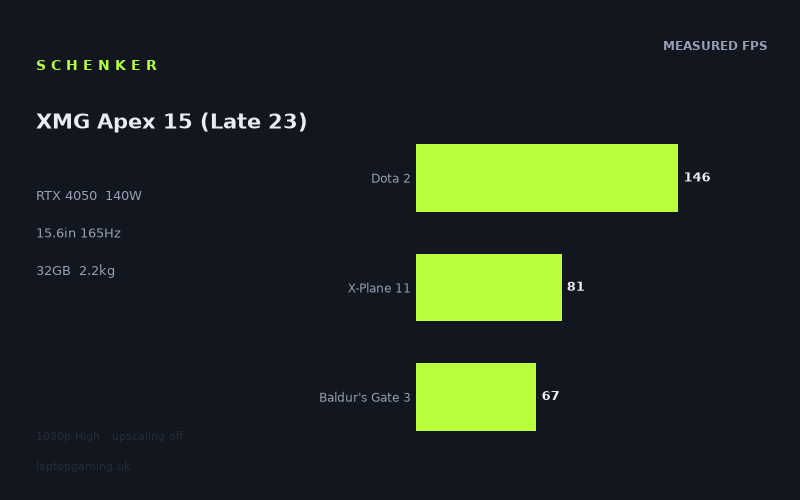
Frame rates
1920×1080, High preset, upscaling off.
Measured on this machine. Source: Notebookcheck, 2023-10-11.
Not scored: incomplete benchmark suite
Every scored laptop on this site is averaged over the same 5 games, and this one is short of Cyberpunk 2077, GTA V. A mean over 3 games is not comparable to a mean over 5, so we publish the figures we have and leave the score blank rather than rank it against machines tested on a different set. The numbers below are real - the suite is just incomplete.
How these numbers were produced
Frame rates here are not measured by us, and we label how each one was arrived at. A figure marked measured comes from a published run on that exact machine. A figure marked representative is derived from the GPU and its power limit (TGP) and cross-referenced against published reviews - a sound estimate of what that configuration delivers, but not a measurement of that specific laptop. Unless stated otherwise, numbers are 1920x1080, High preset, upscaling off. Where a laptop ships in several power configurations we use the wattage of the exact SKU listed, because a 140W RTX 5070 and a 115W one are not the same product.
In use
The short version
The Schenker XMG Apex 15 (Late 23) is a performance-led 15.6in gaming laptop whose strongest case is straightforward: its RTX 4050 is configured with a 140W GPU power limit, and the published Notebookcheck benchmark data shows that it can deliver very high frame rates in a broad range of games at 1920x1080 on the High preset with upscaling disabled.
That does not mean every game runs anywhere near the screen’s 165Hz refresh rate. The benchmark spread is wide. Doom Eternal reaches 208fps, Strange Brigade reaches 168fps, The Witcher 3 reaches 161fps and F1 23 reaches 159fps. Those are excellent results for a machine with an RTX 4050, and they show that the Apex 15 has enough performance for very high-refresh play in lighter, older or particularly well-optimised games.
At the other end of the list, Starfield reaches 42fps, Ratchet & Clank Rift Apart reaches 48fps and Immortals of Aveum reaches 49fps. The Last of Us reaches 62fps, Flight Simulator 2020 reaches 65fps and Baldur’s Gate 3 reaches 67fps. Those figures are still usable in many cases, but they are a reminder that the GPU power limit cannot remove the demands of newer and heavier games. A laptop that can run Doom Eternal at 208fps is not automatically a laptop that can drive every current blockbuster at its 165Hz panel limit.
The important point is that this is not a weak RTX 4050 implementation being held back by an unusually low GPU power limit. The stated 140W limit matters because it gives the GPU a more generous operating ceiling than many thinner machines. The results support that view: the Apex 15 is competitive with an MSI Katana A15 AI carrying an RTX 4070 at 105W and with a Schenker Key 14 (M24) carrying an RTX 4060 at 100W. Across the shared games available for comparison, the Apex 15 is only 2fps behind each. That is a near-zero difference, not a reason to pretend that the RTX 4050 is equivalent to either of those GPUs in every circumstance, but it is strong evidence that laptop GPU labels and power limits need to be considered together.
Buy the Apex 15 if the appeal is a relatively conventional 15.6in gaming machine with 32GB of memory, a 2560x1440 IPS display, a 165Hz refresh rate and published 1080p gaming figures that range from very good to excellent in many games. It is especially sensible for someone who plays a mixture of esports-style titles, racing games, older AAA games and less demanding modern releases, and who is happy to adjust settings in the toughest games rather than expecting maximum-refresh performance everywhere.
Be more cautious if the central aim is to play demanding current games at the native 2560x1440 resolution with high settings and no compromises. The available figures are at 1920x1080, not 2560x1440. That distinction is crucial. The Apex 15’s 1080p figures are useful and attributable, but they do not prove what it will do at the panel’s native resolution. In the games already below 60fps at 1080p, there is no evidence here that native-resolution High settings will be comfortable.
Price is also unresolved. There is no confirmed UK price for this configuration, so it is not possible to make a responsible value judgement. The hardware and benchmark data make the Apex 15 an interesting machine, but whether it is a sensible purchase depends heavily on what Schenker and UK retailers actually charge. A capable RTX 4050 laptop can be good value or poor value depending on its price, and there is no basis here for pretending otherwise.
Performance
A high-power RTX 4050, but not a universal high-refresh solution
The XMG Apex 15 combines an RTX 4050 with a stated 140W GPU power limit, a Ryzen 7 7840HS and 32GB of memory. The measured figures cited below come from Notebookcheck, recorded on 2023-10-11 at 1920x1080, using the High preset with upscaling off. This is a useful test condition because it shows the machine’s direct game performance without relying on upscaling to increase the frame-rate result.
The 140W limit is important context, but it should not be mistaken for a guaranteed frame-rate result. A GPU power limit defines how much power the graphics processor may be allowed to use; it does not make every game respond in the same way. Some games are limited more by their own engine behaviour, their CPU demand, memory use, streaming requirements or the specific graphics settings used. Others scale very well with available graphics power. The Apex 15’s results show exactly that kind of variation.
At the fastest end, Doom Eternal reaches 208fps. That is the only measured result above the panel’s 165Hz refresh rate by a large margin, but it is not alone in demonstrating very strong performance. Strange Brigade reaches 168fps, just above 165Hz. The Witcher 3 reaches 161fps and F1 23 reaches 159fps. These results sit close enough to the panel limit that the 165Hz display is relevant rather than merely aspirational. In these games, the machine has the kind of frame-rate headroom that makes a high-refresh panel worthwhile.
Dota 2 reaches 146fps, matching Forza Horizon 5 at 146fps. Alan Wake Remastered reaches 132fps. Death Stranding and GRID Legends both reach 130fps. Lies of P reaches 118fps, Atlas Fallen reaches 113fps and Watch Dogs Legion reaches 107fps. This is the next important performance tier: games that are not necessarily reaching 165fps, but are still delivering well above 100fps or close to it. On a 165Hz display, that remains a very good outcome. The panel can display more than the 60fps level associated with basic smooth console-style performance, and these results give it meaningful work to do.
Armored Core 6 reaches 99fps. That result is useful because it sits just below the 100fps mark and illustrates the middle of the Apex 15’s benchmark range. It is not a 165Hz result, but it is still far above the slower end of the data. Final Fantasy XV reaches 85fps and X-Plane 11 reaches 81fps. Atomic Heart reaches 77fps, while Crysis Remastered and God of War both reach 75fps. Cyberpunk 2077 1.6 reaches 73fps. In this group, the laptop is delivering a clearly playable experience at the tested settings, but the 165Hz screen is no longer the target the GPU is reaching.
The figures then continue down through Uncharted Legacy of Thieves Collection at 68fps, Baldur’s Gate 3 at 67fps and Flight Simulator 2020 at 65fps. The Last of Us reaches 62fps and The Crew Motorfest reaches 60fps. These games matter more to a prospective buyer than the headline 208fps result in Doom Eternal, because they indicate what happens when game demands rise. The Apex 15 remains capable at 1080p High in this part of the list, but it is not carrying a surplus of performance that can simply be spent on a higher resolution, a substantially higher frame-rate target or more demanding settings without consequence.
The slowest measured titles are Immortals of Aveum at 49fps, Ratchet & Clank Rift Apart at 48fps and Starfield at 42fps. The difference between 208fps in Doom Eternal and 42fps in Starfield is not a contradiction in the data. It is the point of looking at a broad game list rather than relying on a single average. Modern games place very different demands on a laptop. A buyer considering this machine primarily for Starfield, Ratchet & Clank Rift Apart or Immortals of Aveum should focus on those specific results, not on the much higher figures from less demanding games.
What the benchmark spread says about real buying priorities
The published figures place the Apex 15 into several practical groups. First are the games that can make strong use of the 165Hz panel at the tested 1080p settings: Doom Eternal at 208fps, Strange Brigade at 168fps, The Witcher 3 at 161fps and F1 23 at 159fps. These are the clearest examples of games where the system’s graphics performance and screen refresh rate line up closely.
Second are the titles that stay between 100fps and 146fps: Dota 2, Forza Horizon 5, Alan Wake Remastered, Death Stranding, GRID Legends, Lies of P, Atlas Fallen and Watch Dogs Legion. This is a substantial group, and it is arguably the Apex 15’s most attractive performance zone. The machine may not fully saturate the 165Hz panel in every one of these games, but it is still delivering the kind of high frame rate that makes gaming feel substantially more responsive than a 60fps cap.
Third are the games between 73fps and 99fps: Armored Core 6, Final Fantasy XV, X-Plane 11, Atomic Heart, Crysis Remastered, God of War and Cyberpunk 2077 1.6. This range is still respectable at the tested settings. It is particularly relevant for buyers who do not need every game to match the display refresh rate, but do want a machine that can remain comfortably above the lower end of the performance chart in many major releases.
Finally, there are the games from 42fps to 68fps: Uncharted Legacy of Thieves Collection, Baldur’s Gate 3, Flight Simulator 2020, The Last of Us, The Crew Motorfest, Immortals of Aveum, Ratchet & Clank Rift Apart and Starfield. Here, the Apex 15 is no longer a high-refresh gaming laptop in practical terms at the tested settings. It is a laptop capable of running the games, but settings choices become more important. The available data does not tell us which individual settings should be reduced, nor does it provide results with upscaling enabled, so it would be irresponsible to claim a particular optimisation path. What can be said is that these are the games in which buyers should expect to prioritise either image quality or higher frame rate rather than assuming they will get both.
The three-game scoring-suite mean is 98fps, based on Dota 2 at 146fps, X-Plane 11 at 81fps and Baldur’s Gate 3 at 67fps. That is a useful snapshot of the system’s range across a lighter competitive game, a simulator and a large RPG. It is not, however, a complete cross-laptop ranking basis. There are no figures here for Cyberpunk 2077 or GTA V within the scoring suite, and every scored laptop is normally averaged across the same five games. Because that set is incomplete, the Apex 15 should not be placed in a formal ranking against machines with complete results.
That limitation is worth stating plainly because partial benchmark data can mislead in both directions. A three-game mean of 98fps sounds healthy, and it is certainly not a poor result in isolation. But the three included games do not capture the entire spread shown elsewhere in the benchmark list. They do not include Starfield at 42fps, Ratchet & Clank Rift Apart at 48fps or Doom Eternal at 208fps. A buyer should use the wider game-by-game list, especially the games they actually intend to play, rather than treating a partial average as a complete verdict.
Where the 140W power limit helps
The most useful interpretation of the 140W GPU power limit is not that it turns the RTX 4050 into a different class of graphics hardware. It does not. It means the Apex 15 is configured to give its RTX 4050 a relatively high power allowance, and the measured results indicate that this implementation is not obviously being strangled by a low-power design.
That point becomes clearer in the rival data. The MSI Katana A15 AI uses an RTX 4070 at 105W, while the Schenker Key 14 (M24) uses an RTX 4060 at 100W. Across the three shared games available in each comparison, the Apex 15 averages only 2fps behind. The result is close enough that it should not be oversold as a victory for the Apex 15. It is still behind in each comparison. But the small gap shows why laptop buyers should not shop by GPU name alone.
At 1920x1080, lighter games in the shared set can become more dependent on CPU-side performance than on raw GPU capability. That compresses genuine graphics gaps. It also means that a 140W RTX 4050 can look surprisingly close to a lower-power RTX 4060 or RTX 4070 in a limited shared-game sample. The correct conclusion is not that all three GPUs are interchangeable. The correct conclusion is that measured results matter, and that the Apex 15’s configuration can compete strongly in the games represented here.
The reverse is also true. When games are much more demanding, GPU differences can become clearer. The Apex 15 trails the Asus ROG Strix Scar 17 with an RTX 4090 by an average of 167fps across seven shared games. That is an enormous gap, and it demonstrates that power limits and platform design cannot erase the advantage of a far more powerful graphics configuration. The Apex 15 is a capable RTX 4050 laptop; it is not an alternative to a flagship RTX 4090 machine for buyers who need the highest frame rates in demanding games.
The screen
A 2560x1440, 165Hz IPS panel with a performance caveat
The Apex 15 has a 15.6in IPS display with a 2560x1440 resolution and a 165Hz refresh rate. On paper, that is a more ambitious panel than the 1920x1080 test resolution used for the published game figures. It offers a high native resolution for a 15.6in laptop and a refresh rate that can show very high frame rates where the hardware is able to produce them.
The IPS panel designation tells us the panel type, but the supplied specifications do not include brightness, contrast, colour coverage, response-time behaviour, adaptive-sync support or any other display quality measurements. There is therefore no basis to make claims about colour work, HDR use, outdoor visibility, black levels or competitive-gaming motion clarity beyond the stated 165Hz refresh rate.
The key issue is the relationship between the panel’s native resolution and the benchmark resolution. Notebookcheck’s figures are at 1920x1080 on High settings with upscaling off. The panel is 2560x1440. These are not the same resolution, and 2560x1440 asks the GPU to render more pixels than 1920x1080. The measured frame rates are therefore evidence of 1080p performance, not proof of native-resolution performance.
That does not make the screen a mismatch. It means the buyer needs to understand what it is for. In the faster games, the high refresh rate is justified even from the 1080p data. Doom Eternal at 208fps is beyond 165Hz. Strange Brigade at 168fps is effectively at the panel limit. The Witcher 3 at 161fps and F1 23 at 159fps are close enough to it that the 165Hz panel remains valuable. Dota 2 and Forza Horizon 5 at 146fps also make convincing use of a high-refresh screen.
In the 100fps to 132fps range, the panel is still useful. Alan Wake Remastered at 132fps, Death Stranding at 130fps, GRID Legends at 130fps, Lies of P at 118fps, Atlas Fallen at 113fps and Watch Dogs Legion at 107fps all sit well above 60fps, even though they do not approach the 165Hz ceiling. A 165Hz display is not wasted simply because a game does not reach 165fps; it can still display those higher-than-60fps results.
For the games between 73fps and 99fps, the display’s refresh ceiling becomes less central. Armored Core 6 at 99fps, Final Fantasy XV at 85fps, X-Plane 11 at 81fps, Atomic Heart at 77fps, Crysis Remastered at 75fps, God of War at 75fps and Cyberpunk 2077 1.6 at 73fps are all far closer to conventional playable performance than to 165Hz gaming. The screen is still capable of displaying their output, but the GPU is no longer driving it at the level implied by the refresh-rate headline.
The slower group makes the native-resolution question especially important. Uncharted Legacy of Thieves Collection at 68fps, Baldur’s Gate 3 at 67fps, Flight Simulator 2020 at 65fps, The Last of Us at 62fps, The Crew Motorfest at 60fps, Immortals of Aveum at 49fps, Ratchet & Clank Rift Apart at 48fps and Starfield at 42fps are already demanding at the tested 1080p High settings. There is no measured evidence here to support an assumption that these games will run well at 2560x1440 High with upscaling disabled.
How to think about the resolution choice
For buyers who mainly play games such as Doom Eternal, Strange Brigade, The Witcher 3, F1 23, Dota 2 or Forza Horizon 5, the combination of high benchmark figures and a 165Hz screen makes sense. The measured performance suggests that these games can deliver frame rates substantially above 100fps at 1080p High, with several close to or beyond 165fps. A high-refresh panel gives those results somewhere to go.
For buyers whose library is dominated by Starfield, Ratchet & Clank Rift Apart, Immortals of Aveum, The Last of Us or Flight Simulator 2020, the screen should be viewed differently. Its 2560x1440 native resolution is attractive in specification terms, but the available benchmark data does not show that the RTX 4050 can sustain native-resolution High settings in those games. The sensible approach is to treat 1080p benchmark data as a realistic baseline and not buy on the assumption of universal 1440p performance.
There is also no need to reduce the display to a single question of whether every game reaches 165fps. The screen can serve several different use cases. The high resolution may appeal for desktop work and media use, while the 165Hz refresh rate is relevant in the games that reach high frame rates. But the supplied information does not include productivity measurements or image-quality testing, so gaming remains the area where the evidence is strongest.
The most honest conclusion is that the display is more capable than the GPU can fully exploit in every measured game. That is normal for a gaming laptop with a broad game library. The panel is well suited to the Apex 15’s fastest titles and still useful in its middle tier. It is less well matched to the heaviest games at their most demanding settings, where the published 1080p figures already sit far below the refresh limit.
Build, size and portability
Weight is known; dimensions are not
The supplied specification gives the Apex 15 a weight of 2.214kg. That places it firmly in the category of a laptop that can be moved between rooms, taken to work, carried to university or transported for travel, but it is not a machine to describe as especially light on the evidence available here.
A 2.214kg gaming laptop is likely to be most comfortable for people who move it regularly rather than constantly. It suits a buyer who wants one computer for a desk, a shared living space and occasional travel. It is less obviously suited to someone who wants the least burden in a backpack every day. That is not a criticism of the Apex 15 specifically; it is simply the trade-off implied by a 15.6in gaming laptop with a 140W GPU power limit.
No physical dimensions are provided in the fact sheet. We do not have a width, depth or thickness figure, so there is no basis to state how much desk space the chassis occupies, whether it fits a particular bag size, or whether it is thin compared with a rival. Likewise, there are no figures for the power supply, so the total travel weight cannot be calculated from the available information.
There are also no published facts here covering materials, keyboard layout, trackpad quality, port selection, upgrade access, speakers, webcam, cooling noise, temperatures or battery life. Those omissions matter. A gaming laptop is more than its frame-rate chart, and buyers who need quiet operation, long unplugged use, a particular display output or a certain keyboard arrangement should seek confirmed specifications before buying.
What the available facts do support
What can be said is that the Apex 15 is a 15.6in machine with a 2.214kg weight, a 2560x1440 165Hz IPS display, 32GB of memory, a Ryzen 7 7840HS and an RTX 4050 configured at 140W. That is a specification shaped around performance rather than extreme portability.
The comparison with the Schenker Key 14 (M24) is informative in this context, even though no weight for that rival is supplied here. The Key 14 uses an RTX 4060 at 100W and the Apex 15 is only 2fps behind across the three shared games. The Apex 15’s larger 15.6in format and higher stated GPU power limit appear to be part of why its RTX 4050 can remain competitive in that limited comparison. This is an interpretation of the benchmark relationship, not proof of a particular chassis design advantage, but it reinforces the point that the Apex 15 is not built around the lowest possible weight.
For a buyer choosing between portability and gaming performance, the 2.214kg figure should be treated honestly. It is manageable, but it is not insignificant. If the laptop will spend most of its life on a desk and be moved occasionally, the performance orientation makes sense. If it will be carried all day, every day, the buyer should consider whether the extra mass and the unknown power-adapter weight fit their routine.
How it compares
Against the Samsung Galaxy Book4 Ultra
The Samsung Galaxy Book4 Ultra is listed with an RTX 4050, the same GPU family as the Apex 15. There is no confirmed UK price for the Samsung in the supplied data, so this is a performance comparison rather than a value comparison.
Across six shared games, the Apex 15 averages 30fps ahead of the Galaxy Book4 Ultra. That is a meaningful gap. Unlike the 2fps differences against the MSI Katana A15 AI and Schenker Key 14, a 30fps advantage is large enough to alter how some games feel in practice. It can be the difference between a result sitting closer to 60fps and one sitting closer to 100fps, or between a moderately high frame rate and one that makes much better use of a 165Hz panel.
The two machines share the RTX 4050 label, but the Apex 15’s stated 140W GPU power limit is important context. Laptop RTX 4050 systems are not automatically alike. The benchmark comparison strongly supports that warning. Anyone considering the Samsung because it appears to have the same GPU should not assume equal gaming performance. On the shared-game evidence, the Apex 15 is substantially faster.
That makes the Apex 15 the stronger gaming choice between these two on the data available. It does not settle questions of screen quality, weight, battery life, build, ports or price, because those details are not supplied for the comparison. But if gaming frame rate is the deciding factor, the 30fps average advantage is compelling.
Against the MSI Katana A15 AI
The MSI Katana A15 AI carries an RTX 4070 at 105W. On GPU naming alone, a buyer might expect it to sit well ahead of the RTX 4050-based Apex 15. The shared benchmark data does not show that outcome in the limited comparison available: the Apex 15 averages only 2fps behind across three shared games.
This does not prove that the Apex 15 is broadly equal to an RTX 4070 laptop. The sample is only three shared games, and the fact sheet specifically notes that lighter titles at 1080p can become CPU-bound, compressing real GPU differences. That is an important technical limitation. If the shared games are not fully graphics-limited, their results will not reveal the full separation that might emerge elsewhere.
Still, the comparison is useful. It shows that the Apex 15’s 140W RTX 4050 is not a poor performer merely because its GPU name sits lower in the range. The 2fps average deficit is effectively a tie for the shared 1080p results. The sensible conclusion is that the Katana’s RTX 4070 does not automatically guarantee a visible advantage in every game and setting.
No confirmed UK price is available for the MSI either. That prevents the more important purchase judgement: whether its small shared-game advantage is worth any additional cost. Without prices, the comparison should remain focused on the evidence available. The MSI is ahead in the shared data, but only marginally. The Apex 15 therefore deserves serious consideration if it is priced competitively, though its own UK price is also unconfirmed.
Against the Schenker Key 14 (M24)
The Schenker Key 14 (M24) uses an RTX 4060 at 100W. Again, the Apex 15 trails by only 2fps across three shared games. This is another comparison where GPU labels alone tell an incomplete story.
The Key 14’s RTX 4060 is a different GPU, but its stated 100W power limit is lower than the Apex 15’s 140W limit. The near-zero benchmark difference is consistent with the idea that the Apex 15’s higher-power RTX 4050 configuration can remain very competitive at 1080p in the shared games. It should not be read as proof that the two machines will remain this close in every current release, at every resolution or under every graphics setting.
The form-factor implication is also worth considering. The Apex 15 is a 15.6in, 2.214kg machine. The rival’s name identifies it as a Key 14, but no display size or weight is provided in the supplied rival data, so no precise portability judgement should be made. What the frame-rate data does show is that buyers who assume a higher-numbered GPU must always deliver a clear gaming lead could make the wrong decision. In the shared sample, it does not.
As with the MSI comparison, there is no confirmed UK price for the Key 14. The correct buying conclusion is therefore conditional: if the Key 14 commands a substantial premium, the available shared performance data does not show a substantial gaming advantage. If prices are close, other confirmed specifications would need to decide the choice.
Against the Asus ROG Strix Scar 17
The Asus ROG Strix Scar 17 is the opposite end of the comparison range. It uses an RTX 4090 and is listed at £4,864. Across seven shared games, the Apex 15 averages 167fps behind.
That gap is huge, and it is useful because it prevents the encouraging comparisons with the MSI and Key 14 from being exaggerated. The Apex 15 can sit close to certain lower-power RTX 4060 and RTX 4070 laptops in a small shared 1080p sample. It cannot approach an RTX 4090 machine across a wider shared sample. The Strix Scar 17 is in a completely different performance tier on the benchmark evidence.
The difference also changes what the screen specifications mean. The Apex 15’s 165Hz display can be well used in its faster games, but its RTX 4050 cannot be expected to sustain high-refresh performance in the heaviest titles. A much faster RTX 4090 system has far more room for demanding games, higher resolutions and higher frame-rate targets. The £4,864 price is also radically different from any price that would normally make sense for an RTX 4050 laptop, though the Apex 15’s own UK price is not confirmed and therefore cannot be directly compared.
The Scar 17 is not a natural alternative for the same buyer unless budget is exceptionally flexible and maximum gaming performance is the only priority. Its role in this comparison is more useful as a reminder of where the Apex 15 sits: strong for an RTX 4050 configuration, but far from flagship performance.
Who it’s for
Buy it if these are your priorities
The XMG Apex 15 makes the most sense for a buyer who wants a 15.6in gaming laptop with a high-refresh 2560x1440 screen, 32GB of memory and strong published 1080p performance without moving into flagship RTX 4090 territory.
It is particularly well suited to players whose regular games resemble the faster half of the benchmark list. Doom Eternal at 208fps, Strange Brigade at 168fps, The Witcher 3 at 161fps, F1 23 at 159fps, Dota 2 at 146fps and Forza Horizon 5 at 146fps demonstrate the kind of titles in which the Apex 15 can offer high-refresh gaming rather than merely adequate performance.
It is also a good fit for someone comfortable with the fact that gaming performance is game-specific. The results from Alan Wake Remastered, Death Stranding, GRID Legends, Lies of P, Atlas Fallen and Watch Dogs Legion show that the laptop can remain above 100fps in a substantial group of games. The results from Armored Core 6, Cyberpunk 2077 1.6, God of War and Atomic Heart show that it can still provide solid frame rates in more demanding releases, even when it is no longer near the panel’s 165Hz limit.
The Apex 15 should appeal to buyers who understand the value of a higher-power GPU configuration. Its 140W RTX 4050 does not guarantee that it will beat every laptop with a higher-numbered GPU, but the shared-game comparisons show why it deserves consideration. It is 30fps ahead of the RTX 4050-equipped Samsung Galaxy Book4 Ultra across six shared games, and only 2fps behind the RTX 4070 MSI Katana A15 AI and RTX 4060 Schenker Key 14 across their three shared games.
Finally, it suits someone whose laptop is mainly a desk machine that can travel when needed. At 2.214kg, it is portable enough to move, but it is not the choice for someone whose overriding priority is minimising carried weight.
Buy something else if these are your priorities
Look elsewhere if the priority is confirmed native 2560x1440 performance in demanding modern games at High settings with upscaling off. The available figures are all at 1920x1080. In Starfield, Ratchet & Clank Rift Apart and Immortals of Aveum, the Apex 15 reaches 42fps, 48fps and 49fps respectively at that tested resolution. There is no evidence here to support expecting native-resolution High performance to be better.
Choose a faster class of laptop if the goal is high-refresh performance in the toughest games, not just the fastest ones. The Apex 15 can approach or exceed 165fps in Doom Eternal, Strange Brigade, The Witcher 3 and F1 23, but it does not do that in Cyberpunk 2077 1.6, The Last of Us, Flight Simulator 2020, Baldur’s Gate 3, Ratchet & Clank Rift Apart or Starfield. The 167fps average deficit to the RTX 4090-equipped Asus ROG Strix Scar 17 across seven shared games shows how much performance remains above this configuration.
Buy a lighter machine if daily carrying weight is the main concern. The Apex 15 weighs 2.214kg before any unknown power-supply weight is considered. It can travel, but it is not presented by the available evidence as an ultra-portable system.
Do not buy it solely on the RTX 4050 name if price is the deciding factor. The UK price is not confirmed. That makes it impossible to say whether the Apex 15 is good value, average value or poor value against the MSI Katana A15 AI, the Schenker Key 14, the Samsung Galaxy Book4 Ultra or any other alternative. Its performance case is supported by the Notebookcheck numbers. Its value case cannot be settled until a real UK price is available.
The final judgement is therefore positive but conditional. The Schenker XMG Apex 15 (Late 23) is a convincing example of how a 140W RTX 4050 can perform well when judged by attributable game data rather than by GPU label alone. It is fast enough to make its 165Hz screen meaningful in many games, competitive with some lower-power RTX 4060 and RTX 4070 laptops in the limited shared data, and clearly ahead of another RTX 4050 machine in the Samsung comparison. But it is not a machine for buyers who expect every demanding game to run at native 2560x1440 and 165Hz, and it cannot be recommended on value until its UK price is confirmed.