Review
Lenovo Legion 5 16IRX G9 review
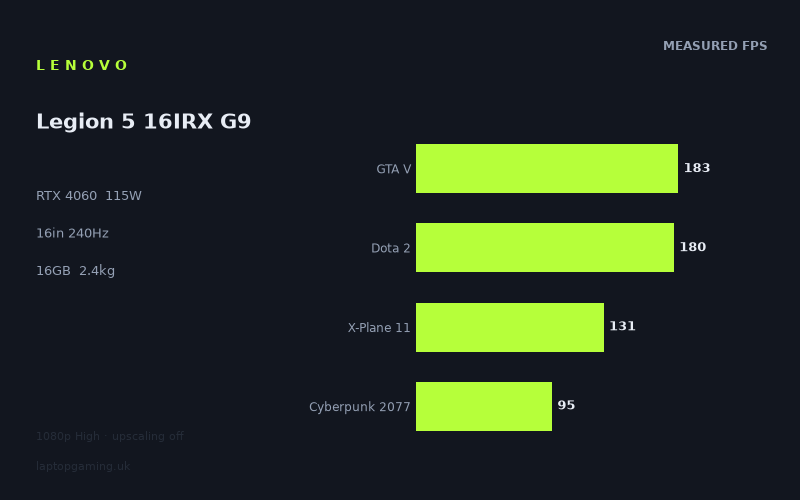
Frame rates
1920×1080, High preset, upscaling off.
Measured on this machine. Source: Notebookcheck, 2024-01-31.
Not scored: incomplete benchmark suite
Every scored laptop on this site is averaged over the same 5 games, and this one is short of Baldur's Gate 3. A mean over 4 games is not comparable to a mean over 5, so we publish the figures we have and leave the score blank rather than rank it against machines tested on a different set. The numbers below are real - the suite is just incomplete.
How these numbers were produced
Frame rates here are not measured by us, and we label how each one was arrived at. A figure marked measured comes from a published run on that exact machine. A figure marked representative is derived from the GPU and its power limit (TGP) and cross-referenced against published reviews - a sound estimate of what that configuration delivers, but not a measurement of that specific laptop. Unless stated otherwise, numbers are 1920x1080, High preset, upscaling off. Where a laptop ships in several power configurations we use the wattage of the exact SKU listed, because a 140W RTX 5070 and a 115W one are not the same product.
In use
The short version
The Lenovo Legion 5 16IRX G9 is a machine that gets the balance right in an unfashionable way. It pairs a mid-range GPU — an RTX 4060 configured at 115W — with a genuinely serious processor in the Core i7-14650HX, and puts both behind a 16in 2560x1600 panel running at 240Hz. The usual criticism of that arrangement is that the GPU is the weak link. The measured figures suggest something more interesting: in a great many games, the GPU is not the thing being measured at all, and the processor Lenovo has chosen does a large amount of the heavy lifting.
The numbers are strong for the tier. Across eleven games in our record this machine runs from 292fps in F1 2021 down to 95fps in Cyberpunk 2077, and that floor is the important figure. Cyberpunk 2077 at 1920x1080 on High with upscaling switched off is one of the hardest workloads in the set, and a result in the mid-nineties there is a genuinely good showing for a 4060 — the kind of number that means you are not going to be negotiating with settings menus in most of what you play.
The caveat is the same one that applies to every high-resolution laptop measured this way, and it needs stating early: all of these figures were recorded at 1920x1080, while the panel is 2560x1600. Those are different amounts of work, and our record does not hold native-resolution results for this machine. The benchmark figures establish capability and allow like-for-like comparison against other laptops; they are not a forecast of what the built-in display will show at its own resolution. On a 4060, that distinction matters more than it does further up the stack, because there is less headroom to absorb the extra pixels.
Buy it if you want a well-balanced all-rounder with an unusually good screen for the class and a processor that will not become the bottleneck in three years. Look elsewhere if you intend to play the heaviest modern games at the panel's native resolution without upscaling, because that is asking a 4060 to do something it is not configured to do. We have no confirmed UK price for this configuration, which limits how far any value judgement can go.
Performance
All the frame rates below were measured by Notebookcheck on 31 January 2024, at 1920x1080, High preset, upscaling off. That last condition should be kept in mind throughout — DLSS is available on this hardware, it is very effective in the heaviest titles, and the benchmark data deliberately excludes it so that machines can be compared consistently. The low end of this list is a floor, not a limit.
What 115W means for a 4060
The GPU power limit is the single most useful specification for predicting how a laptop will behave, and it is the one most buyers never look at. The same GPU can be configured across a wide band of sustained power, and the difference between a conservative and an aggressive implementation is large enough to close or open an entire tier gap. Two laptops advertising a 4060 can be meaningfully different products.
115W is a strong configuration for this part — towards the upper end of what manufacturers ship — and it tells you Lenovo has given the graphics part room to work rather than clamping it to keep the chassis quiet and thin. In practice that shows up in the GPU-limited titles at the bottom of the list rather than the CPU-limited ones at the top, which is exactly where you want it to show up. Cyberpunk 2077 at 95fps and Final Fantasy XV at 106fps are the two results that reflect the power limit most directly, because they are the two where the GPU has the least help.
The equally important half of this machine is the Core i7-14650HX. This is a high-core-count, desktop-derived mobile processor, and putting one behind a mid-range GPU is a deliberate choice that runs against the industry's usual instinct to match tiers. It pays off visibly. GTA V at 183fps, Dota 2 at 180fps and X-Plane 11 at 131fps are processor results far more than graphics results, and they are high — high enough that this machine matches far more expensive hardware in those titles, as the comparison section demonstrates at some length.
The strategic consequence is worth stating plainly: a machine configured this way ages differently. Games become more demanding over time on both the CPU and the GPU, but a GPU can be worked around with upscaling and settings while a processor that runs out of throughput produces stutter you cannot tune away. Starting with more processor than the GPU currently needs is a defensible way to build a mid-range laptop.
The top of the list: three F1 games and a lesson
F1 2021 at 292fps is the highest figure in the set and one of the least useful in isolation, but the presence of three F1 titles in this record makes the group unusually informative. F1 2021 at 292fps, F1 22 at 217fps and F1 23 at 207fps are three iterations of a broadly similar game on an evolving engine, and the descent from one to the next is a neat illustration of how quickly workloads get heavier even within a single franchise. The hardware did not change between those three measurements; the games did.
All three are far beyond the point where frame rate affects the experience, and all three are well past what most displays can show. What they establish is that racing titles, and the broad category of well-optimised games built for wide hardware compatibility, are not remotely a challenge here.
Strange Brigade at 243fps and The Witcher 3 at 229fps belong in the same bracket. Strange Brigade has always been a generous scaler, and The Witcher 3 — in the form our record holds, which is not the same workload as a differently-versioned build of that game — is comfortably overpowered by current hardware. These are ceiling measurements. They tell you about the machine's absolute throughput in light workloads and almost nothing about how it handles anything difficult.
The scoring-suite results, and what they actually measure
Four of the five games we score on are present in our record here: GTA V at 183fps, Dota 2 at 180fps, X-Plane 11 at 131fps and Cyberpunk 2077 at 95fps, averaging 147fps. Read individually rather than as an average, they tell a much more interesting story than the average does.
GTA V and Dota 2 are old, light and — at 1080p on High — limited by the processor and their own engines. Landing at 183fps and 180fps is a strong result but it is a strong CPU result, and a 4060 at 115W has ample capacity to spare in both. X-Plane 11 at 131fps is a different kind of test again: simulators of that generation are bound by draw-call throughput and single-thread performance rather than raw graphics power, which is precisely why it earns a place in a scoring suite. It stops the average being a pure GPU measurement.
Cyberpunk 2077 at 95fps is the only one of the four where the GPU is unambiguously the constraint, and it is therefore the only one that tells you what the 4060 at 115W is worth. It is also, by some distance, the most useful number on this page. A mid-range laptop that runs Cyberpunk 2077 at native 1080p, High, with no upscaling, in the mid-nineties is a machine that will handle the current generation of games without drama.
Note the spread within the suite: from 183fps down to 95fps. That is nearly a two-to-one range across four games that are all supposed to be measuring the same laptop. Any single-figure average across a set that varied is a summary of very different behaviours, which is a large part of why the composition of a comparison matters so much — a point the rivals section returns to repeatedly.
The middle and the floor
Far Cry 5 at 155fps sits between the light titles and the heavy ones — an older open-world game that is not trivial to run but is not built for current-generation hardware budgets either. Final Fantasy XV at 106fps is heavier on the GPU than its age suggests, thanks to an effects-dense engine, and it lands just above three figures.
Cyberpunk 2077 at 95fps is the floor, and it is a high floor. Eleven measured titles and the worst result is in the mid-nineties: that is a distribution most mid-range laptops do not produce, and it is worth appreciating in context. Machines a tier below routinely land in the fifties in their hardest measured title. Nothing in our record for this machine drops anywhere near that.
What is missing from the picture is a genuinely brutal recent release — something with heavy ray tracing, or one of the recent releases that punished mid-range hardware. Cyberpunk 2077 on High without ray tracing is demanding but it is not the worst case, and it would be wrong to read a 95fps floor as meaning nothing can trouble this machine. It means nothing in this eleven-game set troubles it.
Why there is no ranking for this machine
Every laptop we score is averaged across the same five games so that the comparison is like for like. Here we hold four of them and are missing Baldur's Gate 3.
That is much closer to complete than most incomplete records — four of five, including the important heavy title — but it is still not the same measurement, and averaging four games against machines averaged over five would compare two different things while presenting a single number as though it were one. So there is no rank printed here. The 147fps four-game average above should be treated as a description of those four specific titles, not as a score in disguise.
It is worth saying that this is a machine that would probably benefit from the missing figure rather than suffer from it, since Baldur's Gate 3 is more processor-sensitive than most modern releases and the processor here is the strongest part of the specification. But that is a prediction, not a measurement, and we are not going to write it into a ranking.
The screen
16in, 2560x1600, 240Hz, IPS. This is the best specification on the machine and it is the part most likely to look like a mismatch with the GPU. Both of those things are true at once.
Resolution: the benchmark caveat, restated properly
Every figure in this review was measured at 1920x1080. The panel is 2560x1600, which is a considerably larger number of pixels to draw, and our record contains no native-resolution measurements for this machine.
We are not going to estimate what native figures would be, because a scaling guess presented alongside real measurements is exactly the sort of thing that makes benchmark data untrustworthy. What can be said with confidence is the mechanism. The titles at the top of the list — the F1 games, Strange Brigade, The Witcher 3, GTA V, Dota 2 — are limited by the processor, so raising the pixel count costs them relatively little until the GPU becomes the constraint. The titles at the bottom — Cyberpunk 2077 and Final Fantasy XV — are limited by the GPU already, and they will lose the most.
Cyberpunk 2077 at 95fps is the figure to watch, because it is the one with the least margin and the one whose bottleneck is unambiguous. If native-resolution performance in the heaviest games matters to you and you are unwilling to use upscaling, that is the specific number to interrogate further, and our record cannot answer it.
Is a 4060 enough for this panel?
For the majority of the measured library, comfortably. Nine of the eleven titles here are at 131fps or better at 1080p, which is a substantial amount of headroom to spend on extra pixels. Racing games, older titles, competitive games and anything from the enormous back catalogue will run at high frame rates at native resolution.
For the heaviest current games, this is where upscaling stops being optional. That is not a criticism unique to this machine — it is the standard operating condition of mid-range gaming hardware paired with high-resolution displays, and DLSS at a sensible quality setting is a genuinely good solution rather than a workaround. But you should buy this machine understanding that the panel is ahead of the GPU in the hardest titles, and that Lenovo has priced the screen into the machine on the assumption you will use the software features that close the gap.
The alternative reading is more positive: a high-resolution panel is a long-lived component and a GPU is not. The screen will still be excellent in five years. Buying a machine whose display outclasses its graphics card is a defensible way to spend money, particularly if you also expect to plug it into an external display for serious gaming.
240Hz, and whether it means anything here
240Hz is a high refresh rate and it is fair to ask what it is doing on a 4060 machine. The measured figures answer that better than any argument could: five of the eleven titles — F1 2021 at 292fps, Strange Brigade at 243fps — reach or approach it at 1080p, with F1 2021 exceeding it outright and Strange Brigade sitting essentially at it. So the panel is not decorative. In light and competitive titles this machine genuinely produces frames at that rate, and a display that can show them is the difference between the hardware's output being used and being discarded.
In the middle and bottom of the list the panel is far ahead of the hardware, which is the correct arrangement. A display should not be the bottleneck. And high refresh has benefits that have nothing to do with reaching the number: smoother cursor movement, better handling of frame rates that vary, and — with variable refresh — a wider window in which frame-time variation is absorbed rather than displayed as a stutter.
Panel type
IPS. The sensible mainstream choice: consistent viewing angles, no exposure to the burn-in questions that follow OLED panels asked to display static interface elements for hundreds of hours, and no unusual caveats. What you lose against OLED is contrast — black will read as dark grey in a dark room, and high-dynamic-range material will not have the same impact.
Our record does not include brightness, contrast ratio, colour gamut or response-time figures for this panel, so we are not going to characterise its quality. IPS spans a very wide range in practice and the label does not tell you where this one falls.
Build, size and portability
2.425kg for a 16in machine, with an 80Wh battery.
The weight in context
2.425kg is ordinary for a 16in gaming laptop — neither notably heavy nor light. It is the weight at which a machine is genuinely transportable but never invisible: fine to move between home and an office, fine to take away for a week, tiring as a daily carry alongside everything else in a bag.
The power supply matters as much as the laptop. A 115W GPU alongside a Core i7-14650HX needs a substantial adapter, and it travels with the machine because gaming performance on battery is not realistic here or anywhere else in the category. The practical total is meaningfully more than the headline figure suggests.
Set against that, the 16in 16:10 panel is a real day-to-day benefit. The extra vertical space compared with a 16:9 display of similar width is genuinely useful for anything involving documents, code or timelines, and it is one of the reasons this size and aspect ratio took over the class. If you are choosing between a 15in and a 16in machine and the weight difference is modest, the screen is usually worth it.
What the size and weight buy
Cooling. A 4060 at 115W and a high-core-count HX processor generate real heat, and sustaining the frame rates in our record requires a thermal solution with somewhere to put it. Thinner and lighter machines with the same GPU name almost invariably carry lower power limits, and the frame rates follow the power. The mass here is doing work, not sitting there as a design failure.
Battery
80Wh is a large cell. Our record does not include measured battery life and we will not estimate one, because runtime depends on the display, the platform's power management and the workload far more than on capacity. A 240Hz 2560x1600 panel and an HX-class processor are not power-frugal components, and a large battery in front of them does not automatically produce long runtimes.
The structural point holds as it does for every machine in this class: no laptop runs a 115W GPU from its battery, performance drops substantially when unplugged, and the cell exists to make non-gaming work away from a socket possible. Plan accordingly.
What our record does not cover
No surface temperatures, no fan noise, no keyboard assessment, no port list, no build-quality observation. Lenovo's Legion range has a reputation in these areas but a reputation is not a measurement, and we do not hold the data. If acoustics under load matter to you — and on a 115W configuration in a 2.425kg chassis they reasonably might — that is worth establishing from a source that has measured it.
How it compares
Each comparison below uses only the games both machines hold in our record, preferring the scoring suite. This is the honest method, and it carries a systematic consequence that dominates this particular section: the titles laptops most commonly share are GTA V, Dota 2 and X-Plane 11, all of which are limited at 1080p by the processor rather than the graphics part. A comparison drawn from those games will compress real GPU differences, sometimes to nothing.
This machine makes an unusually good case study, because it has an exceptionally strong processor behind a mid-range GPU. That combination is precisely the one that performs at its best in CPU-limited comparisons and its worst in GPU-limited ones — and the four results below spread across both.
MSI Thin GF63 (RTX 4050) — this machine averages 68fps ahead across four shared games
The widest win in the set, and the least contentious. A 4050 in a thin, inexpensive chassis against a 4060 at 115W behind a Core i7-14650HX is a mismatch on both halves of the specification, and a four-game overlap is broad enough to include at least one title where the GPU actually matters.
68fps is a decisive margin, and the four-game basis makes it more trustworthy than the three-game comparisons that follow. This is what a genuine hardware gap looks like when the measurement can see it. We hold no confirmed UK price for the GF63, so we cannot say whether it is cheap enough to make the trade worthwhile for someone on a tight budget — but nobody should be choosing between these two on performance grounds.
MSI Titan 18 HX (RTX 4090) — level on average across four shared games
This is the result that demands explanation, and it should not be reported without one. A 4060 machine and an RTX 4090 machine, four shared games, and no average difference between them.
Nobody should read that as "this laptop is as fast as a 4090 laptop", and we are not going to let the number sit there implying it. Here is what is actually happening.
First, the shared set is drawn preferentially from the scoring suite, and three of the four suite games — GTA V, Dota 2 and X-Plane 11 — are limited at 1080p by the processor and by ageing game engines, not by the graphics part. In those three titles, a 4090 has nothing to do with the extra capacity it holds. The Core i7-14650HX in this machine is a fast processor, and it produces results in that category that a far more expensive machine cannot beat, because there is nothing left to beat them with.
Second, an average across four games conceals the distribution within them. A large deficit in one genuinely GPU-bound title can be offset by advantages in three CPU-bound ones and still produce an average of zero. Our record gives us the average, not the per-game breakdown for the rival, so we cannot show you that spread — but the arithmetic permits it, and the physics of the hardware makes it the most likely explanation.
Third, and most decisively, the internal evidence contradicts the naive reading. There are three RTX 4090 machines in this comparison set. Against one of them this machine is level, against another it is a single frame per second behind, and against the third it is 34fps behind. If a 4060 at 115W were genuinely equivalent to 4090 hardware, that third result could not exist. The variation between the three tells you that what differs is the composition of each shared set, not the capability of the graphics hardware.
What the comparison legitimately establishes is narrower and still worth knowing: in the specific category of older, lighter, processor-limited games, this machine gives up nothing at all to hardware costing several times as much. If that is the bulk of your library, that is a genuinely useful and money-saving finding.
Asus Zephyrus Duo 16 (RTX 4090 at 175W) — this machine averages one frame per second behind across three shared games
The same phenomenon in a narrower comparison, and against a 4090 that our record shows running at 175W — an aggressive configuration, so this is not a case of a flagship GPU being throttled into mediocrity.
Across three shared games the difference is about one frame per second, which is inside the range where nothing is being measured. Three shared games is the smallest and least reliable basis in this section, and it will be the CPU-limited trio. The result says that both machines have processors fast enough to saturate those three titles at 1080p, and it says nothing whatsoever about what happens when a game asks the GPU for everything it has.
The Zephyrus Duo 16 is a very different machine in every other respect and we hold no confirmed UK price for it. Treating it as interchangeable with this one on the strength of three CPU-bound games would be a serious misreading.
Asus ROG Strix Scar 17 (RTX 4090) — this machine averages 34fps behind across three shared games
The machine that beats this one by the widest margin, and the comparison that rescues the whole section from ambiguity.
Three shared games — the same narrow, CPU-heavy basis that produced no measurable difference against the Titan 18 HX and one frame against the Zephyrus Duo 16 — and here it produces a 34fps margin. That is not a rounding error and it is not noise. It is a clear, substantial gap found by exactly the method that reported nothing twice.
This is the evidence that the benchmark can separate machines. When it reports a near-zero difference, that is a real result about those specific titles rather than a failure of resolution. When there is a gap large enough to survive the compression, it shows up plainly. Any reader tempted by the Titan 18 HX comparison to conclude that GPU tiers do not matter should read this one immediately afterwards.
We hold no confirmed UK price for the Strix Scar 17 and no GPU power limit for it, so we are not going to characterise its configuration or its value — only its measured position relative to this machine.
Reading the four together
68fps ahead of a 4050 machine across four games. Level with a 4090 machine across four. One frame behind another 4090 across three. 34fps behind a third 4090 across three. Laid out like that, the pattern is not confusing at all — it is a map of what different shared sets can and cannot detect.
The practical conclusion for a buyer is specific and useful. In light and older games, this machine performs at a level that expensive hardware cannot improve on, because the processor is what sets those results and this machine's processor is excellent. In genuinely GPU-limited games, it is a 4060 and it performs like one — good for the tier, and a long way below flagship hardware. Which of those two categories describes your library is the question that should decide your purchase, and it is a question about you rather than about the laptop.
Who it's for
Buy it if
You want the processor to last. This is the strongest argument for this specific configuration. A Core i7-14650HX behind a 4060 is more processor than the GPU currently requires, and the comparison results show what that is worth: parity with much more expensive machines in every CPU-limited title measured. GPU shortfalls can be managed with upscaling and settings; processor shortfalls produce stutter that cannot be tuned away.
Your library leans towards competitive, older or well-optimised games. Nine of eleven measured titles at 131fps or better, with a 240Hz panel able to display a good portion of that, is a strong package for that kind of player.
You want a good screen and are willing to use upscaling. The 2560x1600 240Hz panel is a better display than this class of machine usually carries. Pairing it with DLSS in heavy titles is a sensible, modern way to run a mid-range laptop, and it is clearly what the configuration anticipates.
You want one machine for games and work. The 16:10 aspect ratio, the high-resolution panel and the strong processor make this credible for development, content work and heavy multitasking in a way that a cheaper machine with a weaker CPU is not.
Buy something else if
You want native-resolution performance in the heaviest games without upscaling. Cyberpunk 2077 at 95fps is a 1080p figure, and the panel has substantially more pixels than that. A 4060 at 115W is a good implementation of a mid-range part, not a substitute for a bigger one, and the Strix Scar 17 comparison quantifies what the gap looks like even in a measurement that compresses it.
You need genuine portability. 2.425kg plus a substantial adapter is a machine you carry deliberately. A 14in laptop with a lower power limit will be far more pleasant in a bag and considerably slower in GPU-limited work — that is the trade, and for some people it is the right one.
You are shopping purely by GPU tier. This machine is an argument against that habit in both directions. It beats a 4050 machine by 68fps and matches 4090 machines in the games those machines cannot show their advantage in. The tier on the box predicts far less than the power limit, the processor and the games you actually play.
You need to know whether it is good value. We have no confirmed UK price, and none of the four comparison machines has one either. The specification is coherent and the measured results are strong for the class, but a value judgement without a price is not a judgement.
What we do not know
To be explicit about the limits here: no confirmed UK price for this machine or any of its listed rivals; no Baldur's Gate 3 figure, so no complete scoring set and no ranking against the rest of our database; no native-resolution measurements at the panel's own 2560x1600; no measured battery life; no thermal, acoustic, keyboard or port data; and no panel measurements beyond resolution, refresh and type. Everything above is derived from the specification in our record and from Notebookcheck's measurements of 31 January 2024 at 1920x1080 on High with upscaling off.
Within those limits this is a coherent and rather well-judged machine. Lenovo has spent money on the processor and the display rather than on the GPU tier, given the GPU it did choose a strong power configuration, and produced a laptop whose worst measured result is still in the mid-nineties. The main thing to understand before buying is that its performance profile is uneven by design: outstanding where processors decide the outcome, solidly mid-range where the graphics part does.