Review
Schenker Vision 14 review
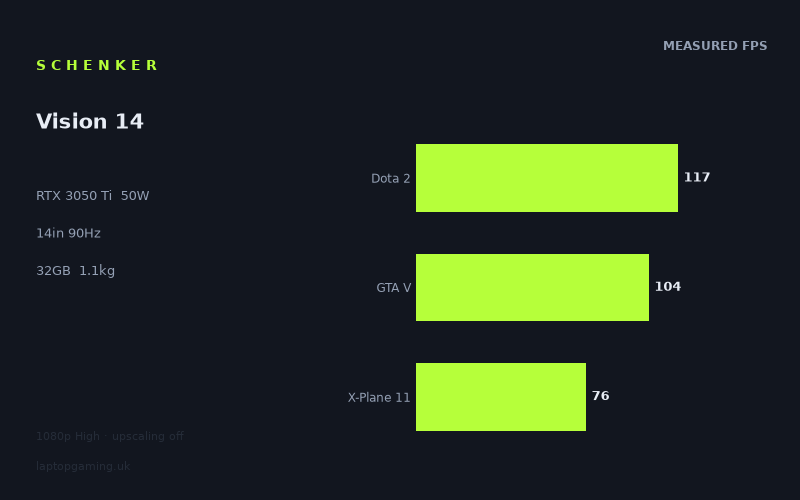
Frame rates
1920×1080, High preset, upscaling off.
Measured on this machine. Source: Notebookcheck, 2022-01-28.
Not scored: incomplete benchmark suite
Every scored laptop on this site is averaged over the same 5 games, and this one is short of Cyberpunk 2077, Baldur's Gate 3. A mean over 5 games is not comparable to a mean over 5, so we publish the figures we have and leave the score blank rather than rank it against machines tested on a different set. The numbers below are real - the suite is just incomplete.
How these numbers were produced
Frame rates here are not measured by us, and we label how each one was arrived at. A figure marked measured comes from a published run on that exact machine. A figure marked representative is derived from the GPU and its power limit (TGP) and cross-referenced against published reviews - a sound estimate of what that configuration delivers, but not a measurement of that specific laptop. Unless stated otherwise, numbers are 1920x1080, High preset, upscaling off. Where a laptop ships in several power configurations we use the wattage of the exact SKU listed, because a 140W RTX 5070 and a 115W one are not the same product.
In use
The short version
The Schenker Vision 14 is a very light 14in laptop with a surprisingly capable gaming result for a machine carrying an RTX 3050 Ti limited to 50W. Notebookcheck’s benchmark data shows that it is not a laptop for chasing maximum settings at its native 2880x1800 resolution, nor is it a substitute for a larger high-power gaming machine. It is, however, capable of delivering genuinely usable 1080p High-preset performance in a broad set of games while weighing only 1.127kg.
That distinction matters. The Vision 14’s RTX 3050 Ti is not operating in the sort of chassis normally associated with gaming laptops, and its 50W GPU power limit is much lower than the limits seen on performance-led models using the same graphics chip. The usual expectation would be a compromise-heavy gaming experience. Instead, the measured figures include 117fps in Dota 2, 104fps in GTA V, 97fps in F1 2021 and 89fps in Strange Brigade. Those are strong results for a machine this light, and they show that the Vision 14 can make sensible use of its 90Hz display in the games that are not especially GPU-heavy.
The limitations are equally clear. The notebook’s screen has a 2880x1800 resolution, but the available game figures are measured at 1920x1080 with the High preset and upscaling disabled. There is no native-resolution benchmark data here, so it would be wrong to assume that these results translate directly to the panel’s full resolution. They will not. Running more pixels generally places more work on the GPU, and a 50W RTX 3050 Ti is already the central performance constraint in the more demanding games in this set. Final Fantasy XV reaches 41fps, while Far Cry 5 reaches 64fps and The Witcher 3 reaches 73fps. These are usable results at the measured settings, but they do not suggest a machine built to run every game at high refresh rates.
The best way to understand the Vision 14 is as a portable premium laptop that can game well when it is asked to do so sensibly. Its Core i7-11370H, 32GB of memory and 1TB SSD are a substantial specification for a compact machine. The screen is unusually sharp for a 14in laptop, the 90Hz refresh rate is meaningfully higher than a conventional 60Hz panel, and the weight makes it far easier to carry than a typical dedicated gaming laptop. But the GPU power limit defines the gaming proposition: this is a laptop for 1080p-class settings, selective compromises and games that suit its hardware, not a system that makes the native screen resolution the default target.
There is no overall value judgement because the UK price for this exact configuration is not confirmed. The benchmark suite is complete and the Vision 14 ranks normally on frame-rate performance, but value cannot be calculated without a confirmed price.
Buy it if the combination of low weight, a high-resolution 14in IPS display, 32GB of memory and credible 1080p gaming performance is more important to you than playing every demanding game at the panel’s native resolution. It makes particular sense for someone whose work or study laptop also needs to handle Dota 2, GTA V, F1 2021, Strange Brigade and similarly scaled games well. It makes less sense for someone buying principally for the newest and most demanding games, for competitive players who want consistently high frame rates across all titles, or for anyone who expects a 2880x1800 panel to mean 2880x1800 gaming without substantial setting changes.
Performance
Notebookcheck measured the Schenker Vision 14 at 1920x1080, using the High preset with upscaling disabled. That test condition is important. It gives a clean view of what the Core i7-11370H and 50W RTX 3050 Ti can do without assistance from image reconstruction technologies, but it does not represent native-resolution gaming on the laptop’s 2880x1800 display.
Across the five scoring-suite games, the Vision 14 records a mean of 85fps. That is a useful broad result, but it should not be mistaken for a promise that every game will run near the display’s 90Hz refresh rate. The individual results range from 117fps in Dota 2 to 41fps in Final Fantasy XV. The spread is large, and it is the spread rather than the average that should guide a buying decision.
The games that suit the Vision 14 best
Dota 2 is the standout result at 117fps. That is comfortably beyond the screen’s 90Hz refresh rate at the measured 1920x1080 High setting. For a player focused on this sort of lighter, competitive or CPU-sensitive game, the Vision 14’s combination of a 90Hz screen and a measured result above that refresh rate is encouraging. It suggests that the laptop has enough performance headroom for the panel to feel responsive rather than merely decorative.
GTA V also performs strongly, at 104fps. Again, that is above the display refresh rate in the benchmark data. It is important not to turn that result into a general claim about all open-world games: GTA V is one game, under one preset, at one resolution. But it does show that the Vision 14 is not confined to low-demand esports titles. At the measured settings, it can run a well-known open-world game quickly enough to make proper use of a 90Hz display.
F1 2021 follows at 97fps. That is another result above 90Hz, and it is perhaps the clearest example of the Vision 14 delivering the sort of performance a buyer might reasonably expect from a compact laptop advertised with a faster-than-standard screen. Racing games benefit from fluid motion, and 97fps at the measured 1080p High setting puts F1 2021 in the group where the display’s refresh rate is an asset rather than an unreachable ceiling.
These results should not be dismissed simply because the Vision 14 uses an RTX 3050 Ti rather than a more recent or higher-tier GPU. The point of a laptop such as this is not to match a large gaming chassis. It is to provide credible performance in a machine that weighs 1.127kg. On that basis, Dota 2, GTA V and F1 2021 are the evidence that the hardware configuration works. The machine is capable of high-refresh gaming in the titles that suit its graphics budget.
Games that fall below the panel refresh rate
Strange Brigade reaches 89fps. That is effectively at the 90Hz panel’s refresh rate, but it is still just below it in the measured result. This is a useful reminder that a refresh-rate target is not an on-or-off threshold. A result around this level should still look considerably smoother than a 60fps result, but it does not provide the clear margin shown in Dota 2, GTA V or F1 2021. Any increase in settings, resolution or game complexity could move the result further away from the display limit.
X-Plane 11 records 76fps. That remains a respectable result for a light 14in machine, and it is above the conventional 60fps mark many buyers would regard as a good outcome. It does not, however, fully exploit the 90Hz screen. Flight simulation is also a useful example of why an average can conceal important differences between games. The Vision 14’s 85fps scoring-suite mean sounds close to the display refresh rate, but X-Plane 11 shows that some titles will sit noticeably below that figure.
The Witcher 3 reaches 73fps. That is a usable result at 1920x1080 on High settings, but it is clearly not a high-refresh result in the same way as Dota 2 or GTA V. A buyer playing this type of graphically richer third-person game should expect to choose between image quality, resolution and frame rate rather than receiving all three at once. The benchmark data suggests that the Vision 14 can run it well enough to be enjoyable at the tested setting, but not that it can drive the 90Hz screen flat out.
Far Cry 5 is measured at 64fps. This is still close to the level many people consider a comfortable target for single-player gaming, yet it is also a substantial step below the panel refresh rate. It demonstrates the basic character of the Vision 14’s GPU: the RTX 3050 Ti is not weak in absolute terms, but at 50W it does not have the reserve needed to turn every High-preset game into a 90fps experience.
Final Fantasy XV is the lowest result in the available figures, at 41fps. That result is the clearest warning against treating the Vision 14 as a no-compromise gaming machine. The game remains playable in the ordinary sense that it is running well above a slideshow, but 41fps is far from the panel’s 90Hz capability and leaves limited margin for further increases in resolution or visual settings. Anyone whose preferred games are similarly demanding should expect to reduce settings, accept lower frame rates, or look for a laptop with a substantially more powerful GPU.
What the 50W GPU power limit means
The RTX 3050 Ti name on its own does not tell the whole story. Laptop GPUs are configured with different power limits, and those limits affect sustained performance. This Vision 14 uses a 50W RTX 3050 Ti. That is a defining part of the specification, not a footnote. It helps explain why the laptop can exist at 1.127kg, but it also means the GPU is working within a much tighter power envelope than the same named graphics processor can have in a larger chassis.
In practical terms, the 50W limit means the Vision 14’s gaming performance is best judged by the settings under which the measurements were taken: 1920x1080, High preset, upscaling off. That is a demanding but sensible test point for this class of machine. The results show that the laptop can be quick in games that are lighter on the GPU, while graphically heavier titles begin to expose the finite performance available.
The frame-rate distribution makes more sense when viewed through that lens. Dota 2 at 117fps, GTA V at 104fps and F1 2021 at 97fps demonstrate that the system can run fast when the game does not demand too much from the graphics hardware at the measured setting. Strange Brigade at 89fps, X-Plane 11 at 76fps and The Witcher 3 at 73fps show a gradual move away from the panel’s refresh limit. Far Cry 5 at 64fps and Final Fantasy XV at 41fps show where the machine begins to look more like a conventional 60fps-or-lower portable gaming system.
That variation is normal. Games have different engines, different rendering workloads, different CPU demands and different sensitivity to available graphics power. It is not useful to describe the Vision 14 as simply an “85fps laptop” because that mean is built from results that behave very differently in practice. Someone playing Dota 2 could see a laptop that frequently exceeds the panel refresh rate. Someone playing Final Fantasy XV sees a laptop that is clearly limited before the panel’s 90Hz capability becomes relevant.
The Core i7-11370H matters here too. In titles where the GPU is not the sole bottleneck, processor behaviour can shape the result. The supplied comparison data specifically notes that at 1080p the lighter titles in the shared game sets can be CPU-bound, compressing genuine GPU differences. That is important when comparing the Vision 14 with rivals, but it is also relevant within the Vision 14’s own results. A high frame rate in a lighter game does not mean the RTX 3050 Ti has enough GPU headroom to repeat that result in every more graphically intensive title.
There is no upscaling in the benchmark setup. This makes the figures straightforward to interpret, because they show native rendering at the tested 1920x1080 resolution rather than a result aided by an upscaling mode. It also means the data does not tell us what frame-rate improvements may or may not be available through an upscaling setting in a supported game. Buyers should not assume such a mode is available, assume it would look equally good in every title, or assume it would solve the native-resolution challenge of the 2880x1800 screen.
How to use these figures when choosing settings
The benchmark data supports a clear practical approach. For games resembling Dota 2, GTA V and F1 2021 in demand, 1920x1080 High settings are a sensible starting point. The results are at or beyond 90fps, so the screen’s refresh rate is relevant and the laptop’s gaming performance should feel suitably fluid.
For Strange Brigade, X-Plane 11 and The Witcher 3, the measured results suggest that 1920x1080 High remains a reasonable baseline, but buyers should not expect a locked 90fps experience. These are the kinds of games where a player’s priorities matter. Someone who values visual settings may be happy with the observed performance. Someone who values the highest possible frame rate may choose to lower graphical settings, but the available data does not quantify the gain from doing so.
Far Cry 5 and Final Fantasy XV are where expectations need to be most disciplined. At 64fps and 41fps respectively, they demonstrate that the Vision 14’s GPU power limit has real consequences. The measured settings remain perfectly defensible for playing, especially in single-player games where absolute frame rate is not the only concern, but neither result supports an expectation of high-refresh gaming. A buyer wanting 90fps-class performance in every game should choose different hardware rather than assuming that minor tweaks will close every gap.
The Vision 14 therefore has a credible but specific gaming identity. It is not a machine whose results are uniformly limited to low frame rates, and it is not one whose results are uniformly high enough to exploit the 90Hz display. It is strongest when the game, resolution and settings are chosen with the 50W RTX 3050 Ti in mind.
The screen
The Vision 14 has a 14in IPS display with a 2880x1800 resolution and a 90Hz refresh rate. On paper, that is a strong screen specification for a compact laptop. The high resolution should make the panel attractive for general desktop use, text-heavy work and applications where a sharp image matters. The 90Hz refresh rate is also a welcome step above a standard 60Hz display, particularly in the games where the measured frame rate can approach or exceed it.
For gaming, though, the screen presents both an advantage and a constraint. The advantage is obvious: 90Hz gives the Vision 14 a higher ceiling than a conventional 60Hz panel. Notebookcheck’s figures show that Dota 2 at 117fps, GTA V at 104fps and F1 2021 at 97fps can exceed that ceiling at 1920x1080 High settings. Strange Brigade, at 89fps, comes very close. In those titles, the screen specification is well matched to the machine’s capability.
The constraint is the 2880x1800 native resolution. The published game results are not measured at that resolution. They are measured at 1920x1080. That distinction is central to the review. It would be misleading to describe the Vision 14 as a laptop that delivers 117fps, 104fps or 97fps at its native screen resolution, because there is no such data in the fact sheet. The available numbers establish 1080p-class High-preset performance only.
That means buyers should think of the native resolution as a display feature rather than an automatic gaming target. The RTX 3050 Ti at 50W already produces a wide range of frame rates at the measured 1920x1080 setting. The more demanding games in the list, especially Final Fantasy XV at 41fps, provide no basis for expecting native-resolution High gaming to be comfortable. The sensible expectation is that games will often need to be run below the panel’s native resolution, with settings adjusted according to the title and the player’s priorities.
This is not unusual for thin, light laptops with high-resolution displays. A screen can be excellent for everyday use while still being more demanding than the installed GPU can exploit at native resolution in modern games. What matters is whether the compromise is acceptable. For someone who wants one portable machine for work, media and occasional gaming, a sharp 2880x1800 IPS screen with a 90Hz refresh rate may be more appealing than a lower-resolution gaming-focused panel. For someone buying mainly to play demanding games, however, a high-resolution display that the GPU cannot confidently drive at native resolution can be an awkward pairing.
The IPS panel type is worth noting without making claims the available information cannot support. IPS tells us the display technology, but the fact sheet provides no measurements for brightness, contrast, colour coverage, response time or outdoor visibility. Those are all relevant to screen quality, but they are not available here, so there is no basis for declaring the Vision 14’s panel excellent, poor, colour-accurate or particularly fast beyond its stated 90Hz refresh rate.
Likewise, 90Hz should not be confused with a guarantee of 90fps. A display refresh rate is a capability of the panel; game frame rate depends on the hardware, the game, the resolution and the settings. The Vision 14 provides examples on both sides of that divide. Dota 2, GTA V and F1 2021 are fast enough in the published 1080p data to make full use of the panel. Final Fantasy XV is not. Far Cry 5, The Witcher 3 and X-Plane 11 land between those extremes.
The best screen-related reason to choose the Vision 14 is therefore not “native-resolution gaming”. It is the combination of a compact 14in format, high pixel count and smoother-than-standard refresh rate, with the understanding that gaming should be approached at the measured 1920x1080 class rather than assumed to happen at 2880x1800. That is an entirely reasonable compromise for the right buyer, but it should be a deliberate one.
Build, size and portability
The most concrete portability figure available for the Schenker Vision 14 is its 1.127kg weight. That is exceptionally low for a laptop carrying a Core i7-11370H, 32GB of memory, a 1TB SSD, a 14in 2880x1800 IPS display and dedicated RTX 3050 Ti graphics. It changes the kind of machine this is.
A laptop at this weight is not being positioned like a large desktop replacement. The Vision 14 is clearly intended to be carried regularly, used away from a fixed desk and treated as a general-purpose portable computer rather than a gaming system that happens to have a battery. The presence of dedicated graphics makes that portability more interesting: the buyer is not choosing between light weight and any gaming capability at all. They are choosing a light-weight machine that can still produce 117fps in Dota 2, 104fps in GTA V and 97fps in F1 2021 at the published test settings.
The 50W GPU power limit also fits this portable identity. A higher-power GPU configuration would ordinarily demand a different balance between performance, power delivery and cooling capacity. The Vision 14’s results show the trade-off directly. It is light enough to be unusually easy to carry for a machine with dedicated graphics, but it cannot be expected to behave like a 175W RTX 3080 Ti laptop or even like every RTX 3050 Ti laptop. The chassis purpose and the power limit are linked.
No physical dimensions are provided in the fact sheet, so there is no basis for claims about its footprint, thickness, bag fit or desk space. The 14in screen size strongly indicates a compact class of laptop, but screen size is not a substitute for published dimensions. Similarly, there are no published details here about materials, keyboard layout, trackpad, ports, webcam, speakers, cooling design or upgrade access. Those omissions do not indicate a problem with the laptop; they simply mean those aspects cannot be assessed from the supplied specification and benchmark data.
The battery is rated at 53Wh. Capacity alone is not a battery-life result. There are no measured runtime figures in the available information, so it would be irresponsible to promise a day of work, a particular number of hours of video playback, or any specific gaming endurance away from mains power. Dedicated GPU laptops can behave very differently depending on workload, screen settings and power modes. The only defensible conclusion from the supplied information is that the Vision 14 has a 53Wh battery, not that it achieves a particular battery life.
The 32GB memory allocation is notable in the context of a small portable machine. It gives the Vision 14 a specification that looks suitable for demanding multitasking and memory-heavy professional workloads, although the available data does not include productivity benchmarks. It also removes one potential concern for gaming alongside other tasks: there is a generous amount of installed memory. The 1TB SSD similarly provides a substantial starting storage capacity, though there is no supplied information about drive speed, additional storage options or serviceability.
What can be said confidently is that the Vision 14 is much more than a bare-bones lightweight. It combines 1.127kg weight with high-resolution display hardware, 32GB of memory, 1TB of SSD storage and dedicated graphics. That is a persuasive specification for someone who needs their machine to travel often and does not want gaming to be completely off the table.
What cannot be said is that it has the same physical robustness, thermal behaviour, noise profile or connectivity as a conventional gaming laptop. There are no temperature or noise measurements in the fact sheet, and no chassis description beyond the stated weight and screen size. Buyers for whom fan noise, port selection or upgradeability are decisive should seek verified information on those areas rather than infer it from the frame-rate results.
How it compares
The comparison data is useful because it avoids the common mistake of treating GPU names as complete performance descriptions. The Vision 14 uses an RTX 3050 Ti at 50W, but its rivals show that similar names, different power limits and different laptop designs can produce results that do not follow a simple hierarchy.
These comparisons are based only on games held in common, with preference given to the scoring suite. That is the correct method because it avoids comparing one machine’s strength in a particular title with another machine’s result in a different title. It also means that the comparison averages should be treated as shared-game indicators, not replacements for the Vision 14’s full benchmark spread.
Against the MSI Prestige 15
The MSI Prestige 15 is fitted with an RTX 3050 Ti at 105W. On paper, that much higher GPU power limit might lead a buyer to assume that it must be materially faster than the Vision 14. Yet the supplied shared-game comparison says the Schenker Vision 14 averages 31fps ahead across the shared results.
That is a striking outcome, and it is a useful warning against buying based only on the GPU label or TGP figure. The Vision 14’s 50W RTX 3050 Ti is far from a high-power implementation, but the shared benchmark outcome is still decisively in its favour against this particular Prestige 15 configuration. The available data establishes the result; it does not provide enough information to isolate every reason behind it. There are no like-for-like details here on processor behaviour, memory configuration, cooling profiles, firmware settings or the precise game-by-game breakdown beyond the shared average.
The sensible conclusion is not that a 50W RTX 3050 Ti is generally faster than a 105W RTX 3050 Ti. That would go beyond the evidence. The sensible conclusion is narrower and more useful: against this MSI Prestige 15 in the shared games, the Vision 14 is ahead by 31fps on average. Anyone considering those two specific machines should take that real result seriously rather than assuming the TGP number settles the comparison by itself.
Against the Lenovo Slim Pro 7
The Lenovo Slim Pro 7 uses an RTX 3050 at 58W. Across the shared games, the Vision 14 averages exactly the same frame rate. A near-zero difference is not a meaningless result or missing information. It says that, in this particular shared-game set, these machines are effectively tied.
That may appear surprising given that the Schenker has an RTX 3050 Ti while the Lenovo uses an RTX 3050, and given their different stated power limits. But the supplied comparison notes why such ties can happen. At 1080p, lighter titles in the shared set can be CPU-bound. When the processor or game engine is limiting performance rather than the GPU, genuine graphics-hardware differences are compressed. Two laptops that might separate more clearly in a heavier GPU-limited workload can look very similar in lighter games at this resolution.
This is exactly why a buyer should not overinterpret a zero-frame shared average as proof that the graphics chips are interchangeable in every game. It is evidence that the machines deliver the same result in the selected common titles and conditions. It does not tell us that they will remain tied in every untested game, at the Vision 14’s native 2880x1800 resolution, or under every graphics preset.
For a buyer choosing only on these published gaming figures, there is no performance advantage for the Vision 14 over the Slim Pro 7 in their shared games. Other factors would need to decide the purchase, but the supplied information does not provide a full comparison of screen characteristics, size, weight, battery runtime or price. The frame-rate data alone says tie, not victory.
Against the Asus Zenbook Pro 15 OLED
The Asus Zenbook Pro 15 OLED also uses an RTX 3050 Ti. In the five shared games, the Vision 14 trails it by 7fps on average. That is a modest deficit rather than a collapse in performance. It places the Schenker slightly behind this Asus in the available shared gaming evidence, but close enough that the difference should be understood in context.
A 7fps average gap can matter differently depending on where the games sit. Near a display refresh target, even a small difference may affect whether a system regularly reaches the panel limit. In a title already far below the target, it may not transform the experience. The fact sheet does not provide the individual shared-game results for this pairing, so there is no defensible way to say which games account for the difference or whether it is concentrated in one demanding title.
What is clear is that the Vision 14 is competitive with another RTX 3050 Ti laptop, even though it operates at 50W and weighs 1.127kg. It does not win this comparison, but it is not being left behind by an enormous margin either. For someone prioritising portability, the ability to stay within 7fps on average of this specific rival across the shared set is a respectable showing. For someone prioritising every available gaming frame rate, the Asus has the edge in the supplied data.
Against the MSI Raider GE77 HX
The MSI Raider GE77 HX is in a completely different performance class. It uses an RTX 3080 Ti at 175W, and the Vision 14 averages 84fps behind it across the five shared games. That is the largest deficit in the listed comparison set, and it is exactly what a buyer should expect when comparing a 1.127kg 14in portable machine with a much higher-power gaming laptop.
This comparison is useful not because it identifies a close alternative, but because it defines the ceiling the Vision 14 is not trying to reach. The Raider’s 175W RTX 3080 Ti has a vastly different power budget from the Vision 14’s 50W RTX 3050 Ti. The 84fps shared-game gap shows that portability comes with a substantial gaming-performance trade-off.
No buyer should look at the Vision 14’s 117fps Dota 2 result or 104fps GTA V result and conclude that it can replace a large gaming laptop in demanding modern titles. Those results are good within its class and form factor. The Raider comparison shows what happens once GPU power and graphics tier are prioritised above portability: the gap becomes very large.
That does not make the Vision 14 a poor machine. It makes it a specialised one. The right choice depends on whether a buyer values carrying 1.127kg of laptop more than having the performance headroom represented by a 175W RTX 3080 Ti system. The benchmark data gives a very clear answer to the gaming part of that trade-off.
Who it’s for
The Schenker Vision 14 is for the buyer who wants a genuinely portable laptop first and a capable gaming machine second, without reducing the gaming side to an afterthought. The 1.127kg weight is the foundation of that appeal. It is light enough to stand apart from conventional gaming laptops, while the RTX 3050 Ti, Core i7-11370H, 32GB memory and 1TB SSD give it a much stronger specification than an ordinary ultra-light laptop.
It suits someone who spends most of their time on general computing, professional applications, education or travel, then wants to play games at sensible settings without owning a separate gaming system. The high-resolution 2880x1800 IPS screen should be attractive to buyers who care about display sharpness for non-gaming work, while the 90Hz refresh rate gives the laptop some real gaming benefit in the titles where it can reach that level.
It is especially well suited to players whose regular games resemble Dota 2, GTA V and F1 2021 in the supplied benchmark set. Notebookcheck’s figures of 117fps, 104fps and 97fps show that these games can run at or above the panel’s refresh rate at 1920x1080 High settings with upscaling disabled. That is not merely “it can run games”; it is a level of performance that can make the Vision 14 feel properly responsive.
It also suits buyers who are comfortable treating 1920x1080 as their practical gaming resolution, despite the sharper native panel. This is the crucial mindset. The 2880x1800 display is a benefit for everyday use, but the available evidence supports 1080p-class gaming as the performance target. A buyer who understands that distinction can get a very balanced portable machine.
The 32GB memory and 1TB SSD strengthen its appeal for people who want one laptop rather than separate work and gaming devices. There are no supplied productivity measurements, so there is no basis for claims about rendering, coding, content creation or other professional workloads. But the installed memory and storage capacities are substantial, and they make the configuration more credible as an all-round portable computer than a minimal gaming-only specification would.
Who should buy something else
Buy something else if your main purpose is playing the most demanding games at high settings and high frame rates. Final Fantasy XV at 41fps is the clearest evidence that the Vision 14 has firm limits. Far Cry 5 at 64fps also shows that even games which remain comfortably playable may not come close to using the 90Hz screen fully. The RTX 3050 Ti at 50W is capable, but it is not designed for uncompromising performance.
It is also the wrong choice for someone who expects to game at 2880x1800 by default. There are no native-resolution benchmark figures in the supplied data, and the 1080p results already range widely. The sensible assumption is not that the laptop will effortlessly scale to the panel’s full resolution, but that native-resolution gaming will demand compromises that the published figures do not quantify.
Competitive players who need consistently high frame rates across a wide variety of titles should be cautious. Dota 2, GTA V and F1 2021 provide excellent results, but the same machine posts 76fps in X-Plane 11, 73fps in The Witcher 3, 64fps in Far Cry 5 and 41fps in Final Fantasy XV. If your standard is that every game should run close to or above 90fps, the Vision 14 does not meet it.
Buyers who want maximum gaming performance per machine should also look elsewhere. The MSI Raider GE77 HX comparison makes the scale of the trade-off plain: the Vision 14 is 84fps behind on average across the five shared games. That is not a narrow loss that can be addressed with a settings adjustment. It is a fundamentally different class of hardware, with a 175W RTX 3080 Ti against the Vision 14’s 50W RTX 3050 Ti.
Anyone who values a larger display for gaming should consider other options too. A 14in panel is excellent for portability, but some players simply prefer more screen area for simulation, strategy, competitive games or long single-player sessions. The fact sheet provides no external-display information, so no claims can be made about display-output support or desk use beyond the built-in 14in screen.
Finally, buyers who need verified battery runtime, noise data, temperature figures, physical dimensions, detailed connectivity information or upgrade guidance should not make a decision from this data alone. Those details are not present in the fact sheet. The Vision 14’s published performance and specifications make a clear case for a particular sort of buyer, but they do not answer every ownership question.
The final judgement is straightforward. The Schenker Vision 14 is a compelling performance-and-portability compromise when judged on what the data actually shows. At 1.127kg, it delivers measured 1080p High-preset results that can exceed its 90Hz display refresh rate in Dota 2, GTA V and F1 2021, while remaining more limited in heavier games. Its 2880x1800 IPS panel, 32GB memory and 1TB SSD make it more ambitious than a basic lightweight laptop. Its 50W RTX 3050 Ti prevents it from being a native-resolution, high-refresh gaming specialist. Buy it for mobility and sensible gaming expectations; avoid it if gaming performance is the priority above all else.