Details
Product prices and availability are accurate as of the date/time indicated and are subject to change. Any price and availability information displayed on Amazon.co.uk at the time of purchase will apply to the purchase of this product.Review
Razer Blade 14 review
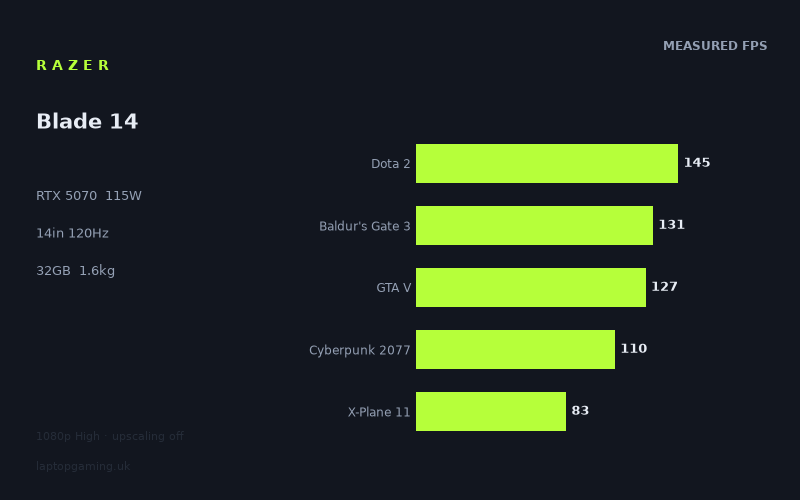
Frame rates
1920×1080, High preset, upscaling off. Averages 119fps across the 5 core benchmark games.
Measured on this machine. Source: Notebookcheck, 2025-06-25.
Not scored: no confirmed UK price
We have the full benchmark suite for this machine, so it ranks on the frame rate leaderboard like any other. What we don't have is a UK listing for this exact configuration - it's sold as a European review unit, or only in specifications that differ from the one tested. Since 30% of our score is value for money, scoring it would mean pretending price is no object, which would flatter it against every laptop you can actually buy. The frame rates below are real and comparable; there is just no buying recommendation to make yet.
How these numbers were produced
Frame rates here are not measured by us, and we label how each one was arrived at. A figure marked measured comes from a published run on that exact machine. A figure marked representative is derived from the GPU and its power limit (TGP) and cross-referenced against published reviews - a sound estimate of what that configuration delivers, but not a measurement of that specific laptop. Unless stated otherwise, numbers are 1920x1080, High preset, upscaling off. Where a laptop ships in several power configurations we use the wattage of the exact SKU listed, because a 140W RTX 5070 and a 115W one are not the same product.
In use
The short version
The Razer Blade 14 (2025) is the version of the small gaming laptop that most people actually want and almost nobody builds properly: a 14in machine at 1.615kg with a full RTX 5070 behind it, not a downclocked apology for one. The critical number on the spec sheet isn't the GPU name — it's the 115W power limit. That is the same figure the ASUS TUF Gaming A18 gives its RTX 5070, and the A18 is an 18in desktop-replacement chassis that nobody carries anywhere. Razer has fitted the same GPU power budget into a machine you can put in a bag and forget about.
The benchmark data says that budget is being spent, not just advertised. Across the ten games both machines have been measured on, the Blade 14 comes out a single frame per second ahead of the A18. One. That is a rounding error, and it's the whole point: a 14in laptop is matching an 18in one game for game, because the silicon is being fed the same wattage and the cooling is evidently good enough to keep it there through a benchmark run. Against the Asus ProArt P16, another RTX 5070 machine, the Blade is eight frames per second ahead across eleven shared games. Against two RTX 5060 laptops — the HP Omen 16-ap0091ng and the Lenovo Yoga Pro 9 16IAH G10 RTX — it leads by four and nine frames per second respectively.
It is not the fastest RTX 5070 in the database. The HP Omen 17z-db100 is six frames per second ahead of it across eleven shared games, which is what a 17in chassis with more room for air ought to deliver. But six frames per second is a smaller gap than the difference in size, weight and portability between those two machines, and that trade is the entire argument for buying a Blade 14.
The reservations are real and they're specific. The first is 8GB of VRAM, which is not a comfortable amount of memory in 2025 and is very likely the reason Indiana Jones and the Great Circle returns a zero in the measured set rather than a frame rate. The second is that this machine has a 2880x1800 OLED panel and every frame rate we have for it was measured at 1920x1080 — the numbers below describe the GPU running at less than half the panel's pixel count, and native-resolution performance will be materially lower in the demanding titles. The third is more mundane: we have no confirmed UK price for this exact configuration, and since value accounts for 30% of our score, we can't compute one. That is a gap in our data, not a criticism of the laptop. The benchmark suite is complete, it ranks normally on the frame rate leaderboard, and everything below stands on its own.
Buy it if you want genuine 1080p and 1440p-class gaming performance out of something that weighs 1.615kg and has an OLED panel good enough to work on. Look elsewhere if you play the newest, heaviest, texture-hungry releases at maximum settings, because 8GB is the ceiling that will bite you first and there is no way to raise it.
Performance
All frame rates below were measured by Notebookcheck on 25 June 2025 at 1920x1080, High preset, with upscaling switched off. That last condition matters more than people usually credit. These are native-render numbers with no DLSS, no frame generation and no reconstruction of any kind — the rawest form of the comparison, and the one that scales most predictably when you change resolution or settings. Every figure would be higher with DLSS enabled, in some cases dramatically so, but we have no measured upscaled numbers and won't guess at them.
What 115W actually buys
Laptop GPUs of the same name are not the same product. The RTX 5070 mobile ships across a wide range of configured power limits, and the difference between a low-wattage implementation and a high-wattage one is far larger than the difference between adjacent GPU tiers. This is the single most misleading thing about buying a gaming laptop by GPU name alone, and it is why our fact sheets record the TGP separately.
The Blade 14's 115W figure is the meaningful piece of information here, and its significance is best understood through the comparison the database hands us. The ASUS TUF Gaming A18 runs its RTX 5070 at exactly the same 115W. The A18 is an 18in machine — vastly more internal volume, larger heatsinks, bigger fans, more surface area to dump heat through, and no meaningful constraint on how thick the chassis gets. If chassis size determined sustained GPU performance, the A18 should be comfortably ahead. Across ten shared games, it is one frame per second behind.
The conclusion that follows is narrow but important: at 115W, on these benchmark runs, the Blade 14's cooling is not the limiting factor. The GPU is getting its power budget and converting it into frames at essentially the same rate as a machine four inches larger. That is an engineering result worth respecting, and it is what separates a thin gaming laptop that works from a thin gaming laptop that throttles into irrelevance ten minutes into a session.
Two caveats attach to that conclusion, and both are about the limits of what benchmark runs tell you. First, benchmark passes are short. They are long enough to expose a machine that collapses immediately, but they are not a three-hour session in a warm room. We have no sustained-load data, no thermal figures and no fan noise measurements for this machine, so we cannot tell you what it does in hour two. Second, thin machines with high power limits generally achieve that by running their fans hard. We have no acoustic measurements for the Blade 14 and will not invent any — but if you are buying a 1.615kg laptop with a 115W GPU, the reasonable prior is that it is audible under load, and you should plan on headphones.
The top of the chart
Strange Brigade returns 293fps, F1 24 229fps and F1 25 170fps. These three sit well clear of everything else and they tell you about the ceiling rather than the floor.
Strange Brigade is in the suite precisely because it is a well-optimised, Vulkan-based title that scales cleanly with GPU throughput and rarely runs into anything else. At 293fps it is doing what it always does — establishing that the graphics hardware, given a workload it likes, has a great deal of headroom at 1080p. It is not a prediction about any modern game. Treat it as a control measurement.
The two F1 titles are more interesting because they are a year apart and there is a 59fps gap between them. F1 24 at 229fps and F1 25 at 170fps on the same hardware, same preset, same resolution, is a clean illustration of how quickly the target moves. Nothing changed about the laptop between those two runs; the newer game simply asks for more. Both are comfortably above the panel's refresh rate and both would remain so with a good deal of settings headroom left over, so for racing games specifically this machine is not in any difficulty at 1080p. But the year-on-year delta is the thing to internalise: a machine that clears a bar by 100fps today clears it by 40fps in two years' time, and by less than that after another two.
The middle of the pack, and the panel's refresh rate
The panel runs at 120Hz, and that is the number to hold every result against, because frames above it are not displayed and frames below it are visible as a shortfall.
Dota 2 at 145fps, Final Fantasy XV at 138fps, Baldur's Gate 3 at 131fps, GTA V at 127fps and Cyberpunk 2077 at 110fps form the substantial middle of the distribution. Four of those five clear 120fps. Cyberpunk 2077 sits just under it.
Four of the five games in our scoring suite live in this band — Dota 2, Baldur's Gate 3, GTA V and Cyberpunk 2077 — with X-Plane 11 as the fifth. The mean across the scoring suite is 119fps, which lands almost exactly on the panel's refresh rate. That is a tidy coincidence but also a fair summary of where this machine sits: on the games we score, at 1080p High with no upscaling, it averages roughly one frame per refresh. It is a 120Hz machine at 1080p in the general case, not a 240Hz esports machine and not a machine that struggles to hit 60.
Dota 2 at 145fps deserves a specific note, because it looks low for what it is. Dota 2 is an old game running on an engine that a modern GPU should demolish. When a title like that lands at 145fps rather than several hundred, the graphics card is not the constraint — the CPU is. The same logic applies to GTA V at 127fps, another game whose engine predates every piece of silicon in this laptop and which is well known for leaning on single-threaded CPU performance. Neither of these results reflects badly on the RTX 5070; they reflect the Ryzen AI 9 365 and the platform around it, and they would look broadly similar if you fitted a considerably faster GPU.
This is worth understanding before you buy, because it changes what upgrading would achieve. If you mostly play older or CPU-heavy games — MOBAs, strategy titles, simulators, large-scale multiplayer with lots of entities — a more powerful GPU in the same class of chassis buys you very little. The Blade 14's frame rate in those games is set by the processor, and the processor here is a mobile part in a thin machine with a shared power budget.
Cyberpunk 2077 at 110fps is the most quoted result in any laptop review and it should be read carefully. That is the High preset with upscaling off, not Ultra, and emphatically not with ray tracing or path tracing enabled. 110fps at High is a genuinely strong result for a 14in machine — it means Cyberpunk is playable at high refresh with the settings still in a good place, and it means there is room to push individual settings up and still stay above 60. It does not mean Cyberpunk runs at 110fps with RT Overdrive on, which is a different workload by an order of magnitude and one we have no measurement for.
The demanding end
X-Plane 11 at 83fps, Alan Wake 2 at 72fps and Assassin's Creed Shadows at 63fps represent the bottom of the measured range, and they get there for two entirely different reasons.
X-Plane 11 is the CPU story again, in its purest form. Flight simulators are among the most reliably CPU-bound workloads in any benchmark suite — scenery streaming, flight model calculation and draw-call volume all land on the processor, and the GPU spends a good deal of its time waiting. At 83fps this is comfortably playable and considerably better than a lot of thin machines manage, but it is the result that would improve least if you swapped in faster graphics. Simulator players should read this number as the platform's verdict, not the GPU's.
Alan Wake 2 at 72fps and Assassin's Creed Shadows at 63fps are the opposite: modern, GPU-heavy titles that ask for everything the graphics hardware has. Both remain above 60fps at High with no upscaling, which is a result many 14in machines cannot claim, and both would climb substantially with DLSS enabled — though again, we have no measured figures for that and won't estimate them. What these two establish is the floor. The most demanding things you can reasonably ask of this machine at 1080p land in the 60s, which means it is a 60fps machine in current AAA and a 120fps machine in almost everything else.
The practical reading is that you will be making a choice in newer releases: high refresh with upscaling on and settings trimmed, or 60fps native at High with everything left alone. Both are legitimate. Neither requires you to drop to Low. That is a healthy place for a 14in laptop to be, and it is a substantially better place than the RTX 5060 machines in our comparison set occupy.
The Indiana Jones zero, and the VRAM problem behind it
Indiana Jones and the Great Circle is recorded as 0fps. A zero is not a slow frame rate; it is the absence of a result. The benchmark run did not produce a usable figure — the game either would not launch, would not complete a pass, or would not run at the tested settings at all.
We cannot state with certainty why, and we are not going to pretend otherwise. What we can say is that this specific title is one of the most consistently reported failure cases for graphics cards with 8GB of VRAM. It is built on an engine with mandatory ray tracing, and its texture pool settings scale directly with available graphics memory in a way that makes 8GB cards fall over at settings that 12GB and 16GB cards handle without complaint. The Blade 14 has 8GB. The correlation is hard to ignore.
Whatever the cause, the consequence is straightforward and it is the most important single thing in this review. This machine has an RTX 5070 running at a healthy 115W and a capable processor, and there is at least one shipping AAA game in the measured set that it did not produce a frame rate for. The GPU is not the bottleneck there. The memory is.
Eight gigabytes was a comfortable amount of VRAM several years ago. It is not comfortable now. Modern engines allocate aggressively for texture streaming, ray tracing acceleration structures and post-processing buffers, and the pattern when you run out is not a graceful decline in frame rate — it is stutter, texture pop-in, sudden multi-second hitches, or an outright refusal to run. That is a qualitatively worse failure mode than simply being slow, because you cannot compensate for it with a faster GPU or a lower resolution target; you compensate for it by turning textures down, which is precisely the setting that most affects how a game looks.
There is a second-order problem specific to this machine. It has a 2880x1800 panel. Higher rendering resolutions increase VRAM consumption alongside everything else, so the memory ceiling arrives sooner at native resolution than it does at the 1080p the benchmarks used. The panel and the memory budget are pulling in opposite directions.
None of this means the Blade 14 is a bad machine. Eleven of twelve measured titles returned a frame rate, most of them good ones, and the scoring suite is complete. But if you are spending real money on a laptop you intend to keep for four or five years, 8GB of VRAM is a hard, unupgradeable constraint that will get tighter every year, and the Indiana Jones zero is what that constraint looks like when it has already arrived rather than being a forecast.
Reading the spread
The measured range runs from 293fps at the top to 63fps at the bottom, with a zero underneath. That is a spread of well over four to one between the fastest and slowest games that produced results, and understanding where it comes from is more useful than any single average.
Three separate mechanisms are at work. At the top, Strange Brigade and F1 24 are efficient engines with modest per-frame workloads, and the GPU is simply free to run. In the middle, Dota 2, GTA V and X-Plane 11 are constrained by the processor, not the graphics card — their results would barely move with a different GPU in the same chassis. At the bottom, Alan Wake 2 and Assassin's Creed Shadows are genuinely GPU-limited modern titles where the RTX 5070 at 115W is working hard and delivering roughly what you would expect it to.
The reason this matters when you're spending money is that it tells you which upgrade helps you. If your library is CPU-bound, this machine's frame rates are set by the platform and a more expensive GPU changes nothing. If your library is modern AAA, the GPU is doing the work and the 115W power limit is why the numbers are as good as they are. And if your library includes the heaviest texture-streaming releases, neither component is your constraint — the 8GB memory pool is, and no amount of power limit helps.
The screen
The panel is a 14in OLED at 2880x1800, running at 120Hz. On specification alone it is the best display in this comparison group and one of the better ones on any gaming laptop, and it is a substantial part of why someone would choose this machine over a cheaper 16in with a conventional IPS panel.
OLED delivers per-pixel illumination, which means true black rather than a dark grey with backlight bleeding through it, and contrast that no LCD backlight arrangement matches. In practical terms that transforms dark games — horror, space, anything with a night cycle, anything relying on light sources in darkness. Alan Wake 2, which sits at 72fps here, is exactly the kind of title where an OLED panel changes the experience rather than merely improving a measurement. Response times on OLED are also far faster than IPS, which reduces motion smearing at high refresh in a way that a specification sheet doesn't capture well but your eyes do immediately.
2880x1800 is a lot of pixels for 14 inches. That yields very high pixel density — text and interface elements are sharp in a way that 1920x1080 panels of the same size simply cannot be, and for anyone who works on the machine as well as playing on it, that is a genuine daily benefit. Scaled desktop use, code, documents, timelines and photo work all improve.
120Hz is the one number here that is merely good rather than excellent. There are gaming laptops with 165Hz, 240Hz and faster panels, and if your priority is competitive shooters at the highest possible refresh, this is not the panel for that. What 120Hz does provide is a coherent target: it is high enough to feel clearly smoother than 60Hz, and low enough that this GPU can actually reach it in a majority of the measured titles. A 240Hz panel on this hardware would go unfed in almost everything.
Can the GPU drive it
This is where the honest answer requires care, because every frame rate we have was measured at 1920x1080 and the panel is 2880x1800. Those are not the same workload. 2880x1800 is two and a half times the pixel count of 1920x1080, and rendering cost scales substantially — not perfectly linearly, but substantially — with pixel count in GPU-limited scenarios.
We have no measured native-resolution figures for this machine, so we are not going to publish estimates dressed up as data. What we can do is reason about the shape of the outcome, clearly flagged as reasoning rather than measurement.
In the CPU-limited titles — Dota 2, GTA V, X-Plane 11 — raising the resolution costs proportionally less, because the processor was setting the pace anyway. Those results should hold up comparatively well at native resolution. In the GPU-limited modern titles — Alan Wake 2 at 72fps, Assassin's Creed Shadows at 63fps, Cyberpunk 2077 at 110fps — the resolution increase lands squarely on the component that was already the bottleneck, and the drop will be significant. It is entirely reasonable to expect that the heaviest games will not hold 60fps at native 2880x1800 with High settings and upscaling off.
That is not a criticism unique to this laptop; it is true of essentially every high-resolution gaming laptop panel, and it is why DLSS exists. The intended workflow on a machine like this is to render internally at a lower resolution and reconstruct to the panel's native output, which the RTX 5070 is well equipped to do. The measured numbers here, with upscaling off, are deliberately the pessimistic case. Real-world use with DLSS enabled will be considerably better than a naive resolution-scaling calculation suggests — we simply have no measured figures to quantify by how much.
The other route, and one many people take on high-resolution panels, is to run games at 1920x1080 or an intermediate resolution and let the display scale. On a 2880x1800 panel, 1920x1080 is not an integer fraction, so scaling is not pixel-perfect and you will see some softness. It works, plenty of people do it, and the frame rates in this review are exactly what you would get — but it does throw away part of what you paid for the panel.
One further OLED consideration worth stating plainly: OLED panels are subject to burn-in from persistent static elements over long periods. Game HUDs, taskbars and fixed interface furniture are the usual culprits. Modern panels include mitigation measures and the risk is far lower than it once was, but if your use case involves the same static interface on screen for eight hours a day, every day, for years, that is a real consideration that an IPS panel does not have. We have no data on this specific panel's behaviour over time and are noting the general characteristic rather than making a claim about this machine.
Build, size and portability
The Blade 14 weighs 1.615kg and has a 14in display. Those two numbers are the reason this machine exists, and they are worth putting in context against the alternatives in the comparison set.
The ASUS TUF Gaming A18 — the machine this one matches, frame for frame, across ten shared games — is an 18in laptop. The HP Omen 17z-db100 is a 17in laptop. The Asus ProArt P16, the HP Omen 16 and the Lenovo Yoga Pro 9 are all 16in. The Blade 14 is delivering comparable or better frame rates than most of that group from a chassis that is meaningfully smaller than any of them and, in the case of the 17in and 18in machines, dramatically smaller.
What 1.615kg means in practice is a machine you carry without planning around it. It goes in a normal rucksack rather than requiring a dedicated laptop bag. It fits on an aeroplane tray table, on a train seat-back table, on a desk that already has things on it. You can take it to a client meeting without looking like you're moving house. An 18in gaming laptop is a machine you transport occasionally, deliberately, and with a bit of resentment; a 1.615kg 14in machine is one you carry by default.
The 14in screen is the trade. If you want a large canvas for spreadsheets, multi-window development or timeline editing, 14 inches is small regardless of how many pixels are packed into it — the high resolution gives you the ability to fit more on screen, but the physical size of everything shrinks accordingly, and there is a limit to how small a person can usefully read. Anyone whose work genuinely benefits from screen area should be looking at 16in machines and accepting the weight penalty.
The battery is 72Wh. That is a reasonable capacity for a 14in chassis, and it is a genuine constraint on how thin these machines can get, because battery and cooling compete for the same internal volume. What we do not have is any measured runtime figure for this machine, so we can't tell you how long it lasts and won't guess. What can be said from the specification alone is that an OLED panel at 2880x1800 is not a low-power display — high-resolution OLEDs draw meaningfully more than modest IPS panels, particularly with bright content — and that gaming on battery on any machine with a 115W GPU will drain 72Wh quickly and will almost certainly involve reduced performance, since the power delivery cannot supply the full GPU budget from the battery alone. Assume you game plugged in. Non-gaming battery life is a genuine unknown here and we would want measured figures before saying anything about it.
The other elements of the configuration are sensible rather than remarkable. 32GB of memory is the right amount for a machine at this level in 2025 — enough that you are not going to be short in games or in most professional workloads, and enough headroom that it will not be the reason you replace the machine. 1TB of SSD storage is adequate rather than generous. Modern AAA installs run to well over 100GB each, so 1TB accommodates a working library of a handful of large games plus everything else, and you will be managing it rather than ignoring it. Whether it can be expanded, and whether the memory is soldered, are things we would want to confirm before treating either as upgradeable.
We have not handled this machine. We have no measurements for surface temperatures, fan noise, keyboard feel, trackpad quality, port selection or display uniformity, and we are not going to describe any of them. What we are analysing here is published performance data and specifications, and there is a limit to what those can tell you about a laptop you will touch every day. If build quality, keyboard and acoustics matter to you — and on a machine you carry, they should — read a hands-on review alongside this one.
How it compares
Our comparisons only use games both machines have been measured on, which is why the game counts differ between rivals. Comparing averages across different game sets would produce numbers that look precise and mean nothing.
ASUS TUF Gaming A18 — RTX 5070 at 115W, £1,489
This is the most instructive comparison in the set, because the GPUs are configured identically. Same RTX 5070, same 115W power limit. The only substantive variables are the chassis, the cooling and the processor.
Across ten shared games, the Blade 14 averages one frame per second ahead. That is a tie in any meaningful sense — well inside run-to-run variance, and certainly inside the margin that would make you choose one over the other on performance grounds.
The consequence is that the choice between these two is not a performance choice at all. It is a choice between an 18in machine and a 1.615kg 14in one, and between a machine with a confirmed UK price and one without. The A18 gives you a much larger screen, more room for ports, more room for storage expansion in all likelihood, and a price you can actually check today. The Blade 14 gives you the same frame rates in something you can carry, plus an OLED panel at far higher resolution.
If you never move your laptop, the A18 is the more sensible purchase and the tie in frame rates makes that easy to say. If portability has any value to you at all, the Blade 14 is delivering identical performance in a fraction of the volume, which is the harder engineering problem and the more useful product.
HP Omen 17z-db100 — RTX 5070
The only machine in the comparison set that is measurably faster. Across eleven shared games, the Omen 17z is six frames per second ahead of the Blade 14.
That is a real gap, not noise. Six frames per second across eleven titles indicates a genuine and repeatable advantage, most plausibly explained by a 17in chassis having more thermal headroom, a higher configured power limit, or both. We do not have the Omen's TGP in front of us, so we can't attribute it precisely, but the direction is unsurprising: bigger machines with the same GPU tier generally go faster.
The question is what six frames per second is worth to you. In the 60-70fps range, where Alan Wake 2 and Assassin's Creed Shadows live, six frames is roughly a ten percent improvement and marginally perceptible. In the 110-145fps range, it is invisible. Set against that, the Omen 17z is a 17in machine and the Blade 14 is 1.615kg. For anyone who moves their laptop, that is not a close call.
The Omen 17z also has no confirmed UK price in our database, so we cannot tell you which represents better value. On performance alone it is the faster machine and deserves credit for it. On performance per kilogram it is not remotely competitive.
Asus ProArt P16 — RTX 5070
Across eleven shared games, the Blade 14 is eight frames per second ahead. Both machines have the RTX 5070, so this gap is about implementation, not GPU tier — most likely a lower power limit in the ProArt, which is a creator-focused machine where acoustics and sustained quiet operation are prioritised over peak gaming throughput.
Eight frames per second is the largest gap between two RTX 5070 machines in this comparison set, and it is a good illustration of why GPU names alone are insufficient. Two laptops, same graphics card on the box, and a consistent eight-frame difference across eleven titles.
The ProArt is a genuinely different proposition — it is built for colour-accurate creative work first and games second — and buying it for gaming would be missing the point. But if you were cross-shopping them because both are portable machines with an RTX 5070, the Blade 14 is the faster gaming laptop by a clear margin.
HP Omen 16-ap0091ng — RTX 5060
Across eight shared games, the Blade 14 leads by four frames per second. That is a smaller gap than the difference in GPU tier would suggest, and it is the sort of result that should make you sceptical of paying a large premium for the higher tier on paper alone.
Four frames per second across eight games is a modest advantage. It is real — it is consistent enough to show up as an average — but it is not the difference between playable and unplayable in anything. If the Omen 16 turns out to be substantially cheaper, that four-frame gap is not a good reason to spend the difference on frame rates alone.
Where the Blade 14 pulls clearly ahead of an RTX 5060 machine is not in the average — it is in the panel, the weight and the ceiling in the heaviest titles. It is also worth noting that RTX 5060 laptops commonly ship with 8GB of VRAM too, so moving to the 5060 does not necessarily cost you memory headroom. The 8GB constraint discussed above is not something the Blade 14 solves relative to this rival; it is a limitation both share.
Lenovo Yoga Pro 9 16IAH G10 RTX — RTX 5060
The largest gap in the set: across ten shared games, the Blade 14 is nine frames per second ahead. Combined with the four-frame gap against the Omen 16's RTX 5060, this suggests the Yoga Pro 9 is running its GPU at a notably conservative power limit — which is consistent with what it is, a premium 16in creator-oriented machine that happens to have discrete graphics rather than a gaming laptop that happens to be well made.
Nine frames per second is enough to matter. In the demanding titles at the bottom of the range, that is the difference between comfortably above 60fps and hovering around it. If you are choosing between these two specifically for gaming, the Blade 14 is the clearly better machine and it is also lighter.
What the comparison set adds up to
The Blade 14 is not the fastest machine here — the Omen 17z is, by six frames per second across eleven games. It is faster than every other machine in the set: eight ahead of the ProArt P16, nine ahead of the Yoga Pro 9, four ahead of the Omen 16, and level with the TUF A18.
What makes that record impressive is not the size of any individual gap. It is that the Blade 14 is by some distance the smallest and lightest machine in the group at 1.615kg, and it is placing second out of six on frame rates. Every machine that matches or beats it is significantly larger. That is the argument for this laptop stated as precisely as the data allows.
Who it's for
People who actually move their laptop. This is the primary case and it is a strong one. If you take a machine between home and an office, between university and halls, on trains, on planes, to a friend's house — and you also want to play modern games on it properly — the Blade 14 is doing something very few machines do. It matches an 18in laptop's frame rates at 1.615kg. That is the whole product.
People who want one machine for work and play. The 2880x1800 OLED panel, 32GB of memory and the Ryzen AI 9 365 make this a credible work machine rather than a gaming laptop you tolerate during the day. The high pixel density is a genuine asset for text and detailed work, and the OLED contrast is a real benefit for photo and video review. Plenty of gaming laptops are grim to use for eight hours; this specification suggests this one is not.
People playing 1080p and 1440p-class workloads at high refresh. The measured data is unambiguous here. Four of the five scoring-suite games clear 120fps at 1080p High with no upscaling, and the mean across the suite is 119fps. This is a machine that hits the panel's refresh rate in most of what it was asked to run, and it does so without leaning on reconstruction.
People who play a lot of well-optimised or slightly older titles. Strange Brigade at 293fps, F1 24 at 229fps, F1 25 at 170fps and Final Fantasy XV at 138fps all indicate enormous headroom in anything that isn't a bleeding-edge release. If your library skews that way, this machine will feel very fast for a long time.
Who should buy something else
Anyone playing the newest, heaviest AAA releases at maximum settings. The 8GB VRAM pool is the constraint and it is already producing a failure in the measured data. Indiana Jones and the Great Circle returned nothing. That is the leading edge of a problem that will get worse over the life of the machine, not better, and it cannot be upgraded. If your intention is to play every major release on day one at the highest texture settings, buy a machine with 12GB or 16GB of VRAM, even if it costs you frame rate elsewhere. Memory capacity is a cliff, not a slope.
Anyone who never moves their laptop. If the machine lives on a desk permanently, you are paying a substantial engineering premium for portability you will never use. The TUF Gaming A18 matches this machine's frame rates within a frame per second, has a much larger screen, and has a confirmed price you can check. For desk-bound use, a larger chassis will always give you more performance, more ports, more cooling headroom and more storage for the same money.
Competitive shooter players who want maximum refresh. 120Hz is a coherent target for this hardware but it is not a high-refresh esports panel. If you play CS2, Valorant or Apex and care about the difference between 120Hz and 240Hz, there are machines built specifically for that, and the Dota 2 result at 145fps suggests the CPU would be the limiting factor in that class of game anyway.
Anyone who needs a large screen for work. 14 inches is 14 inches. High resolution gives you the option of fitting more on screen, but everything is physically smaller and there is a hard limit to that. If you work across multiple large windows, spreadsheets or editing timelines all day and you can't always dock to an external display, get a 16in machine.
Anyone buying primarily on price. This is a Razer Blade, and that has historically meant paying for the chassis engineering as well as the components. If the specification list is what you care about and the size is not, there will be larger machines offering the same or better frame rates for less. The TUF A18 comparison makes that concrete: identical GPU, identical power limit, identical measured performance, in a chassis that is cheaper to build.
The bottom line
The Razer Blade 14 (2025) does the hard thing well. A 115W RTX 5070 in a 1.615kg chassis, matching an 18in machine frame for frame across ten shared games and beating three of the five rivals in our comparison set, is a genuine engineering result rather than a marketing one. The 2880x1800 OLED panel is the best display in the group. The scoring-suite mean of 119fps at 1080p High with no upscaling puts it comfortably in high-refresh territory in most of what was measured, with the heaviest modern titles landing in the 60s — a floor, not a failure.
The reservation is singular and it is serious. Eight gigabytes of VRAM is the wrong amount of graphics memory for a machine of this capability in 2025, and the measured data already contains a game that would not produce a frame rate. Everything else about this laptop suggests a four or five year lifespan; the memory pool suggests something shorter, or at least a future of turning texture settings down on a machine with a display good enough to deserve better. If you can live with that constraint — and for a great many people, playing a great many games, it will not bite — this is one of the most genuinely portable capable gaming laptops the data supports.