Details
Product prices and availability are accurate as of the date/time indicated and are subject to change. Any price and availability information displayed on Amazon.co.uk at the time of purchase will apply to the purchase of this product.Review
Lenovo Legion 5 15AHP G10 review
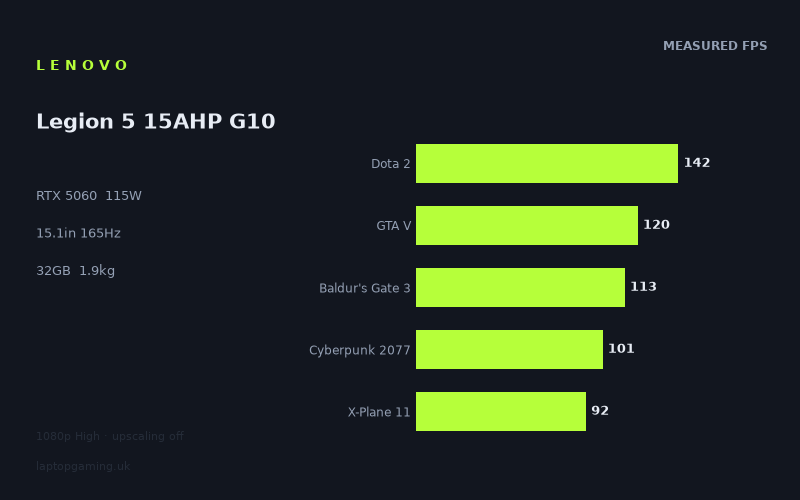
Frame rates
1920×1080, High preset, upscaling off. Averages 113fps across the 5 core benchmark games.
Measured on this machine. Source: Notebookcheck, 2025-07-01.
Not scored: no confirmed UK price
We have the full benchmark suite for this machine, so it ranks on the frame rate leaderboard like any other. What we don't have is a UK listing for this exact configuration - it's sold as a European review unit, or only in specifications that differ from the one tested. Since 30% of our score is value for money, scoring it would mean pretending price is no object, which would flatter it against every laptop you can actually buy. The frame rates below are real and comparable; there is just no buying recommendation to make yet.
How these numbers were produced
Frame rates here are not measured by us, and we label how each one was arrived at. A figure marked measured comes from a published run on that exact machine. A figure marked representative is derived from the GPU and its power limit (TGP) and cross-referenced against published reviews - a sound estimate of what that configuration delivers, but not a measurement of that specific laptop. Unless stated otherwise, numbers are 1920x1080, High preset, upscaling off. Where a laptop ships in several power configurations we use the wattage of the exact SKU listed, because a 140W RTX 5070 and a 115W one are not the same product.
In use
The short version
The Legion 5 15AHP G10 is a 15-inch gaming laptop that does the sensible thing with an RTX 5060: it gives the GPU a 115W power budget and puts it in a chassis that weighs under 2kg. That combination is rarer than it sounds. Plenty of machines carry the same GPU name at a fraction of that power allocation, and the frame rate difference between a well-fed 5060 and a starved one is large enough to be the difference between a game feeling smooth and feeling compromised.
The measured numbers back that up. Across the five games in our scoring suite, Notebookcheck's figures average 114fps at 1920x1080 on High with upscaling switched off. That is a genuinely comfortable mid-range gaming result. Nothing in the suite drops below 92fps, and the heaviest title in the wider benchmark set — Assassin's Creed Shadows at 49fps — is still playable rather than a slideshow. This is a machine that will run essentially everything at 1080p High without you having to think about it, and will run most things at the panel's native resolution provided you are willing to use upscaling.
The interesting friction is between the GPU and the display. Lenovo has fitted a 15.1in 2560x1600 OLED running at 165Hz, which is a considerably better panel than the class usually gets. It is also roughly twice as many pixels as the resolution the benchmarks were run at, and 165Hz is a refresh rate that only three of the eleven measured games get anywhere near. So you are buying a display that outruns the graphics card in both directions — more pixels than the GPU wants to push natively in demanding titles, and more refresh headroom than the GPU can fill in most of them. That is not a criticism exactly; an OLED that you cannot always saturate is still an OLED, and the panel will make the games it does run well look considerably better than a mid-range IPS would. But if your mental model is "1600p 165Hz gaming laptop", the benchmark data says the honest description is "1080p-to-1440p-class GPU behind a very good 1600p screen".
The other thing worth flagging up front: 8GB of VRAM. At the settings these numbers were measured at, it is fine. At native 1600p with texture settings pushed, in the newest releases, it is the specification detail most likely to age badly. There is nothing in the benchmark data that shows a VRAM wall — the results are consistent with what a 115W 5060 should do — but the games that will expose it are the ones released after these numbers were taken, not before.
One housekeeping note. We have not published a score for this machine, because we do not have a confirmed UK price for this exact configuration. Value accounts for 30% of our score and cannot be computed without one. The benchmark suite is complete, the machine ranks normally on our frame rate leaderboard, and nothing about it is in question — we simply will not print a number that depends on a price we cannot verify.
Buy it if you want a 15-inch machine that plays modern games properly at 1080p and 1440p, you value display quality as much as raw frame rate, and you want something you can move between rooms and desks without a second thought. Look elsewhere if your priority is filling a high-refresh panel in competitive shooters, if you play at native resolution with upscaling off on principle, or if you want the most frames per pound available and are prepared to carry a larger chassis to get them.
Performance
All the frame rates discussed here were measured by Notebookcheck on 1 July 2025, at 1920x1080, High preset, with upscaling disabled. That last detail matters more than it usually does on a machine like this, because the panel is not 1080p and because DLSS on an RTX 50-series card is not a fringe feature — it is how most people will actually play. Read every number below as a native-render figure, and treat it as a floor for what the machine can do rather than a ceiling.
What 115W actually buys
The single most useful specification on this machine is not the GPU name, it is the power limit attached to it. An RTX 5060 in a laptop is a variable quantity. The same silicon, in a thin chassis with a modest cooling system and a conservative firmware, produces meaningfully lower frame rates than the same silicon given room to draw current and somewhere for the heat to go. 115W is at the generous end of what mobile 5060 implementations get, and the measured results read like it.
The practical consequence is that the Legion 5's numbers should be treated as representative of what the 5060 can do rather than what a particular chassis allowed it to do. When you see this machine within a handful of frames of laptops carrying an RTX 5070, that is not the 5060 punching above its weight — it is the 5070 in those machines being constrained, or being asked to do the same job with a similar power allowance. We will come back to that in the comparison section, because it is the single most important buying insight the data offers: GPU tier tells you much less than GPU tier plus power limit, and marketing tells you the first and buries the second.
There is a corollary. A well-fed GPU in a sub-2kg chassis has to put its heat somewhere. We have no thermal or acoustic measurements for this machine, so we are not going to characterise how loud it gets or how warm the keyboard deck runs — that would be invention. What we can say is that the physics are unforgiving: 115W of GPU plus a mobile Ryzen under sustained load in a 1.936kg 15-inch body is a lot of thermal work for a small volume, and it would be surprising if the fans were quiet doing it. If silence under load is a requirement, that is a question to resolve before purchase, not one this data set can answer.
The top of the chart: where the GPU is barely working
Strange Brigade at 269fps is the outlier, and it is an outlier for a reason. It is a well-optimised Vulkan title from an era when GPUs were doing considerably less work per frame, and it functions in benchmark suites primarily as a measure of how much raw throughput a card has when nothing is holding it back. 269fps tells you the GPU is not being throttled into the ground and that the memory subsystem is healthy. It does not tell you anything about how the machine will handle a 2025 release, and you should not carry that number into your expectations.
F1 24 at 214fps is more interesting, because racing games are the genre where high refresh rates genuinely pay off and where 200fps-plus is an achievable, meaningful target. At 214fps the Legion 5 is comfortably beyond what the 165Hz panel can display, which means you have headroom to raise settings, raise resolution, or simply enjoy consistently low frame times with the panel never waiting on the GPU. If you play F1 and nothing else, this machine is emphatically enough.
Then comes the first genuinely instructive data point in the set: F1 25 at 166fps. Same series, same genre, one year apart, and a drop of 48fps — a little over a fifth of the frame rate gone. That is what a single generation of renderer changes costs on a mid-range card. It is the clearest illustration in the whole benchmark spread of why you should be sceptical of buying a laptop on the strength of how it runs the games you already own. The Legion 5 clears 165Hz in F1 25 by a single frame, which means that at High settings, at 1080p, with no upscaling, this generation of the same game sits exactly on the edge of the panel's capability where the previous one sailed past it. Next year's version, on current trends, will not.
The middle: the games most people actually play
The bulk of the suite lands between 100 and 145fps, and this is where the machine's real character shows.
Dota 2 at 142fps is a number that deserves scrutiny rather than a nod. Dota 2 is not a demanding game for a 115W RTX 5060 — not remotely. A card of this class rendering Dota 2 at 1080p High should be limited by something other than its shaders, and it is. That something is the CPU, the engine's single-threaded characteristics, or both. 142fps is perfectly playable, but it sits below the panel's 165Hz refresh, and for a title in this category that is the wrong side of the line. If you are the kind of player who buys a high-refresh screen specifically to get every frame out of a competitive game, the honest reading is that this configuration will not saturate its own display in Dota 2 at these settings. Dropping to lower presets would help — that is what competitive players do anyway — but the measured data we have says 142fps at High, and 142 is not 165.
GTA V at 120fps tells a similar story from a different angle. GTA V is a 2013 PC release. On a modern 115W mobile GPU it should not be a challenge at 1080p, and 120fps is not what the graphics card is capable of in that game — it is what the rest of the system allows. Old engines with heavy draw-call overhead and limited threading lean on the CPU disproportionately, and the Ryzen 7 260 here is a capable mid-range mobile part rather than one of the high-power HX-class chips that top-end gaming laptops carry. In GPU-bound scenarios that distinction costs you very little. In CPU-bound ones it costs you real frames, and GTA V, Dota 2 and X-Plane 11 are all sitting in that category.
Final Fantasy XV at 126fps is the sort of result you would expect from a well-configured mid-range card on a demanding-for-its-era title, and it is a useful sanity check that the GPU is doing its job when the workload is genuinely graphical. Baldur's Gate 3 at 113fps is more relevant to more buyers. BG3 is a game people play for hundreds of hours, and it has a known appetite for CPU in its later act, where the density of NPCs and scripting pushes load away from the GPU. 113fps at High in a benchmark run is a healthy figure; expect the busiest scenes in Act 3 to sit lower than that, as they do on every machine. It will remain comfortably playable, and BG3 is not a game where the difference between 113fps and 80fps changes the experience.
Cyberpunk 2077 at 101fps is arguably the single most useful number in the set. Cyberpunk remains the reference workload for "modern, heavy, but not absurd", and triple-digit frame rates at High with no upscaling is a strong result for a card of this tier. It also gives you a clear sense of the headroom available: from 101fps at 1080p High native, you have room to raise settings toward Ultra, or to move to the panel's native resolution with DLSS doing the heavy lifting, and still land somewhere comfortable. What you do not have is room for both plus ray tracing at native resolution, which we have no measurements for and will not speculate about.
X-Plane 11 at 92fps is the lowest figure in the scoring suite, and again the constraint is not the graphics card. Flight simulators of that generation are notoriously bound by single-threaded CPU performance, and 92fps is a respectable showing for a mid-range mobile Ryzen. Flight sim users should read this as an indication that the CPU is adequate rather than exceptional, and should note that this is a title where a higher-power CPU would produce a larger improvement than a higher-tier GPU.
The heavy end: where the 5060 starts working for a living
Alan Wake 2 at 62fps and Assassin's Creed Shadows at 49fps are the two numbers that define the machine's ceiling, and they are the two you should weight most heavily if you buy new releases at launch.
62fps in Alan Wake 2 at 1080p High with no upscaling is a solid result. That is a game with a renderer designed around modern GPU features and a visual density that punishes mid-range hardware, and the Legion 5 delivers a frame rate that is comfortably above the threshold where a single-player game feels sluggish. With DLSS enabled — which is how the game is meant to be played on hardware of this class — there is meaningful headroom above that figure, though we have no measured numbers for upscaled runs and will not guess at them.
49fps in Assassin's Creed Shadows is the honest bottom of the range. It is playable. It is not comfortable, and it is not what most people would call a good experience on a 165Hz panel. This is the number that tells you the RTX 5060, even at 115W, is a mid-range part being asked to run a 2025 flagship at native resolution, and that the answer to that question is "yes, but you will want upscaling on". For a slower-paced action game with a locked camera and generous input timing, 49fps is survivable in a way it would not be in a shooter. For anyone who bounces off sub-60 frame rates, this is the machine's limit stated plainly, and it will be reached more often as new releases land.
The gap between the top and bottom of the measured set is stark: 269fps to 49fps, a spread of more than five to one across eleven games. That is not unusual — it is what happens when a benchmark suite spans a decade of engine development — but it is worth internalising, because it means the average is a poor guide to any individual game. The scoring-suite mean of 114fps is a useful number for ranking machines against each other. It is not a number you will see in any specific game, and you should plan around the titles you actually play rather than the aggregate.
Reading the spread: what actually causes it
Three separate constraints are visible in this data set, and distinguishing between them is what turns a list of frame rates into useful buying advice.
- Pure GPU load. Strange Brigade, F1 24, F1 25, Final Fantasy XV, Cyberpunk 2077, Alan Wake 2 and Assassin's Creed Shadows all scale primarily with graphics power. Their ordering is a clean function of how much work the renderer does per frame. These are the games where the 115W power limit earns its keep, and where a lower-powered 5060 would visibly fall behind.
- CPU and engine ceilings. Dota 2 at 142fps, GTA V at 120fps and X-Plane 11 at 92fps are not describing the graphics card at all. They describe the Ryzen 7 260 and the engines' threading. A more powerful GPU in the same chassis would move these numbers barely at all. This is important when comparing against rivals with different CPUs, because a few frames of difference in these three titles can drag an average around without saying anything about gaming capability more broadly.
- Mixed loads. Baldur's Gate 3 at 113fps sits between the two, GPU-limited in some scenes and CPU-limited in others. Its result is the most representative of "a real game being played" and the least useful for isolating any single component.
The scoring suite — Dota 2, GTA V, Baldur's Gate 3, Cyberpunk 2077 and X-Plane 11 — leans deliberately toward that mixed picture, which is why its mean of 114fps sits well below the machine's peak and above its floor. It is also why three of the five scoring games are partly CPU-bound, and worth remembering when this machine is measured against rivals carrying different processors.
The VRAM question
8GB is enough for every result above. It is a genuine question mark for the years after them.
The mechanism is simple: when a game needs more texture and buffer data than the card can hold, it starts moving data across the PCIe bus mid-frame, and the result is not a graceful decline in average frame rate but a spiky, stuttering mess where the average looks acceptable and the experience does not. Nothing in this benchmark set shows that happening. But every game here was measured at 1920x1080, and the panel is 2560x1600 — close to double the pixel count, with correspondingly larger frame buffers and render targets.
In practice, this pushes you toward a specific way of using the machine: native panel resolution with DLSS Quality, which renders internally at close to 1080p and reconstructs upward. That keeps the VRAM footprint near where these benchmarks measured it while filling the screen properly, and on an RTX 50-series card the reconstruction quality is good enough that most people will prefer it to running the panel at a non-native resolution. It is the correct setting for this hardware and it is what a sensible owner will end up using. Anyone who insists on native rendering with maximum textures in the newest releases is buying the wrong amount of VRAM, and no amount of GPU power limit fixes that.
Frame generation and how it changes the picture
We have no measured figures for this machine with frame generation enabled, so nothing below is a number — but the capability is part of what you are buying and it is reasonable to say what it does and does not solve. Frame generation multiplies displayed frames from a rendered base, which means it is at its best when the base frame rate is already decent and at its worst when it is not. A game running at 101fps natively, like Cyberpunk 2077 here, has an excellent base to build on and can plausibly make good use of a 165Hz panel. A game running at 49fps, like Assassin's Creed Shadows, has a base where latency is already noticeable, and generating additional frames on top of it improves smoothness without improving responsiveness.
The upshot: frame generation is genuinely useful on this machine for taking already-good frame rates and matching them to a high-refresh OLED. It is much less useful for rescuing the heaviest titles. That is worth understanding before you assume the 165Hz panel will be filled by software.
The screen
A 15.1in 2560x1600 OLED at 165Hz is a specification that would look at home on a machine costing considerably more than a mid-range gaming laptop typically does, and it is the component most likely to make owners glad they bought this over a rival.
Start with the aspect ratio. 2560x1600 is 16:10, which gives you meaningfully more vertical space than a 16:9 panel of the same width. For gaming it is a minor benefit — most engines handle it fine, some older titles handle it awkwardly. For everything else you do on a laptop it is a substantial one: more visible lines of code, more of a document, more timeline, more spreadsheet. Combined with the resolution, this is a panel that makes the machine credible as a general-purpose computer rather than purely a games console with a keyboard.
Then the panel technology. OLED brings per-pixel illumination, which means true blacks and no backlight bleed, and it brings extremely fast pixel response, which means motion clarity that IPS panels of the same refresh rate cannot match. In dark games — and Alan Wake 2 is the obvious example in this suite — the difference is not subtle. It is the sort of upgrade that changes how a game looks in a way that raising settings by one notch does not. We do not have measured brightness, colour gamut or response-time figures for this specific panel, so we are not going to characterise it in those terms; what we can say is that the panel type sets a floor on contrast performance that no IPS competitor reaches.
The usual OLED caveats apply and should be stated rather than glossed over. Static interface elements displayed for hundreds of hours are the technology's known weakness, and a gaming laptop with a permanently visible taskbar and a permanently visible game HUD is a reasonably demanding environment in that respect. Modern panels and modern mitigation are much better than they used to be. It remains a consideration if you intend to use this machine as a fixed desktop replacement running the same application all day.
Can the GPU drive it?
This is where the honest answer requires some care, because the benchmark data does not directly address it. Every measured figure here is at 1920x1080. The panel is 2560x1600. That is roughly twice the pixels, and while frame rate does not scale linearly with pixel count, the direction of travel is not in doubt.
Working from the measured 1080p results, the sensible expectation looks like this. The titles at the top of the chart — Strange Brigade at 269fps, F1 24 at 214fps — have enormous headroom and will remain fast at native resolution. The middle of the pack, where Cyberpunk 2077 sits at 101fps and Baldur's Gate 3 at 113fps, will drop meaningfully but should stay comfortably playable at native, and will be excellent with DLSS Quality. The bottom of the chart, where Alan Wake 2 sits at 62fps and Assassin's Creed Shadows at 49fps, is where native 1600p stops being a realistic option at High settings without upscaling. That is not speculation about specific numbers — we have none — it is the arithmetic of pixel count applied to figures we do have.
The refresh rate question is separate and more clear-cut, because we can answer it directly from the measured data. At 1080p High with no upscaling, exactly three of the eleven measured games reach 165fps: Strange Brigade at 269fps, F1 24 at 214fps, and F1 25 at 166fps by the narrowest possible margin. Everything else sits below the panel's refresh ceiling, including Dota 2 at 142fps, which is the one title in the set where a competitive player would most want the headroom.
This does not make the 165Hz panel pointless — far from it. A high-refresh display with variable refresh handling is better at every frame rate, not just at its maximum, because it eliminates the tearing and judder that come from a mismatch between render rate and display rate. And a game running at 120fps on a 165Hz panel looks and feels better than the same game running at 120fps on a 120Hz panel, because the panel is not the limiting factor in frame delivery. But if you specifically want to fill 165Hz, you will be doing it by lowering settings below High in the games that matter to you, not by relying on the GPU to get there at the settings measured.
The correct framing for this panel is that it is a quality display first and a speed display second. Buy it for the contrast, the resolution and the motion clarity. Treat the 165Hz as useful headroom rather than a target.
Build, size and portability
At 1.936kg, this is a 15-inch gaming laptop that stays under the psychological 2kg line, and that matters more than the 64-gram margin suggests. Gaming laptops in this performance class routinely sit between 2.2kg and 2.6kg, and 18-inch machines — including one of the rivals below — go well beyond that. The difference between 1.9kg and 2.5kg is the difference between a machine you take somewhere without deliberating and one you decide about.
It is worth being precise about what "portable" means here, though. We do not have a measured figure for the power adapter, and a laptop feeding a 115W GPU plus a mobile Ryzen needs a substantial one. The realistic travelling weight is the laptop plus a brick that is not small, and anyone budgeting bag space should plan for that rather than for the 1.936kg figure alone. This is a machine that moves between desks, rooms, offices and homes comfortably. It is not a machine you carry all day without noticing.
The 80Wh battery is at the upper end of what a 15-inch chassis accommodates, which is encouraging. We have no measured runtime figures for this configuration and will not estimate any — battery life on gaming laptops varies enormously with panel brightness, GPU switching behaviour and workload, and a number invented here would be worse than no number. What can be said structurally is that an 80Wh cell paired with a mid-range Ryzen and a display that can switch to integrated graphics is the right combination for a machine that might reasonably be used unplugged for non-gaming work. Gaming on battery, as on every laptop with a 115W GPU, will be a substantially reduced experience — the power delivery simply is not there — and should not factor into your buying decision.
The internal specification supports the general-purpose framing. 32GB of memory is generous for a gaming machine and is genuinely useful for anything involving virtual machines, large project files, many browser tabs alongside a running game, or content work. It also means you are unlikely to need to open the machine to upgrade it, which is a real advantage on a laptop. 1TB of storage is the current sensible baseline: enough for the operating system and a working set of large modern games, not enough for a library you never uninstall from. If you keep six 100GB-plus titles installed simultaneously, plan on either managing that actively or adding storage.
The 15.1-inch screen size deserves a note of its own. It is fractionally larger than the traditional 15.6-inch class measurement suggests in practice, because 16:10 panels at a given diagonal are taller and less wide than 16:9 ones. The net effect is a chassis that is slightly deeper and slightly narrower than an equivalent 16:9 15-inch machine, which tends to make for a better-proportioned laptop on a small desk or an aircraft tray table. We have not handled this machine and are not going to characterise its keyboard, trackpad, hinge or port layout from specifications — those are things that need to be assessed in person, and any assessment of them here would be fabrication.
How it compares
Our comparison figures are drawn only from games both machines in each pair have measured results for, which is the only honest way to do it — but it means the number of shared titles varies from pair to pair, and that variance matters. A comparison across six shared games is noisier than one across eleven, and a difference of one or two frames across any of these sets is well inside the range where run-to-run variance, driver versions and test-date differences could account for it. Treat the small numbers as "effectively identical" and reserve conclusions for the larger gaps.
Lenovo Yoga Pro 9 16IAH G10 RTX — RTX 5060
Across ten shared games, the Legion 5 averages one frame per second behind its stablemate. That is not a difference; that is measurement noise. Two machines with the same GPU tier, performing identically in a large shared sample, are telling you that this GPU is doing what this GPU does regardless of the badge on the lid.
Which means the choice between them is entirely about everything except gaming performance. The Yoga Pro 9 is a 16-inch premium machine aimed at creative work, with the chassis quality, the display calibration focus and the general-purpose polish that implies. The Legion 5 is a 15-inch gaming machine with an OLED panel that happens to be excellent. If you want a laptop that reads as a work machine and games well as a secondary function, the Yoga is the more natural fit. If you want a laptop that reads as a gaming machine and does work as a secondary function, the Legion is. We have no confirmed UK price for either, so we cannot tell you which is the better buy in pounds — only that the frame rates will not decide it for you.
Asus ProArt P16 — RTX 5070
Eleven shared games, and the ProArt averages two frames per second ahead. This is the single most instructive comparison in the list, and it is not because of the margin — it is because of what the margin is compared to.
The ProArt P16 carries an RTX 5070. That is a full GPU tier above the Legion 5's 5060, and in desktop terms it would be a substantial gap. In these two laptops, across eleven measured games, it is worth two frames per second. The explanation is not mysterious: the ProArt is a thin creator-focused machine, and thin creator-focused machines do not give their GPUs the power and thermal headroom that a purpose-built gaming chassis does. A 5070 that cannot draw the current it wants performs like a 5060 that can.
This is the lesson that should follow you around the rest of your laptop shopping. The GPU tier in the product name is not a performance figure. It tells you which silicon is in the machine, and silicon does nothing without power. When you see two laptops advertised with different GPU tiers at similar prices, the power limit is the specification that will determine which one is actually faster, and it is the specification least likely to appear in the marketing copy. The Legion 5's 115W allocation is the reason it holds its own here.
If you need the ProArt's specific strengths — colour-critical work, a creator-oriented feature set, a chassis designed for that context — buy the ProArt and accept that gaming performance is not what you are paying the premium for. If you want games, the Legion 5's two-frame deficit is not a reason to spend more.
ASUS TUF Gaming A18 — RTX 5070 at 115W, £1,489
Nine shared games, and the TUF averages four frames per second ahead. It is also the only rival on this list with a confirmed UK price, at £1,489, which makes it the most useful reference point we have — even though we cannot compute a comparison in value terms without a price for the Legion.
The comparison here is cleaner than the ProArt one, because both machines run their GPUs at 115W. Same power budget, different tier, and the higher tier wins by four frames across nine games. That is a real gap rather than noise, and it is roughly the size you would expect once both cards are properly fed: the 5070 is faster, but the advantage is measured in single-digit frames rather than in the transformative leap the naming would imply. Anyone assuming that stepping up a GPU tier delivers a meaningfully different gaming experience should sit with that figure for a moment.
The more important differences are physical. The TUF A18 is an 18-inch laptop. That is a fundamentally different object from a 1.936kg 15-inch machine — larger footprint, more weight, a bigger bag, more desk. It buys you a bigger screen and, typically, more room for cooling, which is part of why its GPU performs as it does. It is a desk machine that can be moved rather than a portable machine that can be docked.
And there is the panel. We are comparing a 15.1in 2560x1600 OLED against a machine in a series that has historically prioritised value over display quality. If display is a significant part of what you want from a laptop, that comparison does not go the TUF's way, and four frames per second is not a large enough gap to change that calculus. If display is not a priority and frames per pound is, the TUF has a known price and a slightly faster GPU, and that is a legitimate case.
HP Omen 16-ap0091ng — RTX 5060
Eight shared games, and the Omen averages four frames per second ahead — with the same GPU tier. That is the comparison worth thinking about hardest, because it is the one where the Legion loses to a like-for-like rival.
Four frames across eight games is a small but real margin, and with identical GPU tiers the likely explanations are a higher power allocation, a different CPU affecting the CPU-bound titles in the shared set, or a combination. We do not have the Omen's power limit in front of us here, so we are not going to assert which. What we can say is that the gap is small enough to be invisible in play — the difference between 101fps and 105fps in Cyberpunk 2077 is not something a human perceives — and that it is a smaller sample than the ten- and eleven-game comparisons above, which makes it slightly less robust.
The Omen is a 16-inch machine, so the same size trade-off applies as with the TUF, though less dramatically. We have no confirmed UK price for it, which means we cannot tell you whether four frames per second comes at a premium, a discount or parity. If both machines end up at similar prices, this becomes a question of whether you want 15 inches and an OLED or 16 inches and marginally more frames.
Acer Nitro V14 AI — RTX 5050
Six shared games, and the Legion averages seven frames per second ahead. This is the smallest shared sample on the list and therefore the least reliable, but the direction is what you would expect: a step down in GPU tier costs you performance.
What is striking is how little it costs. Seven frames per second is the gap between an RTX 5060 at 115W and an RTX 5050, at least across these six titles, and that is not a chasm. It reinforces the same point the ProArt comparison made from the opposite direction: the mid-range mobile GPU stack is compressed. The differences between adjacent tiers, once power limits are accounted for, are measured in single-digit frames far more often than the naming suggests.
The practical advice this generates is straightforward. If the Nitro V14 AI is substantially cheaper and you play the sorts of games in the middle of this suite, the seven-frame gap is not what should decide it — the 14-inch form factor, the panel, the memory and storage configuration and the price should. If you play the heaviest titles, where the Legion is already at 49fps in Assassin's Creed Shadows, a seven-frame deficit from a lower tier moves you from uncomfortable to genuinely difficult, and the gap matters much more than the average suggests. Averages compress exactly where you least want them to.
What the comparison set adds up to
Five rivals, and the Legion 5 lands within four frames per second of four of them and seven ahead of the fifth. The entire competitive field, spanning three GPU tiers, fits inside an eleven-frame band. That is the state of mid-range mobile graphics in this generation, and it has two consequences for anyone shopping.
First, stop shopping on GPU tier. It is not predictive. A 5070 in a thin chassis loses to a 5060 in a well-cooled one by enough to matter, and a 5050 is closer to a 5060 than the numbering implies. The power limit is the number to hunt for.
Second, shop on everything else. When performance differences between candidates are this small, the panel, the chassis, the weight, the memory, the storage and the price are what actually differentiate the machines. On that basis the Legion 5's case is strong: a 2560x1600 OLED, 32GB of memory, and sub-2kg weight are genuine advantages that four frames per second in either direction does not offset. The one thing we cannot fold into that judgement is the price, and that is the whole reason there is no score attached to this review.
Who it's for
The clearest case for this machine is someone who wants one laptop that does everything and whose gaming is serious but not competitive.
If you play single-player games — Cyberpunk 2077, Baldur's Gate 3, Alan Wake 2, the Assassin's Creed series — and you care about how they look, this hardware is well matched to that. The measured frame rates in that category sit between 49fps and 113fps at 1080p High native, which with sensible use of upscaling translates into a comfortable experience at the panel's native resolution. And the panel is the point: an OLED at 2560x1600 makes atmospheric single-player games look substantially better than the IPS panels most machines in this class carry. You will notice that every session. You will not notice a four-frame difference against a rival ever.
It also suits someone whose laptop has to work as a laptop. 32GB of memory, a 16:10 high-resolution display, an 80Wh battery and a sub-2kg chassis describe a machine that is genuinely usable for work, study and travel in a way that a 2.5kg 16:9 gaming laptop is not. If your machine spends five days a week on a desk doing productive things and two evenings a week playing games, this configuration is aimed squarely at you.
Flight sim and strategy players get a reasonable but qualified recommendation. X-Plane 11 at 92fps and Dota 2 at 142fps are respectable, but both are CPU-limited results rather than GPU-limited ones, which means the Ryzen 7 260 is the component setting the ceiling in those genres. It is adequate, not exceptional. If simulation is the majority of your use, a machine with a higher-power CPU will serve you better than one with a higher-tier GPU, and that is a different shopping list.
Who should buy something else
Competitive players chasing high refresh rates. The panel runs at 165Hz and, at the settings measured, only three of eleven games reach it — with Dota 2 at 142fps falling short. You can lower settings to close that gap, and competitive players do, but if your entire buying rationale is filling a high-refresh display in esports titles, you want a machine built around CPU throughput and a fast, lower-resolution panel, not a 1600p OLED behind a mid-range GPU.
Anyone who plays new releases at maximum settings without upscaling. Assassin's Creed Shadows at 49fps and Alan Wake 2 at 62fps are 1080p figures. At the panel's native resolution, without upscaling, at High, the heaviest current titles are past this GPU's comfortable range, and the 8GB of VRAM is the specification that will bite first in the releases that come next. If native rendering is a principle rather than a preference, this is not the machine.
Anyone whose primary metric is frames per pound. The TUF Gaming A18 sits at £1,489 with an RTX 5070 at the same 115W and a four-frame advantage across nine shared games, in an 18-inch chassis that is much less pleasant to move but likely more generous with cooling. If you want a stationary machine and the most gaming performance per pound spent, larger and plainer laptops will generally beat this one — and you would be giving up a very good display to get there.
Anyone who needs a fully specified purchase decision today. We do not have a confirmed UK price for this configuration, which is why there is no score on this page. Everything above is a judgement about the hardware, and the hardware is good. Whether it is good value is a question that a price answers, and we do not have one to give you.
The bottom line on the hardware
Strip away the naming and the marketing and this is a well-balanced machine. The GPU is given the power it needs, which is the single decision that most affects real frame rates and the one most often got wrong. The memory allocation is generous rather than adequate. The panel is better than the class norm by a clear margin. The weight is genuinely portable for the performance on offer. The two soft spots — 8GB of VRAM and a mid-range rather than high-power CPU — are both visible in the data and both matter in specific circumstances