Details
Product prices and availability are accurate as of the date/time indicated and are subject to change. Any price and availability information displayed on Amazon.co.uk at the time of purchase will apply to the purchase of this product.Review
Schenker XMG Neo 16 (Early 24) review
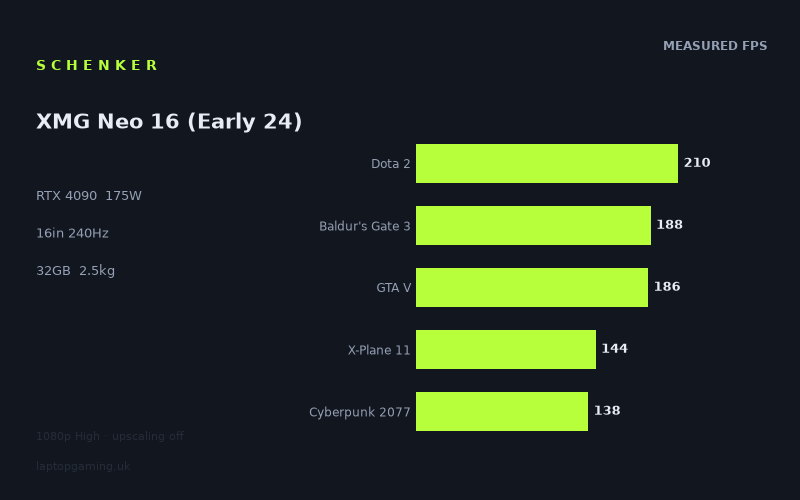
Frame rates
1920×1080, High preset, upscaling off. Averages 173fps across the 5 core benchmark games.
Measured on this machine. Source: Notebookcheck, 2024-06-24.
Not scored: no confirmed UK price
We have the full benchmark suite for this machine, so it ranks on the frame rate leaderboard like any other. What we don't have is a UK listing for this exact configuration - it's sold as a European review unit, or only in specifications that differ from the one tested. Since 30% of our score is value for money, scoring it would mean pretending price is no object, which would flatter it against every laptop you can actually buy. The frame rates below are real and comparable; there is just no buying recommendation to make yet.
How these numbers were produced
Frame rates here are not measured by us, and we label how each one was arrived at. A figure marked measured comes from a published run on that exact machine. A figure marked representative is derived from the GPU and its power limit (TGP) and cross-referenced against published reviews - a sound estimate of what that configuration delivers, but not a measurement of that specific laptop. Unless stated otherwise, numbers are 1920x1080, High preset, upscaling off. Where a laptop ships in several power configurations we use the wattage of the exact SKU listed, because a 140W RTX 5070 and a 115W one are not the same product.
In use
The short version
The Schenker XMG Neo 16 (Early 24) is a seriously fast gaming laptop on the evidence available. Its RTX 4090 runs at a stated 175 W GPU power limit, paired with a Core i9-14900HX and 32 GB of memory, and Notebookcheck’s 1080p High benchmark figures show performance ranging from 79fps in Senua’s Saga: Hellblade II to 413fps in The Witcher 3. The five-game scoring-suite mean is 173fps. That is a very high baseline, but it is not a machine that can simply be described as “240fps gaming” across everything.
That distinction matters because the screen is a 16in, 2560x1600, 240Hz IPS panel. At the measured 1920x1080 High settings, several lighter or older titles clear 240fps decisively, while others sit well below that mark. More demanding modern games are still fast, often comfortably above 100fps, but their measured numbers do not come close to filling a 240Hz panel. At the panel’s native 2560x1600 resolution, the figures will not be the same as the published 1080p results, so buyers should not read the 1080p data as a promise of native-resolution 240fps performance.
The right buyer is someone who wants a powerful desktop-replacement-class notebook with enough performance headroom for a wide spread of games, from esports-friendly titles through to demanding new releases. The XMG Neo 16 makes particular sense for someone who values a high-refresh 1600p display but understands that refresh rate is a ceiling, not a frame-rate guarantee. It also makes sense for buyers who want an RTX 4090 laptop with a full 175 W limit rather than a lower-powered implementation of the same GPU name.
It is less convincing for anyone whose main requirement is travel-friendly weight. At 2.52kg before considering any charger or peripherals, this is not a casual carry-everywhere laptop in the ordinary sense. It is also not the model to buy solely because the display is 240Hz. The benchmark data shows that 240fps is available in some games at 1080p High, but not in every game, and especially not in the heaviest titles in the published set.
There is no confirmed UK price for this exact configuration. That means the page cannot calculate its overall rating, because a price-dependent value element is missing, even though the benchmark suite is complete and the laptop ranks normally on the frame-rate leaderboard. That is not a performance concern; it is simply a limitation on judging whether the machine is good value in the UK at a particular moment.
Performance
A 175 W RTX 4090, backed up by a fast HX-class CPU
The key performance specification is the RTX 4090 running at a 175 W GPU power limit. Laptop GPU names alone are not enough to explain gaming performance, because the power limit matters. Here, Schenker is not presenting the RTX 4090 as a low-power design intended primarily for a thinner or lighter machine. The stated 175 W limit places the GPU in the high-performance category, and the measured results support that reading.
The Core i9-14900HX and 32 GB of memory are also important context for the lower-resolution test conditions. Notebookcheck’s numbers were recorded at 1920x1080, High settings, with upscaling off. At that resolution, some games can become more limited by the CPU or by the game engine than by the GPU itself. That is why a very powerful RTX 4090 does not necessarily scale away from the rest of the laptop market by the same amount in every game. It is also why the results need reading title by title rather than treating the five-game mean as the whole story.
The five scoring-suite games average 173fps: Dota 2 at 210fps, Baldur’s Gate 3 at 188fps, GTA V at 186fps, X-Plane 11 at 144fps and Cyberpunk 2077 at 138fps. That mean is excellent, but the range between 138fps and 210fps is meaningful. A buyer whose regular games resemble Dota 2, Baldur’s Gate 3 or GTA V can expect very high measured frame rates at the published settings. A buyer focused on Cyberpunk 2077 should instead see this as a high-refresh result rather than a 240fps result.
The broader test set reinforces that point. The XMG Neo 16 is not merely quick in a small handful of older games. It posts 302fps in F1 24, 216fps in Alone in the Dark, 197fps in Final Fantasy XV, 184fps in Far Cry 5, 126fps in Horizon Forbidden West and 123fps in Alan Wake 2. That is a wide spread of game types and performance demands. Yet the same list also shows that a powerful laptop GPU does not erase the differences between game engines, settings workloads and modern graphical demands.
The result to focus on is not just that some games exceed 200fps. It is that the machine stays well above 100fps in several demanding titles under Notebookcheck’s stated 1080p High, upscaling-off conditions. Horizon Forbidden West reaches 126fps, Alan Wake 2 reaches 123fps and Cyberpunk 2077 reaches 138fps. Those are strong figures. But they are not interchangeable results: Cyberpunk 2077 is 15fps ahead of Horizon Forbidden West and 15fps ahead of Alan Wake 2 in this set, while the difference between Horizon Forbidden West and Alan Wake 2 is only 3fps.
The games that make best use of 240Hz
A 240Hz screen can display up to 240 frames each second. Based on the published 1080p High figures, The Witcher 3, Strange Brigade and F1 24 are the games in this set that clear that level. The Witcher 3 reaches 413fps, Strange Brigade reaches 397fps and F1 24 reaches 302fps.
The Witcher 3 is the standout result. At 413fps, it is 173fps above the panel’s 240Hz refresh rate under the measured conditions. That does not mean the screen itself displays more than 240 separate refreshes each second, but it does show substantial performance headroom at 1080p High with upscaling disabled. It is the clearest example in the data of a game where the XMG Neo 16’s GPU and CPU combination is producing frames faster than this particular display can refresh.
Strange Brigade is close behind at 397fps. That is 157fps above 240fps, again indicating that the laptop has more rendering performance available than the display refresh limit can expose in this benchmark scenario. F1 24, at 302fps, is lower than either The Witcher 3 or Strange Brigade but still clearly beyond the 240Hz threshold by 62fps. For these games, the 240Hz panel is not an aspirational specification that the hardware rarely reaches; Notebookcheck’s measured figures show the machine can exploit it at the published settings.
That does not mean every game at 302fps, 397fps or 413fps will feel identical, and it does not mean that all settings choices will preserve those numbers. The useful conclusion from this dataset is narrower and more reliable: these three measured results are sufficient to show that the XMG Neo 16 is capable of driving very high frame rates in suitable games at 1080p High without upscaling.
There is also a large gap between the three 240fps-plus results and the next tier. Alone in the Dark reaches 216fps, Dota 2 reaches 210fps, Final Fantasy XV reaches 197fps, Baldur’s Gate 3 reaches 188fps, GTA V reaches 186fps and Far Cry 5 reaches 184fps. These are all fast measured results, and several are close enough to 240fps that it would be wrong to portray them as slow or inadequate for a high-refresh screen. But they do not meet the 240fps line in the recorded conditions.
That distinction is particularly important for Dota 2. It reaches 210fps, which is a strong result and only 30fps below 240fps, but the panel’s maximum refresh rate should not be used as shorthand for a guaranteed Dota 2 frame rate. Likewise, Baldur’s Gate 3 at 188fps and GTA V at 186fps both deliver substantially higher frame rates than the 144fps seen in X-Plane 11, yet they remain below the display’s maximum refresh figure. The laptop has the performance for high-refresh gaming across this group, but not uniform 240fps gaming across this group.
The demanding games are still the reality check
The lower end of the benchmark spread is where the XMG Neo 16 becomes easier to understand as a real-world purchase rather than a specification list. Senua’s Saga: Hellblade II records 79fps. That is not a poor result in isolation, but it is dramatically different from the 413fps achieved in The Witcher 3. The difference between those two published figures is 334fps. A single average cannot explain that spread away.
Horizon Forbidden West at 126fps, Alan Wake 2 at 123fps and Cyberpunk 2077 at 138fps occupy the middle ground between the exceptionally quick games and Hellblade II. These are all above 100fps at 1080p High with no upscaling in Notebookcheck’s data, which is a strong outcome. However, each is also far from 240fps. The machine’s 240Hz panel therefore gives it headroom in lighter titles and in games with high frame-rate potential, rather than proving that every visually demanding release will run anywhere near the panel’s maximum refresh rate.
Hellblade II is especially useful because it prevents an over-simple “RTX 4090 equals maximum settings and maximum refresh” conclusion. At 79fps, it is 59fps below the 138fps measured in Cyberpunk 2077, 44fps below Alan Wake 2, 47fps below Horizon Forbidden West and 65fps below X-Plane 11. It is also 131fps behind Dota 2. This is not a small fluctuation between broadly similar workloads. It is a clear demonstration that game choice remains more important than the badge on the GPU when estimating likely frame rate.
For buyers, that means setting expectations by the games they actually play. Someone splitting time between Dota 2, GTA V, Far Cry 5 and F1 24 will see a very different side of this laptop from someone spending most of their time in Senua’s Saga: Hellblade II, Alan Wake 2, Horizon Forbidden West and Cyberpunk 2077. The first group is looking at measured results from 184fps to 302fps, with Dota 2 at 210fps. The second group is looking at 79fps to 138fps.
Neither use case invalidates the machine. Instead, they describe two different reasons to buy it. In the faster group of games, the XMG Neo 16 is a route to very high frame rates. In the demanding group, it is a route to maintaining relatively high measured performance without needing to pretend that the 240Hz panel will always be saturated. The latter is still a worthwhile outcome, but it is not the same proposition.
What the scoring-suite mean does, and does not, tell you
The five-game scoring-suite mean is 173fps. That is a useful summary because it draws from Dota 2, Baldur’s Gate 3, GTA V, X-Plane 11 and Cyberpunk 2077 rather than relying on a single favourable game. It shows that the XMG Neo 16 is consistently fast across a varied set of titles. The machine does not depend on one unusually high result such as The Witcher 3 at 413fps to look impressive.
At the same time, 173fps is not a substitute for the individual numbers. The scoring-suite games span from 138fps in Cyberpunk 2077 to 210fps in Dota 2, a 72fps range. Baldur’s Gate 3 at 188fps and GTA V at 186fps are close together, separated by only 2fps. X-Plane 11 at 144fps is 42fps behind Baldur’s Gate 3 and 42fps ahead of Cyberpunk 2077. This is precisely why the average should be treated as a guide to the laptop’s overall pace, not as a prediction for any particular game.
The mean also sits below the display’s 240Hz maximum. That does not diminish the value of a 240Hz screen, because averages are not targets and the machine does exceed 240fps in several games outside the five-game scoring set. But it does make the buying case more nuanced. The screen gives the laptop the capacity to show extremely high frame rates where the game can deliver them. The hardware does not produce 240fps on average in the five scoring-suite titles at the published settings.
There is a practical upside to this. A 240Hz panel does not become useless simply because a game runs at 138fps, 173fps or 216fps. The refresh ceiling is still above the measured performance. The problem would be a display limit below the performance the laptop can produce in a wide range of games. Here, the screen is not restricting the highest measured results, while the performance figures remain high in many titles that do not reach 240fps.
The more cautious interpretation is that the XMG Neo 16 is better described as a broadly high-frame-rate 1600p-class gaming laptop than as a machine defined exclusively by 240Hz. That wording fits the data. It respects the excellent results in The Witcher 3, Strange Brigade and F1 24, while also respecting the very different result in Hellblade II.
The screen
2560x1600, 240Hz and IPS: an ambitious pairing
The display specification is a 16in IPS panel with a 2560x1600 resolution and 240Hz refresh rate. On paper, that is a demanding combination: it combines a high refresh ceiling with a higher-than-1080p native resolution. The RTX 4090 at 175 W is the right class of GPU for such a screen, but the available benchmark data must be interpreted carefully.
Notebookcheck’s measured figures are at 1920x1080, High settings, with upscaling off. The panel’s native resolution is 2560x1600. Those are not the same resolution, and the fact sheet does not provide benchmark numbers at 2560x1600. As a result, there is no responsible basis for claiming a specific native-resolution frame rate for any game listed here.
This matters most in the games already below 240fps at 1080p. Hellblade II is measured at 79fps, Alan Wake 2 at 123fps, Horizon Forbidden West at 126fps, Cyberpunk 2077 at 138fps and X-Plane 11 at 144fps. Since those figures were produced at 1920x1080 rather than 2560x1600, they should not be used to claim that the laptop will run these games at 240fps on its native panel. The data simply does not establish that.
The same caution applies to the faster titles, even though their 1080p figures are far more encouraging. F1 24 reaches 302fps, Strange Brigade reaches 397fps and The Witcher 3 reaches 413fps at the published settings. Those results show considerable performance headroom at 1080p High. They do not provide a measured 2560x1600 figure, so they cannot prove how much of that headroom remains at the display’s native resolution.
Buyers should therefore separate two questions. The first is whether the laptop can produce very high frame rates in the published 1080p test. The answer is clearly yes in several titles. The second is whether it can match the 240Hz screen at 2560x1600 in those same games. The fact sheet does not contain those measurements, so the answer must remain unknown rather than assumed.
Where 240Hz is meaningful
The 240Hz refresh rate is most meaningful in the games where Notebookcheck’s results reach or exceed 240fps. The Witcher 3, Strange Brigade and F1 24 meet that condition at 1920x1080 High with upscaling off. For players who prioritise these sorts of high-frame-rate results, the panel is appropriately specified rather than excessive.
It is also meaningful for games that sit somewhat below 240fps but still deliver high measured performance. Alone in the Dark at 216fps and Dota 2 at 210fps are clear examples. The laptop is not reaching the nominal ceiling in these results, but it is operating in a performance range where a high-refresh panel is still a logical match for the hardware. Final Fantasy XV at 197fps, Baldur’s Gate 3 at 188fps, GTA V at 186fps and Far Cry 5 at 184fps are in the same general category: fast, clearly above conventional lower refresh targets, but not shown at 240fps in the published data.
The panel is less about a promise that every game will hit its maximum refresh rate and more about avoiding an unnecessarily low ceiling in games where the hardware can run very quickly. That is an important distinction for a machine with performance ranging from 79fps to 413fps. A lower-refresh panel would be more restrictive in the games at the top of that range. The 240Hz display gives the XMG Neo 16 room to show those results where they occur.
What cannot be judged from the supplied information
The fact sheet identifies the panel as IPS, but it does not provide measured brightness, contrast, colour coverage, response-time data, colour accuracy or any assessment of backlight behaviour. Those areas cannot be judged here. It would be wrong to infer panel quality from “IPS” alone, just as it would be wrong to infer native-resolution game performance from 1080p benchmarks alone.
What can be said is that the display specification is well aligned with the machine’s strongest benchmark outcomes. A 240Hz panel makes sense alongside 302fps in F1 24, 397fps in Strange Brigade and 413fps in The Witcher 3. It is simply not evidence that every game will run at 240fps, and it does not remove the need to consider the much lower 79fps result in Hellblade II.
Build, size and portability
The XMG Neo 16 weighs 2.52kg. That is the portability figure available, and it places the machine firmly on the substantial side of gaming laptops. It is not sensible to describe 2.52kg as ultralight, easy to forget in a bag or ideal for frequent all-day travel. The hardware specification and benchmark performance also make clear that this is not trying to be a low-power, lightweight notebook first and a gaming laptop second.
The more accurate description is a powerful 16in machine that can be moved when needed, but whose weight should be considered before buying it as a regular commuter laptop. A buyer who mostly uses one desk, occasionally changes rooms or takes the laptop to another location from time to time may find 2.52kg entirely acceptable. A buyer carrying it every day alongside other equipment should not ignore that figure.
No chassis dimensions are provided in the fact sheet, so there is no basis for claiming that the laptop is thin, compact, deep or especially space-efficient for its class. Weight is the only physical portability measurement available. That makes it possible to judge the broad trade-off, but not to make detailed claims about bag fit or desk footprint.
The performance data suggests the reason for accepting the weight is speed. This is a machine delivering 173fps across the five-game scoring suite, 302fps in F1 24, 397fps in Strange Brigade and 413fps in The Witcher 3 under Notebookcheck’s stated test conditions. Buyers considering a 2.52kg laptop should decide whether that level of gaming performance is the priority. For the right user, it will be. For someone who values low carrying weight above all else, the specification points in the wrong direction regardless of the frame rates.
It is also worth avoiding a false choice between portability and performance. The XMG Neo 16 is portable in the literal sense that it is a laptop, but the 2.52kg weight means portability is a compromise rather than its defining strength. The 175 W RTX 4090, Core i9-14900HX and 240Hz 16in display are the more defining parts of the proposition.
How it compares
Against the MSI Thin GF63: the large performance gap
The widest comparison in the supplied rival set is against the MSI Thin GF63 with an RTX 4050. Across five shared games, the XMG Neo 16 averages 97fps more. That is a substantial gap, not a marginal tuning difference and not a result that needs careful wording to make it look important.
The comparison illustrates what the 175 W RTX 4090 is buying in performance terms. The XMG Neo 16’s measured frame-rate spread includes games above 300fps and even above 400fps, while its five-game scoring-suite mean is 173fps. A 97fps average advantage across five shared games is large enough to affect not only benchmark charts but also the kind of display a buyer can sensibly pair with the hardware.
That does not make the MSI Thin GF63 irrelevant. It has a different GPU class, and the fact sheet provides no confirmed UK price for it. Without a confirmed price for either machine, this cannot become a value verdict. But as a pure performance comparison, the Schenker is in another tier. Buyers looking at the XMG Neo 16 should not expect an RTX 4050 rival to offer the same measured frame-rate territory.
Against the Lenovo Legion 9: effectively level in the shared data
The Lenovo Legion 9 is a much closer comparison because it also uses an RTX 4090 at 175 W. Across three shared games, the XMG Neo 16 averages 2fps more. That is a near-zero result in practical terms, and it should be read as evidence that the two machines are broadly matched in the available shared-game data rather than as a meaningful Schenker win.
At 1080p, lighter titles in a shared game set can become CPU-bound, compressing genuine GPU differences. That is especially relevant when comparing two laptops with the same RTX 4090 class GPU and the same stated 175 W power limit. A 2fps average difference across only three shared games does not establish that one laptop is categorically faster in every game, resolution or setting. It establishes that the XMG Neo 16 is essentially level with the Legion 9 in this particular comparison.
This is a useful result for a prospective buyer because it puts the Schenker’s performance in context. It is not merely faster than a lower-tier RTX 4050 system. It also keeps pace with a comparable 175 W RTX 4090 laptop in the shared data. With no confirmed UK price for the Legion 9, the comparison should remain focused on performance rather than value.
Against the Alienware m18 R1: another near-tie
The Alienware m18 R1 also carries an RTX 4090, and the XMG Neo 16 averages 1fps more across three shared games. This is even closer than the Legion 9 comparison. A 1fps average difference is not a buying reason. It is effectively a tie in the published shared-game comparison.
The explanation is similar: at 1080p, the lighter titles in a shared set can be CPU-bound, which reduces the visible distance between high-end GPU implementations. That does not mean GPU power limits never matter. In this case, the XMG Neo 16’s 175 W RTX 4090 is clearly a high-performance implementation. It means that the available three-game, 1080p comparison is not the right evidence for declaring one of these RTX 4090 laptops decisively superior.
For buyers deciding specifically between the XMG Neo 16 and the Alienware m18 R1, performance is not the differentiator shown by these figures. The Schenker is 1fps ahead on average across the shared games, but that is a practical draw. There is no confirmed UK price for the Alienware configuration listed, so price cannot settle the comparison here either.
Against the Asus ROG Strix Scar 17: the Schenker trails in the shared set
The Asus ROG Strix Scar 17 is the rival that beats the XMG Neo 16 by the largest amount in the supplied comparison group. Across three shared games, the Schenker averages 19fps fewer. That is not as enormous as the 97fps gap over the RTX 4050-equipped MSI Thin GF63, but it is large enough to take seriously.
The result matters because the Asus is also an RTX 4090 laptop. It demonstrates that an RTX 4090 badge and a 175 W limit do not automatically produce identical frame rates across all high-end machines. The XMG Neo 16 remains exceptionally fast in its own published results, but the Scar 17 has the stronger average in the three shared games.
The Asus ROG Strix Scar 17 is listed at £4,866. That price confirms only the listed rival’s UK pricing in the fact sheet; it does not establish whether the Schenker is cheaper, more expensive or better value, because the exact XMG Neo 16 configuration has no confirmed UK price. The important conclusion is therefore limited but useful: the Scar 17 is the fastest of these named high-end comparisons in the available three-game shared set, while the Schenker remains close to the Legion 9 and Alienware m18 R1.
That wider rival spread is valuable. It prevents two bad conclusions. The first would be that the XMG Neo 16 is automatically the fastest RTX 4090 laptop because its own benchmark numbers are extremely high. The second would be that it is somehow weak because one rival leads it by 19fps across three shared games. Neither is supported. The Schenker is far ahead of the RTX 4050 MSI, essentially level with the Lenovo and Alienware in the available shared-game data, and behind the Asus by a meaningful but not category-changing amount.
Who it’s for
Buy it if high-end gaming performance is the priority
The XMG Neo 16 is for buyers who want a high-performance gaming laptop and intend to use that performance. Its 175 W RTX 4090, Core i9-14900HX and 32 GB memory configuration are backed by benchmark data that is consistently strong rather than dependent on one favourable title.
It is particularly suitable for players whose games include titles such as The Witcher 3, Strange Brigade and F1 24. The measured results of 413fps, 397fps and 302fps respectively show that the laptop can make meaningful use of its 240Hz display at 1080p High with upscaling off. Dota 2 at 210fps, Alone in the Dark at 216fps, Final Fantasy XV at 197fps, Baldur’s Gate 3 at 188fps, GTA V at 186fps and Far Cry 5 at 184fps also make a strong case for buyers who value high frame rates even when they are below the panel maximum.
It is also for buyers who play demanding modern games but do not confuse “high-end” with “always 240fps”. Cyberpunk 2077 at 138fps, Horizon Forbidden West at 126fps and Alan Wake 2 at 123fps are strong measured outcomes under the stated test conditions. They show that the XMG Neo 16 has the performance to keep demanding games running at high frame rates without upscaling at 1080p High. Hellblade II at 79fps is the reminder that some games remain extremely demanding even for this class of hardware.
Buyers who want an RTX 4090 laptop that is competitive with other high-end RTX 4090 systems should also take it seriously. It is effectively tied with the Lenovo Legion 9 and Alienware m18 R1 in the supplied shared-game comparisons, averaging 2fps and 1fps more respectively. It loses to the Asus ROG Strix Scar 17 by 19fps across three shared games, but that does not undermine the overall conclusion that the Schenker belongs in the top performance tier.
Buy something else if portability is the main goal
Anyone who needs a laptop to be genuinely light for frequent daily carrying should buy something else. The 2.52kg weight is not a minor footnote. It is part of the deal being made here: significant gaming performance in exchange for a substantial machine. The fact sheet contains no dimensions, so there is no basis for arguing that the chassis compensates through unusual compactness.
Buy something else if you are choosing primarily on UK value. There is no confirmed UK price for this exact XMG Neo 16 configuration, so it cannot currently be judged properly against alternatives on cost. Performance is clear; value is not. Waiting for an exact UK price is more sensible than guessing.
Buy something else if your main expectation is native-resolution 2560x1600 gaming at 240fps in every title. The panel is 2560x1600 and 240Hz, but the available results are 1920x1080 High measurements with upscaling off. Even at that lower benchmark resolution, several games fall below 240fps, including Cyberpunk 2077 at 138fps, Horizon Forbidden West at 126fps, Alan Wake 2 at 123fps and Hellblade II at 79fps.
Finally, buy something else if you want a laptop whose appeal rests on a single universal frame-rate claim. The XMG Neo 16 does not fit that description, and that is not a criticism. Its strength is the breadth of its performance: exceptional results in some games, very high results in many others, and still capable numbers in demanding releases. The honest buying case is not “240fps everywhere”. It is a powerful 175 W RTX 4090 laptop with a 240Hz 1600p screen, a 173fps five-game mean, and benchmark evidence strong enough to stand alongside the best high-end machines in the listed comparison set.