Details
Product prices and availability are accurate as of the date/time indicated and are subject to change. Any price and availability information displayed on Amazon.co.uk at the time of purchase will apply to the purchase of this product.Review
Aorus MASTER 16 review
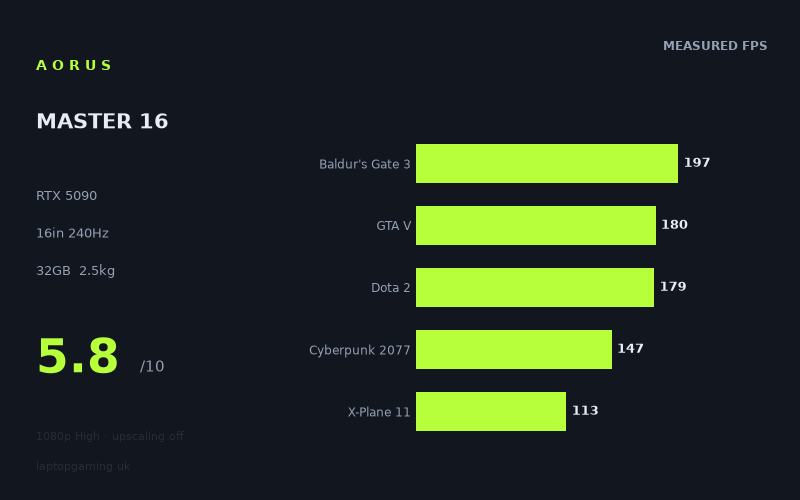
Frame rates
1920×1080, High preset, upscaling off. Averages 163fps across the 5 core benchmark games.
Measured on this machine. Source: Notebookcheck, 2025-06-02.
Not scored: no confirmed UK price
We have the full benchmark suite for this machine, so it ranks on the frame rate leaderboard like any other. What we don't have is a UK listing for this exact configuration - it's sold as a European review unit, or only in specifications that differ from the one tested. Since 30% of our score is value for money, scoring it would mean pretending price is no object, which would flatter it against every laptop you can actually buy. The frame rates below are real and comparable; there is just no buying recommendation to make yet.
How these numbers were produced
Frame rates here are not measured by us, and we label how each one was arrived at. A figure marked measured comes from a published run on that exact machine. A figure marked representative is derived from the GPU and its power limit (TGP) and cross-referenced against published reviews - a sound estimate of what that configuration delivers, but not a measurement of that specific laptop. Unless stated otherwise, numbers are 1920x1080, High preset, upscaling off. Where a laptop ships in several power configurations we use the wattage of the exact SKU listed, because a 140W RTX 5070 and a 115W one are not the same product.
In use
The short version
The Aorus MASTER 16 is an extremely fast gaming laptop with an excellent-looking specification on paper: an RTX 5090 with 24GB of VRAM, a Core Ultra 9 275HX, 32GB of memory, a 1024GB SSD and a 16in 2560x1600 240Hz OLED display. Notebookcheck’s measured game figures confirm that it is genuinely powerful. It reaches 425fps in Strange Brigade, 252fps in F1 24, 201fps in Final Fantasy XV and 197fps in Baldur’s Gate 3 at 1920x1080 on the High preset with upscaling disabled.
The problem is not that the Aorus MASTER 16 lacks speed. The problem is that it costs £6,007, which is an extraordinary amount of money for a machine whose performance does not clearly separate it from substantially less expensive alternatives. The Medion Erazer Beast 16 X1 Ultimate, another RTX 5090 laptop listed at £4,884, is ahead by 9fps on average across the games shared with this Aorus. The Aorus is also behind both Asus machines in the nearest comparison set, despite one of those rivals using an RTX 5080 rather than an RTX 5090.
That does not make the Aorus MASTER 16 slow. Far from it. It is capable of exceptionally high frame rates in less demanding games and still strong results in heavier modern titles. It also has a screen specification that makes sense for players who value an OLED panel and a 240Hz refresh rate. But those strengths need to be weighed against a price that is difficult to justify from the benchmark evidence alone.
This is therefore a laptop for a narrowly defined buyer: someone who specifically wants this combination of a 16in 240Hz OLED display, RTX 5090-class hardware, 24GB of VRAM and a high-end Core Ultra 9 processor, and who is prepared to pay well beyond the price of rival high-performance systems. It is not the sensible choice for someone who wants the most frames for their money. The measured figures are good enough to establish that it is a serious gaming machine; the rival data is strong enough to establish that it is not a compelling value machine at £6,007.
It is also important to be precise about what the published results do and do not show. The figures here are Notebookcheck’s measurements from 2025-06-02, taken at 1920x1080 on the High preset with upscaling disabled. They are useful for comparing the laptop with other machines tested under the same sort of conditions, and they show how the hardware behaves without leaning on DLSS, frame generation or another upscaling method. They are not direct evidence of frame rates at the laptop’s native 2560x1600 resolution, and they do not tell us what happens once ray tracing, higher texture settings or other demanding options are enabled.
That distinction matters particularly with this machine. A 240Hz screen can show a great deal more motion information than a conventional lower-refresh display, but only when the game and settings allow the system to deliver frames at a suitably high rate. In the lighter games measured, the Aorus can do that. In the more demanding titles, it cannot reach the panel’s full refresh rate at these test settings, let alone demonstrate that it can do so at 2560x1600. That is not a criticism unique to this laptop: modern graphically demanding games are difficult workloads even for high-end hardware. It does mean that buyers should treat the 240Hz panel as most relevant to esports, older games and technically lighter titles, rather than expecting every major new release to run at 240fps.
Performance
Notebookcheck’s benchmark data gives the Aorus MASTER 16 a broad rather than narrowly specialised performance profile. It can deliver extremely high frame rates where the game engine and graphics workload allow it, while remaining capable in difficult modern games. Across the five scoring-suite games, the measured mean is 163fps. That is a strong result in isolation, but the individual results are more useful than the mean because the gap between games is large.
At the top end of the results, Strange Brigade reaches 425fps. F1 24 follows at 252fps. Those are the two measured games that exceed the display’s 240Hz refresh rate at 1920x1080 High with upscaling disabled. In practical terms, those results show that the Aorus has enough performance for very high-refresh gaming in the right titles. A player concentrating on fast racing games, competitive games with modest graphics demands, older games or well-optimised engines has a strong chance of making meaningful use of the 240Hz panel, assuming the relevant game behaves similarly to the titles measured.
It is worth avoiding a simplistic conclusion from the 425fps Strange Brigade result. A figure that high does not mean every game will be similarly effortless, and it does not mean the laptop is somehow wasting performance in other titles. It tells us that Strange Brigade is a comparatively manageable workload for this hardware at the published settings. The result is useful because it establishes a ceiling: when a game is not heavily restricted by demanding effects, engine behaviour or processor limitations, the Aorus can produce frame rates far beyond what many displays can show. It does not set a baseline for new, visually demanding games.
F1 24 at 252fps is perhaps the more directly relevant 240Hz result. It is close enough to the panel refresh rate to show that the laptop can support a very fast display in a current racing game at the tested settings. That makes the Aorus potentially attractive to players who care about high-refresh racing performance and who are comfortable tuning settings around the measured configuration. However, the benchmark is still at 1920x1080 rather than the screen’s 2560x1600 native resolution. There is no published native-resolution result in the fact sheet, so it would be wrong to claim that F1 24 will maintain 240fps on the built-in panel at its full resolution.
Final Fantasy XV runs at 201fps, while Baldur’s Gate 3 reaches 197fps. These are both high figures and they place the Aorus close enough to the 240Hz ceiling that the display can still be useful even when it is not being fully saturated. A game does not need to run at exactly 240fps for a 240Hz screen to be worthwhile. The important point is that 201fps and 197fps are substantial frame rates, and they indicate that the system has room for responsive gameplay in titles that are less demanding than the heaviest modern releases.
Neither result should be presented as full-refresh performance, though. Final Fantasy XV is 39fps below the screen’s 240Hz refresh rate, and Baldur’s Gate 3 is 43fps below it. Those differences are derived from the supplied figures rather than additional benchmark data, but they illustrate the practical issue: the Aorus can be very fast without consistently reaching the full refresh ceiling. If the main reason for choosing this machine is the 240Hz OLED panel, the owner should expect some games to fall short of that ceiling even at the published 1920x1080 High settings.
GTA V measures 180fps and Dota 2 measures 179fps. These results remain excellent for general gaming and should make the system appealing to players who value high frame rates more than a fixed target of 240fps. Dota 2 at 179fps is particularly relevant because competitive multiplayer games are often the kind of titles for which a 240Hz display is bought. The measured figure is well above the performance level many players would consider smooth, but it does not fully use the panel’s maximum refresh rate in this particular configuration.
It would be easy to look at Dota 2 and assume that a laptop with an RTX 5090 ought to be locked at 240fps in that sort of game. The supplied evidence does not support that claim. Notebookcheck’s number is 179fps under the stated conditions, and that is the figure to use. Laptop gaming performance is influenced by more than the GPU model name. Processor behaviour, memory configuration, cooling, firmware tuning, game engine limits and the laptop’s power management can all shape results. The Aorus has a Core Ultra 9 275HX and 32GB of memory, which is a high-end configuration, but the benchmark result still shows that game-specific behaviour matters.
Cyberpunk 2077 records 147fps. That is a strong result for a demanding modern game at 1920x1080 High without upscaling, but it is a different class of result from the numbers in Strange Brigade or F1 24. It sits well below the display’s 240Hz refresh rate, so buyers should not choose the Aorus expecting every visually intensive game to turn into a 240fps experience merely because the machine has a 240Hz panel and an RTX 5090.
At the same time, 147fps is not a disappointing outcome in isolation. It indicates that the machine has enough performance headroom for a fast gaming experience in Cyberpunk 2077 at the benchmark settings. It also suggests that users who prefer image-quality settings over chasing the highest possible frame rate may have room to make different choices, although the fact sheet does not contain measurements for alternative presets, ray tracing, native resolution or upscaling. There is no basis here for claiming exactly what settings trade-off the laptop can make in that game.
X-Plane 11 reaches 113fps. This is a useful reminder that games and simulations do not all scale in the same way. A high-end GPU does not guarantee that every title will approach the display’s maximum refresh rate. Flight simulation workloads can behave differently from action games, and the supplied number places X-Plane 11 in a more moderate performance category on this laptop. At 113fps, the result is still comfortably above a conventional 60Hz target, but it does not turn the Aorus into a full-refresh 240Hz flight-simulation machine under the tested settings.
Doom: The Dark Ages measures 108fps, while Alan Wake 2 measures 95fps. These are the lowest two figures in the supplied list, and they are the most important results for setting realistic expectations. Both games are still running at frame rates that many players would consider good, but neither is remotely close to 240fps. The gap between 425fps in Strange Brigade and 95fps in Alan Wake 2 is not evidence of inconsistent hardware quality; it demonstrates how dramatically game workload changes from one title to another.
Alan Wake 2 at 95fps is particularly significant because it shows the limit of interpreting the RTX 5090 label too literally. This is an expensive laptop with top-tier components, but the benchmark data still has it below 100fps in one of the measured games at 1920x1080 High without upscaling. That does not make the result poor. It does mean that buyers considering the Aorus specifically for the most graphically demanding games should be realistic about the role of settings management and upscaling technologies. The fact sheet does not provide any upscaled result, so there is no attributable figure for what DLSS or another method might achieve.
The benchmark spread also explains why an average alone is insufficient. The published mean across the five scoring-suite games is 163fps, but that average combines 197fps in Baldur’s Gate 3, 180fps in GTA V, 179fps in Dota 2, 147fps in Cyberpunk 2077 and 113fps in X-Plane 11. A buyer whose library resembles Baldur’s Gate 3, GTA V and Dota 2 will experience the Aorus differently from a buyer who spends most of their time in simulations or new graphics-heavy releases. The machine is not equally suited to every type of gaming simply because its average is high.
The Aorus is strongest when the workload allows high frame rates, and the figures in Strange Brigade, F1 24, Final Fantasy XV, Baldur’s Gate 3, GTA V and Dota 2 make that clear. It remains capable in Cyberpunk 2077, X-Plane 11, Doom: The Dark Ages and Alan Wake 2, but those results show that demanding games can pull performance far away from the 240Hz target. That is exactly why a 240Hz screen should be treated as a capability rather than a promise.
GPU power limit: what the published information can and cannot tell us
The fact sheet identifies the graphics processor as an RTX 5090 with 24GB of VRAM, but it does not provide a GPU power limit for the Aorus MASTER 16. That means it is not possible to make a supported claim about how many watts this particular RTX 5090 is configured to use, whether it has a higher or lower power limit than another RTX 5090 laptop, or how aggressively Gigabyte has chosen to tune the GPU.
This is an important limitation because laptop GPU names are not the complete performance story. A laptop RTX 5090 is not automatically identical in behaviour to every other laptop RTX 5090. Power limits, cooling capacity, firmware behaviour and system design can affect sustained performance. Without the Aorus’s GPU power limit in the supplied information, the responsible conclusion is simply that its real-world benchmark position must be judged from its measured figures rather than assumed from the GPU badge.
The comparison data reinforces that point. The Aorus is 8fps behind the Asus ROG Strix Scar 16 across nine shared games, despite both laptops being listed with an RTX 5090. It is also 9fps behind the Medion Erazer Beast 16 X1 Ultimate across seven shared games, again with both machines using RTX 5090 graphics. Those outcomes do not tell us exactly why the differences exist, because the fact sheet does not supply the Aorus’s power limit, cooling data or the Medion’s and Asus’s full configurations. They do show that the RTX 5090 name alone is not enough to establish leadership.
There is a similar lesson in the Asus ROG Strix G16 comparison. That laptop has an RTX 5080 listed at 175W, yet the Aorus is 2fps behind it across ten shared games. The Aorus may still be the more expensive and more richly specified machine in some respects, but the shared-game numbers do not support an assumption that the RTX 5090 badge gives it a blanket performance advantage. If a buyer is paying for the top GPU name, that buyer should expect the measured results to support the premium. Here, they do not consistently do so.
For a prospective owner, the practical takeaway is straightforward. Buy the Aorus for the actual package it offers: its OLED panel, 24GB of VRAM, 32GB of memory, Core Ultra 9 processor and the measured performance it achieves. Do not buy it on the assumption that every RTX 5090 laptop performs alike, or that its GPU designation ensures it will beat an RTX 5080 system in all games. The published comparison data plainly does not show that.
The screen
The display is one of the Aorus MASTER 16’s strongest paper specifications. It is a 16in OLED panel with a 2560x1600 resolution and a 240Hz refresh rate. In a market where many high-end gaming laptops use fast LCD panels, an OLED display is a meaningful differentiator for buyers who specifically want that panel technology. The 2560x1600 resolution also gives the machine a taller format than a conventional 1920x1080 gaming display, which can be attractive for users who want additional vertical workspace as well as a gaming screen.
However, the screen needs to be considered alongside the benchmark conditions. Notebookcheck’s published figures were measured at 1920x1080, not at the screen’s native 2560x1600 resolution. That does not diminish the value of the benchmark data; 1920x1080 High without upscaling is a useful common comparison point. But it means there is no directly attributable evidence here for native-resolution frame rates.
Moving from the benchmark resolution to the panel’s native resolution requires the system to render more detail, and performance may therefore differ. The exact effect varies by game and settings, and the fact sheet contains no 2560x1600 benchmarks from which to quantify it. The sensible expectation is not that every measured 1920x1080 result will transfer unchanged to native resolution. Buyers who want to run every game at 2560x1600, High settings and close to 240fps should not infer that outcome from the supplied data.
The two results that exceed the panel’s refresh rate are Strange Brigade at 425fps and F1 24 at 252fps. At the benchmark resolution and settings, these show that the laptop can make full use of a 240Hz display in favourable games. F1 24 is especially close to the refresh ceiling, while Strange Brigade is far beyond it. For games that are similarly light on the hardware, older titles or competitive games with adjustable graphics settings, the panel has clear potential.
Final Fantasy XV at 201fps and Baldur’s Gate 3 at 197fps are also well suited to a high-refresh display, even if they do not fully hit 240fps. The difference between 197fps and 240fps matters to a buyer specifically targeting the highest possible refresh rate, but it should not obscure the fact that both figures are high. A screen capable of refreshing at 240Hz is still a suitable match for frame rates below that maximum.
GTA V at 180fps and Dota 2 at 179fps occupy a similar position. These are not full-refresh results, but they are clearly high-frame-rate results. Dota 2 is especially relevant to the question of whether this screen is useful for competitive gaming. The Aorus does not reach 240fps in the published Dota 2 test, but 179fps remains much closer to the high-refresh end of gaming than to the sort of performance associated with a basic 60Hz laptop display.
The screen’s 240Hz maximum becomes less directly relevant in Cyberpunk 2077 at 147fps, X-Plane 11 at 113fps, Doom: The Dark Ages at 108fps and Alan Wake 2 at 95fps. These results do not make the panel a poor fit; they simply show that the panel’s refresh ceiling is higher than the measured output in heavier games. In those titles, the OLED panel and 2560x1600 resolution may be more important reasons to choose the display than the 240Hz headline figure, but the fact sheet does not include panel brightness, colour coverage, response measurements or other display metrics that would allow a fuller assessment of image quality.
That lack of display measurement matters. “OLED” and “240Hz” are meaningful specifications, but they do not tell us everything about a panel. The supplied information does not include brightness, contrast measurements, colour accuracy, colour gamut, flicker behaviour, response-time measurements or HDR performance. It would therefore be wrong to present the screen as definitively best-in-class in all visual respects. What can be said is that the specification is unusually premium and well aligned with the class of hardware in the Aorus.
There is also a practical decision to make between native resolution and frame rate. A buyer may prefer to run lighter games at settings aimed at taking advantage of 240Hz, while using more demanding games at settings prioritising image quality. The machine’s benchmark spread makes that approach more plausible than a one-size-fits-all expectation. Strange Brigade and F1 24 show a system that can reach or exceed the panel ceiling at the published test settings. Alan Wake 2, Doom: The Dark Ages and X-Plane 11 show a system where the owner may need to decide what matters more in a given game: resolution, graphics settings, or higher frame rate.
For someone whose first priority is an OLED gaming display, the Aorus MASTER 16 has a strong case. For someone whose first priority is native-resolution 240fps in all games, the evidence does not support that expectation. No current benchmark list in the fact sheet demonstrates that level of performance at 2560x1600, and several games are below 240fps even at 1920x1080 High without upscaling.
Build, size and portability
The Aorus MASTER 16 weighs 2.493kg and has a 99Wh battery. Those are the portability facts available here, and they point to a machine that can be transported but should not be treated as lightweight. A 2.493kg laptop is substantial enough that it belongs in the large-performance-laptop category rather than the thin-and-light category. It is plausible for travel between home, work, university or events, but it is not the sort of system chosen primarily for minimal carry weight.
The weight also makes sense in the context of the hardware. This is a 16in laptop with an RTX 5090, 24GB of VRAM, a Core Ultra 9 275HX, 32GB of memory, a 1024GB SSD, a 99Wh battery and a 240Hz OLED screen. That is a dense collection of high-end components. Buyers should approach it as a portable desktop-style gaming system: a computer that can move location when necessary, rather than a machine that disappears into a bag.
The fact sheet does not provide the laptop’s dimensions, thickness, charger weight, port selection, keyboard layout, webcam details, chassis materials, fan noise or thermal figures. Those omissions matter when judging the complete ownership experience. It would be inappropriate to claim that the Aorus is compact, thin, quiet, cool-running, easy to carry with its charger, or particularly well built without supporting data.
The 99Wh battery is a large battery capacity in straightforward specification terms, but capacity is not battery life. The supplied facts do not contain a runtime measurement for web use, video playback, office work or gaming. Nor do they provide any battery gaming benchmark. High-performance gaming laptops can behave very differently away from the mains, and a 99Wh battery should not be turned into an unsupported claim about how long the Aorus lasts.
For gaming, the performance figures should be understood as benchmark results rather than portable, battery-powered promises. The fact sheet does not state whether Notebookcheck’s figures were taken on battery or mains power, and no battery performance figures are supplied. A buyer who expects the RTX 5090 to deliver the published frame rates while away from a power socket should seek specific battery-mode testing before spending £6,007.
What the available information does support is a clear use-case judgement. The Aorus is suitable for a buyer who needs a high-performance machine that can be moved from place to place and who accepts a 2.493kg laptop as part of that deal. It is less suitable for a buyer who travels constantly, works from small bags, values low system weight above all else, or wants a laptop chosen primarily around battery runtime. The 99Wh battery is a positive capacity figure, but it is not a substitute for measured endurance.
The 16in screen size is also relevant. It places the Aorus in a practical middle ground between smaller gaming machines and very large desktop replacements. The fact sheet does not include an 18in version comparison for physical size, but the listed rivals do include the Medion Erazer Beast 18 X1 and Acer Predator Helios 18 AI. Buyers considering those machines may prefer a larger display, whereas buyers drawn to the Aorus may prefer the more compact 16in category. That is a preference decision, not something the benchmark data can settle.
How it compares
The Aorus MASTER 16’s comparison position is the main reason it is difficult to recommend at £6,007. The published performance numbers are strong, but the nearest rivals show that high-end speed can be bought for less, and that similarly specified machines can be quicker. The comparisons are limited to games both machines have in common, which is the correct way to compare benchmark databases with incomplete overlap. They should not be read as universal claims about every game, but they are still meaningful evidence.
Against the Asus ROG Strix G16
The Asus ROG Strix G16 is listed with an RTX 5080 at 175W and has no confirmed UK price in the supplied information. Across ten shared games, the Aorus MASTER 16 averages 2fps behind it. This is a particularly awkward comparison for the Aorus because the Asus carries a lower-tier GPU label yet remains slightly ahead in the shared results.
The difference is small, and it would be unreasonable to present 2fps as a dramatic performance gulf. Game-to-game variation can matter more than a small shared-suite average. But it is still important because the Aorus is the laptop being sold for £6,007. At that price, buyers are entitled to expect clear evidence of leadership, not merely broadly similar performance to a rival RTX 5080 laptop.
The 175W figure belongs to the Asus specification, not the Aorus. Since the Aorus GPU power limit is not supplied, there is no basis for a watt-for-watt comparison or for claiming that power configuration explains the result. The only safe conclusion is that the Asus delivers a slightly higher shared-game average despite being identified as an RTX 5080 system. If the Asus gains a confirmed UK price below the Aorus’s £6,007, this comparison would become even harder for the Aorus to defend. At present, no confirmed price is available in the supplied facts, so no direct value calculation should be made.
Against the Asus ROG Strix Scar 16
The Asus ROG Strix Scar 16 is the more directly comparable Asus machine because it also has an RTX 5090. It has no confirmed UK price in the supplied data, but it is 8fps ahead of the Aorus across nine shared games. That is a more substantial performance gap than the 2fps deficit against the ROG Strix G16.
Again, the data does not explain the reason for the gap. The fact sheet does not provide power limits, cooling design, memory details or display specifications for the Scar 16. It would be speculation to assign the difference to any one component or tuning choice. What the data does establish is that the Aorus is not the strongest of the listed RTX 5090 laptops in shared-game performance.
For someone committed to buying an RTX 5090 laptop, the Scar 16 should be on the shortlist. Its unknown UK price prevents a complete value judgement, but its 8fps shared-game advantage means the Aorus cannot be recommended solely as the fastest available 16in RTX 5090 option. A buyer who prefers the Aorus OLED display may still choose it, but that would be a screen-led decision rather than a performance-led one.
Against the Medion Erazer Beast 18 X1
The Medion Erazer Beast 18 X1 uses an RTX 5080 and is listed at £2,499. The Aorus is 8fps ahead across eight shared games. This is the comparison most favourable to the Aorus in pure performance terms: it is ahead, and the gap is meaningful enough to recognise.
However, the pricing context is severe. The Aorus costs £6,007, while the Medion is listed at £2,499. The Aorus has the stronger RTX 5090 designation, 24GB of VRAM, a 16in OLED panel and a 240Hz refresh rate, while the supplied information identifies the Medion as an 18in RTX 5080 laptop. Those differences may matter to a buyer who wants the Aorus’s particular configuration. But an 8fps advantage across the shared games does not, by itself, make the Aorus’s price look proportionate.
The Medion is not necessarily the right alternative for every buyer. An 18in system has a different physical proposition from a 16in system, and the fact sheet does not provide its weight, panel type, refresh rate or other details needed to compare the full package. Still, this rival makes the central value issue impossible to ignore. Buyers who mainly want high gaming performance and are not specifically committed to a 16in OLED RTX 5090 laptop should investigate the £2,499 Medion carefully.
Against the Medion Erazer Beast 16 X1 Ultimate
The Medion Erazer Beast 16 X1 Ultimate is the most damaging comparison in the supplied list. It is an RTX 5090 laptop, it is listed at £4,884, and it is 9fps ahead of the Aorus across seven shared games. The Aorus therefore costs more while trailing in the shared benchmark set.
There may be reasons a buyer prefers the Aorus. Its 16in 2560x1600 240Hz OLED panel is a clear specification draw, and the fact sheet does not give enough display information for the Medion to establish whether its screen is comparable. Nor does the supplied information provide a full build, portability or feature comparison. But on the two figures that are available to assess directly — price and shared-game performance — the Aorus is in a weak position.
This is the rival that makes the Aorus difficult to recommend to a buyer who wants an RTX 5090 specifically. The Medion is less expensive by a large amount and has the better shared-game average. Unless the Aorus’s OLED panel is a decisive requirement, the benchmark evidence points toward the Medion as the more rational starting point.
Against the Acer Predator Helios 18 AI
The Acer Predator Helios 18 AI uses an RTX 5080 and is listed at £3,103. The Aorus is 10fps ahead across seven shared games. This is the largest stated performance advantage for the Aorus among the listed rivals, and it confirms that the Aorus can outperform some RTX 5080 systems by a useful margin.
Yet the price gap remains enormous. The Aorus costs £6,007, while the Acer is £3,103. A 10fps advantage across the shared games is real, but it does not automatically justify paying so much more. The Aorus also has a 16in OLED 240Hz screen, whereas the Acer is identified as an 18in laptop, so the systems target somewhat different preferences. A buyer who wants a large 18in machine may prefer the Acer’s class of design; a buyer who wants the Aorus’s 16in OLED specification may accept the smaller format.
Even so, the Acer comparison supports the same overall conclusion as the Medion comparisons: the Aorus has high performance, but it is priced at a level where each performance advantage needs to be substantial and obvious. A 10fps shared-game lead is not nothing. It is simply not enough to make £6,007 look like a straightforward bargain.
Who it’s for
The Aorus MASTER 16 is for the buyer who has very specific priorities and is willing to pay heavily for them. The strongest case is someone who wants a 16in OLED gaming laptop with a 2560x1600 resolution, a 240Hz refresh rate, an RTX 5090 with 24GB of VRAM, 32GB of memory and a Core Ultra 9 275HX. That buyer also needs to value the combination rather than any one item in isolation.
It is particularly suited to someone who plays a mix of high-frame-rate games and visually demanding single-player titles. The benchmark data shows it can excel in the former category, with 425fps in Strange Brigade and 252fps in F1 24, while still producing strong figures in games such as Final Fantasy XV, Baldur’s Gate 3, GTA V, Dota 2 and Cyberpunk 2077. The machine is not limited to esports-style workloads, but its screen is most fully exploited by lighter games and games that can sustain high frame rates.
It also makes sense for a buyer who sees 24GB of VRAM as an important part of a high-end purchase. The fact sheet does not include workload-specific memory tests, so no claim should be made about particular professional applications or future games. But the 24GB figure is a substantial part of the machine’s headline specification, and buyers who want that capacity rather than a lower-VRAM GPU may consider it worth prioritising.
The Aorus may also appeal to someone replacing a desktop setup but who still needs a system that can be carried between locations. At 2.493kg, it is transportable, but it should be chosen with realistic expectations. It is not a lightweight travel laptop. The 99Wh battery is a substantial capacity figure, but there is no supplied battery-life measurement, so it should not be bought on the assumption of a particular unplugged runtime.
It is not for the buyer whose main criterion is value. At £6,007, the Aorus faces direct competition from the Medion Erazer Beast 16 X1 Ultimate at £4,884, which is ahead by 9fps across seven shared games, and from the Medion Erazer Beast 18 X1 at £2,499, where the Aorus is only 8fps ahead across eight shared games. The Acer Predator Helios 18 AI is £3,103, with the Aorus ahead by 10fps across seven shared games. Those figures make it hard to argue that the Aorus is the efficient route to high frame rates.
It is also not for the buyer who assumes that an RTX 5090 laptop must be the outright leader in every benchmark comparison. The Aorus is behind the Asus ROG Strix G16 by 2fps across ten shared games despite the Asus using an RTX 5080 at 175W. It is behind the Asus ROG Strix Scar 16 by 8fps across nine shared games, and behind the Medion Erazer Beast 16 X1 Ultimate by 9fps across seven shared games. The Aorus is fast, but it is not uniquely fast.
Players who mainly play the most demanding recent games and want a stable 240fps target should also look elsewhere in their expectations, if not necessarily elsewhere in the market. The supplied figures show 108fps in Doom: The Dark Ages and 95fps in Alan Wake 2 at 1920x1080 High without upscaling. Those are respectable results, but they show that the panel’s 240Hz capability is not a universal gaming outcome. The Aorus is better understood as a laptop with a 240Hz screen that can be fully exploited in some games, rather than a machine that turns every demanding title into a 240fps experience.
Finally, it is not for someone who needs assured battery endurance, confirmed quiet operation, known thermal behaviour or a detailed portability assessment. The fact sheet gives a 99Wh battery and a 2.493kg weight, but no measured battery runtime, temperature figures, noise figures or dimensions. Those aspects may be important enough to some buyers that they should seek further attributable data before making a purchase.
The overall judgement is clear. The Aorus MASTER 16 is a powerful, premium-specification gaming laptop with a particularly attractive 16in 2560x1600 240Hz OLED display and genuinely strong Notebookcheck benchmark figures. It is capable of spectacular performance in the right games and remains fast in difficult titles. But at £6,007, it asks for a level of spending that the comparison data does not convincingly support. Buy it only if the OLED display, 24GB RTX 5090 configuration and specific Aorus package are exactly what you want. If your priority is simply maximum gaming performance for your money, the rivals listed here make much more persuasive alternatives.