Details
Product prices and availability are accurate as of the date/time indicated and are subject to change. Any price and availability information displayed on Amazon.co.uk at the time of purchase will apply to the purchase of this product.Review
Razer Blade 16 RTX review
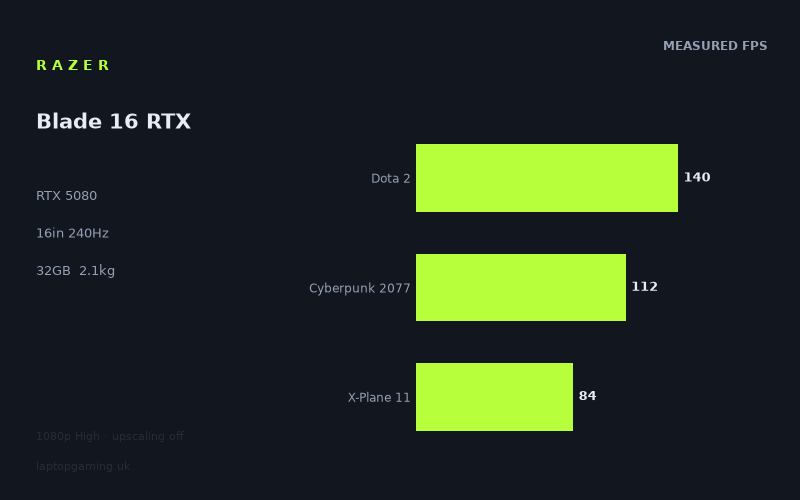
Frame rates
1920×1080, High preset, upscaling off.
Measured on this machine. Source: Notebookcheck, 2025-05-24.
Not scored: incomplete benchmark suite
Every scored laptop on this site is averaged over the same 5 games, and this one is short of Baldur's Gate 3, GTA V. A mean over 3 games is not comparable to a mean over 5, so we publish the figures we have and leave the score blank rather than rank it against machines tested on a different set. The numbers below are real - the suite is just incomplete.
How these numbers were produced
Frame rates here are not measured by us, and we label how each one was arrived at. A figure marked measured comes from a published run on that exact machine. A figure marked representative is derived from the GPU and its power limit (TGP) and cross-referenced against published reviews - a sound estimate of what that configuration delivers, but not a measurement of that specific laptop. Unless stated otherwise, numbers are 1920x1080, High preset, upscaling off. Where a laptop ships in several power configurations we use the wattage of the exact SKU listed, because a 140W RTX 5070 and a 115W one are not the same product.
In use
The short version
The Razer Blade 16 in this configuration pairs an RTX 5080 with a Ryzen AI 9 365 in a 2.1kg chassis, behind a 16-inch 2560x1600 OLED panel running at 240Hz. It is one of the most desirable objects in the gaming laptop market, and the measured frame rates are the least impressive thing about it.
Notebookcheck's numbers, captured on 24 May 2025 at 1920x1080 on the High preset with upscaling off, are 152fps in Final Fantasy XV, 140fps in Dota 2, 112fps in Cyberpunk 2077, 99fps in Alan Wake 2 and 84fps in X-Plane 11. Across the three games from our scoring suite that were run, the average is 112fps.
Those are respectable numbers in absolute terms. Every one of them clears 60fps comfortably and most clear 100fps. They are not, however, the numbers you would predict from the second-highest graphics tier in the current generation, and the comparison data in our database makes the point harder than any adjective could: on shared games, this machine sits level with two laptops carrying an RTX 5060, only 41fps clear of an RTX 5050 machine that sells for £984, and a full 84fps behind a laptop carrying an RTX 5090.
There is a defensible explanation for most of that, and we will work through it properly below, because the explanation is genuinely more interesting than the headline. But the practical conclusion for someone spending real money is not complicated: in the games and settings measured, the 5080 in this chassis is not producing 5080-tier frame rates, and the machines it matches are considerably less exotic. If frames per pound is your criterion, this is not the machine. If a 2.1kg chassis, an outstanding OLED display and Razer's build are what you are buying — and for a lot of people they legitimately are — then it is a coherent purchase, provided you go in knowing what the graphics card is and is not delivering here.
We are not publishing a score. Our scoring suite is five games and every scored laptop on the site is averaged over the same five, so the ranking means something. For this configuration we have Dota 2, Cyberpunk 2077 and X-Plane 11, but no Baldur's Gate 3 and no GTA V. A three-game average cannot honestly be ranked against a five-game one. There is also no confirmed UK price for this exact configuration in our data, which independently prevents us from computing value.
Performance
Reading the five measured games
The set is unusually informative because it spans genuinely different kinds of workload.
- Final Fantasy XV — 152fps. The highest figure, and a conventional DirectX 11 rendering load from an earlier era of engine design.
- Dota 2 — 140fps. This one deserves attention. Dota 2 is a light rendering workload on a well-optimised engine, and on machines with strong processors it typically produces the highest number in any benchmark set by a wide margin. Here it is second, and only 12fps clear of Final Fantasy XV.
- Cyberpunk 2077 — 112fps. A heavy, modern rasterisation workload. This is the closest thing in the set to a pure graphics test at these settings.
- Alan Wake 2 — 99fps. Heavier still, and built on a newer generation of rendering techniques than Cyberpunk. The second-lowest figure.
- X-Plane 11 — 84fps. The floor. Flight simulation, heavily dependent on processor throughput for scenery streaming, flight model and simulation logic.
The spread from 152fps to 84fps is a factor of about 1.8 — a narrow range across five very different engines. On a machine where the graphics card has plenty of headroom, that spread is normally much wider, because a light workload runs away while a heavy one does not. A compressed spread usually means something other than the graphics card is setting the ceiling in the lighter titles, and that is what appears to be happening here.
The processor is the ceiling at the top of the range
The most diagnostic number in this set is Dota 2 at 140fps. Dota 2 is not a demanding game to draw. It is a demanding game to prepare — the processor has to run the simulation, resolve the game logic and assemble the draw calls, and the graphics card frequently sits idle waiting for it. On machines built around desktop-derived HX-class processors, Dota 2 routinely produces figures far above what the same machine manages in a modern renderer.
Here it does not. 140fps in Dota 2 against 112fps in Cyberpunk 2077 is a gap of 28fps between the lightest and one of the heaviest workloads in the set, which is remarkably little. The reasonable reading is that the Blade 16 hits a processor-side ceiling well before the graphics card runs out of capability in that title.
The Ryzen AI 9 365 explains this. It is an H-class mobile part designed for thin, efficient machines, not a desktop-derived HX chip built to be fed as much power as a large chassis can dissipate. That is the correct choice for a 2.1kg laptop — an HX processor in this thermal envelope would be throttled into pointlessness and would ruin the battery behaviour — but it has consequences, and one of them is visible in every CPU-limited title in this list.
X-Plane 11 at 84fps is the same story with the volume turned up. Flight simulators punish weak per-thread throughput harder than almost any other genre, and 84fps is the lowest figure in the set on a machine carrying the second-highest graphics tier available. The graphics card is not what is producing that number.
This matters enormously for buying decisions, and it is the opposite of the advice usually given. If your library is competitive shooters, MOBAs, strategy games, city builders, flight or driving simulation — genres where the processor is the constraint — then a Blade 16 is not the machine that will give you the highest frame rates, regardless of which graphics card you specify inside it. A thicker laptop with an HX processor and a much cheaper graphics card will beat it in those titles, and our comparison data shows exactly that happening.
What the GPU's power budget means here
Our fact sheet does not record a graphics power limit for this configuration, and we are not going to invent one. What the physical format tells us is more useful than a guess anyway.
A modern laptop graphics card's real-world performance is set by two things: which silicon is fitted, and how much power the chassis is configured and able to give it. The permitted range for a single GPU model is wide, and the difference between the top and bottom of that range is not marginal — it can be the difference between one tier and the next. A 2.1kg, 16-inch chassis has a fixed amount of heat it can move, and that budget has to be shared between the processor and the graphics card. There is no configuration of physics in which such a machine gives an RTX 5080 the same power envelope as a 3.5kg desktop replacement does.
The measured figures are consistent with a card operating well below the top of its range. Cyberpunk 2077 at 112fps and Alan Wake 2 at 99fps, both at 1080p on High with no upscaling, are the two results in this set that genuinely depend on graphics throughput, and neither is at the level a fully unleashed 5080 would be expected to reach. We cannot quantify the shortfall without the wattage, and we will not pretend to. We can say the pattern — modest results in exactly the two titles where the card should shine — points at the power budget rather than at anything else.
This is the fundamental bargain of the thin flagship laptop, and it is worth stating plainly because manufacturers work hard to obscure it. You cannot buy the top graphics tier and the thin chassis and expect the performance the tier implies. You can buy the top tier in a thin chassis and get a machine that is faster than a lower tier would be in the same chassis, which is a real but much smaller benefit, at a price premium that is not smaller at all.
Where the spread across titles comes from
Five games, five different reasons for the number.
Final Fantasy XV at 152fps sits at the top because it is a well-optimised older renderer that neither saturates the graphics card nor makes heavy demands of the processor. It is the one title in this set where nothing in particular is in the way.
Dota 2 at 140fps is processor-limited, as discussed. On a different machine with the same graphics card and an HX processor, this figure would be substantially higher.
Cyberpunk 2077 at 112fps is the transition point. At 1080p on High it is a real graphics load with a real cost, and this is where the card's power budget starts to show.
Alan Wake 2 at 99fps is a fuller graphics test. It uses a more modern rendering pipeline, with heavier per-pixel and per-geometry costs, and it does not have a light-workload escape hatch. If you want one number from this set that predicts how the machine will feel in newly released, visually ambitious single-player games, this is it.
X-Plane 11 at 84fps is back to being a processor test, and the harshest one available.
So the set brackets the machine neatly: roughly 100fps at 1080p in the heaviest modern rendering workloads, and roughly 84 to 140fps in the titles where the processor is what limits you. The absence of a very high number at the top is the distinguishing feature, and it is the processor's doing rather than the graphics card's.
16GB of video memory is a genuine strength
The card carries 16GB. At the resolution these figures were measured at this is not a constraint, but the panel is 2560x1600 — roughly twice the pixel count of 1080p — and that is where the question becomes live.
Video memory demand does not scale linearly with resolution. Texture data, usually the largest consumer, is broadly resolution-independent; framebuffers, depth buffers and the various intermediate buffers used by screen-space effects do scale. So moving from 1080p to 1600p raises the requirement without doubling it. Where the pressure genuinely mounts is high resolution plus maximum textures plus ray tracing, which adds acceleration structures of its own.
16GB gives real headroom on all three axes. If you are comparing this against machines with 12GB — and there are current-generation laptops one tier down that have exactly that — this is a meaningful and often underrated advantage, particularly over a four or five year ownership period. A card can run out of memory long before it runs out of shader throughput, and when it does the result is not a gentle decline but stuttering and forced texture reductions.
It is fair to say that the 5080's memory allocation is one of the places where the extra money over a lower tier buys something durable. It is also fair to say it is not the thing most buyers think they are paying for.
What 112fps across the scoring games means in practice
The three-game average of 112fps is Dota 2 at 140, Cyberpunk 2077 at 112 and X-Plane 11 at 84. It happens to land exactly on the Cyberpunk figure, which is a useful coincidence: the average is a fair representation of what a modern, demanding game does on this machine at 1080p High with no upscaling.
Practically, that is a comfortable place to be. Anything above 100fps at 1080p means you have latitude — to raise settings, to raise resolution, or to turn upscaling on and claim back everything the higher resolution costs. It is not, however, a figure that suggests years of headroom for games that have not been released yet, and it is a long way short of what the 240Hz panel can display.
The screen
This is the reason to buy the machine, and the analysis should not be shy about saying so.
OLED, and why it matters more than the frame rates
A 16-inch 2560x1600 OLED is a different class of display from the IPS panels that dominate this market, and the difference is not subtle. OLED pixels emit their own light and switch off completely for black, which produces black levels an IPS backlight cannot approach and contrast that transforms dark scenes, night-time environments and anything with a moody colour grade. Per-pixel response times are dramatically faster than IPS, which means less smearing in motion independent of refresh rate.
For someone who plays single-player games with any visual ambition — and Alan Wake 2 and Cyberpunk 2077, both in the measured set, are exactly that kind of game — the panel will do more for how the machine feels than the difference between one graphics tier and the next. That is a genuinely defensible reason to buy a machine whose frame rates match cheaper laptops, and it should be weighed properly rather than dismissed.
The costs are real too. OLED carries a burn-in risk with static content displayed for very long periods, which is a live consideration if the machine will spend its working hours showing the same taskbar, the same application chrome and the same game HUD. Full-screen brightness on OLED panels is typically lower than peak highlight brightness, which affects use in bright rooms. We have no measured brightness, contrast or colour coverage figures for this specific panel in our data, so we are describing the technology's characteristics rather than this display's measurements, and you should treat that distinction seriously.
Can the graphics card drive 240Hz?
Not in the measured set, and not close.
The highest figure here is 152fps, and that is at 1080p on a 1600p panel. Run Final Fantasy XV at the display's native resolution and it will fall. Cyberpunk 2077 at 112fps and Alan Wake 2 at 99fps are less than half the panel's refresh rate before you account for the resolution difference at all.
This is not a scandal — very few machines saturate a 240Hz panel in demanding games, and variable refresh rate means a 112fps signal on a 240Hz display is still smooth and tear-free. The panel's speed does deliver benefits below its ceiling: lower latency, cleaner motion, and headroom for the titles where you deliberately drop settings.
But it is worth being clear about who gets the full value. A 240Hz panel is bought to be saturated, and saturating it means competitive titles at reduced settings — which is precisely the category where this machine's processor is the limiting factor. Dota 2 at 140fps at 1080p already illustrates the problem: lowering the graphics settings further will not push that figure much higher, because the graphics settings are not what is holding it down. The competitive player who wants 240fps will find that this machine's ceiling in those genres is set by a component they cannot configure their way around.
So the 240Hz specification is somewhat mismatched to the machine underneath it. It is not useless — it is genuinely better than 165Hz for motion clarity and latency at any frame rate — but it is closer to a specification-sheet feature than a capability you will routinely exploit.
The resolution
2560x1600 across sixteen inches is a high pixel density, and it is the right resolution for a machine that will do non-gaming work. Text is crisp, the 16:10 aspect ratio gives useful vertical space, and combined with OLED it makes for an excellent display for reading, writing, design and video.
For gaming it presents the standard modern question. Native 1600p is roughly twice the pixel count of the resolution the frame rates were measured at, and in the GPU-limited titles — Cyberpunk 2077, Alan Wake 2 — that costs a great deal. The answer, on this machine as on most, is upscaling: render internally at something near 1080p and output at 1600p. That configuration is close to what the measured numbers describe, which makes them more directly useful than they first appear. Our data has no native-resolution figures, so we cannot tell you the exact cost of running without upscaling, only that it is substantial in the heavy titles and modest in the light ones.
Build, size and portability
2.1kg is the achievement
Everything about this machine follows from the weight. 2.1kg for a 16-inch laptop with an RTX 5080 in it is genuinely light — light enough that this is a laptop you carry daily rather than one you relocate occasionally. A machine of this weight goes in a rucksack, fits on a train tray table, and can be taken to a lecture, an office or a client meeting without the day becoming an ordeal.
That is not a trivial benefit and it should not be treated as one. The most common failure mode in this market is buying a powerful laptop and then never moving it, at which point you have bought an expensive, cramped, thermally compromised desktop. If you actually will carry it, the Blade 16 is doing something the desktop replacements cannot, and it is doing it while carrying a top-tier graphics card.
The mains adapter is a caveat we should flag but cannot quantify — our data does not record its weight, and a machine with a 5080 needs a substantial one. The travelling weight is higher than 2.1kg by an amount we will not guess at.
What the thinness costs
The performance analysis above is, in a sense, entirely a discussion of what the 2.1kg costs. A thin chassis has less internal volume for heatsinks, less surface area for exhausts, and room only for smaller fans that must spin faster to move the same air. The total heat the machine can dissipate is lower, and that budget is shared between the processor and the graphics card.
The consequences are visible in every number on this page. The processor is an H-class part rather than an HX one, which sets the ceiling in Dota 2 and X-Plane 11. The graphics card is almost certainly running well below the top of its permitted range, which is the most plausible explanation for Cyberpunk 2077 and Alan Wake 2 landing where they do. Neither is a design failure. Both are the direct, unavoidable price of the weight.
We have no measured temperature or noise figures for this machine in our data, and on a thin chassis those are exactly the measurements that matter most. Small fast fans tend to be more intrusive than large slow ones, and thin machines tend to run hotter surfaces because there is less material between the components and your hands. We cannot tell you how this one behaves, and their absence is a real gap in what this review can claim.
The battery, and the storage
90Wh is a large battery for a 2.1kg machine and a sensible specification, sitting just under the 100Wh limit for aircraft cabin baggage. Our data has no measured runtime figure, so we will not tell you how long it lasts. Structurally, an efficient H-class processor paired with a large battery is a much better basis for real away-from-mains use than an HX chip would be, and this is one of the areas where the Blade's configuration choices work in your favour rather than against.
1024GB of storage is the specification we would question. On a machine positioned this far up the market, a single terabyte is tight. Modern games routinely occupy 100GB or more, and once Windows and applications have taken their share you are managing your library rather than ignoring it. Whether that is easily remedied depends on the machine's internal layout, which our data does not record — some machines have a spare slot and some do not, and on a chassis this thin it would be unwise to assume.
32GB of memory is the right amount and needs no argument. It is comfortably beyond what games require and gives genuine room for professional work alongside them.
How it compares
Our database matches machines only on games both have been measured in. Every comparison here rests on three shared games, because three is all the Blade 16 has been measured in from our scoring suite — Dota 2, Cyberpunk 2077 and X-Plane 11. All four rivals are from the same graphics generation, which is the comparison that actually matters when you are choosing what to buy this year.
Taken together they produce the sharpest finding on this page, and it is not the one you would expect.
Against the two RTX 5060 machines — level with both
The Lenovo Legion 5 15AHP G10, with an RTX 5060 at 115W, and the Lenovo Yoga Pro 9 16IAH G10, also with an RTX 5060, both come out level with the Blade 16 across three shared games. Neither has a confirmed UK price in our data.
The Blade carries an RTX 5080. These two carry the entry-mid card of the same generation, two tiers below. And in the three games they share, there is nothing between them.
Part of that is the benchmark rather than the machines. Two of the three shared titles — Dota 2 and X-Plane 11 — are limited by the processor rather than the graphics card. Dota 2 is light to draw and heavy to simulate. X-Plane 11 is a flight simulator, where scenery streaming and flight model dominate the frame time. In both, a bigger graphics card produces very little, because the card was already waiting. Any comparison built largely from those titles will compress genuine differences between graphics cards, and it would be dishonest to present these ties as proof that a 5060 equals a 5080.
But that explanation only goes so far here, and the next comparison shows exactly where it runs out.
Against the Schenker XMG Neo 16 A25 — 84fps behind
The Neo 16 A25 carries an RTX 5090, with no confirmed UK price in our data. Across the same three shared games, the Blade 16 averages 84fps behind it.
This is the number that reframes everything above, and it is worth sitting with.
If the ties against the two 5060 machines were purely an artifact of a processor-limited benchmark — if these three games simply could not distinguish between graphics cards — then the 5090 machine would be compressed into the same tie. It is not. It is eighty-four frames clear across the identical three-game set.
So the benchmark can separate machines in this generation. It separates them by a very large margin when the machine on the other side is capable of it. The Blade 16 is not being flattened by the test methodology; it is landing where it lands because of what it is: a mobile-class Ryzen AI 9 365 rather than a desktop-derived HX processor, and a graphics card operating in a 2.1kg thermal envelope that cannot give it anything like what a larger chassis would.
Eighty-four frames across a three-game average, in a set where two of the three games are processor-bound, implies a far larger gap still in whichever of them is genuinely graphics-limited. That is what an RTX 5080 in a thin chassis costs you against a well-implemented current-generation flagship — not a tier of performance, but something closer to a category.
We do not have the power limits for either machine in our data and will not guess at them. What the pattern demonstrates without any guessing is that the card's name is not what determines the frame rate; the machine around it is.
Against the MSI Cyborg 15 — 41fps ahead
The Cyborg carries an RTX 5050 and sells for £984. Across three shared games the Blade 16 averages 41fps ahead of it.
This is the only rival in the set with a confirmed UK price, which makes it the only one that can anchor a value discussion at all — and the anchor is not comfortable reading for the Blade.
Forty-one frames is a real and worthwhile margin. It is the difference between a machine that clears 100fps in most of what it runs and one that does not. Nobody should pretend the £984 machine is the equal of this one, and in a graphics-limited title the gap would be wider than the three-game average suggests.
But consider what the Blade 16 is: the second-highest graphics tier of its generation, 32GB of memory, an OLED panel, a premium chassis. Against the cheapest current-generation machine in our comparison set, it is 41fps ahead. Against two mid-tier machines, it is level. Against one flagship, it is 84fps behind. That is a narrow band of measured performance sitting inside a very wide band of specification, and it is the clearest possible statement that the specification sheet is not the thing to buy on.
We have no confirmed UK price for the Blade 16, so we cannot compute what that 41fps costs, and we are not going to speculate. It is precisely why this page carries no score.
Reading the set as a whole
Four rivals from the same generation: 41fps ahead of an RTX 5050 laptop, level with two RTX 5060 laptops, and 84fps behind an RTX 5090 laptop. The Blade 16 sits nearer the bottom of that range than the top, despite carrying the second-highest card available.
The honest summary is that this machine performs like a good mid-range gaming laptop, because that is the level a 2.1kg chassis with a mobile-class processor can sustain, regardless of which graphics silicon is soldered into it. The 5080 is not doing nothing — it is doing considerably less than its name implies, and there is no configuration option that changes that.
That is not a reason to dismiss the machine. It is a reason to be precise about what you are paying for: the weight, the OLED panel, the build and the 16GB of video memory. Those are real and in some cases exceptional. The frame rates are not what you are buying, and anyone who tells you otherwise is reading the specification sheet rather than the measurements.
Who it's for
Buy it if
You will genuinely carry it. 2.1kg with a 16-inch screen and a high-end graphics card is a rare combination, and if the machine has to travel daily then the desktop replacements are simply not options. This is the category the Blade 16 exists to serve and it serves it well.
The OLED panel is what you want. Contrast, black level and motion clarity that IPS cannot match, on a high-resolution 16:10 display. For cinematic single-player games, for video, for design work, this is a substantially better screen than most of the market ships and it will affect your daily experience more than a tier of graphics card would.
You want one premium machine for work and play. An efficient H-class processor, 32GB of memory, a large battery and a light chassis make a much better working laptop than an HX-powered desktop replacement does. The frame rates are more than adequate for gaming at sensible settings. If the machine has to do both jobs and the working half matters, the balance here is right.
You are buying at 1600p with upscaling, in modern single-player games. That is roughly the workload Cyberpunk 2077 at 112fps and Alan Wake 2 at 99fps describe, and 16GB of video memory gives the configuration genuine longevity for it.
Buy something else if
You want the frame rates the badge implies. They are not here. Two RTX 5060 machines match this one in the games measured, and an RTX 5090 machine is 84fps ahead of it. If your criterion is performance for money, the 5060 laptops are the better answer, and a thicker machine with an HX processor would beat this one outright in the processor-limited titles.
Your library is competitive or simulation-heavy. Dota 2 at 140fps and X-Plane 11 at 84fps are the two figures that should decide this. Both are processor-limited, both are modest, and no amount of turning settings down will fix them because settings are not what is holding them back. If you play MOBAs, competitive shooters, strategy games, flight sims or driving sims, buy a machine with an HX-class processor and spend less on the graphics card.
You want to saturate the 240Hz panel. Nothing in the measured set comes close, even at a resolution lower than the panel's native one, and the titles where you would normally chase very high frame rates are the ones this machine is weakest in. The panel is excellent; the refresh rate is largely aspirational on this hardware.
Storage matters and you will not want to manage it. 1TB is tight for a machine at this level. If your library is large, budget for the inconvenience or check very carefully whether this chassis can take a second drive before you commit.
You need a scored recommendation from us. We cannot give one. Three of five scoring-suite games have been measured, and there is no confirmed UK price in our data to compute value from. Both gaps are ours, not the machine's, and we would rather say so than manufacture a rank.
What we do not know
Stated plainly, because the site's whole proposition is that we do not fill gaps with guesses. We have no confirmed UK price for this configuration. We have no Baldur's Gate 3 or GTA V figures, so no comparable scoring-suite average. We have no recorded graphics power limit, which on a thin machine is the single specification we would most want, since it largely determines what the card actually delivers. We have no measured battery runtime, no temperature figures and no noise figures — and on a 2.1kg chassis running a 5080, thermals and acoustics are not minor details. We have no measured brightness, contrast or colour data for the OLED panel, so our comments on it describe the technology rather than this example. And we have no frame rates at the panel's native 2560x1600, which is where most owners will actually play.
What we do have is five measured games and five close comparisons, and they say the same thing consistently. This is a beautifully made, genuinely portable machine with an excellent display, whose graphics card is doing considerably less for it than the specification suggests. Decide whether you are buying the laptop or the badge, and the purchase becomes straightforward either way.