Review
HP Omen 16-b1090ng review
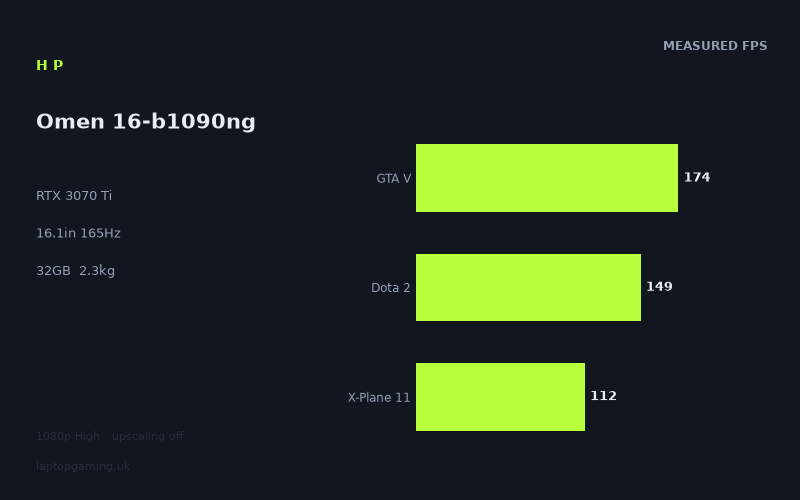
Frame rates
1920×1080, High preset, upscaling off.
Measured on this machine. Source: Notebookcheck, 2022-05-04.
Not scored: incomplete benchmark suite
Every scored laptop on this site is averaged over the same 5 games, and this one is short of Cyberpunk 2077, Baldur's Gate 3. A mean over 5 games is not comparable to a mean over 5, so we publish the figures we have and leave the score blank rather than rank it against machines tested on a different set. The numbers below are real - the suite is just incomplete.
How these numbers were produced
Frame rates here are not measured by us, and we label how each one was arrived at. A figure marked measured comes from a published run on that exact machine. A figure marked representative is derived from the GPU and its power limit (TGP) and cross-referenced against published reviews - a sound estimate of what that configuration delivers, but not a measurement of that specific laptop. Unless stated otherwise, numbers are 1920x1080, High preset, upscaling off. Where a laptop ships in several power configurations we use the wattage of the exact SKU listed, because a 140W RTX 5070 and a 115W one are not the same product.
In use
The short version
The HP Omen 16-b1090ng is a strong high-refresh gaming laptop on the evidence that matters most: its published game results. Notebookcheck’s measured figures at 1920x1080 on the High preset, with upscaling off, show an RTX 3070 Ti and Core i7-12700H combination that is capable of very high frame rates in a broad range of games. It is particularly convincing in lighter, older or well-optimised titles, where results reach 196fps in Vampire Bloodhunt, 195fps in Back 4 Blood, 188fps in The Witcher 3 and 174fps in GTA V.
That makes this a sensible fit for someone who wants a 16.1in laptop with a 165Hz screen and mostly plays competitive games, established online games, older AAA releases or games that can run comfortably at high frame rates without relying on upscaling. The benchmark data also shows that it remains capable in more demanding titles: Outriders reaches 136fps, Days Gone 135fps, Tiny Tina’s Wonderlands 115fps, Deathloop 112fps and Final Fantasy XV 100fps. This is not a machine that falls apart once a game becomes more visually demanding.
The important limitation is that the screen is a 2560x1440 panel, while the supplied measured frame rates are at 1920x1080. The figures demonstrate excellent 1080p High performance, but they do not prove that every result will carry over to the panel’s native resolution. A higher resolution puts more work on the GPU, and there are no 2560x1440 benchmark results in the fact sheet. Buyers who insist on playing every game at native resolution, at high settings, and near the screen’s 165Hz refresh rate should therefore be cautious. The Omen’s 1080p results are strong, but they should not be misrepresented as native-1440p numbers.
There is also a clear divide between games that can make full use of a 165Hz screen and games where the GPU will need a more selective approach to settings if maximum fluidity is the goal. Vampire Bloodhunt, Back 4 Blood, The Witcher 3 and GTA V all exceed the panel refresh rate in the supplied results. Strange Brigade at 164fps is effectively at that level too. Dota 2 and Farming Simulator 22 both reach 149fps, while Ghostwire Tokyo reaches 146fps. These are all very good outcomes, but they are not all identical experiences: 196fps in a fast competitive game gives more headroom than 146fps in a demanding action title.
At the tougher end of the list, the results become more conventional for this class of GPU. New World reaches 93fps, Dying Light 2 reaches 70fps and Elden Ring reaches 60fps. Those are not poor figures, but they show why the Omen should be viewed as a high-performance 1080p machine first, rather than a laptop guaranteed to deliver 165fps in every modern game. The 165Hz display is an advantage when a game can use it; it is not a promise that every game will reach it.
The configuration is otherwise appropriately specified for gaming. It combines the RTX 3070 Ti with a Core i7-12700H, 32GB of memory and a 1TB SSD. The available figures do not provide storage speeds, memory configuration, CPU-only benchmarks, temperatures, fan noise, keyboard quality, chassis materials or port selection, so those are not areas where a data-led verdict can be made. What can be said with confidence is that the published gaming data is strong, the 32GB memory allocation is generous for a gaming laptop, and the 1TB SSD is a useful baseline for a library containing large modern games.
There is no confirmed UK price for this exact HP Omen 16-b1090ng configuration. That means value cannot be assessed properly, and no value verdict should be inferred from the performance results alone. The benchmark suite is complete and the machine ranks normally on the frame-rate leaderboard; the absence of a value judgement is solely because the price needed to calculate it is not confirmed.
In practical terms, this is a laptop for buyers who prioritise measured gaming performance and want a sizeable 16.1in 165Hz IPS display without moving to an especially heavy desktop-replacement class. At 2.29kg, it is portable enough to move regularly, but it is not an ultralight machine. It looks most appealing for someone who will play a mixture of multiplayer games, older and newer AAA games, and who is comfortable choosing sensible resolution and settings choices depending on the game.
Performance
What the benchmark data says
Notebookcheck measured the HP Omen 16-b1090ng at 1920x1080 using the High preset with upscaling disabled. That test condition matters. It gives a clean view of the laptop’s conventional rasterised gaming performance without a frame-rate boost from upscaling, but it is not the same thing as measuring games at the laptop screen’s native 2560x1440 resolution.
The overall picture is very good. Across the five scoring-suite games, the Omen averages 140fps. Those games are GTA V at 174fps, Strange Brigade at 164fps, Dota 2 at 149fps, X-Plane 11 at 112fps and Final Fantasy XV at 100fps. That spread is useful because it covers several different kinds of workload. GTA V remains relatively easy for modern gaming hardware to run at high frame rates. Dota 2 is a competitive title where CPU performance and game-engine behaviour can have an important role. X-Plane 11 is a more simulation-heavy game, while Final Fantasy XV is a more demanding graphical workload. The Omen remains strong across all of them, but it does not produce a uniform result.
The headline results are in Vampire Bloodhunt and Back 4 Blood, at 196fps and 195fps respectively. These are the clearest examples of the laptop being able to exploit a 165Hz panel at the stated 1080p High settings. The Witcher 3 reaches 188fps and GTA V reaches 174fps, again placing them above the display refresh rate. Strange Brigade is measured at 164fps, which is essentially the same class of result from a display-use perspective: the panel’s high refresh rate is not wasted in that game.
Those figures are valuable because a laptop display refresh rate can otherwise become a marketing number rather than a usable benefit. Here, there are measured games that genuinely exceed or approach 165fps. A player focused on smooth camera movement, reduced motion blur from high refresh operation and responsive-feeling gameplay has evidence that the Omen can deliver that experience in several games. It is not merely fitted with a 165Hz display that the hardware can never approach.
The next group of results is also strong, even where it sits below 165Hz. Dota 2 and Farming Simulator 22 both reach 149fps. Ghostwire Tokyo reaches 146fps. Outriders delivers 136fps and Days Gone delivers 135fps. These figures indicate a laptop that remains comfortably into high-frame-rate territory across a wide variety of engines and genres. They also show why raw refresh-rate matching is not the only useful measure of gaming performance. A game running at 149fps does not somehow become a poor experience because the screen is capable of 165Hz. It is still running at a high frame rate, and it still benefits from a panel that can display more than the conventional 60Hz class.
Tiny Tina’s Wonderlands at 115fps, Deathloop at 112fps and X-Plane 11 at 112fps form another meaningful group. The Omen is still well above 100fps in each of them at the stated settings. For many players, that is an excellent result. It gives room for an experience that is much more fluid than basic console-style frame-rate targets, while avoiding the need to reduce settings immediately. It also demonstrates that the RTX 3070 Ti is not restricted to esports-style workloads in this laptop. It can deliver strong results in demanding single-player and action-focused games as well.
Final Fantasy XV reaches 100fps and New World reaches 93fps. These are still respectable outcomes, but this is where the difference between “high refresh capable” and “always near the panel maximum” becomes important. The Omen can run these games quickly at 1080p High, but the benchmark data does not put them into the same category as Vampire Bloodhunt, Back 4 Blood or GTA V. Buyers whose favourite games resemble New World more than Dota 2 should treat the 165Hz screen as useful headroom rather than a target that will be reached in every situation.
Dying Light 2 reaches 70fps and Elden Ring reaches 60fps. These are the results that keep the review grounded. The Omen’s performance is strong overall, but it cannot erase the fact that some modern games are significantly more demanding than others. Dying Light 2 is far below the laptop’s results in the lighter games, and Elden Ring is measured at 60fps. That does not mean the laptop is weak; it means game engines, graphics settings and title-specific limits matter. A laptop that delivers 196fps in one game can still be operating in a very different performance bracket in another.
The spread between games matters
The range from 196fps in Vampire Bloodhunt to 60fps in Elden Ring is not a contradiction in the benchmark data. It is precisely why a single average frame rate is never enough to describe a gaming laptop. Different games load the system in different ways. Some are limited more heavily by CPU performance at 1080p. Some put the primary load on the GPU. Some are shaped by game-engine limits, simulation complexity, world detail, effects workload or the way a particular title scales with hardware.
At 1920x1080, lighter games can become CPU-bound before the GPU has reached its full potential. That is particularly relevant when comparing closely matched systems, but it is also relevant within the Omen’s own results. A very high figure in a lighter title tells us that the Core i7-12700H and RTX 3070 Ti combination has substantial throughput. It does not mean that every more GPU-intensive game will reach the same result simply because the GPU name is the same.
The Core i7-12700H is paired here with 32GB of memory. There are no separate CPU benchmark figures supplied, so the CPU cannot be ranked numerically from this information alone. Still, the frame-rate results in titles such as Dota 2, GTA V and X-Plane 11 show that this is not an obviously unbalanced gaming configuration. The system does not present a pattern where a capable GPU is consistently held back by poor game performance in the broader suite. That is an important point for buyers looking beyond a GPU badge on a product page.
The 32GB memory specification is also reassuring for gaming use. The fact sheet does not provide memory speed, channel configuration or upgrade information, so it would be wrong to claim more than that. But 32GB gives this configuration more breathing room than a basic gaming-laptop memory allocation, particularly for buyers who keep browsers, chat clients, launchers, recording tools or background applications open while gaming. It should also be useful for players who mix gaming with memory-heavy creative or productivity work, although no application benchmarks are supplied here.
The 1TB SSD is similarly a sensible capacity for the type of buyer this laptop targets. Game installation sizes can be substantial, and a laptop designed for modern AAA games benefits from not starting with a small drive. There are no storage performance measurements and no information about expansion, so the review cannot judge load times, drive type or upgradeability. Capacity, rather than speed, is the only storage conclusion supported by the specification.
GPU power limit: what can and cannot be concluded
GPU power limit is one of the most important variables in laptop gaming performance, particularly within a generation where the same GPU name can appear in machines with very different cooling systems and power allowances. It is therefore tempting to explain the Omen’s results through a specific RTX 3070 Ti power figure. The fact sheet does not provide that figure for this HP configuration, so it should not be invented or inferred from the laptop’s performance.
What the measured results show is the outcome of HP’s complete implementation: the RTX 3070 Ti, the Core i7-12700H, the cooling arrangement, the system firmware and the test conditions. They do not identify how much of that outcome comes from a particular GPU power limit. The correct conclusion is not that the power limit is high, low or equivalent to another RTX 3070 Ti laptop. The correct conclusion is that this particular Omen performs very strongly at 1080p High in a broad set of games.
This distinction matters especially because rival systems can carry higher-tier GPU names yet produce compressed differences in lighter 1080p games. A GPU label alone does not guarantee a large advantage in every benchmark. In a CPU-bound title, or where the engine itself becomes the limiting factor, differences between GPUs can shrink sharply. Conversely, in a more GPU-heavy game, a better-powered implementation or a faster GPU can produce a clearer lead.
For the Omen buyer, the practical implication is straightforward. Judge this laptop by the published results for the games and settings closest to your own habits. If your priorities include Dota 2, GTA V, Back 4 Blood, The Witcher 3 or similar games, the numbers are excellent. If your priorities are demanding modern games such as Dying Light 2, the figures still show playable high-performance output, but the system is not operating at anything like the display’s maximum refresh rate. That is the difference that matters more than an unavailable power-limit number.
What settings strategy makes sense
The supplied data is already based on the High preset with upscaling off, which is a useful and demanding baseline. For games where the Omen reaches or exceeds 165fps, there is no obvious reason to compromise image quality simply to chase more frame rate unless a player has a specific competitive preference. Vampire Bloodhunt, Back 4 Blood, The Witcher 3, GTA V and Strange Brigade already demonstrate the kind of performance that can make the 165Hz panel worthwhile at the measured settings.
For titles around 149fps to 135fps, the case for changing settings depends on the game and the player. Dota 2 at 149fps, Farming Simulator 22 at 149fps, Ghostwire Tokyo at 146fps, Outriders at 136fps and Days Gone at 135fps are all already fast. A player may prefer to preserve the High preset rather than lower visual settings in pursuit of a number closer to 165fps. The panel still has value in these cases, because it can display the frame rates the system is generating without being capped at a lower refresh class.
For Tiny Tina’s Wonderlands, Deathloop, X-Plane 11, Final Fantasy XV and New World, the measured figures suggest a more balanced decision. At 115fps, 112fps, 100fps and 93fps, the Omen is producing very playable results, but a player who values frame rate above image quality may choose to adjust settings. The fact sheet does not provide alternative-preset or upscaling results, so no specific improvement should be promised. The only safe point is that these are the games where settings choices are likely to matter more if a buyer wants to push closer to the refresh ceiling.
Dying Light 2 and Elden Ring are the clearest cases where expectations should be adjusted. At 70fps and 60fps respectively, these games do not use the full 165Hz capability in the measured configuration. That does not make the 165Hz display irrelevant; a high-refresh panel can still provide a good experience at lower frame rates. But someone buying primarily for demanding recent games should be realistic. The Omen’s screen is capable of much more than these games are measured to deliver at 1080p High without upscaling.
The screen
The HP Omen 16-b1090ng uses a 16.1in IPS display with a 2560x1440 resolution and a 165Hz refresh rate. On paper, that is an appealing gaming screen specification. The resolution is higher than 1920x1080, offering more desktop space and a sharper native image, while 165Hz gives the panel the ability to display very high frame rates when the system can produce them.
The first thing to understand is that the measured game data is not native-resolution data. Notebookcheck’s figures are from 1920x1080 at High settings with upscaling disabled. The Omen’s own panel is 2560x1440. That means the benchmark results should be interpreted as evidence of 1080p performance, not as a promise of equivalent results at the screen’s native resolution.
This is not a small technicality. Resolution changes the GPU workload. Running a game at 2560x1440 means asking the graphics hardware to render more image detail than at 1920x1080. The result will normally be lower frame rates, but there are no native-resolution measurements supplied here, so it would be inappropriate to estimate how much lower they will be in any specific game. The size of the change varies from game to game and depends on whether the workload is primarily GPU-limited or constrained elsewhere.
At 1080p, the Omen has several results that can fully exploit, or come extremely close to exploiting, the 165Hz panel. Vampire Bloodhunt at 196fps, Back 4 Blood at 195fps, The Witcher 3 at 188fps, GTA V at 174fps and Strange Brigade at 164fps are the most obvious examples. These are not marginal high-frame-rate outcomes. They show that the laptop can provide the kind of responsiveness and fluid motion that buyers expect from a fast gaming display, at least in games with similar performance demands under the measured settings.
The results at 149fps, 146fps, 136fps and 135fps are also a good fit for a 165Hz display. Dota 2, Farming Simulator 22, Ghostwire Tokyo, Outriders and Days Gone are all well beyond the range where a standard 60Hz panel would be the natural pairing. The difference between those results and the display maximum should not be framed as failure. High-refresh screens are not useful only when a game lands on exactly the advertised maximum. They are useful whenever the system can deliver frame rates above conventional refresh rates, and this Omen does so repeatedly.
Where the panel becomes less fully utilised is in the more demanding part of the benchmark list. Tiny Tina’s Wonderlands at 115fps, Deathloop at 112fps, X-Plane 11 at 112fps, Final Fantasy XV at 100fps, New World at 93fps, Dying Light 2 at 70fps and Elden Ring at 60fps all sit below 165fps. These are still meaningful frame rates, and several are comfortably above 60fps. But they reinforce the point that a 165Hz screen is a capability, not a guaranteed output level.
The IPS panel type is a positive for buyers who want a laptop that will also be used for general work, browsing, media and non-gaming tasks. IPS is the panel technology identified in the specification, but there are no measurements for brightness, contrast, colour coverage, response times, backlight behaviour or outdoor visibility. It would be wrong to call this a colour-critical display, a particularly bright display or a fast-response display without those figures. The supported conclusion is simply that it is a 16.1in IPS panel with a high resolution and a 165Hz refresh rate.
The 16.1in size is also worth considering in relation to the resolution. A 2560x1440 desktop workspace on a 16.1in display gives more room than a basic 1080p panel, which can be useful for productivity, multi-window work and game interfaces. At the same time, the higher native resolution is the reason buyers should not assume the 1080p benchmark figures will translate directly. This laptop gives the owner a choice: native 2560x1440 for image detail and desktop space, or a 1920x1080-style performance target closer to the available benchmark results.
That choice is particularly sensible in a mixed game library. In less demanding titles, the Omen’s 1080p results show enough performance to make high refresh a realistic goal. In demanding titles, a player may decide that preserving a high frame rate matters more than rendering at native resolution. The fact sheet does not provide image-scaling quality information or game-specific native-resolution data, so no universal recommendation can be made. But the specification and the benchmark results clearly support a flexible use case rather than a one-setting-fits-all approach.
Build, size and portability
The most concrete portability figure available for the HP Omen 16-b1090ng is its 2.29kg weight. That places it in a category best described as portable gaming rather than ultralight travel hardware. It is realistic to move between home, university, work or occasional travel locations, but it is substantial enough that buyers should expect to notice it in a bag. The 16.1in screen, RTX 3070 Ti graphics and 83Wh battery all point towards a machine designed to balance mobility with serious performance rather than prioritising minimum weight.
At 2.29kg, the Omen should make more sense as a laptop that travels with a purpose than as a device carried all day without thought. Someone who commutes occasionally, moves between rooms, takes the laptop to a friend’s house or uses it in more than one regular location may find that balance appropriate. Someone who wants the lightest possible machine for daily carrying is likely to prefer a smaller and lighter class of laptop, even if that means accepting a different screen size or a different level of gaming performance.
The supplied specification does not include physical dimensions. As a result, there is no basis for claims about how thin the chassis is, how much desk depth it needs, whether it fits a particular bag size or how it compares physically with named rivals. Weight alone is useful, but it is not the whole portability story. A 16.1in laptop may be manageable for regular transport, yet buyers should check the dimensions from a retailer or manufacturer listing before choosing a sleeve, backpack or travel case.
The fact sheet also does not provide chassis material, keyboard layout, trackpad quality, port selection, webcam information, speakers, cooling noise or surface temperatures. Those omissions matter because a gaming laptop’s daily ownership experience is not defined only by frame rates. It would be easy to fill those gaps with assumptions about the Omen range, but that would not be a reliable review. The available evidence supports a performance and portability judgement, not a detailed tactile or acoustic judgement.
The 83Wh battery is a substantial specification in capacity terms, but no measured battery-life figure is supplied. It should not be converted into claims about browsing time, video playback, school-day endurance or gaming away from the mains. Gaming performance is generally most relevant when a laptop is connected to power, but the fact sheet does not include plugged-in versus battery benchmark comparisons either. Buyers who need predictable battery duration should seek a measured battery test for this exact configuration rather than relying on battery capacity alone.
For many buyers, the key point is that the Omen combines a 16.1in screen and strong 1080p gaming results in a 2.29kg package. That is a more practical proposition than a much heavier desktop-replacement model for someone who genuinely needs to move the machine, while remaining more substantial than a thin-and-light laptop built around a lower-performance GPU. It sits in the middle ground where portability exists, but performance remains the priority.
That middle ground also explains who should be careful. If the laptop will remain on one desk almost all the time, a heavier system with a more powerful GPU implementation may be a better fit, particularly if the buyer plays demanding games and wants the highest possible frame rates. If it will be carried constantly, the 2.29kg weight may become more significant than the gaming advantage. The Omen is neither an ultra-portable nor a maximum-performance-only design on the evidence available. It is a powerful 16.1in gaming laptop that can be moved, not a machine that disappears into a bag.
How it compares
The rival comparison is useful because it shows both sides of laptop GPU performance. The Omen is clearly stronger than a lower-tier RTX 3050 Ti system, but it can be effectively level with systems carrying ostensibly faster graphics labels in lighter shared 1080p games. It also loses meaningful ground to a much more powerful RTX 3080 Ti implementation. This is why buyers should not shop only by GPU name.
Against the MSI Prestige 15 with RTX 3050 Ti
Against the MSI Prestige 15 with an RTX 3050 Ti at 105W, the HP Omen 16-b1090ng averages 80fps ahead across four shared games. That is a major performance gap, not a minor variation caused by one unusually favourable title. The Omen’s RTX 3070 Ti, Core i7-12700H and gaming-focused specification give it a clearly different level of gaming capability in the overlapping data.
This comparison is the clearest reason not to treat all laptops with dedicated graphics as broadly interchangeable. An RTX 3050 Ti machine may be perfectly valid for lighter gaming, but the Omen’s result across the shared set points to considerably more headroom for high-refresh play, demanding games and longer-term flexibility. The Omen’s 165Hz display also makes more sense alongside its benchmark figures. A laptop that is substantially behind in shared-game performance is less likely to make equally good use of a fast panel.
There is no confirmed UK price for the MSI Prestige 15 configuration listed, so this is strictly a performance comparison. It cannot establish which machine represents better value. Nor should it be used to make claims about build quality, portability, battery life or display quality, because no comparable measurements for those characteristics are provided here. What is clear is that the Omen is in a stronger gaming-performance tier.
Against the Alienware x15 RTX 3070
The comparison with the Alienware x15 RTX 3070 is more revealing. The Omen averages +0fps across five shared games. In other words, the shared-game result is effectively level. That may seem surprising because the HP is fitted with an RTX 3070 Ti while the Alienware is listed with an RTX 3070 at 110W. But the result should not be dismissed as a mistake simply because the model names suggest an expected hierarchy.
At 1080p, lighter titles in a shared set can become CPU-bound and compress genuine GPU differences. Once a game is constrained more by processor performance, engine behaviour or other non-GPU factors, a faster graphics chip may not produce a visible lead. The shared average therefore tells us that, in these particular overlapping games and test conditions, the two systems perform at essentially the same level. It does not prove that the RTX 3070 Ti and RTX 3070 are identical in every game or at every resolution.
This is an important buying lesson. If a buyer mainly plays the kind of games included in that shared set at 1920x1080, the Omen’s RTX 3070 Ti badge should not automatically be treated as a decisive advantage over the Alienware. The measured shared result says otherwise. On the other hand, the Omen’s own wider game list remains strong, with results ranging from 196fps down to 60fps depending on the title. The laptop should be judged on the titles closest to the buyer’s own library, not on an assumed GPU hierarchy.
Again, there is no confirmed UK price for the Alienware x15 configuration in the supplied data. There is therefore no basis for a value recommendation between the two. The evidence supports a conclusion about shared 1080p gaming performance only: neither machine establishes a meaningful average advantage in the available common games.
Against the Aorus 15 with RTX 3080 Ti
The Aorus 15 comparison goes further still. The HP Omen averages -0fps across four shared games against the RTX 3080 Ti Aorus 15. The practical result is again a tie in the available overlap. It should not be read as proof that an RTX 3070 Ti is universally equivalent to an RTX 3080 Ti. It means that the shared games, tested at 1080p, did not expose a meaningful average difference between these particular systems.
That near-zero result is precisely the kind of outcome that illustrates how 1080p can compress hardware gaps. In lighter titles, or in games that are CPU-bound, a higher-tier GPU may not be the limiting component. The system can reach a point where graphics performance is available but the game cannot turn that additional GPU capability into higher frame rates. This is why a laptop with a nominally stronger GPU can appear level in selected game comparisons.
The right conclusion is not that the Aorus 15 has no potential advantage. Rather, it is that the supplied shared-game data does not demonstrate one. Buyers who play the overlapping titles at 1080p should take the tie seriously. Buyers interested in more GPU-heavy games or native 2560x1440 play should avoid extrapolating from this result, because no relevant shared native-resolution figures are given.
There is no confirmed UK price for the Aorus 15 listed here either. It is therefore impossible to decide whether parity in the shared games would make the Omen the more sensible purchase. The performance evidence only says that the expected difference from the GPU names is not visible in this particular 1080p comparison.
Against the MSI Raider GE77 HX with RTX 3080 Ti
The MSI Raider GE77 HX is the comparison that shows where a more powerful system can pull away. The Omen averages 29fps behind across five shared games against the Raider’s RTX 3080 Ti at 175W. Unlike the Alienware x15 and Aorus 15 comparisons, this is not a near-zero result. The Raider establishes a meaningful lead in the overlapping game data.
The Raider’s listed RTX 3080 Ti power figure of 175W is relevant to understanding why laptop class matters. This is a higher-powered graphics implementation than the Omen can be assumed to match, although the Omen’s own GPU power limit is not supplied. The benchmark evidence shows the outcome rather than requiring speculation: in the shared games, the Raider is clearly faster on average.
For a buyer whose priority is the highest possible frame rate in demanding games, this is the rival comparison that matters most. The Omen is very quick, but it is not the top-performance answer in every same-generation comparison. A more performance-focused RTX 3080 Ti system can create a substantial advantage where the games and hardware allow it.
That does not automatically make the Raider the better laptop for every buyer. The Omen weighs 2.29kg, while no weight for the Raider is supplied here, so a direct portability comparison cannot be made from this fact sheet. Nor is there a confirmed UK price for either configuration, so value cannot be judged. The proper conclusion is narrower and more useful: buyers willing to prioritise maximum shared-game performance should recognise that the Raider’s measured advantage is real, while buyers who prefer the Omen’s 16.1in format and strong results may not need that extra level of performance.
Who it’s for
The HP Omen 16-b1090ng is for the buyer who wants strong published 1080p gaming performance in a 16.1in laptop with a 165Hz IPS screen. Its best fit is someone whose game library includes competitive titles, online games, older AAA releases and a sensible mix of modern single-player games. The measured figures in Vampire Bloodhunt, Back 4 Blood, The Witcher 3, GTA V and Strange Brigade show that the laptop can genuinely deliver the kind of high frame rates that justify its display refresh rate.
It is also well suited to players who want a machine capable of much more than basic esports play. Outriders at 136fps, Days Gone at 135fps, Tiny Tina’s Wonderlands at 115fps, Deathloop at 112fps, X-Plane 11 at 112fps and Final Fantasy XV at 100fps show a laptop that stays convincingly fast across a varied game selection. A buyer who alternates between multiplayer games and demanding single-player releases should not view the Omen as a one-dimensional high-fps machine.
The configuration makes particular sense for someone who values memory capacity. The 32GB memory specification offers more room for general multitasking around games than a more basic allocation, although the supplied information does not permit claims about memory speed or upgradeability. The 1TB SSD is also useful for a buyer who wants to keep several substantial games installed without immediately relying on external storage or constant uninstalling.
It is a reasonable option for someone who moves their gaming laptop regularly but does not expect an ultralight device. At 2.29kg, the Omen is transportable, but it should be bought with realistic expectations. This is a 16.1in performance laptop, not a minimal-weight travel machine. The 83Wh battery is a substantial capacity figure, but anyone whose purchase depends on long unplugged use should find a measured battery-life result before committing, because none is provided here.
The Omen is also for buyers who are comfortable treating resolution and settings as choices rather than fixed rules. The native panel resolution is 2560x1440, but the available benchmark data is at 1920x1080. A buyer who is happy to use 1080p-style settings in demanding games, and to reserve native resolution for lighter titles or non-gaming use, is more likely to get the best from this machine. The 1080p High results are the evidence base, and they are very good.
It is not the ideal choice for someone who expects every current demanding game to run near 165fps at high settings. Dying Light 2 at 70fps and Elden Ring at 60fps show that expectation would be unrealistic even at 1920x1080 under the stated High preset and without upscaling. The Omen can run those games, but it does not make the 165Hz refresh rate a universal performance target.
It is also not the machine for a buyer who refuses to compromise from native 2560x1440 in every game while also demanding the highest settings and very high frame rates. There are no native-resolution figures in the supplied information. The laptop may be capable of satisfying that goal in some games, particularly lighter ones, but it cannot be guaranteed from these 1080p measurements. A buyer with that requirement should seek directly comparable 2560x1440 benchmark data rather than assuming the panel resolution and the GPU name tell the whole story.
Buyers focused exclusively on maximum performance should also look at the MSI Raider GE77 HX comparison carefully. The Raider’s RTX 3080 Ti at 175W is ahead by 29fps on average across five shared games. That is a meaningful difference. The Omen is a high-performance machine, but it is not the fastest option represented in the available same-generation comparisons. If the purchase decision is entirely about extracting the highest possible shared-game frame rates, the evidence points towards the Raider class rather than the Omen.
Conversely, a buyer considering a lower-tier RTX 3050 Ti laptop should take the MSI Prestige 15 comparison seriously. The Omen is 80fps ahead on average across four shared games. For someone who wants high-refresh gaming rather than merely acceptable gaming performance, that is the sort of difference that can justify choosing a more capable system, assuming the eventual UK price is appropriate.
The near-level comparisons with the Alienware x15 RTX 3070 and Aorus 15 RTX 3080 Ti are a reminder to shop intelligently. The Omen is effectively tied with both in the listed shared 1080p games, despite the different GPU names. Buyers who play lighter titles at 1080p should not assume that paying for a higher badge automatically produces visibly higher frame rates. CPU limits and game-engine limits can compress real GPU differences, particularly in lighter games.
Ultimately, the HP Omen 16-b1090ng should be shortlisted by players who want a proven high-performance 1080p gaming laptop with a 165Hz 16.1in IPS display, 32GB memory and 1TB storage. Its published results support that case strongly. It should be avoided by buyers who need a verified native-1440p performance guarantee, known battery-life data, detailed noise and thermal measurements, or a confirmed UK value judgement. Those questions cannot be answered responsibly from the supplied facts. The gaming evidence, however, is clear: this is a capable RTX 3070 Ti laptop with enough performance to make a high-refresh screen meaningful in many games, while still requiring sensible expectations in the most demanding titles.