Review
Dell XPS 17 9720 RTX review
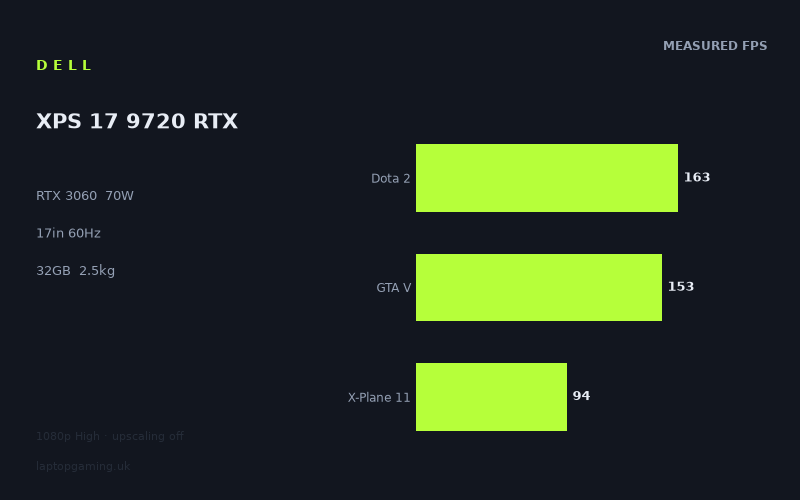
Frame rates
1920×1080, High preset, upscaling off.
Measured on this machine. Source: Notebookcheck, 2022-05-31.
Not scored: incomplete benchmark suite
Every scored laptop on this site is averaged over the same 5 games, and this one is short of Cyberpunk 2077, Baldur's Gate 3. A mean over 5 games is not comparable to a mean over 5, so we publish the figures we have and leave the score blank rather than rank it against machines tested on a different set. The numbers below are real - the suite is just incomplete.
How these numbers were produced
Frame rates here are not measured by us, and we label how each one was arrived at. A figure marked measured comes from a published run on that exact machine. A figure marked representative is derived from the GPU and its power limit (TGP) and cross-referenced against published reviews - a sound estimate of what that configuration delivers, but not a measurement of that specific laptop. Unless stated otherwise, numbers are 1920x1080, High preset, upscaling off. Where a laptop ships in several power configurations we use the wattage of the exact SKU listed, because a 140W RTX 5070 and a 115W one are not the same product.
In use
The short version
The Dell XPS 17 9720 RTX is a powerful large-screen laptop with an unusual gaming balance. Its Core i7-12700H, 32GB of memory and RTX 3060 produce strong measured results at 1920x1080 on the High preset, with upscaling disabled. Notebookcheck’s benchmark data puts it well clear of entry-level RTX 3050 Ti competition, and its shared-game results sit surprisingly close to some laptops carrying RTX 3070 and RTX 3070 Ti graphics.
That does not make it a straightforward gaming-laptop recommendation. The RTX 3060 is limited to 70W, while the fitted IPS screen is a 17in 3840x2400 panel running at 60Hz. Those specifications pull the machine in different directions. The screen is aimed at workspace, image detail and high-resolution non-gaming use; the GPU’s strongest results are measured at 1920x1080, substantially below the panel’s native resolution. The measured figures show that it can deliver excellent frame rates in lighter and older games, while demanding titles are more naturally suited to a 60Hz target at 1080p than to native-resolution gaming.
The XPS makes most sense for someone who wants a large, high-resolution laptop primarily for general work, creation or professional applications, but who also wants credible gaming performance without buying a conventional gaming chassis. Its 2.512kg weight means it is transportable rather than effortlessly portable, but it is still a single-machine option for someone moving between a desk and occasional travel. The 97Wh battery is a substantial capacity on paper, although there is no battery-life measurement in the available data and no claim should be made about how long it lasts away from mains power.
For gaming alone, the 60Hz display is the key limitation. Dota 2, GTA V, The Witcher 3 and Strange Brigade all exceed the panel refresh rate in the measured configuration, so the system has more performance than its built-in screen can visibly show in those titles without using an external display. X-Plane 11, Final Fantasy XV and Cyberpunk 2077 are different: their figures are strong enough for play, but they do not leave the same surplus above 60fps. Cyberpunk 2077 in particular lands exactly at the screen’s refresh target in the published result, leaving little room for higher resolution, more demanding settings or performance variation.
There is no overall score for this exact configuration because its UK price is not confirmed. That is a pricing-data limitation, not a problem with the benchmark record: the suite is complete and the machine sits normally on the frame-rate leaderboard. Without a confirmed UK price, though, it would be irresponsible to make a value judgement or speculate about where it belongs against cheaper or more expensive alternatives.
The best way to view the Dell is therefore as a high-resolution 17in laptop with meaningful gaming ability, not as a gaming-first machine that happens to have a large panel. The measured performance is genuinely capable at 1080p High, especially in games that are less punishing on the GPU. Buyers who specifically want high-refresh competitive gaming, native 3840x2400 gaming, or the best possible performance in demanding new releases should look towards machines designed around those priorities. Buyers who value screen resolution, a large workspace and respectable game performance in the same laptop have a more compelling reason to consider the XPS.
Performance
What the measured figures show
Notebookcheck measured the Dell XPS 17 9720 RTX at 1920x1080 using the High preset with upscaling switched off. That matters. These are not native-panel-resolution results, and they are not figures produced with an upscaler reducing the rendering load. They show the straightforward performance available when the RTX 3060 is asked to run a conventional 1080p High workload.
Across the five scoring-suite games, the mean is 122fps. That headline figure is useful, but it should not be treated as a promise that every game will run close to that level. The results range from 163fps in Dota 2 down to 69fps in Final Fantasy XV, with Cyberpunk 2077 at 60fps. This is a wide spread, and it is a more useful description of the laptop’s gaming character than the average alone.
- Dota 2: 163fps
- GTA V: 153fps
- The Witcher 3: 134fps
- Strange Brigade: 131fps
- X-Plane 11: 94fps
- Final Fantasy XV: 69fps
- Cyberpunk 2077 1.6: 60fps
Dota 2 at 163fps is the clearest example of the XPS having performance beyond the needs of its own 60Hz panel. At that measured level, the laptop has a substantial frame-rate reserve for a game that can benefit from responsiveness, but the internal display cannot present more than 60 refreshes each second. An external display with a higher refresh rate would make better use of the result, assuming the rest of the connection and display setup supports it; the available specifications do not provide those details, so no stronger claim can be made about external-display capability.
GTA V at 153fps tells a similar story. The result is far above 60fps and indicates that the RTX 3060 at 70W can drive this game very comfortably at the measured settings. The Witcher 3 at 134fps and Strange Brigade at 131fps also clear 60fps by a wide margin. In all of these titles, the XPS has enough measured performance for the built-in display to be the limiting factor rather than the benchmark result. That is good news for consistency at the tested settings, but it also exposes the mismatch between the system’s gaming output and its fixed 60Hz screen.
X-Plane 11 comes in at 94fps. That remains above the panel refresh rate, but the margin is smaller. It is still a good result in the context of a 60Hz screen: there is room above the display’s ceiling at the tested 1080p High setting. It is not, however, the same kind of enormous headroom seen in Dota 2 or GTA V. A buyer should not see the 122fps mean and assume all games will have triple-digit performance with a large reserve.
Final Fantasy XV at 69fps is much closer to the screen’s practical target. It clears 60fps in the published result, but only by a modest amount. That is enough to make the 60Hz display a sensible match at the tested settings, rather than a restrictive one. It also means there is less evidence of spare GPU performance for increasing resolution or adding further graphical load. The frame rate is good, but it is not an argument for assuming the Dell is comfortable at every setting combination a buyer might choose.
Cyberpunk 2077 1.6 is the most demanding result here, at 60fps. That is an important result because it demonstrates that the XPS can reach the internal panel’s refresh target in a demanding game at 1920x1080 High without upscaling. It should also be read carefully. The figure is exactly aligned with the display refresh rate, not comfortably beyond it. There is no published evidence here of excess performance for native 3840x2400 rendering, and no reason to expect the same result after raising resolution beyond the measured 1920x1080 configuration.
The significance of the 70W GPU limit
The RTX 3060 name alone does not fully describe this laptop’s gaming potential. Dell specifies the GPU at a 70W power limit, and that number is central to understanding the XPS. Gaming laptops carrying the same GPU name can be configured differently, and the power limit affects the performance available when the graphics processor is under sustained load. A 70W RTX 3060 should therefore be considered as a particular implementation, not as an interchangeable stand-in for every RTX 3060 laptop.
The benchmark data shows that this implementation remains capable at 1080p High. It is not a weak result set: four of the listed titles are above 100fps, and another is close to that level. The important qualification is that the strongest figures occur in a mixture of lighter or less GPU-punishing workloads, while the more demanding games draw the result closer to the display’s 60Hz limit. That is exactly where a lower-power GPU configuration becomes relevant in practice. The machine has enough performance to make 1080p gaming credible across the measured set, but the data does not support treating it as a high-refresh, maximum-settings gaming platform in every modern title.
It is also worth avoiding a simplistic conclusion that the 70W limit makes the Dell automatically slower than every laptop with a nominally stronger graphics chip. The comparison results show why. Against the Gigabyte A7 X1 with an RTX 3070, the Dell averages only 1fps ahead across four shared games. Against the MSI Creator Z17 with an RTX 3070 Ti at 105W, the average result across four shared games is effectively level. Those are surprising comparisons on specification labels alone, but they are not proof that the Dell’s RTX 3060 is universally equivalent to those GPUs. They show that shared-game, shared-setting outcomes can be compressed by the particular games involved, especially at 1080p.
The most useful conclusion is narrower. The XPS 17’s 70W RTX 3060 is sufficient for the measured 1080p High workload, and it can produce very strong figures where the game allows it. Its limits become clearer in the games that already sit close to 60fps. Buyers should judge it on those tougher results as well as the very high numbers in Dota 2 and GTA V. A gaming laptop should be assessed by its difficult cases, not just by the titles in which it runs far faster than the installed screen can display.
Why the results vary so much
The difference between 163fps in Dota 2 and 60fps in Cyberpunk 2077 is not a contradiction in the data. It is the expected consequence of games placing very different demands on a laptop. Some titles can become constrained by processor performance, game-engine behaviour or the wider platform before they fully separate GPUs of different classes. Others place a heavier graphics load on the system and expose more of the difference between GPUs and power limits.
The Core i7-12700H is a strong companion to the RTX 3060 in this context. The available data does not include processor-only benchmarks, so it would be wrong to assign a precise share of responsibility for any individual result. But the close comparisons against laptops with RTX 3070 and RTX 3070 Ti graphics are explicitly explained by the shared 1080p game mix: lighter titles can become CPU-bound and compress genuine GPU gaps. In other words, when the GPU is not the sole bottleneck, a more powerful graphics processor does not necessarily translate into a much higher measured frame rate.
This matters particularly for Dota 2, GTA V, The Witcher 3 and Strange Brigade. Their high frame rates contribute heavily to the 122fps mean, but they do not establish that the Dell will outperform more powerful GPUs in graphically demanding games. They show that this laptop can run those games extremely well at the stated settings. That is valuable, especially for someone whose library includes these titles, but it should not be stretched into a broad claim about every game.
Cyberpunk 2077 and Final Fantasy XV provide the more cautious side of the picture. At 60fps and 69fps respectively, they show the XPS working nearer to the level that matters for its internal display. These are the figures to focus on when deciding whether the Dell has enough gaming performance for a buyer’s likely workload. Someone mainly playing lighter multiplayer games, older large-budget releases or the less demanding games in the list can reasonably expect the laptop to feel powerful at 1080p High. Someone buying specifically for demanding games should recognise that the measured headroom is much narrower.
The absence of upscaling is another reason the results are useful. The published data is not relying on an image-reconstruction setting to reach its frame rates. That makes the 60fps Cyberpunk 2077 result a straightforward baseline for the stated benchmark configuration. It does not tell us what result the game would achieve with upscaling enabled, because that figure is not provided. It also does not tell us how the laptop would perform with alternative presets, native resolution or other game versions. Those are all separate questions from the measured result.
The screen
A high-resolution panel with a gaming compromise
The Dell’s screen is a 17in IPS panel with a 3840x2400 resolution and a 60Hz refresh rate. On specification alone, this is a display built around density and desktop space rather than high-refresh gaming. The 3840x2400 format provides substantially more pixels than the 1920x1080 benchmark resolution, while the 60Hz refresh rate sets a hard ceiling on the number of distinct frames that the built-in panel can show each second.
The resolution is a clear attraction for non-gaming use. A 17in 3840x2400 display gives the laptop the kind of large, detailed workspace that makes sense alongside 32GB of memory and a Core i7-12700H. The available specification does not include colour coverage, brightness, contrast, response time or calibration information, so it would be wrong to make claims about its suitability for colour-critical work, outdoor use or motion clarity. What can be said is that the resolution and screen size prioritise space and detail over refresh rate.
For gaming, the gap between the panel resolution and the benchmark resolution is the central issue. All the published frame rates were recorded at 1920x1080, not at 3840x2400. A buyer should not read 163fps in Dota 2 or 60fps in Cyberpunk 2077 as native-resolution figures. The measurements establish that the laptop can play the games at 1080p High with upscaling off; they do not establish native 3840x2400 performance.
That distinction matters because raising render resolution increases graphical work. The benchmark data does not provide a conversion from 1080p to the screen’s native resolution, so there is no credible basis for inventing expected frame rates at 3840x2400. The sensible conclusion is simply that the native panel asks substantially more of the GPU than the tested setting. Games that already run near 60fps at 1080p High should be approached with particular caution if a buyer intends to run them at the full panel resolution.
Which measured games match the 60Hz display?
Dota 2 at 163fps, GTA V at 153fps, The Witcher 3 at 134fps and Strange Brigade at 131fps all exceed 60fps by a considerable margin. On the internal panel, those results should be understood as performance reserve rather than visible high-refresh output. The screen cannot display the full measured frame rate as unique refreshes beyond 60Hz. That does not make the performance pointless: a large margin can be useful for maintaining a target at the tested settings. But it does mean a buyer choosing this Dell specifically for fast competitive play is paying for a display that does not match the frame rates the hardware can produce in several games.
X-Plane 11 at 94fps also exceeds the display refresh rate, though with less surplus. It is still a strong pairing with a 60Hz panel at the benchmark settings. Final Fantasy XV at 69fps is more tightly matched. Here, the internal display is not obviously holding the system back; the measured result is only moderately above the panel target. Cyberpunk 2077 at 60fps is the closest match of all. In that game, the panel’s refresh rate and the measured frame rate align exactly.
This split is important because it prevents an overly broad verdict. The 60Hz panel is a poor fit for buyers whose priority is exploiting very high frame rates in games such as Dota 2, GTA V or Strange Brigade. It is a reasonable fit for someone whose target is a stable 60fps experience in heavier games. The XPS is not uniformly mismatched to its screen. Rather, its display is well aligned with its difficult gaming workloads and under-specced for its lighter ones.
The IPS panel type is another part of the balance. IPS tells us the panel technology, but the provided information does not include response-time measurements or any display-quality measurements beyond the basic specification. There is therefore no basis for claiming that it is especially quick or slow in motion, especially colour-accurate, or especially bright. The safe conclusion is limited but useful: it is an IPS display with high resolution, a large diagonal and a 60Hz refresh ceiling.
The practical resolution decision
For a buyer focused on gaming, 1920x1080 is the proven setting in this review because it is the resolution used for every published frame-rate figure. The XPS can produce good to excellent performance there. At 3840x2400, no measured gaming result is available. That does not mean the laptop cannot run games at native resolution; it means the supplied data does not support a frame-rate claim.
This is where the Dell’s identity becomes clearer. A conventional gaming laptop with a high-refresh 1920x1080 or similar panel is built to present a high proportion of the frame rates its GPU can generate. The XPS instead combines a high-resolution 60Hz screen with GPU performance that often exceeds 60fps at the tested resolution. That makes the laptop more attractive to someone who values the desktop experience of the panel and treats gaming as an important secondary use, rather than someone buying around a specific high-refresh gaming experience.
There is no need to dismiss the display because of that. A 60Hz panel remains appropriate for game results around 60fps, and the high resolution has value outside games. The point is that the buyer must choose which capability matters more. The XPS gives more screen detail than a gaming-first 60Hz design would normally prioritise, while giving less refresh headroom than a gaming-first machine would normally offer.
Build, size and portability
The Dell XPS 17 9720 RTX weighs 2.512kg. That places it firmly in large-laptop territory. It is portable in the literal sense that it can travel with its owner, but it is not the kind of machine that disappears into a bag or feels inconsequential during a commute. A buyer considering it for regular transport should treat the weight as a meaningful part of the purchase rather than an incidental specification.
The 17in display helps explain the role it is likely to play. This is best understood as a mobile large-screen system: a laptop for a desk, home office, studio, university accommodation or other fixed space that can also be moved when necessary. It is less naturally suited to someone who spends every day carrying a laptop for long periods and wants the smallest possible burden. The weight is not extreme for a 17in performance laptop, but it is still 2.512kg before considering any charger or accessories, for which no weight information is provided.
No dimensions are supplied in the available fact sheet. That means there is no reliable basis for describing the XPS as thin, compact, deep, wide or easy to fit into a particular bag. The screen size and weight establish that it is a substantial laptop, but they do not permit a precise judgement about footprint. Buyers for whom bag compatibility is critical should check the exact dimensions before buying rather than relying on broad impressions.
The same restraint applies to build materials, keyboard quality, trackpad feel, port selection, cooling behaviour and fan noise. None of those details is provided here. It would be easy to infer a premium construction from the XPS name or to assume particular connectivity from the model, but neither would meet the standard required for a buying recommendation. The specification and published benchmarks tell us that this is a 17in, 2.512kg laptop with strong 1080p gaming results; they do not tell us how its controls feel, what connections it offers or how it sounds under load.
The 97Wh battery capacity is significant in the context of a laptop this size, but capacity and endurance are not interchangeable. Battery life depends on workload, screen behaviour, system settings and many other variables that are not measured in the supplied information. It would therefore be inaccurate to describe the Dell as all-day, long-lasting or short-lived. The useful buying point is simply that it has a 97Wh battery, while no attributable battery-life figure is available.
The combination of 17in screen, 2.512kg weight and 97Wh battery points towards a machine designed to retain some freedom from the desk without becoming a lightweight travel computer. That is a reasonable role for a laptop that also has a high-resolution display and capable internal hardware. For occasional movement, working in different rooms or carrying between locations when needed, the XPS is plausibly suited by its basic specification. For constant travel, the weight is a concrete reason to look at smaller systems.
How it compares
Against the MSI Prestige 15
Against the MSI Prestige 15 with an RTX 3050 Ti at 105W, the Dell averages 66fps ahead across four shared games. This is the clearest and largest positive comparison in the supplied rival set. It demonstrates that the XPS 17’s RTX 3060 configuration is not merely a marginal step above lower-tier graphics hardware. In the shared benchmarks, the Dell has a substantial frame-rate advantage.
The contrast is useful because the MSI’s RTX 3050 Ti has a higher stated power limit of 105W, while the Dell’s RTX 3060 is limited to 70W. The Dell’s result therefore reinforces an important buying principle: GPU tier still matters, and power limit is not the only specification that determines outcomes. A higher-wattage lower-tier GPU does not automatically overtake a lower-wattage GPU from a higher tier. In these shared games, the Dell is decisively ahead.
That makes the XPS a better option for someone who wants strong gaming performance alongside a large high-resolution screen, rather than merely enough graphics capability to run games at reduced expectations. The comparison does not tell us about pricing, because the MSI Prestige 15 also has no confirmed UK price in the supplied information. It should be read as a performance comparison only.
Against the Gigabyte A7 X1
The Gigabyte A7 X1 carries an RTX 3070, yet the Dell averages 1fps ahead across four shared games. Taken literally, that is a near-tie with a slight advantage for the XPS in this particular shared set. It is not evidence that the Dell’s RTX 3060 is categorically more powerful than an RTX 3070. The supplied comparison notes explain why a result this close can happen: at 1080p, lighter games in the shared group can become CPU-bound and compress genuine GPU differences.
This is exactly why benchmark context matters more than a single graphics label. If the games are no longer limited chiefly by GPU throughput, moving to a stronger GPU may produce little visible change in the measured average. The Dell’s Core i7-12700H and the nature of the shared games help explain why it can match the Gigabyte so closely under these conditions.
For a buyer, the practical lesson is not that the XPS should be assumed equal to the Gigabyte in every game. It is that the Dell’s measured 1080p High performance is strong enough that, in this shared selection, an RTX 3070 laptop does not create a meaningful average advantage. The titles that expose GPU differences more clearly are likely to matter more when choosing between graphics tiers, but the supplied shared comparison does not provide a broader game-by-game breakdown beyond the average.
Against the MSI Creator Z17
The MSI Creator Z17 uses an RTX 3070 Ti at 105W. Across four shared games, the Dell’s average is effectively level, recorded as a difference of -0fps. Again, that result should not be misread as proof that a 70W RTX 3060 and a 105W RTX 3070 Ti are generally interchangeable. It is a result from the specific games both machines hold at the stated benchmark conditions.
The near-zero gap is meaningful because it shows how strongly game selection can shape a ranking at 1920x1080. The lighter titles in the shared set can be constrained by factors other than raw GPU capability, reducing the separation one might expect from GPU names and power limits alone. That is not a flaw in the benchmark data. It is a useful warning against buying purely by specification hierarchy.
The Dell deserves credit for being competitive in this comparison, particularly given its lower 70W power limit. But buyers should remain disciplined about what the result proves. It proves that the XPS can keep up on average in those four shared games. It does not prove equivalent performance in every game, at native 3840x2400 resolution, or in workloads that put a more sustained emphasis on graphics power.
Against the MSI Raider GE77 HX
The MSI Raider GE77 HX is the rival that most clearly demonstrates the Dell’s limits. It has an RTX 3080 Ti at 175W, and the XPS averages 47fps behind across five shared games. That is a substantial deficit. Unlike the near-ties against the RTX 3070 and RTX 3070 Ti machines in the smaller shared sets, this comparison shows that a much more powerful, much higher-wattage gaming configuration can create a clear advantage when examined across a wider shared group.
This is the comparison that should guide buyers who want maximum gaming performance. The XPS is capable, but it is not configured as an all-out performance machine. A 70W RTX 3060 cannot be expected to match a 175W RTX 3080 Ti laptop across the available shared data, and it does not. The 47fps average gap is large enough to matter in practical terms, especially in games where the Dell’s own figures are already around the 60fps level.
The Raider comparison also puts the Dell’s high frame rates in lighter games into perspective. The XPS can reach 163fps in Dota 2 and 153fps in GTA V, but those results do not erase the advantage of higher-power hardware in the more demanding aggregate comparison. If a buyer’s priority is high-refresh gaming, demanding titles or the greatest possible reserve for future games, the Raider-style configuration is the more suitable direction based on performance alone. As with the other rivals, there is no confirmed UK price in the supplied data, so this cannot become a value comparison.
What the rival spread actually says
The four rivals form a useful performance map. The Dell is substantially ahead of the RTX 3050 Ti MSI Prestige 15. It is unexpectedly close to the RTX 3070 Gigabyte A7 X1 and the RTX 3070 Ti MSI Creator Z17 in their limited shared 1080p game sets. It is clearly behind the RTX 3080 Ti MSI Raider GE77 HX across five shared games.
That pattern is more informative than simply saying that the XPS is “mid-range” or “premium”. It shows that the Dell is strong where 1080p performance becomes constrained by the broader platform or by lighter game workloads, but it also shows that much higher-power graphics hardware retains a substantial advantage when the comparison exposes it. The machine should therefore be chosen for its combined package of large high-resolution display, Core i7 processor, 32GB memory and capable gaming results, not because it is expected to replace a top-power gaming laptop.
Who it’s for
A good fit for a mixed-use buyer
The Dell XPS 17 9720 RTX is best suited to a buyer who wants a large laptop for more than gaming. The 17in 3840x2400 IPS display, 32GB of memory and Core i7-12700H make a strong foundation for a system that will spend much of its time handling work, study, creative applications or general desktop-style use. The RTX 3060 then adds real gaming capability rather than token graphics performance.
For that buyer, the published results are encouraging. Dota 2, GTA V, The Witcher 3 and Strange Brigade all run far beyond 60fps at 1920x1080 High with upscaling off. X-Plane 11 also exceeds the panel refresh rate. Final Fantasy XV is above 60fps, while Cyberpunk 2077 reaches 60fps. This is enough evidence to call the Dell a capable 1080p gaming laptop, provided the buyer accepts that the screen itself is capped at 60Hz and that the figures do not represent native 3840x2400 performance.
It also suits someone who values a single large screen when away from an external monitor. The 17in panel and 3840x2400 resolution are the defining qualities that distinguish the XPS from a conventional gaming-first alternative. A buyer who spends time editing documents, viewing detailed material, arranging several windows or simply prefers a large laptop display has a concrete reason to accept the 60Hz compromise.
The machine is also suitable for someone whose games are closer to the high-frame-rate end of the published list. Dota 2 at 163fps, GTA V at 153fps, The Witcher 3 at 134fps and Strange Brigade at 131fps show that the Dell has considerable capability at the tested settings. The limitation is visual presentation on the internal display, not a lack of produced frames in those games.
Who should buy something else
Buyers focused primarily on competitive high-refresh gaming should choose something else. The Dell’s own measured figures make the argument. Several games run well beyond 60fps, but the internal screen refreshes at 60Hz. A laptop with a higher-refresh display would make better use of those results. The XPS is not the right fit for someone whose purchase is driven by the desire to see the highest possible frame rate on the laptop’s own panel.
Buyers who expect to play demanding games at the native 3840x2400 resolution should also be cautious. There are no native-resolution frame rates in the supplied data. Cyberpunk 2077 reaches 60fps at 1920x1080 High with upscaling off, which is a positive result, but it does not establish performance at the much higher native resolution. Someone who wants native-resolution gaming as a baseline should seek a laptop with attributable benchmark data at that resolution rather than infer it from the Dell’s 1080p figures.
The XPS is also not the best choice for someone who wants the strongest possible gaming performance regardless of screen type or weight. The MSI Raider GE77 HX comparison is decisive: the Dell averages 47fps behind across five shared games. A buyer who wants greater GPU headroom for demanding games, higher settings or more demanding future workloads should look at a higher-power gaming machine rather than trying to make the Dell serve a role it was not configured to fill.
Frequent travellers should consider the 2.512kg weight carefully. The Dell can be moved, but it is not a light machine. Someone who carries a laptop throughout the day, takes frequent flights, walks long distances with a bag or simply wants minimal bulk may be better served by a smaller laptop. No dimensions are available here, so buyers should check them directly if bag fit is important.
Finally, buyers who need a firm value judgement should wait for a confirmed UK price for this exact configuration. The performance data is sufficient to describe where the Dell stands in gaming terms, but not to say whether it is good value. Until the price is confirmed, the sensible buying decision rests on whether its particular combination of 17in 3840x2400 screen, 60Hz refresh, 2.512kg weight, 97Wh battery capacity, Core i7-12700H, 32GB memory and 70W RTX 3060 matches the intended use.
The Dell XPS 17 9720 RTX is therefore a credible choice for a buyer who wants a high-resolution large-screen laptop that can also play games properly at 1080p High. It is less convincing as a pure gaming purchase, where its 60Hz screen, unmeasured native-resolution performance and lower-power RTX 3060 configuration become more significant. The benchmark data supports confidence in its 1080p ability, but it also draws a clear line around what the machine is and is not designed to do.