Details
Product prices and availability are accurate as of the date/time indicated and are subject to change. Any price and availability information displayed on Amazon.co.uk at the time of purchase will apply to the purchase of this product.Review
Medion Erazer Scout 17 E1 review
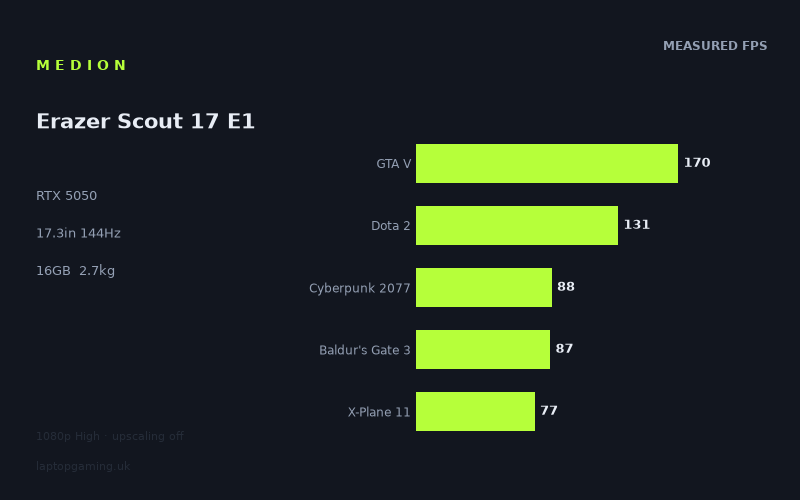
Frame rates
1920×1080, High preset, upscaling off. Averages 110fps across the 5 core benchmark games.
Measured on this machine. Source: Notebookcheck, 2025-09-01.
Not scored: no confirmed UK price
We have the full benchmark suite for this machine, so it ranks on the frame rate leaderboard like any other. What we don't have is a UK listing for this exact configuration - it's sold as a European review unit, or only in specifications that differ from the one tested. Since 30% of our score is value for money, scoring it would mean pretending price is no object, which would flatter it against every laptop you can actually buy. The frame rates below are real and comparable; there is just no buying recommendation to make yet.
How these numbers were produced
Frame rates here are not measured by us, and we label how each one was arrived at. A figure marked measured comes from a published run on that exact machine. A figure marked representative is derived from the GPU and its power limit (TGP) and cross-referenced against published reviews - a sound estimate of what that configuration delivers, but not a measurement of that specific laptop. Unless stated otherwise, numbers are 1920x1080, High preset, upscaling off. Where a laptop ships in several power configurations we use the wattage of the exact SKU listed, because a 140W RTX 5070 and a 115W one are not the same product.
In use
The short version
The Erazer Scout 17 E1 is a big, plain, entry-level gaming laptop built around the combination that defines the bottom rung of the 2025 market: an RTX 5050 with 8GB of VRAM, an entry-tier Intel H-series chip, 16GB of memory and a 17.3in 1920x1080 IPS panel running at 144Hz. Nothing about that list is ambitious. What matters is whether the parts add up to a machine that plays current games at the resolution it ships with, and on the measured evidence the answer is a qualified yes — with the qualification doing a lot of work.
Across the twenty games Notebookcheck measured at 1920x1080 on High with upscaling switched off, the frame rates run from 220fps down to 35fps. That is a spread of more than six to one from the easiest title to the hardest, and it is the single most important thing to understand about this machine. The middle of that range sits in the low seventies. Two games out of twenty clear the panel's 144Hz refresh rate. Fifteen of the twenty land below 100fps. Five land below 50fps. This is a 1080p sixty-frames machine with a 144Hz panel attached, and the panel is there for the older, lighter and competitive titles rather than for anything with Lumen or hardware ray tracing baked into it.
Within its own class it is competitive. The benchmark data puts it essentially level with an Acer Nitro V 16 AI running the same GPU at 115W, and ahead of the 14in Nitro V14 AI on the same silicon — the larger chassis appears to be letting the card work, which is not something you can take for granted at this end of the market. Against RTX 5060 machines it gives up ground, and against a 5070 machine it gives up a lot.
We are not printing a score for this laptop. The reason is administrative rather than a criticism: we do not have a confirmed UK price for this exact configuration, value accounts for a large share of how we score, and the arithmetic simply cannot be done without a number to put in it. The benchmark suite is complete, the machine ranks normally on the frame rate leaderboard, and everything below is based on the same measured data we use for every other laptop on the site. When a price is confirmed, a score appears.
Who should be interested: someone who wants a large-screen 1080p machine that will live on a desk, plays a mixture of competitive and single-player titles, and is willing to turn settings down in the heaviest new releases. Who should not: anyone who wants to actually use the 144Hz panel in modern AAA games, anyone who moves their laptop daily, and anyone who expects 8GB of VRAM and a 512GB drive to still be comfortable in two years.
Performance
What the GPU is, and what we can and can't say about how hard it's run
The RTX 5050 is the entry point of Nvidia's mobile Blackwell line, and in laptops it is the part that gets fitted when the price of the machine is the design brief. Eight gigabytes of VRAM, a narrow memory bus, and a shader count that puts it firmly in "1080p, high settings, no ray tracing" territory. Everything the benchmark data shows is consistent with that positioning.
We do not have a confirmed GPU power limit for this specific Medion configuration, so we are not going to state one. That matters, because in this class the power limit is frequently the difference between two machines with identical spec sheets. The same 5050 can be run at a figure that lets it stretch, or throttled down to fit a thin chassis and a small cooling system, and the gap between those two implementations is often larger than the gap between adjacent GPU tiers.
What we can do is infer from the comparative measurements. The Acer Nitro V 16 AI in our database runs an RTX 5050 at a confirmed 115W, and across the thirteen games both machines have been measured in, the Medion averages one frame per second ahead. One frame is noise. It is not a meaningful lead in either direction; it is two machines producing the same performance. The reasonable reading is that the Erazer's 5050 is being allowed to run at or very near the level of a 115W implementation. A 17.3in chassis has room for cooling that a thinner or smaller machine does not, and the numbers suggest Medion has used it rather than wasted it.
The Acer Nitro V14 AI comparison points the same way from the other side. Same GPU, 14in chassis, and the Erazer averages six frames per second ahead across the nine shared games. Six frames is a real difference — small, but consistent enough across nine titles to be more than measurement scatter. That is roughly what you would expect from the same silicon given more thermal headroom and, in all likelihood, a higher sustained power budget. If you were choosing between 5050 laptops purely on how much performance the card is allowed to deliver, the big-chassis option is the one the data favours.
Reading the spread
Twenty measured games is enough to see structure rather than just a list, and the structure here is very clear. Group the results by what they actually run at:
- Above the panel's 144Hz refresh: Strange Brigade at 220fps and GTA V at 170fps. Two games.
- Between 100fps and the refresh rate: F1 25 at 132fps, Dota 2 at 131fps, Final Fantasy XV at 102fps.
- Comfortably above 60fps but well below the panel: Cyberpunk 2077 at 88fps, Baldur's Gate 3 at 87fps, X-Plane 11 at 77fps, Space Marine 2 at 76fps, Kingdom Come: Deliverance 2 at 74fps, Ghost of Tsushima at 68fps, Horizon Forbidden West at 64fps.
- Around or just below 60fps: Until Dawn at 54fps, Doom: The Dark Ages at 53fps, Indiana Jones and the Great Circle at 52fps.
- Under 50fps: Stalker 2 and Oblivion Remastered at 48fps, Assassin's Creed Shadows at 43fps, Star Wars Outlaws at 41fps, and Senua's Saga: Hellblade 2 at 35fps.
The five games in our scoring suite average 111fps between them, which sounds healthy and is, in isolation, misleading. That figure is carried by GTA V at 170fps and Dota 2 at 131fps — two titles whose engines predate the current generation of rendering techniques by a wide margin. The other three scoring-suite entries are Cyberpunk 2077 at 88fps, Baldur's Gate 3 at 87fps and X-Plane 11 at 77fps, all of which are perfectly playable but none of which are anywhere near 144Hz. The suite average is a useful ranking tool because every machine on the site is measured the same way; it is not a prediction of what you will see in a 2025 release.
Where the bottom of the range comes from
The five slowest results are not random. Hellblade 2, Stalker 2, Oblivion Remastered, Star Wars Outlaws and Assassin's Creed Shadows all lean on modern global illumination — Unreal Engine 5's Lumen in several cases, hardware-accelerated ray-traced GI in others — and those techniques scale with a class of GPU capability that the 5050 has the least of. Doom: The Dark Ages and Indiana Jones and the Great Circle sit just above them, and both of those titles use ray tracing as a baseline requirement rather than an optional extra. There is no "turn RT off" escape hatch in either.
That is the single most useful pattern in the data for a buyer. The question "will this laptop run the game I want" resolves almost entirely to "does the game use modern GI, and can it be switched off". If it can, the 5050 in this chassis produces comfortable numbers — Kingdom Come: Deliverance 2 at 74fps and Space Marine 2 at 76fps are both genuinely good results for an entry card at High. If it cannot, you are looking at the 35-to-53fps band, and the settings menu is where you will be spending your first hour.
The top of the range tells the opposite story and should be discounted accordingly. Strange Brigade at 220fps is a benchmark that has been in test suites for years precisely because it is well-optimised and undemanding; it tells you the machine is not broken and very little else. GTA V at 170fps is a game from the previous console generation running on hardware two generations of consoles later. Neither result should factor into a purchase decision about a game released this year.
The CPU, and one result worth pausing on
The Core 5 210H is the entry rung of Intel's current H-class mobile line, and it is a sensible pairing for a 5050 in the sense that a faster chip would spend most of its time waiting for the graphics card. In the GPU-bound majority of these twenty games, the processor is not the constraint and a more expensive one would not change the frame rates meaningfully.
There is one measurement that suggests the CPU is doing some limiting at the top end, though. Dota 2 at 131fps is a low number for Dota 2. It is a lightweight game by 2025 standards, and on hardware where the graphics card has headroom it typically runs well clear of that. Sitting at 131fps, in a suite where Strange Brigade manages 220fps, is the signature of a title that has stopped scaling with the GPU and started scaling with single-thread throughput and draw-call handling instead. We cannot prove that from frame rates alone — we do not have per-component utilisation data — but it is the most economical explanation for the shape of the results.
The practical consequence is narrow but real. If your reason for wanting a 144Hz panel is competitive multiplayer — MOBAs, shooters with large player counts, anything with a lot of simulation happening off-screen — the CPU is more likely to be your ceiling than the GPU, and that is the one area where a more expensive machine with a stronger processor would show a difference this one cannot close by turning settings down. In single-player rendering-bound titles, which is most of this list, it makes no difference at all.
Eight gigabytes of VRAM
Eight gigabytes is the number that will age this machine. At 1920x1080 on High with upscaling off — the exact conditions these figures were measured under — it is mostly adequate, and the results bear that out: nothing in the list collapses in the way a VRAM-starved configuration collapses, with frame times falling off a cliff rather than degrading smoothly. The measured numbers descend in an orderly progression from 220fps to 35fps, which is what a GPU running out of shader throughput looks like, not what one running out of memory looks like.
But several of the games at the bottom of that list are the ones most likely to push against an 8GB buffer once texture settings go up, and the titles that require ray tracing — Indiana Jones and Doom: The Dark Ages in particular — carry a VRAM cost for the acceleration structures on top of everything else. The 52fps and 53fps those two produce are usable results. They are also results with very little margin, and the direction of travel in the games industry is not towards smaller memory footprints.
The honest framing: 8GB is enough for the games measured here, at the settings measured here, today. It is the specification most likely to force compromises before anything else on this machine does, and if you are buying a laptop expecting to keep it for four or five years, that is the line item to think hardest about.
Upscaling
Every figure above was captured with upscaling switched off, which is the right way to benchmark — it removes a variable that behaves differently in every game and every driver revision — but it is not how anyone will actually play the heavier titles on this laptop. DLSS is available on this GPU and frame generation is part of the current feature set, and in practice a 41fps result in Star Wars Outlaws or a 35fps result in Hellblade 2 becomes considerably more tolerable with quality-mode upscaling doing the heavy lifting at 1080p.
We have no measured upscaled figures for this machine, so we are not going to put numbers on that improvement. What we will say is that at 1920x1080 the input resolution for upscaling gets low enough that image quality costs become visible — you are asking the reconstruction to work from a smaller source than it would on a 1440p or 4K panel, and it shows in fine detail and in motion. Upscaling is a genuine tool for making the bottom five games on this list playable. It is not free, and at this resolution it is less free than usual.
The screen
A 17.3in IPS panel at 1920x1080, refreshing at 144Hz. Each of those four attributes deserves separate consideration, because they do not all point in the same direction.
The resolution is correct for the GPU. This is the most important thing about the display and it is easy to underrate. A 1920x1080 panel paired with an RTX 5050 is a matched pair; the same card behind a 2560x1440 screen would produce results across this twenty-game suite that ranged from disappointing to unusable, and you would spend the machine's life running the panel below its native resolution or leaning on upscaling in everything. Medion has resisted the temptation to put a higher-resolution screen on the spec sheet as a selling point, and buyers benefit from that restraint even if it reads as a downgrade in a comparison table.
The pixel density is low. 1920x1080 stretched across 17.3in gives you noticeably larger pixels than the same resolution on a 15in or 16in machine. Whether that bothers you depends heavily on viewing distance and what you do outside games. Sitting at normal desk distance, text is coarser than you may be used to if you have been working on a higher-density display, and fine detail in games — distant foliage, thin geometry, small UI text — is less well resolved than the same settings would look on a smaller panel. If the laptop is your only computer and you spend hours a day reading and writing on it, this is a real ergonomic consideration rather than a spec-sheet quibble.
The refresh rate is largely aspirational. This is where the measured data does the arguing. Of twenty games, two exceed 144fps: Strange Brigade and GTA V. Three more sit between 100fps and the refresh ceiling. That leaves fifteen games — three-quarters of the suite — where the panel is running well ahead of what the graphics card can feed it. Cyberpunk 2077 at 88fps and Baldur's Gate 3 at 87fps are using a little over half the panel's capability. Star Wars Outlaws at 41fps is using well under a third.
That does not make the 144Hz panel pointless. Even at 60 to 90fps, a high-refresh display with adaptive sync — assuming it is present, which we cannot confirm from the specifications we have — delivers smoother frame delivery and lower latency than a fixed 60Hz screen, because it can display frames as they arrive rather than holding them for the next refresh interval. Frame rates between 60 and 90 benefit meaningfully from a panel that can show them at their native cadence. And for competitive titles that scale well on modest hardware, the headroom is genuinely usable.
What it does mean is that if you are buying this machine specifically because 144Hz appears on the specification, the benchmark data should reset that expectation. In current single-player releases you will be playing at somewhere between a third and two-thirds of the panel's capability, and the refresh rate is not the thing that will improve your experience — settings management is.
IPS is the right panel technology at this price point, and it comes with the usual trade-offs: good off-axis viewing, respectable colour, and black levels that are merely acceptable rather than good. In a dark room, dark scenes will show the grey-black that IPS panels produce. That is expected and not a mark against this specific machine.
What we do not have is any measured data on this panel's brightness, colour gamut coverage, colour accuracy or response time. Those figures vary enormously between panels that carry identical headline specifications, and the difference between a good IPS gaming panel and a mediocre one is substantial — particularly in response time, where a slow panel will smear in motion badly enough to undermine the point of a 144Hz refresh rate. We cannot tell you which end of that range this screen falls at, and we are not going to guess.
Build, size and portability
2.706kg, and a 17.3in screen. Those two numbers together define how this laptop will be used more than any other specification on the sheet.
Let us be clear about what 2.7kg means in practice. It is not a laptop you carry casually. It is a laptop you make a decision about carrying. Add the mains adapter — and a gaming laptop's adapter is a substantial object in its own right, though we have no confirmed weight for this one — and you are meaningfully past three kilograms of kit in a bag. That is a commute you will notice every day, and a load that requires a proper backpack rather than a sleeve.
The footprint compounds it. A 17.3in chassis will not fit in most bags sold as laptop bags, and it will not fit comfortably on an aeroplane tray table, a train seat-back table, or a small café table. Airline overhead-locker rules and airport security trays are both easier with a 17in laptop than they used to be, but the machine is still an awkward object in transit in a way that a 14in or 15in laptop is not.
The flip side is that within that class, 2.706kg is unremarkable rather than heavy. Seventeen-inch gaming laptops routinely weigh more. Medion has not built something unusually dense; it has built a normally-proportioned large laptop, and the size is going somewhere useful — into a bigger screen and, on the evidence of the comparison against the 14in Nitro V14 AI, into cooling that lets the GPU run harder than it does in a smaller machine. That is a real trade, and if the laptop is going to sit on a desk anyway, it is a trade in your favour.
The battery
53Wh is a small pack for a laptop this size. Sixteen and seventeen-inch machines frequently carry considerably more, and the cell capacity is one of the clearest indications of where the cost has been managed in this design.
We have no measured battery runtime figures for this machine, so we are not going to publish an estimate dressed up as a fact. What we will say is what follows from the specifications without any need for measurement. A 53Wh pack powering a 17.3in backlight, an H-class processor and a discrete graphics card is not going to deliver long unplugged sessions under any workload, and gaming on battery is not a realistic proposition — not simply because the pack will drain quickly, but because gaming laptops universally restrict GPU and CPU power on battery, so the frame rates above would not apply anyway. Every figure in this review was produced with the machine plugged in, and that is how the machine is intended to be used.
For light work — browsing, documents, video — a 53Wh pack in a large chassis will get you through part of a working day rather than all of it. If you need a laptop that unplugs for meetings and lectures and comes back with charge left, this is not that laptop, and the battery capacity says so before any measurement is taken.
Storage and memory
512GB is the specification that will annoy you soonest. Current big-budget games have grown to the point where a handful of installs will fill a drive this size, and that is before Windows, drivers and everything else you keep locally. Anyone playing more than two or three large games concurrently will be managing installations rather than playing, and the shuffle of uninstalling one thing to make room for another gets old quickly.
16GB of memory is adequate for gaming today and will be the second thing to feel tight. It is enough for every title in the measured suite and for normal desktop work alongside it; it is not enough to be relaxed about a browser with thirty tabs, a Discord client, a game and a streaming encoder all running together, and the trend in system memory requirements has not reversed.
Both of these are, in principle, the kind of thing you can fix after purchase — an M.2 drive swap and a memory upgrade are among the cheapest ways to extend a gaming laptop's useful life. We cannot confirm from the specifications we have whether this chassis provides a second M.2 slot or whether the memory is socketed rather than soldered, and those two facts materially change how upgradeable the machine is. If you are considering it, they are worth establishing before you buy, because a 512GB soldered-memory configuration and a 512GB configuration with a free drive bay and two SO-DIMM slots are very different propositions over four years.
How it compares
Before the individual comparisons, one structural point about this segment. Of the five closest rivals in our database, four have no confirmed UK price. That is not a coincidence and it is not a database gap on our side — the entry tier of the 2025 gaming laptop market is genuinely price-opaque in the UK, with configurations appearing and disappearing at retailers, region-specific SKUs, and pricing that moves week to week. It makes like-for-like value judgements across the class harder than they should be, and it is the reason a machine can have a complete benchmark suite and still not have a score attached to it.
All comparisons below use only the games both machines have been measured in, which means the sample sizes differ. That matters more than it looks like it should, and we will come back to it.
Acer Nitro V 16 AI — RTX 5050 at 115W
Across thirteen shared games, the Erazer averages one frame per second ahead. That is a tie. There is no performance argument to be made in either direction, and anyone treating one frame as a win has misunderstood what measurement noise looks like.
Which means the choice between these two is decided entirely on the things frame rates do not capture: a 16in screen versus a 17.3in one, whatever difference exists in build quality, keyboard, port selection, panel quality, cooling noise and — when both are confirmed — price. The useful conclusion is not that the Medion beats the Acer but that the Medion's implementation of the RTX 5050 is a proper one. When a machine with an unstated power limit matches a known 115W implementation across thirteen games, the sensible reading is that it is not being quietly starved to fit a cheaper cooling system. That is worth knowing, because plenty of entry-tier laptops are.
Acer Nitro V14 AI — RTX 5050
Across nine shared games, the Erazer averages six frames per second ahead. Nine games is a smaller sample and the margin is modest, but it is consistent enough to be more than scatter, and it is exactly the pattern you would expect: the same graphics card in a 14in chassis has less thermal headroom and, almost certainly, a lower sustained power budget than the same card in a 17.3in one.
Six frames per second is not a reason to choose one machine over the other on its own. The real difference between these two is what kind of laptop you want. A 14in machine with an RTX 5050 is a portable computer that also plays games — something you can carry every day and use on a train. A 17.3in machine at 2.7kg is a desktop replacement that happens to fold. If you want portability, the performance penalty for taking it is small and the Nitro V14 AI is the sane choice. If you do not need portability, there is no reason to pay the performance and screen-size cost of a small chassis, and the Erazer is the better use of the same GPU.
Lenovo LOQ — RTX 5060 at 115W
This is the most informative comparison in the set, because it is the largest shared sample: twenty games, with the Erazer averaging six frames per second behind.
Six frames across twenty games is a small average gap for a full GPU tier, and it is worth understanding why. Averaged absolute frame-rate differences are dominated by the easy games. A twenty-frame lead in a title running at 200fps counts the same in the average as a twenty-frame lead in a title running at 50fps, even though the first is invisible and the second is transformative. Because this suite contains several titles where both machines are running well clear of anything that matters, the average understates what a 5060 buys you in the games where it counts and overstates what it buys you in the games where it does not.
We only have the aggregate figure, so we cannot tell you where in the range the gap opens up. But the sensible expectation is that the 5060's advantage is smaller than six frames in the Strange Brigade and GTA V end of the list and larger than six frames in the Hellblade 2, Star Wars Outlaws and Assassin's Creed Shadows end — which is precisely where an extra ten or fifteen per cent of performance changes whether a game is playable at High or needs to be dropped to Medium. The 5060 also brings more VRAM in most configurations, which matters more for longevity than the raw frame rate difference does.
Neither machine has a confirmed UK price, so we cannot tell you whether the 5060 is worth its premium. What we can say is that if the two are close on price, the LOQ is the more future-proof purchase, and if the Medion is meaningfully cheaper, the six-frame average gap is not the thing that should decide it.
Lenovo Legion 5 15AHP G10 — RTX 5060 at 115W
Across nine shared games, the Erazer averages fourteen frames per second behind — a considerably larger gap than the six frames it gives up to the LOQ, despite both rivals running an RTX 5060 at 115W.
Resist the temptation to conclude from that pair of numbers that the Legion is faster than the LOQ. The sample sizes are different — nine games against twenty — and different sets of games. A nine-game overlap that happens to include more of the demanding titles will produce a larger absolute average gap than a twenty-game overlap that includes more of the lightweight ones, regardless of the underlying hardware. Comparing two deltas that were computed against different game sets is not a valid comparison, and we would be misleading you if we presented it as one.
What the Legion comparison does establish is that a well-implemented 5060 machine is a clear step up from this one in demanding titles, and enough of a step to change settings decisions. It is also a 15in laptop, which makes it a different proposition on the portability axis — lighter and easier to carry, with a smaller screen. Again, no confirmed UK price, so no value verdict.
MSI Katana 17 HX — RTX 5070, £2,312
Across sixteen shared games, the Erazer averages fourteen frames per second behind, and the Katana is the only rival in this group with a confirmed UK price: £2,312.
The performance conclusion is straightforward — a 5070 is meaningfully faster, and in the ray-traced and Lumen-heavy titles at the bottom of the list, fourteen frames per second is the difference between a game that needs compromises and a game that does not. If your priority is playing this year's heaviest releases at High without a settings negotiation, this laptop is not the machine for that and the Katana is closer to it.
The value conclusion cannot be drawn, because we do not have a price for the Medion, and we are not going to speculate about one. What is clear is that an RTX 5050 machine with an entry-tier H-series CPU, 16GB of memory and a 512GB drive sits in a different segment of the market from a £2,312 RTX 5070 laptop. These two are not competing for the same buyer, and the comparison is useful for calibrating what the Erazer's frame rates mean rather than as a shopping decision. If £2,312 is inside your budget, you were never seriously considering this laptop. If it is not, the Katana comparison tells you what you are giving up, which is worth knowing even when you cannot act on it.
What the data doesn't cover
We are analysing published measurements and specifications, and there are several things this laptop will be judged on in daily use that no benchmark figure captures. Being explicit about them is more useful than filling the gap with assumptions.
- Fan noise. We have no measured sound-pressure figures for this machine. Entry-tier gaming laptops vary enormously here — some large chassis run quietly because the cooling has room to work at low fan speeds, others are loud because the fans are cheap. A 17.3in chassis has the physical potential for quiet cooling; whether Medion has realised it is not something we can determine from frame rates.
- Surface and component temperatures. No measured figures, and therefore nothing to say about whether the keyboard deck gets uncomfortable under load or where the hot spots sit.
- Sustained performance. The benchmark figures represent measured performance in each title. They do not tell you whether the machine holds those numbers over a two-hour session or tails off as the chassis heat-soaks. This is a common failure mode in cheaper laptops and one that no single-run benchmark exposes.
- Panel quality beyond the headline specification. No brightness, gamut, accuracy or response-time data. As noted above, the range within "17.3in 1080p 144Hz IPS" is wide.
- Battery runtime. No measured figures. The 53Wh capacity constrains what is physically possible, but the actual hours depend on panel efficiency and platform power management, neither of which we have data for.
- Keyboard, trackpad, ports, chassis materials and build feel. We have not handled this machine and we are not going to pretend otherwise. On a laptop you will be typing on daily, the keyboard is not a minor consideration, and it is one you should establish for yourself before buying.
- Upgradeability. As discussed, we cannot confirm the number of M.2 slots or whether memory is socketed. Given the 512GB drive and 16GB of memory, this is more consequential here than it would be on a better-provisioned machine.
Who it's for
The benchmark data supports a fairly precise description of the right buyer for this laptop.
Someone who wants a large screen and does not need to carry it. This is the clearest case. If the machine is going to sit on a desk with a mouse next to it and move perhaps twice a year, the 17.3in panel is a genuine benefit and the 2.706kg weight costs you nothing. The size is also, on the evidence of the comparison against the 14in machine with the same GPU, buying you performance rather than just bulk. A big cheap gaming laptop that lives in one place is a perfectly rational purchase, and this is a competent example of one.
Someone whose game library skews older, lighter or competitive. The measured results are strong wherever modern global illumination is not involved. Strange Brigade at 220fps, GTA V at 170fps, F1 25 at 132fps, Dota 2 at 131fps, Final Fantasy XV at 102fps, Baldur's Gate 3 at 87fps, Space Marine 2 at 76fps, Kingdom Come: Deliverance 2 at 74fps — that is a substantial slice of what people actually play, all running comfortably, several of them making real use of the 144Hz panel. If your list looks like that, the machine does everything you need it to.
Someone buying on a tight budget who understands the compromise. The compromise is specific: you will manage settings in new AAA releases, and you will lean on upscaling in the heaviest of them. Cyberpunk 2077 at 88fps says the machine is not weak. Hellblade 2 at 35fps says it has a ceiling. If you are comfortable opening the graphics menu and making decisions, this is a workable machine. If you expect to press play at High and never think about it, it is not.
Someone who wants a first proper gaming laptop for a younger player. The frame rates support the popular multiplayer titles well, the 1080p resolution is matched to the GPU rather than aspirational, and the big screen is easy to share. The 512GB drive is the thing that will cause friction, and it is worth budgeting for a second drive if the chassis allows one.
Who should buy something else
Anyone who moves their laptop daily. A 17.3in, 2.7kg machine with a 53Wh battery is a bad commuting computer, and no amount of frame rate compensates. The Acer Nitro V14 AI in our comparison set gives up six frames per second on average and gives back a chassis you can actually carry. If you are on trains, in lecture theatres, or working from multiple locations, take the smaller machine and the small performance hit.
Anyone whose priority is current-generation AAA at high settings. Five of twenty measured games land below 50fps, and they are exactly the games that get the most coverage and the most attention. Doom: The Dark Ages at 53fps, Indiana Jones and the Great Circle at 52fps, Stalker 2 at 48fps, Assassin's Creed Shadows at 43fps, Star Wars Outlaws at 41fps, Hellblade 2 at 35fps. These are all playable with settings work and upscaling; none of them are comfortable at the measured settings, and none of them are anywhere near the panel. If this is the category of game you buy a gaming laptop for, buy a 5060 machine at minimum, and understand that the 5070 comparison here shows what the next step up beyond that delivers.
Anyone who wants to use the 144Hz panel in single-player games. Two of twenty measured titles exceed the refresh rate, and both are old. The panel is there for competitive play and for smoothness at intermediate frame rates, not for driving modern games at 144fps. If a high-refresh single-player experience is what you are paying for, this hardware does not deliver it and nothing at this GPU tier will.
Anyone buying for a five-year horizon. 8GB of VRAM, 16GB of system memory and a 512GB drive is a specification set that is adequate now and will be constraining sooner than the GPU's raw speed will. If longevity is the priority, more VRAM matters more than more frames, and that means moving up a GPU tier rather than optimising within this one.
Anyone who needs the machine to work unplugged. The 53Wh battery is small for the chassis, gaming on battery is not viable on any laptop of this type, and we have no runtime data to soften that conclusion. This is a mains-powered computer.
The bottom line
The Erazer Scout 17 E1 does the