Details
Product prices and availability are accurate as of the date/time indicated and are subject to change. Any price and availability information displayed on Amazon.co.uk at the time of purchase will apply to the purchase of this product.Review
Lenovo Legion Pro 5 review
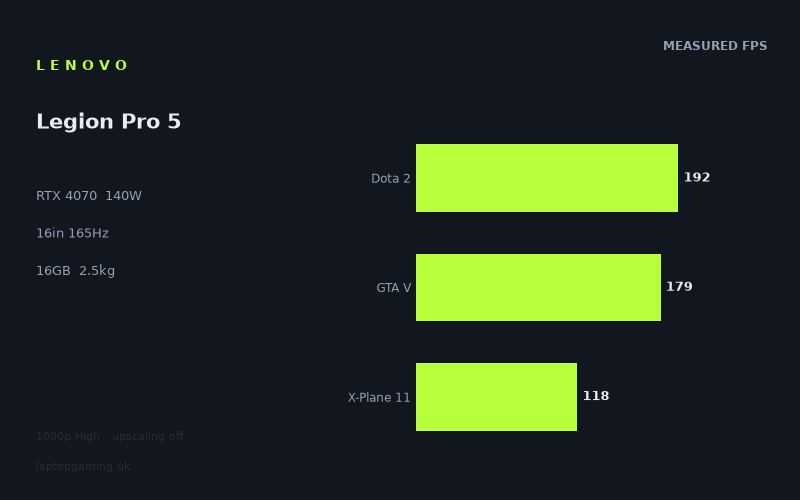
Frame rates
1920×1080, High preset, upscaling off.
Measured on this machine. Source: Notebookcheck, 2023-05-24.
Not scored: incomplete benchmark suite
Every scored laptop on this site is averaged over the same 5 games, and this one is short of Cyberpunk 2077, Baldur's Gate 3. A mean over 3 games is not comparable to a mean over 5, so we publish the figures we have and leave the score blank rather than rank it against machines tested on a different set. The numbers below are real - the suite is just incomplete.
How these numbers were produced
Frame rates here are not measured by us, and we label how each one was arrived at. A figure marked measured comes from a published run on that exact machine. A figure marked representative is derived from the GPU and its power limit (TGP) and cross-referenced against published reviews - a sound estimate of what that configuration delivers, but not a measurement of that specific laptop. Unless stated otherwise, numbers are 1920x1080, High preset, upscaling off. Where a laptop ships in several power configurations we use the wattage of the exact SKU listed, because a 140W RTX 5070 and a 115W one are not the same product.
In use
The short version
The Lenovo Legion Pro 5 (16ARX8) is a high-performance gaming laptop built around an RTX 4070 configured with a 140 W GPU power limit, a Ryzen 7 7745HX processor, 16 GB of memory and a 16-inch 2560x1600 IPS display running at 165 Hz. The available benchmark data shows that it is very quick at 1920x1080 on the High preset with upscaling disabled, but its suitability depends heavily on the games you play and on whether you expect to use the screen at its native 2560x1600 resolution.
Notebookcheck’s measured figures show a machine that can run several older, lighter or especially well-scaling games at or beyond the display’s 165 Hz refresh rate at 1080p High. Strange Brigade reaches 260 fps, The Witcher 3 reaches 257 fps, F1 22 manages 235 fps, Dota 2 reaches 192 fps, GTA V reaches 179 fps and Shadow of the Tomb Raider reaches 168 fps. Those are strong results, and they show that the Legion Pro 5 has the performance to make practical use of a high-refresh screen in a substantial portion of the measured catalogue.
The other side of the results matters just as much. Tiny Tina’s Wonderlands reaches 144 fps, Cyberpunk 2077 1.6 reaches 121 fps, Final Fantasy XV reaches 120 fps and X-Plane 11 reaches 118 fps. Returnal is the slowest of the measured games at 85 fps. None of those figures is poor in isolation, particularly with the test running at High settings and with upscaling disabled, but they demonstrate that a 165 Hz panel is not the same thing as a guaranteed 165 fps experience. In demanding games, this Legion will still require sensible expectations, settings adjustments or a willingness to play below the screen’s maximum refresh rate.
That is the right way to approach this configuration. Buy it because you want an RTX 4070 laptop with a high GPU power limit, a 165 Hz display and very strong 1080p High results across a varied game selection. Do not buy it on the assumption that every modern game will run at the display’s native resolution, at High settings, without upscaling, while also filling all 165 refresh cycles. The supplied measurements do not establish that.
The laptop’s UK price is not confirmed, which prevents a firm value judgement. That is not a minor omission. The same level of performance can look excellent or unconvincing depending on the asking price, especially when it sits between lower-cost RTX 4050 machines and more expensive RTX 4080 and RTX 4090 models. Until there is a confirmed UK price, this is a performance-led recommendation rather than a value-led one.
There is also no overall ranking for this Legion Pro 5. The scoring suite contains figures for Dota 2, GTA V and X-Plane 11, producing a mean of 163 fps across those three games, but figures are unavailable for Cyberpunk 2077 and Baldur’s Gate 3 within that suite. Because scored laptops are normally averaged across the same five games, a partial set should not be presented as directly comparable with complete five-game results. The available data is still useful, but it needs to be read as evidence of performance rather than forced into a ranking it cannot support.
The Legion Pro 5 is therefore best seen as a powerful, relatively substantial 16-inch gaming laptop for someone who mainly plays plugged in, values high frame rates in competitive or older games, and wants enough graphics headroom for demanding single-player titles without moving into RTX 4080 or RTX 4090 pricing by default. At 2.474 kg, it is transportable rather than light. Its 80 Wh battery is a meaningful specification, but there is no battery-life measurement in the supplied data, so it would be wrong to promise a particular amount of time away from the mains.
Performance
What the measurements actually show
All of the published frame rates here come from Notebookcheck and were measured at 1920x1080, High preset, with upscaling disabled. That test method matters. It gives a clean view of the laptop’s conventional rendering performance at 1080p, without an upscaling mode increasing the reported frame rate. It does not, however, directly tell us how every game will perform at the Legion Pro 5’s 2560x1600 native screen resolution, nor does it tell us what will happen at alternative quality presets.
At this test setting, the Legion Pro 5 produces a distinctly broad performance range. At the top end are Strange Brigade at 260 fps and The Witcher 3 at 257 fps. F1 22 follows at 235 fps. These are not marginally above the display’s 165 Hz refresh rate; they are comfortably beyond it. That gives the machine useful excess performance at 1080p High in those titles. The point is not that a 165 Hz screen can somehow display more than its stated refresh rate. The point is that the GPU is not struggling to keep the panel fed at its maximum refresh rate in these games under the measured settings.
Dota 2 at 192 fps, GTA V at 179 fps and Shadow of the Tomb Raider at 168 fps are also above the panel’s 165 Hz ceiling. Shadow of the Tomb Raider is only just over it, which is a reminder that a single average frame-rate figure should not be mistaken for an assurance that every moment of every run sits above 165 fps. Still, the measured result is enough to place it on the high-refresh side of the divide. Dota 2 and GTA V have more room above the refresh ceiling, while Shadow of the Tomb Raider is much closer to it.
That makes six of the measured games capable of exceeding 165 fps in the supplied 1080p High data: Strange Brigade, The Witcher 3, F1 22, Dota 2, GTA V and Shadow of the Tomb Raider. For a laptop with a 165 Hz panel, that is an encouraging spread. It includes competitive and mainstream gaming workloads as well as established single-player titles. The Legion Pro 5 is not reliant on one unusually favourable game to show high frame rates; it reaches the display’s refresh limit in several very different engines.
The next group falls below 165 fps but remains well above a conventional 60 Hz target. Tiny Tina’s Wonderlands reaches 144 fps. Cyberpunk 2077 1.6 reaches 121 fps, Final Fantasy XV reaches 120 fps and X-Plane 11 reaches 118 fps. These results remain fast, but they are a better representation of what to expect when a game places greater pressure on the graphics hardware, the processor, or both. They are also the figures that should temper any simplistic claim that an RTX 4070 laptop automatically turns a 165 Hz display into a constantly saturated gaming screen.
Returnal at 85 fps is the important low-end result. It is still above 60 fps in the measured test, but it is far from 165 fps. The gap between Returnal at 85 fps and Strange Brigade at 260 fps is substantial. This is not a fault in the benchmark data; it is exactly why a review should discuss several games rather than quote one attractive headline result. Modern games vary widely in their demands and in the way they respond to a particular processor and GPU combination. A buyer whose library resembles Returnal, Cyberpunk 2077 1.6 or Tiny Tina’s Wonderlands should read the lower results as more relevant than the figures from Strange Brigade or Dota 2.
The meaning of the 140 W GPU power limit
The RTX 4070 in this Legion Pro 5 has a stated GPU power limit of 140 W. That is a major part of the configuration, because an RTX 4070 laptop is not defined only by the name of the GPU. The power limit is part of the performance picture. In this machine, the GPU is configured for a 140 W limit, and Notebookcheck’s figures show that the laptop can produce high 1080p High frame rates across the available game set.
It would be wrong to claim, from the supplied facts alone, exactly how much faster this 140 W implementation is than every lower-power RTX 4070 laptop. No direct same-game, same-setting comparison against such a machine is provided here. What can be said is that this is not an RTX 4070 specification with an unspecified power limit. The 140 W figure is known, and the measured frame rates are consistent with a configuration intended to prioritise performance rather than merely carrying the RTX 4070 label.
The practical lesson for buyers is simple: this Legion Pro 5 should be judged on its measured results, not on the GPU name alone. In Strange Brigade, The Witcher 3 and F1 22, the GPU and the wider platform produce frame rates far above 165 fps at 1080p High. In Returnal, the same configuration records 85 fps. The 140 W power limit gives context for the laptop’s position, but it does not eliminate the normal differences between games.
There is another reason not to reduce the results to the GPU alone. At 1080p, lighter titles in a shared test set can become limited more by the processor or by the game engine than by raw GPU throughput. The Ryzen 7 7745HX is therefore part of the explanation for the Legion’s strongest results, particularly in games where very high frame rates are possible. This is also relevant when looking at the rival comparisons later in the review: near-identical averages against substantially higher-tier GPUs do not mean the GPUs are interchangeable. They can instead show that the shared 1080p games are compressing genuine graphics-performance differences.
High refresh gaming: where the Legion makes sense
A 165 Hz panel is most valuable when the laptop can regularly approach or exceed 165 fps in the games a buyer actually plays. The Legion Pro 5 does that in six of the measured titles at 1080p High with upscaling disabled. For Dota 2 at 192 fps, GTA V at 179 fps and F1 22 at 235 fps, the display’s refresh rate is not merely decorative. The available numbers suggest that the machine has enough performance to support a high-refresh experience in those games under the benchmark conditions.
Strange Brigade at 260 fps and The Witcher 3 at 257 fps go further still. These figures show that the display refresh rate, rather than the laptop’s average frame rate, becomes the limiting factor under the tested conditions. That is a good place to be if the game is one you play often, because it leaves some performance headroom for background activity, busier scenes or a preference for visual settings beyond the benchmark preset. The data does not quantify how much headroom exists in every circumstance, but the difference between 257 fps and 165 Hz is clearly larger than the difference between 168 fps and 165 Hz in Shadow of the Tomb Raider.
Shadow of the Tomb Raider at 168 fps is an example of a result that is technically above the panel refresh rate but should not be oversold. It indicates that the laptop can reach the 165 Hz threshold in the benchmark, but it leaves little average margin beyond it. For someone who wants every title to sit comfortably above the display’s maximum refresh rate, this is not the same class of result as F1 22 at 235 fps. It is nevertheless a strong result at 1080p High without upscaling.
Tiny Tina’s Wonderlands at 144 fps is the point where expectations need to change. A 144 fps result is still quick and still makes good use of a high-refresh panel, but it is not a full 165 fps average. Cyberpunk 2077 1.6 at 121 fps, Final Fantasy XV at 120 fps and X-Plane 11 at 118 fps remain smooth-looking figures in broad terms, yet they show that the laptop’s display has more refresh capacity than these games are filling in the measured configuration.
Returnal at 85 fps is lower again, though not remotely unplayable from the supplied number alone. It simply belongs to a different use case from Dota 2 at 192 fps. If your main interest is quick multiplayer games, strategy games or established titles that often run at high frame rates, the Legion’s screen and performance pairing is attractive. If your priority is demanding, visually intensive games where 85 fps or around 120 fps is more representative, the 165 Hz display is still a quality feature but not something that will be fully exploited in every title.
The scoring-suite figures and their limits
The three available scoring-suite games are Dota 2 at 192 fps, GTA V at 179 fps and X-Plane 11 at 118 fps. Their mean is 163 fps. That is useful as a compact summary of these particular three games, but it must be treated carefully. The spread from 118 fps to 192 fps is already wide, so the mean does not describe one uniform level of gaming performance. It is pulled upwards by Dota 2 and GTA V, both of which are much faster than X-Plane 11.
More importantly, the scoring suite is incomplete for this laptop. There are no supplied scoring-suite figures for Cyberpunk 2077 or Baldur’s Gate 3. Since scored laptops are averaged across the same five games, this Legion Pro 5 cannot be placed into that complete ranking on the basis of only three results. Presenting it as if it had a directly comparable five-game average would create false precision.
The correct conclusion is not that the available numbers are unhelpful. Dota 2 at 192 fps, GTA V at 179 fps and X-Plane 11 at 118 fps still reveal a lot about the Legion’s range. They show excellent performance in the first two and a distinctly more restrained result in the simulation title. But they do not justify an overall league-table claim. The benchmark evidence supports a nuanced verdict: the Legion Pro 5 is fast, often very fast, but performance varies significantly by game and it cannot be assigned a complete comparative score from the partial suite.
The screen
The Legion Pro 5 has a 16-inch IPS screen with a 2560x1600 resolution and a 165 Hz refresh rate. On paper, this is a well-matched specification for a performance-focused gaming laptop. The resolution provides more desktop space and a sharper native image than the 1920x1080 benchmark setting, while the 165 Hz refresh rate gives the system room to display very high frame rates where the game and hardware allow them.
The key qualification is that all supplied gaming measurements were taken at 1920x1080, not at the panel’s native 2560x1600. That means the benchmark data demonstrates how the Legion Pro 5 performs at 1080p High with upscaling off; it does not prove that the same figures apply at native resolution. The distinction matters because 2560x1600 asks the GPU to render more pixels than 1920x1080. It is therefore not responsible to take the 260 fps Strange Brigade result, the 235 fps F1 22 result or the 121 fps Cyberpunk 2077 1.6 result and present them as native-resolution results.
This does not make the screen a poor choice. It makes it a screen that offers the owner options. The measured 1080p results show strong high-refresh potential in several games, and the 2560x1600 panel provides a higher-resolution native mode for games where image detail matters more than chasing the maximum possible frame rate. The data does not tell us the precise performance trade-off at native resolution, so the sensible buyer should expect to decide between resolution, settings and frame-rate ambition on a game-by-game basis.
For fast games, the 165 Hz refresh rate is most clearly justified by the titles already above that level in Notebookcheck’s data. Strange Brigade at 260 fps, The Witcher 3 at 257 fps, F1 22 at 235 fps, Dota 2 at 192 fps, GTA V at 179 fps and Shadow of the Tomb Raider at 168 fps all exceed 165 fps at the tested 1080p High setting. In those games, the screen is capable of presenting more updates than a standard 60 Hz panel would allow.
For the middle group, the display remains useful but is not fully saturated by the measured average frame rate. Tiny Tina’s Wonderlands at 144 fps comes reasonably close to the refresh limit. Cyberpunk 2077 1.6 at 121 fps, Final Fantasy XV at 120 fps and X-Plane 11 at 118 fps are further away. Returnal at 85 fps is further still. These results are why the display should be considered a flexibility feature rather than a promise that every game will run at 165 fps.
The IPS panel type is another part of the stated specification, but there are no supplied measurements for brightness, contrast, colour coverage, response times or any other image-quality characteristic. It would be wrong to invent conclusions about those qualities. The available evidence supports only the basics: the Legion Pro 5 has an IPS panel, it is 16 inches, it is 2560x1600, and it refreshes at 165 Hz. That is enough to identify the intended class of display, but not enough to declare it excellent or poor for colour-critical work, outdoor use or fast-motion clarity.
Prospective buyers should also avoid treating the 165 Hz number as a reason to ignore the resolution. The high-refresh capability is valuable, but it will be most relevant in games where the laptop can produce very high frame rates under the chosen settings. The higher native resolution is valuable, but it will generally make greater demands on performance than the 1080p test setting. The screen’s appeal lies in having both options available, not in pretending that the laptop must always use both at their maximum simultaneously.
Build, size and portability
The confirmed physical figure is a weight of 2.474 kg. That places the Legion Pro 5 firmly in the substantial gaming-laptop category. It is not an ultra-light machine intended to disappear into a bag and be carried all day without thought. It is portable in the basic sense that it is a laptop, but the weight points towards a system that will be most comfortable as a desk-based machine which can be moved when necessary, rather than one chosen primarily for minimum carrying burden.
That weight is understandable in the context of the specification, though the supplied facts do not provide enough information to make detailed claims about chassis construction, cooling hardware, dimensions or power-adapter weight. This is a 16-inch machine with an RTX 4070 at a 140 W power limit and a Ryzen 7 7745HX. Those are performance-oriented components, and the benchmark results confirm that the laptop is intended to deliver high frame rates. But it would be speculation to state exactly how its design accommodates those components or to claim a particular thickness, footprint or travelling weight including accessories.
For practical buying purposes, 2.474 kg means the Legion Pro 5 is best suited to a user who has a regular place to play: a desk at home, a fixed work area, a student room, or another location where the laptop can usually remain set up. It can still be taken to another room, carried to a friend’s house or moved between home and work, but portability is not its defining advantage. Someone whose priority is frequent travel should take the weight seriously before choosing it.
The 80 Wh battery is a useful specification to know, but there is no measured battery-life figure in the supplied data. It is therefore not possible to state how long the Legion Pro 5 lasts in gaming, video playback, browsing or office work. Gaming laptops can also behave very differently on battery compared with mains power, but no battery-performance measurements are provided here. A buyer who needs reliable unplugged endurance should not infer it from battery capacity alone and should seek battery testing specific to this configuration.
There are no dimensions in the supplied information. That means there is no evidence-based way to say whether the Legion Pro 5 is especially slim, deep, wide or easy to fit into a particular bag. The 16-inch display and 2.474 kg weight establish that this is not a tiny machine, but they do not provide a complete portability picture. Likewise, there are no facts here about ports, keyboard layout, webcam, speakers, storage capacity, upgrade access or cooling noise. Those may matter greatly to individual buyers, but they cannot be assessed from the available fact sheet.
The correct conclusion is restrained but useful. The Legion Pro 5 is a relatively heavy 16-inch performance laptop, not a lightweight travel-first option. The 80 Wh battery may be relevant to mobility, but no endurance claim can be made. If your normal use involves a mains socket and a stable desk setup, the weight is less of an objection. If you expect to carry the laptop daily for long distances, it should be compared with lighter alternatives before committing.
How it compares
The rival data gives a useful cross-section of the RTX 4000-generation laptop market. It includes a lower-tier RTX 4050 machine, an RTX 4080 machine and two RTX 4090 machines. The comparisons are based only on games held in common, with preference given to scoring-suite titles. That limitation is important: these are shared-game averages, not universal statements of performance across every game or every setting.
Against the MSI Thin GF63 with RTX 4050
Against the MSI Thin GF63 with an RTX 4050, the Legion Pro 5 averages 75 fps ahead across three shared games. That is the largest winning margin among the listed rivals, and it supports the obvious conclusion that the Legion is in a different performance tier from this particular RTX 4050 comparison point.
The gap is especially relevant to the Legion’s 165 Hz display. A 75 fps average advantage across the shared games can make the difference between merely acceptable frame rates and genuinely high-refresh performance. It also helps explain why the Legion’s 1080p High numbers are so often above 165 fps in the measured set. The MSI has no confirmed UK price, so it is not possible to say whether the performance difference is justified by a particular price gap. But on the shared benchmark evidence alone, the Lenovo is clearly the more performance-focused option.
This does not mean every buyer should automatically avoid the MSI. An RTX 4050 laptop may still make sense if it is much cheaper, lighter, or better matched to a buyer’s needs, but those conditions cannot be established from the supplied facts. The relevant point for this review is narrower: if the decision is based on shared-game frame rates, the Legion Pro 5 delivers a substantial advantage.
Against the Acer Predator Helios 18 with RTX 4090
The Acer Predator Helios 18 with an RTX 4090 is the striking comparison. Across three shared games, the Legion Pro 5 averages 1 fps ahead. That does not mean an RTX 4070 is generally equivalent to an RTX 4090. It means that in this limited shared set, at the tested conditions, the difference is effectively negligible.
The fact sheet gives the reason this kind of result needs interpretation: at 1080p, lighter titles in the shared set can become CPU-bound and compress genuine GPU differences. That is the most sensible explanation for an RTX 4070 Legion Pro 5 appearing essentially level with an RTX 4090 laptop across only three shared games. When games are no longer strongly limited by the GPU, spending more on a higher-tier GPU does not necessarily produce a proportionate increase in average frame rate.
This comparison is useful because it warns against buying solely from GPU tier labels without considering actual game behaviour. It is not useful as proof that the Acer’s RTX 4090 has no advantage in more demanding workloads, at higher resolutions or in games that better expose GPU differences. The shared set is too small and too potentially CPU-limited for that claim. The Acer has no confirmed UK price in the supplied information, so there is also no value conclusion to draw.
Against the Alienware x16 R2 with RTX 4080
Against the Alienware x16 R2 with an RTX 4080, priced at £3,131, the Legion Pro 5 averages 1 fps behind across seven shared games. Again, this is effectively a near-zero difference in the available shared-game data. Unlike the Acer comparison, this result covers seven shared games rather than three, so it is based on a broader overlap. Even so, it should not be misrepresented as proof that the RTX 4070 and RTX 4080 are identical in all circumstances.
The same 1080p limitation applies. When shared tests include lighter games or games that are more processor-limited at 1080p, the gap between graphics tiers can be reduced sharply. The Legion’s Ryzen 7 7745HX and its 140 W RTX 4070 configuration clearly allow it to perform extremely well in this test environment. The Alienware’s RTX 4080 may have more potential in different games or at different resolutions, but that potential is not quantified by the supplied shared-game average.
The Alienware’s £3,131 UK price is useful context, but the Legion Pro 5 has no confirmed UK price. Without the Lenovo’s price, it is impossible to state whether being only 1 fps behind across seven shared games represents remarkable value, ordinary value or poor value. If the Legion is substantially cheaper, the comparison may be compelling. If it is priced unusually close to the Alienware, the calculation changes. Price is not an optional detail in this class of laptop, and the missing Lenovo figure prevents a definitive recommendation between the two.
Against the Asus ROG Strix Scar 17 with RTX 4090
The Asus ROG Strix Scar 17 with an RTX 4090 is the rival that beats the Legion Pro 5 by the largest listed margin. The Lenovo averages 36 fps behind across three shared games. This is the comparison that best demonstrates why the near-ties against the Acer RTX 4090 and Alienware RTX 4080 should not be over-read. In a different three-game overlap, a higher-tier RTX 4090 machine opens a meaningful lead.
A 36 fps average deficit is not a trivial difference. It is large enough to affect whether a game sits below or above a high-refresh target, and it represents a real performance advantage for the Asus in the shared titles. The Asus costs £4,883, which is much higher than the Alienware’s £3,131 listed price, although the Legion’s own price remains unconfirmed. The available data therefore shows a familiar trade-off: the Asus delivers more frame rate in the shared comparison, but it sits in a far more expensive stated price bracket.
The three-game overlap still requires caution. It does not tell us the Legion is always 36 fps behind, and it does not reveal which games produced the gap. But it is strong enough evidence to say that buyers seeking the highest possible performance should not assume the Legion can match every RTX 4090 system merely because it was level with the Acer in another small shared set. The Asus comparison shows that GPU-tier advantages can become visible when the selected games expose them.
What the rival spread means
Taken together, the rival results paint a coherent picture. The Legion Pro 5 is decisively ahead of the RTX 4050 MSI Thin GF63 by 75 fps across three shared games. It is effectively tied with the RTX 4090 Acer Predator Helios 18 across three shared games and with the RTX 4080 Alienware x16 R2 across seven. It falls behind the RTX 4090 Asus ROG Strix Scar 17 by 36 fps across three shared games.
That is not contradictory. It is what happens when different game selections place different pressures on the GPU and processor. The fact that the Legion can draw level with higher-tier machines in some 1080p shared sets is impressive, but the fact that it loses ground to the Asus in another set is equally important. A responsible reading is that the Legion is very capable at 1080p High, especially in games where the wider platform or CPU limitation compresses graphics differences, but it is not a replacement for every RTX 4080 or RTX 4090 laptop in GPU-heavy conditions.
No rival has a confirmed price that can be directly compared against a confirmed Legion price, because the Legion’s UK price is unknown. The MSI and Acer also have no confirmed UK prices. The Alienware is listed at £3,131 and the Asus at £4,883, but those figures alone cannot settle the Legion’s value. For now, the rival comparison is primarily about performance positioning: well clear of the RTX 4050 example, capable of challenging higher-tier systems in some shared 1080p workloads, and still vulnerable to a major RTX 4090 advantage in others.
Who it’s for
The Legion Pro 5 is for the buyer who wants strong measured 1080p High performance from an RTX 4070 laptop and does not need an ultra-portable machine. Its 140 W GPU power limit, Ryzen 7 7745HX processor and 165 Hz display form a sensible combination for someone who spends much of their gaming time connected to mains power at a desk.
It is particularly well suited to players of games resembling Dota 2, GTA V, F1 22, Strange Brigade, The Witcher 3 and Shadow of the Tomb Raider under the benchmark conditions. These are the measured games where the Legion reaches or exceeds the 165 Hz display refresh rate at 1920x1080 High with upscaling disabled. If fast response and high frame-rate presentation matter more to you than always playing at the panel’s native resolution, this is the strongest case for the laptop.
It also makes sense for someone who plays a broad mix of game types and accepts that different titles will demand different expectations. Cyberpunk 2077 1.6 at 121 fps, Final Fantasy XV at 120 fps, X-Plane 11 at 118 fps and Returnal at 85 fps show that the Legion remains capable in more demanding workloads, even where it does not approach 165 fps. A buyer who is happy with strong but variable performance across different games should find the benchmark profile reassuring.
The Legion is less suitable for the person who wants every game to run at 165 fps. The data plainly does not support that expectation. Tiny Tina’s Wonderlands at 144 fps is close but below the panel’s refresh rate, while Cyberpunk 2077 1.6, Final Fantasy XV, X-Plane 11 and Returnal sit further below it in the supplied results. Anyone treating the 165 Hz display as a non-negotiable minimum frame-rate target in every game should consider more powerful hardware or revise their settings and resolution expectations.
It is also not the clearest choice for someone who wants confirmed native-resolution performance before buying. The screen is 2560x1600, but the published frame rates are at 1920x1080. The laptop may still be a good native-resolution gaming machine, but that cannot be established from these measurements. Buyers whose priority is 2560x1600 gaming at High settings should look for benchmark data at that resolution rather than assuming the 1080p figures transfer directly.
Frequent travellers should think carefully about the 2.474 kg weight. The Legion Pro 5 is not impossible to carry, but it is not presented by the available specification as a minimal-weight option. The 80 Wh battery does not resolve that question because no battery-life result is supplied. If long periods away from a socket and daily carrying comfort are central to your purchase, there is not enough evidence here to recommend the Legion over a lighter alternative.
Finally, buyers focused above all on value should wait for a confirmed UK price. The performance is clear; the value proposition is not. The Legion’s shared-game results are very strong against the RTX 4050 MSI, effectively level with the RTX 4080 Alienware and one RTX 4090 Acer comparison, and behind the RTX 4090 Asus. But without a Lenovo price, there is no honest way to turn that into a firm buying verdict against machines listed at £3,131 or £4,883, or against rivals with no confirmed UK price.
For the right buyer, the Lenovo Legion Pro 5 is a convincing performance machine: heavy enough to be treated as a desk-first laptop, fast enough to exploit its 165 Hz panel in many games at 1080p High, and flexible enough to handle more demanding titles at lower but still substantial measured frame rates. For the wrong buyer, it is either too heavy, too dependent on a yet-unconfirmed price, or too uncertain at the screen’s native resolution. The benchmark data supports enthusiasm, but it supports selective enthusiasm rather than a blanket recommendation.