Review
MSI Titan 18 HX review
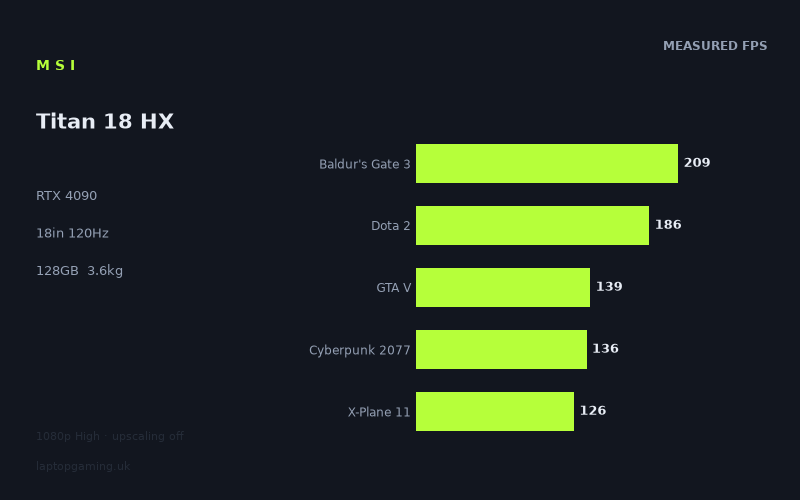
Frame rates
1920×1080, High preset, upscaling off. Averages 159fps across the 5 core benchmark games.
Measured on this machine. Source: Notebookcheck, 2024-01-30.
Not scored: no confirmed UK price
We have the full benchmark suite for this machine, so it ranks on the frame rate leaderboard like any other. What we don't have is a UK listing for this exact configuration - it's sold as a European review unit, or only in specifications that differ from the one tested. Since 30% of our score is value for money, scoring it would mean pretending price is no object, which would flatter it against every laptop you can actually buy. The frame rates below are real and comparable; there is just no buying recommendation to make yet.
How these numbers were produced
Frame rates here are not measured by us, and we label how each one was arrived at. A figure marked measured comes from a published run on that exact machine. A figure marked representative is derived from the GPU and its power limit (TGP) and cross-referenced against published reviews - a sound estimate of what that configuration delivers, but not a measurement of that specific laptop. Unless stated otherwise, numbers are 1920x1080, High preset, upscaling off. Where a laptop ships in several power configurations we use the wattage of the exact SKU listed, because a 140W RTX 5070 and a 115W one are not the same product.
In use
The short version
The MSI Titan 18 HX (A14VIG) is a deliberately uncompromising desktop-replacement gaming laptop built around an RTX 4090, a Core i9-14900HX, 128GB of memory and an 18in 3840x2400 display. Notebookcheck’s benchmark data shows exceptional 1920x1080 High-preset performance with upscaling disabled: every measured game clears the screen’s 120Hz refresh rate at those settings, and several are running far beyond it.
That is the important qualification. The published figures are for 1920x1080 rather than the panel’s native 3840x2400 resolution. They demonstrate that this is an extremely fast machine in the benchmark configuration, but they do not prove that every game will sustain 120fps at the native resolution. The difference between the test resolution and the screen’s native resolution matters enormously, particularly in demanding games such as Cyberpunk 2077 and X-Plane 11. Anyone buying the Titan specifically to play everything at 3840x2400 should treat the published 1080p results as evidence of broad performance potential, not as a native-resolution guarantee.
The machine’s strongest case is for a buyer who wants the highest available class of mobile gaming hardware, does not need a genuinely portable laptop, and values CPU headroom and 128GB of memory alongside the RTX 4090. It is a machine for demanding local gaming, heavy multitasking, large projects and users who want an 18in screen rather than a compact chassis. Its 3.632kg weight makes clear that this is not designed to be thrown into a bag every morning and used like an ordinary mobile computer.
The benchmark data is particularly impressive in The Witcher 3, Strange Brigade, F1 22, Tiny Tina’s Wonderlands, Baldur’s Gate 3, Dota 2 and Final Fantasy XV. Those results give the Titan ample performance headroom for the 120Hz panel when playing at the tested 1920x1080 High settings. Even the lower results in the set, including X-Plane 11, GTA V, Far Cry 5 and Cyberpunk 2077, remain above 120fps in Notebookcheck’s figures. That is a remarkably consistent outcome across a varied group of games.
There is one important missing piece: the exact UK price of this configuration is not confirmed, so its value component cannot be calculated. That is a pricing-data limitation, not a performance concern, and there is no sensible basis for guessing what this exact Titan should cost.
The most useful way to read the Titan is not as a laptop that needs to prove whether it is fast. The figures already establish that. The real question is whether its combination of size, 18in display, 128GB memory and heavyweight RTX 4090 hardware fits the way you actually use a computer. If it will live mostly on a desk, the performance case is strong. If it must travel frequently, be used on trains, carried through campus, or work as a light everyday notebook, its mass alone is a substantial reason to consider something else.
Performance
What Notebookcheck’s figures show
Notebookcheck measured the MSI Titan 18 HX at 1920x1080, using the High preset with upscaling off. This matters because it is a clean, useful comparison point: there is no upscaling result being mixed into the figures, and the settings are consistent across the published game list. It also means the results show the laptop’s baseline rasterised gaming performance at the tested configuration rather than a result boosted by an upscaling mode.
The headline result is a mean of 159fps across the scoring-suite games. That mean comes from Baldur’s Gate 3 at 209fps, Dota 2 at 186fps, GTA V at 139fps, Cyberpunk 2077 at 136fps and X-Plane 11 at 126fps. This is not a suite made solely of lightweight esports games. It contains a broad mix of game engines and bottlenecks, including titles that can lean heavily on the processor as well as games that are much more demanding of the graphics hardware.
Baldur’s Gate 3 at 209fps is particularly strong in the context of a 120Hz screen. At the tested settings, the measured result sits comfortably above the panel refresh rate. That does not mean every location, encounter or future version of the game will behave identically, because the data supplied is a benchmark figure rather than a full account of every possible gameplay scenario. It does mean that the Titan has substantial headroom in the published test run.
Dota 2 reaches 186fps, another result well above 120Hz. For players who care about responsive competitive play, that is useful rather than merely decorative. A 120Hz panel cannot display more than 120 distinct refreshes each second, but running a game above that rate can still leave room for the frame rate to vary without immediately dropping below the screen’s refresh ceiling. The benchmark data does not include frame-time consistency or minimum frame rates, so it would be wrong to promise a fixed experience in every match. Still, the published average is comfortably positioned for the display used here.
GTA V records 139fps. That is not as extravagant a result as Baldur’s Gate 3 or Dota 2, but it remains above the Titan’s 120Hz refresh rate at 1920x1080 High. In practical terms, it is a result with some margin rather than enormous excess. If the aim is to use the panel at its full refresh rate in the benchmark configuration, GTA V is within that target. If the aim is to raise the resolution to the display’s native 3840x2400, raise settings beyond the tested High preset, or introduce other demanding visual options, the published figure cannot tell us what will happen.
Cyberpunk 2077 is measured at 136fps. That is one of the most revealing figures in the list because it is a demanding game and still clears 120fps at the stated test settings with upscaling disabled. It is evidence that the RTX 4090-equipped Titan has serious performance at 1920x1080 High. It is not evidence that Cyberpunk 2077 will run at 136fps at 3840x2400, because Notebookcheck did not publish that result in the fact sheet. The native panel carries substantially more display area than the test setting, and demanding games are exactly where that change can have the greatest effect.
X-Plane 11 is the lowest scoring-suite result at 126fps. It nevertheless remains above 120Hz in the published benchmark. This is a useful reminder that “lowest” does not mean poor here. The Titan’s performance range is high enough that the bottom end of the supplied list still exceeds the screen refresh rate under the stated conditions. The margin is simply narrower than it is in titles such as The Witcher 3, Strange Brigade or F1 22.
The non-scoring-suite figures reinforce the same picture. The Witcher 3 reaches 412fps and Strange Brigade records 406fps. These are extremely high results relative to a 120Hz display. They show that, in games and settings where the system is not being fully constrained by the graphics workload, the Titan has far more rendering capacity than the panel can show at the tested resolution.
F1 22 at 280fps and Tiny Tina’s Wonderlands at 224fps are also very strong results. Both sit far above 120fps in Notebookcheck’s data, leaving a considerable margin at 1920x1080 High. Final Fantasy XV reaches 184fps, placing it in a similar broad performance tier to Dota 2. Far Cry 5 records 158fps, again above the screen refresh rate. The fact that the result remains above 120fps across this whole range of games is the core performance argument for the Titan.
The spread between games matters more than the biggest number
It would be easy to focus only on The Witcher 3 at 412fps or Strange Brigade at 406fps, but those results should not be treated as a general promise of 400fps-class gaming. The benchmark set itself shows why. The Titan ranges from 412fps in The Witcher 3 to 126fps in X-Plane 11 under the published configuration. That is not inconsistency in the machine; it is a normal consequence of different game engines, different graphical workloads and different demands on the processor and graphics hardware.
The machine is configured with a Core i9-14900HX alongside the RTX 4090, and that processor pairing is relevant to the very high frame rates in less restrictive titles. At 1920x1080, particularly where a game can generate extremely high frame rates, the graphics chip is not always the limiting part of the system. A title may instead become constrained by processor work, game-engine behaviour or the interaction between game and system. This is why a top-tier GPU does not produce a proportionally huge lead in every lighter benchmark.
The supplied rival comparison data makes that point especially clearly. Against both the MSI Stealth 16 Studio with an RTX 4070 at 105W and the Lenovo LOQ 15IRH8 Core i7 with an RTX 4050 at 95W, the Titan averages +0fps across the shared games. That is a real result, not a typo and not a reason to conclude that an RTX 4090 is equivalent to either lower-tier GPU. The fact sheet explains the likely reason: at 1080p, the lighter titles in the shared set are CPU-bound and compress genuine GPU gaps. The comparison is showing the limit of that particular shared test selection at that resolution.
That distinction is crucial for sensible buying decisions. Benchmark readers should not take a near-zero shared-game difference in a CPU-bound set and use it to dismiss the Titan’s graphics hardware. Nor should they take the Titan’s highest figures and assume that all games will run at those levels. The full data set is more informative than either simplistic conclusion. In demanding titles, the Titan remains very fast, but the published numbers vary because games vary.
The Titan’s 159fps scoring-suite mean is useful because it includes games spread across a range of performance outcomes rather than just the spectacularly light results. Even there, the mean should not be mistaken for a minimum, a native-resolution figure or a guarantee at a different preset. It is an average across the named five-game scoring suite, all at 1920x1080 High with upscaling disabled. Read it as a concise summary of excellent tested performance, not as a universal answer to every possible game setting.
GPU power limit: what can and cannot be concluded
The supplied specification identifies the laptop as using an RTX 4090, but it does not provide a GPU power limit for this exact MSI Titan 18 HX configuration. That means there is no responsible basis for quoting a wattage, comparing its power allocation directly with another RTX 4090 laptop, or claiming that a particular power setting explains the results. GPU power limits matter in gaming laptops because they can influence how much sustained graphics performance a nominally similar GPU can deliver, but the relevant number is not available here.
The benchmark figures are therefore more useful than pretending to know the missing power specification. They show what this particular system achieved in Notebookcheck’s published game tests. The RTX 4090 branding tells us the GPU class fitted to the machine; the measured results tell us how this laptop performed in the stated benchmark setup. Where those two sources of information could be confused, the measured figures deserve more weight.
This is also why the comparison with the Asus ROG Strix Scar 17 is valuable. That rival also has an RTX 4090, yet the Titan averages 49fps behind it across the shared games. Without full shared-game details, matching settings beyond those already supplied, or the Titan’s power limit, it would be speculation to assign that gap to a single cause. The result does establish that RTX 4090 laptops are not interchangeable simply because the GPU label matches. Chassis implementation, processor behaviour and the game selection can all matter, but the fact sheet does not provide enough evidence to separate those factors.
Conversely, the Titan’s very large lead over the MSI Thin GF63, at an average of 83fps across the shared games, shows that it is not merely relying on CPU-bound lightweight tests to look good. The Thin GF63 uses an RTX 4050, and the Titan’s shared-game advantage is substantial. The exact titles behind that comparison are not listed, so it would be wrong to turn that average into a claim about every game. It remains strong evidence of the gap between the Titan and a far less capable RTX 4050 system in the shared benchmark sample.
What 120Hz means for these figures
The screen refreshes at 120Hz. In the published 1920x1080 High tests, every listed result exceeds 120fps: X-Plane 11 is at 126fps, Cyberpunk 2077 at 136fps, GTA V at 139fps, Far Cry 5 at 158fps, Final Fantasy XV at 184fps, Dota 2 at 186fps, Baldur’s Gate 3 at 209fps, Tiny Tina’s Wonderlands at 224fps, F1 22 at 280fps, Strange Brigade at 406fps and The Witcher 3 at 412fps.
That does not mean that every game has equal headroom. X-Plane 11 has a far narrower margin over 120Hz than The Witcher 3. Cyberpunk 2077, GTA V and Far Cry 5 are also above the target but do not have the same huge surplus seen in the very highest results. For someone who wants to use the screen’s full refresh rate at the exact tested resolution and preset, the data is encouraging across the board. For someone who wants to increase image quality, move to native resolution or pursue the most demanding possible settings, the lower-margin results are the ones to treat most cautiously.
There is no measured data here for ray tracing, frame generation, alternative upscaling modes, native-resolution gaming, minimum frame rates or battery-powered gaming. Those omissions should remain omissions. The Titan’s published results make it reasonable to call it extremely fast at the tested configuration. They do not allow a credible claim about performance in modes that were not measured.
The screen
The Titan has an 18in 3840x2400 display with a 120Hz refresh rate. That is a large, high-resolution panel specification, and it shapes how the performance data should be interpreted. The notebook’s screen is built to present a great deal more detail than a conventional 1920x1080 display, but Notebookcheck’s game figures in this fact sheet were measured at 1920x1080. The benchmark resolution is therefore not the panel’s native resolution.
This does not make the results less valuable. A 1920x1080 benchmark remains a useful way to compare systems consistently, especially when the settings are clearly stated and upscaling is off. It tells a buyer that the Titan can deliver very high frame rates at that resolution and preset. What it cannot tell a buyer is exactly where each of those games will land at 3840x2400.
At the tested resolution, the RTX 4090 is clearly capable of feeding the panel’s 120Hz refresh rate in every named game. That is the direct conclusion supported by the numbers. The more difficult question is whether the machine can feed the same 120Hz panel at the display’s full native resolution. The answer varies by game and settings in real use, but no native-resolution measurements are supplied here. It would be irresponsible to convert the 1920x1080 figures into made-up 3840x2400 estimates.
The safest interpretation is that the screen gives the owner a choice. The high native resolution is available for games and other work where image detail matters most, while the published 1920x1080 figures show a route to very high refresh performance at the tested High preset. The benchmark data does not establish how image scaling is implemented on this screen, how a lower rendered resolution looks, or whether a particular game offers an ideal resolution option. Those are display-behaviour questions outside the fact sheet.
The 120Hz refresh rate is well matched to the data at 1920x1080 High. It is not a panel that needs 300fps or 400fps to be fully utilised; it reaches its stated refresh limit at 120fps. The Titan clears that mark throughout the listed benchmark set. In The Witcher 3 and Strange Brigade, the result is so far above 120fps that the screen rather than the graphics system becomes the limiting factor in terms of visible refreshes. In X-Plane 11, the machine is only modestly above 120fps, which makes the screen’s refresh rate a more realistic performance target than a huge surplus.
The panel type is not provided in the fact sheet, so there is no basis for claims about contrast, brightness, colour coverage, response behaviour, HDR capability or viewing angles. Likewise, there are no measurements for screen brightness or colour accuracy. The display can be described accurately as an 18in 3840x2400 120Hz panel. Anything beyond that would be assumption rather than review evidence.
For buyers focused on esports-style gaming, the screen specification creates a possible mismatch of priorities. The benchmark data supports high frame rates at 1920x1080, particularly in Dota 2 at 186fps, but the panel itself is limited to 120Hz. That does not make the Titan poor for competitive games; it is clearly very fast in the supplied data. It means that a buyer whose sole priority is the highest possible refresh rate may prefer a different class of laptop screen, while a buyer who wants a large 18in high-resolution workspace alongside fast gaming may find the Titan’s balance more compelling.
Build, size and portability
The MSI Titan 18 HX weighs 3.632kg. That single figure is enough to place it firmly in desktop-replacement territory. It is not a minor difference from a light gaming notebook; it changes how and where the machine makes sense. A 3.632kg laptop can be moved between rooms, taken to occasional events or transported when necessary, but it is a poor fit for someone who expects to carry it daily without thinking about it.
That is not a criticism of the Titan’s intended role. A laptop with an 18in screen, RTX 4090, Core i9-14900HX and 128GB of memory is plainly aimed at a buyer who accepts a large system in exchange for high specification. The portability compromise is part of the product category. The mistake would be to buy it expecting the convenience of a much smaller machine simply because it has a laptop form factor.
For desk use, the weight may matter very little. If the Titan will spend most of its time in one place, connected to power and used as the main gaming machine, 3.632kg is much less important than the screen size, the processor, the graphics hardware and the memory capacity. In that role, it offers the advantage of an integrated 18in display while retaining the ability to be relocated without dismantling a desktop setup.
For frequent travel, the opposite is true. The 3.632kg figure is not just a number on a specification sheet; it is a constraint on the type of bag, commute and journey for which the machine is sensible. A buyer travelling every day, moving between lectures, taking regular flights, or using a laptop in cramped spaces should be realistic about whether such a large system suits that routine. The fact sheet does not provide dimensions, charger weight or battery figures, so it would be wrong to quantify the total carried load or make claims about unplugged runtime. The laptop’s own mass is enough to make the main point.
The 18in display reinforces the same conclusion. A screen of this size can be a major benefit for games, timelines, large documents, code, spreadsheets and multi-window work, but it is not the defining feature of a compact mobile device. The Titan is for someone willing to prioritise screen area and component specification over discretion.
There are no published chassis dimensions in the supplied information, so the review cannot responsibly state its width, depth or thickness. There are also no supplied details for ports, storage, keyboard, speakers, webcam, wireless hardware, cooling noise, surface temperatures, battery capacity or battery life. Those are meaningful purchase considerations, particularly on a machine intended to replace a desktop, but they are not measured or specified in this fact sheet. A buyer for whom quiet operation, ports or unplugged endurance are decisive should seek evidence for those areas rather than assuming that a large RTX 4090 laptop will meet a particular expectation.
The 128GB memory allocation is a more concrete reason to view the Titan as a broad workstation-class system as well as a gaming laptop. Modern games alone do not explain every reason to want that amount of memory; its value is greatest for users who genuinely run memory-heavy workloads, large projects or many demanding applications alongside games. The fact sheet does not include application benchmarks, so there is no basis for claiming a specific productivity result. What can be said is that 128GB is an unusually expansive memory configuration and aligns with the Titan’s large, desk-oriented positioning.
How it compares
Against the MSI Thin GF63
The clearest favourable comparison is with the MSI Thin GF63, which uses an RTX 4050. Across five shared games, the Titan averages 83fps more. That is a major performance advantage, not a marginal leaderboard adjustment. The machines are not simply separated by a few frames in a narrow benchmark range; the Titan’s shared-game result indicates a much higher level of gaming performance.
The comparison should still be read carefully. It covers the games both machines hold in common, rather than every game in Notebookcheck’s Titan result list, and the fact sheet does not name the five shared titles. It would therefore be incorrect to say that the Titan is 83fps faster in any specific game. The valid conclusion is narrower and still powerful: in the shared sample, the Titan has a very large average lead over the RTX 4050-equipped Thin GF63.
For a buyer deciding between an entry-level or mainstream RTX 4050 machine and this Titan, the performance difference is meaningful. The Titan also brings the 18in 3840x2400 120Hz screen, Core i9-14900HX and 128GB memory configuration, while the Thin GF63 comparison only establishes its RTX 4050 GPU. The supplied data does not support a full specification comparison beyond that, and neither machine has a confirmed UK price here. Performance alone, however, strongly favours the Titan.
Against the MSI Stealth 16 Studio
The MSI Stealth 16 Studio is the first comparison that needs interpretation rather than a simple winner-and-loser conclusion. It has an RTX 4070 at 105W, yet the Titan averages +0fps across three shared games. Taken literally, that is a tie in the shared benchmark average.
It would be a mistake to turn that tie into a claim that the RTX 4090 in the Titan offers no gaming advantage over an RTX 4070 at 105W. The fact sheet explicitly explains why a near-zero difference can occur: at 1080p, lighter titles in the shared set are CPU-bound and compress genuine GPU gaps. In other words, the comparison is telling us more about the limits imposed by the shared games and test resolution than it is about an absence of graphics-hardware difference.
The Titan’s broader results support that reading. Notebookcheck’s measured figures range from 126fps to 412fps across the supplied game list, with the most demanding titles lower and lighter titles much higher. Where frame rates climb to very high levels at 1920x1080, a test can cease to expose the full difference between graphics chips. A three-game shared average is therefore useful evidence, but it is not sufficient reason to choose a lower-tier GPU laptop on the assumption that it will always perform identically.
The Stealth 16 Studio may still suit a different buyer if its form factor is more appropriate, but that cannot be assessed from the supplied data because its weight and dimensions are not given here. The performance comparison says only that the shared 1080p games produced a tie, and that the tie is explained by CPU-bound behaviour in lighter titles. It does not erase the Titan’s much stronger hardware class or its high results in the full published set.
Against the Lenovo LOQ 15IRH8 Core i7
The Lenovo LOQ 15IRH8 Core i7 has an RTX 4050 at 95W. Like the Stealth 16 Studio comparison, it averages +0fps against the Titan across three shared games. Again, that is a genuine measured outcome in the shared set, but it should not be read as a general equivalence between the systems.
The explanation is the same and is important enough to state clearly: the shared games are lighter titles at 1080p, where CPU limits can compress genuine GPU performance gaps. This is exactly the situation where a buyer can be misled by looking only at an average without considering the games behind it. A top-tier GPU cannot necessarily demonstrate its advantage if the benchmark is limited elsewhere in the system or game engine.
The Titan’s 83fps average lead over the RTX 4050-equipped MSI Thin GF63 is a useful counterweight to this result. It shows that a comparison with RTX 4050 hardware can look dramatically different depending on the shared game sample. Neither result is invalid. Together, they demonstrate why responsible benchmark analysis must name the shared-game limitation and avoid grand conclusions from a small overlap.
For a buyer choosing between the Titan and the Lenovo, the +0fps shared average is not enough information to declare them interchangeable. The Titan’s own listed figures, 18in 3840x2400 120Hz screen, Core i9-14900HX and 128GB memory set it apart in specification. At the same time, there is no confirmed UK price for either in this data, and the Lenovo may fit a different budget or portability target. Those questions cannot be answered by pretending that a CPU-bound three-game tie settles the entire buying decision.
Against the Asus ROG Strix Scar 17
The Asus ROG Strix Scar 17 is the most difficult rival for the Titan because it is the machine that beats it by the largest supplied margin. Both use an RTX 4090, but the Titan averages 49fps behind across three shared games. This is a substantial difference in that small shared sample and cannot be dismissed as noise.
The comparison is useful precisely because it prevents lazy assumptions about the RTX 4090 badge. The Titan is unquestionably fast in its own published results, but it is not automatically the fastest result among every RTX 4090 laptop. The Scar 17’s shared-game advantage shows that implementation matters. The supplied information does not include sufficient detail to attribute the difference to GPU power limit, cooling, processor behaviour, memory configuration, game selection or any other individual factor. A responsible review should leave that causal question open.
For a buyer choosing strictly on the shared benchmark data, the Scar 17 has the stronger result. For a buyer choosing on the Titan’s complete package, the question is broader: the Titan offers an 18in 3840x2400 120Hz display and 128GB of memory, while the fact sheet provides no equivalent full specification detail for the Scar 17 beyond its RTX 4090. The data therefore supports a firm performance warning but not a complete product verdict between the two machines.
It is also important that the comparison is across three shared games. A three-game average can identify a meaningful result, as it does here, but it does not establish a universal gap in every title, resolution or setting. The correct conclusion is not that the Scar 17 is always 49fps faster. The correct conclusion is that it averaged 49fps ahead in the games both machines held in the supplied comparison.
Who it’s for
The MSI Titan 18 HX is for a buyer who wants an extremely high-performance gaming laptop and is prepared to treat it as a portable desktop rather than an everyday carry device. The 3.632kg weight, 18in display, RTX 4090, Core i9-14900HX and 128GB memory all point in the same direction: this is a machine intended to do a great deal from one substantial chassis.
It makes most sense for someone who plays demanding games on a desk and values high frame rates at 1920x1080 High settings. Notebookcheck’s numbers show that every supplied game exceeds the 120Hz refresh rate at those settings with upscaling off. Buyers playing The Witcher 3, Strange Brigade, F1 22, Tiny Tina’s Wonderlands, Baldur’s Gate 3, Dota 2 or Final Fantasy XV have particularly large performance margins in the published data.
It also suits a buyer who wants a large integrated display and does not want to compromise on memory capacity. The 18in 3840x2400 panel offers substantial screen space on paper, while 128GB of memory gives the system unusually broad capacity for demanding use beyond a single game. There are no productivity measurements in the fact sheet, so this should not be read as a benchmark claim for particular professional applications. It is a specification-led reason why the Titan may appeal to users whose needs extend beyond gaming.
The Titan is not the sensible choice for a buyer who needs a genuinely portable laptop. At 3.632kg, it is too heavy to recommend for routine daily carrying unless the buyer has consciously accepted that compromise. A smaller laptop with lower graphics performance may be a better real-world fit for someone who travels frequently, works in changing locations or simply wants a computer that is easier to move.
It is also not the obvious choice for a buyer whose main priority is the highest possible panel refresh rate for competitive gaming. The Titan is very fast in Dota 2 at 186fps and has enormous headroom in some other games, but its own display refresh rate is 120Hz. Someone who wants a screen designed around much higher refresh gaming should look for a machine whose panel specification matches that goal more directly.
Buyers focused on native-resolution gaming should be careful rather than dismissive. The 3840x2400 display is a major attraction, but the published benchmark data is at 1920x1080. The Titan has the hardware class and the tested 1080p performance to make it a credible high-resolution gaming machine, but there are no measured 3840x2400 frame rates in the supplied information. Do not buy it on the assumption that Cyberpunk 2077, X-Plane 11 or any other listed game will sustain 120fps at the native resolution without further evidence.
Finally, it is not the right machine for someone who wants a simple price-to-performance recommendation today, because the exact UK price has not been confirmed. Its performance credentials are clear, but a buying recommendation always depends partly on what is being asked for the exact configuration. Until that figure exists, the sound conclusion is straightforward: the MSI Titan 18 HX is an exceptionally capable, very large RTX 4090 laptop with benchmark results that comfortably serve its 120Hz display at the tested 1920x1080 High settings, but it should be bought for its desk-bound power and expansive specification, not for portability or on unsupported assumptions about native-resolution performance.