Details
Product prices and availability are accurate as of the date/time indicated and are subject to change. Any price and availability information displayed on Amazon.co.uk at the time of purchase will apply to the purchase of this product.Review
Alienware 16X Aurora, RTX review
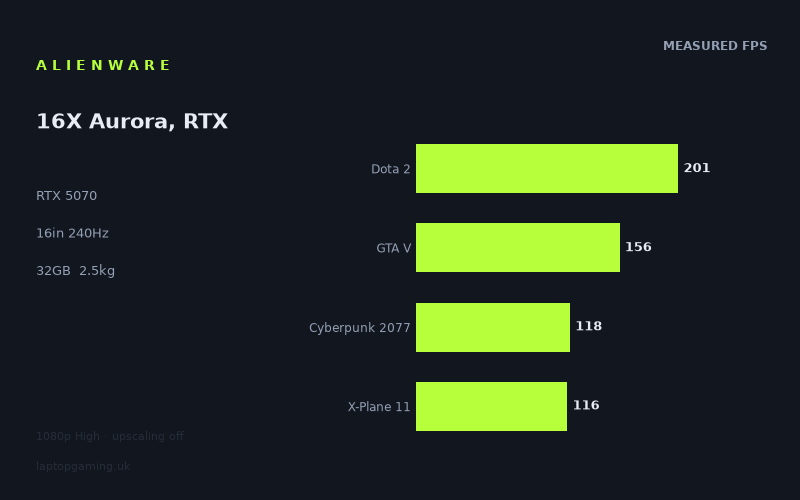
Frame rates
1920×1080, High preset, upscaling off.
Measured on this machine. Source: Notebookcheck, 2025-08-13.
Not scored: incomplete benchmark suite
Every scored laptop on this site is averaged over the same 5 games, and this one is short of Baldur's Gate 3. A mean over 4 games is not comparable to a mean over 5, so we publish the figures we have and leave the score blank rather than rank it against machines tested on a different set. The numbers below are real - the suite is just incomplete.
How these numbers were produced
Frame rates here are not measured by us, and we label how each one was arrived at. A figure marked measured comes from a published run on that exact machine. A figure marked representative is derived from the GPU and its power limit (TGP) and cross-referenced against published reviews - a sound estimate of what that configuration delivers, but not a measurement of that specific laptop. Unless stated otherwise, numbers are 1920x1080, High preset, upscaling off. Where a laptop ships in several power configurations we use the wattage of the exact SKU listed, because a 140W RTX 5070 and a 115W one are not the same product.
In use
The short version
The Alienware 16X Aurora in its RTX 5070 configuration is a fast machine sold at a price that asks you to care about something other than frames per pound. The measured figures put it at or near the top of the RTX 5070 laptops in our database — it is ahead of every other 5070 machine we can compare it against, and by margins that are real rather than statistical noise. It is also £2,569, which is £474 more than an MSI Crosshair 18 HX AI that gives up an average of four frames per second across the games both machines have been run through, and £257 more than an MSI Katana 17 HX that gives up eight.
That is the whole argument in two sentences. If you want the fastest RTX 5070 laptop in this dataset and the extras that come with a 16in Alienware — the 2560x1600 240Hz panel, the 32GB of memory, the 96Wh battery, the Core Ultra 9 275HX — then the price is defensible on the grounds that you are not only buying frames. If you are buying frames, the cheaper MSI machines get you most of the way there and leave a few hundred pounds in your pocket, which is a meaningful sum when the difference on screen is a handful of frames in the middle of a benchmark run.
The performance story has a shape worth understanding before you commit. Across the nine games in the measured set, the numbers run from 201fps down to 56fps. The top half of that list is comfortable, fast and in some cases limited by the processor and the game engine rather than the graphics card. The bottom half — Black Myth: Wukong at 66fps, Alan Wake 2 at 63fps, Assassin's Creed Shadows at 61fps, Indiana Jones and the Great Circle at 56fps — is the modern-engine group, and it sits within a few frames of 60 at 1920x1080 with upscaling switched off. The panel is 2560x1600. That gap between the resolution the benchmarks were run at and the resolution the screen actually is matters more on this machine than on most, and it is the single thing a buyer should think hardest about.
We cannot give this machine a number. Our score is computed across the same five games for every laptop in the database, and we have no Baldur's Gate 3 figure for this one. Averaging four games and comparing that against machines averaged over five would produce a ranking that looks precise and isn't. So this review argues its case in words, which is the honest way to do it when a fifth of the evidence is missing.
Performance
What the numbers actually are
All the frame rates here come from Notebookcheck, measured on 13 August 2025 at 1920x1080, High preset, with upscaling turned off. That last condition is important and easy to skim past. No DLSS, no frame generation, no dynamic resolution — the graphics card is rendering every pixel of every frame. That makes the numbers comparable across machines, which is the point of running them that way, but it also means they are a floor rather than a ceiling for what you would see in practice on a machine like this one.
The measured set, ordered:
- Dota 2 — 201fps
- GTA V — 156fps
- Final Fantasy XV — 151fps
- Cyberpunk 2077 — 118fps
- X-Plane 11 — 116fps
- Black Myth: Wukong — 66fps
- Alan Wake 2 — 63fps
- Assassin's Creed Shadows — 61fps
- Indiana Jones and the Great Circle — 56fps
The mean across the four games from our scoring suite that were measured is 148fps. That figure is useful for getting a rough sense of the class of machine this is, and useless for anything finer, because the four games in question — Dota 2, GTA V, Cyberpunk 2077, X-Plane 11 — skew towards the older and more processor-limited end of the list. The average of a benchmark suite is only ever a description of the suite.
The top of the range, and why it's there
Dota 2 at 201fps, GTA V at 156fps and Final Fantasy XV at 151fps are all games that a current-generation graphics card is not really working hard at 1080p. Dota 2 in particular is a title where the frame rate is set by how quickly the processor can feed the graphics card, not by how quickly the graphics card can shade pixels. The Core Ultra 9 275HX is a large, high-core-count mobile part, and 201fps is the kind of number that says the processor is doing its job rather than the graphics card is being stretched. If you play competitive titles built on older engines — MOBAs, older shooters, anything from the last decade with a low geometry and lighting budget — this machine will run them at rates that meaningfully exercise a 240Hz panel.
GTA V at 156fps is the same phenomenon with a different engine. It is an eleven-year-old game with a renderer designed around hardware two generations of consoles ago, and it has always been unusually sensitive to single-thread processor performance. Final Fantasy XV at 151fps is slightly different — it is a heavier renderer than either of the other two and does put real load on the graphics card, but at 1080p High it still lands well clear of the point where you would be looking at the frame rate.
The practical read on this group: these are numbers you can enjoy. A 240Hz panel refreshes roughly every four milliseconds, and at 150 to 200fps you are close enough to that cadence for the difference between the game's output and the panel's refresh to be small. Motion is clean, input feels immediate, and the extra frames above 120 or so are doing genuine work in reducing the latency between a mouse movement and the corresponding change on screen.
The middle: Cyberpunk and X-Plane
Cyberpunk 2077 at 118fps and X-Plane 11 at 116fps sit almost on top of each other, and it is worth saying why, because they arrive at nearly the same number by opposite routes.
Cyberpunk at High without ray tracing is a genuine graphics workload. It is dense, it is well optimised at this point in its life, and the High preset — as distinct from the ray-traced or path-traced presets — is a rasterised rendering path that a card of this class handles cleanly. 118fps at 1080p is a good result and puts the game comfortably above the 100fps mark where a high-refresh panel starts to feel like it is earning its keep rather than just existing.
X-Plane 11 gets to 116fps despite looking, frankly, less impressive than Cyberpunk, because it is a simulator with an old renderer that spends its budget on draw calls and physics rather than shading. It is one of the more processor-limited titles in the suite. The number here is another data point in favour of the Core Ultra 9 275HX being a real asset in this configuration rather than a spec-sheet flourish — a machine with a weaker processor and the same graphics card would be expected to fall further behind in X-Plane and Dota 2 than in, say, Alan Wake 2.
The bottom: the modern-engine cluster
Here is where the review has to slow down, because four games — Black Myth: Wukong at 66fps, Alan Wake 2 at 63fps, Assassin's Creed Shadows at 61fps, Indiana Jones and the Great Circle at 56fps — cluster within ten frames of each other and all sit close to or below 60fps at a resolution lower than the machine's own screen.
These four have a lot in common. They are all recent, they all use rendering techniques that were exotic five years ago and are now baseline — software or hardware ray-traced global illumination, high-resolution material sets, heavy volumetrics, geometry densities that older engines could not have streamed. Indiana Jones in particular uses ray-traced lighting as part of its core renderer rather than as an optional extra, which is why it sits at the bottom of the list even though its art direction is less flashy than Wukong's. Alan Wake 2 and Assassin's Creed Shadows are both engines built around similar assumptions.
What that means for a buyer is straightforward. In the games people are actually buying right now, this machine at 1080p High with no upscaling delivers frame rates in the high fifties to mid sixties. That is playable — comfortably so for a single-player action game — but it is nowhere near the 240Hz the panel is capable of, and it leaves no headroom for turning settings up, for enabling ray tracing beyond whatever the High preset includes, or for running at the panel's native resolution.
The spread across the whole set is a factor of roughly 3.6 between the fastest and slowest game. That is a wide spread, wider than you would have seen in a benchmark suite from five years ago, and it reflects a real bifurcation in the games market rather than anything odd about this laptop. Older and competitive titles are effectively free for hardware at this level; the current generation of graphically ambitious single-player games is not.
The 8GB question
This configuration carries 8GB of video memory. In 2025 that is the single most consequential number on the spec sheet, more so than the graphics card model itself, and it deserves a section rather than a clause.
Video memory is not a performance dial in the way that shader throughput is. It behaves more like a cliff. Below the amount a game wants for its current settings and resolution, the renderer has to evict and re-stream assets from system memory over the PCIe bus, and the symptom is not a lower average frame rate so much as stutter — hitches when you turn a corner into a new area, texture pop-in, frame time spikes that an average frame rate figure smooths away entirely. A game can post a perfectly respectable average and feel unpleasant.
The measured figures we have are averages at 1080p High. That is close to the most forgiving realistic scenario for an 8GB card: a resolution that keeps the framebuffer and its associated render targets small, and a preset that does not push texture pools to their maximum. What the data cannot tell us is how this configuration behaves at 2560x1600 with texture settings raised, which is the setting a lot of people will actually run given that they have paid for a 1600p screen. Indiana Jones is the specific game to be careful about here — it has a texture pool setting that scales with available memory and is well documented as being unhappy on 8GB cards at higher settings. It is already the slowest game in the measured set at 1080p.
We are not going to guess at figures for scenarios that were not measured. But the honest framing is this: 8GB is the constraint that will define how long this machine feels current, more than the graphics card's shader performance will. A machine with the same card and more memory would post nearly identical numbers in the benchmark set above and diverge noticeably in two years' time when texture budgets have crept up again. If you are buying a £2,569 laptop with the expectation of keeping it for four or five years, this is the reason to hesitate.
What the power limit is doing — and what we can and can't tell
Mobile graphics cards of the same model can be configured across a wide range of sustained power, and the difference between a conservatively configured card and an aggressively configured one is not marginal. Two laptops with an identically named GPU can differ by double-digit percentages in a graphics-limited game purely because one of them is allowed to draw more power and has the cooling to keep doing so.
Our fact sheet does not record a graphics power limit for this machine, so we are not going to state one. What we can do is infer from the comparative data, which is arguably more useful anyway, because the number that matters is the one that shows up in games rather than the one printed in a specification table.
Against the three other RTX 5070 machines in our database, this one is ahead in all three cases: by an average of four frames per second against the MSI Crosshair 18 HX AI across six shared games, eight against the MSI Katana 17 HX across five, and fifteen against the HP Omen 17z-db100 across nine. Three wins out of three, with the largest margin coming from the comparison built on the most shared games. That pattern is consistent with a graphics card being run towards the upper end of its configurable range, in a chassis with the thermal capacity to sustain it, paired with a processor fast enough not to hold it back in the CPU-sensitive titles.
It is not proof. Different laptops in that group have different processors, different memory configurations and different screens, and a fifteen-frame average across nine games includes games where the difference is much larger and games where it is negligible. But the direction is unambiguous, and it is the reason this machine can be argued for at all at its price: it is not simply a badge-engineered version of a cheaper 5070 laptop. It is a faster one.
The practical consequence of a graphics card running near the top of its power envelope is that it will produce heat and the fans will have to move it. Our fact sheet contains no acoustic or thermal measurements, and we are not going to invent an impression of what this laptop sounds like under load. What can be said generally is that the performance shown here is not achieved by a quiet machine, and anyone who is sensitive to fan noise should treat that as an unknown to be checked before buying rather than a risk that has been ruled out.
The processor's role
The Core Ultra 9 275HX is at the top of the current mobile stack, and in a gaming laptop it does two things. In the CPU-limited titles — Dota 2, X-Plane 11, GTA V — it sets the frame rate, and the numbers here suggest it is setting it high. In the graphics-limited titles it mostly gets out of the way, which is what you want.
Where it earns its place beyond gaming is in anything that scales across cores. This is a chip that will handle video encoding, compilation, simulation and heavy multitasking at a level that a mid-range mobile processor will not, and paired with 32GB of memory and a 1TB SSD, the machine is a credible workstation as well as a games machine. That matters to the value argument. If the only thing you do with this laptop is play games, the processor is partly wasted and the price premium over the MSI machines is harder to justify. If you are also compiling code, editing video or running simulations, the calculation changes, because you are buying two capabilities rather than one.
32GB of system memory is the right amount for this class in 2025 and worth noting explicitly because 16GB configurations remain common at prices not far below this one. 16GB is genuinely limiting now for anyone running a game alongside a browser with a serious number of tabs, a Discord client and a streaming application, and it is limiting immediately rather than in three years. That this machine ships with 32GB as configured is a real advantage, and it is one of the places the extra money goes.
Storage
1TB is adequate and no more. Two or three current-generation open-world games with their high-resolution texture packs will consume a meaningful fraction of it, and after the operating system and applications you are looking at a drive you will be managing rather than ignoring. Most machines in this class allow additional drives to be fitted, but our fact sheet does not confirm the internal layout for this one, so treat expandability as something to check rather than assume. If you keep a large library installed rather than rotating games in and out, budget for either an external drive or an internal upgrade.
Why there is no score
Our scoring model averages the same five games for every laptop, so that a number for one machine means the same thing as a number for another. For the Alienware 16X Aurora we have four of them: Dota 2, GTA V, Cyberpunk 2077 and X-Plane 11. Baldur's Gate 3 is missing.
We could average the four and print it. We are not going to, because the four we have skew fast — three of them are substantially processor-limited at 1080p — and a four-game mean would flatter this machine relative to laptops averaged over the full five. A number that is not comparable is worse than no number, because it looks comparable.
What we can do is compare against individual rivals on the games both machines have actually been run through, which is what the comparison section below does. Those are like-for-like, and they are the strongest evidence available for where this machine sits.
The screen
16in, 2560x1600, 240Hz, IPS. On its own terms that is a good specification and one of the clearest reasons the price is what it is.
The 16:10 aspect ratio is the right choice for a machine that will be used for work as well as games. The extra vertical space is genuinely useful in a browser, a code editor or a timeline, and in games it is either neutral or a small advantage depending on how the title handles field of view. 2560x1600 on a 16in diagonal gives a pixel density high enough that text is sharp and aliasing is less objectionable than at 1080p, without pushing into the territory where the operating system's scaling behaviour becomes a daily annoyance.
240Hz on an IPS panel is a serious specification rather than a marketing figure. Getting an IPS panel to switch fast enough to make 240Hz meaningful requires real engineering, and the alternative — an OLED panel — brings its own trade-offs around burn-in risk for a machine that will spend hours a day showing static desktop elements. IPS also tends to hold up better for colour-critical work under mixed lighting, though our fact sheet contains no colour gamut or brightness measurements, so we cannot tell you how good this specific panel is at that. Treat colour accuracy and peak brightness as unknowns.
Can the graphics card drive it?
This is the question that matters, and the answer is: for some games, comfortably; for others, not at native resolution without help.
The measured frame rates are all at 1920x1080. The panel is 2560x1600. That is 4,096,000 pixels against 2,073,600 — very close to double. Graphics performance does not scale perfectly inversely with pixel count, because some of the per-frame work is resolution-independent, but in a graphics-limited game the drop from 1080p to 1600p is substantial. We have no measurements at 1600p and we are not going to manufacture estimates, but the direction is not in doubt.
Work through what that implies for each group:
The fast group — Dota 2 at 201fps, GTA V at 156fps, Final Fantasy XV at 151fps. These are the titles where the panel and the graphics card are well matched. Two of the three are limited by the processor at 1080p rather than by the graphics card, which means raising the resolution costs less than it would in a graphics-limited title. You should expect these to run at native resolution at high frame rates, and this is where a 240Hz panel does its best work.
The middle group — Cyberpunk 2077 at 118fps, X-Plane 11 at 116fps. Cyberpunk at 1600p High without upscaling would be a real graphics workload and the frame rate would fall meaningfully from 118. With DLSS enabled at a quality setting, which is what any sensible person does in a game that supports it well, native-resolution rendering is not required and the panel is drivable. X-Plane, being processor-limited, should survive the resolution increase better than its 1080p number would suggest.
The slow group — Wukong at 66fps, Alan Wake 2 at 63fps, Assassin's Creed Shadows at 61fps, Indiana Jones at 56fps. At 1080p with no upscaling, these are around 60fps. At 1600p with no upscaling, they will be well under it. This is not a criticism of the laptop specifically — it is true of every RTX 5070 machine and most tiers above it — but it does mean that in the most demanding current games you will be running upscaling, and probably frame generation, to make full use of the screen you have paid for. That is the normal state of affairs in 2025 and the technology is good enough that it is not a hardship. It is worth being clear-eyed about it rather than buying a 240Hz 1600p panel under the impression that the graphics card will feed it natively across the board.
The other thing worth flagging: our fact sheet does not confirm whether this panel supports variable refresh rate. For the fast group it barely matters. For the slow group — games sitting in the fifties and sixties — it matters a great deal, because that is exactly the frame rate band where the difference between a variable-refresh display and a fixed one is the difference between smooth motion and visible judder or tearing. Given the class of machine, VRR support is likely, but likely is not confirmed, and if you are buying primarily to play the kind of games in that bottom group you should verify it.
Build, size and portability
2.549kg for a 16in machine is not light and not unusual. It puts this in the middle of the gaming laptop range: heavier than the thin-and-light 14in and 16in machines that trade sustained performance for portability, lighter than the 17in and 18in desktop-replacement chassis that make no pretence of being carried anywhere.
What that weight buys, in general terms, is thermal capacity. A machine that runs a graphics card near the top of its power range needs somewhere to put the heat, and heatsink mass, fan diameter and internal volume all cost weight. The comparative performance figures above — three wins out of three against other RTX 5070 laptops — are consistent with a chassis that has been built to sustain load rather than to be as thin as possible. You do not get one without the other.
In practice, 2.549kg is a laptop you can carry, but you will notice it. It goes in a rucksack for a commute or a train journey without drama; it is not something you casually pick up and take to a café for two hours. Add the power adapter — and a machine with this much processor and graphics power will have a substantial one, though our fact sheet does not give its weight — and the travelling total is meaningfully higher than the figure on the specification sheet. If you move between two fixed locations, a second adapter is a worthwhile purchase and removes most of the practical annoyance.
The 96Wh battery is essentially as large as a laptop battery is allowed to be if you want to take it on an aeroplane, since airlines apply a 100Wh limit to batteries carried in the cabin. That is a deliberate design choice and a good one. We have no measured battery life figure, so we will not tell you how long it lasts, and anyone who tells you a runtime for a machine like this without qualifying the workload is guessing. What can be said with confidence is that gaming on battery is not a realistic proposition on any laptop in this class — the graphics card cannot draw the power it needs and the frame rates fall off a cliff — and that a 96Wh cell paired with a modern mobile processor should give a reasonable working day for light tasks. Whether it does depends heavily on panel brightness, whether the machine can switch the discrete graphics card out of the path entirely, and how the power management is configured, none of which our fact sheet covers.
The 16in form factor is, on balance, the right compromise for most people. An 18in machine gives you more screen and usually more cooling headroom, at the cost of being genuinely awkward to transport and of not fitting comfortably on an economy tray table or a small desk. A 14in machine is far easier to live with and gives up real performance. 16in with a 16:10 panel is the size that works both as a desk machine and as something you move.
How it compares
A word on methodology before the specifics. Each comparison below is made only on games both machines have measured figures for, which is the only defensible way to do it, but it means the comparisons are built on different game sets of different sizes. A margin established across nine shared games is stronger evidence than one established across five. It also means the averages below are not directly comparable to each other — a +4fps margin over six games and a +15fps margin over nine games were computed over different games.
MSI Crosshair 18 HX AI — RTX 5070, £2,095
This is the comparison that does the most damage. Same class of graphics card, £474 less, and the Alienware is ahead by an average of four frames per second across six shared games.
Four frames per second is a real difference and it is consistently in the Alienware's favour, but it is not a difference you would notice without a counter on screen. In percentage terms it is small — in the fast games it is a rounding error, and in the slow games it is the difference between, say, 61fps and 57fps, which is perceptible but not transformative. £474 is a graphics card upgrade's worth of money, or a very good monitor, or most of a year of game purchases.
The counter-argument is that you are not only buying frames. The Crosshair is an 18in machine, which is a different proposition entirely for portability — meaningfully larger and, in the general case, heavier. Our fact sheet does not record its weight, screen specification or memory configuration, so we cannot make those comparisons in detail, but the size class difference alone means these two machines suit different people. If you want a laptop you actually move, the 16in Alienware at 2.549kg is the one. If the machine lives on a desk and the 18in screen is a feature rather than a burden, the Crosshair saves you a substantial amount for a small performance concession.
Put plainly: on pure frames per pound, the Crosshair wins clearly. The Alienware has to justify the gap on form factor, screen, processor and everything else, and whether it does is a judgement about what you want rather than a fact about the benchmark data.
MSI Katana 17 HX — RTX 5070, £2,312
£257 less, and the Alienware is ahead by an average of eight frames per second across five shared games. This is a closer call than the Crosshair comparison and, on the numbers, tips the other way.
Eight frames per second for £257 is a rate of exchange most buyers at this level would accept, particularly because eight frames matters most exactly where you least want to be short — in the sixty-frames-per-second cluster, where the difference between the high fifties and the mid sixties is the difference between a game feeling slightly heavy and feeling fine. It is worth noting the caveat that this margin rests on five shared games rather than nine, so the confidence interval around it is wider.
The Katana is a 17in machine, again a different size class, and the Katana line has historically sat at the value end of MSI's range rather than the premium end. Our fact sheet does not give its screen, memory or build details, so we cannot tell you whether it matches the Alienware's 2560x1600 240Hz panel or its 32GB of memory, and those are the specifications most likely to differ at this price gap. If the Katana ships with a lower-resolution or lower-refresh screen and 16GB of memory — which would be typical for the price — then the £257 gap is not really a gap at all, and the Alienware is the better machine outright.
Razer Blade 16 Core Ultra 9 — RTX 5090, £5,000
The Blade has a graphics card three tiers up the stack and costs £2,431 more. Across seven shared games, it is ahead by an average of eight frames per second.
Read that again, because it is the most striking number in this review. Nearly double the money, the flagship mobile graphics card, and the margin over the Alienware in these seven games is eight frames per second.
There are good reasons not to take that at face value. Several of the seven shared games are almost certainly processor-limited at 1080p — both machines use the same class of processor, so both hit the same ceiling and the graphics card difference is invisible. The Blade's advantage would be expected to grow substantially at 1600p, at higher settings, and above all with ray tracing enabled, where the flagship card's additional hardware and much larger memory pool would show themselves properly. A benchmark suite run at 1080p High with upscaling off is close to the worst possible test for demonstrating what a top-end card is for.
But that cuts both ways, and it is a useful lesson about how to read benchmark data. If your usage looks like the measured conditions — 1080p, high but not extreme settings, no ray tracing — then the Blade's £2,431 premium buys you almost nothing. The reason to buy a flagship card is to run at native 1600p with ray tracing on, or to keep the machine current for longer, or because the memory capacity means texture-heavy games never hit the cliff described earlier. Those are real reasons. They are not visible in this dataset.
For most buyers, the comparison lands firmly in the Alienware's favour. £5,000 is an enormous amount to spend on a laptop, and the measured evidence available says the return on the additional £2,431 is modest in the conditions tested.
Lenovo Legion 5 Pro — RTX 5070 Ti, no confirmed UK price
The Legion is ahead by an average of ten frames per second across six shared games, which is what a step up the graphics card stack should look like. Ten frames per second is a genuine, noticeable margin, particularly in the sixty-frames cluster where it would move games from the high fifties into the high sixties.
The problem is that we have no confirmed UK price for it, which makes the comparison structurally incomplete. Ten frames per second is worth having if the machine costs the same or less; it is worth much less if it costs several hundred pounds more. The Legion line has generally been positioned as a value proposition rather than a premium one, and a 5070 Ti configuration would ordinarily be expected to sit above a 5070 in price, but "expected" is not a price and we will not put a figure on it.
What we can say is that the graphics card tier difference is the relevant one and that it shows up in the data as you would predict. If you can find a Legion 5 Pro in this configuration at anywhere near £2,569, it is the faster machine and worth serious consideration on the frame rates alone. Our fact sheet does not record its memory configuration, screen or weight, so you would want to check whether it matches the Alienware's 2560x1600 240Hz panel, its 32GB, and its portability before treating the comparison as settled. In particular, if the 5070 Ti configuration carries more video memory than this machine's 8GB — we do not have that figure recorded — that would be a more significant long-term advantage than the ten frames per second.
HP Omen 17z-db100 — RTX 5070, no confirmed UK price
This is the largest margin in the Alienware's favour: fifteen frames per second across nine shared games. It is also the best-evidenced, since nine shared games is the widest overlap of any comparison here.
Fifteen frames per second between two laptops with the same class of graphics card is a large gap, and it is the clearest illustration available of why the graphics card model on a laptop's specification sheet tells you less than people assume. Configuration — sustained power, cooling capacity, processor pairing — accounts for the whole of that difference. Two machines, same card, fifteen frames apart across nine games.
Without a confirmed UK price for the Omen we cannot turn that into a value judgement, but it does establish the Alienware's position clearly. Among RTX 5070 laptops in this database, it is not merely at the top, it is at the top by a margin that is visible in games rather than only in spreadsheets. That is the strongest thing that can be said in favour of the price.
What the comparisons add up to
Three RTX 5070 machines, three wins, by four, eight and fifteen frames per second. One RTX 5070 Ti machine ahead by ten. One RTX 5090 machine, at nearly double the price, ahead by eight.
The pattern is coherent and it says two things. First, this is a well-configured 5070 laptop — the card is being allowed to work and the processor is not holding it back. Second, the 5070 tier as a whole is close enough to the tiers above it, at the settings measured, that spending a great deal more money does not buy a great deal more performance in these conditions. The gap opens up at higher resolutions and with ray tracing, which is not in this dataset, and buyers who care about those things should weight the comparisons accordingly.
Who it's for
Buy this if you want the fastest RTX 5070 laptop in this database in a chassis you can genuinely move, and you have a use for the processor beyond gaming. The Core Ultra 9 275HX and 32GB of memory make this a credible machine for compilation, video work, simulation or anything else that scales across cores, and if you are buying one machine to do two jobs then the price stops looking like a gaming premium and starts looking like a workstation that also plays games well. The 16in 2560x1600 panel is a better working display than a 1080p gaming screen and the 16:10 aspect ratio helps.
Buy it if you play a lot of competitive or older titles. Dota 2 at 201fps, GTA V at 156fps and Final Fantasy XV at 151fps are the numbers of a machine that will comfortably exercise its 240Hz panel in that category of game, and the processor is the reason. If your library skews that way, you will spend most of your time in the part of the performance range where this machine is unambiguously strong.
Buy it if portability actually matters to you. At 2.549kg with a 96Wh battery in a 16in chassis, this is the most transportable machine among the closest rivals we have specifications for — the Crosshair is 18in and the Katana and Omen are 17in. If the laptop needs to move between home and an office, or go in a bag on a train, the size class difference is more consequential to daily life than four to eight frames per second.
Who should buy something else
If you are buying frames per pound and nothing else, buy the MSI Crosshair 18 HX AI. £474 less for an average of four frames per second across six shared games is a trade most people should take, provided you are content with an 18in machine that will largely stay on a desk. The Alienware is the better laptop in ways that are not captured by frame rate; it is not £474 of better if frame rate is your metric.
If you intend to run current games at the panel's native resolution with settings turned up, look at something with more video memory. 8GB is workable now at 1080p and manageable at 1600p with upscaling, but it is the specification on this machine most likely to become a limitation, and it will do so through stutter and texture pop-in rather than through a lower average frame rate. Indiana Jones at 56fps is already the slowest game measured, and it is a title known to be demanding of memory. If you keep laptops for four or five years, this is a real risk rather than a theoretical one.
If you want ray tracing switched on in the current generation of games, this is not the machine. The measured set is rasterised at High, and four titles already sit within ten frames of 60fps at a resolution below the panel's native. Adding ray-traced effects on top of that, at 1600p, with 8GB of memory, is not a configuration this hardware is built for. You would be relying entirely on upscaling and frame generation to make it work, and while both are good, they are not free.
If you want a genuinely portable machine, this is not it either. 2.549kg plus a substantial power adapter is a machine you carry deliberately, not one you carry casually. The 14in and thin 16in class of gaming laptop gives up real sustained performance in exchange for being something you barely notice in a bag, and if that is the trade you want, this machine is on the wrong side of it.
If you are considering the Razer Blade 16 at £5,000 on the basis of these numbers, don't. Eight frames per second across seven shared games for £2,431 more is not a case that the measured data supports. The Blade's advantages exist — at higher resolutions, with ray tracing, and in longevity — but none of them are visible here, and if your usage matches the measured conditions you would be paying an enormous premium for something you will not see.
What we don't know
In the interest of being straight about the limits of this analysis: we have no Baldur's Gate 3 figure, which is why there is no score. We have no measurements at the panel's native 2560x1600, so everything said about native-resolution performance is reasoning from the 1080p data rather than observation. We have no thermal or acoustic measurements and cannot tell you how loud this machine gets under sustained load, which for a laptop apparently running its graphics card hard is a genuine gap. We have no battery runtime figure. We have no colour gamut or brightness measurement for the panel, and no confirmation of variable refresh support. We have no confirmed UK prices for the Lenovo Legion 5 Pro or the HP Omen 17z-db100, which leaves two comparisons incomplete.
And the frame rates were measured on 13 August 2025. Driver maturity moves numbers, usually upwards and usually in the newest games, so the modern-engine cluster at the bottom of the list is the part of this dataset most likely to have improved since. That does not change the comparative picture — the rivals are subject to the same effect — but it is worth knowing that the absolute figures are a snapshot rather than a permanent state of affairs.
What we do know is that among the RTX 5070 laptops we can compare it against, this one is the fastest, and that at £2,569 it is also the most expensive of the ones with confirmed prices. Whether that is the right trade is a question about what else you want from a laptop, and that part is yours to answer.