Details
Product prices and availability are accurate as of the date/time indicated and are subject to change. Any price and availability information displayed on Amazon.co.uk at the time of purchase will apply to the purchase of this product.Review
Razer Blade 18 2025 RTX 5090 Laptop review
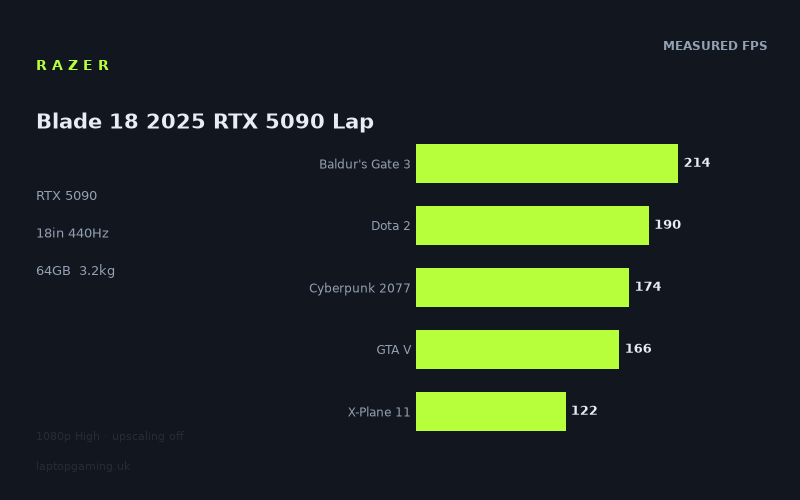
Frame rates
1920×1080, High preset, upscaling off. Averages 173fps across the 5 core benchmark games.
Measured on this machine. Source: Notebookcheck, 2025-07-15.
Not scored: no confirmed UK price
We have the full benchmark suite for this machine, so it ranks on the frame rate leaderboard like any other. What we don't have is a UK listing for this exact configuration - it's sold as a European review unit, or only in specifications that differ from the one tested. Since 30% of our score is value for money, scoring it would mean pretending price is no object, which would flatter it against every laptop you can actually buy. The frame rates below are real and comparable; there is just no buying recommendation to make yet.
How these numbers were produced
Frame rates here are not measured by us, and we label how each one was arrived at. A figure marked measured comes from a published run on that exact machine. A figure marked representative is derived from the GPU and its power limit (TGP) and cross-referenced against published reviews - a sound estimate of what that configuration delivers, but not a measurement of that specific laptop. Unless stated otherwise, numbers are 1920x1080, High preset, upscaling off. Where a laptop ships in several power configurations we use the wattage of the exact SKU listed, because a 140W RTX 5070 and a 115W one are not the same product.
In use
The short version
The Razer Blade 18 in this 2025 configuration is about as much laptop as the category currently permits: an RTX 5090 with 24GB of video memory, a Core Ultra 9 275HX, 64GB of memory, 2TB of storage, and an 18-inch 3840x2400 panel quoted at 440Hz. It weighs 3.173kg, which for an 18-inch machine carrying that hardware is at the lighter end of the format rather than the heavier one.
The benchmark data is complete, which matters. Notebookcheck measured all eleven titles on 15 July 2025 at 1920x1080 on the High preset with upscaling off, including every one of the five games in our scoring suite. Those five average 173fps: Baldur's Gate 3 at 214fps, Dota 2 at 190fps, Cyberpunk 2077 at 174fps, GTA V at 166fps and X-Plane 11 at 122fps. Outside the suite the machine turns in 485fps in Strange Brigade, 281fps in F1 24, 217fps in F1 25, 215fps in Final Fantasy XV, 116fps in Alan Wake 2 and 95fps in Assassin's Creed Shadows.
That is a genuinely fast machine by any reading, and unlike many of the laptops we cover, its benchmark suite is complete enough to rank normally on our frame rate leaderboard. What it does not have is a score, and the reason is narrow and worth stating once so we can leave it alone: we have no confirmed UK price for this exact configuration, value accounts for 30% of the score, and a score computed without it would be a different measurement wearing the same label. Nothing is wrong with the machine. We simply cannot price it, and we are not going to speculate about what it might cost.
The interesting finding is not the raw speed. It is that our comparison set contains two other laptops carrying the same RTX 5090, and the Blade 18 is level with one of them and 27fps behind the other across five shared games. Identical silicon, a gap you would notice. That spread — wider than the gap between this machine and one a tier below it — is the most instructive thing in the data, and we will work through what it means.
Buy it if you want the largest, fastest, most memory-rich configuration available and you value Razer's construction and restraint in a category that usually goes the other way. Look elsewhere if you were expecting the 5090 to separate itself from cheaper cards at the settings measured here, because at 1080p on High it frequently does not — our comparison data shows a laptop with an RTX 5070 Ti matching it across the three games they share.
Performance
Eleven games, and a spread of more than five to one
The full set, top to bottom:
- Strange Brigade — 485fps. The ceiling, and by a distance. A Vulkan title famous for being exceptionally well optimised and undemanding relative to how it looks.
- F1 24 — 281fps. A modern racing engine built to run fast, because racing games have to.
- F1 25 — 217fps. The following year's release, 64fps slower than its predecessor at the same settings.
- Final Fantasy XV — 215fps. An older conventional renderer.
- Baldur's Gate 3 — 214fps. Scoring suite. A large, complex game that is nonetheless not trying to be a graphics showcase.
- Dota 2 — 190fps. Scoring suite. Worth a second look, discussed below.
- Cyberpunk 2077 — 174fps. Scoring suite. The reference modern rasterisation workload.
- GTA V — 166fps. Scoring suite. An old engine with a stubborn processor dependency.
- X-Plane 11 — 122fps. Scoring suite. Flight simulation, and heavily processor-bound.
- Alan Wake 2 — 116fps. A newer, heavier rendering pipeline.
- Assassin's Creed Shadows — 95fps. The floor, and the newest title in the set.
485fps at the top and 95fps at the bottom is a spread of more than five to one on identical hardware at identical settings. That is a wide range, and a wide range is what you see when the graphics card has enormous headroom — the light workloads run away while the heavy ones do not. On a machine where the card is the constraint everywhere, the spread compresses. Here it does the opposite, which is the clearest single indication in the data that this is a large graphics card being properly fed.
The Dota 2 anomaly, and what it tells you about the processor
Dota 2 at 190fps is the number to sit with, because on most gaming laptops Dota 2 produces the highest figure in any benchmark set by a comfortable margin. Here it is sixth of eleven, behind Baldur's Gate 3, and 295fps behind Strange Brigade.
The reason is that Dota 2 is not a graphics test. It is a processor test dressed as a game. The engine's cost is in simulation, game logic and draw call submission, and the graphics card spends a substantial share of each frame waiting. So on a machine with a genuinely enormous graphics card, Dota 2 does not scale with the card — it scales with the processor, and the processor has a ceiling.
The Core Ultra 9 275HX is a strong desktop-derived part and 190fps is a strong result in absolute terms. But it demonstrates something important about this machine: the RTX 5090 is comfortably ahead of the processor in every title where the processor has significant work to do. GTA V at 166fps and X-Plane 11 at 122fps are the same phenomenon in more pronounced form — both are old-engine or simulation-heavy workloads that lean hard on per-thread throughput, and both land in the bottom half of a set where the graphics card managed 485fps elsewhere.
This is not a criticism of the processor. It is a structural observation about what happens when you fit the largest available mobile graphics card: in a substantial fraction of real games, you will not be able to use it, because something else finishes last. That fraction shrinks as you raise resolution and settings, which is exactly why this machine's panel matters so much to the argument.
The genuinely GPU-limited results
Four figures in this set are meaningfully about the graphics card at these settings: Cyberpunk 2077 at 174fps, Alan Wake 2 at 116fps, Assassin's Creed Shadows at 95fps, and to a lesser extent F1 25 at 217fps.
Cyberpunk 2077 at 174fps is a strong result for a heavy modern renderer at 1080p High with nothing switched on to help it. Alan Wake 2 at 116fps reflects a newer pipeline with heavier per-pixel and per-geometry costs. Assassin's Creed Shadows at 95fps is the most forward-looking number in the set — the newest game, the heaviest load, and the best single predictor of how this machine will handle releases that do not exist yet.
That last figure deserves emphasis because it cuts against the marketing. The most capable mobile graphics configuration currently available produces 95fps in a current release at 1080p on High with upscaling off. Not 300. Not 200. Ninety-five. Games have grown to consume whatever hardware exists, and the gap between a benchmark suite's older titles and its newest one is the honest measure of where the platform actually sits.
The F1 24 and F1 25 pairing is instructive for the same reason and in a smaller frame. Same series, same publisher, consecutive years, and 281fps becomes 217fps — a 23% reduction from one iteration to the next at identical settings. That is what visual progress costs, measured cleanly with almost every other variable held constant.
What the GPU's power limit means — and the gap in our data
Our fact sheet does not record a graphics power limit for this configuration. On a current gaming laptop that is the single most consequential specification after the card's model name, and we are not going to invent a figure.
The reason it matters this much is that the permitted power range for a modern laptop GPU is wide, and a card near the bottom of its range can be comprehensively beaten by a lower-tier card near the top of its. The card's name tells you which silicon is fitted; the wattage tells you how much of it you get. Two laptops with identical badges can differ substantially, and the difference grows the longer you play, because sustained performance depends on how much heat the chassis can move indefinitely rather than in short bursts.
Our comparison set illustrates the point better than any explanation could. It contains two other laptops with the same RTX 5090. One is level with this machine across five shared games; the other is 27fps ahead of it across five shared games. Same card, same generation, a gap of 27 frames — produced entirely by what the two machines do with the silicon rather than by the silicon itself.
What we can infer about the Blade 18 is limited but real. An 18-inch chassis at 3.173kg has substantial internal volume, and the frame rates do not suggest a card being obviously strangled: Strange Brigade at 485fps and F1 24 at 281fps are not the numbers of a throttled part. Whether it sits at the top of its permitted range or in the upper middle, four hundred frames in one game cannot tell us. We would rather say so than guess.
There is a second unknown of the same shape. These are benchmark runs, not four-hour sessions. Our data contains no sustained-load behaviour, no temperature figures and no noise figures for this machine, and on a thin-for-its-size 18-inch chassis those are precisely the measurements that distinguish a well-engineered large laptop from a merely large one.
24GB of video memory is the specification that ages best
The card here carries 24GB, which is more than any other configuration in this comparison set and more than the great majority of gaming laptops ever shipped with.
At the resolution these figures were measured at, it is irrelevant — 1080p on High does not come close to filling it. The panel is 3840x2400, which is roughly 4.4 times the pixel count of 1080p, and that is where the specification starts to earn its place.
Memory demand does not scale linearly with resolution. Textures, usually the single largest consumer, are broadly resolution-independent. Framebuffers, depth buffers and the intermediate buffers used by screen-space effects do scale, and at 3840x2400 they scale a long way. Add ray tracing, which builds acceleration structures of its own, and add maximum texture packs, and the requirement climbs sharply.
24GB means that on this machine, running the panel at native resolution with everything turned up, video memory is not what will stop you. Shader throughput might; memory will not. That is a meaningful difference over a long ownership period, because running out of video memory does not produce a gentle decline in frame rate — it produces stutter, texture pop-in and forced quality reductions. A card that is merely slow degrades gracefully. A card that is out of memory does not.
If you are weighing this against a 16GB machine and you specifically intend to drive a high-resolution panel at native with maximum settings, this is the axis on which the decision genuinely turns, and it is not visible anywhere in the 1080p frame rates.
What 173fps across the scoring suite means
The five-game average is 173fps, built from 214, 190, 174, 166 and 122. That distribution is tight at the top and has one clear outlier at the bottom, and the average sits close to the Cyberpunk 2077 figure — which is convenient, because Cyberpunk is the most representative modern workload in the group.
The practical meaning is that at 1080p High with no upscaling, nothing in our scoring suite troubles this machine. The lowest figure, X-Plane 11 at 122fps, is still comfortably above what a 120Hz display can show. Everything else clears 160fps.
Because the suite is complete, this figure is directly comparable to every other scored laptop on the site, which is more than we can say for a large fraction of the machines we cover. The frame rate ranking is meaningful here even though the overall score is not computable.
The screen
3840x2400 at 440Hz, and a caveat about how to read that
Our data records the panel as 18 inches, 3840x2400, 440Hz, IPS. Those two headline figures — a full 4K-class resolution and a 440Hz refresh rate — are characteristic of dual-mode panels, which switch between a high-resolution mode at a lower refresh rate and a lower-resolution mode at the very high refresh rate. Our fact sheet does not record the modes separately, so please treat that as an inference from how such panels are typically built rather than as something we can show you. What we can say for certain is that both figures are what the panel is specified at.
If it is a dual-mode display, it is the right solution to a real problem, and the frame rate data explains why. Assassin's Creed Shadows at 95fps and Alan Wake 2 at 116fps — both at 1080p — tell you that in the heaviest modern titles you want resolution, image quality and every frame you can get, and 440Hz is irrelevant. Dota 2 at 190fps and Strange Brigade at 485fps tell you that in light and competitive titles the opposite is true. A panel that can be either thing serves both, where a fixed one has to compromise.
Can the graphics card drive it?
At native 3840x2400, in the heaviest games, no — not without upscaling, and that is not a criticism of this machine specifically. Nothing currently available can.
Work through it with the figures. 3840x2400 is roughly 4.4 times the pixel count of 1920x1080. In the titles that are genuinely graphics-limited, frame rate scales substantially with pixel count. Assassin's Creed Shadows at 95fps at 1080p is not going to be a comfortable native-resolution experience with upscaling off. Alan Wake 2 at 116fps is in the same position. We have no native-resolution measurements in our data, so we cannot give you the exact figures, and we are not going to divide numbers by 4.4 and present the result as a measurement.
In the processor-limited titles the arithmetic is completely different. Dota 2 at 190fps, GTA V at 166fps and X-Plane 11 at 122fps are limited by something that does not care how many pixels there are, so raising the resolution costs far less. This is the standard and counter-intuitive shape of high-resolution gaming: the games that look worst are often the ones that scale best, because they were never GPU-bound to begin with.
The practical answer for the heavy titles is the same as it is on every machine at this resolution — upscaling. Render internally at something between 1080p and 1440p, output at native, and the 24GB of video memory means you can pair that with maximum textures without hitting a wall. That is a genuinely excellent configuration, and it is what this hardware is designed around.
For the 440Hz half of the specification: Strange Brigade at 485fps clears it, F1 24 at 281fps does not, and everything else is a long way below. Even the fastest mobile hardware available saturates 440Hz in almost nothing. The refresh rate is there for competitive players running deliberately reduced settings at a lower resolution, which is a real use case and a small one.
IPS rather than OLED
The panel is IPS, which on a machine at this level will disappoint some buyers. IPS gives up black level, contrast and per-pixel response time against OLED, and in dark scenes that difference is immediately visible.
There is a case for the choice. IPS carries no burn-in risk, which matters on a machine that will display the same taskbar and the same game HUD for thousands of hours. IPS typically sustains full brightness across the entire panel rather than dimming as more of the screen lights up, which matters for bright-room use and for productivity work on white backgrounds. And the very high refresh rate specified here is easier to deliver on IPS.
Our data contains no measured brightness, contrast or colour coverage figures for this display, so we cannot tell you where this particular panel sits within the very wide range of IPS panels. That is a real gap: on a machine of this class the display quality is a large part of the proposition, and "IPS" on its own tells you far less than people assume.
Build, size and portability
3.173kg for an 18-inch machine with a 5090
The weight is the most interesting physical fact here. An 18-inch chassis housing the top mobile graphics card and a desktop-derived processor is, in most manufacturers' hands, a considerably heavier object than this. 3.173kg is at the light end of the format.
That is worth something, but be clear about what. It does not make this a portable laptop. Three kilograms plus a mains adapter substantial enough to feed a 5090 and a 275HX — and our data does not record the adapter's weight, so we will not put a figure on the total — is a machine that moves between fixed locations rather than one you carry daily. An 18-inch chassis physically does not fit on most train tray tables with the lid at a usable angle, and it dominates any desk it lands on.
What the relatively low weight does buy is the difference between "difficult to move" and "unpleasant to move". A machine like this goes home for the holidays, goes to a LAN event, goes to a second office. It does not commute.
The size is doing the thermal work
An 18-inch chassis exists for one engineering reason: internal volume. More volume means larger heatsinks, more surface area for exhaust vents, larger fans that can move the same air at lower speeds, and more physical distance between the hot components and your hands and wrists.
That is why a machine of this size can plausibly run a 5090 and a Core Ultra 9 275HX simultaneously without either being reduced to a fraction of its capability, and the frame rate data is consistent with a machine that is not fighting its own cooling. Strange Brigade at 485fps is not a throttled result.
The caveat, again, is that our data has no temperature and no noise measurements for this machine. A large chassis makes good acoustics possible; it does not guarantee them, and a manufacturer chasing thinness within the 18-inch format can spend the volume advantage on being slim rather than on being quiet. Given that 3.173kg is light for the class, that trade may well have been made here. We cannot tell you either way, and anyone who claims to without measurements is guessing.
Memory, storage and the platform
64GB of memory and 2TB of storage are both above what gaming requires, and that is the point. 64GB is a professional workstation specification — virtual machines, large video timelines, substantial datasets, heavy 3D scenes — and it is the configuration you choose when the machine has a job beyond games. 2TB means a large game library without constant reinstalling, which on a machine that will not be near a fast connection at all times is a practical convenience rather than a luxury.
Together with the 24GB of video memory, this is a configuration that will remain professionally useful long after its gaming frame rates have become ordinary. That is a genuine argument for the machine and it has nothing to do with the benchmark table.
Our data does not record a battery capacity for this configuration, so we will not comment on it, and we have no measured runtime figure either. What is structurally safe to say is that a desktop-derived HX processor paired with the top mobile graphics card draws far more power under load than any laptop battery can sustain, and machines of this class are mains-tethered when gaming. Treat the adapter as part of the machine.
How it compares
Our database matches machines only on games both have been measured in, and all four rivals here are from the same graphics generation — the comparison that actually reflects what your money is choosing between. The Blade 18's benchmark record is unusually complete, so three of the four comparisons rest on five shared games, which makes them more reliable than most we publish.
Against the Medion Erazer Beast 16 X1 Ultimate — level
Five shared games, and the two are level. The Medion carries an RTX 5090 and sells for £4,884.
This is the like-for-like comparison: same graphics tier, same generation, both machines built to run it. A tie is what you would expect and it is quietly reassuring, because it suggests the Blade's card is being given a competitive power budget rather than being reined in to serve the chassis.
The £4,884 figure is the more useful part. It is the only 5090 price in this comparison set, and it establishes what this class of machine costs. We are not going to use it to guess at the Blade's price — that is exactly the speculation we said we would avoid — but if you are working out whether this category is one you belong in at all, that is a real number attached to a real machine with the same card and the same measured performance.
Against the Schenker XMG Neo 16 A25 — 27fps behind
Five shared games, and the Blade 18 averages 27fps behind it. The Neo 16 A25 also carries an RTX 5090, with no confirmed UK price in our data.
Two machines in this comparison set carry the same graphics card. One of them is level with the Blade 18. The other is 27 frames clear of it across five shared games. That cannot be explained by the silicon, because the silicon is identical.
What differs is everything around it: how much power each chassis is configured to give the card, how well it is cooled, how it behaves once the load is sustained rather than momentary, and what processor sits behind it. Our data records no power figure for any of these three machines, so we cannot tell you which of those factors dominates, and we are not going to guess.
What the pairing does establish, without any guessing at all, is the size of the effect. The spread between two laptops carrying identical graphics cards is 27fps — larger than the gap between the Blade 18 and machines a full tier below it. That is the single most important thing to understand when reading any gaming laptop specification, and it is the reason we keep saying that the wattage matters more than the model name.
It also puts the Blade 18 in its place honestly. It is not the fastest implementation of this graphics card in our database. It is a good one that another machine beats by a margin you would notice.
Against the MSI Vector A18 HX A9W — level
Three shared games, and the two are level. The Vector carries an RTX 5070 Ti, with no confirmed UK price in our data.
A three-game overlap is the thinnest comparison in this set and should carry the least weight, but it is instructive precisely because of which three games they are. The Blade 18's scoring-suite figures that overlap with the Vector's are drawn from a set in which two titles — Dota 2 and X-Plane 11 — are limited by the processor rather than the graphics card. Dota 2 is light to draw and heavy to simulate; X-Plane 11 is a flight simulator whose frame time is dominated by scenery streaming and flight model rather than shading.
In those games, fitting a larger graphics card achieves close to nothing, because the card is already waiting on the processor. Both machines run strong desktop-derived processors in chassis with room to feed them, so both land in the same place — and the RTX 5090's advantage over the RTX 5070 Ti simply never gets asked for.
This is not evidence that the two cards are equivalent. The comparison immediately above proves the benchmark can separate machines by 27fps when there is a real difference to find. It is evidence that in processor-limited genres, the top graphics tier buys you nothing at all — which is worth knowing before you spend on one, because a large share of what people actually play sits in exactly those genres.
Against the MSI Cyborg 15 — 85fps ahead
Five shared games, and the Blade 18 averages 85fps ahead. The Cyborg carries an RTX 5050 and sells for £984.
This is the widest gap in the set and it puts a floor under the argument. Eighty-five frames is not a testing artifact or a rounding difference — it is a different tier of experience, and in the graphics-limited titles within that five-game set the true gap will be considerably larger than the average implies.
It is also the only other confirmed price in the comparison set, and setting £984 against the Medion's £4,884 frames the real question. Somewhere between those two figures sits every decision worth making in this market. The Blade 18 delivers 85fps more than the cheap end and matches the expensive end. Whether that is worth what Razer asks is a question we cannot answer, because we have no confirmed UK price for it — which, as stated at the top, is the only reason this page carries no score.
Reading the set as a whole
Four rivals from the current generation: 85fps ahead of the entry-level machine, level with an identically equipped £4,884 flagship, level with a machine a tier below in the three processor-limited games they share, and 27fps behind a differently implemented laptop carrying the same card.
That is a machine performing as a well-built 5090 laptop should, without being the best example of one in our database. It is fast in a way that is genuinely visible against cheaper hardware, and invisible against comparable hardware in the games where the processor calls the tune. If you buy it, buy it for the panel, the 24GB of video memory, the 64GB of system memory and the construction — because on measured frame rates, a laptop with the same card is 27 frames further ahead.
Who it's for
Buy it if
You want to run a very high-resolution panel at native settings. This is the strongest case for the machine and it is barely visible in the 1080p benchmarks. 3840x2400 with maximum textures, ray tracing and a modern upscaler is a workload where 24GB of video memory and the largest available graphics card genuinely matter, and where the cheaper machines in our comparison set would start to struggle in ways this data cannot show.
The machine has a professional job as well as a gaming one. 64GB of memory, 2TB of storage, 24GB of video memory and a large high-resolution display make a serious mobile workstation. Video work, 3D, large datasets, virtual machines — the specification is chosen for those, not for games, and it will remain useful for them for years.
You want an 18-inch screen without the usual weight penalty. 3.173kg is light for this format. If you have decided you want the largest laptop display available, this is a comparatively civilised way to have one.
You play newer, heavier releases and want the most headroom available. Assassin's Creed Shadows at 95fps and Alan Wake 2 at 116fps are the numbers that matter for that, and they are the best in our comparison set's class. The advantage over cheaper machines is smaller than the badge suggests, but it is real and it will grow as games get heavier.
Buy something else if
You play at 1080p, or at 1440p with upscaling. The comparison data is unambiguous: an RTX 5070 Ti laptop matches this one across the three games they share, because those games are limited by the processor rather than the graphics card. At those settings you are paying a great deal for capability the workload never invokes.
Your library is competitive or simulation-heavy. Dota 2 at 190fps, GTA V at 166fps and X-Plane 11 at 122fps are all processor-limited results. They are good figures, but they are not what a 5090 buys you, and no graphics card would improve them. A machine with the same processor and a much cheaper card would produce nearly identical numbers in those genres.
Contrast is what you notice in a display. The panel here is IPS, and for all its resolution and refresh rate it will not match an OLED in black level or dark-scene contrast. If you play cinematic single-player games in a dim room, that is a real and daily difference, and it points at a different machine rather than a different configuration of this one.
You need to carry it. Light for an 18-inch machine is still an 18-inch machine. It will not fit comfortably on a train table, it dominates a desk, and with its adapter it is not a daily-carry object. Be honest about whether it will actually move before you buy the size.
You want a score from us. We cannot compute one without a confirmed UK price, because value is 30% of it. The frame rate half of the picture is complete and ranks normally; the price half does not exist in our data. When it does, the score will follow.
What we do not know
Set out plainly, because the site's proposition is that we do not fill gaps with guesses. We have no confirmed UK price for this configuration. We have no recorded graphics power limit for this machine or for either of the two rival RTX 5090 laptops, which given the 27fps spread between identically equipped machines is the specification we would most want. We have no sustained-load behaviour, no temperature figures and no noise figures — significant on a chassis that is light for its size. We have no battery capacity or measured runtime in our data for this configuration. We have no measured brightness, contrast or colour coverage for the display, and no confirmation of how the 3840x2400 and 440Hz specifications relate to each other in practice. And we have no frame rates at anything other than 1920x1080, which on a machine with a 3840x2400 panel is the largest gap of all.
What we do have is eleven measured games — an unusually complete record — and five substantial comparisons. They describe a machine that is genuinely fast, unusually well specified for work as well as play, and functionally indistinguishable from considerably cheaper laptops at the settings the benchmarks were run at. Whether that is a bargain or an extravagance depends entirely on a resolution nobody has measured it at, and on a price we do not yet have.