Review
Gigabyte Aero 15 OLED XD review
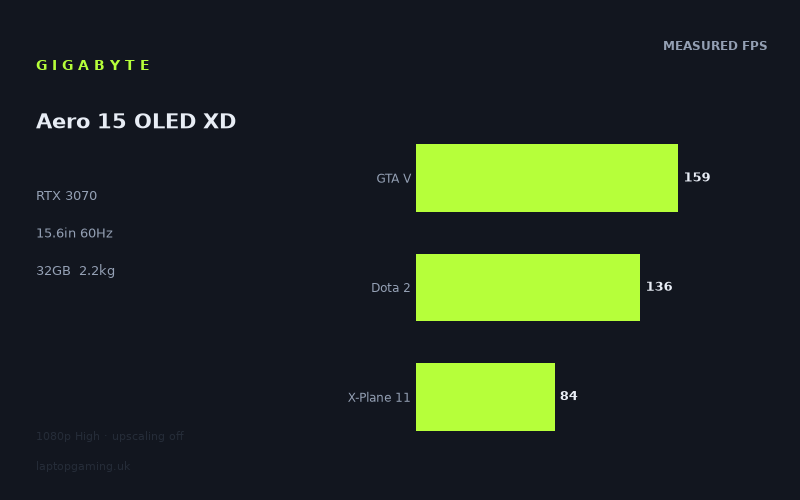
Frame rates
1920×1080, High preset, upscaling off.
Measured on this machine. Source: Notebookcheck, 2021-08-04.
Not scored: incomplete benchmark suite
Every scored laptop on this site is averaged over the same 5 games, and this one is short of Cyberpunk 2077, Baldur's Gate 3. A mean over 5 games is not comparable to a mean over 5, so we publish the figures we have and leave the score blank rather than rank it against machines tested on a different set. The numbers below are real - the suite is just incomplete.
How these numbers were produced
Frame rates here are not measured by us, and we label how each one was arrived at. A figure marked measured comes from a published run on that exact machine. A figure marked representative is derived from the GPU and its power limit (TGP) and cross-referenced against published reviews - a sound estimate of what that configuration delivers, but not a measurement of that specific laptop. Unless stated otherwise, numbers are 1920x1080, High preset, upscaling off. Where a laptop ships in several power configurations we use the wattage of the exact SKU listed, because a 140W RTX 5070 and a 115W one are not the same product.
In use
The short version
The Gigabyte Aero 15 OLED XD is a distinctly mixed gaming proposition: it has an RTX 3070, a Core i7-11800H, 32GB of memory and a 15.6in OLED display, but its screen is a 3840x2160, 60Hz panel rather than the high-refresh 1080p or 1440p displays more commonly associated with gaming laptops of this class. The published gaming data is strong at 1920x1080 on the High preset with upscaling disabled. Across the five-game scoring suite, Notebookcheck’s measured figures average 128fps. That is enough performance to make 1080p gaming very credible, and enough to clear the panel’s 60Hz refresh limit in every measured game.
That last point needs careful interpretation. The Aero’s display can only present 60 frames per second at its native refresh rate. The benchmark data therefore shows that, at 1080p High, the RTX 3070 has enough headroom to reach the screen’s refresh ceiling in even the demanding titles in this set. But the laptop’s panel has far more pixels than a 1080p display. There are no published frame rates here for gaming at 3840x2160, so it would be irresponsible to suggest that the same results carry over to the native resolution. They do not automatically do so. The measured figures establish that this is a capable 1080p gaming laptop; they do not establish that it can run every game at 4K High at 60fps.
For the right buyer, that does not make the Aero 15 OLED XD a bad choice. A buyer who values a 15.6in OLED panel, 32GB of memory and a large 99Wh battery alongside credible 1080p gaming performance may find the specification unusually well balanced. It is also useful for someone whose priority is not competitive high-refresh gaming, because the 60Hz panel puts a firm limit on what can be shown even when the GPU is producing much higher frame rates.
For a buyer whose main aim is to get the most visible gaming performance from an RTX 3070, the panel choice is harder to justify. The machine delivers measured figures such as 173fps in Strange Brigade and The Witcher 3, 159fps in F1 2020 and GTA V, and 136fps in Dota 2. Those are far above 60fps, but the supplied display cannot display that full frame-rate output at its native refresh rate. A faster panel would make more direct use of those results. Conversely, its 4K resolution is demanding enough that the 1080p benchmark data should not be mistaken for native-resolution evidence.
The Aero is also not a lightweight ultraportable disguised as a gaming laptop. At 2.23kg, it is portable in the sense that it can travel, but it is substantial for a 15.6in machine. The 99Wh battery is large on paper, but no battery-life measurement is available here, so there is no basis for promising a particular number of hours away from the mains.
There is no confirmed UK price for this exact configuration. That means the value part of the site’s assessment cannot be computed, even though the benchmark suite is complete and the Aero ranks normally on the frame-rate leaderboard. This is not a warning about the laptop itself; it simply means that no sensible value judgement can be made until there is an attributable UK price.
The practical verdict is straightforward. Buy the Gigabyte Aero 15 OLED XD if the OLED 4K screen, 32GB memory and strong measured 1080p performance matter more to you than a high-refresh gaming display, and if you understand that native 4K gaming performance has not been established by the figures available. Look elsewhere if your priority is competitive gaming above 60Hz, if you specifically want measured native-4K results before buying, or if you need a lighter machine.
Performance
What the published figures actually show
All of the frame rates below come from Notebookcheck’s measurements, dated 2021-08-04. They were recorded at 1920x1080, using the High preset with upscaling disabled. This matters because the Aero’s own display is 3840x2160. The results are useful and directly comparable with the rival figures supplied, but they describe a 1080p gaming workload rather than the panel’s native 4K workload.
- Strange Brigade: 173fps
- The Witcher 3: 173fps
- F1 2020: 159fps
- GTA V: 159fps
- Dota 2: 136fps
- Far Cry 5: 111fps
- Final Fantasy XV: 89fps
- Immortals Fenyx Rising: 87fps
- X-Plane 11: 84fps
- Cyberpunk 2077 1.0: 67fps
The mean across the five scoring-suite games is 128fps. That is a healthy result for an RTX 3070 laptop in a 1080p High test, but the average should not be treated as a promise that every game will behave alike. The spread is broad. The highest measured result is 173fps, while the lowest is 67fps. The gap between those two outcomes is not a small variation that can be ignored; it is the difference between a game producing nearly three times the panel refresh rate and a game sitting only modestly above it.
Strange Brigade and The Witcher 3 both reach 173fps. F1 2020 and GTA V both reach 159fps. Dota 2 follows at 136fps. These are the results that show the Aero’s RTX 3070 operating with considerable spare performance at the stated settings. On the supplied 60Hz screen, all of them are beyond the refresh limit. That does not mean extra GPU performance is meaningless: higher frame rates can still provide headroom against momentary drops, and they show that the laptop is not struggling with these workloads. But it does mean that a faster display would be better positioned to expose the difference between 136fps, 159fps and 173fps.
Far Cry 5 records 111fps, which remains comfortably above 60fps. Final Fantasy XV at 89fps, Immortals Fenyx Rising at 87fps and X-Plane 11 at 84fps are lower again, but still clearly above the panel’s refresh rate under the measured conditions. These are useful results because they show the Aero remaining on the right side of 60fps in games that reduce the room between the GPU’s output and the display ceiling.
Cyberpunk 2077 1.0 is the most demanding result in the supplied list at 67fps. It still clears 60fps at 1080p High with upscaling disabled, which is significant because the panel itself is 60Hz. Yet 67fps should not be described as vast excess performance. It is a relatively narrow margin above the refresh limit. Anyone treating Cyberpunk 2077 as their deciding game should read the number as evidence that the Aero can meet the screen’s 60Hz target in this specific benchmark configuration, not as evidence of unlimited room for higher resolution or more demanding settings.
Comfortable at 60Hz, but not evidence for 4K
Every published result is above 60fps. For this particular laptop, that makes the relationship between the benchmark data and the display unusually important. At 1920x1080 High, the Aero has measured enough performance to meet or exceed the refresh ceiling in Strange Brigade, The Witcher 3, F1 2020, GTA V, Dota 2, Far Cry 5, Final Fantasy XV, Immortals Fenyx Rising, X-Plane 11 and Cyberpunk 2077 1.0.
That is a good outcome for a 60Hz gaming target. It means there is no game in this measured list where the published 1080p High figure falls below what the panel can show. A buyer who intends to use a 60fps cap at 1080p has a clear basis for confidence within this set of titles and settings. The heavier games are not racing far beyond the target, but they reach it. The lighter games are far beyond it.
However, the panel is not a 1080p panel. It is a 3840x2160 OLED display. A laptop can be capable at 1920x1080 while still requiring compromises at 3840x2160, because rendering at the native resolution involves a much larger workload. The fact sheet contains no native-resolution results, no 4K preset comparisons and no upscaling results. There is therefore no attributable evidence for claims such as “4K gaming is smooth”, “4K High runs at 60fps”, or “the RTX 3070 can fully drive this panel in modern games”.
This distinction is more than technical housekeeping. It defines whether the Aero makes sense for a particular buyer. If you are happy selecting 1920x1080 in games, the figures are encouraging. If you bought a 3840x2160 screen specifically because you expect every game to run at its native resolution, the benchmark information is incomplete for that decision. It would be wrong to fill that gap with assumptions.
The 60Hz refresh rate also changes the usual argument around very high frame rates. On a 144Hz, 165Hz or faster screen, the difference between 89fps and 173fps can be directly visible as a higher displayed frame rate. On this 60Hz panel, the display itself is the limiting factor once the game output is above 60fps. The Aero’s strongest results demonstrate available performance, but not a correspondingly higher refresh experience on the built-in screen.
GPU power limit: what is known and what is not
The RTX 3070 name alone is not enough to explain laptop gaming performance. Power limits can materially affect how one laptop implementation compares with another, particularly when two machines use the same GPU. That is why it would be useful to know the Aero’s GPU power limit when reading its figures beside other RTX 3070 laptops.
But the specific GPU power limit for the Gigabyte Aero 15 OLED XD is not supplied in the fact sheet. It should not be guessed from the model name, the weight, the screen, or the benchmark results. The measured figures are the reliable evidence available here; an unconfirmed wattage is not.
What can be said is that the Aero’s real-world benchmark position is competitive among the supplied RTX 3070 rivals. It averages 1fps ahead of the Gigabyte A5 X1 with an RTX 3070 at 140W across five shared games, and it averages 0fps behind the Schenker XMG Apex 17 M21 with an RTX 3070 across five shared games. Those near-identical shared-game outcomes mean that, in this particular 1080p comparison set, the Aero is not visibly handicapped simply because it is an Aero rather than a thicker, more overtly gaming-focused design.
That does not prove that the laptops have the same GPU power limit, the same cooling behaviour, or the same performance in every game and resolution. It proves something narrower and more useful: on the shared games used for these comparisons, the published frame rates are effectively level. A claimed power-limit disadvantage would need stronger evidence than the data provides.
The fact that the Aero can sit level with another RTX 3070 laptop at 140W in the shared-game comparison also illustrates why buying by GPU label or wattage label alone is insufficient. The actual frame-rate data is more valuable. Here, the Aero’s numbers are what matter: +1fps against the Gigabyte A5 X1 over five shared games, and -0fps against the Schenker XMG Apex 17 M21 over five shared games. Those results do not support describing the Aero as meaningfully slower than either one in that set.
Why the results vary so much by game
The 173fps result in Strange Brigade and The Witcher 3 should not be used to predict 173fps in every game. The 67fps result in Cyberpunk 2077 1.0 should not be used to define the performance of every game either. The benchmark spread is the point: games place different demands on the CPU, GPU and game engine, and those demands produce very different outcomes even at the same resolution and preset.
The Core i7-11800H is part of the system behind these results, as is the 32GB memory configuration. There is no separate CPU benchmark or memory-speed data in the fact sheet, so it would be wrong to assign a precise share of the performance to either component. But the observed pattern makes clear that this is not a laptop delivering one fixed “RTX 3070 frame rate”. It delivers a range, from 67fps in Cyberpunk 2077 1.0 to 173fps in Strange Brigade and The Witcher 3, depending on the title.
The supplied rival comparison notes an important reason why apparently different GPUs can sometimes appear very close: at 1080p, lighter titles in the shared set can be CPU-bound and compress genuine GPU gaps. This is particularly relevant when looking at the Aero beside other RTX 3070 machines. If lighter shared games are limited more by the processor or game engine than by the GPU, a faster or higher-power GPU may not separate itself much in the average. A near-zero difference is therefore a real result, but it is not proof that every GPU configuration is identical under every workload.
This is also why the Aero’s own mean of 128fps should be read alongside the individual game list. The average is useful for locating the machine on a broad 1080p leaderboard. The game-by-game figures are more useful for deciding whether it suits your library. A buyer mainly interested in F1 2020, GTA V, Dota 2, Strange Brigade or The Witcher 3 is looking at results well above 60fps. A buyer focused on Cyberpunk 2077 1.0 should pay more attention to the 67fps figure and recognise the smaller margin at the same settings.
The screen
A 4K OLED panel with a 60Hz gaming limit
The Aero 15 OLED XD has a 15.6in OLED display with a 3840x2160 resolution and a 60Hz refresh rate. That combination defines the laptop more strongly than the RTX 3070 badge alone. It is not a conventional high-refresh gaming panel. It is a high-resolution OLED panel with a refresh rate that caps the built-in display at 60fps.
The OLED specification may be a major attraction for buyers who care about the display as much as the gaming hardware. But the fact sheet does not provide measurements for colour coverage, brightness, response time, contrast, calibration, HDR behaviour or any other panel characteristic. The appropriate conclusion is simply that this is an OLED panel, not a claim about how it performs in areas for which no figures have been supplied.
For gaming, the important measurable facts are the native resolution and the refresh rate. The native resolution is 3840x2160. The measured gaming figures are at 1920x1080. The refresh rate is 60Hz. This creates a clear division between what the laptop’s hardware can demonstrate in the benchmark data and what the display can show at its maximum refresh.
At 1080p High, every game in the published list exceeds 60fps. That makes the screen’s refresh rate the ceiling rather than the GPU in those tested conditions. Strange Brigade and The Witcher 3 at 173fps, F1 2020 and GTA V at 159fps, and Dota 2 at 136fps all produce far more frames than the panel can refresh each second. Far Cry 5 at 111fps, Final Fantasy XV at 89fps, Immortals Fenyx Rising at 87fps and X-Plane 11 at 84fps also sit above that display limit. Cyberpunk 2077 1.0 at 67fps does as well, though with much less spare room.
A buyer should therefore separate two questions. First: can the Aero hit 60fps at 1080p High in the measured games? The published data says yes. Second: can the Aero play those same games at the screen’s native 3840x2160 resolution at 60fps? The supplied data does not answer that question.
The resolution mismatch is the central compromise
A 3840x2160 display can be attractive for uses beyond gaming, but the available gaming data does not show the Aero operating at that native resolution. Gaming at 1920x1080 on a 3840x2160 panel is not the same thing as gaming on a native 1080p laptop display, and no judgement should be made here about image quality at non-native resolution because there are no display measurements for it.
What can be judged is the strategic fit. The RTX 3070 produces solid 1080p High results in the published tests. The panel’s 4K native resolution asks a different question of the GPU, one for which these figures do not provide an answer. That makes the Aero more suitable for a buyer who sees 4K OLED as a general-purpose display feature and 1080p as the measured gaming mode, rather than a buyer who expects the GPU and panel to be matched around native-resolution gaming in every title.
The 60Hz refresh rate is equally important. Competitive players often benefit from a display that can show frame rates above 60fps. The Aero’s published figures show several games running much faster than that at 1080p High, yet the built-in panel cannot display those higher rates as a higher refresh experience. This does not erase the value of stable performance above 60fps, but it does mean that the screen is not extracting the full visible benefit from the machine’s best benchmark outcomes.
For slower-paced single-player gaming, a 60Hz target may be entirely reasonable. For esports-focused or competitive multiplayer buyers, it is a limitation that should be considered before purchase rather than discovered afterwards. Dota 2 reaches 136fps in the measured data, but the display remains 60Hz. The laptop has the performance figure; the panel does not have the refresh rate to present 136 unique frames per second.
Build, size and portability
The Gigabyte Aero 15 OLED XD weighs 2.23kg. That is the key portability figure available. It places the machine in a category that can be moved between home, work, study and travel locations, but should not be described as effortlessly light. A 2.23kg laptop is a meaningful item to carry regularly, especially once its charger and other accessories are included, although the fact sheet provides no charger weight and no total travel weight.
The screen is 15.6in, which is a practical size for someone wanting a single machine that can accommodate gaming, work and media use without stepping up to a larger format. But the physical dimensions are not supplied. There is no attributable width, depth or thickness figure, so no claim can be made about how much desk space it occupies, how slim it is, or whether it fits a particular bag more easily than another laptop.
The 99Wh battery is one of the larger specification figures in the machine. It indicates substantial battery capacity, but capacity is not battery life. Battery life depends on workload, display use, power settings and many other factors, and no measured runtime is included in the fact sheet. It would therefore be misleading to turn 99Wh into a promised number of hours. The sensible conclusion is limited: the laptop has a 99Wh battery, but its actual unplugged endurance is not established here.
The 2.23kg weight and 99Wh battery together suggest a machine intended to be portable rather than tiny. It makes more sense as a laptop that can travel when needed than as one selected purely to minimise carry weight. This is especially relevant because the Aero’s screen and internal specification point towards a broad role: OLED panel, 4K resolution, 32GB of memory, Core i7-11800H and RTX 3070. It is a configuration that can reasonably be considered for more than one kind of task, but the supplied evidence only allows gaming performance to be assessed in detail.
No temperature measurements, fan-noise figures, chassis-material information, keyboard details, port list or webcam information are supplied. Those omissions matter for a purchase decision, particularly at 2.23kg, because portability is affected by more than mass alone. But they should not be replaced with generic assumptions about the Aero range. The published specification establishes the screen size, weight, battery capacity and core hardware; it does not establish acoustics, thermals or physical dimensions.
How it compares
Against the MSI Prestige 15
The MSI Prestige 15 is the clearest lower-performance comparison in the supplied group. It uses an RTX 3050 Ti at 105W. Across four shared games, the Gigabyte Aero 15 OLED XD averages 63fps ahead.
That is not a marginal result. It is the largest positive gap listed for the Aero, and it supports a straightforward conclusion: if gaming frame rate is the priority, the Aero’s RTX 3070 configuration is materially stronger in the shared-game data. The difference is large enough that it should affect a purchase decision, provided the buyer is comparing the same kinds of games and settings represented by the shared tests.
The comparison does not provide a confirmed UK price for the MSI Prestige 15, and it does not supply a broader specification comparison beyond the GPU and its 105W figure. There is no basis for declaring one machine better value, better built, quieter or more portable. But on the available gaming evidence, the Aero has a substantial performance advantage.
Against the Gigabyte A5 X1
The Gigabyte A5 X1 uses an RTX 3070 at 140W. Across five shared games, the Aero averages 1fps ahead. That is effectively a tie in practical terms. It is a real measurement result, but not one that supports a claim that either laptop is meaningfully faster in the shared set.
The closeness is informative because the A5 X1’s stated GPU power figure is available while the Aero’s is not. It would be easy, but wrong, to infer the Aero’s power limit from the 1fps result. What the data demonstrates is only that these machines are nearly level across the five games they share at the tested 1080p settings.
The supplied comparison context explains why such small gaps can occur. At 1080p, lighter titles in the shared set can become CPU-bound, compressing genuine GPU differences. In other words, a small average gap does not necessarily mean every internal aspect is equal. It means the published shared-game frame rates do not separate the machines meaningfully in that test set.
For a buyer choosing between these two, the screen specification becomes especially important. The Aero brings a 15.6in 3840x2160 OLED panel at 60Hz. The fact sheet does not provide the A5 X1’s display, weight, memory or battery specification, so no direct all-round recommendation can be made. But the gaming comparison itself offers little reason to choose one over the other purely on shared 1080p frame rate.
Against the Schenker XMG Apex 17 M21
The Schenker XMG Apex 17 M21 is another RTX 3070 rival. Across five shared games, the Aero averages -0fps against it. In plain English, the machines are level in the supplied comparison. There is no meaningful frame-rate lead for either laptop.
It is worth spelling this out because “-0fps” can look as if it implies a deficit. It does not indicate a practical disadvantage. The result is a tie, and it is evidence that the Aero’s published gaming performance can stand alongside another RTX 3070 machine in the shared set.
Again, a tie at 1080p should not be stretched into a universal conclusion. The shared titles may include lighter, CPU-bound workloads that reduce GPU separation. There are no comparisons here for native 4K, no complete thermal data, no noise data, no price and no screen specification for the Schenker. Still, if the buyer’s question is narrowly whether the Aero’s RTX 3070 is competitive with this RTX 3070 rival at the stated benchmark conditions, the answer is yes: the benchmark data puts them level.
Against the MSI Raider GE77 HX
The MSI Raider GE77 HX is the machine that beats the Aero by the largest margin in the supplied rival group. It uses an RTX 3080 Ti at 175W, and the Aero averages 41fps behind across five shared games.
This is a substantial gap, unlike the near-zero differences against the Gigabyte A5 X1 and Schenker XMG Apex 17 M21. A buyer pursuing maximum frame rate should take it seriously. The Raider’s RTX 3080 Ti at 175W has a clear advantage in the shared-game figures. The Aero’s mean of 128fps across its five-game scoring suite is strong, but the rival comparison makes clear that it is not the top performance option in this generation when placed against a higher-tier GPU implementation.
There is no confirmed UK price for the Raider in the supplied information, so its performance lead cannot be turned into a value judgement. A 41fps average advantage is important, but whether it is worth paying for depends on a price comparison that is not available. Nor should the Raider’s advantage be used to dismiss the Aero. The Aero still clears 60fps in every published game at 1080p High, while its OLED 4K display, 32GB memory and 99Wh battery may appeal to a different buyer. The point is not that the Raider is universally better; the point is that it is materially faster in the shared gaming data.
Who it’s for
Buy it if the screen and balanced specification matter as much as peak frame rate
The Gigabyte Aero 15 OLED XD makes the most sense for a buyer who wants a laptop with more than a conventional gaming-panel specification. The 15.6in OLED display, 3840x2160 resolution, Core i7-11800H, 32GB memory, RTX 3070, 99Wh battery and 2.23kg weight create a specification aimed at someone who may use the laptop for a broad mix of activities rather than only competitive games.
It is particularly suitable for someone comfortable with 1080p High gaming. The Notebookcheck figures are strong in that mode: 173fps in Strange Brigade, 173fps in The Witcher 3, 159fps in F1 2020, 159fps in GTA V, 136fps in Dota 2, 111fps in Far Cry 5, 89fps in Final Fantasy XV, 87fps in Immortals Fenyx Rising, 84fps in X-Plane 11 and 67fps in Cyberpunk 2077 1.0. Every one of those results is above the 60Hz panel refresh rate.
It also suits someone who does not require an ultra-light laptop. At 2.23kg, it is manageable as a transportable 15.6in machine rather than a minimal-weight option. The 99Wh battery capacity may be attractive to those who value a large battery specification, while recognising that no measured battery life is available.
Finally, it suits a buyer who values evidence over assumptions. The Aero has a complete gaming benchmark suite and competitive standing among the listed RTX 3070 machines. It is effectively tied with the Gigabyte A5 X1 and Schenker XMG Apex 17 M21 in the supplied shared-game comparisons, substantially ahead of the MSI Prestige 15, and substantially behind the MSI Raider GE77 HX. That is a more useful position than a vague claim that it is “fast for an RTX 3070”.
Buy something else if you want high-refresh competitive gaming
The most obvious reason to choose another machine is the 60Hz display. The Aero’s 1080p figures frequently exceed 100fps and reach as high as 173fps, but the built-in panel refreshes at 60Hz. Anyone buying primarily for Dota 2, racing games, shooters or other competitive titles where high refresh is central to the experience should look for a laptop with a faster display. The Aero has benchmark headroom in several games, but its panel does not turn that headroom into a higher than 60Hz on-screen refresh rate.
Choose something else if native 4K gaming is your requirement rather than a potential option. The laptop has a 3840x2160 screen, but the available gaming measurements are all at 1920x1080. There are no 4K frame rates in the fact sheet. Buying this machine on the assumption of 4K High gaming at 60fps would go beyond the evidence.
Choose something else if maximum performance is the only criterion. The MSI Raider GE77 HX leads the Aero by an average of 41fps across five shared games. There is no price information for either exact configuration, so no value conclusion follows, but the performance hierarchy in that comparison is clear.
Choose something else if low carry weight is essential. The Aero weighs 2.23kg. That is not an extreme weight for a gaming-capable 15.6in laptop, but it is still substantial. Without dimensions or charger-weight data, it is not possible to make a more detailed travel comparison, yet buyers who prioritise the lightest possible machine should treat 2.23kg as a reason to examine alternatives.
The final buying judgement
The Gigabyte Aero 15 OLED XD is best understood as a 4K OLED laptop with demonstrated 1080p gaming capability, not as a conventional high-refresh gaming laptop and not as a proven native-4K gaming machine. Its RTX 3070 and Core i7-11800H produce convincing measured results at 1920x1080 High with upscaling disabled. The 128fps scoring-suite mean is supported by strong individual figures, and even Cyberpunk 2077 1.0 reaches 67fps under those conditions.
The trade-off is visible in the screen specification. The OLED 3840x2160 panel may be the reason to buy the laptop, but its 60Hz refresh rate means the machine’s best 1080p frame rates cannot be fully displayed as high-refresh gameplay. Meanwhile, native-resolution gaming remains an evidence gap rather than a confirmed strength.
With no confirmed UK price, the final value judgement has to wait. The performance case is clear enough: this is a capable 1080p High gaming machine that stands level with the supplied RTX 3070 rivals, decisively beats the RTX 3050 Ti competitor and falls behind the RTX 3080 Ti system. Whether that combination is worth buying depends on how much you value the OLED 4K display and 32GB memory, and on a UK price that has not yet been confirmed.