Details
Product prices and availability are accurate as of the date/time indicated and are subject to change. Any price and availability information displayed on Amazon.co.uk at the time of purchase will apply to the purchase of this product.Review
Schenker XMG Neo 16 E25 RTX 5090 Laptop review
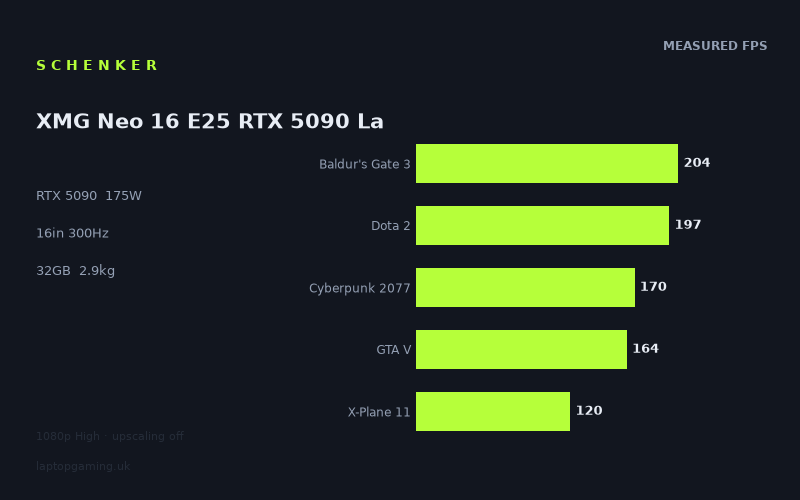
Frame rates
1920×1080, High preset, upscaling off. Averages 171fps across the 5 core benchmark games.
Measured on this machine. Source: Notebookcheck, 2025-05-15.
Not scored: no confirmed UK price
We have the full benchmark suite for this machine, so it ranks on the frame rate leaderboard like any other. What we don't have is a UK listing for this exact configuration - it's sold as a European review unit, or only in specifications that differ from the one tested. Since 30% of our score is value for money, scoring it would mean pretending price is no object, which would flatter it against every laptop you can actually buy. The frame rates below are real and comparable; there is just no buying recommendation to make yet.
How these numbers were produced
Frame rates here are not measured by us, and we label how each one was arrived at. A figure marked measured comes from a published run on that exact machine. A figure marked representative is derived from the GPU and its power limit (TGP) and cross-referenced against published reviews - a sound estimate of what that configuration delivers, but not a measurement of that specific laptop. Unless stated otherwise, numbers are 1920x1080, High preset, upscaling off. Where a laptop ships in several power configurations we use the wattage of the exact SKU listed, because a 140W RTX 5070 and a 115W one are not the same product.
In use
The short version
The Schenker XMG Neo 16 E25 is a 16in desktop-replacement built around a mobile RTX 5090 running at a 175W power limit, an Intel Core Ultra 9 275HX, 32GB of memory and a 2560x1600 panel at 300Hz. On the published benchmark data it is a fast machine in absolute terms and an unremarkable one relative to its peer group — which is a more interesting sentence than it looks, because its peer group is entirely made up of laptops carrying the same GPU badge.
Across the five games in our scoring suite, Notebookcheck's numbers put it at a mean of 171fps at 1920x1080 on High with upscaling off. Nothing in the measured set drops below 90fps. Two titles clear 300fps. That is a genuinely capable gaming laptop by any normal standard, and if you sat down in front of it without a comparison chart you would have no complaints at all.
The comparison chart is where it gets awkward. The Lenovo Legion Pro 7i 16 Gen 10 carries an RTX 5080 at the same 175W and averages 6fps ahead of the Neo 16 E25 across the nine games both machines have been measured on. That is a small margin, and small margins across nine titles are not proof of much on their own — but it is the wrong direction for a laptop wearing the bigger GPU. The Legion also has a confirmed UK price of £3,662, which is a real number you can act on. Meanwhile Schenker's own XMG Neo 16 A25, another RTX 5090 machine in the same 16in family, averages 18fps ahead of this one across ten shared games, and the Asus ROG Strix Scar 18 — also an RTX 5090 at 175W — averages 14fps ahead across eleven.
So the shape of the verdict is this. The Neo 16 E25 sits in the lower half of the 5090 field on measured frames, roughly level with the Medion Erazer Beast 16 X1 Ultimate (2fps behind across six shared games, which is noise), comfortably ahead of the ROG Strix Scar 16 (13fps ahead across ten), and behind the two fastest 5090 configurations we have data for. What it offers that the Legion does not is 24GB of VRAM, which matters enormously for a specific set of non-gaming workloads and matters almost not at all for playing games at the resolutions measured here.
One point of housekeeping, stated once and then dropped: we have no confirmed UK price for this exact configuration, so this review carries no score. Value is 30% of our scoring model and it cannot be computed without a price. The benchmark suite is complete, the machine ranks normally on the frame rate leaderboard, and nothing is wrong with it. There is simply no number to divide the performance by.
Buy it if you want a 16in machine with 24GB of video memory for mixed creative and gaming use and you can get it at a price that undercuts the confirmed alternatives. Look elsewhere if you are buying frames per pound, if you need a laptop that leaves the desk regularly, or if you want a machine that can actually saturate its own 300Hz panel in anything other than a handful of unusually light titles.
Performance
All the frame rates below come from Notebookcheck, measured on 2025-05-15 at 1920x1080, High preset, upscaling off. That last clause is important and comes up repeatedly: these are native-render numbers with no DLSS or frame generation in play, which makes them a clean measure of raw throughput but a poor prediction of what you would actually see in day-to-day use on a machine of this class, where DLSS is essentially free performance in most modern titles.
What 175W actually buys
The mobile RTX 5090 is not one product. It is a silicon design that manufacturers configure to a power budget, and the power budget does more to determine the frame rate than the name on the box. This machine is listed at 175W. That is at the upper end of what a 16in chassis typically sustains, and it is the same figure quoted for the ROG Strix Scar 18 in our database — an 18in machine with, by definition, more room for heatsink surface, fan diameter and airflow.
The Strix Scar 18 averages 14fps ahead of the Neo 16 E25 across eleven shared titles. Two machines, the same GPU, the same nominal power limit, and a consistent gap in one direction. There are only a handful of plausible explanations for that: sustained clocks under thermal load, memory tuning, CPU pairing, or driver and firmware behaviour on the day of measurement. We do not have thermal or acoustic data for either machine, so we cannot tell you which of those it is. What we can tell you is that the number on the spec sheet marked "TGP" is a ceiling, not a promise, and that two laptops quoting the same ceiling can be a persistent double-digit frame rate apart.
The wider point is worth internalising before you spend four figures on any of these machines. Across our five closest rivals, four of which carry an RTX 5090, the measured spread relative to this laptop runs from 18fps behind (the XMG Neo 16 A25) to 13fps ahead (the ROG Strix Scar 16). That is a range of roughly 31fps between the fastest and slowest 5090 configurations in the set, on games they share. The badge tells you which tier you are shopping in. It does not tell you where in that tier you land.
The top of the chart
Two games clear 300fps. Strange Brigade at 457fps and F1 24 at 341fps. Neither is a surprise and neither should influence your buying decision much.
Strange Brigade is a benchmarking fixture precisely because it scales cleanly and asks very little of a modern GPU. It is a well-optimised, several-generations-old title with a low-level renderer that has always flattered high-end hardware. 457fps is a number that tells you the graphics pipeline is not being obstructed by anything — memory bandwidth, driver overhead, CPU handoff — rather than telling you anything about how the machine handles a 2025 game. Treat it as a diagnostic reading rather than a gameplay result.
F1 24 at 341fps is more relevant, because competitive sim racing is one of the few genres where triple-digit-plus frame rates translate into a real experience improvement, and because racing games are among the most consistent frame-time producers on PC. If you race, this is the reading that matters most to you in the whole set, and it is a good one. It is also, notably, the only genuinely current game in the measured suite that clears the panel's refresh rate at 1080p.
The broad middle
The bulk of the suite lands between 130 and 204fps, which is where the character of the machine actually lives.
- Baldur's Gate 3 — 204fps. A comfortable result for a game where frame rate is a luxury rather than a requirement. BG3 is turn-based at its core and heavily CPU-dependent in its most crowded environments; a benchmark run captures the rendering load rather than the late-game simulation load, so treat this as a ceiling rather than an average.
- Final Fantasy XV — 203fps. Another older title with a renderer that has been thoroughly picked over by driver teams. It sits almost exactly level with BG3, which is a coincidence rather than a pattern.
- Dota 2 — 197fps. This one is genuinely informative. Dota 2 is a decade-old game running on an engine that a mobile RTX 5090 should be able to render several times over. It does not hit 400fps, or 500fps, or anything like the ceiling Strange Brigade demonstrates the GPU can reach. It lands at 197fps, and it lands there because it has run out of CPU and engine headroom, not GPU headroom. If you are a MOBA player looking at this machine because you want the highest possible frame rate in Dota, the GPU is not the component you are buying — and a substantially cheaper laptop with a comparable CPU would very likely return a similar number.
- Cyberpunk 2077 — 170fps. On the High preset with upscaling off, meaning no path tracing and no DLSS. This is the single most useful data point in the suite for predicting how the machine handles heavy modern rasterisation, because Cyberpunk's High preset is a well-understood workload that hundreds of laptops have been measured against. 170fps at 1080p is strong. It is also a number that will fall considerably once you move to the panel's native resolution and start switching ray tracing features on, which is exactly what most buyers of a 5090 laptop will do on day one.
- GTA V — 164fps. A 2015 game, on a 2025 flagship GPU, at 164fps. Like Dota 2, this is a CPU and engine result rather than a GPU result. GTA V's renderer has hard single-thread bottlenecks that no amount of graphics silicon resolves. The gap between Strange Brigade's 457fps and GTA V's 164fps, on identical hardware in the same test session, is the clearest illustration in the whole set of how much game engines differ in what they demand.
- Indiana Jones and the Great Circle — 143fps. One of the more demanding entries, and a good indication of how the machine handles a current-generation engine with ray-traced global illumination as part of its baseline rendering rather than as an optional extra. 143fps here is a healthy figure for a title that cannot simply have its lighting turned off.
- Alan Wake 2 — 130fps. Heavy, modern, mesh-shader-based rendering, and one of the better proxies for how the machine will behave in the graphically ambitious games of the next two years. Comfortably above 120fps at 1080p with no upscaling assistance is a good result and one that leaves useful headroom for raising the resolution.
- X-Plane 11 — 120fps. Flight simulators are their own category. X-Plane 11 is limited by single-threaded simulation work more than by rendering, and 120fps here reflects the CPU pairing far more than the GPU. Simulator users should read this number and largely ignore everything else on the list.
The floor
Assassin's Creed Shadows at 90fps is the hardest workload in the suite and the number to anchor your expectations to. It is the newest and most demanding title measured, with a modern lighting pipeline and dense open-world geometry, and 90fps at 1080p High with no upscaling is what a 175W RTX 5090 delivers against it.
That is a perfectly good result. It is also a useful reality check on what "flagship mobile GPU" buys you in 2025: in the heaviest current release in the test set, at a resolution well below the panel's native output, with upscaling switched off, you get a shade over 90fps. Turn DLSS on and that number rises considerably. Move to 2560x1600 and it falls. The two roughly cancel in practice, which is why buyers of machines like this end up running upscaling more or less permanently.
Where the spread comes from
The full range across the eleven measured titles runs from 457fps to 90fps — a factor of five. That spread is not a fault in the machine and it is not measurement noise. It is a map of how differently PC games are built.
At the top you have older titles with mature, heavily optimised renderers that ask for very little and get out of the way: Strange Brigade, Final Fantasy XV. Immediately below them you have current titles built for high frame rates by design: F1 24. Then a band of games where the CPU, not the GPU, sets the ceiling: Dota 2, GTA V, X-Plane 11, and arguably Baldur's Gate 3 depending on the scene. And at the bottom, three modern engines with ray-traced or ray-traced-adjacent lighting that genuinely load the graphics hardware: Indiana Jones, Alan Wake 2, Assassin's Creed Shadows.
What this means practically is that the mean of 171fps across the scoring suite is a ranking tool, not a prediction. It is useful for placing this machine against others measured the same way. It is not useful for guessing what you will see in a specific game, because the specific game could plausibly return anything from 90 to 450.
It also means that the games where this laptop's GPU is genuinely stretched are the ones where a faster 5090 configuration would show its advantage most clearly, and the games where it is CPU-bound are the ones where paying more for graphics hardware buys nothing at all. If your library is mostly competitive shooters, MOBAs and older titles, the marginal value of moving from a 5080-class machine to this one is close to zero on the measured evidence. If your library is Alan Wake 2, Assassin's Creed Shadows and whatever the next Unreal Engine 5 showcase turns out to be, the calculus changes.
The CPU's contribution
The Core Ultra 9 275HX is Intel's top mobile enthusiast part and it is doing visible work in this data set. Three of the eleven measured results — Dota 2, GTA V and X-Plane 11 — are almost certainly limited by it rather than by the GPU, and Baldur's Gate 3 may well be in real gameplay even if the benchmark scene is not.
That is not a criticism. Any 175W 5090 paired with any current CPU would show the same pattern, because those games have hard engine-level ceilings that no consumer hardware clears. But it does reframe what you are buying. In four of eleven measured titles, the flagship GPU is partly idle. In the remaining seven, it is the limiting factor and it performs like a flagship GPU should.
The gap to Schenker's own Neo 16 A25 — 18fps across ten shared games, in the A25's favour — is the one result in the comparison set that most invites a CPU-related explanation, since it is the same manufacturer and the same chassis family. We do not have the A25's power limit or CPU listed in our data, so we cannot state a cause. We can only report that a sibling machine in the same product line is measurably faster on shared titles, and that if you are considering the Neo 16 family specifically, the variant you pick matters more than the family you pick.
The 24GB of video memory
24GB of VRAM is the specification that most clearly separates this machine from the 5080-class competition, and it deserves an honest assessment rather than an enthusiastic one.
For gaming at the resolutions measured here, it does essentially nothing. No title in the suite at 1080p High comes close to needing that much video memory, and even at the panel's native 2560x1600 with maximum textures and ray tracing enabled, you would struggle to construct a realistic scenario in which 16GB became the bottleneck. Anyone telling you that 24GB is a gaming necessity in 2025 is selling something.
For everything else, it is transformative. Local large language model inference is bounded almost entirely by video memory capacity — the difference between 16GB and 24GB is the difference between which model sizes will fit at usable quantisation levels, and no amount of extra compute compensates for a model that does not load. The same logic applies, less dramatically, to 3D scene work with large texture sets, video timelines with heavy effects stacks, and scientific or ML workloads with large intermediate tensors.
So the honest framing is: if you are buying this laptop primarily to play games, the 24GB is not why you should choose it over a 5080 machine. If you are buying it to do serious GPU-accelerated work and play games in the evening, the 24GB may be the single most important number in the specification, and it justifies a price premium that pure frame rate comparisons never will.
Worth noting alongside it: 32GB of system memory. For gaming that is ample and will remain so for the foreseeable life of the machine. For the memory-hungry professional workloads that justify the 24GB of VRAM, 32GB of system RAM is adequate rather than generous, and it is the specification most likely to feel tight first if you are working with large data sets alongside the GPU.
Storage
1024GB of SSD. This is the specification that will annoy you most and cost you least to fix. A single terabyte on a machine of this class is functional but not comfortable — a handful of large modern installs will fill it, and you will be managing your library rather than ignoring it. On most machines in this segment there is a straightforward upgrade path, but our data does not specify how many drive bays this chassis provides, so we cannot promise you one. Budget for either a second drive or an external, and check the configuration options before you order.
What the data does not cover
We should be explicit about the gaps, because they are relevant to a machine at this power level.
We have no thermal data. No CPU or GPU temperatures under sustained load, no surface temperature readings, no information about whether the machine throttles over a long session. On a 175W GPU in a 16in chassis, this is not a trivial omission — thermal behaviour is precisely the variable that separates the fast 5090 laptops from the slow ones, and the Neo 16 E25's position in the lower half of that field is consistent with, but not proof of, a thermally constrained configuration.
We have no acoustic data. No noise figures at idle or under load. Every machine in this class is loud when it is working; the question is how loud and at what pitch, and we cannot answer it.
We have no battery data. No runtime figures under any workload. High-wattage gaming laptops with HX-class CPUs are not machines you use unplugged for long, but "not long" covers a wide range and we cannot narrow it.
We have no native-resolution benchmark data. Everything above was measured at 1920x1080. The panel is 2560x1600, which is roughly 78% more pixels. Frame rates at native resolution will be materially lower, and we cannot tell you by how much because those runs are not in our data. Directionally, expect the heavier titles to move from comfortable to merely adequate, and expect DLSS to become part of your standard settings rather than an occasional aid.
The screen
A 16in panel at 2560x1600 with a 300Hz refresh rate. On paper that is close to the ideal specification for this class of machine, and there is a reasonable argument that it is the best-judged part of the whole laptop.
The resolution is the right one. 2560x1600 in 16:10 gives you meaningfully more vertical working space than a 16:9 panel of the same diagonal, which matters for anything with toolbars, timelines or code, and it is a resolution a 175W RTX 5090 can genuinely drive rather than aspire to. 4K panels on 16in gaming laptops remain a specification-sheet flourish more than a practical benefit — the pixel density exceeds what most people can resolve at typical viewing distances, and the frame rate cost is severe. 1600p is the sensible landing point and this machine has it.
Whether the GPU can feed 300Hz
Not usually, and the measured data makes that unambiguous.
Of the eleven titles measured, exactly two return frame rates above 300fps at 1920x1080: Strange Brigade at 457fps and F1 24 at 341fps. Baldur's Gate 3 and Final Fantasy XV land just past 200fps. Cyberpunk 2077 sits at 170fps. Assassin's Creed Shadows manages 90fps. And all of those are at a resolution with 44% fewer pixels than the panel actually displays.
Run those games at the panel's native 2560x1600 and the number of titles capable of saturating 300Hz falls further — plausibly to Strange Brigade alone, though we do not have the native-resolution figures to state that as fact. The 300Hz refresh rate is not a specification this GPU can exploit across a normal game library.
That is not a reason to avoid the machine, and it is not a criticism of the panel. High refresh rates remain worthwhile below their maximum: a 300Hz panel showing 170fps with variable refresh active produces a cleaner, lower-latency image than a 165Hz panel showing the same 170fps, because the display is not waiting to present frames. Desktop use, window dragging and menu navigation all feel better at high refresh regardless of what games manage. And competitive players running older or lighter titles at reduced settings — Counter-Strike, Valorant, Overwatch, none of which are in the measured set — will get closer to the ceiling than these benchmarks suggest.
But if the 300Hz figure is what is pulling you towards this laptop, understand that you are buying headroom you will rarely use, and that a 240Hz panel on a cheaper machine would be functionally identical in almost every game measured here.
What we cannot tell you about the panel
Our data lists resolution and refresh rate and stops there. It does not specify the panel technology, and that is a significant gap. An IPS panel and an OLED panel at 2560x1600 and 300Hz are enormously different products in terms of contrast, black level, colour volume, response time, brightness behaviour and — for anyone doing long working sessions — burn-in risk. We have no brightness figure in nits, no colour gamut coverage percentages, no response time measurement, and no confirmation of variable refresh rate support.
If the panel matters to your purchase — and on a machine you may use for colour-sensitive work, it should — verify the specific panel in the specific configuration before you buy. We are not in a position to characterise it and we are not going to guess.
Build, size and portability
The listed weight is 2.853kg. That is the number that determines how this laptop actually gets used, and it deserves to be taken seriously rather than glossed over.
Two point eight five kilograms is at the heavier end of the 16in gaming category. For context on what that means physically: it is roughly double the weight of a typical 14in ultraportable, and comfortably more than most people will carry in a backpack alongside a charger, a mouse and whatever else a day requires. Our data does not specify whether that figure includes the power adapter, and it almost certainly does not — a laptop feeding a 175W GPU plus an HX-class CPU needs a substantial brick, and we do not have its weight. Assume the travelling total is meaningfully above three kilograms.
The practical consequence is that this is a machine that moves between rooms rather than between cities. It works as a desk-bound primary computer that you can relocate — to a different desk, to a friend's house for a weekend, to a hotel room on a work trip where you will unpack it once and leave it plugged in. It does not work as a laptop you carry daily and open on a train. With no battery data available, we cannot even tell you how long it survives away from mains power, but the physics of the components involved do not encourage optimism.
None of that is a criticism of the design. A 16in chassis containing a 175W GPU and a flagship desktop-class-derived CPU has to put the cooling somewhere, and heatsink mass, vapour chamber area and fan size all have weight. If anything, a lighter machine at this power level would be a warning sign rather than a selling point — and it is worth noting that the two 5090 machines in our comparison set that beat this one on frames are an 18in laptop (the Strix Scar 18, with correspondingly more thermal volume) and a sibling Neo variant. Cooling capacity buys frames, and cooling capacity has mass.
What our data does not cover on build
We have no dimensional figures beyond the 16in screen size, so we cannot tell you the chassis thickness or footprint, which matters if you are fitting it into a specific bag or a specific desk. We have no information about materials, hinge design, keyboard layout or travel, trackpad size, port selection or port placement — and on a desktop-replacement machine, the port arrangement genuinely affects daily usability, since these laptops typically live permanently connected to a monitor, peripherals and a network cable.
We also have no information about serviceability: whether the memory is socketed, how many storage bays exist, or how accessible the fans are for cleaning. On a machine likely to be kept for four or five years and run hard, those are real considerations. We are analysing published measurements and specifications rather than a machine we have opened, and we are not going to fill those gaps with assumptions.
How it compares
Five machines in our database sit closest to this one. Each comparison below uses only games both laptops have been measured on, which is why the number of shared titles varies.
Lenovo Legion Pro 7i 16 Gen 10 — RTX 5080 at 175W, £3,662
This is the comparison that matters most, and it is the one that goes worst for the Schenker.
Across nine shared games, the Neo 16 E25 averages 6fps behind the Legion. Same power limit. Same screen size. Lower GPU tier on the Legion. Nine titles is a large enough sample that this is unlikely to be pure measurement variance, though a 6fps mean gap on results that range from 90fps to 450fps is proportionally small and you should not read it as a rout.
What it does mean is straightforward: at 1080p High with upscaling off, moving from a 175W RTX 5080 to a 175W RTX 5090 bought no frames in these particular configurations. The bigger GPU has more silicon and more memory, but a fixed power budget means that silicon runs at lower clocks, and in a workload set that includes several CPU-bound titles, the extra parallel throughput has limited opportunity to express itself.
The Legion also has a confirmed UK price. £3,662 is a real, actionable number. Unless the Neo 16 E25 lands below it — and we have no price to tell you whether it does — the Legion is the more defensible purchase for anyone buying purely to play games. The Schenker's counter-argument is the 24GB of VRAM against the 5080's smaller allocation, and for the workloads described earlier that counter-argument is genuinely strong. For gaming, it is not.
Medion Erazer Beast 16 X1 Ultimate — RTX 5090, £4,884
Across six shared games, the Neo 16 E25 averages 2fps behind. That is a tie. Six games is a modest sample and 2fps is well within the range you would expect from driver versions, ambient temperature and run-to-run variance. Treat these two as performing identically on the available evidence.
The Medion is useful here mainly as a price anchor. At £4,884 it establishes roughly what a 16in RTX 5090 laptop costs in the UK market, which gives you a reference point for judging whatever price the Neo 16 E25 turns out to carry. If the Schenker comes in meaningfully under that figure, it is the better buy of the two on this data, because you are getting the same measured performance for less. If it comes in above, the argument has to be made on the parts of the machine we cannot assess — panel quality, build, serviceability, support.
It also, uncomfortably, sets up the Legion comparison in sharper relief: £4,884 for a 5090 that this machine matches, against £3,662 for a 5080 that this machine trails.
Asus ROG Strix Scar 16 — RTX 5090, no confirmed UK price
Across ten shared games, the Neo 16 E25 averages 13fps ahead. This is the one clear win in the comparison set, and it is a solid one — ten titles is a good sample and 13fps is a visible margin rather than noise.
Our data does not list the Strix Scar 16's power limit, so we cannot attribute the gap with confidence, but a 13fps deficit on a nominally identical GPU points strongly at a lower sustained power budget or a more constrained thermal envelope. It is another data point in the argument that "RTX 5090" is a category rather than a performance guarantee.
We have no confirmed UK price for the Strix Scar 16 either, which limits how far this comparison can be taken. But on frames alone, the Schenker is the faster machine, and by a margin that would be perceptible in the heavier titles.
Asus ROG Strix Scar 18 — RTX 5090 at 175W, no confirmed UK price
Across eleven shared games — the largest sample in the set — the Neo 16 E25 averages 14fps behind. Both machines carry an RTX 5090 at a stated 175W. The Strix Scar 18 is consistently faster.
The obvious structural explanation is chassis size. An 18in laptop has more internal volume, larger heatsinks, bigger fans and more exhaust area than a 16in one, and at a shared 175W ceiling the machine that can sustain that ceiling for longer under load will post better numbers. We have no thermal data for either machine to confirm this, so it remains the most plausible explanation rather than a demonstrated one.
The trade is straightforward and you already know which side you are on. An 18in laptop is bigger, heavier and less transportable than a 2.853kg 16in machine, and it demands a larger desk and a larger bag. If you have never intended to move the machine, the 18in format's performance advantage is real and worth having. If the 16in form factor is why you are here in the first place, this comparison tells you what that choice costs — roughly 14fps on average, which in practice means the difference between comfortable and very comfortable in the demanding titles, and nothing at all in the CPU-bound ones.
Schenker XMG Neo 16 A25 — RTX 5090, no confirmed UK price
The most awkward comparison in the set. Across ten shared games, the Neo 16 E25 averages 18fps behind its own sibling — the largest deficit against any machine here, and against a laptop in the same product family, same screen size, same GPU tier.
Our data does not list the A25's power limit or CPU, so we cannot state why. An 18fps mean gap across ten titles is not marginal, though, and it is not the sort of thing that gets explained away by measurement variance. Something in the A25's configuration — power budget, processor pairing, memory, cooling revision — is producing a consistently better result.
If you have decided on an XMG Neo 16, this is the comparison to resolve before you order. Both variants lack a confirmed UK price in our database, so we cannot tell you what the performance difference costs. But on measured frames alone, the A25 is the stronger of the two, and choosing between them on the basis of which is available or which is cheaper, without checking the benchmark difference, would be a mistake.
Reading the comparison set as a whole
Line them all up and the picture is consistent. Against four other RTX 5090 machines, the Neo 16 E25 is 2fps behind one, 13fps ahead of another, 14fps behind a third and 18fps behind a fourth. Its median position is below the middle of the 5090 field. Against a 5080 at the same power limit, it is 6fps behind.
That does not make it a bad laptop. It posts 171fps as a mean across our scoring suite and never drops below 90fps in anything measured. It makes it an ordinary-to-slightly-below-average performer within an extremely fast category, which means its case has to rest on the things frame rates do not capture: the 24GB of VRAM, the 1600p 300Hz panel, the build, and — critically, and unresolvably here — the price.
Who it's for
The clearest buyer for this machine is someone whose workload has a hard video-memory requirement and who also plays games seriously.
If you run local language models, work in 3D with large scene and texture budgets, edit video with heavy GPU-accelerated effects, or do ML work that needs to fit in VRAM, the 24GB allocation is not a marginal upgrade over a 16GB card — it is a capability threshold. Workloads either fit or they do not, and there is no amount of patience that makes a model load into memory it does not have. For that buyer, the fact that the Legion Pro 7i is 6fps faster in games at £3,662 is entirely beside the point, because the Legion cannot do the job at all. Pair the 24GB with a 300Hz 1600p panel, an HX-class CPU that handles compilation and simulation work well, and a chassis with enough cooling to run a 175W GPU, and you have a coherent single-machine solution for someone who currently needs two.
The second reasonable buyer is someone who specifically wants the 16in 16:10 format and is willing to accept a performance position in the lower half of the 5090 field to get it. 2560x1600 on a 16in panel is a genuinely good working resolution — sharper than 1080p without the frame rate collapse of 4K, and with vertical space that 16:9 does not provide. If that is your priority and you are choosing between this and the 18in Strix Scar, the 14fps you give up is a fair price for a machine that fits on a normal desk.
The third is anyone who finds it at a price that undercuts the confirmed alternatives. On measured performance it matches the £4,884 Medion. If it is available for less than that, the arithmetic works in its favour, and the parts of the machine we cannot assess — panel quality, build, warranty terms — become the deciding factors rather than the frame rates.
Who should buy something else
Anyone buying frames per pound. The Lenovo Legion Pro 7i 16 Gen 10 has an RTX 5080 at the same 175W, averages 6fps ahead across nine shared games, and costs a confirmed £3,662. If you play games and do nothing else demanding with the GPU, that is the machine to look at first, and the Schenker needs to come in well below it to make a counter-argument.
Anyone chasing the 300Hz panel. Two of eleven measured titles clear 300fps at 1080p, and the panel runs at 2560x1600. In practice you will be playing at somewhere between 90 and 200fps in most modern games. That is excellent, and it is not 300. If maximum refresh in competitive shooters is the goal, a cheaper machine with a 240Hz panel and a lower-tier GPU will get you to the same place for less money.
Anyone who needs the laptop to be portable. 2.853kg before the power adapter is a machine you relocate, not one you carry. With no battery data available, we cannot tell you how it behaves unplugged, but nothing about the specification suggests it will be a pleasant experience. If you need a computer for a commute, this is not it.
Anyone whose library is mostly older or CPU-bound titles. Dota 2 at 197fps, GTA V at 164fps and X-Plane 11 at 120fps are results driven by the processor and the game engine, not by the