Review
Schenker XMG Core 16 VE M25 review
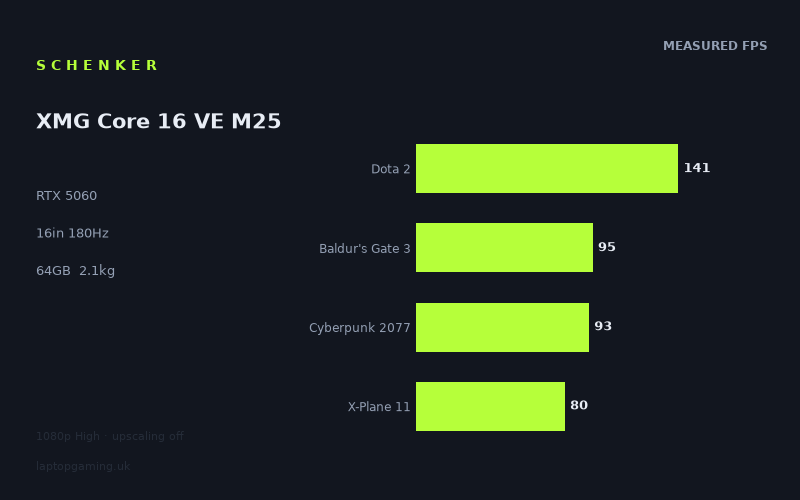
Frame rates
1920×1080, High preset, upscaling off.
Measured on this machine. Source: Notebookcheck, 2026-01-18.
Not scored: incomplete benchmark suite
Every scored laptop on this site is averaged over the same 5 games, and this one is short of GTA V. A mean over 4 games is not comparable to a mean over 5, so we publish the figures we have and leave the score blank rather than rank it against machines tested on a different set. The numbers below are real - the suite is just incomplete.
How these numbers were produced
Frame rates here are not measured by us, and we label how each one was arrived at. A figure marked measured comes from a published run on that exact machine. A figure marked representative is derived from the GPU and its power limit (TGP) and cross-referenced against published reviews - a sound estimate of what that configuration delivers, but not a measurement of that specific laptop. Unless stated otherwise, numbers are 1920x1080, High preset, upscaling off. Where a laptop ships in several power configurations we use the wattage of the exact SKU listed, because a 140W RTX 5070 and a 115W one are not the same product.
In use
The short version
The XMG Core 16 VE M25 is Schenker's cost-conscious 16in machine, and the specification tells you exactly where the money went and where it did not. There is a current-generation RTX 5060 with 8GB of VRAM, a generous 64GB of memory and a 2TB SSD — and then a Ryzen 7 255, a mainstream processor rather than one of the HX-class parts that usually accompany this GPU tier in a chassis this size. That single decision is visible in almost every measured result, and understanding it is the most useful thing you can take from this review.
Notebookcheck's figures, taken at 1920x1080 on High presets with upscaling off, run from 141fps in Dota 2 down to 67fps in Anno 117: Pax Romana. That is a narrow range by the standards of gaming laptops — barely more than two to one across eight titles — and the narrowness itself is a finding. This machine does not have a spectacular ceiling and it does not have an embarrassing floor. It is consistent, and consistency at this level means everything measured runs above 60fps at 1080p.
Buy it if you want a well-specified 16in laptop with a large screen, plenty of memory and storage, that plays modern games competently at 1080p and at native resolution with upscaling. Buy something else if your library is heavy on the genres that punish processors — flight simulation, large-scale strategy, competitive titles where frame rates are set by the CPU — because the results here show the Ryzen 7 255 setting a lower ceiling than a more expensive machine would.
This machine carries no overall score, and in this case the reason is worth stating clearly because it is different from a missing price. Our scores average performance across a fixed set of five games so that every laptop is judged on identical ground. This one has been measured in four of them. There is no GTA V result. A four-game average cannot be honestly ranked against a five-game average — it is a different measurement of a different thing — so we do not publish a rank for it. The mean across the four scoring games it does have is 102fps, and you should treat that as a description of this machine rather than as a position in a league table.
Performance
What the missing GTA V result costs us
Starting here, because it shapes how everything below should be read. GTA V is one of the five titles our scoring average is built on, and it is a specific kind of test: an old engine, heavily dependent on single-thread processor performance, that no modern GPU finds taxing. On machines with strong processors it produces very high figures; on machines with mainstream processors it produces merely good ones.
Its absence therefore removes the test that would have most directly measured the thing this machine is most likely to be limited by. We cannot infer what the number would have been and we will not try. What we can say is that the four scoring games we do have — Dota 2, Baldur's Gate 3, Cyberpunk 2077 and X-Plane 11 — include two that are strongly CPU-influenced, so the picture is not blind. It is just incomplete, and incomplete in a way that means the 102fps figure above must not be compared with the five-game averages published elsewhere on this site.
Dota 2 at 141fps, and what it says about the processor
Dota 2 at 141fps is the fastest measured result, and it is a processor test rather than a graphics test. At 1080p High, Dota 2's renderer is trivial for an RTX 5060; what determines the frame rate is how quickly the CPU can issue draw calls and advance the simulation.
141fps is a good, usable figure. It is also, in the context of current gaming laptops, a modest one. Machines built around HX-class processors — the desktop-derived parts that appear in most 16in gaming laptops at this GPU tier — post substantially higher numbers in this title, because it is the only thing the title rewards. The Ryzen 7 255 is a mainstream mobile chip, not one of those, and this is where you see it.
Whether that matters depends entirely on what you play. In a game where the frame rate is set by the graphics card, this processor will keep up perfectly well; you cannot see a CPU bottleneck that never occurs. In a game where the frame rate is set by the processor, this is the ceiling, and no settings change will lift it.
X-Plane 11 at 80fps — the clearest CPU signal in the set
If Dota 2 hints at the processor's limits, X-Plane 11 at 80fps states them. X-Plane is close to a pure single-thread CPU benchmark dressed up as a flight simulator: past a fairly low threshold, the graphics card stops being the deciding factor and the processor's per-core throughput takes over entirely.
80fps is a perfectly comfortable frame rate for flight simulation. Sim pilots are routinely delighted with far less, because the genre's demands are about stability and scenery detail rather than raw speed. But as a hardware measurement, it is the low point of the four scoring games and it is low for a machine carrying a current-generation GPU. It is the single number that most clearly identifies where Schenker economised.
The practical reading: if you fly, this machine will fly perfectly acceptably, and you should not expect it to be a standout in the genre. If your interest is in the heaviest simulation workloads — complex aircraft, dense scenery, a lot of add-ons — the processor is the component you would want to have spent more on, and this is not the configuration that does that.
The graphics-limited middle: 107fps, 105fps, 95fps, 93fps
Four results cluster tightly together, and unlike the two above, these are genuine tests of the RTX 5060.
Final Fantasy XV at 107fps is a heavy post-processing and effects load on an older engine. Triple-digit performance here means the graphics card is doing real work at a comfortable pace.
ARC Raiders at 105fps is the more interesting number, because it is a current title and a well-optimised one. It demonstrates something important that the rest of this review's caution should not obscure: a modern game built with performance in mind runs excellently on this hardware. The problems that afflict mid-tier GPUs in 2026 are not universal to modern games; they are specific to modern games that make expensive architectural choices. ARC Raiders does not, and the result reflects that.
Baldur's Gate 3 at 95fps and Cyberpunk 2077 at 93fps are the two most representative figures in the whole set, because between them they cover a large share of what people actually play. Cyberpunk's High preset is a rasterised load without the ray tracing modes that flatten mid-range cards, and 93fps at 1080p means comfortable headroom — enough to trade for higher settings, higher resolution, or both. Baldur's Gate 3 mixes a moderate renderer with a demanding simulation in its busiest areas, and 95fps means neither half of the machine is struggling.
These four results are the machine's core competence, and they are good. Anything with a comparable rendering cost will land in the same territory.
The Outer Worlds 2 at 73fps and Anno 117 at 67fps
The two lowest measured results are also the two most recent titles, and they are limited by different things, which makes them a useful pair.
The Outer Worlds 2 at 73fps is a graphics-limited result: a current-generation engine with the rendering costs that implies, running on a mid-tier card. 73fps at 1080p High with no upscaling is genuinely fine — comfortably above 60, with room to move to the panel's native resolution if you accept upscaling. It is not a warning sign. It is the sound of a modern game being modern.
Anno 117: Pax Romana at 67fps is a different animal and the more revealing of the two. Large-scale city builders are among the most processor-intensive games in existence: thousands of simulated entities, complex economic logic, pathfinding at scale. A benchmark pass early in a game will not stress that as heavily as a mature save with a sprawling city will, so 67fps should be read as an optimistic figure for the genre rather than a worst case.
That matters because it interacts with the processor point above. In this genre, the frame rate degrades as the save file grows, and what determines how far it degrades is the CPU. On a machine with a mainstream processor, the late-game experience in heavy simulation titles is the thing most likely to disappoint. We have no measured data on that — benchmark passes do not model a fifty-hour save — so this is reasoning from the hardware rather than a finding, and should be treated as such. But if city builders and grand strategy are your genres, it is the risk to weigh.
The narrow spread, and what is missing from it
Eight games, top to bottom in a ratio of roughly two to one. That is a much tighter range than most gaming laptops produce, and there are two ways to read it.
The generous reading is that this is a consistent machine with no catastrophic weaknesses. Everything measured clears 60fps at 1080p High without upscaling, which is not something every mid-range laptop can claim, and the four graphics-limited results are grouped closely enough to suggest the GPU is being fed properly rather than throttled.
The sceptical reading is that the measured set does not include the games that produce catastrophic results. There is no title here with mandatory ray tracing. There is nothing from the very heaviest tier of current releases — the ones built to consume as much hardware as you can give them. That absence is not this machine's fault; it is a function of what was measured and when. But it means the data cannot tell you where this laptop's floor is, only that nothing measured got near it.
Eight gigabytes, and the limit the data does not show
The 8GB frame buffer deserves attention precisely because the benchmark set does not stress it. When a game's working set of textures, buffers and ray tracing structures exceeds what the graphics card can hold, data begins moving across the PCIe bus mid-frame. The result is not a proportional slowdown but a cliff: average frame rates drop sharply and frame-to-frame consistency drops further, which is felt more acutely than any average number suggests.
None of the eight measured titles appears to hit that limit at 1080p. That is genuinely reassuring for the games listed and genuinely uninformative about the ones that are not. Titles built around mandatory ray tracing, or shipping with high-resolution texture packs by default, are where 8GB cards run into trouble, and none of those are in this set.
The honest position is this: the hardware here is an 8GB mid-tier card, and 8GB is the specification most likely to determine how well this machine ages. Upscaling helps — it reduces the render resolution and therefore the framebuffer targets — but it barely touches the texture pool, so it is a good answer to shader-throughput limits and a weak answer to memory limits. If you plan to keep this laptop for four or five years, that asymmetry is the thing to think about, and the measured data cannot settle it for you either way.
64GB of memory and a 2TB drive
These two specifications do not appear in any frame rate chart and will affect your ownership experience more than a ten-frame difference in Cyberpunk would.
64GB of system memory is four times a mainstream configuration. For gaming it is more than any current title needs, and the returns above 32GB are essentially nil. For everything else it is transformative: virtual machines, large codebases, video timelines, big datasets, or simply never thinking about memory pressure again. On a machine with a mainstream processor, it is also a slightly odd pairing — you have the memory capacity of a workstation and the processor of a thin-and-light — but memory is cheap and useful, and there is no argument against having it.
2TB of storage removes the single most persistent annoyance of gaming laptop ownership. Modern AAA installations are large enough that a 512GB drive forces a permanent cycle of installing and uninstalling; 2TB means you keep a real library resident. It is an unglamorous specification that pays back constantly.
Taken together, the memory and storage are the parts of this configuration that look expensive. The processor is the part that looks like a budget decision. Whether that trade suits you depends on whether your bottleneck is capacity or speed.
The screen
16in, 2560x1600, 180Hz, IPS
This is a well-judged panel for the hardware behind it, and refreshingly free of specifications chosen to look impressive on a box.
16in at 16:10 is the format that has largely replaced the old 15.6in 16:9 standard, and for good reason. The extra vertical space is worth more than the diagonal measurement suggests for anything with a user interface — strategy games, RPG inventories, spreadsheets, code — and 16in is large enough to be a comfortable primary display without pushing the chassis into desktop-replacement territory.
2560x1600 is the right resolution for the size: sharp without being punishing. A 4K panel here would look marginally better on the desktop and would be an active handicap in every game. Schenker have not made that mistake.
180Hz is the specification worth praising, because it is honest. Look at what the machine actually produces: the fastest measured game is Dota 2 at 141fps, and everything else runs below 110fps. A 180Hz panel is comfortably ahead of that — it gives variable refresh room to work and reduces the display's contribution to input latency — without being a number the hardware cannot approach. Manufacturers routinely fit 240Hz or 300Hz panels to machines that never produce those frame rates in anything. This is a display specified to match its GPU rather than to win a spec-sheet argument, and that deserves noting.
Native resolution versus the measured resolution
Every frame rate above was measured at 1920x1080. The panel is 2560x1600, which is just under twice as many pixels. That gap has very different consequences depending on which result you are looking at.
In the processor-limited titles — Dota 2, X-Plane 11, and to a degree Anno 117 — moving to native resolution costs relatively little, because the pixel count was never what was holding them back. In the graphics-limited titles — Final Fantasy XV, ARC Raiders, Cyberpunk 2077, The Outer Worlds 2 — it costs a great deal.
We have no measured native-resolution figures and we are not going to estimate them. The practical consequence is straightforward and applies to every laptop at this GPU tier: you will run demanding games at native resolution with upscaling enabled, rendering at a lower internal resolution and reconstructing to 2560x1600. That is what modern mid-range hardware is designed around, and on a 16in panel the reconstruction holds up well. It is not a flaw specific to this machine; it is the deal at this price level, and a 5060 driving a 1600p panel is a more sensible pairing than a 5060 driving a 4K one would be.
IPS, and what is not measured
The panel is IPS rather than OLED, which means solid viewing angles and no risk of burn-in from static interface elements over years of ownership, at the cost of contrast and true blacks. For a machine that will display the same HUD for thousands of hours, that is the lower-risk choice, and on a value-focused configuration it is also the sensible one — OLED costs money that this machine has spent on memory and storage instead.
We have no measured figures for this specific panel's brightness, colour gamut, contrast ratio or response time, so we will not characterise them. If colour accuracy matters to your work, that is a gap to fill from a source that has measured the display directly.
Build, size and portability
2.112kg puts this in the middle of the 16in gaming laptop field — heavier than the sub-2kg machines that market themselves on portability, lighter than the 17in and 18in desktop replacements that make no pretence of it. It is a weight you can carry when you need to and would not choose to carry every day.
The realistic use pattern is a machine that has a home on a desk but travels without drama: between rooms, home to office, back to family at the weekend, into a bag for a trip. For that pattern the 16in screen is a real advantage, because it is large enough that you do not miss an external monitor for most work.
As always, the carrying weight is higher than the headline figure once the power supply is included, and a laptop with a discrete GPU needs a substantial one. If you intend to game away from home you carry both; if the laptop travels for work and games at home, the charging situation is easier to manage.
80Wh of battery
An 80Wh battery is a reasonable capacity for a 16in machine and, notably, it is paired here with a mainstream processor rather than a power-hungry HX-class part. That combination is more promising for unplugged use than the specification sheet of most gaming laptops in this size class, because mainstream mobile chips are designed around efficiency in a way that desktop-derived parts are not.
We have no measured runtime figures for this machine and we will not put a number on it. What can be said from the specification is directional: a decent capacity plus an efficiency-oriented processor is the combination you want if the laptop will spend time away from a socket doing light work. Gaming on battery remains a compromised experience on any machine of this type — the GPU is power-limited when unplugged, and every frame rate above is a mains-powered figure — but for browsing, documents and video, this configuration has more going for it than most.
That is, incidentally, one of the few places where the processor choice is an advantage rather than a compromise. A faster HX chip would post better numbers in Dota 2 and X-Plane 11 and would give you less time away from the wall.
Thermals and noise: not measured
We have no temperature or noise data for this laptop and will not estimate any. The only observation available from the specification is that a 16in chassis has meaningfully more internal volume for heatsinks and fans than a 14in or 15in one, and that the combined thermal load of a mainstream processor and a mid-tier GPU is lower than that of an HX-class chip paired with a flagship card. Physically, this machine has an easier cooling job than most of its size class. Whether Schenker have executed it well is a question the available data cannot answer.
How it compares
Our comparisons only use games both machines have actually been measured in, and only against laptops from the same GPU generation. The four below are a deliberate spread: the two nearest neighbours, the machine this one beats by the widest margin, and the machine that beats it by the widest margin.
One caveat applies to all of them and it follows from the missing GTA V result discussed earlier. Every comparison here runs across four shared games rather than five, because this machine's scoring suite is incomplete. Four is a workable sample and the conclusions below are sound, but it is a narrower base than we would like, and the game that is missing is one of the two most processor-dependent titles in the suite. Keep that in mind particularly for the third row.
MSI Cyborg 15 (RTX 5050, £984) — 32fps ahead across 4 shared games
The clear win, and the only machine in the group with a confirmed UK price. Across the four shared games the Core 16 VE is ahead by an average of 32fps, which is a substantial and unambiguous margin — nothing like the noise-level differences in the two rows that follow.
That is what a full GPU tier looks like when the benchmark set is capable of showing it. An RTX 5050 against an RTX 5060 is a real gap, and here it registers plainly. The row is worth reading first for exactly that reason: it establishes that this comparison set is not blind. When there is a genuine hardware difference to detect in these titles, it gets detected. That matters for how you interpret the near-level results below.
£984 is also the only hard price reference available here, and it usefully marks roughly where the floor of this segment sits. We have no confirmed price for the Core 16 VE and will not guess at one, but if you are trying to work out what a 5060 machine with 64GB and 2TB ought to cost, knowing what the tier below sells for — and that it gives up 32fps in these games — is the right starting point.
Lenovo LOQ (RTX 5060 at 115W) — 2fps ahead across 4 shared games
This is the most informative row in the table for understanding the machine itself, and it answers a question the specification sheet leaves open.
We do not have a published GPU power limit for the Core 16 VE. That is a meaningful gap, because power limits do more to determine a laptop GPU's real performance than almost anything else — the same silicon configured at a low wattage and a high one behaves like two different products, and manufacturers rarely print the number. The LOQ's 115W allocation is published, and it is a healthy figure: enough for the card to work properly rather than being throttled to fit a thin chassis.
Across four shared games, the Core 16 VE is 2fps ahead. That margin is inside benchmark run-to-run variation, so treat it as a dead heat — and a dead heat against a known 115W configuration is a useful indirect measurement. It tells you Schenker are feeding this GPU properly. Whatever the actual figure is, the card is performing in the same territory as one given 115W, which is what you want to know and what the spec sheet does not tell you.
For a buyer choosing between these two specific laptops, the frame rates will not decide it. Memory, storage, screen, chassis and price will — and neither has a confirmed UK price in our database, so we cannot help with the last of those.
Schenker XMG Core 15 (M25) (RTX 5060) — 4fps behind across 4 shared games
The most interesting row, because it isolates a single variable almost perfectly. This is Schenker's own 15in Core with the same GPU as the machine under review, and across the four shared games it is 4fps ahead.
Since the graphics card is identical, the difference cannot be the graphics card. And the four shared titles are not evenly weighted: two of them, Dota 2 and X-Plane 11, are the most processor-dependent games in our suite, while the other two, Baldur's Gate 3 and Cyberpunk 2077, are genuine graphics loads. That distribution points squarely at the processor, and it fits everything else in this review — the Core 16 VE's Dota 2 result of 141fps and X-Plane 11 result of 80fps are the two figures in its own data that most clearly identify where Schenker economised.
Four frames is a small average and nobody should choose a laptop over it. What makes the row worth publishing is what it demonstrates rather than what it decides: with the GPU held constant, a processor change is worth a measurable amount in a suite that is half CPU-bound. That is the same mechanism, running in the opposite direction, that flattens the graphics comparisons in this table.
If you are choosing between these two Schenker machines, decide on size and format. The Core 15 is smaller and lighter; this is the 16in one with the larger screen and a published 80Wh battery. On frame rates, they are the same machine.
Schenker XMG Neo 16 A25 (RTX 5090) — 102fps behind across 4 shared games
The far end of the spread, and the largest margin in this comparison group by a wide distance. Across the same four games, an RTX 5090 machine is 102fps ahead.
Set the four rows in order and the shape of the market is visible in a way no single comparison could show. A tier down costs 32fps. The same tier at a known-good power limit is level. The same GPU with a stronger processor is 4fps better. Three tiers up is 102fps better. Graphics tier differences are therefore not invisible in this suite — they are visible downward and they are visible when the gap is enormous. What compresses them is the CPU-bound content in the middle of the range, where this machine sits.
The honest implication is that a buyer looking at this class of laptop is close to the point where spending more on graphics stops returning frames in these particular games. It starts returning frames again a long way up the stack, and it returns them everywhere in games that are not in this suite — ray-tracing-heavy releases, native high resolutions, the current wave of AAA. None of those are measured here, which is the limitation of the data rather than a verdict on the machine.
The Neo 16 A25 has no confirmed UK price in our database, and in any case a 5090 laptop is not competing for the same buyer. It appears here as evidence about the benchmark suite, not as a shopping alternative.
Reading the table honestly
Four rivals across four shared games: one clearly slower, one level, one marginally faster with an identical GPU, one dramatically faster. Taken together they say something more useful than any of them says alone.
At 1080p, with a suite half-composed of processor-limited titles, adjacent GPU tiers compress towards each other and processor differences become visible instead. That is exactly backwards from how most people shop for a gaming laptop, and it is why the Core 15 row — four frames, from a CPU change, with the GPU held constant — is arguably the most instructive line in the whole table.
For your own decision: if the games you play look like this suite, the Core 16 VE is competitive with anything in its price neighbourhood and you should choose on screen, storage, weight and price. If they do not — if you are buying for heavy modern releases — then this comparison group is not measuring your experience, and the 102fps gap at the top of the stack is the only hint here of what real graphics headroom is worth.
Who it's for
The 1080p player who wants a big screen and lots of storage. Every measured game clears 60fps at 1080p High with no upscaling, and four of the eight clear 90fps. Paired with a 16in 1600p panel, 64GB of memory and a 2TB drive, this is a machine that handles a broad library comfortably and does not force you to manage disk space.
The person who values capacity over peak speed. This configuration is unusually generous where capacity is concerned and merely adequate where raw processor speed is concerned. If your work involves large files, many applications open at once, or virtual machines — and your gaming is mainstream rather than cutting-edge — that is the right way round.
The buyer who wants a sensible panel rather than a headline one. 180Hz on a machine that produces up to 141fps is a display specified to match its hardware. Buyers who have been burned by 240Hz or 300Hz panels attached to GPUs that never approach those figures will appreciate the restraint.
Someone who does light work unplugged and games at a desk. An 80Wh battery with an efficiency-oriented processor is a better combination for time away from the socket than most 16in gaming laptops offer, even if we have no measured runtime to quantify it.
Who should buy something else
Anyone whose library leans on the processor. This is the clearest exclusion and the data supports it directly. X-Plane 11 at 80fps and Dota 2 at 141fps are the two most processor-dependent results in the set, and both sit below what machines with HX-class chips produce. The comparison against Schenker's own Core 15 makes the same point from another direction: same graphics card, different processor, a measurable gap. Flight simulation, grand strategy, large city builders and high-refresh competitive shooters all have their frame rates set by the CPU, and this is not the configuration that maximises it. The Anno 117 result at 67fps is worth particular attention if simulation-heavy strategy is your genre, because that number will fall as a save file grows.
Anyone buying for the heaviest current releases. Nothing in this measured set stresses the 8GB frame buffer, which means the data cannot tell you where this machine's floor is in games that do. The hardware is an 8GB mid-tier card, and that specification is what will govern how it ages. If your purchase is being driven by a specific ray-tracing-forward 2025 or 2026 release, look at a higher tier with more graphics memory, and do not let this benchmark set reassure you about games it does not contain.
Anyone who needs a directly comparable ranking. This machine has no GTA V figure, which means no five-game average, which means no position on our leaderboard. It also means every comparison above rests on four shared games rather than five. If comparing like for like against scored machines is how you shop, that is a real limitation of what we can offer here, and we would rather state it than fudge a four-game number into a five-game table.
Anyone who wants to run games at the panel's native resolution without upscaling. 2560x1600 is nearly twice the pixels of the measured 1080p, and a 5060 will feel that in the graphics-limited titles. You will use upscaling on this machine at native resolution. That is normal at this tier, but if it bothers you, buy a stronger GPU.
Anyone who needs the lightest possible machine. 2.112kg is reasonable for 16in, not remarkable. Sub-2kg machines exist with comparable GPUs — Schenker's own Core 15 among them — and if the laptop is in a bag every day, that difference is felt.
The verdict, restated
The XMG Core 16 VE M25 is a coherent piece of cost engineering. Schenker have spent generously on memory, storage and screen — the things that are cheap to improve and pleasant to live with — and economised on the processor, which is the thing that costs most and shows up in the narrowest range of games. In eight measured titles, that decision is visible twice: in Dota 2 and in X-Plane 11. Everywhere else, the RTX 5060 is the component doing the work, and it does it competently.
The result is a machine with no dramatic strengths and one identifiable weakness, running everything measured above 60fps at 1080p. Whether that weakness matters is a question only your own game library can answer, and this review has tried to give you enough detail to answer it rather than a single number that would obscure it. The absence of a GTA V result means we cannot rank it against our scored machines at all, which is frustrating but honest — a partial average is not a comparable one, and we would rather publish the gap than paper over it.