Review
MSI Crosshair 15 R6E review
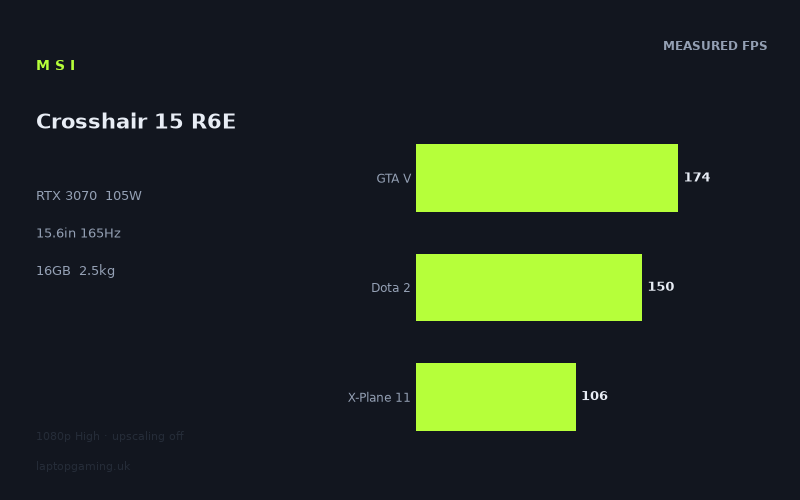
Frame rates
1920×1080, High preset, upscaling off.
Measured on this machine. Source: Notebookcheck, 2022-12-19.
Not scored: incomplete benchmark suite
Every scored laptop on this site is averaged over the same 5 games, and this one is short of Cyberpunk 2077, Baldur's Gate 3. A mean over 5 games is not comparable to a mean over 5, so we publish the figures we have and leave the score blank rather than rank it against machines tested on a different set. The numbers below are real - the suite is just incomplete.
How these numbers were produced
Frame rates here are not measured by us, and we label how each one was arrived at. A figure marked measured comes from a published run on that exact machine. A figure marked representative is derived from the GPU and its power limit (TGP) and cross-referenced against published reviews - a sound estimate of what that configuration delivers, but not a measurement of that specific laptop. Unless stated otherwise, numbers are 1920x1080, High preset, upscaling off. Where a laptop ships in several power configurations we use the wattage of the exact SKU listed, because a 140W RTX 5070 and a 115W one are not the same product.
In use
The short version
The MSI Crosshair 15 R6E is a performance-led 15.6in gaming laptop built around an RTX 3070 running at a 105W GPU power limit, a Core i7-12700H, 16GB of memory and a 1TB SSD. Its most important strength is simple: the available Notebookcheck benchmark data shows that it is fast in a broad range of games at 1920x1080 using the High preset with upscaling disabled. The measured mean across the scoring-suite games is 148fps, which is a strong result for a machine with a 165Hz display.
That does not mean every game will sit at the screen’s full 165Hz refresh rate. The Crosshair can exceed that figure in several lighter or better-scaling games, including Strange Brigade, F1 2021, GTA V, Rainbow Six Extraction and The Witcher 3. It falls short in Dota 2, Far Cry 5, X-Plane 11, Final Fantasy XV and Cyberpunk 2077 1.6. The key point is that the lower figures are still generally well above the level at which a game feels merely playable; they are simply not high enough to make full use of the panel refresh in every title.
The RTX 3070 is not operating at the highest GPU power level seen in gaming laptops of this generation. Its 105W limit matters because an RTX badge alone does not tell the whole performance story. A laptop RTX 3070 configured at a lower power limit can behave very differently from one allowed substantially more power, and the Crosshair’s results should be assessed as the output of this specific 105W implementation rather than as a generic RTX 3070 result.
The numbers indicate that MSI has paired the RTX 3070 with a suitably capable processor for the benchmark set. There is no obvious sign in the published figures that the system is routinely held back to low frame rates in lighter games. Strange Brigade reaches 211fps, F1 2021 reaches 193fps, GTA V reaches 174fps and Rainbow Six Extraction reaches 171fps. Those are the results that make the 165Hz panel meaningful rather than decorative, at least when gaming at the benchmark resolution and settings.
The compromise is that the display is a 2560x1440 IPS panel while the supplied frame-rate data is at 1920x1080. The Crosshair’s published results show what it can do at Full HD, not what it will deliver at the panel’s native resolution. That distinction matters. Anyone buying this machine specifically to play every demanding game at 2560x1440 and 165Hz does not have the native-resolution data needed to make that promise. The available figures support a much more measured conclusion: it is a quick Full HD gaming machine with a higher-resolution screen, and its native-resolution performance cannot be confirmed from this benchmark set.
It is also not a machine to choose primarily for low carry weight. At 2.47kg, the Crosshair 15 R6E is substantial for a 15.6in laptop. The 90Wh battery is a sizeable specification on paper, but there is no measured battery-life result in the fact sheet, so there is no basis for claiming a particular amount of untethered gaming, work or video playback. Treat it as a laptop intended to travel when necessary rather than one selected because it will disappear into a bag.
There is no confirmed UK price for this exact MSI Crosshair 15 R6E configuration. That means its value cannot be judged properly, and no overall rating can be calculated from the available information. This is not a comment on the machine’s benchmark standing: the performance data is complete and it ranks normally on the frame-rate leaderboard. It is simply impossible to say whether it is good value without knowing what UK buyers are being asked to pay.
For the buyer who wants a 15.6in laptop with a 165Hz IPS display and strong measured Full HD gaming performance, the Crosshair has a credible case. For the buyer whose priority is native 2560x1440 frame rates in the most demanding games, portability below 2.47kg, or a fully evidenced value judgement, the available facts point towards caution rather than a blanket recommendation.
Performance
A 105W RTX 3070 needs to be judged by its results
The Crosshair 15 R6E uses an RTX 3070 with a 105W GPU power limit. That is the specification that gives the benchmark results their context. It would be a mistake to assume that every RTX 3070 laptop offers the same gaming output, because the stated power limit is part of the configuration. Here, the useful evidence is not the badge alone but the combination of that badge, the 105W limit and Notebookcheck’s measured figures.
Notebookcheck recorded the figures at 1920x1080, with the High preset selected and upscaling disabled. That is a valuable baseline because it avoids presenting performance assisted by upscaling as if it were directly equivalent to conventional rendering. It also gives a reasonably demanding but still practical setting for a machine of this class. The Crosshair is not relying on a low preset to produce impressive-looking results, but neither should these figures be treated as native 2560x1440 measurements.
Across the five scoring-suite games, the measured mean is 148fps. That figure is useful as a broad indicator, but it should not be mistaken for a guarantee in every game. The range in the individual results is large. Strange Brigade is measured at 211fps, while Final Fantasy XV is measured at 98fps. Both results belong to the same laptop, same benchmark resolution, same High preset and same no-upscaling condition. The difference tells prospective buyers that game engine behaviour matters at least as much as the average when deciding whether a particular laptop suits a particular library.
The Crosshair is therefore not best described as a laptop that always reaches 165fps. It is better described as a laptop that often gets close to, reaches or exceeds 165fps in lighter titles, while remaining fast but below that threshold in more demanding titles. That may sound like a small distinction, but it is the distinction that determines whether the 165Hz display will be fully exploited without reducing settings or changing resolution.
The games that make the 165Hz panel earn its place
Strange Brigade is the standout result at 211fps. That is comfortably above the Crosshair’s 165Hz display refresh rate. On the published data, it is one of the clearest examples of a game where the laptop has more frame-rate headroom than the panel can display as separate refreshes. For a buyer playing games with similar demands, the screen is not an optimistic specification: the benchmark figure shows that the system can genuinely feed it at a rate beyond 165fps.
F1 2021 is similarly strong at 193fps. That is also above 165Hz and leaves a useful margin over the panel’s refresh rate in the published benchmark. Racing games can benefit from high and consistent frame rates because movement across the screen is continuous and rapid. The available result does not establish consistency over every circuit, weather condition or race situation, but it does show that the Crosshair is capable of performance beyond the display’s refresh rate in this specific test.
GTA V reaches 174fps. That is only modestly above 165Hz, but it still clears the display refresh rate in Notebookcheck’s figures. The difference matters because it places GTA V in the group of tested games where the Crosshair can fully use the screen at the stated 1920x1080 High settings. It is not a vast surplus, so there is less room for changed in-game situations or settings than there is in Strange Brigade, but the measured result is nevertheless on the favourable side of the panel limit.
Rainbow Six Extraction is measured at 171fps. Again, the result is above 165Hz, although only by a narrow margin. That narrowness should be interpreted sensibly. It does not mean the result is meaningless; it means the Crosshair is operating around the point at which its screen refresh becomes relevant. The laptop is not delivering the enormous surplus seen in Strange Brigade, but it is still in the group of games where the benchmark result can match the panel’s maximum refresh.
The Witcher 3 reaches 168fps. That is another close but positive result relative to the 165Hz panel. It shows that the machine can get beyond the display refresh rate in a major game rather than only in the least demanding title in the set. At the same time, the margin is small enough that nobody should turn 168fps into a sweeping claim that the Crosshair will run every large single-player game at 165fps. The rest of the benchmark list is the necessary correction to that overstatement.
The games where high performance is not the same as 165Hz performance
Dota 2 is measured at 150fps. That is below the panel’s 165Hz refresh rate, but it remains a high frame-rate result. The important practical point is not that the benchmark falls short of a specification on the screen box; it is that the Crosshair is delivering enough performance to make high-refresh gaming relevant. A buyer focused on reaching the absolute maximum panel refresh in this game would need to consider settings and resolution choices, but the published result is not remotely in the territory of struggling performance.
Far Cry 5 reaches 122fps. This is a more obvious distance from 165Hz, and it demonstrates why the 148fps mean should not be read as a universal expectation. The machine still delivers well above a conventional 60Hz level in this test, but it does not drive the screen at its maximum refresh. For someone who plays Far Cry 5 or games that behave similarly, the Crosshair should be viewed as a high-refresh-capable laptop rather than a locked-165fps machine.
X-Plane 11 records 106fps. That result is particularly useful because it reminds buyers that frame rate is not dictated solely by the graphics processor name. Different games place different demands on the overall system, including the Core i7-12700H. The published figure does not identify a single limiting component, so it would be wrong to claim that the GPU or CPU alone explains it. What it does establish is that the Crosshair’s performance varies materially by workload, even under the consistent 1920x1080 High no-upscaling benchmark conditions.
Final Fantasy XV is measured at 98fps. It is one of the lower results in the set and a clear example of why the machine’s 165Hz panel should not be treated as a performance guarantee for demanding games. At 98fps, the Crosshair is still delivering a high frame rate by ordinary gaming standards, but it is well short of the panel maximum. A buyer who values visual settings and a higher-resolution display may be content with that outcome. A buyer whose central aim is to remain at 165fps in every game will need to look beyond the average and focus on the titles that matter most.
Cyberpunk 2077 1.6 reaches 91fps. This is the lowest listed result, and it is the most important corrective to any overly rosy summary of the machine. The Crosshair is not slow in this game: 91fps at 1920x1080 High with upscaling off is a respectable measured figure. But it is nowhere near the display’s 165Hz ceiling. The laptop can support a satisfying high-frame-rate experience here on the available evidence, yet it cannot be described as a system that automatically turns a demanding game into a 165Hz showcase at these settings.
Understanding the benchmark spread
The spread from 211fps in Strange Brigade to 91fps in Cyberpunk 2077 1.6 is the central performance story of the Crosshair. It is tempting to reduce a gaming laptop to one average figure, especially when the mean of the scoring-suite games is 148fps. That mean is useful for comparing machines, but individual game results are more useful for choosing one. A buyer who spends most of their time in F1 2021, GTA V, Rainbow Six Extraction or The Witcher 3 has evidence that the Crosshair can make excellent use of a 165Hz display at the benchmark conditions. A buyer focused on Cyberpunk 2077 1.6, Final Fantasy XV or X-Plane 11 should expect a different relationship with the same panel.
There is no contradiction in the Crosshair being a strong gaming laptop while failing to reach 165fps in several tests. A 165Hz panel is an upper limit on the display refresh, not a promise that every game will reach it. The machine’s results show several levels of performance: well above 165fps in the fastest titles, around 165fps in others, around the high-refresh range without reaching the panel maximum in Dota 2 and Far Cry 5, and lower but still fast results in X-Plane 11, Final Fantasy XV and Cyberpunk 2077 1.6.
This also explains why a buyer should avoid choosing solely on the RTX 3070 label. The relevant question is not whether an RTX 3070 can produce high frame rates in the abstract. The question is whether this RTX 3070 at 105W, paired with this Core i7-12700H, 16GB of memory and 1TB SSD, delivers the level of performance required in the games being played. Notebookcheck’s figures provide a useful answer for the titles listed, but they do not justify claims about every untested game or every setting combination.
The presence of the Core i7-12700H is important in another way. The comparative data shows that some nominally more powerful GPU systems produce effectively the same shared-game results as the Crosshair. The supplied rival notes explain why: at 1920x1080, lighter titles in the shared set can be CPU-bound, which compresses genuine GPU gaps. That does not mean the Crosshair’s RTX 3070 is equivalent to every more powerful GPU in every circumstance. It means the benchmark conditions and game selection can limit how much of a GPU advantage appears in the final frame-rate figure.
That is a useful warning against both overpraising and underrating the Crosshair. It should not be praised as if a 105W RTX 3070 automatically equals a higher-power RTX 3080 Ti. Equally, it should not be dismissed because its GPU name is below that of an RTX 3080 Ti or RTX 3070 Ti rival. In several shared games at 1920x1080, the measured differences are essentially absent. The correct conclusion is conditional: in these particular shared tests, under these conditions, the Crosshair keeps up remarkably well with some more highly named rivals. That is a real result, but it is not a universal hardware hierarchy.
What the power limit means in practice
The stated 105W GPU power limit gives the Crosshair a defined place in its generation. It is not an unspecified RTX 3070 implementation, and buyers should not assume that every laptop carrying the same GPU will produce matching frame rates. The rival set makes this especially clear. The Crosshair is almost level with a 105W RTX 3080 Ti machine and a 120W RTX 3070 Ti machine in the shared-game comparisons, but it is behind a 175W RTX 3080 Ti machine by a meaningful amount. The numbers support the idea that configuration matters, while also showing that the relationship is not as simple as reading one specification line.
In practical buying terms, the Crosshair’s 105W setting looks capable of producing very strong Full HD results without making the laptop a universal answer for maximum-refresh, maximum-resolution gaming. It is enough to reach or exceed 165fps in five of the listed games, but it is not enough to make 165fps the expected outcome in the full benchmark selection. That is a sensible and evidence-led position: the machine has clear strengths, but the data does not support pretending that it has unlimited graphical headroom.
The 16GB memory and 1TB SSD are part of the specified configuration, but there is no separate memory or storage benchmark information in the fact sheet. It would therefore be inappropriate to claim that either component is responsible for a particular game result, loading behaviour or system responsiveness. What can be said is that the published gaming figures belong to this complete configuration, not to a bare GPU test. If a retailer offers a differently configured Crosshair 15 R6E, buyers should not assume that it is automatically identical to the B12UGZ-050 described here.
The screen
A strong specification with a resolution caveat
The Crosshair 15 R6E has a 15.6in IPS display with a 2560x1440 resolution and a 165Hz refresh rate. On specification alone, that is a well-judged gaming screen. The 165Hz refresh provides room for the high frame rates the laptop can achieve in several of the measured games, while the 2560x1440 resolution is higher than the 1920x1080 benchmark resolution. The IPS panel type is also specified, although the fact sheet contains no measured brightness, colour, contrast or response-time results.
The absence of those display measurements means the screen should not be described as colour-accurate, bright, dim, fast in pixel response or suitable for professional image work. Those are all claims that need evidence not provided here. The screen can be described accurately as a 15.6in 2560x1440 165Hz IPS panel. That specification is meaningful, but it does not tell the whole visual-quality story.
The larger issue for gaming is the gap between the panel’s native resolution and the benchmark resolution. Notebookcheck’s results are all at 1920x1080, High preset, with upscaling off. The display itself is 2560x1440. There are no supplied 2560x1440 frame rates for Strange Brigade, F1 2021, GTA V, Rainbow Six Extraction, The Witcher 3, Dota 2, Far Cry 5, X-Plane 11, Final Fantasy XV or Cyberpunk 2077 1.6.
As a result, the benchmark data proves that the Crosshair can produce strong frame rates at 1920x1080. It does not prove that it can produce the same figures at 2560x1440. Buyers should be strict about that distinction, especially because the display’s higher resolution may be a major reason for considering the machine. It would be misleading to take the 211fps Strange Brigade result, the 193fps F1 2021 result or the 174fps GTA V result and present them as native 2560x1440 performance.
Where 165Hz is supported by the available evidence
At the measured resolution, the screen’s 165Hz refresh rate is not wasted. Strange Brigade at 211fps, F1 2021 at 193fps, GTA V at 174fps, Rainbow Six Extraction at 171fps and The Witcher 3 at 168fps all meet or exceed the refresh rate. These results give the Crosshair a legitimate high-refresh gaming identity rather than merely a high-refresh specification.
There is a useful distinction between the games that beat 165fps by a wide margin and those that only just clear it. Strange Brigade and F1 2021 have obvious room above the screen maximum. GTA V, Rainbow Six Extraction and The Witcher 3 are much closer to the line. In those latter games, the screen can still be used to its full refresh in the stated benchmark, but there is little reason to exaggerate the margin. The machine is reaching the target rather than effortlessly exceeding it.
Dota 2 at 150fps makes good use of a 165Hz display even though it does not fully meet the panel maximum in the recorded result. Far Cry 5 at 122fps, X-Plane 11 at 106fps, Final Fantasy XV at 98fps and Cyberpunk 2077 1.6 at 91fps tell a different story. In those games, the panel is offering capacity that the tested settings do not fully use. That is not a fault in the panel. It is simply the normal relationship between a fast display and a varied game library.
The screen is therefore best viewed as a flexible part of the machine rather than a guarantee. It can display up to 165Hz, and the Crosshair can supply that rate in several measured games at 1920x1080 High without upscaling. In more demanding games, the display will still be useful because the frame rates remain high, but its maximum refresh will not be fully reached under the published settings. Native-resolution performance remains an open question because it has not been supplied.
The resolution choice for prospective buyers
A buyer who values a sharper 2560x1440 desktop and a 165Hz screen may find the Crosshair’s panel specification appealing even if much gaming is done at 1920x1080. A buyer who wants every game rendered at the panel’s native resolution needs more caution. The available facts do not show where the Crosshair lands at 2560x1440, and it would be irresponsible to convert Full HD results into a native-resolution promise.
This is especially relevant in Cyberpunk 2077 1.6, where the measured 1920x1080 result is 91fps with upscaling off. That is a strong Full HD figure, but it is not evidence for 2560x1440 performance. The same applies to Final Fantasy XV at 98fps and X-Plane 11 at 106fps. These are precisely the games where buyers should resist assuming that the 165Hz panel will be driven near its maximum at the higher resolution.
Conversely, the exceptionally high Full HD results in Strange Brigade and F1 2021 show that the system has considerable performance in some titles. They suggest that the Crosshair is not restricted to low-refresh gaming merely because it has a 2560x1440 panel. But “suggest” is the correct word. Without native-resolution measurements, the responsible conclusion remains limited to the evidence available.
Build, size and portability
The Crosshair 15 R6E is a 15.6in gaming laptop weighing 2.47kg. That weight places it firmly in the category of machines that can be moved around but should not be selected on the assumption that they will feel insignificant in a backpack. A 2.47kg laptop is a meaningful object to carry alongside its charger and any other equipment, even though the fact sheet does not provide a combined travel weight.
The machine’s role is likely to be closer to a desktop replacement that remains transportable than to an ultra-portable computer. That is not criticism. Gaming laptops with this level of measured Full HD performance are often used primarily on a desk, connected to mains power for gaming, then taken between rooms, homes, university accommodation or work locations when required. The Crosshair’s specified weight supports that sort of use more readily than it supports a buyer who prioritises minimal load every day.
No dimensions are provided in the fact sheet. There is therefore no basis for describing the Crosshair as thin, thick, compact, wide, deep or easy to fit into a particular bag. Likewise, there are no supplied details on chassis materials, port selection, keyboard layout, touchpad quality, speakers, webcam, cooling behaviour, fan noise or surface temperatures. These omissions matter because they prevent a complete judgement of the laptop as an object to live with. The performance case is much clearer than the ergonomic case.
The 90Wh battery is one of the more substantial specifications listed for the Crosshair, but capacity is not the same thing as measured endurance. There is no battery-life figure for gaming, web use, video playback or idle operation. Buyers should not infer a specific result from the capacity alone. In particular, gaming battery life cannot be claimed from a 90Wh rating, and there is no evidence here for saying whether the machine is better or worse than rivals away from mains power.
The absence of thermal and acoustic data also deserves a direct mention. A 105W RTX 3070 and Core i7-12700H are substantial performance components, but there are no published figures in the supplied information for noise or temperature. It would be wrong to call the Crosshair quiet, loud, cool-running or hot-running. Buyers sensitive to fan noise or chassis heat need additional evidence before treating this as a purchase decision.
What is known is enough to establish the broad portability profile. At 2.47kg, this is not a featherweight machine. With a 15.6in screen, it occupies the familiar gaming-laptop middle ground: less imposing than the largest gaming notebooks but plainly more substantial than a light travel laptop. The 90Wh battery suggests that battery capacity was not treated as an afterthought, but only measured battery testing could show how that translates into real use.
For a buyer who expects the laptop to spend most of its time on a desk, the weight may be entirely acceptable. The strong Full HD benchmark results, 165Hz panel and 1TB SSD are more relevant to that usage than a few hundred grams either way. For a buyer who travels constantly, the 2.47kg figure should be treated as a central specification, not a footnote. There is no evidence in the fact sheet that offsets it with unusually long measured battery life or unusually compact dimensions.
How it compares
Against the MSI Prestige 15 with RTX 3050 Ti
The MSI Prestige 15 rival listed here uses an RTX 3050 Ti at 105W. Across four shared games, the Crosshair averages 78fps more. That is the largest positive gap in the comparison set, and it gives the Crosshair a clear performance advantage over that machine in the games both hold.
The comparison is useful because the two laptops share the same stated GPU power limit but not the same GPU model. The Crosshair’s RTX 3070 produces a substantially higher shared-game average than the Prestige 15’s RTX 3050 Ti. The 78fps advantage is large enough that this is not a case of benchmark noise or a tiny difference that would disappear in ordinary use. For a buyer primarily interested in gaming performance, the Crosshair is plainly the stronger machine of the two on the supplied shared-game evidence.
There is no confirmed UK price for the Prestige 15 either, so this is a performance comparison rather than a value comparison. It would be wrong to claim that the Crosshair is the better buy without knowing what either machine costs in the UK. But if the decision is strictly about the measured frame rates in the shared games, the Crosshair has a major advantage.
Against the MSI Stealth GS77 with RTX 3080 Ti
The MSI Stealth GS77 uses an RTX 3080 Ti at 105W. Across five shared games, the Crosshair averages 1fps more. On paper, an RTX 3080 Ti name suggests a higher tier than the Crosshair’s RTX 3070. In the supplied shared-game result, however, there is effectively no meaningful separation.
The near-zero difference is not a reason to claim that the Crosshair’s RTX 3070 is universally equal to an RTX 3080 Ti. The comparison notes explain that at 1920x1080, lighter titles in the shared set can be CPU-bound and compress genuine GPU gaps. That explanation is important. When a game is limited elsewhere in the system, adding GPU capability may not show up as a proportionate increase in the frame-rate result.
For a buyer comparing these two machines on the listed shared games at the stated benchmark conditions, the Crosshair’s performance is remarkably competitive. It is not merely close; it is ahead by 1fps on the averaged shared result. But a 1fps difference is best understood as practical parity, not as evidence of a broad victory. The Crosshair’s case is that it keeps pace in this specific comparison, not that it overturns every expectation attached to the two GPU names.
Again, neither exact configuration has a confirmed UK price. There is no honest way to decide which is better value. The useful conclusion is narrower: in the shared 1920x1080 data, the Crosshair does not surrender ground to the 105W RTX 3080 Ti Stealth GS77 in any meaningful way.
Against the Asus ROG Zephyrus M16 with RTX 3070 Ti
The Asus ROG Zephyrus M16 uses an RTX 3070 Ti at 120W. Across five shared games, the Crosshair averages the same frame rate, with a difference of 0fps. This is the clearest example in the rival set of a nominal specification difference failing to create a visible gap in the selected benchmark result.
The Zephyrus has an RTX 3070 Ti rather than an RTX 3070, and its stated GPU power limit is 120W rather than 105W. Yet the available shared-game average produces no difference. The fact sheet explicitly notes that near-zero differences are real results in this context, while also explaining that lighter games at 1920x1080 can become CPU-bound and compress genuine GPU gaps. That is the correct framework for reading this comparison.
It would be wrong to conclude that the additional GPU power limit on the Zephyrus is irrelevant in all games, resolutions or settings. The data does not say that. It says that in the five games shared with the Crosshair, the measured average is level. For a buyer whose own library resembles those shared tests and who plans to game at 1920x1080, the Crosshair has no measurable average disadvantage in this comparison.
This result also reinforces the case for looking beyond GPU names. The Crosshair’s 105W RTX 3070 and the Zephyrus’s 120W RTX 3070 Ti do not separate in the shared-game average. That does not erase their specification difference, but it does show why purchasing decisions should be grounded in attributable frame-rate data rather than a simple hierarchy of model labels.
Against the MSI Raider GE77 HX with RTX 3080 Ti
The MSI Raider GE77 HX is the rival that beats the Crosshair by the largest margin. It uses an RTX 3080 Ti at 175W and averages 21fps more across five shared games. This is the comparison that most clearly demonstrates what the Crosshair gives up by using a 105W RTX 3070 rather than a much higher-power GPU configuration.
A 21fps average deficit is meaningful. Unlike the 1fps difference against the Stealth GS77 or the 0fps difference against the Zephyrus M16, it should not be brushed aside as practical parity. The Raider’s higher-power RTX 3080 Ti produces a clear advantage in the shared benchmark set. Buyers who want the greatest available frame-rate headroom from these specific rivals should regard the Raider as the stronger performer.
That does not make the Crosshair weak. The Crosshair’s own 148fps scoring-suite mean remains strong, and it reaches or exceeds 165fps in five listed games. The Raider comparison simply establishes that there is a higher performance tier available when moving to an RTX 3080 Ti with a 175W power limit. The Crosshair cannot match that position in the supplied shared-game data.
As with every rival here, there is no confirmed UK price for the exact Raider configuration. Therefore the 21fps advantage cannot be converted into a value recommendation. A buyer may decide that the additional performance is worth paying for, or may decide that it is not, but that decision depends on a price difference not supplied here. Performance leadership is clear; value leadership cannot be claimed.
What the rival spread tells us
The four rivals form a useful spread around the Crosshair. It is far ahead of the RTX 3050 Ti Prestige 15, essentially level with the 105W RTX 3080 Ti Stealth GS77, exactly level with the 120W RTX 3070 Ti Zephyrus M16, and clearly behind the 175W RTX 3080 Ti Raider GE77 HX.
That spread is more informative than a single nearest-rival comparison. It shows that the Crosshair is not simply placed according to GPU name. It beats a lower-tier RTX 3050 Ti machine by a wide margin, competes surprisingly well with certain more highly labelled machines under the shared conditions, and loses to a substantially higher-power RTX 3080 Ti system. The pattern is credible because it reflects the importance of configuration, power limit and benchmark context.
For buyers, the practical lesson is straightforward. If a rival laptop has a stronger GPU name but similar shared 1920x1080 results, there may be little performance reason to prefer it for the tested games. If a rival has a materially higher-power GPU configuration and a meaningful measured advantage, as the Raider does, the Crosshair’s lower power limit becomes more visible. This is exactly why attributable frame-rate data is more useful than a shopping list of processor and graphics names.
Who it’s for
The MSI Crosshair 15 R6E suits the buyer who wants strong measured gaming performance at 1920x1080 using High settings without upscaling. Notebookcheck’s results show a machine capable of 211fps in Strange Brigade, 193fps in F1 2021, 174fps in GTA V, 171fps in Rainbow Six Extraction and 168fps in The Witcher 3. That is a convincing set of results for someone who plays a mix of competitive, racing, older and mainstream games and wants a laptop screen capable of showing high frame rates.
It also suits the buyer who understands what a 165Hz display is for. The Crosshair can genuinely reach or exceed 165fps in several listed games at the benchmark settings. This is not a case where a fast panel exists only for marketing while the hardware can never approach it. The machine has enough measured Full HD performance to make the refresh rate worthwhile in a meaningful portion of the test suite.
The Crosshair may appeal to a buyer deciding between an RTX 3070 laptop and certain more expensive-sounding configurations, provided the eventual prices are checked carefully. The shared-game comparisons show practical parity with the MSI Stealth GS77’s 105W RTX 3080 Ti and the Asus ROG Zephyrus M16’s 120W RTX 3070 Ti. That does not mean the Crosshair is automatically the better purchase, because price, screen details, portability, acoustics and other features are not established here. It does mean the RTX 3070 label should not cause buyers to dismiss it without looking at measured results.
It is also a plausible fit for someone who mostly uses the laptop at a desk but wants the option to move it. The 2.47kg weight is manageable in the broad sense that it is a laptop rather than a desktop, but it is substantial enough that regular carrying should be considered part of the purchase decision. The 90Wh battery may be welcome for non-gaming use away from mains power, but no measured endurance is available, so this should not be bought on the assumption of a particular battery-life result.
The Crosshair is less suitable for the buyer who insists on evidence that every demanding game will run at 165fps. Cyberpunk 2077 1.6 at 91fps, Final Fantasy XV at 98fps and X-Plane 11 at 106fps show that the machine cannot be described that way under the stated benchmark conditions. It remains fast in those games, but fast and maximum-refresh are not the same thing.
It is also less suitable for the buyer whose firm requirement is native 2560x1440 gaming performance. The display is 2560x1440, but the supplied benchmarks are at 1920x1080. There is no native-resolution frame-rate evidence in the fact sheet. A buyer happy to judge the machine as a Full HD performer with a higher-resolution display can make use of the available data. A buyer who wants a proven 2560x1440 result should seek that evidence before buying.
Anyone who needs a particularly light machine should look elsewhere. At 2.47kg, the Crosshair is not best described as a travel-first laptop. It may work well for occasional transport, but the facts do not support presenting it as an especially portable choice. There are also no dimensions supplied, so there is no evidence to support claims of a compact chassis.
Buyers particularly concerned about fan noise, heat, keyboard quality, ports, webcam performance, display brightness, colour quality or battery endurance should also pause. None of those areas is measured or specified in sufficient detail here. The Crosshair’s frame-rate case is clear. Its wider ownership case is not fully documented by the available fact sheet.
Finally, nobody should buy this exact configuration on a value claim until a confirmed UK price is available. The absence of a price does not undermine the laptop’s benchmark position, but it prevents a responsible judgement on whether its RTX 3070, Core i7-12700H, 16GB memory, 1TB SSD, 15.6in 2560x1440 165Hz IPS screen and 2.47kg weight represent a good deal. The Crosshair 15 R6E is a strong measured Full HD gaming performer. Whether it is the right purchase depends on a price that has not been confirmed, the importance of native 2560x1440 performance, and whether 2.47kg fits the way the laptop will actually be used.