Details
Product prices and availability are accurate as of the date/time indicated and are subject to change. Any price and availability information displayed on Amazon.co.uk at the time of purchase will apply to the purchase of this product.Review
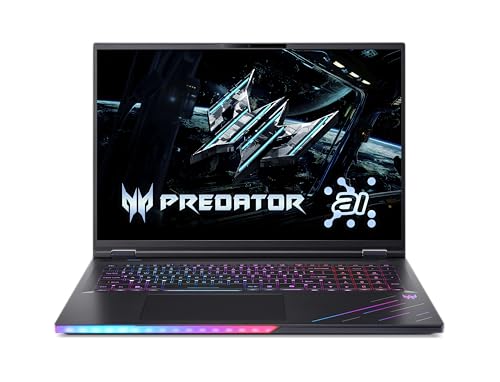
Acer Predator Helios 18 AI review
Frame rates
1920×1080, High preset, upscaling off. Averages 158fps across the 5 core benchmark games.
Measured on this machine. Source: Notebookcheck, 2025-07-09.
How these numbers were produced
Frame rates here are not measured by us, and we label how each one was arrived at. A figure marked measured comes from a published run on that exact machine. A figure marked representative is derived from the GPU and its power limit (TGP) and cross-referenced against published reviews - a sound estimate of what that configuration delivers, but not a measurement of that specific laptop. Unless stated otherwise, numbers are 1920x1080, High preset, upscaling off. Where a laptop ships in several power configurations we use the wattage of the exact SKU listed, because a 140W RTX 5070 and a 115W one are not the same product.
In use
The short version
The Acer Predator Helios 18 AI is a very fast large-format gaming laptop built around an RTX 5080, a Core Ultra 9 275HX, 16GB of VRAM, 2048GB of SSD storage and an 18in 2560x1600 IPS display with a 250Hz refresh rate. Notebookcheck’s measured figures show that it is capable of extremely high frame rates at 1920x1080 on the High preset with upscaling disabled. It reaches 406fps in Strange Brigade, 182fps in Baldur’s Gate 3, 181fps in GTA V, 176fps in Final Fantasy XV, 173fps in Dota 2, 170fps in F1 25 and 150fps in Cyberpunk 2077. Even its lower result in the supplied set, X-Plane 11 at 105fps, remains a strong gaming figure.
The problem is not that the Helios 18 AI lacks performance. It plainly does not. The problem is that the available comparison data does not show it converting its £3,103 price into a meaningful lead over cheaper alternatives. The Medion Erazer Beast 18 X1 also uses an RTX 5080, costs £2,499, and the Acer averages 1fps behind it across seven shared games. That is the most important comparison here. The Acer is a more expensive machine whose published gaming results are effectively level with a substantially cheaper rival.
That makes this a difficult laptop to recommend on price alone. A buyer spending this much should expect either a clear frame-rate advantage, an unusually strong display proposition, a portability benefit, or a specification advantage that directly addresses a specific need. The Helios has a compelling display specification, with its 18in 2560x1600 250Hz IPS panel, and it has a generous 2048GB SSD. But the measured gaming data does not establish that it is appreciably faster than the cheaper Medion, nor does its 3.495kg weight make it the kind of machine that is easy to carry around every day.
The right buyer is someone who specifically wants an 18in gaming laptop, values the 2560x1600 250Hz IPS screen, wants 16GB of VRAM and 2048GB of storage from the outset, and is content to treat the laptop primarily as a transportable desk machine rather than a regularly carried one. For that buyer, the Helios 18 AI has the performance to justify serious consideration. The benchmark data shows no shortage of speed in the games measured, and the hardware is clearly capable of producing very high frame rates at the benchmark settings.
It is not the obvious choice for the buyer whose main goal is getting the most gaming performance for each pound spent. At £3,103, it asks for a substantial premium over the £2,499 Medion Erazer Beast 18 X1 while averaging 1fps less across their shared-game results. It is also only narrowly ahead of the £2,770 Medion Erazer Major 16 X1 with an RTX 5070 Ti at 140W, averaging 4fps more across six shared games. That is not the kind of gap that makes a much more expensive system easy to defend purely through frame rates.
The short verdict is therefore straightforward: this is a powerful and well-specified large-screen gaming laptop, but poor value at its stated UK price when the frame-rate comparisons are taken seriously. Buy it only if the 18in 2560x1600 250Hz screen, 2048GB SSD and large-format design are specifically what you want. If performance per pound is the priority, the shared-game data points towards cheaper alternatives.
Performance
Notebookcheck’s measured figures
The benchmark data supplied for the Acer Predator Helios 18 AI comes from Notebookcheck and was recorded at 1920x1080, using the High preset with upscaling disabled. Those conditions matter. They provide a clean view of the laptop’s performance without an upscaling mode changing the result, but they do not tell us exactly what frame rates to expect at the laptop’s native 2560x1600 resolution. The Helios 18 AI’s screen has substantially more pixels than the benchmark resolution, so the published figures should be read as 1080p High results rather than direct predictions of native-resolution performance.
Across the five scoring-suite games, the Acer averages 158fps. That is a strong mean result, but the individual games are more useful than the mean because they show how widely performance can vary according to the workload. The gap between 406fps in Strange Brigade and 105fps in X-Plane 11 is large. A buyer looking only at the overall average could miss the fact that this laptop will feel very different depending on the game being played and the frame-rate target being pursued.
Strange Brigade is the outlier at 406fps. That result is comfortably above the 250Hz refresh rate of the built-in display. In that particular benchmark, the Helios 18 AI has more than enough performance at 1920x1080 High to keep a 250Hz panel fed with frames. It is the clearest example in the data of a game where the laptop’s screen refresh rate can be meaningfully exploited, at least under the stated benchmark conditions.
Baldur’s Gate 3 reaches 182fps, GTA V reaches 181fps, Final Fantasy XV reaches 176fps, Dota 2 reaches 173fps and F1 25 reaches 170fps. These are all extremely quick results. They are also all below 250fps. That distinction is important because a 250Hz panel does not automatically mean every game will run at 250fps. In the measured 1920x1080 High data, the Helios 18 AI is well short of the panel’s maximum refresh rate in each of those titles, although it still delivers very high frame rates.
Cyberpunk 2077 at 150fps remains a strong showing, especially given that the benchmark uses the High preset with upscaling off. However, it is another title where the laptop does not reach the display’s 250Hz ceiling in the published result. X-Plane 11 is lower again at 105fps. That is still a high frame rate in absolute terms, but it demonstrates that the 250Hz panel should be seen as headroom rather than a guaranteed gaming outcome. A laptop can have a high-refresh screen and still be limited by the demands of particular games, their settings, or the way they respond to the system’s CPU and GPU combination.
The spread is not evidence of a weakness in the Helios 18 AI. Rather, it shows why buyers should avoid treating one impressive result as representative of all gaming. The 406fps Strange Brigade figure is real and valuable for understanding the system’s potential, but it should not be used as shorthand for the experience in X-Plane 11, where Notebookcheck recorded 105fps. Similarly, the 150fps Cyberpunk 2077 result should not be confused with the 182fps seen in Baldur’s Gate 3. The relevant figure depends on the games you actually play.
How much of the 250Hz screen can the hardware use?
At the published benchmark settings, Strange Brigade is the only listed game that clearly exceeds the display’s 250Hz refresh rate. Its 406fps result leaves substantial headroom above 250fps. If a buyer’s use centres on games that behave more like Strange Brigade in this data set, the panel’s high refresh rate is not wasted.
The next group of results sits between 170fps and 182fps: Baldur’s Gate 3 at 182fps, GTA V at 181fps, Final Fantasy XV at 176fps, Dota 2 at 173fps and F1 25 at 170fps. These figures are all fast enough to make a high-refresh display relevant, but they do not reach 250fps in the measured configuration. The laptop is therefore capable of delivering a very fluid output in these titles, while still leaving a gap between its measured frame rate and the screen’s maximum refresh rate.
Cyberpunk 2077 at 150fps and X-Plane 11 at 105fps reinforce the same point. The 250Hz panel is a specification with potential, not a promise that the system will produce 250fps across every game. The frame rate is determined by the title, the resolution, the graphics settings, whether upscaling is used, and the system’s available performance. Here, the results were collected at 1920x1080 High with upscaling disabled. Moving to the 2560x1600 panel resolution will not be equivalent to these 1080p figures, and the supplied data does not provide native-resolution results.
That does not make the display specification mismatched to the hardware. The RTX 5080 is clearly quick enough to produce exceptionally high results in some games and strong results in all of the measured titles. It does mean prospective buyers should be realistic about what they are paying for. The 250Hz rating is most useful as a ceiling for games that can reach it, and as extra room above the results in the 170fps to 182fps range. It is not a reason to assume that a demanding title will run at the panel’s full refresh rate at 2560x1600.
GPU power limit: what we can and cannot conclude
The fact sheet identifies the Acer’s GPU as an RTX 5080 with 16GB of VRAM, but it does not provide a confirmed GPU power limit for this particular Helios 18 AI configuration. That means there is no responsible basis for stating a wattage figure for the Acer, comparing its GPU power allocation directly with another machine, or claiming that a particular power limit explains its benchmark position.
This is especially relevant because one rival, the Asus ROG Strix G16, is identified as using an RTX 5080 at 175W. The Acer averages 2fps behind that Asus across seven shared games. That result tells us the two systems are very close in the available shared-game comparison. It does not tell us that the Acer is operating at a lower, equal or higher power limit, because the Acer’s figure is not supplied. Nor does it tell us whether cooling, CPU behaviour, memory configuration, firmware settings or any other platform factor is responsible for the small gap. The sensible conclusion is simply that, in the shared games, the Acer is effectively in the same performance class as the 175W RTX 5080 Asus, while trailing it slightly.
The absence of an Acer power-limit figure also matters when considering the £3,103 asking price. It would be tempting to assume that a larger 18in laptop must use a particularly aggressive GPU power setting, but that would be an unsupported assumption. The only hard evidence available is the measured frame-rate data. On that evidence, the Acer is very fast, but not clearly faster than the cheaper Medion Erazer Beast 18 X1 or the Asus ROG Strix G16 in the shared-game comparisons.
For buyers who care specifically about GPU power limits, this is a laptop that needs more confirmed technical information before a purchase decision should rest on that question. The benchmark data is sufficient to judge the observed performance. It is not sufficient to attribute that performance to a specific Acer GPU wattage.
What the numbers say about actual buying priorities
The Helios 18 AI is not short of benchmark headroom at 1920x1080 High. A 158fps mean across the five scoring-suite games, alongside individual results ranging from 105fps to 406fps in the full supplied list, puts it firmly in high-performance territory. Buyers stepping up from a system that struggles to maintain high frame rates in demanding games would see the appeal immediately from these figures.
However, high performance is not the same thing as unique performance. The comparison data matters because the rival systems are not distant. The Medion Erazer Beast 18 X1, also equipped with an RTX 5080, is 1fps ahead on average across seven shared games and costs £2,499. The Asus ROG Strix G16 with its 175W RTX 5080 is 2fps ahead on average across seven shared games, although no confirmed UK price is available. The Acer’s gaming results therefore do not establish a decisive advantage over other RTX 5080 machines.
More awkwardly for the Acer’s value case, the Medion Erazer Major 16 X1 uses an RTX 5070 Ti at 140W, costs £2,770, and is only 4fps behind on average across six shared games. The Acer is faster in that comparison, but the lead is narrow. A buyer should not read “RTX 5080” and assume that the real-world gaming gap will necessarily be large enough to settle the buying decision. In the shared results provided, it is not.
The performance conclusion is therefore nuanced. The Helios 18 AI is excellent if considered in isolation: its published 1080p High numbers are consistently strong, often very high, and occasionally far above the screen’s 250Hz refresh ceiling. But the same data becomes less flattering when set against rivals. The Acer delivers the performance expected of an RTX 5080 laptop, yet it does not demonstrate the kind of lead that would make £3,103 look like an obvious bargain.
The screen
The Predator Helios 18 AI has an 18in IPS display with a 2560x1600 resolution and a 250Hz refresh rate. On paper, this is one of the central attractions of the configuration. The screen is large, it offers more vertical pixels than a 2560x1440 panel, and its 250Hz refresh target is substantially higher than the frame rates many gaming laptops can sustain in demanding games. It suits a buyer who wants a large internal display rather than intending to use the laptop only with an external monitor.
The 18in size matters because it makes the 2560x1600 resolution a sensible fit for a large chassis. A buyer choosing an 18in system is usually choosing screen space as much as raw performance. The Helios 18 AI pairs that larger display with 2048GB of SSD storage, 16GB of VRAM and a Core Ultra 9 275HX, creating a specification that is clearly aimed at a buyer who expects the laptop to serve as a primary gaming machine rather than a compact occasional-use device.
The IPS panel type is another relevant part of the specification. The fact sheet confirms that the display is IPS, but it does not provide measurements for brightness, contrast, colour coverage, response time, backlight behaviour or any other image-quality metric. It would therefore be wrong to make claims about the panel’s colour performance, black levels, motion clarity or outdoor usability. The available evidence supports describing it as a 2560x1600 250Hz IPS display, not going further than that.
Resolution versus benchmark resolution
The main caveat is that the supplied frame rates are measured at 1920x1080, whereas the built-in panel is 2560x1600. The notebook’s native resolution has more pixels than the benchmark setting. As a result, the Notebookcheck figures are useful for judging the system’s baseline performance and its ability to exploit high refresh rates at 1080p High, but they are not native-resolution results.
This distinction is particularly important for a laptop with a 250Hz screen. At 1920x1080 High, Strange Brigade reaches 406fps and clears 250fps by a wide margin. Baldur’s Gate 3 at 182fps, GTA V at 181fps, Final Fantasy XV at 176fps, Dota 2 at 173fps and F1 25 at 170fps are all below 250fps even before moving to the screen’s 2560x1600 resolution. Cyberpunk 2077 at 150fps and X-Plane 11 at 105fps are further below the panel maximum. There is no published native-resolution benchmark in the fact sheet that would allow us to quantify how those figures change at 2560x1600.
For buyers, the practical takeaway is that the screen should be selected for its combination of size, resolution and refresh capability, not because every game is guaranteed to run at 250fps at native resolution. The 250Hz rate gives the display plenty of room for games where the hardware can generate very high frame rates. The 2560x1600 resolution gives the system a higher-resolution internal display than the benchmark setting. Those are both positive features, but they make different demands of the GPU.
A buyer who values maximum frame rate above all else may be more interested in the 1920x1080 High figures, where the Helios is clearly rapid. A buyer who values the sharper native panel experience should recognise that the fact sheet does not include the numbers needed to state exactly how the RTX 5080 performs at 2560x1600. There is no reason to pretend otherwise. The machine has the specification for high-resolution gaming, but the published measurements here do not quantify its native-panel results.
Is 250Hz overkill?
It is not overkill in the sense that the Acer can never use it. Strange Brigade at 406fps demonstrates that the system can exceed 250fps at the measured settings. The screen’s maximum refresh rate therefore has a clear use in at least one of the listed benchmarks.
It is, however, more than the hardware reaches in most of the supplied game results at 1920x1080 High with upscaling disabled. Five listed games fall between 170fps and 182fps, Cyberpunk 2077 reaches 150fps, and X-Plane 11 reaches 105fps. Those results still make a high-refresh panel worthwhile, but they do not make 250Hz a universal outcome.
The best way to view the screen is as a high-end component that gives the Helios 18 AI room to show its strengths in lighter-running or particularly well-suited games, while remaining useful when frame rates are lower. It should not be treated as evidence that the laptop delivers 250fps in every game, or that it will do so at 2560x1600. The data simply does not support either claim.
Build, size and portability
The Acer Predator Helios 18 AI weighs 3.495kg. That figure alone places it firmly in the large, heavy end of gaming laptops. It is not a machine for someone who wants a laptop to disappear into a bag and be carried across town, between lectures, or through a long commute without thought. It can be moved, certainly, but the word “portable” needs to be used carefully here. This is best understood as a transportable high-performance computer: suitable for being taken from one fixed location to another, rather than a lightweight device intended to be carried all day.
The 18in screen is a major part of that proposition. Buyers choose this format because they want a large built-in display, not because they are minimising mass. The Helios 18 AI combines that 18in panel with a 99Wh battery, an RTX 5080, a Core Ultra 9 275HX and 2048GB of storage. It is a specification that prioritises capability and screen size over easy everyday mobility.
The fact sheet does not provide chassis dimensions, thickness, power-adapter weight, battery-life results, fan-noise measurements or temperature data. We cannot say how much space it occupies in a bag, whether its charger is easy to carry, how long it lasts away from mains power, or how loud or warm it becomes under load. Those questions matter for a laptop of this class, particularly because its 3.495kg weight already means it is not a casual carry-around system. But they cannot be answered from the supplied information.
A desk-first laptop
At 3.495kg, the Helios makes most sense as a machine that spends the majority of its time on a desk. That does not mean it has no value as a laptop. The integrated 18in 2560x1600 display gives it a self-contained setup that may appeal to buyers who move between a home desk, a second home, a workplace or another regular location. It has a large display without needing an external monitor to provide a substantial gaming view.
But buyers should be honest about the trade-off. The same large-format approach that supports the 18in screen is not compatible with the sort of portability expected from a lighter gaming laptop. The laptop itself is 3.495kg before considering anything else a buyer may need to transport. If your normal routine involves carrying a system every day, the Helios 18 AI’s weight should be treated as a serious downside rather than a footnote in the specification.
The 99Wh battery is a sizeable battery specification, but capacity is not the same thing as measured battery life. The fact sheet does not include a battery-life figure, so no claim can be made about how long the Helios lasts in gaming, browsing, video playback or any other use. The sensible conclusion is limited: it has a 99Wh battery, but the available data does not establish its real-world endurance.
Storage and general configuration
The 2048GB SSD is one of the more practical advantages of this configuration. Gaming laptops at this price should not force buyers to make immediate compromises over installed storage, and 2048GB gives the Helios 18 AI a substantial starting point. The fact sheet does not state the SSD’s speed, slot arrangement or upgrade options, so there is no basis for judging storage performance or expansion. Still, the supplied capacity is a meaningful positive in a system built to hold a large game library and operate as a primary machine.
The same applies to the 16GB of VRAM. It is a specification advantage of the RTX 5080 configuration, but the supplied benchmarks do not isolate VRAM use or show whether a particular title is limited by memory capacity. It is appropriate to note that the laptop has 16GB of VRAM; it is not appropriate to claim that this guarantees a particular outcome in games not listed in the fact sheet.
The Core Ultra 9 275HX is likewise a high-end component within the stated specification, but there are no separate CPU benchmarks provided. X-Plane 11 records 105fps, while Strange Brigade reaches 406fps, yet those results alone do not permit a firm diagnosis of exactly which system component governs each game’s performance. The benchmark spread is useful for understanding expected frame rates, but not for assigning a precise bottleneck without more data.
How it compares
Medion Erazer Beast 18 X1: the value comparison that matters most
The Medion Erazer Beast 18 X1 is the clearest problem for the Acer Predator Helios 18 AI. It also has an RTX 5080 and costs £2,499, compared with £3,103 for the Acer. Across seven shared games, the Acer averages 1fps behind the Medion. That is effectively a tie in practical performance terms, except the cheaper machine is the one with the small lead in the available data.
This comparison does not prove that the Medion is better in every respect. The supplied information does not list its display, storage capacity, weight, battery capacity or other specification details beyond its RTX 5080 and price. It would therefore be wrong to claim that it is universally the better laptop. But it does prove something highly relevant: the Acer does not establish a gaming-performance advantage over the Medion despite costing more.
For a buyer choosing on value, that is hard to overlook. The Acer has an 18in 2560x1600 250Hz IPS display, 2048GB SSD, 16GB of VRAM, a Core Ultra 9 275HX, a 99Wh battery and a 3.495kg weight. If those exact Acer features are worth the additional cost to you, that is a personal buying decision. But the shared-game results do not provide a performance argument for paying more. The Acer averages 1fps less.
The sensible position is not that the Helios 18 AI is slow. It is not. It is that its price is difficult to defend against the Beast 18 X1 on the evidence available. A £3,103 gaming laptop needs to offer a reason to pay £3,103. The benchmark comparison against the £2,499 Medion does not supply that reason.
Asus ROG Strix G16: close performance, unknown UK price
The Asus ROG Strix G16 is another RTX 5080 rival, and its GPU is identified as operating at 175W. Across seven shared games, the Acer averages 2fps behind it. That is again a very small difference, reinforcing the view that the Helios 18 AI is in the same broad gaming-performance bracket as other RTX 5080 systems rather than clearly ahead of them.
There is no confirmed UK price for the Asus in the fact sheet. That means no honest value verdict can be made between the two. If the Asus were priced higher, the Acer’s position could look more reasonable. If it were priced lower, the Acer would look worse. Without the price, the comparison should remain focused on performance: the Acer trails by 2fps across seven shared games.
The 175W GPU figure is useful context for the Asus, but it should not be used to infer the Acer’s power limit. Acer’s GPU wattage is not confirmed in the supplied information. All we can say is that the ROG Strix G16’s identified 175W RTX 5080 produces a small average lead in the shared-game data.
Medion Erazer Major 16 X1: a narrower gap than the badge suggests
The Medion Erazer Major 16 X1 uses an RTX 5070 Ti at 140W and costs £2,770. The Acer averages 4fps ahead across six shared games. This is a win for the Helios 18 AI, but it is a modest one given that the Acer costs £3,103 and carries an RTX 5080.
The significance of this comparison is not that the RTX 5080 is pointless. The Acer is ahead in the shared-game figures. The point is that the measured gap is small enough that buyers should evaluate the full package rather than assuming the GPU label resolves the decision. The Acer has the larger 18in screen and its stated 2560x1600 250Hz IPS specification. It also has 2048GB of storage. Those could be meaningful reasons to prefer it, depending on the buyer.
But if a buyer is deciding based mainly on frame rate and price, a 4fps average lead across six shared games does not make the Acer a straightforward value winner over a £2,770 RTX 5070 Ti system. The £333 price difference is stated by the listed prices, while the measured gaming advantage is narrow. That is exactly why relying on GPU names alone is not enough.
Asus ROG Strix Scar 16: the RTX 5090 comparison
The Asus ROG Strix Scar 16 uses an RTX 5090 and has no confirmed UK price in the supplied data. The Acer averages 6fps behind it across seven shared games. Given the different GPU designation, the small average gap is notable, but it needs to be interpreted cautiously.
Without a confirmed UK price for the Scar 16, the comparison cannot settle which system is better value. Without further details on display, power limits, cooling or configuration, it also cannot explain why the difference is 6fps. What it does show is that the Helios 18 AI remains relatively close to this RTX 5090 rival in the games shared between them.
That closeness is a positive for the Acer’s performance case. A 6fps average deficit is not a large gulf. Yet it does not rescue the Acer’s value case by itself, because value requires price context and no confirmed UK price is available for the Scar 16. It is best treated as evidence that the Helios is fast enough to sit near a higher-labelled GPU system in the provided shared-game comparison, not as proof that it is the superior purchase.
Lenovo Legion 5 Pro: another lower-tier GPU with a small gap
The Lenovo Legion 5 Pro uses an RTX 5070 Ti and has no confirmed UK price in the supplied information. Across eight shared games, the Acer averages 7fps ahead. This is the largest stated performance lead for the Helios among the listed comparisons, and it supports the case that the Acer’s RTX 5080 configuration does produce higher gaming performance than some RTX 5070 Ti alternatives.
Even here, the gap remains measured in single-digit frames per second. That does not mean 7fps is meaningless; whether it matters depends on the game, the starting frame rate and the buyer’s target. But it does mean the Acer’s advantage is not so overwhelming that the GPU name alone should decide the purchase.
No confirmed UK price is available for the Lenovo, so this is another comparison where performance can be discussed but value cannot be fully judged. If the Legion 5 Pro were much cheaper, its 7fps deficit might be a sensible trade-off. If it were similarly priced, the Acer’s lead could be more persuasive. The fact sheet does not provide the price, so the responsible conclusion stops at the frame-rate difference: the Acer is 7fps ahead on average across eight shared games.
The overall comparison picture
Across the named rivals, the Helios 18 AI is never far from the surrounding competition. It is 1fps behind the Medion Erazer Beast 18 X1 across seven shared games, 2fps behind the Asus ROG Strix G16 across seven, 4fps ahead of the Medion Erazer Major 16 X1 across six, 6fps behind the Asus ROG Strix Scar 16 across seven, and 7fps ahead of the Lenovo Legion 5 Pro across eight.
That pattern tells us that the Acer is not an outlier in performance. It belongs among a tightly packed group of high-end gaming laptops where the shared-game averages are separated by small margins. For the buyer, this increases the importance of price and the rest of the specification. The Helios’s 18in 2560x1600 250Hz IPS display, 2048GB SSD and 16GB of VRAM are tangible parts of its package. But its £3,103 price is also tangible, and the cheaper £2,499 Medion’s 1fps average advantage is difficult to ignore.
Who it’s for
Buy the Acer Predator Helios 18 AI if you want this particular kind of machine
The Helios 18 AI makes sense for the buyer who wants a large, high-performance gaming laptop with a built-in 18in display. The 2560x1600 resolution, 250Hz refresh rate and IPS panel type are central to its appeal. If you want a large internal screen rather than a smaller laptop paired with an external monitor, the Acer is offering a clear high-end format.
It also suits buyers who value a complete starting configuration. The laptop includes an RTX 5080 with 16GB of VRAM, a Core Ultra 9 275HX and a 2048GB SSD. The supplied data does not tell us about upgrade options or storage speed, but the starting capacity is substantial. A buyer who does not want to begin with a smaller SSD allocation has a practical reason to look at this model.
It is particularly suitable if your priority is strong 1920x1080 High gaming performance with upscaling disabled. Notebookcheck’s figures are impressive: 406fps in Strange Brigade, 182fps in Baldur’s Gate 3, 181fps in GTA V, 176fps in Final Fantasy XV, 173fps in Dota 2, 170fps in F1 25, 150fps in Cyberpunk 2077 and 105fps in X-Plane 11. Those results cover an unusually broad range of frame rates, but none suggests that the laptop lacks gaming ability.
Buyers who play titles closer to the faster end of that range may get the most from the 250Hz display. Strange Brigade’s 406fps result proves that the panel can be driven beyond 250fps in the supplied 1080p High data. Buyers playing games that land nearer 170fps to 182fps still have very high frame rates available, even if those results do not reach the display’s maximum refresh rate.
Finally, it suits buyers who accept that 3.495kg is the cost of choosing a large 18in performance machine. If the laptop will usually sit at a desk and only occasionally be moved, that weight is more manageable as a trade-off. The 99Wh battery may also matter to buyers who value battery capacity on paper, although there is no measured battery-life information here and no endurance claim should be inferred from capacity alone.
Buy something else if value is your main concern
If you are shopping primarily for gaming performance per pound, the Acer is difficult to justify at £3,103. The Medion Erazer Beast 18 X1 is listed at £2,499, uses an RTX 5080, and averages 1fps ahead of the Acer across seven shared games. Unless the Acer’s specific display, storage or broader configuration is worth the additional spending to you, the Medion comparison is the strongest argument for looking elsewhere.
The Medion Erazer Major 16 X1 also deserves consideration if you are prepared to accept an RTX 5070 Ti at 140W. It costs £2,770 and trails the Acer by only 4fps on average across six shared games. The Acer is faster, but the gap is not large enough to make the price difference irrelevant. Buyers who do not need the Acer’s 18in screen may find that the narrower frame-rate gap changes the decision.
You should also look elsewhere if you need a laptop that is easy to carry regularly. At 3.495kg, the Helios 18 AI is a heavy system. It is not designed around minimal mass. The fact sheet provides no dimensions or charger weight, so we cannot quantify the full travelling burden, but the laptop’s own weight is enough to make its intended use clear. Buyers carrying a machine every day should put portability ahead of the Helios’s large-screen appeal.
Do not choose it solely because of the 250Hz display if your expectation is that every game will run at 250fps. The available 1920x1080 High data shows one result above that threshold, several in the 170fps to 182fps range, Cyberpunk 2077 at 150fps and X-Plane 11 at 105fps. It is a fast panel with useful headroom, not a guarantee of a universal 250fps gaming experience. At native 2560x1600, the fact sheet provides no measured figures at all.
Buyers who need confirmed battery life, acoustic behaviour, thermal information, chassis dimensions or Acer’s GPU power limit should wait for data that specifically addresses those questions. None of those measurements or specifications is included here. The published gaming figures are strong enough to judge performance, but they do not answer every practical ownership question.
Final buying advice
The Acer Predator Helios 18 AI is easy to admire as a specification: RTX 5080, 16GB of VRAM, Core Ultra 9 275HX, 2048GB SSD, 18in 2560x1600 IPS display, 250Hz refresh rate and a 99Wh battery. Notebookcheck’s benchmark data confirms that the hardware is genuinely fast at 1920x1080 High with upscaling disabled. It can exceed 250fps in Strange Brigade, produces results around 170fps to 182fps in several games, reaches 150fps in Cyberpunk 2077 and still records 105fps in X-Plane 11.
But the purchase decision should not stop at that impressive list. The Helios costs £3,103, weighs 3.495kg, and does not show a meaningful shared-game lead over the cheaper £2,499 Medion Erazer Beast 18 X1. In fact, it averages 1fps behind. That is the evidence that should shape the verdict.
Choose the Acer if you specifically want its 18in 2560x1600 250Hz IPS display, large-format design and 2048GB SSD, and you are comfortable paying for that particular package. Do not choose it because you expect it to outperform every RTX 5080 rival, because the comparison data does not show that. And do not choose it as a value-first gaming laptop at the stated price, because the cheaper Medion’s shared-game result makes that case very hard to sustain.