Review
Razer Blade 15 OLED (Early 2022) review
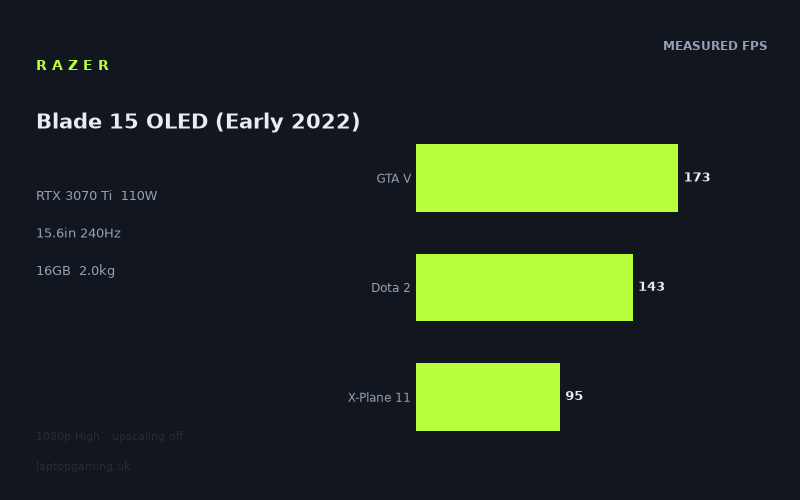
Frame rates
1920×1080, High preset, upscaling off.
Measured on this machine. Source: Notebookcheck, 2023-03-09.
Not scored: incomplete benchmark suite
Every scored laptop on this site is averaged over the same 5 games, and this one is short of Cyberpunk 2077, Baldur's Gate 3. A mean over 5 games is not comparable to a mean over 5, so we publish the figures we have and leave the score blank rather than rank it against machines tested on a different set. The numbers below are real - the suite is just incomplete.
How these numbers were produced
Frame rates here are not measured by us, and we label how each one was arrived at. A figure marked measured comes from a published run on that exact machine. A figure marked representative is derived from the GPU and its power limit (TGP) and cross-referenced against published reviews - a sound estimate of what that configuration delivers, but not a measurement of that specific laptop. Unless stated otherwise, numbers are 1920x1080, High preset, upscaling off. Where a laptop ships in several power configurations we use the wattage of the exact SKU listed, because a 140W RTX 5070 and a 115W one are not the same product.
In use
The short version
The Razer Blade 15 OLED (Early 2022) is a strong 1080p gaming laptop on the published figures, but it is not a machine whose performance can be reduced to its RTX 3070 Ti label alone. Its graphics chip is configured at 110W, paired with a Core i9-12900H and 16GB of memory, and the benchmark data shows a system that is very quick in lighter and older games, still capable in demanding recent releases, but not consistently close to the limits of its 240Hz display.
Notebookcheck’s measured figures range from 197fps in Strange Brigade to 68fps in Dead Space Remake at 1920x1080, High preset and with upscaling off. That is a substantial spread. It means the Blade is able to make excellent use of its high-refresh panel in some games, particularly the less demanding titles in the data set, while newer and more graphically intensive games are far more likely to sit in the region where smooth play is the priority rather than chasing 240fps.
The average across the five scoring-suite games is 142fps. That is a strong result for a 15.6in machine weighing 2.01kg, but it needs to be interpreted sensibly. An average does not mean every game runs at roughly the same speed, and this laptop’s own numbers demonstrate why. Strange Brigade, The Witcher 3, F1 22 and GTA V are well into high-refresh territory. Dota 2 is also fast at 143fps. Yet games including Hogwarts Legacy, A Plague Tale Requiem, Uncharted Legacy of Thieves Collection, Flight Simulator 2020 and Dead Space Remake are much more demanding, returning figures that are clearly playable but nowhere near the display’s 240Hz ceiling.
That makes this a sensible choice for someone who values a compact premium-format gaming machine, wants an OLED panel, and plays a mixture of competitive or older games alongside newer single-player releases. It is particularly well suited to a buyer who understands that the screen’s refresh rate is a capability rather than a performance guarantee. The panel can refresh at 240Hz, but the GPU will only approach that in a subset of games at the measured settings.
It is less convincing for the buyer whose main aim is to maximise frame rates in the newest demanding games, especially if their expectation is that an RTX 3070 Ti should automatically deliver 240fps. The published results do not support that expectation. At 1080p High without upscaling, it does very well in many games, but there is a clear divide between games that run at well over 100fps and games that sit much closer to 70fps.
There is no overall value judgement available for this exact configuration because no confirmed UK price has been supplied. That is not a criticism of the laptop or its performance. The benchmark suite is complete and the Blade ranks normally in the frame-rate data, but value cannot be computed without a confirmed UK price. It would be misleading to pretend otherwise or to speculate about what this configuration might cost.
Performance
A 110W RTX 3070 Ti is the important specification
The RTX 3070 Ti is the headline GPU, but the more useful detail is that it runs at a 110W power limit in this Razer Blade 15 OLED. Laptop GPUs with the same name can perform differently when they are configured with different power limits, cooling arrangements and surrounding components. That is why the measured frame rates matter more than assuming a result from the GPU name alone.
In this machine, the RTX 3070 Ti is paired with a Core i9-12900H and 16GB of memory. The resulting numbers show that the Blade has enough performance to deliver very high frame rates in games that are less graphically punishing, while the GPU limit becomes more apparent in newer titles with heavier rendering demands. The laptop is not slow in those games; 73fps in A Plague Tale Requiem, 72fps in Uncharted Legacy of Thieves Collection, 70fps in Flight Simulator 2020 and 68fps in Dead Space Remake are all usable results. But they illustrate that this is not an all-settings, all-games, 240fps machine at the measured settings.
The testing conditions are important. Notebookcheck’s figures were measured at 1920x1080, using the High preset with upscaling off. Those are useful settings because they reveal native rendering performance without a frame-rate boost from an upscaling mode. They also make the results a conservative guide to what happens when games become more demanding: there is no assistance from upscaling in these figures, and the laptop’s own display has a higher 2560x1440 resolution than the benchmark resolution.
That last point matters. The Blade’s screen is 2560x1440, while the published gaming data is at 1920x1080. We do not have measured frame rates for these games at the panel’s native resolution, so it would be wrong to convert the published figures into invented 2560x1440 results. What can be said is that the 1080p data is the reliable reference point here. Buyers intending to use 2560x1440 should not assume the same figures apply unchanged.
The games where it is genuinely fast
Strange Brigade is the fastest result in the supplied data at 197fps. That is an excellent frame rate and one that makes meaningful use of a 240Hz screen, even though it remains below the display’s maximum refresh rate. The gap between 197fps and 240Hz is worth acknowledging rather than ignoring: the panel can refresh more often than the game is producing frames at the measured settings. Still, 197fps is plainly a high-frame-rate result, and it puts the Blade in a strong position for this kind of lighter title.
The Witcher 3 reaches 177fps, while F1 22 and GTA V each reach 173fps. Those are similarly impressive figures. A buyer focused on fast camera movement, responsive-feeling action or simply very smooth animation in these games will get what they came for. None reaches 240fps in the published data, but all are comfortably beyond conventional 60Hz territory and well beyond 100fps.
Dota 2 runs at 143fps. That is lower than the figures in Strange Brigade, The Witcher 3, F1 22 and GTA V, but it is still a high result. It means the Blade is well positioned for players who want a high-refresh laptop for games in this broad performance class. The screen’s 240Hz refresh rate is not fully saturated by the measured Dota 2 result, but 143fps is enough to make the higher-refresh panel relevant rather than ornamental.
Far Cry 5 records 135fps. This is another result that sits firmly in high-refresh territory. It also helps show why an average can be useful when read with caution: the Blade does not rely on a single outlying result to look quick. There are several games at 135fps or above, and several more between 93fps and 118fps. The performance level is broadly strong, but not uniform.
High On Life reaches 118fps and Final Fantasy XV reaches 100fps. These are important middle-ground figures. They are not close to 240fps, but both are above 100fps or directly at it, which is still a good outcome at the stated settings. For the buyer who wants smooth play without making 240fps a rigid target, this part of the performance spread is reassuring. The Blade does not abruptly fall from very high frame rates into poor results once a game gets tougher. Instead, it steps down through several usable performance tiers.
The middle of the benchmark spread
Spider-Man Miles Morales reaches 95fps, X-Plane 11 also reaches 95fps, and Need for Speed Unbound records 93fps. These figures are strong enough to support a high-refresh experience in the broad sense, but they also make it clear that the 240Hz panel is ahead of the GPU in these games at the measured settings.
It is tempting to describe anything below 100fps as disappointing when a laptop has a 240Hz panel, but that would be the wrong conclusion. The screen does not become wasted simply because the game is not reaching its maximum refresh rate. A 95fps or 93fps result is still much higher than 60fps, and the panel gives the machine room to display that performance. The more accurate criticism is that a 240Hz display sets a very high expectation, and the measured results show that expectation can only be met in the lighter end of the game selection.
Spider-Man Miles Morales at 95fps is especially useful as a reminder that modern, graphically richer games place different demands on the GPU than older or lighter titles. The RTX 3070 Ti at 110W is clearly capable, but its results are constrained by the workload. The same is true of Need for Speed Unbound at 93fps. Neither number suggests that the Blade struggles to run the game; neither supports the idea that it is routinely a 240fps machine.
X-Plane 11 at 95fps adds another perspective. Laptop performance is not determined by the GPU in isolation. The Core i9-12900H matters, and the supplied comparison information specifically notes that lighter shared games at 1080p can become CPU-bound, compressing genuine GPU differences. That does not mean every result here is CPU-bound, and the supplied data does not establish a bottleneck for every individual game. It does mean the Blade’s measured performance must be understood as the output of the whole configuration, not as a simple RTX 3070 Ti ranking.
The demanding games where expectations need to change
The Witcher 3 v4 records 81fps. Hogwarts Legacy records 79fps. These are still playable-looking figures on paper, but they sit in a different performance category from the 173fps and 197fps results at the top of the table. Anyone shopping specifically for current demanding games should pay more attention to this part of the data than to the headline average.
At 81fps and 79fps, the Blade is no longer close to the screen’s maximum refresh rate. That does not make the OLED panel a poor pairing, but it changes the role of the display. In these games, the 240Hz capability is headroom rather than a target being reached. The practical conclusion is straightforward: the laptop can run these games at the measured settings, but high-refresh gaming in the full 240Hz sense is not what the data shows.
A Plague Tale Requiem at 73fps, Uncharted Legacy of Thieves Collection at 72fps and Flight Simulator 2020 at 70fps continue that pattern. These results are clustered closely enough to show a consistent outcome in heavier games. The Blade remains above 60fps in each of them at 1920x1080 High with upscaling off, which is a respectable result. But the difference between around 70fps and 240Hz is too large to gloss over. Buyers should not purchase this Razer purely because the display specification suggests that every game will feel like a competitive title running at several hundred frames per second.
Dead Space Remake is the lowest published figure at 68fps. Again, that is not an unusable outcome. It is, however, the clearest evidence that the RTX 3070 Ti at 110W has limits in newer graphically intensive releases. The Blade is a capable gaming laptop, not a machine that can ignore the demands of every recent game at High settings without assistance from upscaling.
The complete spread from 197fps down to 68fps is the central performance story. The machine is quick, but its quickness is game-dependent. The best results are almost three times the lowest result in the data. A buyer should therefore base their decision on the kind of games they actually play. If the regular library looks more like Strange Brigade, The Witcher 3, F1 22, GTA V, Dota 2 and Far Cry 5, the Blade’s performance is very attractive. If it looks more like Hogwarts Legacy, A Plague Tale Requiem, Uncharted Legacy of Thieves Collection, Flight Simulator 2020 and Dead Space Remake, the results are still solid but much less aligned with the 240Hz headline.
What the 142fps mean actually tells us
The mean across the five scoring-suite games is 142fps. That is a useful indication that the Blade is a fast laptop overall in the selected scoring suite, but it is not a promise of 142fps in every game. The listed results themselves make that clear: Strange Brigade is at 197fps, GTA V is at 173fps, Dota 2 is at 143fps, Final Fantasy XV is at 100fps and X-Plane 11 is at 95fps.
This particular average is therefore tilted by several lighter games that run extremely well. There is nothing wrong with that; it is a real measured result from the stated suite. But it is why a shopper should read the individual figures, particularly before buying a laptop for a specific title. Someone deciding between machines for X-Plane 11 should care about 95fps in X-Plane 11, not merely the wider 142fps mean. Someone buying for Dead Space Remake should care about 68fps there. The average is useful for ranking broad performance, while the individual results are better for deciding whether the laptop suits a particular game.
There is also a wider point about the 110W GPU configuration. The Blade’s results prove that it has substantial gaming capability. They do not prove that every laptop carrying a higher-tier GPU name will be faster, or that every laptop with a similar GPU name will perform identically. The comparison section makes that especially clear. Against some machines with ostensibly different graphics hardware, the shared-game average is effectively unchanged. Against a 175W RTX 3080 Ti system, the Blade trails meaningfully. Configuration and power allowance matter.
The screen
OLED, 2560x1440 and 240Hz are an ambitious combination
The Razer Blade 15 OLED has a 15.6in OLED screen with a 2560x1440 resolution and a 240Hz refresh rate. On specification alone, that is a very ambitious display for a laptop of this size. It combines a relatively high native resolution with an unusually high refresh rate, rather than asking the buyer to choose between a sharper-looking panel and a faster-refreshing one.
The important qualification is that the measured game results are at 1920x1080 rather than 2560x1440. The published figures show what the Blade can do at the lower benchmark resolution, High preset and upscaling off. We do not have equivalent Notebookcheck numbers for the listed games at the panel’s native resolution. As a result, the responsible way to assess the screen is to separate what is known from what is not.
What is known is that the 240Hz panel has plenty of refresh-rate capacity for the Blade’s fastest games. Strange Brigade at 197fps, The Witcher 3 at 177fps, F1 22 at 173fps, GTA V at 173fps and Dota 2 at 143fps all take meaningful advantage of a high-refresh display. The laptop will not be pushing 240fps in those measured results, but it is well beyond 60fps and well into a level where a high-refresh panel has a practical purpose.
What is also known is that many games do not approach 240fps at the measured settings. Far Cry 5 reaches 135fps, High On Life 118fps, Final Fantasy XV 100fps, Spider-Man Miles Morales 95fps, X-Plane 11 95fps and Need for Speed Unbound 93fps. The newer and heavier group is lower again, from The Witcher 3 v4 at 81fps down to Dead Space Remake at 68fps.
That means the display is best understood as having headroom. It can display very high frame rates when the game and settings allow it, and it does not impose a low refresh-rate cap on lighter titles. But the 240Hz figure should not be read as a prediction of gaming performance. The GPU has to supply the frames, and the published data shows that it can only do so at that kind of level in the lighter end of the tested selection.
Resolution versus refresh rate
The 2560x1440 resolution is the other part of the pairing that requires sensible expectations. The benchmark results were obtained at 1920x1080, so they cannot be presented as native-resolution gaming results. A buyer who wants to run every game at 2560x1440 should treat the supplied frame rates as evidence of the Blade’s general 1080p performance, not as a direct prediction for the screen’s full resolution.
This matters more in the demanding titles than in the lighter ones. At 1920x1080, Dead Space Remake is already at 68fps, Flight Simulator 2020 is at 70fps, Uncharted Legacy of Thieves Collection is at 72fps, A Plague Tale Requiem is at 73fps and Hogwarts Legacy is at 79fps. It would be irresponsible to suggest that these numbers establish what happens at 2560x1440, because they do not. There are no supplied native-resolution figures.
For a buyer who sees 2560x1440 and 240Hz and assumes they must be used together in every game, the benchmark data is a useful corrective. The display has both capabilities, but games have different requirements. Some games will be better suited to pursuing high frame rates at the benchmark resolution. Others may lead a player to prioritise image settings, resolution or frame rate according to their own preferences. The data does not tell us which exact setting combination is best for every game, so this review should not pretend that it does.
What can and cannot be said about the OLED panel
The supplied specification confirms that this is an OLED panel. That is worth stating because it differentiates the Blade from a laptop described only by resolution and refresh rate. However, there are no supplied measurements for brightness, colour coverage, colour accuracy, response behaviour, screen uniformity or any other display-quality metric. There are also no supplied observations about screen finish or use in bright rooms.
As a result, the reliable assessment is limited to the panel type, size, resolution and refresh rate. The OLED label and 240Hz specification make this a distinctive display on paper, but we do not have the measurement data needed to rank its image quality against another panel or to make claims about its behaviour beyond those stated specifications.
For gaming, the strongest conclusion remains the simple one: it is a 240Hz panel backed by a system that can deliver high frame rates in a useful number of games, but cannot consistently drive every measured game near 240fps. That is not a mismatch so much as a realistic division between the screen’s maximum capability and the varying demands of modern games.
Build, size and portability
The known portability figure is 2.01kg
The Razer Blade 15 OLED weighs 2.01kg. For a 15.6in gaming laptop with a Core i9-12900H, RTX 3070 Ti and 80Wh battery, that is the portability figure available in the supplied specification. It places the Blade in a category where it can be considered for regular transport, rather than being treated purely as a machine that never leaves a desk.
That does not mean weight stops mattering. A 2.01kg laptop is still a substantial object to carry repeatedly, especially once its charger and other accessories are considered. We do not have a charger weight, bag weight or total travelling weight, so no precise carrying claim should be made. The appropriate conclusion is that the Blade is not a tiny ultraportable, but its listed mass is compatible with a gaming laptop intended to move between home, work, study or other regular locations.
The 15.6in screen is also relevant. This is not a small-screen machine designed around minimal size above all else. The display is large enough to support the 2560x1440 resolution and the 240Hz gaming focus, while the 2.01kg weight means the laptop does not have to be regarded as permanently desk-bound. That combination is likely to appeal to someone who wants one system for both a main gaming position and occasional transport.
There are no supplied dimensions for thickness, width or depth. That means we cannot responsibly claim that the Blade will fit a particular bag, take up a certain amount of desk space or compare its physical footprint with another 15.6in laptop. Nor do we have published information here about ports, keyboard layout, trackpad, webcam, chassis materials, cooling noise or surface temperatures. Those are all meaningful purchasing considerations, but they are outside the provided facts.
Battery capacity is known; battery life is not
The Blade has an 80Wh battery. That is the stated capacity, and it is useful to know because battery capacity is part of the laptop’s portability specification. But there is no supplied battery-life result. We cannot state how long the laptop lasts away from mains power in gaming, video playback, office work or any other use case.
That is particularly important for a gaming laptop. Battery capacity alone does not establish gaming time or general battery life. A buyer who needs a laptop for long periods away from a socket should seek measured battery results before treating the 80Wh figure as an answer. The supplied data supports saying that the battery is 80Wh; it does not support turning that into a number of hours.
What the portable-performance balance looks like
Within the facts available, the Blade’s appeal is the balance between a 2.01kg weight, a 15.6in OLED 2560x1440 240Hz display, a Core i9-12900H and an RTX 3070 Ti at 110W. That is a combination aimed at buyers who want substantial gaming performance in a laptop that is not described by an extreme weight figure.
The performance data supports that positioning. The Blade can produce 197fps in Strange Brigade, 177fps in The Witcher 3 and 173fps in F1 22 and GTA V, while still achieving 68fps to 81fps in several demanding newer games. It is not the outright performance answer for every buyer, but it is clearly far beyond a system intended only for basic or occasional gaming.
At the same time, portability should not be confused with low-power operation. The supplied figures do not include noise, temperatures or battery gaming behaviour. Buyers who need a quiet laptop, a cool-running chassis or specific unplugged performance should not infer those qualities from the 2.01kg weight or 80Wh battery alone.
How it compares
Against the MSI Prestige 15 with RTX 3050 Ti at 105W
Against the MSI Prestige 15, configured with an RTX 3050 Ti at 105W, the Razer Blade 15 OLED averages +74fps across four shared games. This is the largest positive comparison in the supplied rival set, and it is a substantial gap.
The difference makes the Blade the much more convincing choice for a buyer whose priority is gaming performance between these two machines. The RTX 3050 Ti configuration is not being compared through vague product positioning or GPU names alone; the shared-game figures show a clear advantage for the Blade. A 74fps average lead is not something that can be explained away as normal benchmark variation or a small title-by-title fluctuation.
That does not mean every non-gaming consideration automatically favours the Razer. We do not have a confirmed UK price for either exact configuration, nor do we have comparable display measurements, battery-life results, noise data or size data in the supplied facts. But where gaming frame rate is the deciding factor, the Blade’s advantage over this MSI is decisive.
This comparison also gives context to the Blade’s own 110W RTX 3070 Ti. Although it is not configured at the highest power figure found anywhere in the rival list, it is still operating at a much higher gaming-performance level than the RTX 3050 Ti system in the games both machines hold. Buyers moving up from this class of GPU should expect the Blade’s frame-rate lead to matter in practice, especially in games where the Prestige cannot approach the Razer’s higher figures.
Against the Dell G16 with RTX 3060 at 130W
The comparison with the Dell G16 is more surprising. The Dell uses an RTX 3060 at 130W, while the Blade has an RTX 3070 Ti at 110W. Yet across five shared games, the published average difference is +0fps for the Razer.
That is a real result, not a typo and not evidence that the GPUs are identical. The supplied comparison information explains why near-zero results can happen: at 1080p, lighter titles in the shared set can be CPU-bound and can compress genuine GPU gaps. In other words, the shared games may be reaching a point where graphics hardware differences do not translate cleanly into a large frame-rate separation.
For buyers, the practical lesson is that GPU naming alone is not enough. The Blade’s RTX 3070 Ti looks like it should create a straightforward lead over an RTX 3060 configuration, but the five shared-game average does not show one. The Dell’s 130W configuration and the characteristics of the shared 1080p games matter. A buyer choosing between these exact machines should not assume that the Razer’s GPU label guarantees a visible advantage in the game selection represented by this comparison.
This does not undermine the Blade’s own benchmark results. It still reaches 197fps in Strange Brigade, 177fps in The Witcher 3, 173fps in F1 22 and GTA V, and 143fps in Dota 2. Instead, it shows why comparative testing is valuable. The Dell’s result is a reminder that at 1920x1080, particularly in lighter titles, system-level limits can reduce the apparent distance between GPUs.
Without confirmed UK prices for either exact configuration, there is no basis for declaring one better value. Without shared details on display, weight, battery life and other characteristics, there is no full-use-case verdict either. On the shared games, however, the Razer does not establish a frame-rate lead over the Dell despite carrying the higher-tier GPU name.
Against the Gigabyte Aero 16 YE5 with RTX 3080 Ti at 105W
The Gigabyte Aero 16 YE5 has an RTX 3080 Ti at 105W. On the same five shared games, the Blade averages -0fps against it. This is effectively a tie in the supplied comparison data.
That result is another example of why the power limit and game selection are as important as the GPU badge. The Aero’s RTX 3080 Ti has a higher-tier name, but it is configured at 105W, very close to the Blade’s 110W figure. At 1080p in the lighter shared-game set, the benchmark data shows no meaningful average separation between the two laptops.
The correct interpretation is not that an RTX 3070 Ti at 110W and an RTX 3080 Ti at 105W will always perform the same way. The comparison only tells us about the five games both machines hold under the stated framework. The supplied explanation again matters: lighter 1080p games can become CPU-bound and compress genuine GPU gaps. A near-zero average can therefore be a real result without proving that the underlying graphics hardware is interchangeable in every workload.
For a buyer focused on the shared games, the Blade’s result is very strong. It keeps pace with a laptop carrying an RTX 3080 Ti name in that particular cross-section. For a buyer focused on more graphically demanding games or other resolutions, this comparison should be treated more cautiously, because the supplied shared-game average does not provide a complete performance map across every title and setting.
As with the Dell, price cannot settle the argument because no confirmed UK price is supplied for either exact configuration. The display specifications, battery measurements, size and other broader-use information needed for a total comparison are also not available here. But the frame-rate conclusion is clear: in the shared games, the Blade is effectively level with the Aero.
Against the MSI Raider GE77 HX with RTX 3080 Ti at 175W
The MSI Raider GE77 HX is the rival that most clearly outpaces the Blade in the supplied comparison group. It uses an RTX 3080 Ti at 175W, and the Razer averages -28fps across five shared games.
This is the comparison that best illustrates what a much higher GPU power limit can mean. The Raider’s 175W RTX 3080 Ti is not merely a higher-tier GPU by name than the Blade’s RTX 3070 Ti; it also has a substantially higher stated power figure than the Blade’s 110W configuration. In the shared data, that translates into a meaningful average lead for the MSI.
A 28fps average deficit is large enough to matter to a buyer prioritising outright gaming performance. It does not mean the Razer is weak. The Blade still produces strong results throughout the benchmark list, including several games well beyond 100fps. It does mean that someone deciding purely on maximum frame rate should not expect the Razer to match this 175W RTX 3080 Ti laptop.
The comparison also helps place the Blade accurately in the gaming-laptop market of its GPU generation. It is not at the bottom of the group; it beats the RTX 3050 Ti MSI Prestige 15 by a very large shared-game margin. It is not automatically ahead of every lower-named GPU system either, as the Dell comparison shows. It can effectively match the 105W RTX 3080 Ti Gigabyte Aero 16 YE5 in the shared games, yet it trails the much higher-power Raider GE77 HX.
That is exactly why this Razer should be judged as a 110W RTX 3070 Ti laptop, not as a generic RTX 3070 Ti. The configuration offers strong performance in a 2.01kg 15.6in format, but the published comparisons show that a higher-power gaming machine can produce more frame rate where that is the overriding priority.
Who it’s for
Buy it for a mixed library, not for a single headline specification
The Blade 15 OLED is best suited to someone who plays a varied game library and wants a laptop that can be very fast in lighter games while remaining capable in demanding releases. The benchmark spread supports that use case well. Strange Brigade at 197fps, The Witcher 3 at 177fps, F1 22 and GTA V at 173fps, Dota 2 at 143fps and Far Cry 5 at 135fps show that the machine has substantial high-frame-rate ability.
It is also a sensible fit for someone who values the particular screen specification: 15.6in, OLED, 2560x1440 and 240Hz. The high refresh rate is not fully exploited in every measured game, but the laptop has enough performance to take useful advantage of it in a number of titles. For a player who spends time in games that run in the 143fps to 197fps range, the panel is a meaningful part of the package rather than an over-specified extra.
The 2.01kg weight makes the Blade relevant to a buyer who needs gaming performance in a laptop that can be moved regularly. It is still a sizeable 15.6in machine, and we do not have dimensions or full carry-weight information, but the supplied weight supports viewing it as more transportable than a system chosen solely around maximum GPU power.
It is also suitable for the buyer who is comfortable making game-by-game decisions. The published data shows that some games are fast enough to make high refresh rate the obvious priority, while demanding games sit much lower. A practical owner of this machine should be someone who understands that settings, resolution and frame-rate targets may differ by title rather than expecting one fixed approach to suit every game.
Buy something else if 240fps in demanding games is the aim
This is not the right laptop for someone whose non-negotiable requirement is 240fps in demanding modern games at the measured settings. The data does not support that use case. The Witcher 3 v4 is at 81fps, Hogwarts Legacy at 79fps, A Plague Tale Requiem at 73fps, Uncharted Legacy of Thieves Collection at 72fps, Flight Simulator 2020 at 70fps and Dead Space Remake at 68fps.
Those are not poor figures, but they are far from the screen’s 240Hz ceiling. If the primary reason for buying a gaming laptop is to pursue the highest possible frame rates in graphically intensive titles, the MSI Raider GE77 HX is the more appropriate performance direction among the listed rivals. Its RTX 3080 Ti runs at 175W and it leads the Blade by 28fps across five shared games.
Buy something else if you need confirmed battery-life data before purchasing. The Blade has an 80Wh battery, but no battery-life figure is supplied. Capacity is not a substitute for measured endurance. The same applies if you need evidence about noise, temperatures, chassis behaviour, keyboard quality, ports or physical dimensions. None of that is present in the available facts, so none should be assumed.
Buy something else if native 2560x1440 performance is the deciding factor and you need published frame rates for the exact games you play. The Blade’s own panel is 2560x1440, but the supplied gaming results are at 1920x1080. The laptop may still be attractive for native-resolution play, but this review cannot provide invented numbers for that scenario. A buyer who insists on native-resolution evidence should seek measurements at 2560x1440 rather than treating the 1080p figures as interchangeable.
The final buying view
The Razer Blade 15 OLED (Early 2022) earns its place through a credible mixture of high frame rates, a 15.6in OLED 2560x1440 240Hz screen, a Core i9-12900H, 16GB of memory and a 2.01kg weight. The RTX 3070 Ti at 110W is capable enough to make the machine feel properly high-performance in a wide range of games, particularly where the published results reach 135fps, 143fps, 173fps, 177fps and 197fps.
Its limitation is not a lack of gaming ability. It is that the screen’s 240Hz specification is more ambitious than the GPU can consistently satisfy across demanding modern games at 1920x1080 High without upscaling. The low end of the supplied results, from 68fps to 81fps, is still usable but clearly belongs to a different performance tier from the laptop’s best figures.
The rival results reinforce the same conclusion. The Blade is vastly ahead of the RTX 3050 Ti MSI Prestige 15 in the shared games, effectively tied with both the RTX 3060 Dell G16 and the 105W RTX 3080 Ti Gigabyte Aero 16 YE5 in their shared 1080p selection, and behind the higher-power RTX 3080 Ti MSI Raider GE77 HX. It is therefore neither a budget-level performer nor the outright maximum-frame-rate option. It is a strong, balanced 110W RTX 3070 Ti laptop whose real appeal lies in combining serious 1080p gaming results with a compact 15.6in OLED high-refresh format.
Without a confirmed UK price, there is no honest value verdict for this exact Razer configuration. Performance, however, is not in doubt: the Notebookcheck data shows a laptop that is fast where games allow it, capable where games become heavier, and best bought by someone who values the whole balance rather than expecting the RTX 3070 Ti name or the 240Hz panel to guarantee the same result in every title.