Details
Product prices and availability are accurate as of the date/time indicated and are subject to change. Any price and availability information displayed on Amazon.co.uk at the time of purchase will apply to the purchase of this product.Review
Lenovo Slim Pro 7 review
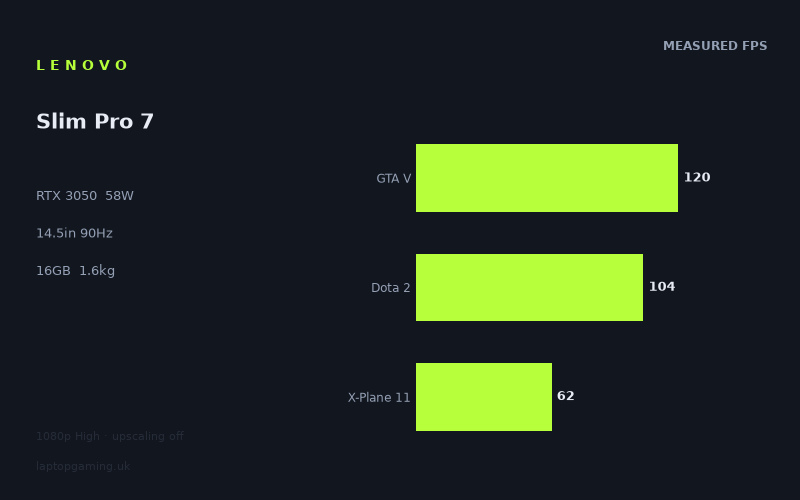
Frame rates
1920×1080, High preset, upscaling off.
Measured on this machine. Source: Notebookcheck, 2023-04-18.
Not scored: incomplete benchmark suite
Every scored laptop on this site is averaged over the same 5 games, and this one is short of Cyberpunk 2077, Baldur's Gate 3. A mean over 4 games is not comparable to a mean over 5, so we publish the figures we have and leave the score blank rather than rank it against machines tested on a different set. The numbers below are real - the suite is just incomplete.
How these numbers were produced
Frame rates here are not measured by us, and we label how each one was arrived at. A figure marked measured comes from a published run on that exact machine. A figure marked representative is derived from the GPU and its power limit (TGP) and cross-referenced against published reviews - a sound estimate of what that configuration delivers, but not a measurement of that specific laptop. Unless stated otherwise, numbers are 1920x1080, High preset, upscaling off. Where a laptop ships in several power configurations we use the wattage of the exact SKU listed, because a 140W RTX 5070 and a 115W one are not the same product.
In use
The short version
The Lenovo Slim Pro 7 is a compact laptop with a distinctly mixed gaming case. Its RTX 3050 runs at a 58W GPU power limit, paired with a Ryzen 7 7735HS and 16GB of memory, and Notebookcheck’s measured figures show that this is enough for very good results in several lighter or older games at 1920x1080 on the High preset with upscaling off. GTA V reaches 120fps, F1 22 reaches 110fps, Dota 2 reaches 104fps and The Witcher 3 reaches 96fps. Those are genuinely strong results for a 1.623kg laptop with a 14.5in display.
That positive impression does not carry across every game. X-Plane 11 records 62fps, Tiny Tina’s Wonderlands records 59fps, Final Fantasy XV records 51fps and Cyberpunk 2077 1.6 records 46fps. Returnal is the clearest warning sign at 34fps. The measured results therefore describe a machine that can be very enjoyable for 1080p gaming, but not one that can be assumed to deliver high-refresh gaming in every title or to run demanding games comfortably at its native 2560x1600 display resolution.
The important thing is to buy it for the kind of games it demonstrably handles well, rather than for the screen specification alone. The 90Hz IPS panel gives the Slim Pro 7 a more ambitious display than its graphics results can consistently exploit. Notebookcheck’s figures show that several games can clear 90fps at 1920x1080 High, but several cannot, and there are no supplied measurements at 2560x1600. A buyer expecting native-resolution High-preset gaming at 90fps would be relying on an assumption the available data does not support.
There is also no confirmed UK price. That makes a firm value verdict impossible. The hardware could be appealing if priced as a premium thin-and-light that also plays a sensible selection of games at 1080p, but it would be much harder to justify if sold against more powerful gaming-oriented machines at a similar price. The frame-rate data alone says the Slim Pro 7 is a competent portable all-rounder with gaming ability, not a substitute for a higher-power gaming laptop.
It is most persuasive for someone who values the 14.5in format, 1.623kg weight, 73Wh battery capacity, Ryzen 7 processor and 16GB memory as much as gaming performance. It makes sense for a buyer whose regular games resemble GTA V, F1 22, Dota 2 or The Witcher 3 more than Returnal. It is less convincing for someone whose priority is running demanding games at high settings, using the full 90Hz refresh rate in a wide range of titles, or playing at the panel’s native resolution without compromises.
One further limitation needs stating plainly. The supplied scoring-suite results do not include Strange Brigade. Because every ranked laptop is normally averaged across the same five games, this partial set cannot be ranked fairly against machines with a complete set of figures. The available mean of 84fps across the four supplied scoring-suite games is useful as a description of these four measurements, but it is not a like-for-like ranking result. The most useful evidence here is the individual game data and the directly supplied shared-game comparisons.
Performance
What the RTX 3050 at 58W delivers
The Slim Pro 7 uses an RTX 3050 with a 58W GPU power limit. That figure matters because an RTX 3050 name alone does not describe how a laptop performs. Mobile graphics chips appear in systems with different power limits, cooling arrangements and surrounding hardware, and the comparison data supplied for this machine makes that clear. A laptop with an RTX 3050 Ti at 50W is effectively level with it in the listed shared-game comparison, while one with an RTX 3050 Ti at 95W is only modestly ahead. Meanwhile, the Slim Pro 7 is substantially ahead of a listed RTX 3050 Ti machine at 105W. The badge and power figure are useful context, but the measured game results remain more trustworthy than assumptions based on the name alone.
For this Lenovo specifically, the 58W limit describes a machine that is not positioned like a large, high-power gaming chassis. It is a 1.623kg laptop with a 14.5in screen, not a larger system built around the highest available graphics power. That does not make the RTX 3050 ineffective. The results show plenty of playable performance at 1920x1080 High with upscaling disabled. It does mean that the graphics headroom is limited in the more demanding entries in the set, and that the higher-resolution display should be treated as a productivity and general-use advantage first, rather than as evidence that every game should be played natively at 2560x1600.
Notebookcheck’s measurements were taken at 1920x1080, using the High preset and with upscaling off. This is a useful, demanding baseline because it avoids presenting frame rates boosted by upscaling. It also means the figures should not be read as native-panel measurements. The Slim Pro 7’s panel has 2560x1600 resolution, while the benchmark data is at 1920x1080. There is no supplied result showing what happens at the display’s native resolution, at lower quality settings, or with upscaling enabled. Those may be sensible options for an owner to explore, but they are not results that can be claimed here.
The supplied four-game scoring-suite mean is 84fps. On its own, that sounds close to the 90Hz panel refresh rate, but the individual results matter much more than the mean. A mean can conceal a wide spread: GTA V is at 120fps, while X-Plane 11 is at 62fps. The difference between those results is large enough to change the experience of using the panel. The laptop is not an 84fps machine in a practical sense. It is a laptop that can reach or exceed 90fps in some games and sits far below that level in others.
That variation is the central performance story. Buyers should not focus only on the RTX 3050 label, the 84fps partial mean or the 90Hz display. They should look at where their own regular games sit in the available results. The Lenovo is strong when the title aligns with its more favourable results. It becomes a conventional 60fps-or-lower proposition when the benchmark data moves towards X-Plane 11, Tiny Tina’s Wonderlands, Final Fantasy XV and Cyberpunk 2077 1.6. It is considerably weaker in Returnal.
Games that make good use of the 90Hz screen
GTA V is the strongest result in the supplied list at 120fps. At the 1920x1080 High settings used by Notebookcheck, that exceeds the panel’s 90Hz refresh rate. This is the clearest example of a game where the Slim Pro 7’s display refresh rate is not merely a specification on the box: the measured performance is high enough to take advantage of it. The result also leaves some margin above 90fps rather than only brushing it.
F1 22 follows at 110fps. That is another result above the screen’s 90Hz refresh rate at the tested settings. Alongside GTA V, it establishes that the RTX 3050 at 58W is capable of high-frame-rate gaming in the right titles. The important qualifier is that these are measured at 1920x1080 rather than 2560x1600, on High, with upscaling off. They are strong data points, but they are not proof of native-resolution 90Hz performance.
Dota 2 measures 104fps. Again, this is above 90fps. For a buyer who spends a large share of their gaming time in Dota 2, that is one of the best reasons to consider the Slim Pro 7. The machine’s 90Hz panel is supported by the measured result at the benchmark settings, and the laptop’s relatively low 1.623kg weight makes the combination more appealing than a heavier gaming laptop if portability is also important.
The Witcher 3 records 96fps. This is the narrowest of the four listed results that exceed 90fps, but it still clears the panel refresh rate in Notebookcheck’s tested configuration. It is an important result because it shows that the Lenovo’s higher-refresh screen is not restricted to only the two highest figures. However, the margin is much smaller than with GTA V at 120fps or F1 22 at 110fps. It would be wrong to turn 96fps at 1920x1080 High into a general promise of 90fps gaming across similar-looking titles, especially given the much lower figures elsewhere in the supplied list.
Taken together, GTA V, F1 22, Dota 2 and The Witcher 3 give the Slim Pro 7 a credible high-refresh case at 1080p. Each reaches at least 90fps in the measured figures, and the range from 96fps to 120fps is comfortably above the level where the display’s 90Hz refresh rate becomes relevant. If these games are representative of what a buyer actually plays, the Lenovo should not be dismissed simply because it is not a large gaming machine.
There is an important practical distinction, though. These results show that the laptop can drive 90fps or better in particular games at the tested settings. They do not show that it can hold 90fps in every game, at every point in those games, at native resolution, or under any settings other than the supplied benchmark configuration. The correct conclusion is positive but narrow: the Slim Pro 7 can make useful use of its 90Hz display in a meaningful part of the measured set at 1920x1080 High with upscaling off.
Games that land around 60fps
X-Plane 11 records 62fps. That is still a usable figure in the context of a portable machine with an RTX 3050, but it is well short of the panel’s 90Hz refresh rate. The difference matters. At 62fps, the screen is no longer being fed frames at a rate that matches its 90Hz capability, so the purchase argument changes from high-refresh gaming to acceptable performance at the tested 1080p High settings.
Tiny Tina’s Wonderlands is measured at 59fps, effectively placing it in the same broad performance area as X-Plane 11 at 62fps, but below the 60fps mark in the reported figure. This result is a useful correction to any overconfident reading of the four high-performing titles. The RTX 3050 does not turn the Slim Pro 7 into a universally high-frame-rate laptop. In this game, the available data points to a substantially lower result than the 104fps recorded in Dota 2 or the 110fps recorded in F1 22.
These two figures also show why average frame rate needs context. A buyer looking only at the 84fps mean across the supplied scoring-suite games might expect performance to generally sit close to the display’s refresh rate. X-Plane 11 at 62fps is 28fps below that mean, while Tiny Tina’s Wonderlands at 59fps is lower still. The experience varies substantially by title. The benchmark spread is not a small fluctuation around a stable number; it is a clear divide between games that can use the panel’s refresh rate and games that cannot.
For buyers who are content with results around 60fps at 1920x1080 High, these figures are not disqualifying. They show the RTX 3050 can still deliver a reasonable gaming experience in titles that do not reach 90fps. For buyers choosing a 90Hz laptop specifically to see 90fps in their regular games, they are a warning that the screen’s refresh rate should not be mistaken for the laptop’s likely output in every workload.
More demanding results and the limits of the configuration
Final Fantasy XV records 51fps in Notebookcheck’s measurement. Cyberpunk 2077 1.6 follows at 46fps. These are not marginal misses of the 90Hz target; they are clearly below it. They also sit below the 59fps result in Tiny Tina’s Wonderlands and below the 62fps in X-Plane 11. In these titles, the Slim Pro 7 should be viewed as a machine capable of running the tested configuration, not as one that will provide the high-refresh experience its panel can offer elsewhere.
Cyberpunk 2077 1.6 at 46fps is particularly useful as a reality check because it is one of the lowest results outside Returnal. There is a 74fps gap between GTA V at 120fps and Cyberpunk 2077 1.6 at 46fps. That is too large to summarise with a broad statement such as “good for gaming”. The accurate assessment is more conditional. It is good for games that resemble the upper end of the measured list in their demands on this configuration; it is much less persuasive for games that produce results closer to Cyberpunk 2077 1.6.
Returnal is the lowest measured result at 34fps. Nothing in the supplied data suggests that this laptop should be bought for this kind of performance target at 1920x1080 High with upscaling off. The 34fps figure is 56fps below the display refresh rate, 50fps below the partial four-game mean and 86fps below the GTA V result. That range illustrates the limitation of using a single number or a single easy-running title to judge a gaming laptop.
The presence of Returnal at 34fps does not erase the strong GTA V, F1 22, Dota 2 and The Witcher 3 results. It does, however, set a firm boundary on the Lenovo’s gaming proposition. The 58W RTX 3050 can be effective at 1080p High in the right software, but it does not have enough demonstrated headroom to be described as a safe choice for every demanding game at those settings. Buyers who frequently play titles that perform like Returnal in this data should look for a more powerful configuration rather than hoping the 90Hz panel will compensate.
Why the results vary so much
The supplied benchmark data shows a spread from 120fps in GTA V to 34fps in Returnal. That is an 86fps difference within the same laptop, at the same stated 1920x1080 High benchmark configuration with upscaling off. The key lesson is not that one result is more “real” than another. They are all Notebookcheck measurements, and they show that game choice matters far more than a simple GPU label suggests.
The Lenovo’s four scoring-suite figures alone range from 120fps in GTA V to 62fps in X-Plane 11. The partial mean of 84fps falls between them, but neither endpoint resembles that mean particularly closely. Dota 2 at 104fps and The Witcher 3 at 96fps sit on the high side; X-Plane 11 is on the low side. A buyer whose library is weighted towards GTA V, F1 22, Dota 2 and The Witcher 3 will see a very different outcome from a buyer focused on Cyberpunk 2077 1.6 and Returnal.
The rival comparison data adds another useful explanation for why laptop GPU comparisons can be messy. In lighter titles at 1080p, the shared-game set can be CPU-bound, compressing genuine GPU gaps. That is why a near-zero average against the Schenker Vision 14 should not be read as proof that a 58W RTX 3050 and a 50W RTX 3050 Ti are identical in every possible game or setting. It is a real shared-set result, but the supplied context explains that lighter titles at 1080p can limit the visible difference between graphics configurations.
This matters for the Slim Pro 7 because it prevents two opposite mistakes. The first is to assume that every RTX 3050 Ti laptop must be ahead simply because of the Ti badge. The second is to assume that the Lenovo’s strong position against some listed RTX 3050 Ti systems means it will match a substantially more powerful gaming machine in demanding work. The individual results and the Raider comparison both argue against that second assumption.
The screen
A 14.5in 2560x1600 IPS panel with a 90Hz refresh rate
The Slim Pro 7 has a 14.5in IPS display with a 2560x1600 resolution and a 90Hz refresh rate. On paper, this is a strong display specification for a compact laptop. The 2560x1600 resolution offers considerably more desktop space than the 1920x1080 benchmark resolution, while the 90Hz refresh rate is higher than the frame rate many portable systems are designed around. The IPS panel specification also tells us the panel type, but no further display measurements are supplied here, so there is no basis for claims about brightness, colour coverage, contrast, response time or outdoor usability.
The screen is therefore best assessed in two separate ways: as a 2560x1600 display for general use, and as a 90Hz display for gaming. The supplied data supports the fact that it has these specifications. What it does not provide is native-resolution gaming performance, battery life, or panel-quality measurements beyond IPS, resolution and refresh rate. A careful buyer should not fill in those gaps with assumptions.
Can the RTX 3050 drive 90Hz?
At 1920x1080 High with upscaling off, the answer is sometimes yes. GTA V at 120fps, F1 22 at 110fps, Dota 2 at 104fps and The Witcher 3 at 96fps all exceed the panel’s 90Hz refresh rate. In those games and at those tested settings, the graphics configuration has enough measured performance to make the higher refresh rate relevant.
It is equally important that the answer is sometimes no. X-Plane 11 at 62fps, Tiny Tina’s Wonderlands at 59fps, Final Fantasy XV at 51fps, Cyberpunk 2077 1.6 at 46fps and Returnal at 34fps are all below 90fps. The gap is modest in X-Plane 11 compared with the gap in Returnal, but neither figure reaches the panel refresh rate. The display does not turn 62fps into 90fps, and it does not remove the importance of choosing sensible settings for the game in question.
This makes the 90Hz panel a selective benefit rather than a universal one. It is valuable for the measured games above 90fps. It is still a 90Hz panel in the lower-performing games, but the benchmark data does not show those games delivering frames quickly enough to use all of that refresh rate at the stated settings. Buyers should regard the screen as a worthwhile feature with the right game library, not as a guarantee of high-refresh gaming.
Native resolution is an unanswered question
The display’s native 2560x1600 resolution is higher than the 1920x1080 benchmark resolution. However, no supplied benchmark figures show the Slim Pro 7 running any of the listed games at 2560x1600. There are also no measurements at alternative quality presets or with upscaling enabled. It would therefore be inaccurate to state a native-resolution frame rate, estimate one, or claim that a particular game will remain above 90fps at 2560x1600.
This absence of data has a direct buying implication. The strongest case for the Slim Pro 7 is gaming at the measured 1920x1080 High settings, not an unsupported claim about native 2560x1600 gaming. The panel may be attractive for work, media and general use because of its resolution, while gaming may require a different balance of settings or resolution depending on the title. The supplied evidence cannot say exactly what that balance should be.
A buyer who wants the screen primarily for desktop space and a sharper-looking workspace has a clearer specification to work from: 14.5in, 2560x1600, IPS and 90Hz. A buyer who wants to drive every game at that resolution has less certainty. In that case, it would be sensible to prioritise a laptop with native-resolution measurements for the games that matter most, rather than treating 2560x1600 as a performance promise.
Build, size and portability
Weight is the useful portability figure available
The Lenovo Slim Pro 7 weighs 1.623kg. That is a central part of its appeal. The performance figures need to be judged alongside the fact that this is a 14.5in laptop at that weight, rather than a larger machine built around a far higher-power graphics chip. It is not difficult to find a configuration with more gaming headroom in principle; the question is whether a buyer wants that capability badly enough to move away from this compact class of laptop.
At 1.623kg, the Slim Pro 7 is suited to a buyer who wants a machine that can plausibly move between desk use and travel without being defined solely as a gaming laptop. The available data does not support claims about chassis materials, thickness, physical dimensions, keyboard quality, trackpad quality, ports, webcam, speakers or cooling noise. Those are all important practical considerations, but they are not included in the fact sheet and should not be invented.
The same restraint applies to the word “Slim” in the product name. It is reasonable to identify the model as the Lenovo Slim Pro 7, but there are no dimensions supplied to quantify its thickness or footprint. The weight is the hard figure available, and it is enough to establish that Lenovo is combining a 14.5in screen and RTX 3050 graphics in a 1.623kg package.
Battery capacity is known; battery life is not
The laptop has a 73Wh battery. That is a useful specification, but it is not a battery-life result. There are no supplied runtime figures for web use, video playback, idle use, gaming or any other scenario. It would be wrong to turn the 73Wh capacity into a claimed number of hours.
For a portable buyer, the right conclusion is simply that the Slim Pro 7 includes a 73Wh battery alongside its 1.623kg weight and 14.5in display. Whether that translates into the battery life required for a particular commute, course, workplace or trip cannot be confirmed from the supplied data. Gaming on battery is also not benchmarked here, so the Notebookcheck frame rates should not be treated as battery-powered gaming figures.
Portability changes the performance judgement
The 1.623kg weight does not make 34fps in Returnal more desirable, and it does not make 46fps in Cyberpunk 2077 1.6 equivalent to 90fps. But it does explain why the Slim Pro 7 should be judged differently from a bigger gaming-first machine. The appeal is the combination of portable dimensions implied by the 14.5in class, a specific measured weight, a 73Wh battery capacity, a Ryzen 7 7735HS, 16GB of memory and an RTX 3050 capable of 120fps in GTA V, 110fps in F1 22, 104fps in Dota 2 and 96fps in The Witcher 3 at the tested settings.
That combination will suit people who need one laptop for more than one role. It will not suit buyers who regard gaming performance as the only purpose of the machine. For the latter group, a 1.623kg design is only an advantage if they genuinely need that mobility. If the laptop mostly remains on a desk and demanding games are the priority, the performance limits visible in the lower figures become much more important.
How it compares
Comparison method and its limitations
The supplied comparisons are based only on games both machines hold, preferring the scoring suite. That is the correct way to compare incomplete benchmark sets, because it avoids pretending that results from different games can be substituted for each other. It also means these figures are shared-game averages, not complete descriptions of every game each laptop can run.
There is another important caveat: the supplied context states that lighter titles at 1080p in the shared set can be CPU-bound, compressing genuine GPU gaps. A small difference is still a real reported outcome, but it may not reveal the full graphics difference that would appear in a heavier game or at a different configuration. This is especially relevant when comparing the Slim Pro 7’s RTX 3050 at 58W against machines with RTX 3050 Ti graphics at different power limits.
Against the MSI Prestige 15
Against the MSI Prestige 15, the Lenovo Slim Pro 7 averages 30fps ahead across four shared games. The MSI uses an RTX 3050 Ti at 105W, while the Lenovo uses an RTX 3050 at 58W. On the supplied shared-game evidence, the Lenovo is decisively ahead despite the apparent advantage suggested by the MSI’s GPU label and power limit.
This is a valuable reminder not to buy solely by GPU suffix or TGP figure. The measured shared-game average is the relevant result, and it favours the Lenovo by 30fps. That is not a near-zero variation which needs extensive qualification; it is a substantial gap in the provided comparison. The MSI has no confirmed UK price, so there is no price-based conclusion available. The performance conclusion is clearer: in the four games both machines hold, the Slim Pro 7 is ahead.
That result does not prove that the Lenovo will be ahead in every game, every preset or every resolution. It proves the narrower and more useful point that its published shared-game result is much stronger than the listed Prestige 15 result. A buyer comparing these exact two machines for the games represented in the shared set should not assume the 105W RTX 3050 Ti makes the MSI the safer gaming choice.
Against the Schenker Vision 14
The Schenker Vision 14 uses an RTX 3050 Ti at 50W. The listed shared-game average for the Lenovo is -0fps against it across four shared games. In practical terms, the supplied comparison identifies no average separation between the two machines in that shared set.
That near-zero result deserves explanation rather than repetition. The provided comparison notes that lighter titles at 1080p can be CPU-bound and compress genuine GPU gaps. As a result, the shared-game tie does not mean that the RTX 3050 at 58W and RTX 3050 Ti at 50W are universally interchangeable. It does mean that, in these four shared games, there is no reported average performance advantage to use as a deciding factor.
For a buyer choosing between these two, gaming performance from this shared set should therefore not be the main differentiator. The supplied information gives no confirmed UK price for the Schenker, and does not provide comparative details on screen quality beyond the Lenovo’s stated panel specification, battery life, build, ports or noise. The honest conclusion is narrow: the available shared-game data is effectively level.
Against the Asus ROG Strix G17
The Asus ROG Strix G17 has an RTX 3050 Ti at 95W and is listed at £1,256. Against it, the Slim Pro 7 averages 5fps behind across four shared games. The direction of the result is unsurprising in the sense that the Asus is ahead in the supplied comparison, but the size of the gap is modest.
A 5fps shared-game difference should not be misrepresented as a dramatic performance class divide. The supplied context is again important: at 1080p, lighter shared titles can become CPU-bound and compress genuine GPU gaps. The Asus may have a different performance profile outside these four shared games, but the provided data does not establish that profile. What it establishes is that the Lenovo trails by 5fps in the common set.
The comparison also shows why the Slim Pro 7 should not be dismissed as incapable merely because it has a lower-power RTX 3050. It remains close to a listed RTX 3050 Ti laptop at 95W in the shared data. At the same time, the Lenovo’s individual results still matter. Being 5fps behind in a shared average does not erase the fact that Returnal records 34fps on the Lenovo, nor does it prove that the Asus would deliver a specific result in that game without its corresponding measurement.
The Asus is the only listed rival with a confirmed UK price, at £1,256. The Slim Pro 7 has no confirmed UK price, so no direct value calculation is possible. If the Lenovo were priced close to that figure, buyers would need to consider carefully whether the smaller 14.5in format and 1.623kg weight justify choosing it over a laptop that is 5fps ahead in the supplied shared set. If it were priced very differently, the judgement could change. Without a confirmed Lenovo price, performance and portability are the only secure basis for comparison.
Against the MSI Raider GE77 HX
The MSI Raider GE77 HX is the opposite end of the comparison spread. It uses an RTX 3080 Ti at 175W, and the Lenovo averages 69fps behind it across four shared games. This is the clearest evidence in the supplied comparison list that the Slim Pro 7 is not trying to compete with a high-power gaming machine.
The 69fps deficit is large. It should not be softened into a vague statement that the Raider is “somewhat faster”. Across the shared games, it is far ahead. The Lenovo’s strengths lie elsewhere: its 14.5in screen, 1.623kg weight, 73Wh battery capacity and ability to produce high frame rates in several measured games at 1080p. Those benefits do not close a 69fps shared-game gap for a buyer whose priority is gaming throughput.
The Raider has no confirmed UK price in the supplied information, so there is no fair price comparison to make. There are also no supplied weight or display details for the Raider, so this is not a complete portability comparison. The conclusion should remain focused: if maximum gaming performance is the objective, the RTX 3080 Ti at 175W class is demonstrated to be much faster in the shared benchmark data. If compactness is the priority, the Slim Pro 7 is operating in a different category.
What the rival spread tells us
The four listed rivals give a much more useful picture than a comparison with only one superficially similar laptop. The Lenovo is 30fps ahead of the MSI Prestige 15, effectively level with the Schenker Vision 14, 5fps behind the Asus ROG Strix G17 and 69fps behind the MSI Raider GE77 HX, all across four shared games. That range shows both the strengths and limits of the Slim Pro 7.
It can outperform a listed RTX 3050 Ti machine by a meaningful margin. It can also stay effectively level with another RTX 3050 Ti system and remain close to a 95W RTX 3050 Ti laptop in the supplied shared data. But it is nowhere near the performance level of a 175W RTX 3080 Ti machine. That is exactly the profile expected of a portable all-rounder with gaming capability: competitive in a narrow section of the market, but not designed to replace a high-power gaming laptop.
The most useful buying lesson is that the Lenovo should be compared against similarly portable machines first, then against larger gaming laptops only if a buyer is deciding whether portability is worth sacrificing gaming performance for. The data does not support an automatic answer because the Slim Pro 7 price is not confirmed. It does support a clear performance hierarchy at the top end: the Raider is in a different class. At the closer end, the comparison is much tighter and more dependent on the buyer’s priorities.
Who it’s for
Buy it if portability and selective 1080p gaming are equally important
The Slim Pro 7 makes the most sense for someone who wants one relatively light laptop rather than a dedicated gaming machine. Its 1.623kg weight, 14.5in display, 73Wh battery capacity, Ryzen 7 7735HS, 16GB memory and RTX 3050 create a credible mixed-use specification. The benchmark data supports gaming as a real part of that package rather than an afterthought.
It is particularly suitable for buyers whose regular games include GTA V, F1 22, Dota 2 or The Witcher 3. Notebookcheck’s figures of 120fps, 110fps, 104fps and 96fps respectively show that these games can exceed the panel’s 90Hz refresh rate at 1920x1080 High with upscaling off. That is the strongest practical use case for this machine: portable hardware that can also deliver genuinely high frame rates in games where the GPU has enough headroom.
It also suits someone who regards around 60fps as acceptable in some games. X-Plane 11 at 62fps and Tiny Tina’s Wonderlands at 59fps show that not every game reaches 90fps, but they remain far stronger outcomes than the 34fps Returnal result. A buyer with a mixed library can still have a good experience if they understand that performance will vary sharply by title.
The screen is another reason to choose it, provided the buyer is realistic about gaming resolution. A 14.5in 2560x1600 IPS panel at 90Hz is a useful specification for someone who wants more than a basic 1080p display. But the gaming evidence is at 1920x1080, not native 2560x1600. Buyers who value the panel for work and general use, while treating 1080p gaming as the measured gaming mode, have the most evidence-backed reason to buy this Lenovo.
Do not buy it expecting universal 90fps gaming
The Slim Pro 7 is not for someone who expects the 90Hz screen to be fully used in every game. The supplied data directly contradicts that expectation. X-Plane 11 is at 62fps, Tiny Tina’s Wonderlands at 59fps, Final Fantasy XV at 51fps, Cyberpunk 2077 1.6 at 46fps and Returnal at 34fps. These are not isolated minor deviations from 90fps. They define a substantial part of the laptop’s performance range.
It is also not for someone who primarily plays games that perform like Cyberpunk 2077 1.6 or Returnal in the available results. At 46fps and 34fps respectively, these are the figures that expose the RTX 3050 at 58W as the limiting part of the specification. The Ryzen 7 7735HS and 16GB memory are part of the machine, but the published frame rates are what matter for a gaming purchase, and they do not support a high-performance verdict in these titles at the tested settings.
Buyers who want consistent high-refresh performance should look towards a more powerful gaming-focused system. The MSI Raider GE77 HX comparison makes that point bluntly: the Slim Pro 7 is 69fps behind across four shared games. That does not make the Lenovo a poor machine in its own category, but it does make it the wrong choice for a buyer whose main requirement is maximum frame rate.
Do not buy it on the assumption of native 2560x1600 gaming
The 2560x1600 panel is attractive, but no supplied game measurement uses that resolution. Every listed frame rate is at 1920x1080, High preset, with upscaling off. There is no basis for stating native-resolution results for GTA V, F1 22, Dota 2, The Witcher 3, X-Plane 11, Tiny Tina’s Wonderlands, Final Fantasy XV, Cyberpunk 2077 1.6 or Returnal.
A buyer who needs native-resolution gaming should therefore choose based on native-resolution benchmark data, not on the panel specification. This Lenovo may still be a good fit if the display resolution is valued for non-gaming use and the buyer is comfortable judging gaming from the confirmed 1080p figures. It is not the right laptop for someone who regards the 2560x1600 panel as a guarantee of 2560x1600 High gaming performance.
Price will decide the final recommendation
There is no confirmed UK price for the Lenovo Slim Pro 7. That prevents a complete verdict on value. It would be irresponsible to describe it as cheap, expensive, good value or poor value without the price that a UK buyer would actually pay.
The £1,256 Asus ROG Strix G17 comparison is useful as a reference point because the Lenovo trails it by 5fps across four shared games, but it is not enough to establish which laptop represents better value. The Lenovo may appeal more strongly to someone prioritising a 14.5in screen and 1.623kg weight. The Asus may appeal more strongly to someone prioritising the small performance lead in the shared set. The price difference would determine how much either advantage is worth.
Until there is a confirmed UK price, the sensible verdict is conditional. The Slim Pro 7 is an appealing specification for a portable buyer who wants verified 1080p gaming performance in a set of games where it can reach 96fps to 120fps. It is less appealing for a performance-first buyer, particularly one focused on games where the measurements fall to 51fps, 46fps or 34fps. Price could make it a compelling compromise or a difficult one, but the frame-rate evidence already makes clear what that compromise is.
Choose the Lenovo Slim Pro 7 for portability, a high-resolution 14.5in 90Hz IPS screen, and strong measured 1080p results in selected games. Choose something more powerful if demanding games, native 2560x1600 gaming or consistent use of the full 90Hz refresh rate matter more than carrying a 1.623kg laptop.