Review
MSI Vector 17 HX AI review
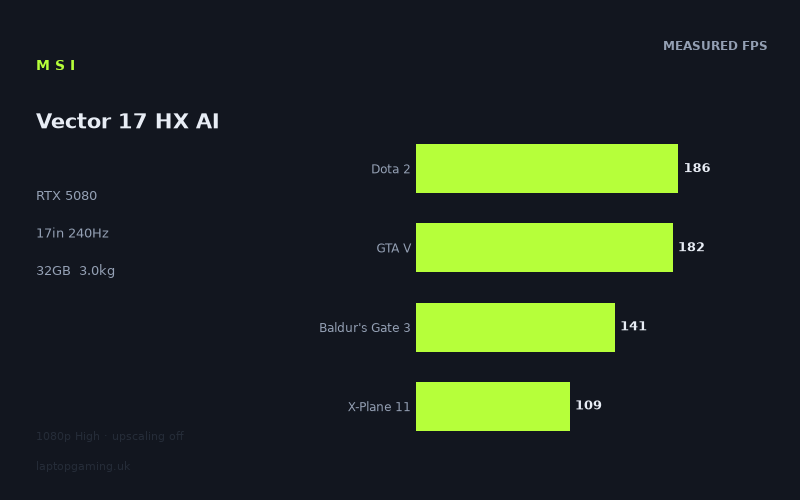
Frame rates
1920×1080, High preset, upscaling off.
Measured on this machine. Source: Notebookcheck, 2025-07-19.
Not scored: incomplete benchmark suite
Every scored laptop on this site is averaged over the same 5 games, and this one is short of Cyberpunk 2077. A mean over 4 games is not comparable to a mean over 5, so we publish the figures we have and leave the score blank rather than rank it against machines tested on a different set. The numbers below are real - the suite is just incomplete.
How these numbers were produced
Frame rates here are not measured by us, and we label how each one was arrived at. A figure marked measured comes from a published run on that exact machine. A figure marked representative is derived from the GPU and its power limit (TGP) and cross-referenced against published reviews - a sound estimate of what that configuration delivers, but not a measurement of that specific laptop. Unless stated otherwise, numbers are 1920x1080, High preset, upscaling off. Where a laptop ships in several power configurations we use the wattage of the exact SKU listed, because a 140W RTX 5070 and a 115W one are not the same product.
In use
The short version
The MSI Vector 17 HX AI, in the A2XWIG configuration, is a 17in gaming laptop built around an RTX 5080 with 16GB of video memory, a Core Ultra 9 275HX, 32GB of system memory and a 2TB solid-state drive. The display is a 17in 2560x1600 IPS panel running at 240Hz. It weighs 3.0kg and carries a 90Wh battery. There is no confirmed UK price for this exact configuration and we will not guess at one.
Notebookcheck measured six titles on 19 July 2025, all at 1920x1080 on the High preset with upscaling switched off. Strange Brigade reached 393fps, Dota 2 186fps, Final Fantasy XV 184fps, GTA V 182fps, Baldur's Gate 3 141fps and X-Plane 11 109fps. Four of those six belong to our fixed scoring suite, averaging 154fps.
There is no ranked score on this page. Our leaderboard averages every laptop across the same five games so the comparison is genuinely like for like, and for the Vector 17 HX AI we have no Cyberpunk 2077 figure. Averaging four games and publishing the result next to machines averaged over five would produce a number that looks precise and is not. That is a gap in the data rather than a criticism of the laptop.
It matters here more than usual which game is missing, and this is the single most important thing to understand about the data on this page. Cyberpunk 2077 is the most demanding conventional rasterisation workload in our suite — the one title of the five where a flagship graphics card is genuinely the limiting factor at 1080p. The four we do have are Dota 2, GTA V, Baldur's Gate 3 and X-Plane 11, and three of those are heavily dependent on processor throughput rather than graphics throughput at this resolution. The measured set, in other words, is weighted almost entirely towards the workloads that a graphics card does not decide.
That single fact explains the comparison data. Across four shared games the Vector 17 HX AI averages 60fps more than the MSI Cyborg 15, an RTX 5050 machine at GBP 984 — a decisive separation. It averages 1fps more than the MSI Vector 16 HX AI, an RTX 5070 Ti machine at GBP 1,592. It averages 1fps more than the Acer Predator Helios Neo 16S AI, another RTX 5070 Ti machine, this one at GBP 2,679. And it averages 51fps less than the Schenker XMG Neo 16 A25 and its RTX 5090.
Buy it if you want a large-screen 17in machine with a high-refresh 2560x1600 panel and a graphics part with real headroom, and if you accept that the strongest arguments for the graphics tier sit in workloads this data set does not cover. Buy something else if you are choosing on measured 1080p frame rates alone, because two RTX 5070 Ti machines matched it on the games we have and one of them costs GBP 1,592.
Performance
The power limit we do not have
We have no graphics power limit figure for this machine, and that is worth stating plainly rather than skipping past. Nvidia licenses the same graphics silicon to manufacturers across a wide range of sustained power budgets, and the chassis, the cooling design and the firmware decide where in that range a particular laptop settles. Two laptops can both print RTX 5080 on the lid and behave like meaningfully different products once the cooling system has stopped being able to bank heat and has to settle into a steady state. Without a stated figure we cannot tell you where the Vector 17 HX AI sits.
What we can say is that a 17in chassis weighing 3.0kg has substantially more internal volume and fin area available to it than a compact 14in or 15in machine, and that this is generally the format in which manufacturers can afford to be generous with power budgets. That is a structural observation about the class, not a measurement of this laptop, and we will not present it as more than that.
The measured results are a more useful guide than an absent specification anyway — with one heavy caveat. A power limit governs the clock speed a graphics card can hold once it is genuinely saturated: high native resolution, heavy shader work, ray tracing, large texture working sets, long sessions at steady state. It decides very little about a graphics card that spends much of each frame idle, waiting for the processor to hand over the next batch of work. Every figure in this data set was recorded at 1920x1080 on the High preset with no ray tracing, and the titles measured skew heavily towards the second situation. So the data we have is close to the least informative possible test of a graphics power limit. That is not a flaw in the measurements — they are honest measurements of real games — but it is a hard constraint on what can be inferred from them.
The six measured titles, one at a time
Strange Brigade at 393fps is the headline number and the least useful one in the set. It is a well-built, efficient, lightly loaded shooter that became a benchmark staple precisely because it scales cleanly and runs fast on everything. At 1080p on High it is not asking an RTX 5080 for anything difficult. A figure like that functions as a diagnostic — it confirms the memory subsystem is not choking, the drivers are behaving, nothing odd is happening in power management — rather than as a performance claim. It is also more than 150 frames beyond what the panel can display.
Dota 2 at 186fps is an esports title engineered from the outset to run acceptably on modest hardware, with a performance profile dominated by single-thread processor speed. An RTX 5080 rendering Dota 2 at 1080p High is nowhere near being the constraint. The figure is a statement about the Core Ultra 9 275HX and its memory subsystem far more than about the graphics card — which does not make it useless, because a great many people buying a high-refresh gaming laptop are buying it substantially for this class of game.
Final Fantasy XV at 184fps is a DirectX 11 title with a rendering path from an earlier era of engine design, and it lands almost exactly alongside Dota 2 for essentially the same reason: the platform runs out of processor before the graphics card runs out of capability.
GTA V at 182fps completes an unusually tight cluster. GTA V dates from a generation of games that predates modern multi-core scheduling and is famously limited by single-thread processor performance at low resolutions on fast hardware. Three titles landing within four frames of each other — 186, 184, 182 — is itself the clearest possible evidence of what is being measured. When three completely different game engines from different eras produce nearly identical frame rates on the same machine, they are not measuring those engines' graphics demands. They are measuring the ceiling of the platform underneath them.
Baldur's Gate 3 at 141fps is the first result where the graphics card is doing recognisable work, and it is a good figure. Baldur's Gate 3 has a documented performance cliff in its dense third act, where the number of simultaneously simulated actors rises sharply, and a benchmark run captures a specific scene rather than a worst case. At 141fps in the measured scene there is meaningful headroom for that to be true and still leave a comfortable frame rate throughout.
X-Plane 11 at 109fps is the lowest result and, paradoxically, the one least dependent on the graphics card. Flight simulators of that generation lean extraordinarily hard on single-thread processor performance and on the draw-call and geometry pipeline. A machine reaching 109fps there has told you a great deal about its processor and memory latency and almost nothing about whether its graphics card has 8GB or 16GB attached to it. Its position at the bottom of the table should not be read as a graphics limitation.
Where the spread comes from, and what the set is missing
The gap from 393fps down to 109fps is a spread of roughly three and a half to one across six titles measured on the same machine, on the same day, at the same resolution and preset. None of it comes from settings or thermal variation. All of it comes from how six game engines distribute their work — and, in this particular set, almost none of it comes from the graphics card being asked to work hard.
That is the honest reading and it is unusual enough to be worth dwelling on. Of the six titles measured, five — Strange Brigade, Dota 2, Final Fantasy XV, GTA V and X-Plane 11 — are either deliberately lightweight or built on older engines, and all five are constrained at 1080p by something other than graphics throughput. Only Baldur's Gate 3 puts real load on the graphics card, and even that is not among the heaviest modern renderers. There is no Cyberpunk 2077 figure, no Alan Wake 2, no Black Myth: Wukong, no Assassin's Creed Shadows, nothing from the current front edge of release schedules where a modern renderer's per-frame cost would actually expose the difference between one graphics tier and another.
The consequence is a data set that describes the platform very well and the graphics card barely at all. It tells you with confidence that this laptop's processor and memory subsystem produce frame rates in the 180s in older and lighter titles. It tells you very little about what an RTX 5080 with 16GB of memory does when a modern game asks it for something difficult. Both of those are worth knowing, and conflating them is the most common error in reading benchmark tables.
The 154fps average and the missing fifth game
Our scoring suite is fixed at five titles: Dota 2, GTA V, Cyberpunk 2077, X-Plane 11 and Baldur's Gate 3. Every laptop on our frame rate leaderboard is averaged across the same five so that the comparison means something. For the Vector 17 HX AI we have four of them, averaging 154fps. Cyberpunk 2077 is absent.
Publishing a four-game mean alongside five-game means would hand this machine a different exam from every other laptop in the table, and in this case the direction of the distortion is not hard to characterise. The four games present are the four processor-leaning members of the suite; the one absent is the one that genuinely loads the graphics card. Adding it would change the composition of the average substantially, and the composition of a benchmark set is a major input to the result rather than a neutral background detail.
So there is no score, and there will not be one until a Cyberpunk 2077 figure exists from a source we are willing to stand behind. This is an honest gap rather than a judgement on the laptop, and it cuts both ways: nobody should read the absence of a rank as evidence that the machine underperforms. On the four suite games we do have, it produces strong numbers.
What these numbers cannot tell you
The unmeasured territory here is unusually large. There are no ray-traced figures, no results with DLSS or frame generation enabled, and nothing at any resolution other than 1920x1080 — including nothing at the panel's own native 2560x1600. There are no measurements from any 2025-era release with a modern renderer. On a machine built around an RTX 5080, those omissions cover most of the reasons someone would choose an RTX 5080.
We also have no measured battery life, no noise figures under load, no surface temperature data and nothing about behaviour after an hour of sustained gaming. Where we lack data we will say so rather than construct an impression from a plausible-sounding argument.
The screen
The panel is 17in, 2560x1600, 240Hz, IPS, and it is a good specification with one awkward relationship to the measured data.
The resolution first. 2560x1600 across 17in gives a pixel density comfortably above a 1080p panel of the same size, which makes text crisp and removes the softness that a large 1920x1080 display shows on desktop work. It is also the right middle ground for a gaming laptop: substantially more demanding than 1080p without going to the extremes of a 4K-class panel that no mobile graphics card can drive at high frame rates in demanding titles. The 16:10 aspect ratio gives useful extra vertical space for anything that is not a game.
The refresh rate is where the data gets awkward. The panel runs at 240Hz, and of the six measured titles exactly one exceeds it: Strange Brigade at 393fps, which is a benchmark staple rather than something people play. The next four cluster in the 180s and 140s — Dota 2 at 186fps, Final Fantasy XV at 184fps, GTA V at 182fps, Baldur's Gate 3 at 141fps — and X-Plane 11 sits at 109fps. So even at 1920x1080, a resolution well below the panel's native one, five of six measured games fall short of the display's refresh ceiling, several of them by a wide margin.
At native resolution the gap widens further, and the arithmetic is worth stating explicitly. 2560x1600 is 4,096,000 pixels; 1920x1080 is 2,073,600. The native panel is very close to double the pixel count of the benchmark resolution. We have no measurements at 2560x1600 and will not invent any, but the direction is not in question: frame rates at native resolution will be materially lower than the figures above. How much lower depends on how graphics-bound each title is — Baldur's Gate 3 would give up the most of the six, X-Plane 11 relatively little, because its constraint was never pixel count in the first place.
None of which makes a 240Hz panel pointless. It is genuinely valuable in the esports titles this machine will run at 180-plus frames, it reduces perceived motion blur even when frame rates sit below the ceiling, and it gives headroom for competitive shooters played at reduced settings — a category entirely absent from the measured set but very much present in what people actually play on a machine like this. But a buyer choosing this laptop because a 240Hz panel sounds like a promise of 240fps gaming should look at the measured list carefully. One title reaches it, and it is not one anyone plays.
The panel technology is IPS, which is the pragmatic choice. IPS delivers good viewing angles, accurate enough colour for gaming and general work, and it avoids both the wear considerations of OLED with static interface elements and the local-dimming complications of mini LED. What it gives up is contrast: blacks are dark grey rather than genuinely black, most noticeable in dark games and dim rooms. On a machine at this level that trade is defensible, though it is worth knowing that some rivals in this price territory offer panel technologies with a visibly larger contrast advantage.
We have no brightness measurement, colour gamut coverage figure or response time data for this specific panel, so we cannot tell you how it copes near a window or how it compares in absolute terms with a rival's display. Those are real gaps and we are not going to paper over them.
Build, size and portability
At 3.0kg the Vector 17 HX AI is heavy, and 17in is a large format that has quietly become less common as manufacturers have converged on 16in and 18in. What 17in offers is a genuine amount of screen area without the full desk footprint and general awkwardness of an 18in machine — a compromise that suits people who want a big display but have not entirely given up on moving the laptop.
Three kilograms is the weight at which a laptop stops being something you carry casually. It will move between rooms and between fixed locations without complaint, and it will go into a bag for an occasional journey. Carried on foot regularly, or taken on a daily commute, it will be noticed every single time. The real travelling weight is also higher than 3.0kg, because a power supply for a high-end processor and an RTX 5080 has to come along; we do not have the adapter's weight in our data and will not put a number on the total, but nobody should budget for 3.0kg and be surprised by what actually goes in the bag.
The mass is a direct consequence of what the machine contains. Cooling a Core Ultra 9 275HX alongside an RTX 5080 requires a substantial heat-pipe or vapour-chamber assembly, a lot of fin area, fans large enough to move air through it and a chassis rigid enough to hold the whole thing without flexing. A 17in machine has the internal volume to do that properly, which is the structural argument in favour of the format. Whether this specific machine converts that volume into a generous graphics power budget is exactly the question we cannot answer, because the power limit is not in our data.
The battery is 90Wh. That is a large cell — not quite the 99Wh maximum permitted in aircraft cabin baggage under standard rules, but close to it, and considerably more than mainstream gaming machines typically carry. We have no measured battery life figure and will not estimate one. The structural point is worth making anyway: no laptop of this class runs its graphics card anywhere near full power on battery, because no cell of any permitted size could sustain that draw for a useful period. Gaming unplugged means accepting substantially reduced performance on any machine in this category. For non-gaming use, 90Wh is as good as the format realistically allows.
The rest of the configuration is well judged. 32GB of system memory is comfortably beyond what any current game needs and enough headroom for heavy multitasking, streaming while playing, or moderate content work. A 2TB solid-state drive holds a serious game library without constant management, which matters when modern installs routinely exceed 100GB. And 16GB of video memory is a healthy allocation that removes texture budget worries at the resolutions this machine will realistically render at — including its own native 2560x1600, which is the case that matters.
How it compares
Four machines from the same graphics generation, chosen to give a spread rather than only the nearest neighbours. All comparisons use only games both machines have figures for, drawn from the same 1080p High measurement conditions. Given what we established above about the composition of the measured set, these comparisons need reading carefully — but they are still the most useful evidence available.
MSI Cyborg 15 — RTX 5050, GBP 984
Across four shared games the Vector 17 HX AI averages 60fps more than the Cyborg 15. That is the widest margin in this comparison set and the number that makes the rest of the section interpretable. A 60fps average gap across four titles is not run-to-run variance or measurement noise; it is a real and substantial separation between an entry-level graphics part and a high-tier one, reported clearly by the same test that produces near-parity results elsewhere.
Hold onto that when reading the two comparisons below. The temptation on seeing a one-frame difference is to conclude the benchmark cannot resolve differences between machines. It plainly can: it resolved 60fps here and, as we will see, 51fps in the other direction. When it reports parity, that is a measurement about those specific machines in those specific games.
The Cyborg 15 costs GBP 984. We have no confirmed price for the Vector 17 HX AI, but a 17in machine with an RTX 5080, 32GB of memory and a 240Hz 2560x1600 panel is not competing in that bracket. This comparison is a calibration of the instrument rather than a value judgement.
MSI Vector 16 HX AI — RTX 5070 Ti, GBP 1,592
Across four shared games the Vector 17 HX AI averages 1fps more than its own 16in sibling, which carries an RTX 5070 Ti and costs GBP 1,592. A full graphics tier lower, and the two produce the same result.
The explanation runs directly from the composition of the shared games. Three of the four — Dota 2, GTA V and X-Plane 11 — are limited at 1080p by processor throughput and memory behaviour rather than by graphics throughput. In a processor-limited title, adding graphics capability produces no additional frames whatsoever; the card simply finishes each frame earlier and waits longer for the next batch of work. Under those conditions an RTX 5070 Ti and an RTX 5080 land in the same place, not because they are equivalent parts, but because neither is what the test is measuring. Only Baldur's Gate 3 gives the two graphics implementations meaningful room to differ, and one title out of four cannot move an average appreciably.
It is also worth noting that both machines use the same processor family and are built by the same manufacturer, which removes most of the platform-level variables that produce differences elsewhere in this comparison set. What is left is the graphics tier, and at 1080p on these four games the graphics tier is not deciding anything.
The buying advice follows directly and it is unusually clear. If your gaming is at 1080p in titles like these, the 16in sibling at GBP 1,592 delivers the same measured performance for less money. The Vector 17's case has to be made on its larger 17in screen, its 2560x1600 240Hz panel and whatever advantage its graphics tier confers in workloads this data does not cover — native-resolution rendering, ray tracing, modern engines at raised settings. Those are real advantages. They are simply not visible here.
Acer Predator Helios Neo 16S AI — RTX 5070 Ti, GBP 2,679
Across four shared games the Vector 17 HX AI averages 1fps more than the Predator Helios Neo 16S AI, another RTX 5070 Ti machine, this one costing GBP 2,679.
The mechanism is the same as the previous comparison, but the pairing of the two results is more instructive than either alone. Two RTX 5070 Ti laptops, priced GBP 1,087 apart — GBP 1,592 and GBP 2,679 — both land within a single frame of this RTX 5080 machine across the same four games. Three machines, two graphics tiers, a very wide price range, and one frame separating all of them.
That is about as clean a demonstration as this site is ever likely to publish of what a 1080p benchmark sweep on processor-leaning titles actually measures. It is not measuring graphics tier. It is not measuring price. It is measuring how quickly a platform can produce frames in games that do not stress a modern graphics card, and on that specific question three quite different machines are equivalent.
What it does not mean is that the three machines are interchangeable. They differ in screen size, panel specification, memory, storage, cooling design and build, and they would differ in graphics-bound workloads that nobody has published figures for here. But a buyer whose gaming genuinely is at 1080p in this class of title has been handed strong evidence that the extra money buys them nothing measurable, and that evidence should carry weight.
Schenker XMG Neo 16 A25 — RTX 5090, no confirmed UK price
Across four shared games the Vector 17 HX AI averages 51fps behind the Schenker XMG Neo 16 A25, an RTX 5090 machine. This is the result that makes the whole section hold together.
Place the four figures side by side: plus 60, plus 1, plus 1, minus 51. The benchmark separates this machine from a lower tier by 60 frames and from a faster platform by 51 frames. It is not a test that collapses everything into a heap. So when it reports one-frame differences against two RTX 5070 Ti machines, that is a genuine finding about those games rather than an instrument failure.
What produces the 51fps gap, on games that are mostly processor-limited, is unlikely to be graphics tier alone. It points to a platform that feeds its graphics card faster under exactly these conditions: processor performance and how aggressively it is permitted to boost, memory bandwidth and latency, and how the firmware balances power between components when neither is fully loaded. The XMG Neo consistently produces high figures against a range of machines on this test, which suggests a platform tuned particularly well for this kind of workload.
For the Vector 17 HX AI, the honest conclusion is that on the measured evidence it sits in the upper part of the field without being near the top of it, and without separating itself from machines a tier below. We have no confirmed UK price for the XMG Neo, so the value comparison cannot be made.
Reading the four results together
Plus 60, plus 1, plus 1, minus 51 describes a machine that is unambiguously faster than entry-level hardware, indistinguishable from two mid-to-upper machines including one that costs GBP 1,592, and well behind the fastest platform in the group. On this test, and with this set of games, the RTX 5080 in this laptop is not earning its position in the graphics stack.
The reason that judgement has to be qualified rather than final is the missing Cyberpunk 2077 figure, and it is a substantial qualification. The one suite title that would genuinely load the graphics card is precisely the one absent from the data, which means the comparison set is systematically biased towards the workloads where graphics tier does not matter. A buyer should not read these results as proof that an RTX 5080 offers nothing over an RTX 5070 Ti. They should read them as proof that in Dota 2, GTA V, Baldur's Gate 3 and X-Plane 11 at 1920x1080 on High, it does not — which is a narrower and more accurate claim.
Who it's for
The Vector 17 HX AI suits someone who specifically wants a 17in machine. That is a smaller group than it used to be, and it is a real one: 17in gives a substantially larger working area than 16in without the desk footprint and general unwieldiness of an 18in machine, and the format has become scarce enough that anyone who wants it has limited choice. If screen size is high on your list, this is one of the machines that offers it with a genuinely high-tier graphics part behind it.
It suits someone who intends to play at the panel's native 2560x1600 rather than at the benchmark resolution. That is the case where an RTX 5080 with 16GB of video memory has a clear structural advantage over a lower tier — roughly double the pixel count of the measured figures, which is exactly the change that shifts a workload from processor-limited to graphics-limited. We have no measurements at that resolution and will not pretend to, but it is the scenario in which this machine's specification makes the most sense.
And it suits someone with mixed use. 32GB of system memory, a 2TB drive, a large high-resolution display and a 90Wh battery describe a machine that will handle content work, heavy multitasking and a long game library without complaint. As a single machine that does several jobs, the configuration is well balanced.
Who should buy something else
If you are buying on measured 1080p performance, buy the MSI Vector 16 HX AI at GBP 1,592. Across the four shared games it matched this laptop to within a single frame with an RTX 5070 Ti. That is the clearest recommendation available from this data set, and anyone whose gaming is at 1080p in older or lighter titles should take it seriously rather than paying for a graphics tier the benchmark cannot see.
If you want the highest measured frame rates in this comparison set, the XMG Neo 16 A25 averages 51fps ahead across four shared games. It is a 16in machine with a higher-tier graphics part and no confirmed UK price in our data, but on this test it is simply faster.
If ray tracing or the newest, heaviest releases are central to what you play, this data set does not cover them and you should look for evidence that does. There are no ray-traced figures for this machine, no Cyberpunk 2077 result, and nothing from the current front edge of the release schedule. Those are precisely the workloads that would justify an RTX 5080 over an RTX 5070 Ti, and we cannot show you the difference because it has not been measured here.
If you need to carry a laptop regularly, 3.0kg plus a 17in footprint plus a power adapter is a serious daily load. Anyone commuting on foot or by public transport should be looking at a smaller machine and accepting the reduced screen area. The 17in format is a desk format that tolerates occasional travel, not a travel format.
If long unplugged battery life is a priority, this is not the category. A 90Wh cell is large by laptop standards and still attached to a high-end processor and a discrete graphics card, and we have no measured runtime figure to offer reassurance with.
And if value is your deciding criterion, this page cannot settle it, because there is no confirmed UK price for this configuration. What the data does give you is the reference points to judge one against when it appears: the same measured performance across four shared games as a GBP 1,592 machine and a GBP 2,679 machine, and 60fps clear of a GBP 984 one. Those are the numbers that should frame any price you are quoted.
The bottom line
The MSI Vector 17 HX AI is a well-configured 17in machine with a good panel, generous memory and storage, and a graphics part with real headroom for the resolution its own display runs at. The measured figures are strong in absolute terms — 186fps in Dota 2, 182fps in GTA V, 141fps in Baldur's Gate 3 — and the four-game scoring average of 154fps places it firmly in the upper part of the field.
The problem is that the data available cannot make the case for the machine's graphics tier, and a prospective buyer deserves to know that plainly. Five of the six measured titles are lightweight or built on older engines. The one suite game that genuinely loads a modern graphics card, Cyberpunk 2077, is missing — which is why there is no ranked score. And the comparison results follow inevitably from that: one frame ahead of an RTX 5070 Ti machine at GBP 1,592, one frame ahead of another at GBP 2,679, and 51fps behind an RTX 5090 platform.
The right conclusion is not that the RTX 5080 is pointless. It is that the evidence for it lives in workloads nobody has published figures for on this machine — native 2560x1600 rendering, ray tracing, the heaviest current releases — and that a buyer choosing on the numbers in front of them is being pointed, quite firmly, at a cheaper machine. If your gaming is at 1080p in the kind of titles measured here, take that hint. If it is not, this is a capable laptop whose strongest arguments simply have not been tested.