Details
Product prices and availability are accurate as of the date/time indicated and are subject to change. Any price and availability information displayed on Amazon.co.uk at the time of purchase will apply to the purchase of this product.Review
Gigabyte AERO 16 OLED BSF review
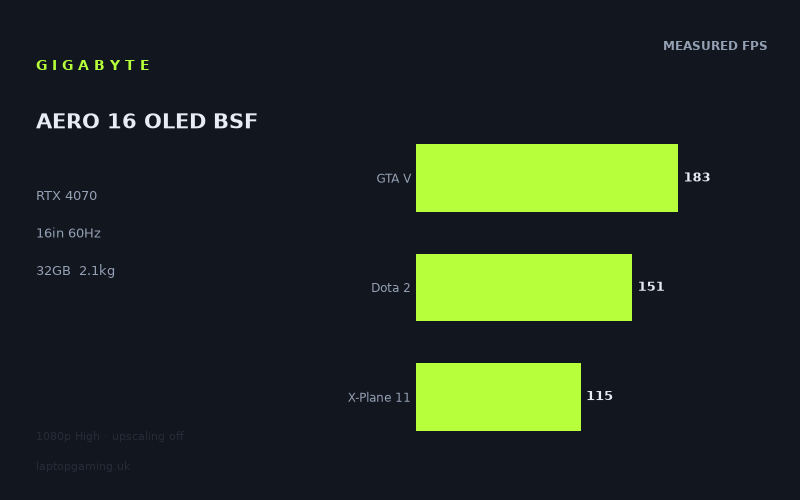
Frame rates
1920×1080, High preset, upscaling off.
Measured on this machine. Source: Notebookcheck, 2023-03-12.
Not scored: incomplete benchmark suite
Every scored laptop on this site is averaged over the same 5 games, and this one is short of Cyberpunk 2077, Baldur's Gate 3. A mean over 3 games is not comparable to a mean over 5, so we publish the figures we have and leave the score blank rather than rank it against machines tested on a different set. The numbers below are real - the suite is just incomplete.
How these numbers were produced
Frame rates here are not measured by us, and we label how each one was arrived at. A figure marked measured comes from a published run on that exact machine. A figure marked representative is derived from the GPU and its power limit (TGP) and cross-referenced against published reviews - a sound estimate of what that configuration delivers, but not a measurement of that specific laptop. Unless stated otherwise, numbers are 1920x1080, High preset, upscaling off. Where a laptop ships in several power configurations we use the wattage of the exact SKU listed, because a 140W RTX 5070 and a 115W one are not the same product.
In use
The short version
The Gigabyte AERO 16 OLED BSF is a 16in machine weighing 2.1kg, built around an RTX 4070 and a Core i9-13900H, with 32GB of memory, an 88Wh battery and a 3840x2400 OLED panel running at 60Hz. Notebookcheck's measured figures, dated 12 March 2023, cover ten titles at 1920x1080 on the High preset with upscaling switched off. They run from 237fps in Strange Brigade down to 90fps in Spider-Man Miles Morales.
Read that range again, because it contains the most important fact about this laptop. Nothing in the measured set falls below 90fps. Not one of the ten titles. The slowest result on the entire page is half again as fast as the display can show. That is an exceptional performance floor, and it means this machine's relationship with its own screen is unlike almost any other laptop we cover.
The panel refreshes at 60Hz. Every single measured title exceeds it — the closest is Spider-Man Miles Morales at 90fps, and it still clears the refresh rate by 50 per cent. In every game in the record, at the benchmark resolution, the display is the limiting factor and the hardware is waiting for it. That is not a criticism of the graphics card. It is a statement about what kind of machine this is, and it reframes everything: the AERO 16 is a workstation-class display attached to gaming-class silicon, not the other way round.
The rival comparisons make the same point from the other direction. Against a Lenovo LOQ 15IRH8 with an RTX 4050 at 95W costing £999, this machine averages level across three shared games. Against an MSI Stealth 16 Studio with an RTX 4070 at 105W costing £3,012, also level. And against an MSI Thin GF63, also an RTX 4050, it averages 62 frames per second ahead. Two laptops with the same graphics chip, one dead level with this machine and one 62fps behind it. The comparison section works through why, because those three results together say more about how to buy a laptop in this generation than any spec sheet does.
There is no score on this page. Our scoring suite is five games, identical for every laptop we rank, and we hold three of them here: GTA V at 183fps, Dota 2 at 151fps and X-Plane 11 at 115fps, averaging 150fps across those three. We have no figure for Cyberpunk 2077 and none for Baldur's Gate 3, and both are heavier than anything in the three we hold. Averaging a partial set against machines averaged over the full five would flatter this laptop in a direction we can predict, so we publish nothing rather than publish something we know is skewed.
We also hold no confirmed UK price for this configuration and no power limit for its RTX 4070, which are the two figures that would let us judge it properly. What we can judge is what it does, and what it does is deliver frame rates comfortably beyond its own display's capacity in everything measured, on a 3840x2400 OLED panel, at 2.1kg.
Buy it if that display is the reason you are here — if you work in images or video, want a machine that also games well, and would rather have 9.2 million pixels of OLED than 165Hz. Look elsewhere if you want a gaming laptop in the ordinary sense, because a 60Hz panel discards most of the performance this hardware is capable of producing.
Performance
The power limit our record does not hold
The most predictive number for any laptop graphics card in this generation is the power limit its manufacturer chose. Nvidia sells identical silicon to every laptop maker with a configurable ceiling, and each maker picks a point in that range according to how much heat the chassis can move, how much fan noise is acceptable and what the machine is meant to cost. The consequence is a product stack in which the difference between a generously configured GPU and a conservatively configured one of the same model routinely exceeds the difference between adjacent model numbers. That is not an edge case; it is the normal behaviour of this generation.
Our record does not hold a power limit for this machine's RTX 4070. That is a real gap and it removes the most useful single predictor available. We will not guess a figure, and nothing below should be read as implying one.
What the record does hold is a 16in chassis weighing 2.1kg carrying an RTX 4070 and a Core i9-13900H. That combination is worth thinking about. Dedicated 16in gaming machines with a graphics card of this class routinely sit at 2.4kg to 2.8kg, and the extra mass is not decoration — it is heatpipe, fin stack, fan volume and structural metal, all of it doing thermal work. At 2.1kg the AERO 16 has less of all four to work with than a purpose-built gaming 16in does, while asking it to cool a full H-class Core i9 and a discrete GPU at the same time.
This is the thin-and-light bargain, and it is the defining engineering decision behind machines like this one. You can have the GPU model number in a lighter body, but the ceiling the manufacturer sets will generally be lower than the same chip gets in a thicker chassis, because the cooling cannot support more. That is not a defect. It is the price of the weight, and it is exactly the trade this class of machine exists to offer.
There is a strong argument, developed through the rest of this section, that on this particular machine the trade costs almost nothing that matters — because the display cannot show the frames a more generously configured GPU would produce. But the underlying point stands for anyone cross-shopping: a 2.1kg 16in RTX 4070 and a 2.7kg 16in RTX 4070 are not the same product, and the difference will show in heavy workloads at native resolution even though this measured set does not reach far enough to expose it.
Every measured title clears the panel, and that changes the analysis
Before working through individual results, the structural observation has to come first, because it governs how every number below should be read.
The panel refreshes at 60Hz. The ten measured results, in descending order, are: Strange Brigade 237fps, The Witcher 3 236fps, GTA V 183fps, F1 22 174fps, Far Cry 5 159fps, Shadow of the Tomb Raider 158fps, Dota 2 151fps, Final Fantasy XV 116fps, X-Plane 11 115fps and Spider-Man Miles Morales 90fps.
Every one of those clears 60fps. The lowest clears it by 30fps. At the benchmark resolution, in every title in the record, this machine produces more frames than its display can present — in most cases two to four times as many.
The usual analytical question for a gaming laptop is which titles the hardware can drive at the panel's refresh rate and which it cannot. Here that question has a one-word answer: all of them. So the more useful question becomes what to do with the surplus, and the honest answer is that at 1920x1080 there is nothing useful to do with it at all. Frames rendered above the refresh rate of the display are discarded. A machine averaging 237fps against a 60Hz panel is presenting roughly one frame in four and throwing the rest away.
This is why the display section below matters more than the performance section on this particular laptop, and why the native resolution of the panel is the single most important variable in the whole review. At 1080p this hardware is enormously over-specified for its own screen. At 3840x2400 it is not, and the entire product only makes sense when you read the two facts together.
The top of the set: 237fps, 236fps and what they are worth
Strange Brigade at 237fps and The Witcher 3 at 236fps are the two highest results, and they are the two least useful in practical terms — not because the measurement is poor, but because both numbers are almost four times what the display can show.
They are still worth reading, for two reasons. First, they establish the headroom that makes higher-resolution play viable. A title producing 237fps at 1080p has an enormous amount of rendering capacity in hand, and that capacity is what gets spent when the resolution rises towards the panel's native 3840x2400. Second, at these frame rates the results are substantially processor-limited rather than graphics-limited: the GPU is finishing frames faster than the Core i9-13900H can feed it work. What you are largely reading in the 200-plus results is the CPU, with the graphics card comfortably ahead of it.
That matters for the comparison section, where it explains why three rivals with dramatically different graphics cards land within a frame of this machine or 62fps away from it depending entirely on how strong their platforms are.
The Witcher 3 result deserves one specific note. Our record holds a figure for The Witcher 3 and no separate figure for the version-tagged benchmark. Where a laptop's record contains a version-tagged entry, we treat it as a different workload entirely and never merge the two — but that does not arise here, and 236fps is simply the untagged result as measured.
The middle: 115 to 183fps
The band from GTA V at 183fps down to X-Plane 11 at 115fps contains seven of the ten measured titles and is the most representative part of the record.
GTA V at 183fps and Dota 2 at 151fps are two of our three scoring-suite results and behave as expected: older, comparatively light titles running well clear of any limit the hardware imposes. F1 22 at 174fps is a more modern workload with a demanding lighting model, and 174fps at native 1080p is a genuinely strong result rather than a formality.
Far Cry 5 at 159fps and Shadow of the Tomb Raider at 158fps land almost exactly together, which is a good sanity check on the measurement — they are titles of broadly similar graphical ambition and they produce broadly similar numbers. Shadow of the Tomb Raider in particular is a useful reference point because it has been a benchmarking staple for years and a great many readers will have an instinct for what 158fps means.
Final Fantasy XV at 116fps and X-Plane 11 at 115fps sit at the bottom of the middle band and represent two quite different kinds of load. Final Fantasy XV is a heavy graphics workload with expensive effects; X-Plane 11 is a flight simulator that leans hard on the processor for world streaming and physics. Both land at essentially the same number, which tells you the machine is reasonably balanced — neither the GPU nor the CPU is dramatically the weaker half.
All seven of these clear the panel's refresh rate by at least 55fps. Every one of them would run at a locked 60fps on this display with substantial capacity left over.
The floor: Spider-Man Miles Morales at 90fps
Spider-Man Miles Morales at 90fps is the lowest result in the record, and on most laptops we cover a result like this would be the warning at the bottom of the review. Here it is close to the opposite.
It is the heaviest title in the measured set — a modern console port with dense streaming demands and a substantial cost per frame — and it still produces 90fps at native 1080p on High with upscaling off. Against a 60Hz display that leaves 30fps of headroom, which is the sort of margin that absorbs difficult scenes without the frame rate ever dropping to where the panel would notice.
It is also the most useful number on the page for judging what the machine does at higher resolutions, because it is the only result that reflects a genuinely modern, genuinely GPU-limited workload. Where the 200-plus results tell you about the processor, 90fps tells you about the RTX 4070. That distinction is the key to reading the whole set: the spread from 237fps to 90fps is not primarily a spread of graphical difficulty as this hardware experiences it, it is the spread between titles where the CPU is the ceiling and titles where the GPU is.
The practical consequence is that a buyer should treat the low end of this record, not the high end, as the guide to what happens when the resolution goes up. The 90fps result has the least headroom to give away and is the first number that will fall.
Why there is no score
Our scoring suite is five games and every ranked laptop is averaged across the same five, so that the comparison between any two machines is like for like. Here we hold three: GTA V at 183fps, Dota 2 at 151fps and X-Plane 11 at 115fps, for a mean of 150fps.
We hold no figure for Cyberpunk 2077 and none for Baldur's Gate 3. Both are heavier than any of the three we do hold, and the pattern in this machine's record makes the consequence predictable: results fall as workloads get heavier, from 237fps at the light end to 90fps at the heavy one. A five-game average including two demanding titles would land meaningfully below 150fps. Ranking this laptop on its available three, against machines averaged over all five, would systematically overstate it — and would overstate it most against precisely the machines best equipped to beat it in the two missing games.
A partial average is not a rough estimate here, it is a biased one with a known direction. That is why the page carries no number.
The screen
This is the component the machine is built around, and it is the reason the AERO 16 exists as a distinct product rather than as a slightly lighter gaming laptop. It is a 16in OLED panel at 3840x2400, refreshing at 60Hz.
3840x2400 against a 1080p benchmark
The arithmetic first, because it governs everything. 3840x2400 is 9.22 million pixels. 1920x1080, the resolution at which every measured figure on this page was taken, is 2.07 million. The panel therefore carries four and a half times the pixel count of the benchmark resolution.
That is the largest gap between benchmark resolution and native resolution of any machine in this class, and it means the performance section describes the hardware doing something quite different from what a buyer running the display natively would ask of it. Games do not scale linearly with pixel count and the relationship varies by title, so we are not going to manufacture native-resolution estimates from 1080p measurements — that would be inventing figures we do not hold. But the direction is not in question, and the 90fps floor in Spider-Man Miles Morales is the number to watch rather than the 237fps ceiling.
The panel's proportions are worth a note. 3840x2400 is 16:10, and it is exactly double 1920x1200 in each dimension — a clean four-to-one pixel mapping. It is not a clean multiple of 1920x1080, which is 16:9 and does not divide evenly into it. In practice this means the display has a natural, geometrically exact half-resolution mode available to it, which is the most efficient way to trade pixels for frames on a panel of this density, and it means the 1080p benchmark figures are being produced at a resolution that does not map cleanly onto the screen. Neither point changes the measurements; both are useful to a buyer deciding how to actually run the machine.
The sensible strategy is straightforward given the numbers. This hardware has enormous surplus at 1080p in every measured title. Spending that surplus on resolution rather than on frames the display cannot show is the obvious use for it, and on a panel this dense the visual return is large. Where a title runs short, the graphics card supports DLSS, and reconstructing towards a very high-resolution panel is precisely the case upscaling handles best.
60Hz
A 60Hz refresh rate on a machine with an RTX 4070 will strike a lot of readers as a mistake, and it is important to be clear about what it is and is not.
It is not a mistake. It is a deliberate choice, and the trade is legible: Gigabyte has spent the display budget on resolution and panel technology instead of refresh rate. 3840x2400 OLED at 60Hz and, say, 2560x1600 IPS at 240Hz are two different products for two different buyers, and this machine is unambiguously aimed at the first. For image and video work, for anything where what is on screen matters more than how fast it changes, 9.22 million OLED pixels is the more valuable specification by a wide margin.
But the consequence for gaming has to be stated plainly, because it is severe and it is the single biggest reason to not buy this machine. Every frame this hardware produces above 60fps at the benchmark resolution is discarded. In Strange Brigade that is roughly three frames in four. The machine is capable of a class of gaming experience — high-refresh, low-latency, visibly fluid motion — that its own display cannot deliver under any circumstances. No setting changes this. No driver update changes this. It is a hardware ceiling.
For a buyer who plays slower or single-player games, this genuinely does not matter much. 60fps locked is a perfectly good experience and this machine will hold it in everything measured, at settings well above the minimum. For a buyer who plays anything competitive, or who has used a 144Hz-plus display and knows what they would be giving up, the panel disqualifies the machine outright — regardless of how strong the frame rates are, because the frame rates cannot reach the eye.
There is one silver lining worth stating. Because the hardware clears 60fps by such a margin in everything measured, this is one of the few machines where a buyer can raise settings and resolution aggressively without the frame rate falling below the display's refresh. The surplus is not wasted if you spend it. It is only wasted if you leave it at 1080p and let it evaporate.
OLED
The panel is OLED, and on a 16in display at this pixel density that is the specification most likely to make a side-by-side comparison against a conventional gaming laptop look one-sided. Per-pixel illumination gives true black, effectively infinite static contrast and no backlight bleed or uniformity problems, and the difference against an IPS panel is obvious without any special knowledge or test material.
Our record holds the panel type, its resolution and its refresh rate. It does not hold brightness, colour gamut coverage, colour accuracy or response-time measurements, so we are not going to characterise those. What the specification does establish is intent: 3840x2400 OLED at 60Hz on a 16in chassis is a content-creation display, chosen by a manufacturer who expects the machine to be used for work where image quality is the product. The RTX 4070 behind it accelerates that work as readily as it renders games, and the 32GB of memory points the same way.
Build, size and portability
2.1kg for a 16in machine carrying an RTX 4070 is the other half of this laptop's proposition, and it is genuinely notable even though it is not remarkable in absolute terms.
Purpose-built 16in gaming laptops with a graphics card of this class typically sit somewhere between 2.4kg and 2.8kg. Getting to 2.1kg with the same GPU model, a Core i9 and an 88Wh battery means removing several hundred grams of chassis and cooling assembly, and the AERO 16 sits closer to a large ultrabook than to a gaming machine in how it will feel to carry. On a 16in footprint that is a meaningful difference — large-screen laptops are awkward to transport for reasons of bulk as much as weight, and every gram removed makes the machine more likely to actually leave the desk.
The trade is the one set out at the top of the performance section and it cannot be engineered away: less mass means less thermal capacity, and less thermal capacity generally means a lower ceiling for the graphics card. We do not hold a power figure for this machine's RTX 4070 and will not invent one, but the structural reasoning applies — a 2.1kg 16in chassis is not going to run a GPU as hard as a 2.7kg one, and a buyer cross-shopping on GPU model number alone should expect a difference in demanding workloads.
What makes this machine unusual is that the trade costs it almost nothing in the context it was designed for. A more generously configured RTX 4070 would produce more frames; the 60Hz panel would discard them. The performance headroom sacrificed to the weight is headroom the display could not use anyway. Whether that reasoning holds at 3840x2400, where the graphics card is genuinely stretched, is a different question, and one the 1080p measurements cannot answer — but at the benchmark resolution the thin-and-light penalty on this specific machine is invisible.
The battery is 88Wh, which is a substantial capacity and towards the upper end of what mobile machines carry. Our record holds no measured runtime for this configuration and we are not going to estimate one — an OLED panel's power draw varies enormously with screen content, and a Core i9-13900H's varies enormously with workload, so capacity alone predicts very little. What is structurally safe to say is that 88Wh is a serious pack, that a machine of this kind is not going to play games away from mains power for long regardless, and that the relevant unplugged figure for a buyer is a productivity one.
The memory configuration is 32GB, which is generous and consistent with the machine's creative-work positioning. It is more than any game in the measured set requires and exactly what video editing, large image work and heavy multitasking do require. Combined with the display and the Core i9, it makes the intended customer obvious.
How it compares
The four machines below all carry graphics cards from this same generation, chosen as a deliberate spread rather than a list of nearest neighbours: the two closest results, the machine this one beats by the widest margin, and the machine that beats it by the widest. Each comparison uses only games both machines hold, drawing preferentially on our scoring-suite titles.
Every one of these comparisons rests on a three-game overlap, and that is a limitation to carry into all four figures. It is also, as it happens, the thing that makes them collectively interesting — because the same three-game depth produces margins of 62fps, zero, zero and 49fps depending on which machine is on the other side. Shallow overlap alone does not explain the two zeroes, and working out what does is the most useful thing on this page.
MSI Thin GF63 — an RTX 4050, and 62 frames per second
The MSI Thin GF63 carries an RTX 4050. We hold no confirmed UK price for it. Across three shared games, the AERO 16 averages 62 frames per second more.
This is the widest winning margin in the set and it is the least surprising of the four. An RTX 4070 in a 2.1kg 16in chassis paired with a Core i9-13900H and 32GB is a substantially more capable platform than an RTX 4050 in a budget 15in one, and the measurement reflects it.
What makes the result worth dwelling on is what it establishes about the benchmark itself. The three shared games are drawn preferentially from our scoring suite, which is the same lighter, partly CPU-limited set that produces near-zero margins elsewhere on this page. Even in those titles, the AERO 16 is 62fps clear. That tells you the GF63's constraint is not the specific games chosen — it is the platform as a whole, CPU included, running out of capacity in workloads where a stronger machine would still be waiting on its processor.
Hold that thought for the Lenovo comparison two sections down, because the Lenovo also carries an RTX 4050 and produces a completely different answer.
MSI Stealth 16 Studio — an RTX 4070 at 105W, £3,012, and a gap of nothing
The MSI Stealth 16 Studio carries an RTX 4070 at 105W and costs £3,012. Across three shared games, the AERO 16 averages level with it: the difference rounds to zero.
This is the most straightforwardly explicable result of the four. Two 16in machines, the same graphics chip, similar positioning, and near-identical frame rates in three shared titles. Whatever power limit Gigabyte has set for the AERO 16's RTX 4070 — and we do not hold it — the outcome in these games is indistinguishable from MSI's 105W configuration.
The caveat is the one that runs through this whole section. These three titles are substantially processor-limited at 1080p on hardware of this class, which means they are not asking the graphics cards a hard enough question to separate two configurations of the same chip. A comparison reaching into heavier workloads at higher resolutions might well find a difference. This one cannot, and we are not going to claim it does.
The price is the useful part. £3,012 is a great deal of money, and it is the clearest reference point we have for what this class of machine costs. We hold no price for the AERO 16, so we cannot complete the comparison — but a buyer who finds the Gigabyte materially below that figure is looking at a machine that matches it in three measured titles, with a considerably higher-resolution display and a lower weight, and that is a strong position from which to argue.
Lenovo LOQ 15IRH8 Core i7 — an RTX 4050 at 95W, £999, and also a gap of nothing
The Lenovo LOQ 15IRH8 with a Core i7 carries an RTX 4050 at 95W and costs £999. Across three shared games, the AERO 16 averages level with it.
This is the most instructive comparison on the page, and it needs handling carefully because a naive reading of it is badly wrong.
Set it against the MSI Thin GF63 result. Both machines carry an RTX 4050. Against the MSI, the AERO 16 is 62fps clear. Against the Lenovo, it is level. Same graphics chip, three shared games each, and a 62fps swing between the two outcomes.
The explanation is the one established in the performance section, and this pair of results is the cleanest demonstration of it we have. At 1920x1080 the lighter titles in the shared set are limited by the processor and the platform, not by the graphics card. The Lenovo pairs its RTX 4050 with a Core i7 and a 95W ceiling — enough platform, in these specific games at this specific resolution, to reach the same numbers a far more expensive machine reaches, because in these games neither machine's graphics card is the constraint. The MSI cannot, so it falls 62fps behind.
What this does not mean is that a £999 RTX 4050 laptop performs like this one. It means these three games, at this resolution, cannot tell them apart. Look at where the AERO 16's own record gets interesting — Spider-Man Miles Morales at 90fps, the only genuinely GPU-limited result in the set — and you are looking at exactly the class of workload the comparison does not reach. An RTX 4050 at 95W is not going to produce 90fps there, and at 3840x2400 the two machines are not remotely in the same conversation.
The honest summary: if you play only the kind of game in this shared set, at 1080p, a £999 Lenovo delivers what this machine delivers, and that is a genuinely useful thing for a buyer on a budget to know. If you play anything heavier, or want to use a high-resolution display, the gap that this comparison hides is large and real.
Asus ROG Strix Scar 17 — an RTX 4090, and 49 frames per second
The Asus ROG Strix Scar 17 carries an RTX 4090. We hold no confirmed UK price for it. Across three shared games, the AERO 16 averages 49 frames per second behind it.
This is the result that proves the benchmark can separate machines, and it is more informative than the raw margin suggests.
Consider what is happening. The three shared titles are the same partly CPU-limited set in which an RTX 4050 at 95W matched this machine exactly. In that same set, the Strix Scar is 49fps ahead. If those games were purely a test of graphics hardware, the Lenovo could not have kept up; if they were purely a test of the processor, the Scar could not have pulled away. What the pair of results actually shows is that these titles have a platform ceiling — set by processor, memory and system throughput together — and that machines cluster at that ceiling until one of them has a materially faster platform overall.
The Strix Scar does. It carries the fastest graphics card of the generation, and a 49fps advantage in titles where this machine's own graphics card is not the limiting factor indicates an advantage that extends beyond the GPU into the platform behind it. Our record for this comparison holds its graphics card and no confirmed UK price; we do not hold its processor, so we will not attribute the margin to a specific component.
What we can say with confidence is that in a heavier shared set — the kind of workload that puts this machine at 90fps rather than 237fps — the gap would very likely be wider, not narrower. The 49fps figure is measured in the games least favourable to demonstrating it. That is the correct way to read it.
What the four say together
Against an RTX 4050 in a weak platform: 62fps ahead. Against an RTX 4070 at 105W: level. Against an RTX 4050 at 95W in a competent platform: level. Against an RTX 4090: 49fps behind.
Two conclusions follow, and both are actionable.
First, GPU model number is a poor guide to performance in this generation. The two RTX 4050 machines in this comparison set are 62fps apart in their relationship to the same reference laptop. Configuration, cooling and platform decide the outcome, and the sticker on the palm rest tells you almost nothing about them. Measured figures are the only reliable route, which is the reason this site exists.
Second, a near-zero margin describes the games in the overlap, not the hardware. Three of these four comparisons involve machines with visibly different graphics cards, and two of them come out level. The Strix Scar result on the identical three-game depth demonstrates that the benchmark is perfectly capable of separating machines when there is a platform difference large enough to separate. Where the numbers converge, it is because the workload has stopped asking the graphics cards a question, not because the graphics cards are equivalent.
Who it's for
This machine has an unusually well-defined buyer, and an unusually large population of people who should not buy it. Both are worth stating precisely.
Buy it if the display is why you are here. A 16in OLED panel at 3840x2400 is a serious professional display, and if you work in photography, video, design or anything else where image quality is the output, it is the specification that justifies the machine. The RTX 4070 behind it accelerates that work, the 32GB of memory supports it, and the measured frame rates show that the same hardware plays games comfortably when the day is done. That combination — genuine creative display, genuine gaming capability, 2.1kg — is rare.
Buy it if you want a 16in machine you will actually carry. 2.1kg on a 16in footprint is several hundred grams below what dedicated gaming machines of this class weigh, and on a screen this size that difference decides whether the laptop travels or lives on a desk. If your requirement is a large, high-quality display that moves with you, this is a coherent answer.
Buy it if your gaming is single-player and you value settings over frame rate. Everything in the measured set clears the panel's refresh with room to spare, which means you can push resolution and quality settings aggressively and still hold 60fps. That is a genuinely comfortable position and a rarer one than it sounds.
Do not buy it as a gaming laptop. This is the central warning and it is not a close call. A 60Hz panel discards the majority of the frames this hardware produces — three in four in the fastest measured title. Everything that makes a high-refresh gaming laptop feel the way it does is unavailable here, permanently, at the hardware level. If gaming is the primary use, the money buys far more capability elsewhere.
Do not buy it for anything competitive. The refresh rate rules it out on its own, before any frame rate is considered. Our measured set contains no competitive shooters and we would not extrapolate into that genre anyway, but the display alone settles the question.
Do not buy it on the strength of the level comparisons. A £999 Lenovo LOQ with an RTX 4050 at 95W matching this machine across three shared games is a fact about those three games at 1080p, not a fact about the two laptops. If your interest is genuinely light 1080p gaming and nothing else, the Lenovo comparison is the honest advice and this machine is enormously over-specified for you. If your interest extends to heavier titles or to using the panel at anything near its native resolution, the comparison hides a large real difference.
Be careful about the missing information. We hold no confirmed UK price, and price is the variable that decides whether a machine positioned like this one is a shrewd purchase or an expensive indulgence — the £3,012 MSI Stealth 16 Studio and the £999 Lenovo LOQ bracket a very wide range. We also hold no power limit for the RTX 4070, no measured battery runtime, no noise or temperature figures, and no results for two of the five games we rank on. That is a lot of not-knowing, and we would rather say so than paper over it. What we do hold is ten measured frame rates from one source on one date, and they describe a machine whose hardware comfortably exceeds its own display in everything measured — which makes the display, not the silicon, the thing to decide on.