Details
Product prices and availability are accurate as of the date/time indicated and are subject to change. Any price and availability information displayed on Amazon.co.uk at the time of purchase will apply to the purchase of this product.Review
Chuwi Gamebook, R9 review
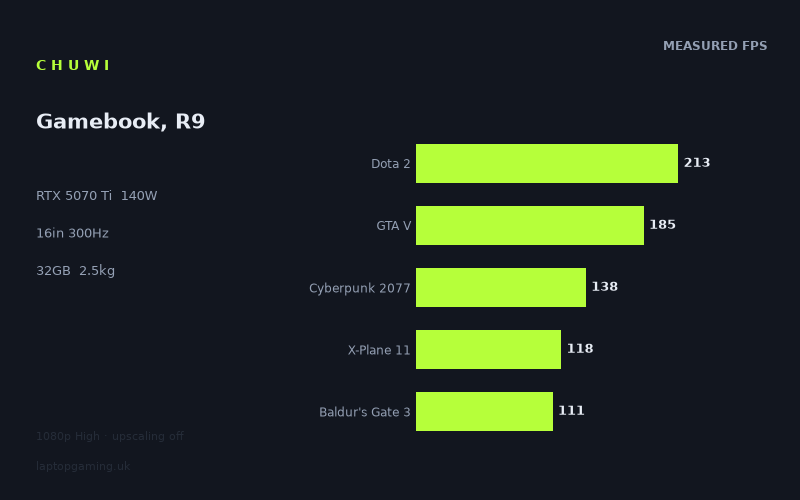
Frame rates
1920×1080, High preset, upscaling off. Averages 153fps across the 5 core benchmark games.
Measured on this machine. Source: Notebookcheck, 2025-08-05.
Not scored: no confirmed UK price
We have the full benchmark suite for this machine, so it ranks on the frame rate leaderboard like any other. What we don't have is a UK listing for this exact configuration - it's sold as a European review unit, or only in specifications that differ from the one tested. Since 30% of our score is value for money, scoring it would mean pretending price is no object, which would flatter it against every laptop you can actually buy. The frame rates below are real and comparable; there is just no buying recommendation to make yet.
How these numbers were produced
Frame rates here are not measured by us, and we label how each one was arrived at. A figure marked measured comes from a published run on that exact machine. A figure marked representative is derived from the GPU and its power limit (TGP) and cross-referenced against published reviews - a sound estimate of what that configuration delivers, but not a measurement of that specific laptop. Unless stated otherwise, numbers are 1920x1080, High preset, upscaling off. Where a laptop ships in several power configurations we use the wattage of the exact SKU listed, because a 140W RTX 5070 and a 115W one are not the same product.
In use
The short version
The Chuwi Gamebook in its Ryzen 9 9955HX configuration is an odd and rather interesting machine: an RTX 5070 Ti at a 140W power limit paired with one of AMD's fastest mobile processors, 32GB of memory and a 16in 2560x1600 300Hz IPS panel, in a 2.468kg body. On the two components that determine frame rate, this is a properly specified gaming laptop.
It also has a 256GB SSD, which in 2026 is not a gaming laptop's storage allocation. That single line does more to shape who should buy this machine than anything else on the spec sheet, and it is dealt with at length below.
The benchmark record is the strongest of any laptop we have covered recently: 31 games, including a large number of current releases, measured at 1920x1080 on High with upscaling off. The median result is 125fps. The five games in our scoring suite average 153fps. The floor is Borderlands 4 at 64fps, and eleven of the 31 titles fall below 100fps. That last figure is the honest headline, because it tells you where a 140W 5070 Ti actually sits in the current market: comfortably above playable in everything, and short of effortless in about a third of what is being released now.
The comparisons produce one genuinely striking result. Against the Razer Blade 16 with a Core Ultra 9 and an RTX 5090, at £5,000, this machine averages 1fps ahead across five shared games. Against the MSI Crosshair A16 HX with an RTX 5070, a tier below, it averages 1fps behind. And against Schenker's XMG Neo 16 A25, also an RTX 5090, it averages 48fps behind. The pattern is consistent with everything else in this generation: the GPU name tells you almost nothing, the power limit and the chassis tell you almost everything, and there is an enormous plateau in the middle of the RTX 50 stack where machines separated by two GPU tiers and thousands of pounds produce the same frames.
We have no confirmed UK price for this configuration, so there is no score. That is not a reflection on the laptop: the benchmark suite is complete and it ranks normally on frame rate. Value accounts for 30% of the score and cannot be computed without a price, so we leave it blank rather than guess.
Buy it if the price is genuinely low, you are comfortable buying from a brand outside the established gaming names, and you will immediately add storage. Buy something else if you need a machine that works properly out of the box, if you play the heaviest current releases at native resolution, or if warranty and service support matter to you.
Performance
140W, and what it puts this machine next to
The GPU power limit is the most informative number on any modern gaming laptop, more so than the GPU name. Nvidia's mobile parts ship in a wide configurable range, and the wattage a manufacturer allows determines most of the result. The consequence, visible throughout this generation, is that two laptops with the same badge can be far apart while two with different badges can be indistinguishable.
At 140W, this 5070 Ti is being run reasonably hard. It is not a thin-and-light configuration, and the 2.468kg weight reflects a chassis with enough volume to support it. That is a sensible engineering position: enough cooling capacity to let the GPU work, without the size and mass of a full desktop replacement.
Where it lands is best illustrated by the comparisons. A 5070 in the MSI Crosshair A16 HX matches it. A 5090 in a £5,000 Razer Blade 16 matches it. A 5090 in Schenker's XMG Neo 16 A25 is 48fps clear. Reading those together, the picture is of a broad performance plateau spanning several GPU tiers, above which sit only the machines that both carry top-tier silicon and give it enough power and cooling to use. This Chuwi is solidly on that plateau. It is not above it, and nothing at 140W is going to be.
We hold no sustained power logs, thermal measurements or noise figures for this machine, so we cannot say whether it holds 140W through a long session or how loud it is doing so. Those are meaningful gaps on a budget-brand machine, where cooling design is one of the more common places for cost to be taken out.
The 31-game set is the most useful thing here
Notebookcheck's data for this laptop covers 31 titles and is dated August 2025, which makes it both the broadest and the most current record among comparable machines. Crucially, it is not padded with the usual collection of ageing benchmark fixtures. It contains Battlefield 6, ARC Raiders, Borderlands 4, Resident Evil Requiem, Crimson Desert, 007 First Light, The Outer Worlds 2, Death Stranding 2, Anno 117: Pax Romana and Assassin's Creed Shadows, alongside the older reference titles.
That matters more than it might appear. A benchmark set weighted towards older games flatters high-end hardware, because those games were built for the rendering budgets of a previous era and any modern GPU walks through them. A set with a dozen current releases in it produces a much more honest picture of what a machine will feel like over the next few years. The results here are correspondingly less flattering and considerably more useful.
It is also worth noting the shape of the distribution. Two games clear 300fps. Three clear 240fps. Twenty clear 111fps. Eleven fall below 100fps and four fall below 80fps. The full range runs from 381fps down to 64fps, a factor of about six.
The top: three games clear 240fps
Strange Brigade at 381fps and The Witcher 3 at 341fps are the only two titles that reach the panel's 300Hz refresh rate at 1080p. Both are ceiling measurements rather than descriptions of anything you will play at those frame rates: Strange Brigade is a well-optimised Vulkan title that has stayed in benchmark suites because it scales cleanly, and The Witcher 3 is a decade-old game whose rendering demands, even after its update, are modest by current standards.
F1 24 at 291fps and F1 25 at 225fps are the more interesting pair, and the comparison between them is one of the most instructive things in the entire dataset. Two consecutive entries in the same racing series, on identical hardware at identical settings, separated by 66fps. That is a drop of roughly a quarter for what is broadly the same kind of game with the same kind of content.
Hold that number in mind when reading everything else. It is a clean, controlled measurement of how fast a machine's headroom evaporates as titles are updated. A laptop producing 225fps in the current F1 game will not be producing 225fps in the F1 game three years from now, and the same erosion applies across every genre in the set.
The middle: where this laptop actually lives
Between roughly 200fps and 110fps sits the bulk of the suite, and this is the machine's real character. Civilization 7 at 213fps and Dota 2 at 213fps lead it, with Total War Pharaoh at 200fps, GTA V at 185fps and Final Fantasy XV at 166fps behind them.
The strategy results deserve particular attention because they are the clearest evidence of the processor's capability. Civilization 7 at 213fps, Total War Pharaoh at 200fps and Anno 1800 at 134fps are all titles where the simulation load rather than the rendering load sets the pace, and strong figures in them are a proxy for something a frame rate does not usually capture: how quickly turns process, how smoothly a large late-game save runs, and whether the machine stays responsive when the map fills up. For anyone whose main use is strategy or management games, that trio is more predictive than any of the shooters.
Below them, Far Cry 5 at 145fps, ARC Raiders at 144fps, Cyberpunk 2077 at 138fps, Far Cry 6 at 136fps, Anno 1800 at 134fps, Battlefield 6 at 129fps and Kingdom Come: Deliverance 2 at 125fps describe a machine that plays current multiplayer and open-world games at high frame rates without assistance.
Battlefield 6 at 129fps and ARC Raiders at 144fps are the two most relevant numbers for a competitive player, since both are current live-service shooters. Those are genuinely good results at 1080p High with upscaling off, and they mean the machine has real headroom to trade settings for frame rate if you want to push higher for competitive play.
Cyberpunk 2077 at 138fps is worth flagging for context. That game spent five years as the industry's standard punishment test, and a mid-range-to-upper-mid-range laptop clearing 138fps in it without reconstruction says a great deal about how the hardware has moved on. It also, quietly, says that Cyberpunk 2077 is no longer the hardest thing in a modern benchmark set. Eleven games in this suite are slower.
The median across all 31 games is Kingdom Come: Deliverance 2 at 125fps, which is a fair single-number summary of the machine at 1080p High.
The eleven games below 100fps
This is the group that defines the machine's limits, and it is where the honest assessment lives. Avatar: Frontiers of Pandora at 98fps, Death Stranding 2 at 97fps, The Outer Worlds 2 at 94fps, Anno 117: Pax Romana at 93fps, 007 First Light at 91fps, The Elder Scrolls IV: Oblivion Remastered at 91fps, Crimson Desert at 90fps, Black Myth: Wukong at 78fps, Assassin's Creed Shadows at 77fps, Star Wars Outlaws at 72fps and Borderlands 4 at 64fps.
Look at what is in that list. It is almost entirely current or very recent big-budget releases. This is not a set of unusual edge cases; it is a fair sample of what the industry is shipping now, and roughly a third of it lands below 100fps at 1080p on a 300Hz 1600p machine.
Borderlands 4 at 64fps is the floor, and it is the number a prospective buyer should think hardest about. Sixty-four frames per second at 1080p High, with upscaling switched off, on a panel capable of 300Hz at 2560x1600. At native resolution it will be lower, and we do not hold a native-resolution measurement to say by how much. This is a title where you will be turning on upscaling, reducing settings, or both.
Star Wars Outlaws at 72fps and Assassin's Creed Shadows at 77fps are the two most demanding open-world releases in the set and land where you would expect. Black Myth: Wukong at 78fps is an Unreal Engine 5 title whose lighting and geometry work is expensive per pixel by design.
Oblivion Remastered at 91fps is worth separating out, because its performance profile is unusual. Remasters built on newer rendering layers over older game logic tend to carry costs that do not correspond to what is on screen, and a result in the low 90s on hardware of this class is consistent with that pattern rather than with the game being visually demanding.
Anno 117: Pax Romana at 93fps, sitting 41fps below Anno 1800's 134fps, is another clean generational comparison within a single series, and it points the same way as the F1 pair: each new entry costs substantially more to run than the last.
None of these results are bad. Sixty-four frames per second in the hardest game in a 31-title suite is a perfectly playable outcome, and most of this group sits above 90fps. But they set a clear expectation. This is not a machine that turns current releases into high-refresh experiences at native resolution. It is a machine that plays them well at 1080p and asks you to make choices at 1600p.
The Baldur's Gate 3 result is an anomaly
One number in the set does not behave as expected. Baldur's Gate 3 records 111fps, which makes it the lowest of the five scoring-suite games, below Cyberpunk 2077's 138fps and X-Plane 11's 118fps.
That ordering is unusual. Baldur's Gate 3 is generally the less graphics-limited of the two, with its frame rate in dense areas determined largely by the processor, while Cyberpunk 2077 is one of the more GPU-bound titles in any suite. On most hardware you would expect Baldur's Gate 3 to sit above it, not 27fps below.
We do not hold the frame-time data, CPU utilisation figures or test-scene details that would explain the discrepancy, and we are not going to construct an explanation we cannot support. It could be a difference in test scene, a driver or patch state at the time of measurement, or something specific to how this platform handles that game. It is worth flagging because Baldur's Gate 3 is one of the five games our scoring is built on, and an unusually low result there pulls the scoring average down relative to what the other 26 games suggest about the machine.
If Baldur's Gate 3 is a game you intend to play a great deal, treat this figure with appropriate caution and look for corroborating measurements elsewhere. 111fps is entirely playable in any case; the point is that it may not be representative.
Where the spread comes from
From 381fps to 64fps is close to a sixfold range, and understanding the three mechanisms behind it is what turns this dataset from a list into information.
The first and largest is engine generation. Strange Brigade, The Witcher 3, GTA V and Final Fantasy XV were built when the priority was filling many pixels cheaply. Black Myth: Wukong, Star Wars Outlaws, Borderlands 4 and Crimson Desert were built when the priority became per-pixel quality, with lighting and geometry systems costing several times as much per frame. No amount of graphics power collapses that gap, because the games are not attempting comparable work. The two within-series comparisons available here, F1 24 against F1 25 and Anno 1800 against Anno 117, isolate the effect cleanly.
The second is processor dependence. Dota 2, GTA V, Civilization 7, Total War Pharaoh and X-Plane 11 all have their frame rates substantially determined by the CPU, and at 1080p that dependence is at its strongest, because the graphics card finishes each frame quickly and the processor becomes the thing everything waits on. This is why comparisons between two fast machines at 1080p compress so severely: several of the shared games have stopped being graphics tests entirely.
The third is the 140W ceiling. At the bottom of the list, in the genuinely GPU-bound titles, the power limit is the binding constraint. Those are the results where a machine with a properly fed top-tier GPU pulls decisively ahead, and the 48fps gap to the Schenker XMG Neo 16 A25 is that effect made visible.
The Ryzen 9 9955HX
The processor here is one of AMD's fastest mobile parts, and its influence shows in the expected places. Civilization 7 at 213fps, Dota 2 at 213fps, Total War Pharaoh at 200fps and GTA V at 185fps are all results where the CPU is doing a large share of the work, and they are strong.
The value of that is easy to underrate. In strategy, simulation and management games, the number that determines whether a machine feels fast is not the frame rate at all, it is how long a turn takes to process or how well a large save holds up. Those workloads live in the same domain as the results above, and this platform handles them well.
X-Plane 11 at 118fps is a solid result in the most processor-dependent workload in the suite, though not an exceptional one. Flight simulation punishes any weakness in single-thread performance and memory latency, and a figure in the high 110s indicates a capable rather than a standout platform for that specific use.
A high-end processor paired with a 140W GPU is a sensible balance for this class of machine. There is no obvious mismatch in either direction, which is more than can be said for the storage.
12GB of VRAM
The specification records 12GB of video memory, and it is one of the two components most likely to constrain this machine before the GPU itself does.
The failure mode when a graphics card runs short of texture memory is not a gradual frame rate decline; it is stuttering, hitching and visible texture pop-in, artefacts that make a game feel broken even when the average frame rate looks fine. It is also a problem that worsens over a machine's life, because texture budgets in new releases have been climbing steadily.
The 1080p measurements here will not surface it, because 1080p is undemanding on texture memory relative to what this panel can display. The relevant question is what happens at 2560x1600 with high textures in the newest titles in this list, and we do not have measurements at that resolution. What we can say is that 12GB is the number to weigh most carefully against how long you intend to keep the machine, and that the games most at risk are precisely the ones already at the bottom of the table.
256GB of storage is the real problem
The 256GB SSD is not a minor specification quibble. It is the single largest practical objection to this machine, and it deserves to be stated bluntly.
Windows and its recovery partition consume a substantial share of a 256GB drive before you install anything. Modern big-budget game installs routinely exceed 100GB, and several of the titles in this very benchmark list are among the largest currently shipping. The realistic outcome is that after the operating system, this machine holds one large modern game comfortably, possibly two if you are careful, and then it is full.
That is not a machine you can use as delivered. It is a machine you buy knowing you will add storage on day one, either by fitting a second drive if the chassis has a free slot, replacing the supplied one, or attaching external storage. We do not have teardown information for this laptop and therefore cannot tell you whether there is a spare M.2 slot, how many there are, or whether upgrading voids anything. That is important information and you should establish it before purchase, not after.
There is a wider inference to draw here too. When a manufacturer fits a genuinely fast GPU, a top-tier processor, 32GB of memory and a 300Hz 1600p panel, and then fits a 256GB drive, that is a deliberate decision about where cost was taken out to reach a price point. The drive is the visible one. It is reasonable to ask what else was economised on, and the honest answer is that we do not have the data to tell you. We hold no thermal measurements, no noise figures, no build quality assessment and no display measurements for this machine.
The screen
300Hz against these frame rates
The panel is 16in, 2560x1600, 300Hz and IPS. Two of the 31 measured games reach 300fps at 1080p: Strange Brigade at 381fps and The Witcher 3 at 341fps. At the panel's native resolution, the number reaching it will be lower still.
That should temper how much weight the 300Hz figure carries in a purchase decision. On this hardware, in these games, it is headroom rather than a capability you will regularly use. A refresh rate that high is genuinely valuable for competitive players running older or well-optimised esports titles at reduced settings, and Dota 2 at 213fps suggests the platform has the processor speed to get there in that category. For everything else in the set, the GPU is the limit long before the panel is.
The counterargument is that a high refresh panel costs nothing when it is not being saturated. Desktop and menu smoothness improve regardless, and it gives the machine somewhere to grow. It is a good specification. It is just not the reason to buy this machine, and a buyer who chose it primarily for the 300Hz number would be misreading what the hardware behind it can deliver.
2560x1600 native, and IPS
16:10 at 2560x1600 on a 16in panel is a sound choice. The extra vertical space over 16:9 is genuinely useful for text, code and timelines, and the pixel density is high enough to look sharp without pushing scaling into awkward territory.
Every frame rate quoted is at 1920x1080, roughly half the native pixel count. We do not hold 1600p measurements and will not estimate them, but the 1080p figures let you reason about which games have headroom. The eleven titles above 144fps plainly do. The band from Cyberpunk 2077 down to Kingdom Come: Deliverance 2, between 125 and 138fps, has room to fall considerably and stay comfortable. The eleven games below 100fps are where native resolution will require upscaling, reduced settings, or acceptance of frame rates well down from the figures listed, and where the 12GB VRAM allocation is under the most pressure at the same time.
IPS is the right technology for this class of machine. It offers better viewing angles and colour consistency than TN, without the cost and the burn-in considerations of OLED, and modern high-refresh IPS panels have largely closed the response time gap that used to count against them. That said, IPS quality varies enormously between panels. We hold no measured response times, contrast ratio, brightness or colour gamut figures for this specific display, and on a machine where cost has clearly been taken out somewhere, the panel is one of the places worth verifying independently before buying.
Build, size and portability
At 2.468kg, this sits in the middle of the gaming laptop range. It is heavier than the sub-two-kilogram machines built around portability and considerably lighter than the 18in desktop replacements. In practical terms, that means it fits in normal laptop bags, it can be carried without much complaint for short distances, and it becomes tiresome over a long day of walking with it.
That weight is the consequence of the 140W power limit. Cooling capacity scales with chassis volume, and a machine feeding a GPU 140W alongside a Ryzen 9 9955HX needs more heatsink, more fan and more airflow than a thin design can provide. Two and a half kilograms in a 16in body is roughly the right amount of mass for that power budget; a manufacturer promising the same wattage in a much lighter chassis would be making a claim worth scrutinising.
The power supply adds to the real carrying weight. A 140W GPU plus a high-end processor requires a substantial adapter, and the 2.468kg figure is the laptop alone.
Who this suits physically: someone who has a home desk as the machine's main location but wants the option of moving it, taking it to a friend's house, or bringing it on a trip occasionally. It is not a daily commuting machine and it is not a fixed installation. That middle position is a legitimate and popular one.
The 77Wh battery
The battery is 77Wh, which is noticeably smaller than the 90Wh and 99Wh cells common in this class. Combined with a 140W GPU and a high-end processor, that is a meaningful constraint.
We do not have a measured runtime figure and will not state one. The general dynamic is clear enough without inventing numbers: a smaller cell paired with the same power draw means less unplugged time than a bigger-batteried rival, and most gaming laptops also cut their power limits substantially on battery, so unplugged gaming performance is typically well below the mains figures quoted here. Treat this as a mains-powered machine and check independent battery measurements if unplugged runtime is important to you.
The 77Wh figure fits the pattern established by the 256GB drive. This is a machine whose money went into the GPU, CPU, memory and panel, and where the components that do not appear in a headline specification comparison were trimmed.
Buying from a brand outside the established names
Chuwi is not one of the established gaming-laptop manufacturers, and that is a practical consideration rather than a snobbish one. With a machine of this cost, the things that matter beyond the specification are warranty terms, UK service arrangements, spare parts availability, BIOS and driver update cadence, and what happens if something fails in year two.
We do not have information on any of those and are not going to characterise them one way or the other. What we would say is that these are questions worth answering before purchase rather than after, and that the answers are a legitimate part of what you are buying. A frame rate advantage does not help if a fault means the machine is out of use for two months.
The same applies to firmware. Gaming laptops depend heavily on manufacturer power and thermal management, and machines whose vendors update BIOS and driver packages regularly tend to age better than those whose vendors do not. That is not a claim about this manufacturer specifically; it is a factor to check.
How it compares
All four comparisons below run over five shared games, which is the fullest overlap available and makes them more trustworthy than the three or four-game comparisons common elsewhere. They use only games both machines hold, preferring the scoring suite.
Razer Blade 16 with Core Ultra 9 and RTX 5090: 1fps behind this machine, at £5,000
This is the headline result of the entire dataset. The Razer Blade 16 in this configuration carries an RTX 5090 and has a confirmed UK price of £5,000. Across five shared games, the Chuwi averages 1fps ahead of it.
One frame per second is a tie; it is well inside the run-to-run variation you would expect from repeating a benchmark on the same machine. But a tie is the point. A 140W 5070 Ti from a budget-focused manufacturer is producing the same frame rates as a 5090 in one of the most expensive gaming laptops sold in the UK.
The explanation is the same one that runs through this whole generation. Our data does not record a power limit for the Razer, so we cannot state its wattage, and we will not guess. What we can say is that the Blade 16 is a thin machine, and thin machines run their GPUs at reduced power limits by physical necessity. Given a constrained power budget, a larger and more capable chip has to run at lower clocks to stay within it, surrendering much of its theoretical advantage. Meanwhile at 1080p, several of the shared games are at least partly processor-limited, which compresses whatever genuine graphics difference remains.
The buying advice this generates is worth stating clearly, because it applies well beyond these two machines: a GPU tier in a thin chassis is not the same product as the same GPU tier in a chassis built to feed it. If you are paying a large premium for top-tier silicon in a slim body, check the power limit before you assume you are buying top-tier performance. In many cases you are buying the badge, the chassis and the build quality, and the frames are coming from somewhere in the middle of the stack.
None of this makes the Razer a bad machine. It is thinner, it is from an established manufacturer with a service network, and it almost certainly has a substantially better screen, build and storage allocation than a 256GB budget laptop. Those things have real value. They are just not frame rate, and at £5,000 against an unstated but presumably far lower price here, the frame rate argument does not exist.
MSI Crosshair A16 HX: 1fps ahead of this machine, over five shared games
The Crosshair A16 HX carries an RTX 5070, a tier below this machine, and averages 1fps ahead across five shared games. Our data does not record its power limit.
Another tie, and another instance of the same phenomenon working in the opposite direction. Where the Razer comparison showed a higher tier failing to pull ahead, this one shows a lower tier failing to fall behind. Between them they bracket the plateau: somewhere from the 5070 up through a power-constrained 5090, machines in this generation produce broadly the same frame rates in these games at this resolution.
The practical consequence for a buyer is that shopping by GPU name in this range is close to useless. If the Crosshair, this Chuwi and the £5,000 Razer all land within a couple of frames of each other, then GPU tier is not the variable to optimise. Power limit, storage, panel quality, memory, weight, warranty and price are all doing more work.
It also means the "Ti" on this machine's GPU is not earning its keep against a plain 5070 in a machine with adequate cooling. That is not a fault in the Chuwi. It is a warning about how much the suffix on a GPU name is worth.
Schenker XMG Neo 16 A25: 48fps ahead of this machine, over five shared games
Schenker's XMG Neo 16 A25 carries an RTX 5090 and averages 48fps ahead across five shared games. Against this machine's five-game scoring average of 153fps, that is a very large margin, and it is the comparison that gives the rest of the set its meaning.
Our data does not record the A25's power limit or its processor, so we cannot attribute the gap precisely, and we will not construct an explanation we cannot support. What is clear is that the same class of GPU that produced a tie in the Razer produced a 48fps advantage here. The silicon is not the variable that changed. The power budget and the chassis around it are.
This result also does essential methodological work. Two consecutive 1fps results might reasonably make a reader suspect the benchmark simply cannot separate machines at this level, that everything above a certain point is measured as a tie because the test has run out of resolution. The 48fps figure disproves that. The same five-game comparison, run the same way at the same resolution, finds a large difference when a large difference exists. A 1fps result is therefore a finding, not a measurement failure.
For a buyer, the honest reading is that if maximum frame rate is the goal, this machine is not the answer and no amount of clever positioning changes that. A properly fed 5090 is roughly a third faster on comparable ground. The reason to consider the Chuwi is that it appears to reach the plateau at a fraction of what the machines above it cost, and that is a value argument rather than a performance one.
MSI Cyborg 15: 65fps behind this machine, at £984
The Cyborg 15 is an RTX 5050 machine at £984, and this Chuwi averages 65fps ahead across five shared games. It is the only other rival here with a confirmed UK price, and between it and the £5,000 Razer, the two priced comparisons bracket this machine neatly.
A 65fps average advantage against a scoring mean of 153fps is a substantial, genuine performance gap, and it shows that the plateau discussed above has a lower edge. Below a certain GPU tier, the graphics card becomes the constraint again even in the lighter shared games, and the difference reappears immediately. Somewhere between a 5050 and a 5070, these comparisons stop measuring the processor and start measuring the GPU again.
For a buyer, this establishes the floor of the argument. The Cyborg 15 at £984 is a machine for playing modern games at 1080p with settings adjusted, which is a legitimate proposition at that price. The Chuwi plays them substantially faster, with a better panel, twice the useful GPU power and a far stronger processor. Whether it does so at a price that makes sense is the one question our data cannot answer.
What the spread proves
Read the four comparisons as one dataset and the structure of this GPU generation becomes clear.
- An RTX 5070 in a well-cooled machine: 1fps ahead. A lower tier with adequate power matches a higher tier.
- An RTX 5090 in a thin £5,000 laptop: 1fps behind. A top tier without adequate power does not beat a mid tier with it.
- An RTX 5090 in a machine built to feed it: 48fps ahead. Power and chassis, not the GPU name, produce the real gap.
- An RTX 5050 in a budget machine: 65fps behind. Tier still matters enormously once you fall far enough down the stack.
The single most useful thing a buyer can take from this generation's data is to treat the GPU name as the least informative number on a specification sheet, and the power limit as the most informative. This Chuwi's 140W is a real, meaningful figure. The "5070 Ti" attached to it is worth much less than it looks.
What we don't have
Since this site's proposition is that every published figure is attributable, the gaps deserve stating explicitly.
- Price. No confirmed UK figure, which is why there is no score. Given that value is 30% of how we normally judge a machine, and given that this laptop's entire case rests on being cheap, that is the most consequential gap here.
- Native-resolution frame rates. Everything is at 1920x1080; nothing at the panel's 2560x1600.
- Battery life. The cell is 77Wh. No measured runtime.
- Noise, temperatures and sustained power. No fan noise, no surface or component temperatures, no evidence that the 140W limit holds under long sessions. On a budget-brand machine these are precisely the questions worth answering.
- Panel measurements. No response times, contrast, brightness or gamut figures for the IPS display.
- Upgradability. No teardown information, so we cannot tell you whether the 256GB drive can be supplemented or only replaced, or whether memory is socketed.
- Warranty and service. Nothing on UK support arrangements.
- Build quality and keyboard. We have not handled the machine and will not describe how it feels.
Who it's for
This machine makes sense for a specific and fairly self-aware buyer: someone who understands exactly what they are getting, values frame rate per pound above brand and polish, and is prepared to fix the storage themselves.
The performance case is genuinely strong. A median of 125fps across 31 games, with a suite unusually weighted towards current releases, describes a laptop that plays everything being shipped now at good frame rates at 1080p. Battlefield 6 at 129fps and ARC Raiders at 144fps are competitive-shooter results with headroom. Civilization 7 at 213fps and Total War Pharaoh at 200fps are strategy results that indicate a fast platform. Cyberpunk 2077 at 138fps clears the old benchmark comfortably. And the comparison against a £5,000 Razer Blade landing level is a striking piece of evidence about where the money goes in this market.
Two groups fit particularly well. The first is competitive and multiplayer players, where the games are typically less demanding than the single-player heavyweights and where a 300Hz panel with 129 to 213fps behind it in current shooters is a good combination. The second is strategy, simulation and management players, for whom the Ryzen 9 9955HX results are more predictive than any of the rendering-heavy numbers, and for whom the 256GB drive is less painful because those games install smaller.
Who should buy something else
Anyone who cannot or will not add storage. 256GB is not enough for a gaming laptop in 2026. If fitting a second drive is not something you are prepared to do, and you have not confirmed the machine can take one, this is the wrong purchase and nothing else on the specification sheet compensates.
Anyone playing the heaviest current releases at native resolution. Borderlands 4 at 64fps, Star Wars Outlaws at 72fps, Assassin's Creed Shadows at 77fps and Black Myth: Wukong at 78fps are 1080p figures on a 1600p panel, and 12GB of VRAM adds a second constraint at exactly that resolution. Those games will need upscaling or reduced settings.
Anyone buying for the 300Hz panel. Two games out of 31 reach it at 1080p. If your reason for choosing this laptop is high-refresh competitive play, be specific about which games you play and whether this hardware reaches those frame rates in them.
Anyone who needs support to be straightforward. Warranty terms, service turnaround, parts availability and firmware update cadence are not things we have data on, and they are worth more than a couple of frames per second when something goes wrong. If you would rather not investigate them, buy from a manufacturer whose arrangements you already know.
Anyone who needs the price to decide. This is the crux. The entire argument for this machine is that it delivers plateau-level performance for less money than the established brands charge, and we do not have the number that would prove it. If it is genuinely cheap, the 256GB drive and the unknown brand support become manageable problems on a machine that matches a £5,000 laptop on frames. If it is not cheap, there is very little reason to accept those compromises, and the measured data will not make the case on its own.