Review
Dell G15 review
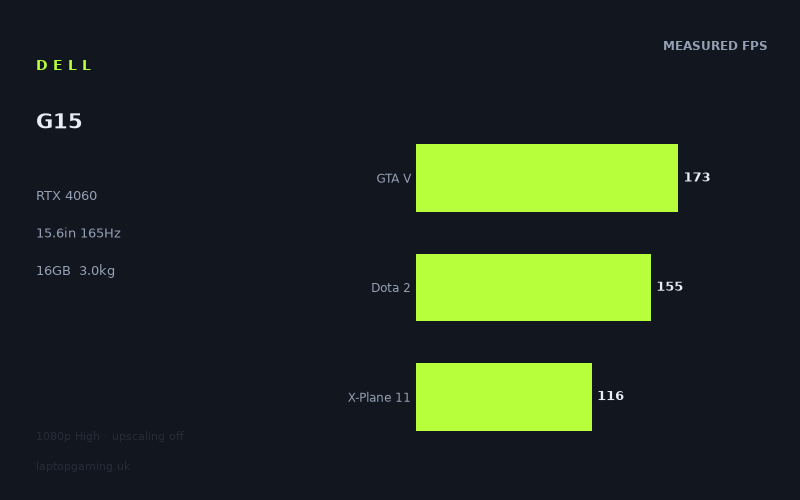
Frame rates
1920×1080, High preset, upscaling off.
Measured on this machine. Source: Notebookcheck, 2023-06-26.
Not scored: incomplete benchmark suite
Every scored laptop on this site is averaged over the same 5 games, and this one is short of Cyberpunk 2077, Baldur's Gate 3. A mean over 3 games is not comparable to a mean over 5, so we publish the figures we have and leave the score blank rather than rank it against machines tested on a different set. The numbers below are real - the suite is just incomplete.
How these numbers were produced
Frame rates here are not measured by us, and we label how each one was arrived at. A figure marked measured comes from a published run on that exact machine. A figure marked representative is derived from the GPU and its power limit (TGP) and cross-referenced against published reviews - a sound estimate of what that configuration delivers, but not a measurement of that specific laptop. Unless stated otherwise, numbers are 1920x1080, High preset, upscaling off. Where a laptop ships in several power configurations we use the wattage of the exact SKU listed, because a 140W RTX 5070 and a 115W one are not the same product.
In use
The short version
The Dell G15 5530 in this configuration does the two things a mid-range gaming laptop most needs to do, and does one thing badly enough that it should change who buys it.
What it does well: it matches its GPU to its panel, and it pairs a mid-range graphics card with a genuinely strong processor. The measured figures were recorded at 1920x1080 and the screen is 1920x1080, so the numbers on this page are the numbers you get — no resolution penalty to mentally apply, no assumption that upscaling is switched on. And the Core i7-13650HX is a desktop-derived chip rather than a mainstream mobile part, which is why the lighter titles in the measured set run as fast as they do: 222fps in Strange Brigade, 205fps in The Witcher 3, 155fps in Dota 2.
What it does badly: our record puts it at 2.97kg. For a 15.6in laptop that is very heavy — heavier, on our own data, than the 17.3in Asus ROG Strix Scar 17 in the comparison set below, which we hold at 2.935kg. We are reporting that as it stands rather than quietly adjusting it, but it is unusual enough that we would encourage anyone to check the figure against the specific listing before buying. Even allowing for it being at the high end of a range, this is not a light machine.
The rest of the specification is a conventional mid-range set: an RTX 4060, 16GB of memory, a 512GB SSD, a 15.6in 165Hz IPS panel and an 86Wh battery. The measured results run from 222fps down to 86fps in Cyberpunk 2077, with the three games from our scoring suite — GTA V at 173fps, Dota 2 at 155fps and X-Plane 11 at 116fps — averaging 148fps.
This page carries no score, because our scoring suite is five games and we hold three of them. There is no Baldur's Gate 3 figure, and the Cyberpunk number in the data is for version 1.6 — a build different enough from the current one that it cannot be substituted in. A three-game average cannot be ranked against five-game averages without corrupting the leaderboard, so we withhold rather than publish something misleading.
Buy it if you play at 1080p, want a strong processor alongside a mid-range GPU, and the machine is going to sit on a desk. Look elsewhere if you need to carry it, if you want a higher-resolution display, or if the heaviest recent releases are your priority.
Performance
The power limit we don't hold
Our record has no TGP figure for this machine's RTX 4060, and on that particular GPU the omission matters more than most. The 4060 was configured across an unusually wide band of power limits in this generation — our data contains examples from the low end to the high end of that range — and the difference between them is large enough to reorder a results table. A well-fed 4060 can match a conservatively configured higher-tier card; a restricted one loses to machines it ought to beat.
We are not going to estimate a number, and we are not going to reason backwards from the frame rates to a plausible-sounding figure and present it as fact. What can be observed is that the results below are consistent with a GPU being run competently, and that the chassis has no obvious reason to be thermally constrained. A 15.6in machine at nearly three kilogrammes is not short of internal volume. Whatever else the weight buys, it does not buy an excuse for a throttled graphics card.
If you are cross-shopping specific G15 listings, chase the power limit. The G15 line spanned several GPU and processor combinations, and the figures on this page describe one particular configuration measured by Notebookcheck.
The top of the chart: an HX processor doing its job
Strange Brigade at 222fps and The Witcher 3 at 205fps open the set. Both are older, lightweight engines that at 1080p on High do not give a modern GPU enough work to keep it busy — the graphics card finishes each frame before the processor has prepared the next, and the frame rate settles at whatever the CPU and the engine will allow.
Which makes those two numbers a statement about the i7-13650HX rather than about the RTX 4060, and a favourable one. HX-class chips are derived from desktop silicon rather than being efficiency-first mobile parts, and in processor-bound work the difference is visible. Two hundred and twenty-two frames per second in a lightweight title on a mid-range gaming laptop is a good result, and it comes from the processor.
That has practical value beyond the benchmark table. Games that lean on the CPU — strategy titles with large simulations, open-world games in dense areas, anything with heavy physics or many active entities — will run better on this machine than its GPU tier alone would suggest. It also means that if you later pair the laptop with an external monitor and a lower-resolution, higher-refresh setup, the platform will keep up.
F1 22 at 178fps and GTA V at 173fps continue the pattern. GTA V is one of our three scoring-suite results and 173fps is a strong figure in it — comfortably above the panel's 165Hz refresh rate, with enough margin that busy scenes will not drop below what the display can show.
The middle: where the panel is fed and where it isn't
Dota 2 at 155fps is the second scoring-suite game and it sits just below the 165Hz refresh rate. That is a decent result for a competitive title and, again, it is a processor result rather than a GPU one — no graphics card is the constraint in Dota 2 at 1080p on High.
It is worth being precise about what 155fps against a 165Hz panel means. The display can show slightly more than the machine produces, so with variable refresh support enabled the experience will be smooth and tear-free but will not be saturating the panel. That is a perfectly good outcome, and considerably better than the alternative arrangement where a manufacturer fits a much higher refresh rate the hardware cannot approach.
Far Cry 5 at 146fps is the last title above the 116fps mark and the first where the graphics card is beginning to do meaningful work. Below it, the character of the results changes.
X-Plane 11 at 116fps is the third scoring-suite game and the lowest of the three. Flight simulation loads the processor with work no graphics card can offload, which is precisely why the title is in the suite — it prevents a machine from looking uniformly fast on GPU strength alone. On a laptop with a strong HX processor, 116fps here is a respectable showing.
Final Fantasy XV at 100fps and Cyberpunk 2077 (version 1.6) at 86fps are the two lowest results in the set, and they are where the RTX 4060 is finally the limiting component.
The Cyberpunk problem, and why it costs this machine its score
The Cyberpunk figure is tagged version 1.6, and that tag is the reason this page has no score.
Cyberpunk 2077 changed substantially after that build — in what it renders, in how it manages its rendering pipeline, and in how it performs. A 1.6 result and a current-build result are effectively different benchmarks that happen to share a name. Dropping the 1.6 number into a suite average alongside laptops measured on the current build would inflate this machine's standing by an unknown amount, and it is exactly the kind of quiet corruption that makes a leaderboard worthless.
So we hold the number, label it, use it as evidence in prose, and refuse to let it into the average. The consequence is that this machine cannot be ranked against the scored field even though the figures make it fairly clear where it would land. The mean across the three suite games we do hold is 148fps, but that average is taken over an easier subset — Cyberpunk on its current build and Baldur's Gate 3 are both heavier than Dota 2 and GTA V — so it is a description of this machine rather than a position in a table.
Read as a description, 86fps in a version of Cyberpunk is still useful. It tells you that when the GPU is genuinely the constraint, this machine produces high-eighties frame rates at native resolution in a demanding open-world title. That is what a mid-range card of this generation delivers, and it is a perfectly good outcome on a 1080p panel.
What the distribution shows, and what it doesn't
Nine measured titles running from 222fps to 86fps is a spread of about two and a half to one, and it is narrower than most sets in our data. That narrowness comes almost entirely from the age of the test set. These figures date from mid-2023, and the heaviest titles released since simply are not in them. There is no Unreal Engine 5 showcase here, no Alan Wake 2, no Hellblade 2 — the kinds of games that pull the bottom of a chart down sharply and reveal where a GPU's real ceiling sits.
That is a genuine limitation and it should temper how you read the results. The lowest figure this machine posted is 86fps, in an older build of one game. The data tells you it handled everything it was tested on comfortably. It does not tell you how it copes with what came afterwards, and an RTX 4060 in 2026 is being asked considerably harder questions than an RTX 4060 in mid-2023 was.
What can be said with confidence is the structure of the results. Four titles clear the panel's 165Hz refresh rate. Three more sit between 116fps and 155fps. Two are between 86fps and 100fps. That is a healthy profile for a 1080p machine — high frame rates in the fast games where refresh rate matters, comfortable frame rates in the heavy games where it does not.
A note on upscaling
Every figure quoted here was measured with upscaling switched off. That is the only defensible way to benchmark hardware: it measures the silicon rather than the reconstruction algorithm, and upscaling implementations differ enough between titles that mixing them makes cross-machine comparison meaningless.
It is not how most people play. DLSS is available on this hardware and it works well, and in the heavier titles at the bottom of the chart it would raise these figures materially. We have no measurement of by how much and will not invent one. The relevant point is that the native-resolution numbers on this page are a floor with a known remedy, not a hard ceiling — and that matters more for a mid-range machine facing games released after the test data than it does for anything at the top of the range.
The screen
A 15.6in 1920x1080 IPS panel at 165Hz. Unglamorous, and correctly specified.
The resolution match, and why it is worth more than it looks
Most gaming laptop benchmark data carries an implicit caveat that the tests were run at a resolution below the machine's own panel. A 1440p or 1600p screen tested at 1080p produces figures that flatter the real experience, sometimes badly — a 1600p panel asks for close to double the pixels of a 1080p one, and in GPU-limited titles that lands squarely on the constraint.
There is no such gap here. The measured figures are native-resolution figures for this machine's own display. 86fps in Cyberpunk means 86fps on the screen in front of you, at the settings tested, with nothing enabled to help. When you are trying to work out whether a machine is fast enough, that removes the single largest source of uncertainty in reading a benchmark table.
It also means the GPU and the panel are properly matched as a design decision rather than as a marketing one. An RTX 4060 driving 1080p is a sensible pairing. The same GPU driving a 1600p panel is a machine that assumes upscaling from the first frame. Neither is wrong, but the first is far easier to reason about and far easier to live with, and it is the strongest structural argument in this machine's favour.
165Hz, and which games reach it
Four of the nine measured titles clear 165fps: Strange Brigade at 222fps, The Witcher 3 at 205fps, F1 22 at 178fps and GTA V at 173fps. Dota 2 at 155fps is just short. The remaining four sit between 86fps and 146fps.
So the panel is saturated in roughly the lighter half of the tested library and comfortably fed by variable refresh in the rest. That is the correct outcome. A 165Hz panel is an honest specification for hardware of this class — high enough that the refresh rate is a real benefit in fast titles, low enough that the GPU can actually reach it in a meaningful number of them. Manufacturers frequently fit much higher figures to machines that will never approach them, because the number looks good on a listing. This is not one of those.
IPS, and what our record doesn't cover
The panel is IPS, which at this level is the pragmatic choice: dependable viewing angles, no burn-in risk from static game HUDs or desktop elements over years of use, and no local-dimming behaviour to manage. It will not match an OLED for contrast in dark scenes or a Mini LED for peak HDR brightness, but neither technology appears at this end of the market, and a good IPS panel is not a compromised one.
Our record holds no measurement of this panel's brightness, contrast, colour coverage or response time. Those vary enormously between IPS implementations, and budget and mid-range machines are exactly where manufacturers economise on panel quality. The label tells you very little. If you intend to use the machine in a bright room, outdoors, or for anything colour-critical, check the specific listing — we have no data and will not describe a display we have not seen measured.
Build, size and portability
This is where the machine has to answer for itself.
Our record puts it at 2.97kg on a 15.6in footprint. To put that in context using nothing but our own data: the Asus ROG Strix Scar 17 in the comparison set below — a 17.3in machine with an RTX 4090 — is recorded at 2.935kg. On our figures, this 15.6in mid-range laptop is heavier than a 17.3in flagship.
We are reporting the number as our record holds it rather than adjusting it to something that feels more plausible, because silently correcting data is how records rot. But it is unusual enough that it is worth verifying against the specific listing you are looking at, and we would treat it as provisional. Machines in this line shipped in several configurations with different batteries and cooling arrangements, and weights vary accordingly.
What is not in doubt is the direction. Even at the lighter end of any plausible range, this is a heavy 15.6in laptop. The G15 has never been a thin-and-light design — it is a large, conventionally built chassis with a sizeable cooling system, sold at a price point where materials are chosen for cost rather than density. That combination produces mass.
The practical consequence is straightforward. This is a desk machine. Three kilogrammes plus a charger is a serious load in a bag, and a 15.6in machine that weighs as much as a 17in one gives you the portability penalty of the larger class without the screen area. If the laptop moves between two fixed locations occasionally, that is fine. If it travels daily, this is the wrong machine and the market has plenty of alternatives in the low two-kilogramme range.
The compensating benefit is real and shows up in the results above. A large chassis with a substantial cooling system can run a GPU hard and sustain it, and there is nothing in the measured figures to suggest this machine is throttling itself. Weight and sustained performance are not independent variables.
The 86Wh battery is a good size for the class — most mid-range machines ship with considerably less, and a larger battery makes a gaming laptop far more tolerable as an everyday computer. We hold no battery-life measurement, so we will not tell you how long it runs. What is true of every machine with a dedicated GPU of this class is that gaming on battery is not a realistic proposition: power draw under load exceeds what a battery of this size can sustain, and performance drops sharply when unplugged.
The 512GB SSD is the specification most likely to annoy you first. Modern games routinely occupy 80 to 150GB each, so after the operating system a 512GB drive realistically holds three or four large installations. That is normal at this price and most machines in the class have a spare M.2 slot — though our record does not confirm whether this one does, so treat that as something to check rather than assume. Budget for a second drive if you keep a large library installed.
Our record holds no dimensions beyond the screen size, no thermal or acoustic measurements, and no keyboard or chassis assessment. Noise is the most consequential gap, because budget and mid-range gaming laptops are precisely where manufacturers accept higher fan speeds to hit a performance target at a price, and we have nothing to offer on how loud this one gets.
How it compares
The rival set is drawn from the same GPU generation and compared only on games both machines hold. It produces one wide win, two ties and one heavy defeat, and the ties are the interesting part.
Against the MSI Thin GF63 — RTX 4050 — ahead by 60fps across three games
An average lead of 60fps across three shared games is a wide, unambiguous margin, and it establishes the most important thing about this comparison set: the benchmark can separate machines. Same methodology, same test conditions, genuinely weaker hardware on the other side, and a sixty-frame gap appears.
That is worth holding on to, because the next two comparisons report no gap at all, and the natural suspicion when a benchmark reports ties is that it is not sensitive enough to detect differences. This result rules that out. When the hardware differs by enough, the numbers show it — even across only three shared titles.
For a buyer whose alternative is an entry-level RTX 4050 machine, this is the argument for spending more. Sixty frames is visible, it is the difference between clearing a refresh rate and falling short of it, and in the heavier titles it is the difference between comfort and compromise.
Against the HP Victus 16 (2024) — RTX 4060 — level across three games
Same GPU tier, and across three shared games the two machines are indistinguishable; the average difference rounds to nothing in either direction.
This is the expected result and it is worth stating why it should not surprise anyone. Two laptops with the same GPU, tested by the same outlet under the same conditions, will produce broadly the same numbers unless something in the implementation differs sharply — a much lower power limit, a much weaker processor, or a cooling system that gives up under sustained load. None of those appears to apply here.
The practical implication is the same one that recurs throughout our data: choosing between machines within a GPU tier on frame rate is largely wasted effort. Choose on price, screen, weight, storage, keyboard, warranty and support. The Victus is a 16in machine and this is a 15.6in one; that difference will matter more to your daily experience than any performance gap the benchmark can find between them.
Against the Asus TUF Gaming A17 — RTX 4070 at 140W — level across four games
This is the comparison that requires explanation, and it is genuinely instructive.
The A17 carries an RTX 4070 configured at 140W — a high power limit for that GPU, not a throttled one. On paper it should beat an RTX 4060 clearly. Across four shared games, it does not: the average difference rounds to nothing.
The reason is the central fact about benchmarking at this resolution. At 1920x1080, the lighter titles in any shared set are limited by the processor rather than the graphics card. The GPU renders each frame faster than the CPU can prepare the next, and the frame rate settles at a ceiling the graphics card has no influence over. In games like that, a 4070 and a 4060 will produce the same number, because in those games neither is the constraint. Put four such titles into a comparison and the genuine GPU difference is invisible.
There is a second factor working in this machine's favour, and it is the i7-13650HX. In precisely the CPU-bound titles that flatten GPU differences, a desktop-derived HX processor has a structural advantage. So this comparison sets a laptop with a weaker GPU and a strong processor against one with a stronger GPU, in a set of games where the processor matters more. A tie is the predictable outcome rather than an anomaly.
The buying lesson is specific and useful: if your library is dominated by the kind of games that produced this tie, paying for a 4070 over a 4060 buys you nothing. The higher tier earns its premium in genuinely GPU-limited work — heavy modern titles at high settings, or at resolutions above 1080p — and a 1080p machine playing older and lighter games is not that scenario. It does not mean an RTX 4070 is not faster hardware. It means this particular comparison contains none of the conditions under which that would show.
Against the Asus ROG Strix Scar 17 — RTX 4090 — behind by 51fps across three games
The top of the generation, and this machine is 51fps behind across three shared games.
Note what that does to the argument above. Three shared games — the same small-sample condition that produced ties against the Victus and the A17 — nonetheless produced a fifty-one frame separation here. So a three-game comparison at 1080p is not incapable of distinguishing machines. It compresses differences, but a genuinely large difference survives the compression and shows up as one.
That is what makes the ties meaningful rather than suspect. When a methodology can produce a 60fps separation in one direction and a 51fps separation in the other, a reported tie is a finding about those machines in those games, not a failure of measurement.
The Scar 17 is not a realistic alternative purchase — it is a 17.3in flagship at the top of the generation's pricing. The comparison is calibration rather than a shopping suggestion, and its main value is showing how much frame rate the top of the range actually buys over the middle: about fifty frames on averages in the mid-hundreds, in a set of games that mostly do not stress either machine.
Reading the spread
Ahead by 60 against a 4050, level with another 4060, level with a well-configured 4070, behind by 51 against a 4090. Lay those out and the picture is of a machine sitting solidly in the middle of its generation, genuinely differentiated from the entry level and genuinely short of the top, with a processor good enough to punch above its GPU tier in the titles where processors matter.
The conclusion for a buyer is about where money is well spent. Between an RTX 4050 and an RTX 4060, the evidence supports spending more. Between an RTX 4060 and an RTX 4070, our shared-game data shows nothing — which does not prove there is no difference, but does suggest the upgrade is worth less than the price gap implies unless you are specifically buying for demanding modern titles. And this machine's HX processor is doing real work in the results, which is a point in its favour that the GPU tier alone would hide.
Who it's for
The buyer who plays at 1080p and wants certainty. The strongest case for this machine rests on the resolution match. The figures here are native-resolution figures for the display it ships with. No mental adjustment, no assumption about upscaling, no gap between the benchmark and the experience. GTA V at 173fps, Dota 2 at 155fps, Cyberpunk at 86fps — that is what the machine does on its own screen.
The buyer who plays processor-heavy games. The i7-13650HX is the specification that most distinguishes this machine from its price peers, and it shows in the numbers: 222fps in Strange Brigade, 205fps in The Witcher 3, 116fps in a flight simulator. Strategy games, simulations, open-world titles in dense areas and anything with a heavy CPU load will run better here than the GPU tier alone would predict.
The buyer whose laptop lives on a desk. At the weight our record holds, this machine is not going anywhere often. If that suits — a computer that folds up and gets moved between two rooms, or between a desk and a cupboard — the mass buys cooling volume, and cooling volume is what stops a GPU throttling under sustained load.
The buyer who wants a big battery in a mid-range machine. 86Wh is generous for the class and makes the laptop considerably more usable for ordinary work away from a socket than the smaller batteries common at this price.
Who should buy something else
Anyone who carries a laptop regularly. This is the clearest disqualification. On our record this 15.6in machine weighs more than a 17.3in flagship, and even if the figure proves to be at the top of a range, the G15 is a heavy design. Machines in the low two-kilogramme range exist with comparable GPUs. You will give up some sustained performance for the lighter chassis; if the laptop has to travel, that is a trade worth making.
Anyone who wants a higher-resolution display. This is a 1080p machine by design, and its GPU is matched to that. If you want the sharpness of a 1440p or 1600p panel, buy a machine built around one — and accept that its native-resolution frame rates will be lower than the ones on this page, because it is pushing far more pixels with comparable hardware.
Anyone buying primarily for the newest, heaviest releases. The measured set here dates from mid-2023 and contains nothing from the current generation of graphically demanding titles. An RTX 4060 at native 1080p will handle them, but with upscaling doing an increasing share of the work and with settings compromises that these figures do not reveal. If that is your main use, look for a machine with more recent measurements and more GPU headroom.
Anyone who needs a lot of local storage. 512GB holds the operating system and three or four modern games. Plan for a second drive from the outset, or buy something that ships with more.
Anyone who needs a value verdict before committing. We hold no confirmed UK price for this configuration and will not speculate about one, which is why this page carries no score. The G15's traditional appeal has been aggressive pricing rather than specification, and if that holds for the listing in front of you, the case for it strengthens considerably. That is a question the price tag answers, not this page.
What we hold, and what we don't
Our record for this machine holds the GPU, processor, memory, storage, screen size, resolution, refresh rate, panel technology, weight and battery capacity, plus nine measured game results from Notebookcheck at 1920x1080 on High with upscaling disabled.
It does not hold a GPU power limit, a confirmed UK price, any battery-life measurement, any display brightness or colour data, and no thermal or acoustic measurements.
Two things about the record deserve to be flagged rather than buried. The 2.97kg weight is high enough for a 15.6in machine that we would treat it as provisional and check it against the listing — on our own data it exceeds a 17.3in flagship, which is unusual enough to warrant verification. And the benchmark set dates from mid-2023, which means it says nothing about how this hardware copes with titles released since. Both are limitations of what we know rather than judgements about the machine, and both are the sort of thing that ought to be visible rather than smoothed over.