Details
Product prices and availability are accurate as of the date/time indicated and are subject to change. Any price and availability information displayed on Amazon.co.uk at the time of purchase will apply to the purchase of this product.Review
Asus ROG Zephyrus G16 2025 5070 Ti review
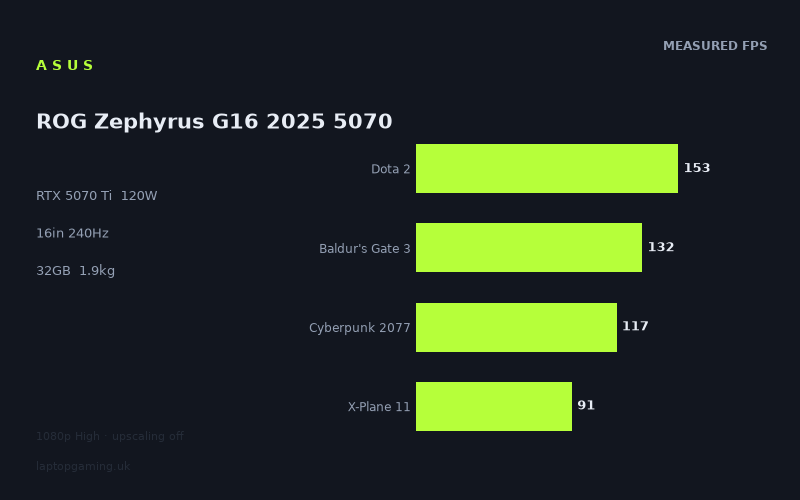
Frame rates
1920×1080, High preset, upscaling off.
Measured on this machine. Source: Notebookcheck, 2025-06-10.
Not scored: incomplete benchmark suite
Every scored laptop on this site is averaged over the same 5 games, and this one is short of GTA V. A mean over 4 games is not comparable to a mean over 5, so we publish the figures we have and leave the score blank rather than rank it against machines tested on a different set. The numbers below are real - the suite is just incomplete.
How these numbers were produced
Frame rates here are not measured by us, and we label how each one was arrived at. A figure marked measured comes from a published run on that exact machine. A figure marked representative is derived from the GPU and its power limit (TGP) and cross-referenced against published reviews - a sound estimate of what that configuration delivers, but not a measurement of that specific laptop. Unless stated otherwise, numbers are 1920x1080, High preset, upscaling off. Where a laptop ships in several power configurations we use the wattage of the exact SKU listed, because a 140W RTX 5070 and a 115W one are not the same product.
In use
The short version
The 2025 Zephyrus G16 with the RTX 5070 Ti is a thin 16in machine that weighs 1.913kg and returns 123fps as the mean across the four scoring-suite games we hold measurements for. That combination — genuine portability alongside frame rates in triple figures across a mixed workload — is the whole argument for this machine, and the measured data supports it.
The specification that governs everything else is the GPU power limit of 120W. The RTX 5070 Ti in this chassis is not being run flat out; it is being run at a ceiling chosen to fit a thin design. What that costs is visible in the benchmark data, and what it does not cost is visible too. The single most instructive result on this page is the comparison against another Zephyrus G16 carrying an RTX 5090 at the same 120W, a machine our record prices at £6,436: across their three shared games, it averages just 2fps ahead. Two frames. That is the clearest evidence you will find anywhere that in a thin chassis, the wattage the cooling system can sustain matters more than the number on the GPU.
Two limitations to state plainly before the detail. First, this page carries no score, because the scoring suite is incomplete — we have no GTA V figure for this machine. Every scored laptop on this site is averaged over the same five games so that the leaderboard compares like with like, and a four-game partial set cannot be ranked against five-game ones without quietly changing what the number means. Second, our record does not hold a panel technology for this machine. We previously carried one that turned out to be an artefact of a data-parsing fault rather than a genuine specification, and we have removed it. Resolution and refresh rate we stand behind; the underlying panel type we do not have.
Buy it if you want a machine that is actually portable and still plays modern games properly. Think harder if you play the heaviest current releases at native resolution, because 12GB of VRAM and a 120W ceiling both show up in the bottom third of the measured set — and if raw frame rate is what you are buying, the comparison data below shows a rival from the same generation running 81fps clear.
Performance
What a 120W ceiling means in a thin chassis
Mobile GPUs of the same name are configured across a wide power band by whoever designs the chassis, and that band is far wider than most buyers realise. The GPU model tells you which silicon is inside. The TGP tells you how hard it is allowed to work, which is a direct function of how much heat the cooling system can move and how much fan noise the designer is willing to accept.
120W is a moderate figure. It is a deliberate engineering choice, not a defect: a 1.913kg 16in machine has limited internal volume for heatsinks, limited surface area for exhaust, and limited room for large fans. You cannot dissipate a top-tier power budget from a chassis this size, and any manufacturer claiming otherwise is either quoting a brief boost figure or building something that will be unpleasant to sit next to. The 120W ceiling is the honest number for what this design can sustain.
What that ceiling costs is best read from the two ends of the measured set. At the top, Strange Brigade at 294fps and F1 24 at 223fps show a system with no bottleneck worth speaking of — those titles are limited by the processor, the engine and the driver stack long before the graphics card runs out of power. At the bottom, Assassin's Creed Shadows at 66fps and Alan Wake 2 at 80fps are where a GPU held to 120W is genuinely working at its limit, and those are the numbers that would move if this same silicon were given a larger power budget in a bigger chassis.
The practical translation: this machine is comfortable in everything measured, and constrained in the heaviest few. That is a reasonable place for a thin 16in laptop to sit, and the honest way to judge it is against other machines of similar physical size rather than against desktop replacements twice its weight.
The full measured spread
Notebookcheck's figures, all at 1920x1080 on High presets with upscaling switched off:
- Strange Brigade — 294fps
- F1 24 — 223fps
- F1 25 — 171fps
- Dota 2 — 153fps (scoring suite)
- Final Fantasy XV — 144fps
- Baldur's Gate 3 — 132fps (scoring suite)
- Cyberpunk 2077 — 117fps (scoring suite)
- Indiana Jones and the Great Circle — 94fps
- X-Plane 11 — 91fps (scoring suite)
- Alan Wake 2 — 80fps
- Assassin's Creed Shadows — 66fps
Eleven games, from 294fps down to 66fps. The ratio between top and bottom is roughly four and a half to one, which is a wide spread and tells you the test set is doing its job: it contains titles that stress the hardware in genuinely different ways rather than eleven variations on the same workload.
The top of the list, and why it tells you less than it looks like
Only Strange Brigade at 294fps exceeds the panel's 240Hz refresh rate. That is worth stating clearly because it changes how the headline numbers should be read: on this machine, in this measured set, exactly one game outruns the display.
Strange Brigade is a benchmark staple precisely because it scales cleanly and runs fast; at 294fps it is measuring processor throughput, memory bandwidth and driver overhead rather than the RTX 5070 Ti's shader performance. F1 24 at 223fps and F1 25 at 171fps are more interesting as a pair, because they are consecutive editions of the same series on a related engine, and the 52fps gap between them is a clean illustration of how quickly the demands of a franchise can rise year on year. F1 25 asks materially more of the hardware than F1 24 did.
The lesson from the top of the list is not "this machine is fast in racing games", though it is. It is that the high numbers are the least informative ones. When a title runs at three or four times the rate a display can show it, the result stops describing the GPU. Judge a machine by the games that push it.
The scoring suite, and the honest gap in it
Four of our five scoring games are present:
- Dota 2 — 153fps
- Baldur's Gate 3 — 132fps
- Cyberpunk 2077 — 117fps
- X-Plane 11 — 91fps
The mean across those four is 123fps. GTA V is missing, and that is why there is no score on this page.
It is worth explaining why we treat that as disqualifying rather than rounding past it. GTA V is, by modern standards, an easy game — it dates from 2013 and modern GPUs are not troubled by it. On almost every machine we hold data for, it lands near the top of the five scoring games rather than the bottom. Averaging this machine over the four games we do have and comparing that figure against other machines' five-game averages would therefore understate it, because the missing game is one that would likely have pulled the average up. Averaging it the other way — estimating the gap — would mean putting a number on the leaderboard that nobody measured.
Neither is acceptable on a site whose entire proposition is that every published frame rate is attributable. So the four measured figures stand as themselves, the 123fps mean is stated as a four-game mean and not compared against five-game means, and there is no score. If a GTA V figure appears in a future test run, the score appears with it.
Within the four we do have, the shape is normal for a machine of this class. Dota 2 at 153fps is a processor-bound result in an engine that has never been about graphics horsepower. Baldur's Gate 3 at 132fps is a solid figure in a game that gets heavy in dense combat encounters with many simultaneous actors. Cyberpunk 2077 at 117fps is the most useful single number for a buyer — it remains the reference point for a demanding modern open world, and 117fps at 1080p High with no upscaling is a genuinely comfortable result with room to raise settings.
X-Plane 11 at 91fps is the lowest of the four, which is the normal pattern. It is a flight simulator with an old, heavily processor-dependent renderer that does not scale with graphics power the way the other three do. Its presence in the suite is deliberate: it stops the average being a pure GPU shootout and rewards machines with strong processors and good sustained behaviour under mixed load. On a thin 16in chassis running an H-class processor rather than a desktop-derived HX part, this is the figure most likely to reflect the chassis's thermal limits rather than the graphics card's.
The bottom of the list, where the real judgement lives
Three titles fall below 100fps:
- Indiana Jones and the Great Circle — 94fps
- Alan Wake 2 — 80fps
- Assassin's Creed Shadows — 66fps
These are the games that separate this machine from a more powerful one, and they are also the games that indicate where the next few years are heading. All three are recent, all three lean on expensive modern lighting, and all three are the sort of release that establishes the hardware baseline for the generation that follows.
Assassin's Creed Shadows at 66fps is the floor, and it is a floor worth reading carefully. 66fps at 1080p High with upscaling off is perfectly playable — it is above 60, it is smooth, and nobody would call it a bad result. But it is 66fps at a resolution well below the panel's native 2560x1600, in a machine whose display runs at 240Hz. The gap between what the panel can show and what the hardware delivers in the heaviest title is very large, and that gap is the honest measure of what a 120W ceiling means.
Alan Wake 2 at 80fps tells a similar story from a different engine. It is one of the most demanding titles in circulation and it punishes anything short of a generous power budget.
The realistic guidance is this: in the current heavyweight releases, expect to be somewhere between 65 and 95fps at 1080p with no assistance, and expect to want upscaling on if you are running the panel at its native resolution. That is not an indictment. It is a thin 16in laptop returning playable frame rates in the hardest games available, which is a genuine achievement for the form factor. But anyone expecting a 240Hz experience in modern single-player games from a 120W GPU is going to be disappointed, and it is better to know that before buying than after.
12GB of VRAM, and why it deserves a paragraph
Our record gives this machine 12GB of VRAM. For a 2025 machine in this performance bracket, that is on the modest side, and it is worth being straightforward about the implications rather than glossing over them.
VRAM is not a performance multiplier in the way that shader throughput is. It is a capacity constraint, and the failure mode when you run out is qualitatively different from simply being slow. A GPU short of raw power delivers a lower but steady frame rate; a GPU short of memory has to evict and reload assets mid-frame, which produces stutter, hitching and texture pop-in — problems that a frame rate average does not capture and that are far more unpleasant to play through than a lower steady number.
The measured figures in this review are 1080p results, where 12GB is comfortable in essentially everything. The pressure point is elsewhere: native 2560x1600 with high-resolution texture settings in modern releases, which is exactly the combination this machine's own panel invites. We do not hold native-resolution measurements for it and will not estimate them, so this is a structural observation rather than a measured finding. But it is a real one, and the direction of travel in game asset sizes over recent years has been consistently upward.
Practical advice: if you buy this machine, texture quality is the first setting to look at when a modern game misbehaves, and it is worth checking VRAM usage in a game's own settings screen before assuming a stutter is a driver problem. The 32GB of system memory and 1TB SSD on our record are both sensible and unremarkable for the class — 32GB is comfortable for gaming with headroom for everything else, and 1TB is adequate rather than generous once a few large modern installations are on it.
The 1080p-to-1600p question
Every frame rate on this page was measured at 1920x1080. The panel is 2560x1600 — roughly twice the pixels. That is the single most important qualification on the whole data set, and it applies to every laptop review on this site, not just this one.
We do not hold native-resolution measurements for this machine and we are not going to produce them by applying a scaling factor, because an estimate dressed as a measurement is precisely what this site exists not to publish. What can be said honestly is directional. The titles at the top of the list — Strange Brigade, F1 24 — are constrained by something other than pixel throughput, so they will lose proportionally less at higher resolution. The titles at the bottom — Assassin's Creed Shadows, Alan Wake 2, Indiana Jones — are GPU-bound already, and those are where a doubling of pixel count costs the most.
This is where upscaling stops being a marketing feature and becomes the actual mechanism by which a 120W GPU drives a 2560x1600 panel. The RTX 5070 Ti has the full current-generation feature set available to it. The measured figures represent the unassisted floor — what the hardware does with nothing helping it — and that is deliberately the hardest test. Real-world use will look better than these numbers in any title that supports modern upscaling well, which is now most of them.
The screen
What we hold, and what we do not
The display is 16in at 2560x1600 with a 240Hz refresh rate. Those specifications we are confident about. We do not have a panel technology for this machine on our record.
The reason is worth stating rather than hiding. We previously held a panel type for this laptop, and it turned out to be a parsing artefact — a fault in how we ingested the source data, not a genuine specification. We removed it rather than continue to publish something we could not stand behind, and we are not going to substitute an educated guess in its place. Everything on this site is meant to be attributable, and that has to apply to specifications as much as to frame rates.
This matters more than a missing line on a spec table usually would, because panel technology drives contrast ratio, black level, response time, viewing angles, brightness behaviour and how HDR content actually looks — and on a premium thin 16in machine, the display is a substantial part of what you are paying for. Two panels sharing the same resolution and refresh rate can look very different indeed. Confirm the panel specification on the exact SKU before you buy, from the retailer listing or the manufacturer's page for that specific model number. If the display is central to your decision, that check is not optional.
Resolution, refresh and whether the GPU keeps up
2560x1600 on a 16in diagonal is a well-judged pairing. The 16:10 aspect ratio buys vertical space that is genuinely useful for anything that is not a game, and at this physical size the pixel density is high enough for clean text without demanding aggressive scaling. It is the resolution most 16in premium machines have settled on, and for good reason.
The 240Hz refresh rate is the specification that sits least comfortably with the measured performance, and it is worth being direct about that. Reading the frame rates against it:
- One title of eleven exceeds 240fps at 1080p: Strange Brigade.
- Three sit between 150 and 225fps: F1 24, F1 25 and Dota 2 — well into high-refresh territory without saturating the panel.
- Seven fall below 150fps, including all three of the heavy modern titles.
And all of that is at half the panel's pixel count. The realistic assessment is that the 240Hz panel will be fully exploited only in older, lighter and competitive titles, and that most of the time it will be running well below its ceiling.
That is not the criticism it might sound like. A high-refresh panel costs nothing when a game does not saturate it, the reduction in perceived motion blur applies to desktop use as much as to games, and if any part of your library is competitive titles the specification earns its place immediately. But if you are weighing this machine against one with a lower refresh rate and some other advantage — a documented panel technology, more VRAM, a higher power limit — be honest about how often you will actually see 240 frames.
Build, size and portability
1.913kg is the point of the machine
Under two kilogrammes for a 16in machine with this level of measured performance is the entire proposition, and it deserves to be treated as a headline specification rather than a footnote.
Consider what that weight actually enables. It goes in a normal backpack alongside other things. It can be carried through an airport without planning around it. It can be used on a lap, on a train table, in a coffee shop, in a lecture hall. It can be moved between home and an office daily without that being a decision. Machines that deliver comparable frame rates in an 18in chassis weigh well over three kilogrammes, and the difference between the two is not incremental — it is the difference between a computer you take with you and a computer you visit.
Our record does not state the mass of the power supply, and a machine feeding a 120W GPU plus a modern processor needs a real one, so travelling weight is higher than the quoted figure by an amount we cannot quantify. But the relative advantage holds regardless: a 120W design needs a smaller adapter than a 175W one, and both the machine and the brick are lighter than the desktop-replacement alternative.
The trade-off has already been quantified in the performance section. 120W is what a chassis this size can sustain, and the bottom of the benchmark list is where you pay for it. That is a coherent, deliberate engineering position rather than a compromise made by accident, and for a large number of buyers it is unambiguously the right one. A machine that never leaves a desk should not have been a thin 16in laptop in the first place.
The 90Wh battery, and what it can and cannot do
90Wh is a large battery, close to the 100Wh regulatory ceiling above which lithium cells generally cannot be carried aboard commercial flights without special arrangement. Fitting one in a 1.913kg chassis is a meaningful engineering commitment — battery mass is a significant fraction of a thin laptop's total weight — and it signals that the design is genuinely intended to be used away from mains power.
We have no measured battery runtime figures for this machine, so we cannot tell you how long it lasts, and we are not going to guess. What can be said without inventing anything is structural. A 120W GPU cannot be fed from a battery at its full draw for any useful length of time, so gaming unplugged means running at substantially reduced performance — that is true of every gaming laptop and it is not specific to this one. All of the measured frame rates on this page were produced on mains power.
Where a 90Wh battery in a sub-two-kilogramme chassis genuinely pays off is in the non-gaming half of the machine's life: writing, browsing, video calls, light development work, watching something on a train. That is a real and substantial part of how a machine like this gets used, and the combination of low weight and a large cell is what makes it a plausible single-laptop purchase rather than a gaming machine you also have to own a thin-and-light alongside.
Processor, memory and storage
The Core Ultra 9 285H is an H-class part rather than the desktop-derived HX chips found in larger machines, which is consistent with the chassis: it is a design that budgets its thermal headroom carefully across CPU and GPU rather than assuming both can run flat out simultaneously. The measured results bear that out. Processor-sensitive titles land where you would expect — Dota 2 at 153fps, X-Plane 11 at 91fps — without any sign of a bottleneck that would suggest the chip is holding the graphics card back in normal use.
32GB of memory is the right amount for this class. It is comfortable for gaming with substantial headroom for everything else running alongside, and it is enough for most creative and development work without being the kind of capacity purchase that only a workstation buyer needs. 1TB of storage is adequate rather than generous — modern AAA installations routinely exceed 100GB, and a 1TB drive carrying an operating system, an application suite and a handful of large games fills faster than people expect. Our record does not state whether the chassis has a second drive bay or socketed memory, so if upgradability matters, that is a question for the retailer.
How it compares
The four machines below all come from the same GPU generation and are chosen to give a spread rather than only the nearest neighbours: the two closest results, the machine this one beats by the largest margin, and the machine that beats it by the largest margin. Every comparison uses only games both machines hold, preferring the scoring suite, because comparing across different game sets produces numbers that look precise and mean nothing.
Asus ROG Zephyrus G16 with RTX 5090 at 120W — £6,436, and 2fps ahead
This is the comparison that should change how you shop, so it goes first.
Our record holds another Zephyrus G16 carrying an RTX 5090 at a 120W power limit, at a UK price of £6,436. Across the three games both machines hold, it averages 2fps ahead of the 5070 Ti version reviewed here.
Two frames per second across three games is a tie by any reasonable standard — well within the range that run-to-run variance, driver version, ambient temperature and background system state can account for. The RTX 5090 is a substantially larger and more capable piece of silicon than the RTX 5070 Ti. Given a comparable power budget in a comparable chassis, it produces a result indistinguishable from the cheaper card.
The explanation is not mysterious, and it is the single most important principle in mobile GPU buying. A GPU that cannot draw more power cannot do more work. The RTX 5090's advantage over the 5070 Ti lies in having more execution resources, but execution resources only convert into frames if there is power available to run them at speed. Cap both at 120W and the larger chip is forced to run its extra hardware at lower clocks, which erodes most of the theoretical advantage. In a thin chassis, the cooling system sets the performance, and the GPU model becomes largely a question of feature set and VRAM rather than throughput.
There is a secondary factor that reinforces the result. The three shared games are compared at 1080p, and at that resolution the lighter titles in any shared set tend to be processor-bound rather than graphics-bound. When both machines have more GPU than the game can absorb, both produce the same number, and the comparison stops measuring the graphics card at all. The three-game shared set is also small, which limits how much weight the average can carry. But even allowing generously for both effects, the direction of the finding is unmistakable.
The buying implication is blunt. If you are looking at Zephyrus G16 configurations, the measured data does not support paying £6,436 for the RTX 5090 version on frame rate grounds. The 5090 model has other advantages this comparison does not capture — VRAM capacity chief among them, which matters for professional work and for texture-heavy play at native resolution — and those may justify the outlay for specific buyers. But if the reason for the upgrade is "it will be faster in games", the shared-game evidence says it will not be, by any margin you could perceive.
HP Omen 17z-db100 — 1fps behind, in a much bigger chassis
The Omen 17z-db100 carries an RTX 5070, with no confirmed UK price on our record. Across four shared games, the Zephyrus averages 1fps ahead.
Another tie, and a four-game shared set makes it a more robust one than the three-game comparison above. A 5070 Ti at 120W and a 5070 in a 17in chassis land in the same place.
Our record does not give the Omen's GPU power limit, which is the piece of information that would explain the result cleanly. What we can say is that a 17in chassis has considerably more room for cooling than a thin 16in one, so it is entirely plausible that the 5070 is running at a higher wattage than this machine's 5070 Ti and closing the tier gap that way. That is inference rather than measurement, and we flag it as such — but it is consistent with everything else in this comparison set.
For a buyer, the useful conclusion is about form factor rather than performance. If two machines deliver the same frames, and one of them weighs 1.913kg while the other is a 17in machine, the smaller one has an argument the benchmark data cannot answer. Portability is the differentiator here, and it points firmly at the Zephyrus.
Schenker XMG Neo 16 A25 — 81fps clear
The Neo 16 A25 carries an RTX 5090, with no confirmed UK price on our record. Across four shared games it averages 81fps ahead of this machine.
This is the machine that beats it by most, and 81fps is not a rounding error — it is a different class of result. It is also, read alongside the £6,436 Zephyrus comparison, the most instructive pairing on this page.
Consider the two together. One RTX 5090 machine is 2fps ahead of this laptop. Another RTX 5090 machine is 81fps ahead of it. Same GPU model, wildly different outcomes. Our record does not state a power limit for the Neo A25, which is frustrating because it is almost certainly the explanation. A 16in machine from a manufacturer that specialises in higher-power thermal designs, running the same silicon as a 120W-limited thin laptop and producing an 81fps average advantage, is the strongest circumstantial evidence available that the two are being fed very differently. Other factors — processor, memory configuration, test date and driver version — could contribute, and we cannot rule them out from the data we hold. But nothing else plausibly accounts for a gap that size.
So the practical lesson is the one this whole comparison set keeps pointing at: the GPU name on a laptop spec sheet does not tell you how fast the laptop is. The wattage does. Two machines with identical GPU models sit 79fps apart in their relationship to this one. Any manufacturer who does not publish a TGP figure is telling you something by omission, and any buyer spending serious money without asking for it is guessing.
It also sets an honest boundary on what this machine is. If maximum frame rate is your objective and you are willing to accept the weight and the noise that a higher-power design implies, this is not the machine to buy, and the Neo A25 comparison quantifies exactly how much you would be giving up.
MSI Cyborg 15 — 54fps behind, at £984
The Cyborg 15 carries an RTX 5050 and sells for £984. Across four shared games the Zephyrus averages 54fps ahead.
This comparison serves two purposes. The first is methodological, and it matters given how many near-ties appear above. The benchmark can separate machines when a genuine difference exists. The same style of four-game comparison that produces a 1fps gap against the Omen produces a 54fps gap here, and an 81fps gap against the Neo A25. Near-ties are therefore evidence that the machines really are near-identical performers, not evidence that the test is too blunt to tell them apart. That is worth internalising, because a page full of small numbers can otherwise read as though nothing is being measured at all.
The second purpose is to frame the value question honestly. £984 buys a machine that is 54fps slower across those four games. We have no confirmed price for the Zephyrus, so we cannot say whether the gap is worth the difference — that is the reader's calculation to make against a live retail listing. But it is worth noting that the Cyborg's frame rates are not nothing, and for a player whose library sits at the lighter end, a machine at that price may be entirely sufficient. The performance advantage this machine holds comes overwhelmingly from the demanding modern titles, and if you do not play those, you are paying for headroom you will not use.
Reading the four together
- Against an RTX 5050 machine: 54fps ahead across four games.
- Against an RTX 5070 in a 17in chassis: 1fps ahead across four games.
- Against an RTX 5090 at 120W in the same family, at £6,436: 2fps behind across three games.
- Against an RTX 5090 of unstated wattage: 81fps behind across four games.
The pattern is consistent and it is not about GPU tiers. This machine sits comfortably clear of the entry-level end, level with a mid-tier card in a larger chassis, level with the flagship card when that flagship is held to the same power ceiling, and a long way behind the flagship when it is not. Power limit explains almost all of it.
For anyone shopping this generation, that produces a short and useful checklist. Find the TGP before you find the price. Treat GPU tier as a guide to feature set and VRAM rather than to speed. And be sceptical of any upgrade path within a single chassis family, because the chassis, not the card, is usually what sets the ceiling.
Why there is no score
Every laptop scored on this site is averaged over the same five games — Baldur's Gate 3, Cyberpunk 2077, Dota 2, GTA V and X-Plane 11 — so that the leaderboard compares like with like. We have four of those five for this machine. GTA V is missing, so it cannot be ranked against machines with complete sets, and there is no score on this page.
That is a data gap, not a verdict. Nothing in the eleven measured titles suggests a problem with the machine; it simply was not run on one of the games our model requires. We could paper over it — average the four, or estimate the fifth — but a four-game average silently compared against five-game averages is a misleading number, and an estimated frame rate is exactly the thing this site exists not to publish. If a GTA V figure appears in a future test run, the score follows automatically.
Separately, we hold no confirmed UK price for this configuration, which would independently prevent a value calculation. Anyone wanting to complete the picture should check a current retail listing, with the £6,436 RTX 5090 sibling and the £984 Cyborg 15 as the two anchors this page provides.
Who it's for
The buyer who actually moves their laptop. This is the core case and it is a strong one. 1.913kg with a 90Wh battery and measured frame rates in triple figures across a mixed set is a rare combination. If your machine travels — between home and office, on trains, to a client site, to university — the weight advantage over a desktop-replacement machine is felt every single day, and the performance you give up shows itself only in the heaviest few titles.
Anyone who wants one computer rather than two. The specification reads as a machine designed to be a serious laptop first and a gaming machine second: 16:10 at 2560x1600, 32GB of memory, a large battery, a chassis you can use on a lap. It plays Cyberpunk 2077 at 117fps and it will also sit on a train table for three hours without complaint. Very few machines do both properly.
Players of mainstream and competitive titles. Dota 2 at 153fps, F1 24 at 223fps and Strange Brigade at 294fps describe a machine with abundant headroom in anything that is not a current-generation graphical showcase. If that describes your library, this delivers everything you need in a form factor you will actually enjoy owning.
Who should buy something else
Anyone chasing maximum frame rate. The Neo A25 comparison is unambiguous: 81fps clear across four shared games, from the same GPU generation. If frames are the objective and you can live with a heavier machine, the thin chassis is costing you a great deal and you should buy accordingly.
Buyers who play the heaviest releases at native resolution. Assassin's Creed Shadows at 66fps and Alan Wake 2 at 80fps are 1080p figures on a 2560x1600 panel. Native-resolution play in that class of title will require upscaling or settings compromises, and if you object to either on principle, this is not the machine.
Anyone whose work is VRAM-limited. 12GB is workable for gaming at these resolutions and constraining for local AI models, large 3D scenes and high-resolution video work. If that is your day job, buy on VRAM capacity first and everything else second — and note that this is precisely where the more expensive RTX 5090 sibling earns its money, even though it does not earn it on frame rates.
Buyers for whom the display is decisive. We do not hold a panel technology for this machine and we are not going to invent one. If contrast, black level and HDR behaviour are central to your decision, confirm the specification directly with the retailer before ordering, or choose a machine whose panel is documented.
Anyone considering the RTX 5090 version of this same laptop for speed. Two frames per second across three shared games, for £6,436. Buy it for the VRAM if you need the VRAM. Do not buy it for the frame rate.
The bottom line
The 2025 Zephyrus G16 with the RTX 5070 Ti is a coherent machine that knows exactly what it is trading. It gives up peak performance to a 120W ceiling and gets back a 1.913kg 16in chassis with a large battery — and the measured data says the performance it gives up is smaller than the specification suggests, because in a thin design the cooling system sets the result and the GPU model is secondary. A 123fps mean across four scoring games, 117fps in Cyberpunk 2077 and a floor of 66fps in the hardest title measured describe a laptop with no games it cannot play properly.
The genuine caveats are 12GB of VRAM against a 2560x1600 panel, a 240Hz refresh rate that only one measured title saturates, a panel technology our record does not hold, and a missing GTA V figure that keeps it off the scored leaderboard. Set against those, the comparison data delivers one finding worth more than any of them: a rival with the flagship GPU at the same power limit is two frames faster and costs £6,436, while a rival with the same flagship GPU unconstrained is 81fps faster. Before you spend anything in this generation, find out the wattage.