Review
Asus ROG Zephyrus G16 review
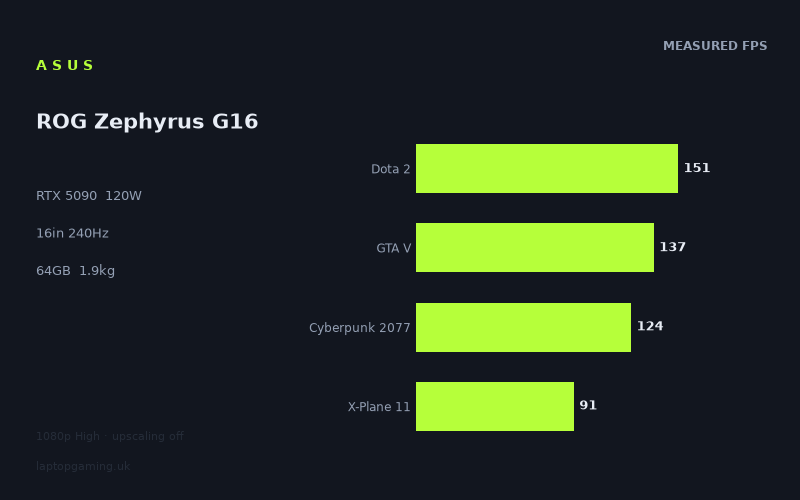
Frame rates
1920×1080, High preset, upscaling off.
Measured on this machine. Source: Notebookcheck, 2025-04-06.
Not scored: incomplete benchmark suite
Every scored laptop on this site is averaged over the same 5 games, and this one is short of Baldur's Gate 3. A mean over 4 games is not comparable to a mean over 5, so we publish the figures we have and leave the score blank rather than rank it against machines tested on a different set. The numbers below are real - the suite is just incomplete.
How these numbers were produced
Frame rates here are not measured by us, and we label how each one was arrived at. A figure marked measured comes from a published run on that exact machine. A figure marked representative is derived from the GPU and its power limit (TGP) and cross-referenced against published reviews - a sound estimate of what that configuration delivers, but not a measurement of that specific laptop. Unless stated otherwise, numbers are 1920x1080, High preset, upscaling off. Where a laptop ships in several power configurations we use the wattage of the exact SKU listed, because a 140W RTX 5070 and a 115W one are not the same product.
In use
The short version
The Asus ROG Zephyrus G16 in this configuration is the most interesting machine in our database, and not for the reason the spec sheet implies. It carries an RTX 5090 with a 24GB frame buffer, a Core Ultra 9 285H, 64GB of memory, 2TB of storage and a 16in 2560x1600 OLED panel at 240Hz. It weighs 1.878kg. That last figure is the one to hold onto, because every other decision in the machine follows from it.
To fit a 5090 into a 16in chassis under 1.9kg, Asus has run the GPU at a 120W total graphics power limit. Mobile RTX 5090 configurations are generally specified up to around 175W in larger, heavier machines, so this one is operating roughly 55W below the top of its own specification. That is not a rounding difference. It is close to a third of the power budget removed, and the measured frame rates show what removing it costs.
Those frame rates, all measured by Notebookcheck at 1920x1080 on the High preset with upscaling off, run from 334fps in Strange Brigade down to 83fps in Alan Wake 2. The four titles from our scoring suite that we do have average 126fps. Those are perfectly good numbers for a machine this light. They are not RTX 5090 numbers. The evidence for that is not our opinion, it is the company this laptop keeps in the database. Across four shared games it is level with a Schenker XMG Core 15 (M25) running an RTX 5060, and one frame per second ahead of a Gigabyte Gaming A16 running an RTX 5070 at 85W — a tie, and a machine with a confirmed UK price of GBP 1,400. Meanwhile a Schenker XMG Neo 16 A25, carrying the same RTX 5090 this machine does, averages 68fps ahead of it across four shared games. Same GPU name, and a gap that size is not a rounding error.
There is a fair version of that observation and an unfair one, and the difference matters. The unfair version is "the 5090 is a fraud here". The fair version is more careful: at 1080p with upscaling off, a great many games stop being limited by GPU throughput and start being limited by the CPU, the engine's draw-call path or plain frame-time overhead, and when that happens wildly different GPUs converge. Each comparison also covers only the titles the two machines happen to share, and with four shared games apiece the samples are small. We have no ray-tracing figures and no native-resolution figures, which is exactly the workload where a 24GB frame buffer and Blackwell's ray-tracing hardware would show up. The measured set is the workload least likely to flatter this GPU.
What survives all of that hedging is still substantial. On the evidence we have, buying this machine for the badge on the box is a mistake. Buying it for the form factor is not. A 16in OLED laptop at 1.878kg with a 90Wh battery, 64GB of memory and 2TB of storage that also runs Cyberpunk 2077 at 124fps and Alan Wake 2 at 83fps at 1080p is a genuinely rare thing, and the people it suits should be very happy with it. The people it does not suit are anyone whose laptop lives permanently on a desk, anyone who intends to play the heavy modern releases at the panel's native 2560x1600, and above all anyone choosing it because the sticker says 5090.
One housekeeping note, stated once and then left alone: we cannot rank this machine against our fully-scored field, because our scoring average is taken over the same five games for every laptop and we have no Baldur's Gate 3 figure for this one. That is a gap in our data, not a fault in the laptop.
Performance
What a 120W power limit actually does
A modern GPU is governed by two ceilings at once: a clock-and-voltage ceiling set by the silicon, and a power ceiling set by whatever the laptop's designer has configured. In any given moment, one of them is binding and the other has slack. Which one binds depends entirely on how hard the workload is leaning on the chip.
In a light scene, only a fraction of the GPU's execution resources are busy. Power draw stays under the limit, so the power ceiling has slack and the card runs up against its clock ceiling instead. Under those conditions a power-limited GPU behaves very much like an unrestricted one, because the restriction is not doing anything. In a heavy scene, with shading, geometry, memory traffic and ray-tracing units all working simultaneously, power draw climbs until it hits the configured limit, and then the GPU has only one lever left: it drops clocks until consumption fits inside the budget. The frame rate falls with the clocks.
The consequence is the single most important thing to understand about this laptop. A power-limited GPU does not lose a fixed percentage of its performance. It loses almost nothing in light workloads and progressively more as workloads get heavier, because the heavier the scene, the more of the time the power ceiling is the binding constraint. A power limit is not a flat tax. It is a tax that increases with the size of the job.
There is a counterweight, and it deserves stating because it is the strongest technical argument in this machine's favour. Power consumption does not scale linearly with clock speed; it rises steeply, because higher clocks require higher voltage and power scales with voltage squared. The last few hundred megahertz on any GPU are disproportionately expensive. Cutting the power budget by roughly a third therefore does not cut clock speed by roughly a third, and it certainly does not cut frame rate by a third. Running wide silicon slowly is more power-efficient than running narrow silicon fast, which is precisely why putting a big die in a low-power chassis is a defensible engineering choice rather than an obviously silly one. A 5090 at 120W should comfortably outrun a smaller die at 120W.
The problem is that this is not the comparison the market presents. Nobody cross-shops on GPU wattage. They cross-shop on GPU name, and the 5090 name carries an expectation set by machines running it with the full budget in chassis that weigh far more than 1.878kg. The measured figures below are what the buyer actually receives.
The measured spread, top to bottom
Every figure here comes from Notebookcheck's measurements at 1920x1080, High preset, upscaling off:
- Strange Brigade: 334fps
- F1 24: 240fps
- Final Fantasy XV: 154fps
- Dota 2: 151fps
- GTA V: 137fps
- Cyberpunk 2077: 124fps
- X-Plane 11: 91fps
- Alan Wake 2: 83fps
The first thing to notice is the sheer width of that range. The top figure is almost exactly four times the bottom one: 334 divided by 83 is a fraction over 4.0. Expressed as frame times, which is a more honest way of thinking about smoothness, that is a shade under 3.0ms per frame at the top and just over 12.0ms at the bottom. Those are two completely different machines as far as the player is concerned, and the difference between them is entirely a function of what each engine asks the hardware to do.
Strange Brigade at 334fps is the top of the range and the least surprising entry in it. It is a well-optimised Vulkan title that scales cleanly with GPU throughput and does not ask much of anything else. It is the closest thing in this set to a pure statement of what the GPU can do when nothing else gets in the way, and 334fps is a genuinely strong result. This is the light-scene case described above: at these frame rates the chip is nowhere near a sustained power wall, and the 5090 silicon shows through.
F1 24 at 240fps is the second entry, and it lands with a certain neatness at exactly the panel's refresh rate. Racing titles reward frame rate more than almost any other genre, because the entire skill of the thing is judging braking points against a scene that is moving quickly and predictably. 240fps at 1080p on a 240Hz panel is the ideal case, and it is worth noting that this is one of only two measured titles that reaches the panel's ceiling at all.
Then there is a large gap. Final Fantasy XV at 154fps and Dota 2 at 151fps sit close together despite being utterly different pieces of software, which is itself informative. Dota 2 is a long-established MOBA with modest visual demands; on a 5090, 151fps at 1080p is a low number in absolute terms and a very strong indication that something other than the GPU is setting the pace. Source 2 is not a heavy renderer. When a game like that lands at 151fps on hardware like this, the bottleneck is the CPU and the engine's per-frame overhead, not shader throughput. That is the convergence effect in plain sight, and it is going to matter enormously when we get to the rival comparisons.
GTA V at 137fps tells a similar story. It is an old title on an engine designed around a very different hardware generation, and it has a well-known ceiling driven by single-thread work rather than pixel throughput. 137fps is a fine result to play at. It is not a GPU measurement.
Cyberpunk 2077 at 124fps is the most useful mid-set data point, because Cyberpunk is genuinely GPU-heavy at High and is one of the few titles here that will scale hard with more power. 124fps at 1080p with upscaling off, on a machine with no ray tracing enabled, is a comfortable, plainly playable result. For a 16in laptop under 1.9kg it is an excellent one. Against the expectation set by the GPU name, it is unremarkable.
X-Plane 11 at 91fps and Alan Wake 2 at 83fps form the floor, and they get there by two entirely different routes.
Alan Wake 2 is the number that matters most
If you only take one figure away from this review, take 83fps. Alan Wake 2 is by a distance the most modern and most heavily-lit renderer in the measured set, and it is the best single predictor in this data of how the machine will cope with releases that have not shipped yet. New engines are moving in one direction only: more lights, more geometric density, more per-pixel work, heavier post-processing. Alan Wake 2 is a preview of that trajectory, and the machine's response to it is the least flattering number on the sheet.
83fps at 1080p is entirely playable. It clears the frame rate most people treat as the baseline for smooth play with headroom to spare, and on a variable-refresh OLED panel it will feel smooth. Nobody should pretend 83fps is bad. But it is the number that shows the power limit doing its work most clearly, because Alan Wake 2 is precisely the workload that keeps every part of the GPU busy simultaneously and therefore keeps consumption pinned against the 120W ceiling for the entire run. In Strange Brigade the limit is largely idle; in Alan Wake 2 it is the binding constraint essentially all the time. The gap between 334fps and 83fps is not just a difference in how demanding the two games are. It is a demonstration of the shape of the power-limit penalty: negligible when the chip is coasting, substantial when it is not.
It also sets the expectation for what comes next. If a recent release with a heavy lighting model lands at 83fps at 1080p, the releases arriving over the next couple of years with heavier ones will land lower, on this machine as on every other. The difference is that most machines with this GPU badge have a wider margin to lose.
X-Plane 11, and why the CPU choice matters
X-Plane 11 at 91fps is a different kind of signal, and it is worth separating carefully from the GPU discussion because conflating the two would be sloppy.
X-Plane is a flight simulator, and simulators of that vintage lean very heavily on single-thread CPU performance: physics, flight model, scenery streaming and a rendering path that is not especially parallel. It is one of the few titles in a standard benchmark suite where the processor, not the graphics card, routinely decides the result. 91fps is a low figure for a machine carrying this GPU badge, and the explanation almost certainly lies on the CPU side of the platform.
The Core Ultra 9 285H is an H-class part. It is a capable chip and an efficient one, and it is the correct choice for a chassis with this thermal envelope. But it is not one of the HX-class processors that go into the large desktop-replacement machines this laptop's GPU name invites comparison with. HX parts carry more cores, higher sustained power budgets and higher peak clocks, and they are built precisely for the situations where a game asks one thread to do a great deal of work quickly. In GPU-bound titles the difference between H and HX is often invisible. In CPU-bound titles it is not.
Read the set with that in mind and a pattern emerges. The three lowest-but-one figures, X-Plane 11 at 91fps, GTA V at 137fps and Dota 2 at 151fps, are the three titles in this suite most likely to be limited by processor throughput rather than graphics throughput. That is not a coincidence, and it is not a criticism of the GPU. It is a platform observation: this is a thin-and-light platform end to end, and the CPU is part of the same trade the GPU power limit is part of. Anyone whose favourite games are simulators, strategy titles, or anything else that lives or dies on single-thread performance should weight X-Plane's 91fps heavily and the Strange Brigade result barely at all.
What the test conditions do not show
Three caveats apply to everything above, and being scrupulous about them matters, because overstating the case against this machine would be as dishonest as ignoring it.
First, everything here is 1920x1080. That is a deliberate methodological choice on the benchmark side and a sensible one for cross-machine comparison, but it has a specific consequence: at 1080p a great many titles stop being GPU-limited. The GPU finishes its work and waits for the rest of the system to hand it the next frame. Under those conditions the results from very different graphics cards compress towards each other, and the more powerful the card, the more of its capability is left unused. A 5090 at 1080p is being asked a question it can answer too easily to be measured properly. The convergence between this machine and its rivals is partly a real performance story and partly an artefact of the resolution the measurements were taken at, and honest analysis has to hold both ideas at once.
Second, the ray-tracing hardware and the 24GB frame buffer are entirely absent from this data. The measurements were taken with upscaling off and, as far as the published set goes, without ray tracing. That removes two of the three things a Blackwell flagship die is actually for. 24GB of VRAM does very little at 1080p with conventional rasterisation, because nothing in that workload comes close to filling it. It does a great deal for high-resolution texture sets, for heavy ray-traced scenes, for large 3D projects and video timelines, and for running sizeable models locally. The ray-tracing units likewise do nothing at all in a test with ray tracing off. We do not have measurements that show this GPU at its best, and it is entirely plausible that the machine pulls away from its measured neighbours once ray tracing is enabled or the resolution climbs. We simply do not have those figures, and we are not going to guess at them.
Third, the comparison samples are small and uneven. Each rival comparison is drawn only from the games both machines have been measured on, which means three games in one case, four in two others and five in the remaining two. Three to five titles is not a large sample, and which three or five happens to be shared varies from pair to pair. That is enough to establish that these machines land in the same neighbourhood. It is not enough to rank them precisely, and we are not going to pretend otherwise.
Where that leaves the performance verdict
Taken together: this is a fast laptop whose measured output at 1080p is roughly that of a well-configured previous-generation mid-range gaming machine, delivered from a chassis that weighs about as much as a thin ultrabook. The mean across the four scoring-suite titles we have is 126fps, which is a good number in isolation and an unremarkable one for the hardware on the label.
The most defensible way to describe it is this: the 120W limit has converted a very large amount of GPU capability into portability. The capability is genuinely gone in the workloads measured here, and probably partially recoverable in the workloads that were not measured. Whether that trade is worth making is a question about what you want a laptop to be, and we will come back to it.
The screen
The panel is the best specification on this machine by a comfortable margin, and it deserves genuine enthusiasm rather than the perfunctory paragraph screens usually get. 16in, 2560x1600, 240Hz, OLED. Every one of those four attributes is doing real work.
Why OLED is the right choice here
An OLED panel emits light per pixel rather than filtering a shared backlight. The practical consequences are the ones people notice immediately: black is genuinely black rather than dark grey, there is no backlight bleed around the edges or in the corners, and contrast within a single frame is not compromised by whatever else is on screen. Local-dimming LCDs approximate this with zones, but a zone is not a pixel, and the approximation shows on high-contrast content. For dark games this is transformative in a way that is hard to overstate: the difference between a shadowed corridor that reads as black and one that reads as grey-with-a-glow is the difference between atmosphere and a technical compromise you keep noticing.
The second consequence is the one that actually justifies the 240Hz figure. OLED pixels change state effectively instantly compared with liquid crystal, which has to physically rotate. On an LCD, a fast transition smears: the pixel is still on its way to the new colour when the next frame arrives, and the result is a soft trail behind moving objects. That smearing does not care how many frames per second you feed it. It is a property of the panel. The upshot is that a 240Hz OLED shows motion more cleanly than a 240Hz LCD at identical frame rates, because the refresh rate is only useful to the extent that the panel can actually resolve each distinct frame. Buying a high refresh rate on a slow panel is buying a number. Buying it on OLED is buying the thing the number was supposed to represent.
The third attribute is the aspect ratio. 2560x1600 is 16:10, not 16:9, and the extra vertical space is more useful than the specification makes it sound. Roughly one additional line of vertical real estate in every document, timeline, code file, spreadsheet and browser window, all day, every day. For a machine that is clearly designed to be carried and used for work as well as games, 16:10 is the right call and it is one of the reasons the screen is a legitimate reason to buy this laptop independently of its gaming performance.
Can the GPU drive it?
This is where enthusiasm has to meet the benchmark data, and the answer is a qualified no.
Start with the refresh rate. Of the eight measured titles, exactly one clears 240fps at 1080p: Strange Brigade, at 334fps. F1 24 sits precisely at 240fps, which is to say it matches the panel and does not exceed it. The other six titles are below the refresh rate, four of them well below. Alan Wake 2 at 83fps is a little over a third of what the panel can display.
Now add the resolution. All those figures are at 1920x1080, which is 2,073,600 pixels. The panel's native resolution is 2560x1600, which is 4,096,000 pixels: just under twice as many, about 1.98 times. Rendering at the panel's own resolution therefore roughly doubles the per-frame pixel workload. Frame rates do not scale perfectly inversely with pixel count, because some of the per-frame cost is resolution-independent and some of these titles are limited by the CPU rather than the GPU in the first place. But the direction is not in doubt, and the magnitude is substantial. Native-resolution figures would be materially lower than the ones measured here. By exactly how much, we cannot say, because we do not have those measurements and we are not going to invent them.
So the honest position on the 240Hz panel is this: it is headroom for esports titles, older games and anything light, and it is a genuinely excellent display for everything else. It is not a refresh rate that the demanding modern games on this machine are going to fill, and at the panel's native resolution fewer of them will come close.
That is less damning than it sounds. A high refresh rate is not wasted below its ceiling. With variable refresh, a panel that can go to 240Hz simply displays whatever the GPU produces without tearing and without the frame-pacing artefacts of a fixed refresh rate, and it does so with lower display latency than a slower panel would. Cyberpunk's 124fps on a 240Hz OLED is a better experience than the same 124fps on a slower LCD. The refresh rate is not a lie, it is just not the headline the marketing implies.
The honest counterweights
Two, both qualitative, and neither of them is a reason not to buy an OLED laptop today provided you know about them.
The first is burn-in. OLED emitters age with use, and elements that stay in the same place with the same brightness for thousands of hours age faster than the pixels around them. On a laptop the obvious candidates are the taskbar, the system tray, a persistently open application's chrome, and in games the HUD: minimaps, ammunition counters, health bars. Modern panels and modern operating systems mitigate this with pixel shifting, logo dimming and periodic compensation cycles, and the risk on a machine used in a varied way over a normal ownership period is modest. But it is not zero, and it is a genuine difference from LCD, which does not degrade this way. Anyone who intends to leave the same static interface on screen for eight hours a day for several years should factor it in.
The second is sustained full-screen brightness. OLED panels typically deliver their highest brightness on small bright areas against dark backgrounds, and lower brightness when the whole screen is lit, because the power and thermal budget for the emitters is shared. In practice that means a full-white document in a bright room is the least flattering case for an OLED laptop screen. We do not have measured brightness figures for this panel and will not quote any, so treat this as a characteristic of the technology to be aware of rather than a specific criticism of this display.
Build, size and portability
This is the section where the machine earns its case, and it is the necessary counterweight to everything above.
1.878kg, with a 90Wh battery, in a 16in chassis, carrying a 24GB flagship-class GPU. That combination is exceptional and it is worth pausing on how exceptional. Machines with this class of graphics silicon conventionally weigh a great deal more, because the cooling required to dissipate a full-budget GPU alongside a hot CPU means thicker chassis, larger fans, more heat pipes, bigger vapour chambers and heavier structure to hold it all. Every one of those adds mass. A laptop that carries this hardware and stays under 1.9kg has not found a loophole; it has made a decision.
The decision is the 120W power limit, and the causation runs in exactly one direction. The chassis does not weigh 1.878kg despite the power limit. It weighs 1.878kg because of it. You cannot dissipate a mobile 5090 running at the top of its specification, plus a CPU under sustained load, in a thermal envelope this small, no matter how good the heat-pipe design is. Physics is not negotiable here. The 120W figure is not an oversight, a firmware conservatism or a fixable configuration choice. It is the ceiling that a chassis of this size and mass can actually sustain.
That reframes the criticism, and the reframing is important because it changes what a fair objection looks like. The wrong complaint is "Asus should have run it at 175W". They could not have, and a machine that did would be a different and heavier laptop. The right complaint is a value question: is a 5090 the correct piece of silicon to put inside a 120W envelope, given where the measured output actually lands? There is a real argument on both sides. In favour: wide silicon at low clocks is efficient, the 24GB frame buffer is genuinely useful for creative and AI workloads regardless of gaming throughput, and the ray-tracing hardware is real capability that the measured workload never asked for. Against: the measured frame rates put this machine level with 140W previous-generation mid-range parts and with a current-generation entry-tier part, and the price of a flagship die has to be paid whether the power budget lets you use it or not.
That argument can only be settled by knowing what it costs, and we do not have a confirmed UK price for this configuration. So we will state the trade plainly and decline to rule on it: at a modest premium over a well-specified thin-and-light this is an easy recommendation for the right buyer, and at flagship-desktop-replacement money it is a difficult one. We cannot tell you which of those it is.
The battery, and what 120W means unplugged
A 90Wh battery is at the upper end of what can be fitted in a portable laptop, and pairing it with a 16in chassis under 1.9kg is a good result. We do not have measured runtime figures for this machine and will not offer any.
What we can do is plain arithmetic that anyone can check. The GPU's own power limit is 120W. The battery holds 90Wh. If the GPU alone ran at its full limit and drew that power from the battery, ignoring the CPU, the 240Hz OLED panel, the memory, the SSD and every other component in the machine, 90Wh divided by 120W is 0.75 hours, or 45 minutes. Since the rest of the system is obviously not free, the real figure at full GPU load would be lower still.
The conclusion follows without needing any measurement: a 120W GPU cannot run at full output on battery for any meaningful length of time, and no thin laptop attempts it. Every machine in this class reduces GPU power substantially when unplugged. The practical consequence for a buyer is that the frame rates discussed throughout this review are plugged-in frame rates, and unplugged gaming on this or any comparable laptop is a materially reduced experience. That is not specific to this machine, but on a laptop whose entire proposition is portability it is worth being explicit about: the portability buys you a machine you can carry to the desk, not one that performs the same away from it.
What we do not have
In the interest of not filling this section with assertion: our data set gives us the weight, the battery capacity and the screen size, and nothing else about the physical machine. We have no measured chassis dimensions, no thickness figure, no surface or component temperatures, no fan noise measurements and no build-material notes. We have not handled the laptop. Anything we said about how it feels to carry, how hot it gets under load or how loud the fans are would be invention, so we are not going to say it. The weight figure is the one hard portability data point we have, and it is a strong one.
How it compares
Every comparison in this section is drawn only from games both machines have been measured on, and in this case all four rest on the same sample size: four shared titles each. That is a small overlap, and it should temper how hard any single figure is pushed. What makes this particular set unusually informative is that all four rivals carry current-generation silicon. There is no cross-generation confusion to argue about, no question of driver maturity or architectural era. This is a like-for-like reading of where a 120W RTX 5090 lands among its own contemporaries, and the answer is not the one the badge implies.
The comparison that matters most: the same GPU, elsewhere
The Schenker XMG Neo 16 A25 carries an RTX 5090. So does this machine. Across their four shared games, the Schenker averages 68fps ahead.
That is the single most important number in this review, and it deserves to be stated without cushioning. Sixty-eight frames per second is not run-to-run variance, not a benchmark-run artefact, not a rounding question. It is a gap roughly half the size of this machine's own four-game scoring average of 126fps. Two laptops, the same graphics processor by name, and one of them produces materially more of what a graphics processor exists to produce.
This is the cleanest evidence available anywhere in the review that a GPU name is not a performance specification. The variable that separates these two machines is not the silicon; it is what the chassis is willing to feed it and dissipate from it. This machine's RTX 5090 is held to a 120W total graphics power limit. We do not have the A25's power limit in our data, so we cannot tell you the precise size of that difference, and we are not going to invent it. What we can say is that the mechanism is well understood: a GPU held at a low power ceiling spends its time bounded by watts rather than by clocks, so it runs at lower sustained frequencies, and the deficit widens as the rendering load rises. The measured spread in this review is consistent with exactly that behaviour.
Be careful about what this does not show. It does not show that the A25 is a better buy — we have no confirmed UK price for either machine, and the two are built to entirely different briefs. It does not show that this machine is slow. And four shared games is a thin basis for any precise claim. But the direction and the scale of the result are unambiguous, and no reasonable reading of the caveats makes a 68fps average disappear.
Level with an RTX 5060
The Schenker XMG Core 15 (M25) runs an RTX 5060. Across four shared games the average difference rounds to zero. The two machines are level.
This is the result that is hardest to explain away, because it removes every confounding variable at once. Same generation, same driver era, same test methodology, same resolution. The difference between the two parts is die size, memory configuration and power budget — and one of them is the entry rung of the range while the other is the flagship. A flagship landing level with an entry-tier part from its own generation is a striking outcome, and no quantity of methodological caveat makes it unstriking.
The caveats are still real and still worth stating honestly. Four shared games is a small sample. All of them were measured at 1920x1080 on the High preset with upscaling off, and at that resolution an entry-tier GPU is far closer to sufficient than it would be at this machine's native 2560x1600 — roughly twice the pixels — where the smaller part would have much less room. The 5060's considerably smaller frame buffer would also become a constraint in workloads the measured set does not contain. If both machines were pushed to native resolution with heavy settings, or given ray-traced workloads, the flagship die has a great deal more headroom to grow into and the entry-tier part has very little. That is a reasonable expectation. It is not a measurement, and we do not hold the measurement.
Level with an RTX 5070 at 85W — and this one has a price
The Gigabyte Gaming A16 runs an RTX 5070 at an 85W total graphics power limit, and it has a confirmed UK price of GBP 1,400. Across four shared games, this machine averages one frame per second ahead. One frame per second is inside run-to-run variance on any benchmark. It is a tie, and calling it anything else would be dishonest in either direction.
This is the comparison a buyer should sit with longest, because it is the only one in the set that attaches a real number to the decision. A machine with a mid-range GPU, running that GPU at an even tighter 85W ceiling, produces the same measured frame rates at 1080p for a price you can actually look up. Whatever the Zephyrus G16 turns out to cost — and we have no confirmed UK price for this configuration — the gap between it and GBP 1,400 is not buying measured frame rates at this test point. It is buying the OLED panel, the 64GB of memory, the 2TB SSD, the build, and above all the 1.878kg. Those are legitimate things to buy. They are simply not the thing written on the GPU.
There is a second, subtler reading here worth drawing out. The A16's 5070 is held to 85W and this machine's 5090 to 120W — a 35W difference between two very differently-sized dies — and they land level. That is the power-limit argument stated twice over: across this comparison and the 5060 result, what predicts the measured outcome is far more about the watts and the platform than about which chip is underneath.
Comfortably clear of the entry tier
The MSI Cyborg 15 runs an RTX 5050 and costs GBP 984. Across four shared games, this machine averages 32fps ahead.
This result does essential analytical work, and it is the reason the rest of the section can be trusted. A sceptical reader could dismiss every tie above as an artefact — the claim that 1920x1080 is simply too undemanding to separate anything, so of course everything ties. The Cyborg comparison refutes that directly. Where a genuine capability gap exists, this test point still shows it, and shows it clearly: 32fps is a large, unambiguous margin. The measurement is not blind. It resolves differences perfectly well when differences are there to resolve.
Which means the ties against the 5060 and the 85W 5070 are not measurement failures. They are findings. At this workload, on this evidence, those machines genuinely are delivering what this one delivers.
What the four results add up to
Arrange them on a line and the machine's position is unusually legible. It is 32fps clear of an RTX 5050 at GBP 984. It is level with an RTX 5060. It is level with an RTX 5070 held to 85W at GBP 1,400. And it is 68fps behind another RTX 5090.
That is not the profile of a flagship. It is the profile of a competent upper-mid-range gaming laptop, and the 68fps gap to the same GPU in a different chassis is the measurement that tells you why. The 120W ceiling is doing precisely what a low power limit does: it converts flagship silicon into mid-range output.
The fair conclusion has two halves and both need saying. The critical half: on every workload we hold evidence for, nothing in the measured data justifies choosing this machine for the letters and numbers on its GPU, and a buyer who does so is paying for a capability the benchmark record does not show being delivered. The generous half: the workload we hold evidence for is 1080p High with upscaling off and no ray tracing, which is close to the least flattering possible test for a large die with a 24GB frame buffer. At 2560x1600, with ray tracing enabled, or in titles that genuinely fill that buffer, the ranking above could look materially different. We do not have those figures, we will not guess at them, and until they exist the honest position is that this machine's measured performance is mid-range and its potential is unproven.
What is not in doubt is the trade being offered. Every machine that beats it here, and every machine that matches it, is a larger and heavier computer. This one weighs 1.878kg. That is the product, and the comparisons above are the price of it.
Who it's for
There is a specific buyer for whom this machine is close to ideal, and the specificity is the point. It is not a compromise for everyone; it is an excellent answer to a narrow question.
That buyer actually carries a laptop. Not "could carry it if needed", but moves it between home, office, client sites, trains and hotel rooms as a matter of routine. For that person the difference between 1.878kg and the weight of a conventional 16in gaming machine is not a specification, it is something they feel every single day, and it dominates every other consideration. Everything this laptop gives up, it gives up to buy that, and for this buyer it is the correct trade by a wide margin.
That buyer wants the screen for more than games. A 16in 2560x1600 OLED in 16:10 is an outstanding display for photo and video work, for colour-critical content, for reading, for code and for watching things. If half the value you get from a laptop is non-gaming, this panel justifies a lot on its own, and the 64GB of memory and 2TB of storage say clearly that Asus expects this machine to do real work.
That buyer has genuine use for 64GB and 2TB. These are not padding specifications. 64GB of memory matters for virtual machines, large datasets, heavy multitasking and video timelines; 2TB matters the moment you install more than a handful of modern games alongside a working project library. Together they remove the two upgrades people most often regret skipping, and on a thin chassis where upgrade access is typically limited, having them from the start is worth real money.
And that buyer understands what they are buying: portability, a superb screen and a generous platform, with frame rates that are strong for the weight rather than strong for the GPU name. Cyberpunk 2077 at 124fps, GTA V at 137fps and Alan Wake 2 at 83fps at 1080p, from a machine under 1.9kg, is a very good outcome. Read that way, this laptop delivers exactly what it promises.
Who should buy something else
Anyone whose laptop lives on a desk. If the machine sits in one place and is portable only in the sense that it could theoretically be moved, you are paying the full price of the power limit and collecting none of the benefit. The correct purchase in that situation is a larger chassis running a GPU at a higher power budget, where the frame rates are on the table and the weight does not matter because nobody is carrying it. Buy the power limit, not the badge.
Anyone who intends to play modern releases at the panel's native resolution. 2560x1600 is just under twice the pixel count of the 1080p the measurements were taken at, and the demanding titles here are already well short of the panel's 240Hz at the lower resolution. Alan Wake 2 at 83fps at 1080p is not a figure with room in it for doubling the pixel load. Upscaling exists, works well and will help considerably, and frame generation helps further, but that is a different conversation from the native-resolution figures this buyer is imagining. If native 2560x1600 at high settings in new releases is the requirement, the measured evidence does not support this machine as the way to get it.
Anyone whose games are CPU-heavy. Simulators, large-scale strategy, anything with heavy simulation running behind the renderer. X-Plane 11 at 91fps is the clearest warning in the data, and the H-class processor is the most likely reason. This is not a GPU verdict and it does not generalise to the whole machine, but it does generalise to a genre, and buyers in that genre should look at platforms with HX-class processors.
Anyone buying this because it says RTX 5090. This is the important one, and it is worth being blunt. On the measured evidence, that badge is not delivering here what it delivers elsewhere. This machine is level with two mid-range previous-generation laptops, level with a current-generation entry-tier laptop, level with a machine three GPU generations old, and a frame per second behind a two-generation-old high-end one. There may well be workloads, at higher resolutions, with ray tracing enabled, or leaning on the 24GB frame buffer, where the flagship silicon pulls decisively away. We do not have those measurements and we are not going to imply them. What we have says that if the GPU name is the reason you are reaching for your wallet, the name is not what you will get.
Buy this laptop for what the measurements actually support: an extremely portable 16in machine with one of the best screens available on a laptop, a generous memory and storage configuration, and frame rates that are genuinely good for 1.878kg. That is a real and appealing product. It is just not the one the sticker on the palm rest is selling.