Review
Schenker XMG Apex 17 M25 review
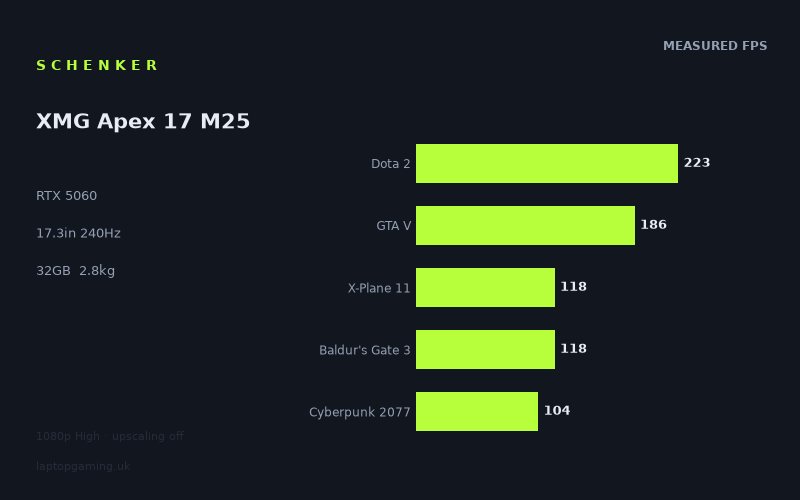
Frame rates
1920×1080, High preset, upscaling off. Averages 149fps across the 5 core benchmark games.
Measured on this machine. Source: Notebookcheck, 2026-02-13.
Not scored: no confirmed UK price
We have the full benchmark suite for this machine, so it ranks on the frame rate leaderboard like any other. What we don't have is a UK listing for this exact configuration - it's sold as a European review unit, or only in specifications that differ from the one tested. Since 30% of our score is value for money, scoring it would mean pretending price is no object, which would flatter it against every laptop you can actually buy. The frame rates below are real and comparable; there is just no buying recommendation to make yet.
How these numbers were produced
Frame rates here are not measured by us, and we label how each one was arrived at. A figure marked measured comes from a published run on that exact machine. A figure marked representative is derived from the GPU and its power limit (TGP) and cross-referenced against published reviews - a sound estimate of what that configuration delivers, but not a measurement of that specific laptop. Unless stated otherwise, numbers are 1920x1080, High preset, upscaling off. Where a laptop ships in several power configurations we use the wattage of the exact SKU listed, because a 140W RTX 5070 and a 115W one are not the same product.
In use
The short version
The XMG Apex 17 M25 is a 17.3in machine built around an unusual pairing: one of the fastest mobile CPUs AMD sells, the Ryzen 9 9955HX, bolted to a mid-tier RTX 5060 with 8GB of VRAM. That is the opposite of the balance most gaming laptops strike, and it explains almost everything about how this laptop behaves in the measured data. In games that lean on the processor, it is startlingly quick for its GPU class. In games that lean on the graphics card — and particularly in games that lean on graphics memory — it falls back into the pack, and in one case falls a long way further than that.
Notebookcheck's figures, taken at 1920x1080 on High presets with upscaling switched off, run from 273fps in Strange Brigade down to 44fps in Doom: The Dark Ages. That is a spread of more than six to one across nine titles, which is wider than you see on most machines, and the reasons for it are worth understanding before you spend anything on this laptop. The five games in our scoring suite average 150fps, which is a genuinely strong number and places it comfortably among laptops carrying nominally faster silicon.
Who should buy it: someone whose game library is CPU-heavy or engine-old — simulation, strategy, competitive shooters, MOBAs, racing sims — who wants a big screen and a lot of processor, and who is content to run at 1080p or use upscaling at the panel's native 1440p. Someone who also does CPU work between gaming sessions, because the 9955HX is not a chip you buy for gaming alone and 32GB of memory with a 2TB SSD is a working configuration rather than a starter one.
Who should not: anyone whose priority list starts with the current generation of heavy, ray-tracing-forward, texture-hungry releases. The 8GB frame buffer is the ceiling on this machine's future, and the Doom: The Dark Ages result is the clearest warning of it in the measured set. At 2.83kg plus a power brick, it is also not a laptop you carry anywhere by choice.
We have no confirmed UK price for this exact configuration, so this machine carries no overall score. That is not a criticism of it. The benchmark suite is complete, it ranks normally on our frame rate leaderboard, and it would be scored like anything else the moment we can attach a verified price to it. Value is 30% of our score and we will not compute it from a guess, so we are not going to speculate about what it costs.
Performance
What an RTX 5060 with 8GB actually is
The RTX 5060 sits in the lower-middle of the current mobile stack. It is a capable 1080p card and a workable 1440p card with upscaling, and in most 2026 laptops it is the part you buy when you want current-generation features — the newer frame generation, the newer encoders, the improved ray tracing hardware — without paying flagship money. Its defining constraint is not raw shader throughput. It is the 8GB frame buffer.
Eight gigabytes was comfortable in 2021, adequate in 2023, and is now the specific thing that separates a card that runs a game at a sensible frame rate from one that stutters through it. When a game's working set of textures, buffers and ray tracing structures exceeds what the card can hold, the driver starts moving data across the PCIe bus mid-frame. The result is not a graceful, proportional slowdown. It is a cliff. Average frame rates collapse and, worse, the frame-to-frame consistency collapses with them, which is felt far more acutely than the average number suggests.
You can see exactly where that cliff sits in this machine's data, and it is worth walking through the whole ladder rather than just quoting the top and bottom.
The top of the ladder: 273fps, 223fps, 186fps
Strange Brigade at 273fps is the highest figure in the set and the least informative about real-world gaming. It is an old, extremely well-optimised title with a low-level API path that has historically been kind to every GPU it touches. Its role in a benchmark suite is not to tell you what a machine feels like in modern games; it is to establish an upper bound — roughly, what this hardware can do when nothing is in its way. 273fps says the GPU is being given enough power and the CPU is not throttling it. Both of those are useful to know, and neither of them will affect your Tuesday evening.
Dota 2 at 223fps is where the 9955HX starts to matter. Dota 2 is not a GPU test in any meaningful sense at 1080p High; it is a test of how fast the processor can push draw calls and simulate the game state. A weaker CPU with the same graphics card would land materially lower here. 223fps is a number that would not embarrass a machine two GPU tiers up, and it is entirely down to the processor. If you play MOBAs, ARPGs, autobattlers or anything else where the bottleneck is the CPU rather than the renderer, this is the single most relevant figure on the page.
GTA V at 186fps tells a similar story with a different accent. GTA V is old enough that its renderer is not remotely taxing for a 5060, but its engine is heavily dependent on single-thread performance and it does not scale well across many cores. 186fps is a good result and, again, is being set by the CPU more than the GPU. Notice the gap between Dota 2 and GTA V: 37fps separates them, and both are nominally "CPU-bound old games". That gap is a reminder that "CPU-bound" is not one condition — different engines bottleneck on different things.
The middle: 174fps, 120fps, 118fps, 118fps
F1 25 at 174fps is the most immediately useful number in the entire set for a certain kind of buyer. Racing games reward frame rate more directly than almost any other genre, because your inputs are continuous and your feedback loop is tight, and 174fps at 1080p High with no upscaling means this machine can run a modern racing title at a rate that meaningfully exceeds most people's perceptual threshold for smoothness. If sim racing is your thing, this figure and the 240Hz panel are the two facts that should interest you most.
Final Fantasy XV at 120fps and Baldur's Gate 3 at 118fps land almost together, which is a coincidence of different limits. FFXV is a genuine GPU load with heavy post-processing and dense effects work; 120fps means the 5060 is doing real graphical work at a comfortable rate. Baldur's Gate 3 is a hybrid — its renderer is not brutal, but its simulation and its dense, entity-heavy Act 3 environments punish CPUs. 118fps is a strong result for it, and given how many people's actual answer to "what do you play" is currently "a very long RPG", it is one of the more representative figures here.
X-Plane 11 at 118fps is the flight-sim result and it is a good one. X-Plane is famously bound by single-thread CPU performance and does not care much about the graphics card past a point. 118fps in a flight simulator is well above what the genre typically needs — sim pilots are usually delighted with half that — and it is another data point in the same direction: the 9955HX is doing heavy lifting throughout this suite.
Cyberpunk 2077 at 104fps
This deserves its own paragraph because it is the industry's default yardstick and because 104fps at 1080p High with upscaling off is a properly good number for an RTX 5060. Cyberpunk's High preset does not turn on the ray tracing modes that flatten mid-range cards, so this is a rasterised result, but it is still a dense, modern, expensive renderer with a lot of geometry and a lot of screen-space work. Triple-digit frame rates here mean the machine will hold 60fps in effectively any current rasterised game at 1080p with headroom to spare, and it means you have room to trade some of that headroom for higher settings, higher resolution, or both.
It is also the last comfortable number in the list, and the drop that follows it is severe.
Doom: The Dark Ages at 44fps — the eight-gigabyte cliff
From 104fps in Cyberpunk to 44fps in Doom: The Dark Ages is a fall of more than half, and it is the most important single figure on this page. Doom: The Dark Ages uses a renderer with ray tracing as a baseline requirement rather than an optional extra. There is no rasterised fallback path to drop back to. That does two things to a card like this one simultaneously: it loads the ray tracing hardware, which the 5060 has but does not have a great deal of, and it loads the frame buffer, because acceleration structures and the high-resolution material data that modern id Tech uses have to live in VRAM alongside everything else.
44fps at 1080p High is playable in the narrow sense that the game runs and you can finish it. It is not playable in the sense anyone buying a 240Hz panel means. And the more useful reading is forward-looking: Doom: The Dark Ages is not an outlier so much as a preview. The direction of travel in game engines is towards mandatory ray tracing, towards larger texture pools, and towards renderers that assume more graphics memory than this card has. Every title that follows that direction will produce a number closer to 44 than to 104 on this machine.
There is a mitigation and it should be stated fairly: upscaling. These figures are measured with upscaling off, which is the correct methodology for comparing hardware but is not how most people actually play. Turning on the 5060's upscaling and frame generation would lift that 44fps substantially, and in a game with the visual style of Doom the artefacts are less objectionable than they would be in, say, a slow-paced strategy title. But upscaling reduces the render resolution; it does not shrink the texture pool by nearly as much, so it treats the shader-throughput half of the problem far better than it treats the memory half. It is a real answer, not a complete one.
Where the spread comes from, in one paragraph
The 273-to-44 range on this machine is not random. It sorts almost perfectly by what limits the frame. At the top are titles limited by the processor and by nothing much else, where the 9955HX is one of the fastest things you can put in a laptop and the results reflect that. In the middle are titles limited by conventional rasterised GPU throughput, where an RTX 5060 is a solid mid-tier card and the results reflect that too. At the bottom is the one title limited by ray tracing hardware and graphics memory, where an 8GB RTX 5060 is genuinely weak, and the result reflects that most of all. If you can look at your own game library and place it on that ladder, you already know what this laptop will do for you.
The 32GB / 2TB configuration
Two specification points deserve mention because they change how the machine is used rather than how fast it runs. 32GB of system memory is double what a mainstream gaming laptop ships with, and it is the amount at which you stop thinking about memory: modern games that want 16GB to themselves leave you nothing on a 16GB machine and half the machine free on this one. Combined with a 16-thread-class HX processor, it makes this a credible machine for compiling, video work, virtual machines or large datasets between play sessions — which is, frankly, the main argument for pairing a CPU this strong with a GPU this ordinary in the first place.
2TB of SSD is the other one. A single modern AAA installation can consume a large fraction of a 512GB drive, and gaming laptops with small drives force a permanently annoying install-uninstall cycle. 2TB removes that problem for most people. Neither of these things shows up in a frame rate chart, and both of them will affect your experience of owning the laptop more than a ten-frame difference in Cyberpunk would.
The screen
17.3in, 2560x1440, 240Hz, IPS
This is a well-chosen panel specification for the hardware behind it, with one significant caveat about the resolution.
The choice of 1440p rather than 4K on a 17.3in gaming laptop is correct and increasingly rare enough to be worth praising. At this size, 1440p gives a sharp image without demanding the pixel throughput that would strangle a mid-tier GPU. A 4K panel here would look marginally crisper on the desktop and would be an active handicap in every game. Schenker have made the right call.
The 240Hz refresh rate is where the picture gets more interesting. Look at which measured titles actually reach it, and the answer is: Strange Brigade at 273fps, and nothing else. Dota 2 at 223fps gets close but does not clear it. GTA V at 186fps and F1 25 at 174fps are comfortably short. Everything from Final Fantasy XV downwards is running at half the panel's capability or less.
That is not a criticism, because a 240Hz panel is not wasted when you are running at 120fps — with variable refresh it simply gives you a wider window in which frames are displayed as soon as they are ready, and reduces the latency penalty of any given frame rate. But it does mean you should be honest with yourself about why you want it. If you play competitive shooters that are not in this measured set — the CS-and-Valorant tier of games, which run at enormous frame rates on far weaker hardware — then a 240Hz panel driven by a 9955HX is a genuinely strong pairing and this laptop is doing something specific for you. If you play story games at 1440p, a 165Hz panel would have served you identically and the 240Hz number is marketing you paid for.
The gap between the measured resolution and the native one
This needs stating plainly because it is the easiest way to be misled by any laptop benchmark. Every frame rate above was measured at 1920x1080. The panel is 2560x1440. That is roughly 1.8 times as many pixels. In GPU-bound titles — Cyberpunk, Final Fantasy XV, Doom — running at native resolution will cost you a substantial share of those numbers. In CPU-bound titles — Dota 2, GTA V, X-Plane 11 — it will cost you far less, because the limit was never the pixel count.
We do not have measured 1440p figures for this machine and we are not going to invent them, so treat the following as a way of thinking rather than a prediction: the titles at the top of the ladder will move down modestly, the titles in the middle will move down significantly, and Doom: The Dark Ages at 44fps was already the problem child and will not become less of one. The practical consequence is that this is a laptop you will very likely run with upscaling enabled at native resolution, or at 1080p on the 1440p panel, in anything demanding. The 5060 is not the card that drives a 1440p 240Hz display natively in modern games, and nobody sensible expected it to be.
IPS, and what is not specified
The panel is IPS rather than OLED. In practice that means good viewing angles and no risk of burn-in from static HUD elements over a long ownership period, against weaker contrast and no true blacks. For a machine likely to spend a lot of hours displaying the same game interface, IPS is the lower-risk choice. We do not have measured figures for this specific panel's brightness, colour coverage, contrast ratio or response time, so we are not going to characterise them. If colour-critical work matters to you, that is a gap you should fill from a source that has measured the panel directly.
Build, size and portability
2.83kg and a 17.3in footprint put this squarely in the desktop-replacement category, and the honest framing is that portability is not one of this machine's features. It is a laptop in the sense that it folds shut and has a battery, not in the sense that you take it to a coffee shop. Add a power supply capable of feeding a 9955HX and an RTX 5060 simultaneously and you are carrying a meaningful load in a bag that has to be large enough for a 17.3in chassis in the first place.
The realistic use pattern is a machine that lives on a desk and occasionally moves — between a bedroom and a living room, home to an office, home to a parent's house at Christmas, into a bag for a LAN event. For that pattern, the 17.3in screen is a genuine advantage: you get a large display without buying and transporting a monitor, and a big panel makes strategy games, flight sims and anything with dense UI substantially more comfortable than a 14in or 16in machine does. Whether that is worth the mass depends entirely on how often the machine actually moves.
The battery is small for the class
73Wh is a modest capacity for a 17.3in machine, and it is the specification that stands out most from the rest of the sheet. Larger chassis usually carry larger batteries, both because there is room and because the components draw more. 73Wh in a laptop with an HX-class processor is a combination that suggests unplugged use was not a design priority.
We have no measured runtime figures for this machine, so we will not put a number on it. What can be said from the specification alone is directional and reliable: high-performance mobile processors draw a great deal of power under load, and no gaming laptop of this class delivers meaningful gaming time on battery regardless of capacity — the GPU is typically power-limited on battery in any case, so gaming unplugged is a compromised experience by design. The question 73Wh raises is not about gaming but about light use: browsing, documents, video. A larger battery would have given more confidence there. If you need a machine that runs a full working day away from a socket, this is not it, and the size and weight already told you that.
Thermals: what we can and cannot say
We have no measured temperature or noise figures for this laptop and we are not going to estimate them. What the specification implies is straightforward: a 9955HX and an RTX 5060 together produce a substantial thermal load, and a 17.3in chassis has more internal volume, more heatsink area and more room for larger, slower-spinning fans than a 15in or 16in one does. Physically, the larger machine has the easier job. That is an argument in this laptop's favour rather than a measured finding, and it should be treated as such. If fan noise is a deciding factor for you, seek out a source that has measured it under sustained load.
How it compares
Our comparisons only use games both machines have actually been measured in, and only against laptops from the same GPU generation, so the hardware is at least contemporary. The four below are deliberately a spread rather than a huddle: the two nearest neighbours, the machine this one beats by the widest margin, and the machine that beats it by the widest margin. Read together they tell a far more coherent story than any single row does.
Gigabyte Aero X16 1WH (RTX 5070 at 85W) — 63fps ahead across 3 shared games
Start here, because it is the most useful lesson in laptop buying that this data contains. The Aero X16 has a full GPU tier more than the Apex — an RTX 5070 against an RTX 5060 — and across the three games they share, the Apex is ahead by an average of 63fps. That is not a rounding artefact. That is a rout.
The explanation sits in the specification, in the number most manufacturers decline to print: 85W. A mobile GPU is not a fixed product. The same silicon is configured across a wide band of sustained power, and the distance between the bottom and the top of that band is the distance between two genuinely different products that happen to share a name. 85W is a restrictive allocation for a 5070, chosen to fit a thin and light chassis and keep it quiet, and a starved 5070 will lose to a properly fed 5060 all day long.
The Apex is a 2.83kg 17.3in machine with the internal volume to cool what it carries; the Aero X16 is a thin 16in one. That is the trade, expressed in frames. If you take one thing from this review into your next purchase, make it this: the tier on the box tells you less than the watts behind it, and a laptop that publishes its power limit is doing you a favour.
The caveat is the sample. Three shared games is a narrow overlap and a margin this size would be worth confirming across a wider set. But 63fps is far too large to be explained away by which three titles they happen to be. Something real is happening here, and it is thermal rather than architectural.
MSI Crosshair A17 HX (RTX 5070 at 115W) — 1fps ahead across 5 shared games
The same GPU tier as the Aero, given a much healthier 115W, and the picture inverts completely: across five shared games the two machines are level, with the Apex a single frame ahead. A 1fps average sits comfortably inside benchmark run-to-run variation, so treat this as a dead heat.
A dead heat against a tier-up machine is easy to misrepresent, so it is worth being precise about what it does and does not mean. It does not mean an RTX 5060 equals an RTX 5070 at 115W. It means these five games could not tell them apart, and there is a specific, identifiable reason for that.
The five shared titles are our scoring suite, and look at what that suite contains for this machine: Dota 2 at 223fps, GTA V at 186fps and X-Plane 11 at 118fps. Three of the five are titles where the frame rate is set by the processor rather than the graphics card. In those, both machines' graphics cards finish their work early and wait, and the outcome is decided by the CPU — where the Apex's Ryzen 9 9955HX is about as strong as mobile silicon gets. The remaining two, Baldur's Gate 3 at 118fps and Cyberpunk 2077 at 104fps, are genuine graphics loads but not punishing ones at 1080p.
So the shared set compresses the GPU gap almost to nothing, and the Apex's exceptional processor closes whatever is left. In games that actually load the graphics card — Doom: The Dark Ages at 44fps being the obvious example from this machine's own results — a 5070 at 115W would pull clear. This row is a true result about five particular games, not a claim about two cards.
MSI Vector 16 HX AI (RTX 5070 Ti, £1,592) — level across 5 shared games
The same story again, one tier higher still, and this is the only machine in the group with a confirmed UK price. An RTX 5070 Ti is two steps above a 5060, and across the same five-game scoring suite the two are indistinguishable.
The compression effect explains the result exactly as above. The price is what makes this row worth more than the others. £1,592 is the one hard reference point we have for what this class of measured performance costs in the UK, and it is attached to a machine carrying substantially more graphics card than the Apex does.
What we cannot do is tell you whether the Apex represents better value, because we have no confirmed price for it and will not invent one. What we can tell you is what £1,592 buys elsewhere: the same frame rates in these five games, a 16in rather than a 17.3in machine, and considerably more GPU headroom for the games that are not in this suite. Weigh that against what the Apex offers instead — its processor, its larger screen, its memory and storage allocation — and the decision becomes a genuine one rather than a frame-rate comparison.
Schenker XMG Neo 16 A25 (RTX 5090) — 51fps behind across 5 shared games
This is the control that proves the point, and it is the reason we publish a spread rather than only the nearest neighbours.
Across the same five shared games that could not separate the Apex from a 5070 or a 5070 Ti, an RTX 5090 machine is 51fps ahead. Same suite. The same CPU-bound compression working against it. And it still finds fifty-one frames.
That single row does two jobs. First, it shows the scoring suite is not simply incapable of separating hardware — give it a large enough gap and it registers one. Second, and more usefully, it tells you the shape of the curve. Moving from a 5060 to a 5070 or a 5070 Ti buys nothing measurable in these titles. Moving to a 5090 buys a great deal. The returns are not linear; they are flat and then they are steep, and where you sit on that curve depends entirely on whether the games you play are limited by the processor or by the graphics card.
The Neo 16 A25 has no confirmed UK price in our database, so no value comparison is available — and a 5090 laptop is not competing for the same wallet as this machine in any case. It is here as evidence, not as an alternative.
Reading the table honestly
Four rivals, spanning an underpowered RTX 5070, a properly powered one, a 5070 Ti and a 5090. The Apex crushes the first, ties the middle two and loses heavily to the last. Every one of those results is real, and not one of them means what a casual glance suggests.
The pattern is consistent and worth stating plainly. At 1080p, in a suite weighted towards CPU-limited titles, graphics tier differences compress towards zero until the tier gap becomes enormous. Power limits, by contrast, do not compress at all — the Aero X16 row shows an 85W allocation costing more than an entire GPU tier is worth.
The practical translation for a buyer is straightforward. If your library resembles the scoring suite — MOBAs, older open-world games, simulators, mainstream RPGs — the Apex is competitive with machines carrying far more expensive graphics silicon, and paying up for a 5070 or 5070 Ti would be money spent on frames you will never see. If your library resembles Doom: The Dark Ages, none of these comparisons measures what you care about, and the 5090 row is the better guide to what real headroom costs.
Who it's for
There is a specific buyer for whom this machine is close to ideal, and they are easy to describe.
The simulation and strategy player. X-Plane 11 at 118fps and the general strength of the CPU-bound results say this machine handles the genres that punish processors and ignore graphics cards. Flight sims, city builders, grand strategy, factory games, anything where the frame rate collapses because of what the game is thinking rather than what it is drawing — those all benefit directly from the 9955HX, and the 17.3in screen gives you room for the dense interfaces those games all have.
The competitive player who also does work. The 240Hz panel plus a top-tier CPU is a coherent combination for high-frame-rate esports, and the 32GB / 2TB configuration means the machine does not become useless the moment you close the game. If you compile, edit, render or run virtual machines, the processor here is doing work that a laptop with a stronger GPU and a weaker CPU simply cannot.
The 1080p player with a large library of existing games. Cyberpunk 2077 at 104fps sets a floor for rasterised modern games that means nearly everything released before the current ray-tracing-mandatory wave will run well above 60fps at 1080p High. If your backlog is five years deep, this machine clears it comfortably.
Someone who wants a big screen without buying a monitor. 17.3in at 1440p is a good desktop as well as a good gaming display, and if the laptop is going to live in one place anyway, you are getting a screen you would otherwise have paid for separately.
Who should buy something else
Anyone whose priority is the newest, heaviest releases. This is the clearest exclusion and the data supports it unambiguously. 44fps in Doom: The Dark Ages at 1080p is what an 8GB card with modest ray tracing hardware does in a game built around ray tracing. If your buying decision is being driven by titles like that — and by the ones that will follow them — then you want more VRAM, and that means a different GPU tier, not this one. No amount of CPU compensates for a frame buffer that is too small.
Anyone who needs to carry a laptop regularly. 2.83kg and a 17.3in footprint plus a large power supply is a commitment. A 16in machine is a fundamentally different object to live with, and the MSI Vector 16 HX AI on the comparison list above is level with this one across the five shared games while carrying more graphics card in a smaller body. If mobility matters at all, look there first.
Anyone who needs long battery life. 73Wh in a machine of this class is modest, and while we have no measured runtime to quote, the combination of a high-performance processor and a battery of that size is not one that suggests all-day unplugged use. Buy this if you have a socket.
Anyone who wants to run games at the panel's native resolution without upscaling. The measured figures are 1080p figures. 2560x1440 is roughly 1.8 times the pixels, and a 5060 will feel that in every GPU-bound title. You will use upscaling on this machine at native resolution, and if that prospect bothers you on principle, buy a laptop with a stronger graphics card or a lower-resolution panel.
Anyone comparison-shopping purely on the numbers above without checking their own library. This machine's remarkable showing against 5070 and 5070 Ti laptops is real but conditional. It holds in CPU-bound and older titles and it does not hold in heavy modern ones, as the 5090 comparison demonstrates. Look at the five games you actually play most, work out which end of this machine's ladder they sit on, and decide from there.
The verdict, restated
The XMG Apex 17 M25 is a lopsided machine, and it is lopsided in an interesting rather than a careless direction. Schenker have spent the budget on the processor, the memory and the storage, and economised on the graphics card. In a benchmark suite dominated by CPU-limited titles, that decision looks brilliant: a 150fps average across the scoring games, dead level with laptops carrying far more expensive silicon. In the one modern, ray-tracing-mandatory title measured, it looks like exactly what it is: an 8GB mid-tier card, struggling.
Both of those things are true simultaneously, and which one governs your experience depends entirely on what you play. That is a more useful conclusion than a single number could give you, and it is the reason we would rather show you the whole ladder than the average. What we cannot tell you is whether it is good value, because we have no confirmed UK price for this configuration — and given how much of a purchase decision at this level comes down to price, that is a gap worth being upfront about rather than papering over with an estimate.