Review
Schenker XMG Core 15 (M22) review
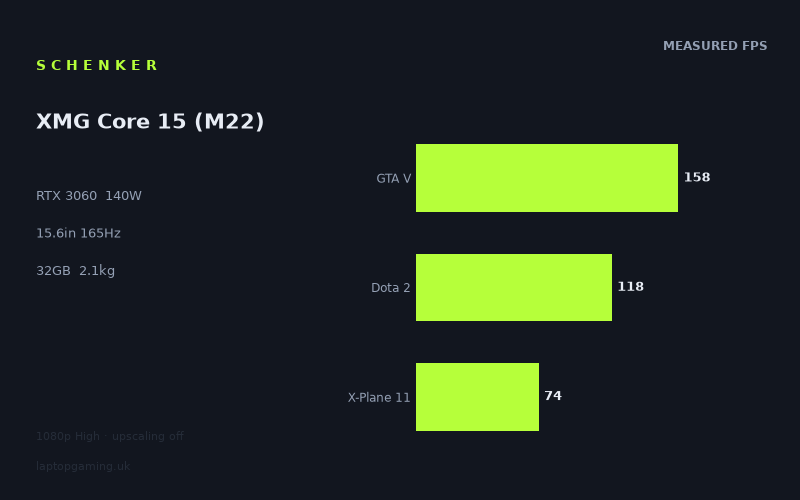
Frame rates
1920×1080, High preset, upscaling off.
Measured on this machine. Source: Notebookcheck, 2023-01-10.
Not scored: incomplete benchmark suite
Every scored laptop on this site is averaged over the same 5 games, and this one is short of Cyberpunk 2077, Baldur's Gate 3. A mean over 5 games is not comparable to a mean over 5, so we publish the figures we have and leave the score blank rather than rank it against machines tested on a different set. The numbers below are real - the suite is just incomplete.
How these numbers were produced
Frame rates here are not measured by us, and we label how each one was arrived at. A figure marked measured comes from a published run on that exact machine. A figure marked representative is derived from the GPU and its power limit (TGP) and cross-referenced against published reviews - a sound estimate of what that configuration delivers, but not a measurement of that specific laptop. Unless stated otherwise, numbers are 1920x1080, High preset, upscaling off. Where a laptop ships in several power configurations we use the wattage of the exact SKU listed, because a 140W RTX 5070 and a 115W one are not the same product.
In use
The short version
The Schenker XMG Core 15 (M22) is a performance-led 15.6in gaming laptop whose published results make a strong case for its RTX 3060 configuration. The important detail is not merely that it has an RTX 3060, but that this GPU is configured with a 140W power limit. That is a substantial part of why the measured figures are so healthy: Notebookcheck recorded 172fps in Strange Brigade, 160fps in The Witcher 3, 158fps in GTA V, 118fps in Dota 2, 118fps in Far Cry 5, 92fps in Final Fantasy XV, 74fps in X-Plane 11 and 73fps in God of War, all at 1920x1080 on the High preset with upscaling disabled.
The five-game scoring-suite mean is 123fps. That does not mean every game will run near the laptop’s 165Hz refresh rate, because the spread between games is substantial. It does mean that this is not an RTX 3060 configuration held back to the point where its name matters more than its real output. In the lighter and more frame-rate-friendly games represented here, it can exceed or closely approach the screen’s refresh ceiling. In the more demanding games, it remains well above the level where the data suggests compromised playability, but it does not produce 165fps-class results.
This is therefore a sensible choice for someone who wants a laptop that can deliver very high frame rates in games such as Strange Brigade, The Witcher 3 and GTA V at the tested settings, while still returning solid figures in Final Fantasy XV, X-Plane 11 and God of War. It also suits the buyer who values a 2560x1440, 165Hz IPS display but understands that the available benchmark data is at 1920x1080 rather than at the panel’s native resolution. The screen gives the machine a more ambitious target than the benchmark resolution alone suggests; the measured results establish a good 1080p baseline, not a promise of equivalent performance at 2560x1440.
Its 2.1kg weight puts it in the portable gaming-laptop category rather than the ultra-light category. That is a useful distinction. It is a machine that can reasonably move between home, work, study and travel, but the published specification does not support presenting it as a negligible-burden laptop. The 62Wh battery is part of the specification, but no battery-life measurement is available here, so there is no responsible basis for estimating unplugged gaming time, office-work endurance or video playback time.
There is one important limitation to the buying advice: there is no confirmed UK price for this exact configuration. As a result, no overall rating can be calculated, because value depends on price; the benchmark suite is complete and the machine ranks normally on the frame-rate leaderboard. That is not a criticism of the laptop itself, but it does prevent the most important final judgement in a purchase decision: whether its performance, display, memory, storage and weight are worth the money being asked.
For performance first, the Core 15 (M22) has a clear case. For value, there is not enough information yet. Buyers who can obtain this exact Ryzen 7 6800H, 32GB, 1TB SSD and RTX 3060 configuration at a sensible UK price should take the benchmark evidence seriously, particularly because the 140W GPU implementation compares far better than the RTX 3060 badge alone might imply. Buyers who need assured 165fps results in demanding games, guaranteed native-resolution performance figures, a lighter machine, or verified battery-life data should look elsewhere or wait for more evidence.
Performance
A high-power RTX 3060, not just an RTX 3060 on paper
The RTX 3060 is configured here with a 140W GPU power limit. That matters because laptop GPUs with the same model name can be configured differently, and the rival data shows why treating every RTX 3060, RTX 3070 or RTX 3080 laptop as though the GPU label settles the question is a mistake. The Core 15’s performance should be read as the performance of this 140W RTX 3060 paired with the Ryzen 7 6800H, rather than as a generic prediction for every RTX 3060 notebook.
Notebookcheck’s measured mean across the five scoring-suite games is 123fps at 1920x1080, High settings and with upscaling off. That is a useful headline number, but it is only a starting point. A mean is not the experience in any one game. The actual results range from 172fps in Strange Brigade down to 73fps in God of War among the listed games. A buyer choosing the Core 15 primarily for competitive or older, lighter-running games should pay much more attention to the higher end of that range. A buyer choosing it for more demanding games should focus on the 92fps, 74fps and 73fps results instead.
The most positive reading of the data is that there is no weak result in the published list. Even the lowest measured figure, 73fps in God of War, is comfortably above the sort of result that would suggest the laptop is struggling at the tested 1080p High settings. But there is also no evidence that this configuration simply makes every game a 165fps experience. It does not. The difference between 172fps in Strange Brigade and 73fps in God of War is too large to flatten into a single claim about “high-refresh gaming”. The right conclusion is more specific: the Core 15 can make meaningful use of a 165Hz screen in selected games, while other games will run well without approaching that refresh limit.
The fastest results
Strange Brigade is the standout result at 172fps. This is the only listed game to exceed the display’s 165Hz refresh rate at the tested settings. That makes it the clearest example of the screen and GPU being well matched for very high-refresh gaming at 1920x1080 High without upscaling. There is a small numerical margin between 172fps and 165Hz, but the important point is not the margin itself. It is that the benchmark data places the laptop beyond the panel’s stated refresh rate in this game.
The Witcher 3 follows at 160fps. That is just below 165Hz and is close enough to the panel’s refresh rate to support the same broad conclusion: at the tested settings, the Core 15 can produce a very high frame-rate experience in this title. It is not technically a measured 165fps result, so it would be inaccurate to call it a full refresh-rate lock. Still, 160fps is a strong figure and clearly belongs in a different performance class from the laptop’s 73fps result in God of War or its 74fps result in X-Plane 11.
GTA V reaches 158fps, again close to the display’s 165Hz specification. As with The Witcher 3, this does not establish a 165fps lock, but it confirms that the Core 15’s 140W RTX 3060 can run some games at frame rates that are much higher than the baseline expectations often associated with a mid-range mobile GPU. For a buyer whose main library includes games with similar performance behaviour to Strange Brigade, The Witcher 3 and GTA V, the 165Hz panel is not excessive. The benchmark evidence shows games where it has a practical purpose.
These three results also matter for a more subtle reason. They demonstrate that the Core 15 is not merely achieving its 123fps scoring-suite mean through a narrow cluster of similar results. It has genuinely high peaks in the data. That gives the machine a split personality in a good way: it can serve as a high-refresh gaming laptop in the right games, while retaining enough performance to handle the heavier titles in the list at materially lower but still strong frame rates.
The 118fps middle ground
Dota 2 and Far Cry 5 both record 118fps. Matching figures do not mean that the games place identical demands on the laptop, but they do create a useful performance reference point. At 118fps, the Core 15 is clearly delivering a high frame rate, yet it is not close enough to 165Hz to claim that the panel will be fully driven in the same way as it is in Strange Brigade. This is exactly why the display needs to be assessed against individual games rather than the mean alone.
For Dota 2, 118fps is a substantial result. For Far Cry 5, 118fps is equally substantial. In both cases, the data indicates that the Core 15 has enough performance for fluid high-refresh play at the tested settings, but not enough evidence to describe the outcome as 165Hz-class. That distinction may sound fussy, but it is important when a buyer is deciding whether the 165Hz panel is a central reason to choose this laptop. The answer depends on the games being played. In the measured data, it is fully exploited in Strange Brigade, closely approached in The Witcher 3 and GTA V, and only partly used in Dota 2 and Far Cry 5.
The 118fps pair also sits close to the 123fps scoring-suite mean. That makes these figures a better guide to the machine’s average position than the spectacular 172fps result in Strange Brigade or the more demanding 73fps result in God of War. If a buyer wants one figure that captures the Core 15’s likely general character at the tested settings, the 118fps results are arguably more informative than either extreme. They show a laptop that is fast enough for high-refresh gaming, but not one that makes the panel’s maximum refresh rate automatic.
The demanding games reveal the limit
Final Fantasy XV records 92fps. This is the first result in the listed data that falls below 100fps, but it remains a strong frame rate by any sensible reading of the evidence. The important point is that it sits well below the 165Hz screen refresh rate, showing that even with a 140W RTX 3060, the Core 15’s performance varies materially by game at 1080p High with no upscaling. Buyers expecting the laptop to deliver similarly high results across every title should take this seriously.
X-Plane 11 records 74fps, while God of War records 73fps. These are the two lowest figures in the listed results and are effectively level with one another. Neither result supports a claim that the laptop is a 165fps machine in these games. They do support a different, more realistic claim: the Core 15 can still run them at frame rates substantially above the lower end of the measured spread, despite the same 1920x1080 High test conditions and no upscaling.
The 73fps result in God of War is particularly useful as a reality check against the headline mean. A five-game mean of 123fps sounds like a laptop that should live comfortably in triple-digit territory, but God of War does not. That is not a contradiction; it is exactly what game-to-game variation looks like. The benchmark set is telling prospective owners to buy this machine based on the games they actually play, not based on a single average. Someone who spends most of their time in titles represented by Strange Brigade, The Witcher 3 and GTA V can reasonably value the high-refresh capability. Someone focused on titles that behave more like God of War or X-Plane 11 should value the stable-looking 73fps and 74fps results rather than expect the panel’s 165Hz rating to define the experience.
There is no measured result here for every current game, every preset, every resolution or every use of upscaling. The testing conditions are specific: 1920x1080, High preset, upscaling off. That specificity is a strength, not a weakness. It tells us exactly what the published numbers represent. It also means there is no basis for asserting what this laptop will do at a different preset, at 2560x1440, with upscaling enabled, or in a game absent from the list. Those may be reasonable questions, but they are not answered by these figures.
What the performance spread means in practice
The difference between 172fps in Strange Brigade and 73fps in God of War is not a reason to distrust the figures. It is the reason to use them properly. The Core 15 is not being measured in a synthetic workload or in a single title selected to flatter the hardware. The results show a realistic spread: very high frame rates in some games, strong triple-digit figures in others, and more moderate but still substantial results in the heaviest entries here.
The practical implication is that this laptop should not be bought on the assumption that a 165Hz panel turns every game into a 165fps game. It should be bought by someone who sees the value in having headroom where a game permits it and accepts that heavier games will sit further below the panel’s ceiling. That is a more mature reason to choose a high-refresh display. The screen is not wasted when a game runs at 73fps or 92fps; it simply is not being fully saturated by the measured frame rate.
The power limit helps explain why the Core 15 can deliver strong numbers for an RTX 3060 machine, especially in the comparison section below. But the 140W figure is not a magic guarantee. The data still has a clear ceiling in the more demanding games. It is best understood as helping the GPU compete strongly within its class and occasionally beyond what its model name might lead buyers to expect, rather than turning it into a universal replacement for a higher-tier GPU configured with more power.
The screen
A 2560x1440, 165Hz IPS panel with a performance caveat
The Schenker XMG Core 15 (M22) has a 15.6in IPS display with a 2560x1440 resolution and a 165Hz refresh rate. On paper, that is an attractive specification for a gaming laptop of this size. The resolution is higher than the 1920x1080 benchmark setting, while the refresh rate is higher than the frame rates achieved in most of the listed games. It is therefore important to separate what the screen can display from what the measured benchmark data confirms the GPU can supply.
The panel’s 165Hz refresh rate is directly relevant to Strange Brigade, where Notebookcheck measured 172fps. In that game, at the tested 1920x1080 High setting with upscaling off, the laptop can exceed the panel refresh rate. The Witcher 3 at 160fps and GTA V at 158fps also sit close to the panel’s limit. Those results make the display specification meaningful rather than decorative. The Core 15 has measured games in which its GPU can produce the sort of frame rates a 165Hz panel is intended to show.
Dota 2 and Far Cry 5 at 118fps tell a more moderate story. Both remain high frame-rate results, but neither reaches the display maximum. Final Fantasy XV at 92fps, X-Plane 11 at 74fps and God of War at 73fps sit further away again. This is not a defect in the display. It is simply the relationship between a high-refresh panel and a laptop whose performance depends heavily on the title being played. The refresh rate gives the machine room for the faster games; it does not compel the slower games to run at the same rate.
The main caveat is resolution. The display is 2560x1440, but every supplied frame-rate figure was measured at 1920x1080. It would be wrong to take 172fps, 160fps or any other listed result and present it as a measured native-resolution result. The benchmark data does not do that. It establishes the Core 15’s output at 1080p High with upscaling disabled, and no more.
This makes the laptop most straightforward to recommend to buyers who are comfortable judging its gaming ability at the tested 1080p setting. The native-resolution screen remains a genuine specification advantage, but native-resolution gaming performance is not quantified in the supplied data. A buyer for whom 2560x1440 gaming is the entire purpose of the purchase should not assume that the 1080p numbers transfer unchanged. A buyer who values the option of a 2560x1440 panel alongside well-documented 1080p performance has a much firmer basis for considering it.
Why IPS and 165Hz matter differently
The IPS panel type and 165Hz refresh rate describe different aspects of the display. The panel type identifies the display technology, while the refresh rate establishes the panel’s stated update ceiling. The available fact sheet does not provide measured brightness, colour coverage, response-time figures, contrast measurements or display calibration data. There is therefore no basis for declaring this screen especially bright, colour-accurate, fast in pixel response or suitable for a particular colour-critical workflow.
What can be said is narrower and more useful. It is a 15.6in IPS panel with 2560x1440 resolution and 165Hz refresh, paired with benchmark evidence that reaches or nearly reaches the refresh limit in several games at 1920x1080 High. That is enough to identify the intended balance of the specification: a sharper-than-1080p panel with enough refresh headroom for very high frame rates where the game and settings allow them.
Do not buy it solely because “165Hz” sounds better than a lower refresh figure. The data says that 165Hz is most relevant in a subset of the measured games. Strange Brigade is the clearest match, The Witcher 3 and GTA V are close, while the remaining listed games range from 118fps down to 73fps. The display is versatile because it accommodates all of those results, but its headline refresh rate should be treated as available headroom rather than a frame-rate promise.
Build, size and portability
The Core 15 uses a 15.6in screen and weighs 2.1kg. That combination gives it a clear place in the market: it is a full-size gaming laptop that remains movable, rather than a tiny ultraportable that happens to have gaming hardware. The 2.1kg figure is important because it gives more practical context than the screen size alone. A 15.6in machine is often chosen as a main laptop, and this weight suggests a design intended to travel when needed without being defined primarily by low mass.
There are no dimensions in the supplied specification. That means there is no responsible way to state its footprint, thickness or how easily it fits into a particular bag. Weight is the only direct portability measurement available, and it should be treated as such. Buyers who need a machine for frequent commuting, constant travel or extremely limited bag space should seek the missing dimensional information before treating the Core 15 as their automatic choice.
The 62Wh battery is another specification that needs careful handling. It confirms the battery capacity, but capacity is not battery life. No measured endurance figure is provided for gaming, web use, video playback or general productivity. It would be misleading to estimate how long it lasts away from mains power, because that outcome depends on workload and there is no tested result here to attribute. The honest conclusion is simply that it has a 62Wh battery and that published battery-life evidence is not available in this fact sheet.
The internal configuration is generous in the areas buyers tend to care about over the life of a gaming laptop: 32GB of memory and a 1TB SSD. Those are firm specifications, not inferred benefits. They mean the exact configuration under discussion is not a low-memory or minimal-storage variant. However, the available information does not state upgrade access, memory configuration, storage performance, spare slots, port selection, keyboard layout, webcam quality, speakers, cooling noise or chassis materials. None of those should be assumed from the name, weight or GPU power limit.
That absence of detail changes how the machine should be judged. The Core 15 can be assessed confidently as a 2.1kg, 15.6in laptop with a 62Wh battery, 32GB of memory, 1TB SSD storage, Ryzen 7 6800H processor, 140W RTX 3060 and 2560x1440 165Hz IPS screen. It cannot be assessed confidently for acoustic behaviour, thermals, input devices, connectivity or upgradeability from this evidence alone. Buyers who place those features above frame-rate output should not let the strong gaming data substitute for missing information.
How it compares
Against the MSI Prestige 15 with RTX 3050 Ti at 105W
Against the MSI Prestige 15, equipped with an RTX 3050 Ti at 105W, the Schenker XMG Core 15 averages 57fps ahead across four shared games. This is the largest positive gap among the named comparisons and is the clearest evidence that the Core 15’s 140W RTX 3060 is not merely posting respectable isolated figures. Across the shared-game comparison, it opens a substantial lead.
The comparison is useful because it shows the effect of stepping down both GPU tier and GPU power limit. The Prestige 15 has an RTX 3050 Ti at 105W, while the Core 15 has an RTX 3060 at 140W. The 57fps average lead should not be reduced to a claim that every game is exactly 57fps faster; it is an average across four shared games. But it is large enough to support a strong buying conclusion. If gaming performance is the priority between these two machines, the Core 15 is the clearly better fit on the shared benchmark evidence.
There is no confirmed UK price for the Prestige 15 either, so this is not a value comparison. It is a performance comparison only. If the two machines were available at radically different prices, that could alter the purchase decision, but the fact sheet does not permit speculation. What the data does permit is a direct statement that the Core 15 provides a much higher shared-game frame-rate average.
Against the MSI Katana GF66 with RTX 3070 at 85W
The comparison with the MSI Katana GF66 is more revealing. The Katana has an RTX 3070, a higher-numbered GPU designation than the Core 15’s RTX 3060, but it is configured at 85W. Across five shared games, the Core 15 averages the same frame rate. The listed difference is +0fps.
That near-zero result should not be dismissed as unhelpful. It is an important outcome. At 1920x1080, the lighter titles in the shared set are CPU-bound and compress genuine GPU gaps. In other words, a higher-tier GPU does not automatically produce a visible lead in this particular shared-game comparison, because the benchmark conditions and game behaviour can limit how much difference the GPU can express. The Core 15’s 140W RTX 3060 is therefore performing on level terms with the Katana’s 85W RTX 3070 in the available shared data.
This is exactly why the power-limit specification deserves attention. A buyer comparing laptop listings may be tempted to choose the RTX 3070 automatically. The shared figures say that would be too simplistic here. The Core 15 does not trail the Katana GF66 on average across their five shared games despite the difference in GPU labels. The comparison does not prove that the two machines will tie in every game, at every setting or at every resolution. It proves that they tie in the stated shared-game set under the available comparison method.
There is no confirmed UK price for the Katana GF66, so once again there is no value verdict to make. But as a performance lesson, this is perhaps the Core 15’s most useful rival comparison. The RTX 3060 name should not put buyers off when it is paired with a 140W limit and when the actual shared benchmark evidence shows parity with an 85W RTX 3070 laptop.
Against the Asus ROG Zephyrus G15 with RTX 3080
The Asus ROG Zephyrus G15 comparison produces another +0fps average, this time across three shared games. The Zephyrus G15 has an RTX 3080, yet the supplied shared-game result is again effectively level. That sounds counter-intuitive only if GPU model names are treated as complete performance descriptions. They are not. The comparison data shows that the Core 15 can match this RTX 3080 rival in the limited three-game shared set.
The explanation supplied with the rival data matters: at 1080p, lighter titles in the shared set are CPU-bound and compress genuine GPU gaps. This is not evidence that the RTX 3060 and RTX 3080 are universally equivalent. It is evidence that, in these shared 1080p results, the difference is compressed to the point where the average is +0fps. The small shared set is also relevant. Three games are enough to establish the reported tie, but not enough to make a sweeping claim about all gaming workloads.
For buyers, the lesson is practical. Do not pay attention only to the largest GPU number in a specification list. Look for attributable game data under stated test conditions. In this case, the Core 15’s measured shared-game position against the Zephyrus G15 is level, despite the rival’s RTX 3080. That makes the Core 15 a credible option for a buyer whose games resemble the shared set and who is considering the machine on gaming output rather than GPU branding.
As with the other rivals, no confirmed UK price is available for the Zephyrus G15. There is no basis for declaring either machine the better buy. The benchmark evidence only establishes that the Core 15 is not outclassed in the three shared games, and that the apparent GPU hierarchy is compressed under these 1080p conditions.
Against the MSI Raider GE77 HX with RTX 3080 Ti at 175W
The MSI Raider GE77 HX is the rival that most clearly beats the Core 15. Its RTX 3080 Ti is configured at 175W, and it holds an average advantage of 46fps across five shared games. Unlike the Katana GF66 and Zephyrus G15 comparisons, this is not a near-zero result requiring a CPU-bound explanation. It is a material performance gap in favour of the Raider.
This comparison establishes the upper boundary of what the Core 15 should be expected to compete with. A 140W RTX 3060 can match certain lower-power or CPU-limited higher-tier configurations in the available shared data, but it does not erase the advantage of a 175W RTX 3080 Ti laptop across this five-game comparison. Buyers who want the highest possible frame rates from this group should look to the Raider GE77 HX, subject to the usual need to consider price and the rest of the specification.
The Core 15 should not be criticised for losing here. It is better to treat the result as useful market positioning. The Raider’s 46fps lead shows that there remains a meaningful performance tier above this laptop. If the target is to maximise frame rates in the more demanding games, or to create more headroom beyond the Core 15’s 73fps, 74fps and 92fps results, the Raider’s shared-game advantage is relevant. If the target is strong performance in a 2.1kg 15.6in machine, the Core 15 has a different proposition.
No confirmed UK price is available for the Raider GE77 HX either, so the performance lead cannot be converted into a buying recommendation based on value. A 46fps average advantage is significant, but spending decisions require a price. The fact sheet establishes the performance hierarchy, not whether the Raider’s lead is worth paying for.
Who it’s for
Buy it for documented 1080p performance and a high-refresh display
The Schenker XMG Core 15 (M22) is for the buyer who wants strong, attributable gaming performance from a 15.6in machine and values evidence over GPU branding. The 140W RTX 3060 is the centre of the case. Notebookcheck’s figures show 172fps in Strange Brigade, 160fps in The Witcher 3, 158fps in GTA V, 118fps in Dota 2, 118fps in Far Cry 5, 92fps in Final Fantasy XV, 74fps in X-Plane 11 and 73fps in God of War at the stated settings. Those are not vague claims about capability; they are published figures tied to a specific resolution, preset and upscaling setting.
It is particularly suitable for someone who plays games that can make real use of the 165Hz panel. Strange Brigade exceeds the screen refresh rate, while The Witcher 3 and GTA V come close. Buyers who spend substantial time in games that behave like those should see the screen as a meaningful part of the package, not just a line in the specification. Dota 2 and Far Cry 5 at 118fps also support a high-refresh experience, even if they do not reach the panel’s maximum.
It is also a good fit for the buyer who needs more than the bare minimum memory and storage configuration. This model has 32GB of memory and a 1TB SSD. That does not answer every question about storage expansion or memory upgrades, but it does mean this exact version is already equipped with substantial stated capacity in both areas. Combined with the Ryzen 7 6800H, it is a configuration aimed at a buyer who wants a properly specified gaming laptop rather than an entry-level version with an attractive GPU label.
The Core 15 also makes sense for someone willing to carry a 2.1kg laptop in exchange for its gaming specification. It is not presented by the numbers as an ultra-light machine, but neither is it defined here by an extreme weight. For a buyer who wants one machine for a desk most of the time and transport some of the time, the weight is likely easier to accept than it would be for somebody carrying it continuously.
Buy something else if your priorities are different
Buy something else if your priority is the highest frame rate available among the named rivals. The MSI Raider GE77 HX has a 46fps average advantage across five shared games, backed by its RTX 3080 Ti at 175W. The Core 15 is powerful for its configuration, but the rival comparison makes clear that it is not the top performance option in this group.
Buy something else, or wait for more evidence, if native 2560x1440 gaming performance is non-negotiable. The Core 15 has a 2560x1440 screen, but the supplied measured figures are all at 1920x1080. There is no published number here for Strange Brigade, The Witcher 3, GTA V, Dota 2, Far Cry 5, Final Fantasy XV, X-Plane 11 or God of War at the panel’s native resolution. Buyers should not turn the 1080p figures into unsupported 1440p expectations.
Buy something else if low weight is the primary requirement. At 2.1kg, this is transportable, but it is still a 2.1kg gaming laptop. The fact sheet does not include dimensions, so there is no way to strengthen or soften that conclusion with footprint or thickness data. A buyer who needs the smallest and lightest possible travel machine should look for a laptop with lower published weight and complete dimensions.
Buy something else if battery runtime, fan noise, surface temperatures, keyboard quality, port selection, webcam quality or display calibration are the deciding factors. None of those has attributable measurement or specification detail in the supplied information beyond the 62Wh battery capacity and the IPS, 2560x1440, 165Hz screen specification. Strong frame rates should not be used as a substitute for evidence in those areas.
Finally, do not buy this exact configuration until the price makes sense for your budget. The absence of a confirmed UK price means there is no defensible value judgement to offer. Performance is well documented, and the rival comparisons show that the 140W RTX 3060 can be highly competitive against some higher-labelled but lower-power machines. But performance leadership in selected comparisons is not the same thing as value. Once a confirmed UK price exists, it can be judged against the 32GB memory, 1TB SSD, 15.6in 2560x1440 165Hz IPS display, 2.1kg weight and, above all, the published frame-rate record.