Review
Razer Blade 15 RTX 2070 Super Max-Q review
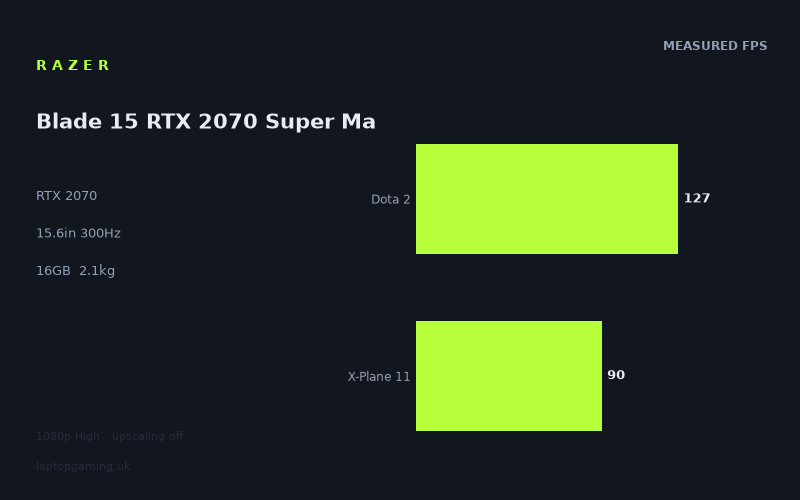
Frame rates
1920×1080, High preset, upscaling off.
Measured on this machine. Source: Notebookcheck, 2020-08-19.
Not scored: incomplete benchmark suite
Every scored laptop on this site is averaged over the same 5 games, and this one is short of Cyberpunk 2077, Baldur's Gate 3, GTA V. A mean over 3 games is not comparable to a mean over 5, so we publish the figures we have and leave the score blank rather than rank it against machines tested on a different set. The numbers below are real - the suite is just incomplete.
How these numbers were produced
Frame rates here are not measured by us, and we label how each one was arrived at. A figure marked measured comes from a published run on that exact machine. A figure marked representative is derived from the GPU and its power limit (TGP) and cross-referenced against published reviews - a sound estimate of what that configuration delivers, but not a measurement of that specific laptop. Unless stated otherwise, numbers are 1920x1080, High preset, upscaling off. Where a laptop ships in several power configurations we use the wattage of the exact SKU listed, because a 140W RTX 5070 and a 115W one are not the same product.
In use
The short version
The Razer Blade 15 RTX 2070 Super Max-Q is a 15.6in gaming laptop built around a 1920x1080 IPS display with a 300Hz refresh rate, a Core i7-10875H processor, 16GB of memory, a 1TB SSD and a 2.145kg chassis. Its published gaming figures are respectable at 1080p High settings with upscaling disabled, but the important qualification is that they do not make convincing use of a 300Hz panel in the games measured.
Notebookcheck’s figures show 141fps in The Witcher 3, 127fps in Dota 2, 90fps in X-Plane 11 and 84fps in Final Fantasy XV. Across the three games in the scoring suite for which figures are available, the mean is 100fps. That is a solid level of 1080p performance, particularly for someone who values a generally responsive experience at High settings without enabling upscaling. It is not, however, evidence that this configuration can routinely feed its display at anything close to the panel’s stated 300Hz maximum.
That distinction matters because the 300Hz screen is the feature most likely to catch a buyer’s eye. A very high-refresh display has real potential when a laptop is running games at very high frame rates, but these measured results span from 84fps to 141fps. Even the strongest result here, The Witcher 3 at 141fps, remains well below the screen’s 300Hz ceiling. The Blade is therefore better understood as a capable high-refresh 1080p machine than as a laptop whose available benchmark data proves a sustained 300fps-class gaming experience.
There is also a naming and specification point worth keeping clear. The machine is identified as the Razer Blade 15 RTX 2070 Super Max-Q, while the supplied GPU specification lists an RTX 2070. The benchmark evidence should be treated as evidence for this specified configuration and not as a reason to assume the performance of every differently configured Blade 15, every RTX 2070 laptop, or every product carrying a similar Max-Q label. Laptop GPU names do not by themselves tell a buyer the whole story, and no GPU power limit is supplied here. That missing figure prevents a firm technical explanation of how much power this particular graphics implementation is allowed to use.
The lack of a confirmed UK price is equally important. There is no basis here for calling it a bargain, expensive, poor value or good value. The performance is clear enough to judge on its own terms; value is not. Anyone considering a purchase should establish the exact retail price, the exact configuration and whether the seller is offering the same screen, processor, memory and storage specification before deciding whether the performance level justifies the asking price.
This Blade makes the most sense for someone who wants a relatively light 15.6in gaming laptop, wants a 1080p IPS panel, and is content with frame rates around the published 84fps-to-141fps range in the measured games at High settings. It is less convincing for a buyer whose main reason for choosing it is the number printed beside the screen refresh rate. The available figures do not show the machine turning modern, demanding games into 300fps experiences at these settings.
It is also not possible to place this laptop in the site’s normal overall ranking. We have no figures for GTA V or Strange Brigade. Every scored laptop is averaged across the same five games, so a partial set of results cannot be ranked fairly against machines with a complete set. That is not a minor administrative gap: it means an apparent numerical comparison would imply a degree of certainty the data does not support.
Performance
What the measured figures actually say
The available frame-rate data comes from Notebookcheck and was published on 2020-08-19. Every result here uses the same stated test conditions: 1920x1080 resolution, High preset and upscaling switched off. Those conditions are useful because they match the Blade’s native screen resolution and avoid making frame rates look stronger through an upscaling mode. They also define the limits of the evidence. These are not maximum possible figures after lowering every setting, nor are they results at a higher resolution, nor are they evidence for performance with upscaling enabled.
- The Witcher 3: 141fps
- Dota 2: 127fps
- X-Plane 11: 90fps
- Final Fantasy XV: 84fps
- Mean across the three available scoring-suite games: 100fps
The Witcher 3 is the best result in the supplied data at 141fps. That is a strong figure for a High preset with upscaling off, and it gives the Blade plenty of performance for a fluid 1080p presentation. It also illustrates the gap between “high frame rate” and “fully exploiting a 300Hz panel”. A result of 141fps is substantially below the display’s 300Hz refresh ceiling. The screen can still present the benefits associated with a high-refresh panel in terms of available refresh headroom, but the measured game does not provide enough frames to meet the screen’s maximum refresh rate.
Dota 2 runs at 127fps in Notebookcheck’s data. That is another clearly high frame-rate result, and it is close enough to the The Witcher 3 figure to show that the Blade can deliver well above conventional console-style frame-rate expectations in some games at these settings. Yet it tells the same broader story: 127fps is nowhere near proof that the 300Hz specification will be saturated. The display is not wasted simply because a game is below 300fps, but the premium implied by an exceptionally fast panel needs to be judged against the games a buyer actually plays.
X-Plane 11 is more demanding for this system in the published data, at 90fps. This is still a useful 1080p High result, but it changes the character of the laptop. At 90fps, the Blade is no longer in the sort of frame-rate territory that makes the 300Hz number central to the experience. Here the display is offering headroom rather than a refresh target the GPU is demonstrably reaching. For flight-simulation players, that is a much more relevant reading of the data than focusing on the panel’s maximum refresh specification.
Final Fantasy XV is the lowest measured result at 84fps. That does not make it a poor result in isolation: 84fps at 1920x1080 on High with upscaling disabled remains comfortably beyond a basic 60fps target. But it is important because it sets the lower end of the published spread. A buyer expecting the 300Hz display to transform every game into an ultra-high-frame-rate experience should pay attention to this figure. The available evidence includes a game that runs at 84fps, not merely games running above 120fps.
The mean of 100fps across the three available scoring-suite games is useful as a broad summary, but it should not be mistaken for a guarantee. A mean conceals the difference between 127fps in Dota 2, 90fps in X-Plane 11 and 84fps in Final Fantasy XV. Those are materially different outcomes for someone selecting a display refresh rate or deciding whether High settings are the right starting point. The average says that the Blade has a credible 1080p performance level. The individual games explain why a prospective owner should still think title by title.
The spread matters more than a single average
The spread from 84fps to 141fps is the most useful part of the benchmark data. It shows that this is not a laptop with one fixed gaming identity. In the measured games, it can look like a very fast 1080p system in one title and a more conventional high-frame-rate system in another. That is exactly why a headline average, even a helpful one such as 100fps, should not be used as a promise for every game in a library.
The published figures do not identify a single simple bottleneck shared by every game. They show different outcomes under the same resolution, High preset and no-upscaling test method. Game engines, graphics workloads and processor demands vary, so the correct practical conclusion is not that the Blade “does 100fps”. The correct conclusion is that it produced results around that level across the three available scoring-suite games, with a notably higher result in The Witcher 3 and lower results in X-Plane 11 and Final Fantasy XV.
For a buyer, this changes how settings should be approached. Someone playing games that resemble the measured titles in their demands may find High settings a sensible default at 1080p. Someone whose priority is frame rate rather than image quality should not assume High settings are the only worthwhile option, especially in titles closer to the 84fps and 90fps results. The benchmark data does not provide lower-preset figures, so it cannot tell us exactly what performance would result from reduced settings. It does, however, show that the screen’s 300Hz ceiling is not the performance level to expect from this laptop at the published High preset.
Equally, someone whose priority is image quality should not assume that 1080p High with upscaling off will always keep them above a particular personal threshold. The results are encouraging, but the range is broad enough that the individual game matters. Final Fantasy XV at 84fps and X-Plane 11 at 90fps show that the Blade’s performance is not so excessive that settings choices become irrelevant.
What the GPU power limit does, and does not, tell us here
The requested question about GPU power limit deserves a direct answer: no GPU power limit is provided in the fact sheet. That means there is no responsible basis for stating a wattage, describing this Blade as a higher-power or lower-power RTX 2070 implementation, or calculating how much performance is being gained or lost because of its graphics power configuration.
This matters particularly because the product name includes “Max-Q”. A label can suggest a particular design intention, but it is not a substitute for an actual supplied power figure. Without that figure, it would be speculation to claim that the Blade’s 84fps-to-141fps results are caused by a particular power limit, to say that a rival is faster because it has more GPU power available, or to infer that the 2.145kg weight was achieved through a specific graphics-power compromise.
What can be said is narrower and more useful. This specific Blade configuration, with its listed RTX 2070 GPU and Core i7-10875H processor, returned the published figures at 1920x1080 High with upscaling disabled. That is the real-world performance evidence available. The data shows a machine capable of 84fps to 141fps across the four measured games. It does not show why every title landed where it did at the hardware-power level.
A buyer comparing listings should therefore be careful with shorthand. “RTX 2070” is not enough to guarantee identical results between laptops, and “Blade 15 RTX 2070 Super Max-Q” is not enough to establish a power limit from this evidence. The sensible comparison is between published measurements made under comparable conditions, alongside confirmed specifications for the exact machines being considered. In this case, the direct rival comparisons supplied below are more useful than trying to fill missing technical information with assumptions.
Processor, memory and storage in the context of the data
The Blade is specified with a Core i7-10875H, 16GB of memory and a 1TB SSD. These are meaningful parts of the configuration, but the supplied benchmark data is gaming data, not a complete workstation or storage test. There are no published application benchmarks here, no memory-speed figures, no SSD throughput results and no evidence about upgrade access. It would be wrong to turn the specification list into claims about video editing, compiling, content creation, file-transfer speed or multitasking performance.
For gaming analysis, the important point is that these components are the context for the measured frame rates. The 141fps, 127fps, 90fps and 84fps results belong to this complete system, not to the GPU in isolation. Buyers should not assume that changing memory capacity, storage configuration, display type or processor selection on a different Blade listing will preserve the same results.
The supplied comparison note also highlights why processor limitations can matter at 1080p. In lighter titles within the shared-game set, CPU limits can compress genuine GPU differences. This is particularly relevant when two laptops with different graphics chips produce nearly identical averages. At this resolution, the GPU badge alone may not explain the observed result. The Blade’s Core i7-10875H is therefore part of the reason it should be assessed as a whole laptop configuration rather than as a graphics card attached to a screen.
The screen
A 300Hz display is a capability, not a promise
The Blade’s screen is a 15.6in IPS panel with a 1920x1080 resolution and a 300Hz refresh rate. On paper, that is a focused gaming specification: Full HD keeps the pixel count aligned with the laptop’s benchmark resolution, while 300Hz gives the panel very substantial refresh headroom. The benchmark conditions are especially relevant here because Notebookcheck’s figures were also recorded at 1920x1080. There is no need to guess how the machine performs at its native resolution; the published data already uses it.
The panel’s 300Hz refresh rate should be interpreted carefully. It describes the maximum number of times the display can refresh in a given second. It does not mean every game will be rendered at 300fps. In the four measured games, none reaches 300fps: The Witcher 3 reaches 141fps, Dota 2 reaches 127fps, X-Plane 11 reaches 90fps and Final Fantasy XV reaches 84fps.
That does not undermine the usefulness of the panel, but it does define it. The screen gives the machine room for very high frame rates in games and settings combinations not represented by this data. The supplied evidence simply does not demonstrate such results. For the games measured at High settings with upscaling off, the Blade is operating below the panel’s maximum refresh rate, sometimes far below it.
This is why the display is best seen as a high-refresh screen with considerable unused headroom in the published tests. Buyers who want a 1080p IPS panel and value the possibility of high frame rates may still find that appealing. Buyers who are choosing specifically between a very high-refresh panel and a less extreme alternative should base that choice on the titles they play, because the measured games do not make a universal case for 300Hz.
How well the GPU drives the panel in the measured games
At 141fps in The Witcher 3, the Blade is delivering a frame rate that makes a high-refresh display meaningful. It is clearly above a basic 60fps experience and should suit a player who values visibly frequent frame updates. Yet the panel has much more capacity than the benchmark result uses. This is not a criticism of 141fps; it is a warning against equating “300Hz panel” with “300fps gaming laptop”.
Dota 2 at 127fps makes a similar case. It is a strong figure, but it remains below the display’s maximum refresh. The gap matters more for buyers who expect the screen specification to be a direct performance target rather than a ceiling. The Blade can present the frames it produces, but the benchmark does not show it approaching the point at which the display is fully fed.
The 90fps result in X-Plane 11 and the 84fps result in Final Fantasy XV shift the conversation further. In these games, the 300Hz panel is not the limiting factor shown by the measurement. The laptop’s rendered frame rate is. A buyer primarily interested in these kinds of more demanding workloads should regard the display as generous overhead, not as a specification that the GPU will routinely exploit at the stated High preset.
The 1920x1080 resolution is nevertheless sensible for the benchmark performance on display. There is no published evidence here for gaming at a higher native resolution, and there is no reason to assume the same 84fps-to-141fps range would carry over unchanged to a more demanding pixel count. The Blade’s screen resolution keeps the configuration and the test methodology aligned: the machine is being judged in the mode its own display is designed to use.
What cannot be concluded about the panel
The IPS panel type is confirmed, but no additional display measurements are supplied. There are no figures here for brightness, colour coverage, contrast, response time, adaptive-sync support, glare treatment or calibration. It would therefore be misleading to claim that the screen is colour-accurate, especially bright, fast in pixel response, suitable for colour-critical work, or ideal for outdoor use.
The panel can be described accurately as a 15.6in, 1920x1080, 300Hz IPS display. The gaming data can be used to discuss whether the GPU drives it at its native resolution. Beyond that, the facts do not support stronger claims. This is worth stating because a 300Hz specification can distract from the display qualities that matter outside raw refresh rate, and those qualities are simply not documented in the supplied information.
Build, size and portability
What the 2.145kg weight means
The Blade weighs 2.145kg. That is the clearest portability figure available, and it places the laptop’s gaming performance in a chassis that is not being presented here as a desktop replacement by weight alone. It is still a substantial machine to carry regularly, particularly once a charger and other accessories are part of the journey, but the supplied weight is materially relevant for someone who expects to move a gaming laptop between home, work, study or travel locations.
Weight should not be confused with dimensions, however. No dimensions are supplied. We cannot say whether the Blade is unusually thin, unusually compact for a 15.6in machine, easy to fit in a particular bag, or smaller than any named rival. The 2.145kg figure tells us how much the laptop itself weighs; it does not describe its footprint, thickness, power brick or packed travel weight.
That restraint matters because “portable gaming laptop” means different things to different buyers. For someone moving between rooms or taking the laptop out occasionally, 2.145kg may be entirely manageable. For someone carrying it every day alongside books, work equipment or other hardware, it remains a meaningful load. The fact sheet supports that practical distinction without pretending to know the complete travel setup.
Battery capacity is not battery life
The Blade has an 80Wh battery. That is a capacity specification, not a measured endurance result. There are no battery-life figures in the supplied data, whether for gaming, video playback, web browsing, idle use or mixed work. It would be irresponsible to turn the 80Wh figure into an estimated number of hours.
The right conclusion is simply that the laptop contains an 80Wh battery and that no published runtime is available here. A buyer who needs dependable battery use away from mains power should seek a measured endurance result for the exact configuration rather than relying on capacity alone. Gaming performance figures at 1920x1080 High do not answer a battery-life question, and no assumptions should be made about whether the published frame rates apply on battery power.
Build quality, thermals and noise are not documented here
There is no supplied information about materials, keyboard feel, trackpad quality, port selection, webcam, speakers, lid rigidity, internal layout, upgradeability, fan noise or surface temperatures. There are also no temperature or noise measurements. The Blade name may carry expectations for some buyers, but expectations are not evidence. This review can analyse the stated specifications and Notebookcheck’s gaming figures; it cannot honestly claim that the chassis is premium, quiet, cool-running, robust or easy to service.
That does not mean those issues are unimportant. On a gaming laptop, they can be decisive. It means they remain unanswered by the available facts. Buyers who care strongly about acoustics, keyboard quality, connectivity or maintenance should not treat this performance-focused evidence as a complete ownership assessment.
How it compares
Why these comparisons need careful reading
The supplied rivals are all from the same GPU generation, but they represent a useful spread rather than a single nearest alternative. The comparisons use only games that both machines have in common, with preference given to the scoring suite. That is the right way to compare incomplete benchmark sets: do not compare a result from one game against a result from another and do not pretend that a partial suite is a complete ranking.
The comparison averages are valuable, but they are not overall laptop verdicts. No confirmed UK prices are available for the rivals, so there is no price-performance conclusion to make. There are also no dimensions, battery-life results, display measurements, thermal figures or noise figures supplied for them. The figures below answer one narrower question: how this Blade’s gaming performance compares with these specific machines across their shared games.
One further point is especially important. The shared-game set includes lighter titles at 1080p where CPU limits can compress genuine GPU differences. In other words, a near-zero difference between laptops with different GPUs is not necessarily evidence that their graphics hardware is equivalent. It can show that the game and resolution are limiting performance elsewhere. That is why the comparisons should be read as observed outcomes in the shared tests, not as a universal hierarchy of graphics chips.
Against the Schenker XMG Core 15 with RTX 2060
Against the Schenker XMG Core 15 with RTX 2060, the Blade averages 31fps more across three shared games. This is the largest positive gap among the specified rivals and is the clearest evidence that the Blade’s measured performance sits meaningfully above at least one lower-tier option from the same generation.
A 31fps average advantage is large enough that it should affect a buyer’s decision if the two machines are being considered primarily for 1080p gaming performance. The Blade’s own results already show a range from 84fps to 141fps in the four published games. Adding an average advantage of 31fps over the XMG Core 15 in the shared set indicates that the Blade is not merely trading blows with that RTX 2060 rival. It has a substantial measured lead in those common tests.
That does not settle the purchase decision because neither machine has a confirmed UK price in the supplied facts. If the XMG Core 15 were priced very differently, value could change. Nor can we say whether the Razer has a better screen, quieter cooling, longer battery life or more convenient chassis. But if the choice is narrowed to the shared-game benchmark evidence, the Blade has the stronger case by a clear margin.
Against the Schenker XMG Apex 15 with RTX 2070
Against the Schenker XMG Apex 15 with RTX 2070, the Blade averages just 1fps more across three shared games. This is effectively a tie in the available comparison data. It should not be inflated into a meaningful gaming victory for the Razer, and it should not be read as proof that the machines are identical in every game or every configuration.
The near-zero result is useful precisely because it resists easy assumptions. Both systems carry an RTX 2070 designation in the supplied specifications, but laptops with similar GPU names can still differ in broader design and operating characteristics. Conversely, the matching outcome here does not tell us that every technical detail is the same. It tells us that, across these three shared games, their observed performance is almost indistinguishable.
The supplied comparison note explains why this can happen at 1080p: lighter titles in the shared set can be CPU-bound, compressing genuine GPU differences. That means a tiny average gap should be interpreted as a result of the measured workload, not as a definitive statement that graphics performance will always be level. For a buyer choosing between these two machines, factors not available in this fact sheet may be more decisive than the shared-game average. Price, screen requirements, battery needs, weight, noise and build preferences could all matter, but they cannot be resolved with the information provided.
Against the MSI Creator 17 with RTX 2080
The MSI Creator 17 with RTX 2080 averages 1fps ahead of the Blade across three shared games. Again, this is a near-zero difference and should be treated as an effective tie in the available shared results, not as evidence that the MSI has a practically decisive gaming advantage.
At first glance, an RTX 2080 label might lead a buyer to expect the Creator 17 to be clearly faster. The benchmark comparison shows why labels alone are insufficient. In these particular shared 1080p tests, the MSI’s advantage is only 1fps. The stated reason for such compressed gaps is that lighter titles in the shared set can be CPU-bound at 1080p. When that happens, the available GPU capability may not translate into a proportionately larger frame-rate result.
This is a strong example of why buyers should not shop solely by GPU name. The Blade does not need to be declared universally equal to an RTX 2080 laptop to make the point. It is enough to say that, in the three shared games used here, it is essentially level with the MSI Creator 17. That is valuable performance evidence for the Blade, while also leaving open the possibility that a different game selection, resolution or setting level could produce a different separation.
Against the MSI GT76 Titan DT with RTX 2080
The MSI GT76 Titan DT with RTX 2080 averages 21fps more than the Blade across three shared games. This is the largest negative comparison gap in the supplied rival set and the clearest evidence that the Blade does have a performance ceiling relative to the strongest listed alternative.
A 21fps average deficit is not a trivial difference. It reinforces the view that the Blade is a capable 1080p gaming laptop rather than the outright performance leader among these same-generation machines. The GT76 Titan DT has the better measured outcome in the shared games, and buyers whose primary priority is extracting the highest frame rates from this comparison group should take that seriously.
At the same time, the supplied data does not allow a full ownership comparison. We cannot state the GT76 Titan DT’s price, weight, dimensions, battery life, noise or screen quality here. We also cannot assign the 21fps gap to a stated GPU power limit, because no such power-limit figure is supplied for the Blade. The narrow conclusion is the correct one: in the shared benchmark evidence, the MSI GT76 Titan DT is faster by 21fps on average.
What the rival spread says about the Blade
Viewed together, the rivals position the Blade in an interesting middle ground. It is clearly ahead of the RTX 2060-equipped Schenker XMG Core 15 by 31fps on average across three shared games. It is essentially level with the RTX 2070 Schenker XMG Apex 15 and the RTX 2080 MSI Creator 17, with only 1fps separating each comparison. It trails the RTX 2080 MSI GT76 Titan DT by 21fps on average.
That pattern is more informative than a simplistic GPU-label ranking. The Blade is not automatically slower than every RTX 2080 laptop in the data, since it is effectively tied with the MSI Creator 17 in their shared tests. Nor is it automatically equivalent to all RTX 2070 systems in all circumstances, even though it is level with the XMG Apex 15 here. The one robust conclusion is that benchmark outcomes depend on the complete laptop and the specific games being tested.
It also supports a practical buying view. The Blade’s performance is strong enough that it should not be dismissed as merely a thin-looking alternative to more performance-focused machines. It has a substantial lead over the named RTX 2060 rival and can match the named Creator 17 in the common tests. But someone pursuing the highest frame rates from this group has evidence that the GT76 Titan DT is faster. Which trade-off is preferable depends on factors including price and portability, and the missing price information prevents a final value judgement.
Who it’s for
Buy it if the published performance matches your games and priorities
The Blade is best suited to a buyer who wants a 15.6in 1080p gaming laptop with an IPS screen, 16GB of memory, a 1TB SSD and a stated weight of 2.145kg, and who is satisfied by the kind of frame rates Notebookcheck recorded at High settings with upscaling disabled. The benchmark data supports an expectation of strong performance in the measured games, from 84fps in Final Fantasy XV through 141fps in The Witcher 3.
It is particularly sensible for someone who sees the 300Hz panel as generous headroom rather than a promise of 300fps. At native resolution, the available figures show genuinely high frame rates in The Witcher 3 and Dota 2, and solid results in X-Plane 11 and Final Fantasy XV. A buyer who values responsive 1080p gaming but does not require every game to approach the display’s maximum refresh rate has a coherent reason to consider it.
The Blade also has a strong case against the Schenker XMG Core 15 if gaming performance in the shared games is the main concern. Its 31fps average lead is the most decisive comparison in the supplied set. If the two are available at prices that make the Razer viable, that benchmark gap is meaningful evidence in its favour. The crucial condition is that the actual UK price must be confirmed first; no price is available here, so the size of the performance lead cannot be converted into a value conclusion.
It may also appeal to a buyer comparing it with the XMG Apex 15 or MSI Creator 17 who wants to avoid making a decision purely from a GPU badge. The Blade is essentially level with both in the limited shared-game data, despite the Creator 17’s RTX 2080 listing. That does not guarantee parity beyond those tests, but it is enough to show that the Blade belongs in the conversation rather than being ruled out by specification shorthand.
Buy something else if 300Hz utilisation is the main goal
Buy something else, or at least seek more game-specific data, if your main reason for choosing this machine is to drive a 300Hz display as fully as possible. The measured figures do not show 300fps in any of the four games available. They show 141fps, 127fps, 90fps and 84fps at 1920x1080 High with upscaling off. That is good gaming performance, but it is not evidence for the extreme frame rates implied by the panel’s maximum refresh specification.
This is especially relevant for players whose favourite games resemble X-Plane 11 or Final Fantasy XV in the benchmark data. The Blade’s 90fps and 84fps results are respectable, but they leave most of the display’s refresh capacity unused. If the priority is simply smooth gaming, that may be perfectly acceptable. If the priority is an experience consistently aligned with a 300Hz panel, the current evidence does not establish it.
Buyers seeking the strongest measured performance among the listed rivals should also look closely at the MSI GT76 Titan DT. It averages 21fps ahead of the Blade across three shared games. There is no basis here for saying whether the MSI is a better purchase overall, because its price and other practical characteristics are not confirmed. But for raw shared-game frame rate, it has the clearer advantage.
Buy something else if price, battery life or chassis details decide the purchase
Anyone making a value-led purchase should wait for a confirmed UK price. Without one, the Blade cannot be recommended as good value or criticised as poor value. Frame rates are only one side of the buying decision, and a laptop with 84fps-to-141fps gaming performance can be compelling or uncompetitive depending on its actual asking price and the alternatives available at that time.
Buy something else, or find additional verified information first, if long battery life is essential. The only battery fact supplied is the 80Wh capacity. There is no measured runtime. Capacity alone cannot tell a commuter, student or frequent traveller how long the laptop will last away from mains power in their own use.
The same applies to buyers who care deeply about fan noise, temperatures, build materials, keyboard quality, port selection, display brightness or upgradeability. None of those areas is documented in the supplied fact sheet. It would be a mistake to buy on the assumption that the Blade will excel in them merely because it has a recognisable name, a 300Hz IPS panel or a 2.145kg weight.
The final buying view
The Razer Blade 15 RTX 2070 Super Max-Q has enough published gaming performance to be taken seriously as a 1080p High-settings laptop. Notebookcheck’s 141fps result in The Witcher 3, 127fps in Dota 2, 90fps in X-Plane 11 and 84fps in Final Fantasy XV show a system that can deliver a strong gaming experience at its native 1920x1080 resolution without upscaling.
The limitation is not that the laptop is slow. It is that the 300Hz display specification is more ambitious than the measured game results. None of the available figures reaches the panel’s maximum refresh rate, and the lower results in the set are much closer to a conventional high-frame-rate experience than to a 300fps target. Buyers should therefore choose it for its demonstrated 1080p performance and its stated 2.145kg weight, not on the assumption that the screen’s headline refresh rate will be fully used in every demanding game.
Its rival results are encouraging but nuanced: it is well ahead of the named RTX 2060 machine, effectively tied with the XMG Apex 15 and MSI Creator 17 in the shared tests, and behind the MSI GT76 Titan DT. That is a credible position, but not a complete ranking. With no figures for GTA V or Strange Brigade, and with no confirmed UK price, the honest conclusion is that this is a capable but incompletely documented option whose suitability depends heavily on the games you play and the price you can actually buy it for.