Review
Lenovo Yoga Pro 7 14IRH G8 review
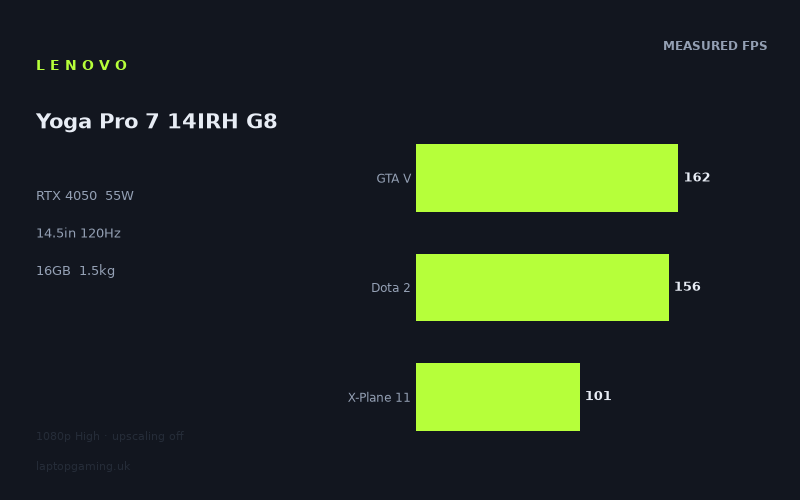
Frame rates
1920×1080, High preset, upscaling off.
Measured on this machine. Source: Notebookcheck, 2023-05-08.
Not scored: incomplete benchmark suite
Every scored laptop on this site is averaged over the same 5 games, and this one is short of Cyberpunk 2077, Baldur's Gate 3. A mean over 3 games is not comparable to a mean over 5, so we publish the figures we have and leave the score blank rather than rank it against machines tested on a different set. The numbers below are real - the suite is just incomplete.
How these numbers were produced
Frame rates here are not measured by us, and we label how each one was arrived at. A figure marked measured comes from a published run on that exact machine. A figure marked representative is derived from the GPU and its power limit (TGP) and cross-referenced against published reviews - a sound estimate of what that configuration delivers, but not a measurement of that specific laptop. Unless stated otherwise, numbers are 1920x1080, High preset, upscaling off. Where a laptop ships in several power configurations we use the wattage of the exact SKU listed, because a 140W RTX 5070 and a 115W one are not the same product.
In use
The short version
The Lenovo Yoga Pro 7 14IRH G8 is not a gaming laptop, and the most useful thing this review can do is say so at the top and then explain, carefully, what that means for someone considering it as one.
It is a 1.52kg, 14.5in machine with a very high-resolution 3072x1920 IPS panel, a 73Wh battery and an RTX 4050 running at a 55W power limit. That last figure is the one that determines everything about how it plays games. The RTX 4050 is deployed across a wide band of power depending on the chassis it is fitted to, and 55W sits towards the bottom of that band. This is a graphics card configured to fit inside a thin creator laptop without turning it into a hairdryer, not one configured to extract every available frame.
Given that, the measured figures are better than you might expect. Notebookcheck's numbers put GTA V at 162fps, F1 2021 at 158fps and Dota 2 at 156fps — all at 1920x1080 with the High preset and upscaling switched off. The other end of the list is where the machine's limits show: Final Fantasy XV at 60fps and Cyberpunk 2077 at 53fps. That is a spread of roughly three to one across ten games, and understanding where it comes from is the difference between buying this machine happily and buying it by mistake.
Two caveats up front. We have no confirmed UK price for this configuration, which means no value verdict is possible here — and value matters more than usual for a machine like this, because a thin laptop with a discrete GPU is priced against both gaming laptops and premium ultraportables and can look like a bargain or a rip-off depending on which side you approach it from.
The second is scoring. Our ranked laptops are averaged over the same five games so the table means something. This machine has GTA V, Dota 2 and X-Plane 11 from that suite, but no Baldur's Gate 3 result, and its Cyberpunk figure comes from version 1.6 rather than the release we score against — a meaningful difference, since the game changed substantially afterwards. A partial set cannot be averaged against a complete one without quietly flattering or punishing the machine, so the Yoga Pro 7 sits outside the ranked table. That is a data gap, stated plainly, not a criticism.
Who it suits, in one line: someone who needs a genuinely portable 14in laptop for work first, wants a superb screen for that work, and wants to be able to play games properly in the evening at 1080p rather than merely tolerably.
Performance
What a 55W power limit actually means
Almost every question about this machine's gaming performance resolves to the same fact: the GPU is running well below what the silicon is capable of, because the chassis cannot dissipate more heat than that without becoming unpleasant to use.
That is not a design failure. It is the deliberate trade a thin machine makes, and it is worth spelling out what is being traded. A laptop that draws more power through its GPU needs more cooling capacity, which means thicker heatsinks, larger fans, more exhaust area and more internal volume. Those things add height and mass. A 14.5in laptop at 1.52kg has none of that room, so the GPU is configured to fit the cooling rather than the cooling being built to fit the GPU. The result is a graphics card that sustains lower clocks under sustained load than the same chip in a heavier machine, and the gap grows as the workload gets harder — because a power-limited GPU has less headroom to give exactly when a game demands the most.
You can see this in the shape of the measured list. At the top, where the games are light, the power limit barely matters; the GPU is not being asked to draw anywhere near its ceiling, so having a low ceiling costs nothing. At the bottom, where Cyberpunk sits at 53fps, the limit is the binding constraint and the machine is giving up real performance to a heavier laptop with the same chip. The rival comparisons below make that concrete.
There is also a CPU dimension that is easy to miss. The Core i7-13700H is a capable processor, and in a thin chassis the GPU and CPU share both a cooling system and, usually, a combined power envelope. Under a load that hammers both — which is what a modern open-world game does — neither component gets its full allocation. That is a general property of thin machines with discrete graphics rather than a specific finding about this one, but it is part of why the heavy end of the chart looks the way it does.
The top of the chart: three games, one wall
GTA V at 162fps, F1 2021 at 158fps and Dota 2 at 156fps sit within six frames of one another. Those three games share nothing technically. GTA V is a 2013 open-world title built around hardware two console generations old. F1 2021 is a racing sim with a tightly controlled scene and a well-behaved engine. Dota 2 is deliberately built to run on modest hardware because a large share of its audience does not own gaming machines.
What they do share is that none of them is hard enough at 1080p to occupy a modern discrete GPU. All three results are effectively measurements of the processor, the driver and the engine rather than the graphics card. Give this machine a faster GPU and those numbers would barely move; give it a slower one and they would move less than you would think. That is the definition of a CPU-bound result, and recognising it is the key to reading the rest of this review, because three of the four rival comparisons below rest on exactly these games.
The middle: where the GPU takes over
F1 22 at 117fps is the first result to break away from the cluster, and the comparison with F1 2021 at 158fps is unusually clean because the two games are consecutive entries in the same series on the same engine lineage. A newer, heavier version of a familiar workload costs this machine a substantial chunk of its frame rate. That is a GPU-limited difference, and it is the first sign in the list that the 55W ceiling is doing something.
X-Plane 11 at 101fps is a different animal. Flight simulators are bound by single-threaded processing and by the volume of scenery data being marshalled, so this result reflects the i7 and the storage subsystem as much as the graphics card. It belongs in the scoring suite precisely because it stresses a part of the machine that pure GPU benchmarks ignore.
The Witcher 3 at 96fps is worth pausing on. The original release of that game is a 2015 title, and on a machine that produces 162fps in GTA V you might expect it to sit much higher. It does not, because The Witcher 3 pushes harder on foliage, shadow cascades and post-processing than its age suggests, and those are GPU costs rather than CPU costs. It is the point in the list where the balance tips decisively from processor-limited to graphics-limited.
The bottom: what this machine actually cannot do
Far Cry 5 at 81fps, Hogwarts Legacy at 74fps, Final Fantasy XV at 60fps and Cyberpunk 2077 at 53fps are the four results that define the machine's realistic ceiling, and they deserve more attention than the fast ones.
Far Cry 5 at 81fps is a good outcome. It is a dense open-world game with heavy vegetation and long draw distances, and clearing 80fps at 1080p High with no upscaling on a low-power entry GPU is comfortably into smooth territory.
Hogwarts Legacy at 74fps is more informative, because it is a genuinely modern title. It has a reputation for being heavy on both VRAM and streaming, and it is exactly the sort of game where a 4050's memory allocation and a thin chassis's power limit both start to matter. 74fps at 1080p High is a perfectly playable result and a fair representation of what recent big-budget releases will feel like on this hardware at that resolution.
Final Fantasy XV at 60fps is the machine sitting exactly on the threshold that most people consider the floor for comfortable play. Final Fantasy XV is an odd, punishing console port that has always cost more performance than its visuals justify, so this is not a red flag in itself. But it is a useful marker: there are games from the previous console generation that will land at around this level, and any of them will feel less than luxurious.
Cyberpunk 2077 at 53fps is the slowest result in the set, and it is the number to hold in your head when deciding whether this machine is enough. Bear the version caveat in mind — this is 1.6 rather than the current release — but the shape of the result is clear. At 1080p, High preset, no ray tracing, no upscaling, one of the heaviest mainstream games of its era lands below 60fps. That is playable, and it is also the honest ceiling. Turning on ray tracing, or raising the resolution towards the panel's native figure, would push it a long way further down.
Where the spread comes from
The distance from 162fps at the top of this list to 53fps at the bottom is roughly a factor of three. Very little of that spread is caused by the graphics card's raw capability, and understanding the split is more useful than memorising the numbers.
Roughly the top third of the list is CPU-bound and would look similar on much faster hardware. The middle third is transitional, with the GPU increasingly setting the pace. The bottom third is entirely GPU-bound, and it is where the 55W power limit costs real frames against a heavier machine carrying the same chip. If you want to predict how a game not on this list will run, the question to ask is which of those three groups it resembles. Competitive titles, older games and anything designed to run on modest hardware belong in the first group. Recent big-budget releases with modern lighting belong in the third.
One more structural point. Every figure here is at 1920x1080 with upscaling off. That last clause matters more on this machine than on most, because a thin laptop with a low GPU power limit and a very high-resolution panel is precisely the hardware upscaling was invented for. The measured numbers describe the machine with one hand tied behind its back, deliberately, so that they are comparable with every other laptop measured the same way. In real use, most people would leave DLSS on and get a materially different experience. We have no measured figures for that, so we will not invent them — but do not mistake the no-upscaling numbers for the only way this machine can be played.
The screen
A 14.5in IPS panel at 3072x1920 with a 120Hz refresh rate is a genuinely excellent display specification, and it is the clearest evidence that this machine was designed for something other than gaming.
Start with the resolution. 3072x1920 in a 16:10 aspect ratio on a 14.5in panel is an extremely high pixel density — dramatically sharper than the 1080p and 1440p panels typical of gaming laptops. For text, for photographs, for design work, for reading long documents, that density is transformative in a way that is easy to dismiss until you have used one. The 16:10 shape adds usable vertical space compared with a 16:9 panel of the same width, which matters for documents, code and timelines far more than it matters for games.
Now the arithmetic that gaming buyers need to confront. 3072x1920 is roughly 2.85 times the pixel count of 1920x1080. Every measured frame rate in this review is at the lower figure. There is no plausible reading of the data in which this GPU drives modern games at the panel's native resolution at High settings with upscaling off. Cyberpunk at 53fps at 1080p does not become anything you would want to play at native. Hogwarts Legacy at 74fps does not either.
This is not a criticism of the panel — it is a description of how the machine has to be used. There are three workable approaches. Play demanding games at 1080p or at an intermediate resolution and accept the scaling softness, which on a panel this dense is less objectionable than it would be on a coarser one. Play at native resolution with DLSS carrying the load, which is exactly what the technology exists for and the single most sensible option here. Or play at native resolution with the detail settings well below High, which works for lighter titles and less well for heavy ones.
The 120Hz refresh rate is a good match for the machine's actual behaviour, and notably better matched than a higher figure would have been. Three of the ten measured games clear it outright — GTA V at 162fps, F1 2021 at 158fps, Dota 2 at 156fps — which covers the competitive and older titles where high refresh genuinely changes how a game feels. F1 22 at 117fps sits just below it, close enough that variable refresh would hold it smooth. Everything from The Witcher 3 downwards runs well short, but those are games where you are chasing image quality rather than motion clarity. A 240Hz panel on this hardware would have been a specification-sheet flourish with almost nothing to feed it; 120Hz is the honest number.
IPS rather than OLED is a defensible choice and, for a machine likely to spend most of its life displaying static interface elements in productivity software, arguably the safer one — there is no burn-in risk to think about. The trade is contrast: blacks will be grey in a dark room, and games with a lot of night-time content will look flatter than they would on a self-emissive panel. We have no measured brightness, contrast or colour-gamut data for this specific display, so we will not characterise it beyond the specification.
Build, size and portability
1.52kg is the number that justifies this machine's existence, and it deserves to be treated as a feature rather than a footnote.
A 14.5in laptop at 1.52kg with a 73Wh battery is something you carry every day without thinking about it. That is a fundamentally different relationship with a computer than the one you have with a 2.4kg gaming laptop and its brick of a charger. It goes in a bag with books. It sits on a train table. It comes to a meeting. None of that is true of the machines this review compares it against on frame rates, and any assessment that only counts frames is measuring the wrong thing.
The 73Wh battery is generous for a laptop of this size and is the other half of the portability argument. We have no measured runtime figures for this machine and will not state one, but the specification is favourable: a large cell in a small chassis with a processor that can drop to low-power operation and a discrete GPU that can be bypassed entirely for non-gaming work. What is certain, and true of every laptop with discrete graphics, is that gaming unplugged is a different proposition — GPU power limits are cut hard on battery and the cell drains quickly under load. This machine will be an excellent all-day laptop and a socket-bound gaming machine, and those two facts are not in tension.
The 14.5in size has consequences beyond weight. It constrains the keyboard, though machines in the Yoga Pro line generally have good ones, and it constrains the cooling, which is the root cause of the 55W power limit discussed above. It also constrains ports and internal expansion in ways typical of thin machines. We have no confirmed information on this unit's upgradeability, so we are not going to speculate about whether the memory is soldered or the storage replaceable, but a buyer should check before assuming either.
16GB of memory is the specification most likely to age awkwardly. It is currently adequate for gaming and comfortable for most productivity work, but it is no longer generous, and if it turns out to be soldered it is a decision made permanently at purchase. The 1TB SSD, by contrast, is the right amount for a machine that is going to hold both a work environment and a game library, and it is a meaningful advantage over the 512GB drives common in cheaper gaming laptops.
One thing this machine buys you that frame rates never show: a laptop that looks and behaves like a professional tool. There is no aggressive styling, no colour-shifting light show, no vents shaped like exhaust pipes. For a large number of people — students on shared courses, professionals who cannot turn up to a client meeting with a machine covered in angular plastic — that is not vanity, it is a requirement. A gaming laptop that cannot go where you need to go is not a useful gaming laptop.
How it compares
The comparisons below use only games both machines hold, averaged across those shared titles. Three of the four rest on just three shared games, and those games come from the scoring suite — which is to say, from the CPU-bound cluster at the top of this machine's chart. That caveat carries a lot of weight here, and it explains most of what looks strange below.
MSI Thin GF63 — the clearest win, and a lesson about badges
Against the MSI Thin GF63, which also carries an RTX 4050, this Yoga Pro 7 averages 52fps more across three shared games. That is a large margin between two machines with nominally identical graphics hardware, and it is the most useful comparison in the group.
It also cuts against the simple story. This machine has a low power limit and is usually the one being warned about in reviews of thin laptops with discrete GPUs — and yet it beats a cheaper 15in gaming-branded machine by a wide margin. The explanation is that power limit is only one of the variables. The Thin GF63 is a budget machine built to a price with a lower-tier processor configuration, and on a shared set drawn from CPU-bound games, the processor is what decides the result. The i7-13700H in this Yoga is doing the work here, not the graphics card.
The wider lesson is one this site keeps running into: the GPU model name on a product listing tells you far less than buyers assume. Two laptops with the same GPU can be separated by a wide margin in either direction depending on power limits, cooling and processor, and in this instance the thin creator laptop is the faster one.
Schenker XMG Core 15 (M24) — a 4060 the shared games cannot separate
The Schenker XMG Core 15 carries an RTX 4060, a distinctly larger GPU, and across three shared games this machine averages a single frame more. Level, in other words, with a machine a full tier above it.
This is a real measurement and a misleading impression, and the reason is the same as before. The overlap is the scoring-suite trio: GTA V, Dota 2 and X-Plane 11. None of those is capable of separating a 4050 from a 4060 at 1080p, because none of them loads a modern discrete GPU hard enough to reach either card's limit. What is being measured is the processors and the engines.
The honest reading is not "this machine matches a 4060 laptop". It is "on these three games at this resolution, the graphics card is not the deciding factor for either machine". Add Hogwarts Legacy or Cyberpunk to the shared set and the XMG would pull clear, because that is where a bigger GPU with a higher power budget has somewhere to put its advantage. Anyone using this comparison as a reason not to pay for a 4060 has drawn precisely the wrong conclusion from it.
MSI Katana 15 — the same chip at nearly double the power, and no separation
The MSI Katana 15 carries an RTX 4050 at 105W — a power limit close to twice this machine's — and across three shared games the average difference rounds to nothing.
Of all four comparisons this is the one most likely to be misread, so it is worth being explicit. It does not mean the power limit is irrelevant. It means the three games in the overlap are ones where neither machine's GPU is working hard enough for the power limit to bite. In a CPU-bound title, a GPU running at 55W and the same GPU running at 105W both finish the frame before the processor can hand them the next one, and both report the same number.
Where the difference would show is exactly where this review has already pointed: Cyberpunk at 53fps, Final Fantasy XV at 60fps, Hogwarts Legacy at 74fps. Those are the workloads that empty a power budget, and a Katana with roughly double the headroom would be expected to pull clear in them. The shared data does not include those games, so the comparison cannot see it. Treat the level result as a statement about the test, not about the hardware — and if your library is full of heavy modern titles, assume the heavier machine wins even though this particular average says otherwise.
Alienware x16 R2 — the comparison with six games and a real answer
The Alienware x16 R2 carries an RTX 4080 and averages 60fps more than this machine across six shared games. That is the most trustworthy comparison in the group, and not by a small margin.
Two reasons. First, six shared games is twice the overlap of the others, which makes the average far less sensitive to which individual titles happened to be included. Second, a 60fps average gap cannot be produced by a CPU-bound set — in the games where everything compresses, nothing can pull that far clear of anything. A gap that size means the shared six include genuinely demanding titles where the larger GPU has room to work.
What that tells a buyer is straightforward. When the workload is real, the difference between an entry-tier GPU in a thin chassis and a high-tier GPU in a machine built to feed it is exactly as large as the price gap between them suggests. This Yoga Pro 7 is a good implementation of a small GPU. It is not, and was never going to be, a substitute for a big one.
It is also worth saying what the comparison does not capture. The x16 R2 is a heavier, larger machine that exists to be a gaming laptop. If you want the frames, that is where they are. If you want a computer you can carry every day, the frames are not the only variable and the comparison is only measuring one of them.
Reading the four together
Laid side by side the four comparisons make a coherent argument. On CPU-bound games this machine matches everything from a 4050 at double its power limit to a 4060, and beats a cheaper 4050 machine handily — because on those games the graphics card is not the deciding factor and the processor is good. On a broader, harder shared set it loses clearly and substantially to a high-tier GPU — because when the graphics card is the deciding factor, tier and power win.
The practical conclusion: this machine's gaming performance is entirely adequate for the games where adequacy is easy, and honestly limited in the games where it is not. That is a fair description of a 55W RTX 4050, and it is exactly what should be expected.
Who it's for
The buyer this machine fits is specific, and the fit is very good.
It suits someone who needs one laptop for everything. If the same machine has to handle a working day, travel, a course, or client-facing work, and then play games in the evening, this is a genuinely strong answer. The 1.52kg weight and 73Wh battery make it a real portable rather than a gaming laptop with an optimistic marketing claim, and the measured frame rates make it a real gaming machine at 1080p rather than a laptop with a token GPU. Very few products do both halves of that properly.
It suits someone whose screen matters for work. 3072x1920 on a 14.5in panel in 16:10 is an outstanding productivity display, and if you spend your days in documents, spreadsheets, code or images, it will earn its keep every hour you use it — which is a much larger share of the time than gaming, for most people who buy machines like this.
It suits someone comfortable with upscaling. This is the single biggest determinant of whether the machine feels good or frustrating. Used with DLSS at the panel's native resolution, it is a modern laptop playing modern games. Used at native with upscaling off and settings at High, it will disappoint in anything heavy. That is not a fault to be worked around; it is how the hardware is designed to be operated.
And it suits someone whose library is broad rather than exclusively cutting-edge. GTA V, Dota 2 and F1 2021 all clearing 155fps is a lot of hours of very smooth gaming. Far Cry 5 at 81fps and Hogwarts Legacy at 74fps are perfectly good experiences. There is a large, deep catalogue of games this machine plays extremely well.
Who should buy something else
Anyone whose priority is frame rates should not buy this. The Alienware comparison is the evidence: 60fps a game, averaged over six titles, is not a rounding error, and it is what a machine built for gaming delivers over a machine built for portability. If the laptop lives on a desk and its job is to play games, buy a gaming laptop. You will get more performance for the money, more cooling headroom, and a screen better matched to what the GPU can drive.
Anyone who wants to run demanding games at the panel's native resolution should look elsewhere or adjust their expectations. 3072x1920 is nearly three times the pixel count of the resolution every measured figure here was taken at, and the bottom of the chart does not have that much headroom to give.
Anyone who wants ray tracing as a routine part of playing games should look at a larger GPU. The 4050 supports it, but the measured data gives no reason to think a 55W implementation will run ray-traced workloads comfortably at meaningful resolutions without heavy upscaling and reduced settings.
Anyone buying primarily for the newest releases over the next few years should think carefully. Cyberpunk at 53fps and Hogwarts Legacy at 74fps are today's heavy games, at 1080p, at High, with the GPU's power ceiling already reached. The trend in new releases is not making that easier, and 16GB of memory alongside an entry-tier GPU is a combination that will be asked hard questions as time passes.
And anyone who has to choose purely on price against a gaming-branded machine should look at what each one is actually for. A Katana-class laptop will beat this in the games that matter for gaming — the Katana comparison above is level only because the shared set cannot see the difference — and it will do it for less money. If you do not need the 1.52kg weight, the 16:10 high-density panel or the ability to take the machine into a professional setting, you are paying for things you will not use.
The verdict, without a price
What the data supports is a clear judgement: this is a very good thin-and-light laptop that plays games at 1080p better than its power limit suggests it should, because it pairs a modest GPU with a strong processor and a first-rate screen. The measured figures show three games above 155fps and nothing below 53fps across a broad ten-title set — a floor high enough that no game on the list is unplayable, and a ceiling high enough to feed the 120Hz panel where it counts.
What the data cannot support is a value judgement, because we have no confirmed UK price. That gap is more consequential than usual here, because this machine is priced against two different markets. Against premium ultraportables it offers a discrete GPU and a superb panel. Against gaming laptops it offers far less performance per pound. Which of those comparisons is the right one depends entirely on what you need the machine to do — and if the answer is "mostly work, some gaming", this is the sort of laptop that quietly justifies itself every single day, in ways a frame-rate chart will never show.