Review
Schenker XMG FUSION 16 (M25) review
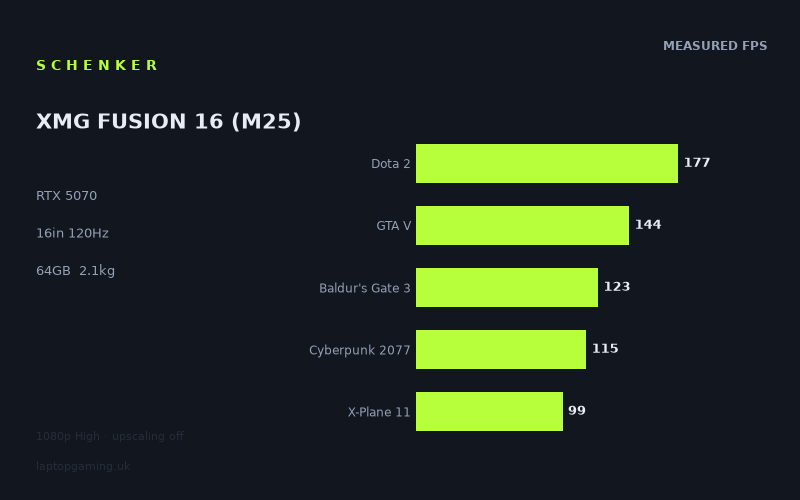
Frame rates
1920×1080, High preset, upscaling off. Averages 131fps across the 5 core benchmark games.
Measured on this machine. Source: Notebookcheck, 2026-01-02.
Not scored: no confirmed UK price
We have the full benchmark suite for this machine, so it ranks on the frame rate leaderboard like any other. What we don't have is a UK listing for this exact configuration - it's sold as a European review unit, or only in specifications that differ from the one tested. Since 30% of our score is value for money, scoring it would mean pretending price is no object, which would flatter it against every laptop you can actually buy. The frame rates below are real and comparable; there is just no buying recommendation to make yet.
How these numbers were produced
Frame rates here are not measured by us, and we label how each one was arrived at. A figure marked measured comes from a published run on that exact machine. A figure marked representative is derived from the GPU and its power limit (TGP) and cross-referenced against published reviews - a sound estimate of what that configuration delivers, but not a measurement of that specific laptop. Unless stated otherwise, numbers are 1920x1080, High preset, upscaling off. Where a laptop ships in several power configurations we use the wattage of the exact SKU listed, because a 140W RTX 5070 and a 115W one are not the same product.
In use
The short version
The XMG FUSION 16 (M25) is the most expensive-looking configuration in Schenker's current range and the one with the most obvious internal contradiction. There is a flagship Intel processor in the Core Ultra 9 275HX, a 2880x1800 OLED panel, 64GB of memory and a 2TB SSD — a specification list that reads like a premium content-creation machine. Sitting in the middle of it is an RTX 5070 with 8GB of VRAM, which is a good graphics card with a frame buffer that does not match the ambition of anything else on that list.
Notebookcheck's figures, taken at 1920x1080 on High presets with upscaling off, run from 278fps in Strange Brigade down to 99fps in X-Plane 11. That is a remarkably high floor. There is no game in the measured set that this machine runs below triple figures at 1080p, and the five games in our scoring suite average 132fps. On the evidence available, this is a fast laptop.
The caveat is what the evidence does not cover. Every title in the measured set is an established one — nothing built around mandatory ray tracing, nothing from the current wave of releases that consume graphics memory faster than anything before them. The 8GB frame buffer, which is the specification most likely to determine how this machine ages, is never seriously tested by these nine games. That is not a criticism of the laptop and it is not a criticism of the benchmarks; it is a gap in what can be known, and pretending otherwise would be dishonest.
Buy it if you want a 16in machine that is genuinely quick in established titles, drives a very good OLED panel, and doubles as a serious workstation because of the processor and memory configuration. Think hard before buying if your reason for spending this kind of money is the heaviest current releases at native resolution, because 8GB is not a comfortable amount of graphics memory for a 2880x1800 display in 2026.
We have no confirmed UK price for this exact configuration, so it carries no overall score. Nothing is wrong with it — the benchmark suite is complete and it ranks normally on our frame rate leaderboard. Value is 30% of our score, we cannot compute it without a verified price, and we are not going to speculate about what it costs.
Performance
A very high floor
The most striking thing about this data set is not the top figure but the bottom one. X-Plane 11 at 99fps is the slowest of nine measured games, and 99fps is a frame rate most laptops would be pleased to post as an average rather than a floor. Everything else is comfortably into three figures, and six of the nine clear 130fps.
That consistency is worth more than a spectacular peak. A machine whose worst measured result is 99fps at 1080p High with no upscaling is a machine that will not surprise you unpleasantly in any established title. Whatever you load, it will run.
The top: 278fps, 241fps, 177fps, 172fps
Strange Brigade at 278fps establishes the upper bound and tells you very little about ordinary gaming. It is an old, exceptionally well-optimised title with a low-level API path that has flattered every GPU it has ever touched. Its value in a suite is diagnostic: 278fps says the graphics card is being given adequate power and nothing in the system is choking it. Both useful facts, neither of which will affect your evening.
F1 24 at 241fps and F1 25 at 172fps are the most genuinely interesting pair in the entire set, and it is worth stopping on them because most reviews would list them and move on.
These are consecutive annual releases in the same franchise, running on the same lineage of engine, measured on the same hardware at the same settings. The newer one is 69fps slower — a drop of nearly thirty per cent, year on year, in a series whose visual output does not change dramatically between instalments. That is the clearest illustration in this data of a trend that governs the whole market: the cost of rendering a frame is rising faster than the hardware to render it. Nothing about the machine changed between those two measurements. The game got more expensive.
Extrapolate that pattern forward and you have the argument for buying more graphics card than you currently need. Extrapolate it backwards and you have the explanation for why old benchmark titles make every laptop look competent. Both of those matter for a purchase at this level.
Dota 2 at 177fps is the processor test of the group, and 177fps is a strong result that reflects a flagship HX-class chip doing what it is good at. At 1080p High, Dota 2's renderer is trivial for an RTX 5070; the frame rate is set by how quickly the CPU can issue draw calls and advance the simulation.
The middle: 144fps, 136fps, 123fps
GTA V at 144fps is the number in this set that does not behave as you would expect. GTA V is an old, single-thread-dependent engine that a flagship processor should dominate, and yet it lands below Dota 2, below both F1 titles, and below Final Fantasy XV. On many machines GTA V is the second- or third-fastest result; here it is fifth.
We are not going to over-explain a single benchmark figure, because run-to-run variation, driver behaviour and engine quirks all contribute and none of them are visible from outside. What can be said is that 144fps is a good result in absolute terms — it is well past the point where more frames improve the experience in that game — and that the relative ordering is a curiosity rather than a concern.
Final Fantasy XV at 136fps is a genuine graphics test: heavy post-processing, dense effects work, an older but expensive renderer. 136fps means the 5070 is doing substantial graphical work at a very comfortable rate.
Baldur's Gate 3 at 123fps is arguably the most representative number in the whole set, because it is the game a large share of people actually have installed. It mixes a moderate renderer with a demanding simulation in its busiest environments, and 123fps means neither half of the machine is under strain. If your mental model of this laptop is set by one figure, this is a reasonable one to choose.
Cyberpunk 2077 at 115fps and X-Plane 11 at 99fps
Cyberpunk 2077 at 115fps is the industry's default yardstick and a properly strong result. The High preset does not enable the ray tracing modes that flatten mid-range cards, so this is a rasterised measurement, but it is still a dense, expensive, modern renderer with a large open world and heavy screen-space work. 115fps at 1080p means substantial headroom: enough to trade for higher settings, for a move towards native resolution, or both.
X-Plane 11 at 99fps is the floor, and it is a processor result rather than a graphics one. X-Plane is close to a pure single-thread CPU benchmark wearing a flight simulator's clothes; past a low threshold, the graphics card stops mattering. 99fps is a very comfortable frame rate for the genre — sim pilots fly happily at a fraction of it — but it is notable that even a flagship HX processor produces the lowest number in this set here. That is the nature of the test, not a fault of the chip.
The practical point for flight simulator users: this machine is strong in the genre, and the ceiling is set by the processor rather than the graphics card, which means adding scenery detail and visual complexity costs you less than you might expect while adding simulation complexity costs you more.
Where the spread comes from
The 278-to-99 range across nine titles sorts cleanly by what limits each frame. At the top are old, cheap-to-render games where nothing is in the way. In the middle are conventional rasterised loads, where a 5070 is a strong card and behaves like one. At the bottom is a title bound entirely by single-thread processor throughput, where no graphics card helps.
What is absent from that ladder is the fourth category: games limited by ray tracing hardware and graphics memory. Not one of the nine measured titles falls into it. That absence is the single most important thing to understand about this data set, and it leads directly to the next section.
Eight gigabytes, and the question this data cannot answer
An RTX 5070 with 8GB of VRAM is an awkward combination, and it is worth being precise about why rather than simply asserting it.
The 5070 is a capable card. Its shader throughput, its ray tracing hardware and its feature set are all a clear step above the tier below it, and the measured figures show that capability being used. What it does not have is much room to store things. Modern renderers keep textures, geometry buffers, shadow maps, screen-space effect targets and ray tracing acceleration structures resident in graphics memory simultaneously. When the total exceeds what the card holds, the driver begins moving data across the PCIe bus during the frame. The consequence is not a proportional slowdown but a collapse in frame-to-frame consistency — stutter, which is felt far more acutely than any average frame rate implies.
Eight gigabytes was comfortable in 2021 and is marginal now. Pairing it with a card that has enough processing power to run demanding games well creates a specific failure mode: the GPU is fast enough to want to render at high settings, and the frame buffer is not large enough to let it. That is a worse arrangement than a slower card with the same memory, because the slower card would have been settings-limited anyway.
The mitigation is upscaling, and it is a real one, but it is asymmetric. Rendering at a lower internal resolution reduces the pixel-shading workload dramatically and the framebuffer target sizes proportionally. It barely touches the texture pool, because textures are loaded at the quality level you selected regardless of render resolution. So upscaling is an excellent answer to shader-throughput limits, a decent answer to ray tracing costs, and a weak answer to memory limits — which is exactly the constraint this card has.
None of this appears in the measured data, because none of the nine games tests it at 1080p. That is genuinely reassuring about those nine games and genuinely uninformative about anything else. We are not going to claim this machine falls over in modern titles, because we have no measurement showing that it does. We are also not going to pretend the specification is not a risk, because it plainly is. If you are spending significant money on a laptop you intend to keep for four or five years, the frame buffer is the specification most likely to end that ownership early, and it is the one this benchmark set cannot speak to.
The Core Ultra 9 275HX, 64GB and 2TB
The rest of the configuration is unambiguously strong and points at a specific kind of buyer.
The Core Ultra 9 275HX is a flagship mobile processor, and the Dota 2 result confirms it is being allowed to perform. In gaming terms, a chip of this class rarely limits anything — and the X-Plane result shows the exception, in a genre where it will still be the ceiling. The stronger argument for it is non-gaming: compiling, rendering, encoding, simulation work. This is a processor you buy because you do something with it besides play.
64GB of memory supports the same reading. For gaming it is far more than any current title needs; returns above 32GB are essentially nil. For virtual machines, large video timelines, big codebases or substantial datasets, it is transformative. 2TB of storage means a real game library stays installed, which is an unglamorous specification that pays back every week.
There is an obvious observation to make about the balance: this configuration has 64GB of the memory games barely use and 8GB of the memory games are desperate for. That is a consequence of how the two are sold — system memory is cheap and configurable, graphics memory is fixed by the GPU you buy — but it does mean the machine is more comprehensively equipped for work than for the hardest gaming.
The screen
16in, 2880x1800, 120Hz, OLED
This is the most interesting component on the machine and the one that will most affect how you feel about owning it.
OLED is a genuine step up from IPS in the ways that matter for games and video: per-pixel illumination means true blacks and effectively unlimited contrast, and the pixel response time is far faster than any LCD, which means no smearing on fast motion. In a dark game, or a film, or an HDR scene with bright highlights against a black background, the difference is not subtle. It is the single most noticeable upgrade you can make to a laptop's subjective quality.
The costs are equally real. OLED panels are susceptible to permanent image retention from static elements displayed for very long periods — a game HUD, a taskbar, a code editor's sidebar — and a gaming laptop is a machine that displays static interface elements for thousands of hours. Modern panels have mitigations and the risk is lower than it was, but it is not zero, and it is a consideration on a machine you intend to keep. We have no measured figures for this specific panel's brightness, colour coverage or HDR behaviour, so we are not going to characterise them.
120Hz, and the odd situation it creates
120Hz is a low refresh rate for a gaming laptop in 2026, and it produces a genuinely unusual relationship with this machine's performance. Compare the panel's ceiling with the measured results:
- Strange Brigade at 278fps — more than twice the panel's refresh
- F1 24 at 241fps — twice the panel's refresh
- Dota 2 at 177fps — well past it
- F1 25 at 172fps — well past it
- GTA V at 144fps — past it
- Final Fantasy XV at 136fps — past it
- Baldur's Gate 3 at 123fps — just past it
- Cyberpunk 2077 at 115fps — just short
- X-Plane 11 at 99fps — short
Seven of the nine measured games exceed what the display can show. At 1080p, this laptop's screen is the bottleneck, not its graphics card. That is an inversion of the normal situation and it has two consequences worth thinking about.
The first is that if high-refresh gaming is your priority, this is the wrong machine. A 120Hz panel caps you at 120Hz no matter what the hardware behind it can do, and the hardware behind this one can do considerably more in a lot of games. Competitive players who care about the difference between 120 and 240 frames a second should look elsewhere; the silicon here would support it and the display will not.
The second is that the surplus performance is not wasted, it is just spent differently. Frames beyond the refresh rate still reduce input latency, and more usefully, headroom above 120fps at 1080p is headroom you can convert into resolution and settings. Which brings us to the panel's other number.
2880x1800, and what native resolution costs
The panel is 2880x1800. The benchmarks are 1920x1080. That is two and a half times as many pixels, and it is the largest measured-versus-native gap of any machine in this class.
The consequences differ sharply by title. In the processor-limited results — X-Plane 11, Dota 2, GTA V — native resolution costs relatively little, because pixel count was never the limit. In the graphics-limited results — Final Fantasy XV, Cyberpunk 2077, both F1 titles — it costs a great deal, and the cost scales with the pixel ratio far more directly.
We have no measured 2880x1800 figures for this machine and we will not invent any. The structural point stands without them: at native resolution this laptop will not be exceeding 120fps in demanding games, and in the heaviest ones it will need upscaling to stay comfortable. That is precisely the situation the 120Hz panel was specified for. Viewed charitably, Schenker have matched the refresh rate to what the machine will actually deliver at the resolution people will actually use, and fitted a much better panel technology with the money that a 240Hz LCD would have cost. That is a defensible trade and arguably the right one for this machine's likely buyer.
Viewed less charitably, a 5070 with 8GB driving a 2880x1800 display is asking a lot of a small frame buffer, and higher resolutions increase memory pressure as well as shader load. This is the point where the two halves of the specification pull against each other most directly.
Build, size and portability
2.133kg is middleweight for a 16in gaming laptop — heavier than the sub-2kg machines that lead with portability, considerably lighter than 17in and 18in desktop replacements. Given what is inside it, that is a good outcome: a flagship HX processor and a 5070 in a 16in chassis at just over two kilograms is a reasonable piece of packaging.
The realistic pattern is a machine that has a home but travels without fuss: between rooms, to an office, on a train, into hand luggage. For that pattern the 16in OLED is a substantial asset. It is large enough and good enough that you would not miss an external monitor for most work, which is not something you can say about most laptop displays.
The power supply is the qualification, as it always is. A laptop feeding a flagship processor and a 5070 simultaneously needs a substantial charger, and the realistic travelling weight is higher than the headline figure. If the machine goes out for work and games at home, that is manageable. If you intend to game away from a desk regularly, you carry both.
The battery specification we do not have
We have no battery capacity figure for this configuration and no measured runtime, and for a machine at this level that is a meaningful gap. It matters more here than on some laptops for a specific reason: an OLED panel at 2880x1800 is a power-hungry display, particularly with bright content, and a flagship HX processor is a power-hungry chip even at idle relative to mainstream parts. The combination is not one that suggests long unplugged use, but without a capacity figure we are guessing at magnitude, and we will not.
What is safely general: gaming on battery is a compromised experience on any laptop of this type, because the GPU is power-limited when unplugged and every frame rate above is a mains-powered figure. The useful battery question is about light work — browsing, documents, video — and it is exactly the question this specification sheet does not answer. If it matters to your purchase, find a source that has measured runtime directly.
Thermals and noise: not measured
We have no temperature or noise data and will not estimate any. The only structural observation available is that a flagship HX processor plus a 5070 is a substantial combined thermal load for a 16in chassis at 2.133kg — more than a mainstream processor with the same GPU would be, and in less volume than a 17in machine would have. That is an argument for paying attention to measured acoustic data before buying, not a finding that the cooling is inadequate. We simply do not know.
How it compares
Our comparisons only use games both machines have actually been measured in, and only against laptops from the same GPU generation. The four below are a deliberate spread rather than a cluster of near-neighbours: the two closest machines, the one this laptop beats by the widest margin, and the one that beats it by the widest margin. Read in order, they say something the individual rows do not.
MSI Cyborg 15 (RTX 5050, £984) — 43fps ahead across 5 shared games
The clear win, and the only machine here with a confirmed UK price. Across the five games of our scoring suite, the FUSION 16 is ahead by an average of 43fps — a wide, unambiguous margin that owes nothing to benchmark noise.
That is what two GPU tiers look like when the benchmark suite can see them, and it is worth registering before reading the next two rows. The suite is not blind. Given a real hardware gap, it reports one, and it reports it clearly. Anyone inclined to dismiss the level results below as an artefact of weak benchmarking should start here.
£984 is the only hard price reference in this group. It marks roughly where the entry level of the current generation sits, and it tells you what 43fps of measured deficit costs to avoid. We have no confirmed price for the FUSION 16 and are not going to guess, but if you are reasoning about what this machine ought to be worth, that figure and that margin are the only firm anchor available.
HP Omen 17z-db100 (RTX 5070) — 1fps ahead across 5 shared games
The same GPU as the FUSION, in a 17in machine, and across five shared games the two are level to within a single frame — comfortably inside run-to-run variation.
This is the least surprising row in the table and the most reassuring. Two laptops with the same graphics card, producing the same results, is what you would hope for; it suggests neither is being unusually throttled or unusually favoured. If the FUSION's 5070 were being starved in that 2.133kg chassis, this is the comparison where it would show, and it does not.
What separates the two machines is therefore everything except frames. The Omen is a 17in laptop, so larger and less portable; the FUSION has the OLED panel, the flagship processor and the 64GB memory allocation. Neither has a confirmed UK price in our database, so we cannot tell you which is better value.
HP Omen 16-ap0091ng (RTX 5060) — level across 5 shared games
This is the awkward one, and it deserves the most attention.
A machine with a full GPU tier less — an RTX 5060 against the FUSION's 5070 — averages dead level across the same five games. Given that the Cyborg 15 row above proves the suite can detect a two-tier gap, the flat result here is telling you something specific rather than nothing.
The explanation is in the composition of the scoring suite. Dota 2 at 177fps, GTA V at 144fps and X-Plane 11 at 99fps are three of the five, and all three are titles where the frame rate is set by the processor and the engine rather than the graphics card. At 1080p High, neither a 5060 nor a 5070 is working hard in any of them; both finish early and wait. The remaining two, Baldur's Gate 3 at 123fps and Cyberpunk 2077 at 115fps, are genuine graphics loads but not punishing ones at that resolution. So the gap between adjacent tiers has almost nowhere to appear.
For a buyer, this is the most practically important row on the page and its lesson is uncomfortable for this machine. If your library resembles that five-game set — established titles, moderate rendering costs, 1080p — then a laptop one tier down will give you the same frame rates. The 5070 in the FUSION earns its place in games that are not in this suite: heavier modern releases, native 2880x1800, ray tracing. Those are exactly the games where its 8GB frame buffer is also the constraint. That tension is the central problem with this configuration, and this row is where it becomes visible.
Schenker XMG Neo 16 A25 (RTX 5090) — 69fps behind across 5 shared games
The far end of the spread, and the row that completes the argument. Across the same five games that could not separate the FUSION from a 5060 machine, an RTX 5090 laptop is 69fps ahead.
Line the four results up and the shape of the curve is clear. Two tiers down costs 43fps. One tier down costs nothing. The same tier is level. Two tiers up is worth 69fps. The returns are not smooth — they flatten completely around this machine's position and then climb steeply again further up the stack.
What that means in practice is that the FUSION 16 sits close to the point where, in these particular games, extra graphics spending stops returning frames. It is not at the point where extra graphics spending stops mattering — the 5090 row proves otherwise, and so would any measurement in a ray-tracing-heavy title, if we had one. But within the boundaries of this benchmark suite, this is a plateau, and buying up one tier from here would have been money spent on frames the suite cannot show you.
The Neo 16 A25 has no confirmed UK price in our database, and a 5090 laptop is not competing for the same buyer in any case. It is here as evidence about the measurement, not as a shopping alternative.
Reading the table honestly
Four rivals: one two tiers down and clearly slower, one a tier down and level, one at the same tier and level, one two tiers up and dramatically faster. Every result is real and the pattern across them is consistent.
At 1080p, in a suite weighted towards CPU-limited titles, adjacent GPU tiers compress towards each other — but the compression is not universal, and the 43fps and 69fps rows at either end prove it. What the suite cannot do is separate a 5060 from a 5070 in these nine established games. What it can do is separate either of them from a 5050 or a 5090.
For your own decision, the question is which side of that plateau your library sits on. If you play the games in this suite, the FUSION's graphics card is not what you are paying for — the screen, the processor and the memory are, and they are worth paying for on their own merits. If you play the heavy modern releases that none of these machines has been measured in, the tier does matter, and so does the frame buffer, and this table is measuring neither.
Who it's for
The person who works and games on one machine. This is the clearest fit. A flagship HX processor, 64GB of memory, 2TB of storage and a high-resolution OLED panel is a content-creation specification that happens to have a capable gaming GPU attached. If you edit video, compile code, render, or run heavy simulations between play sessions, the components here that do not show up in a frame rate chart are the ones you are buying.
Anyone who cares more about how a screen looks than how fast it refreshes. The OLED panel is the best thing about this laptop, and 2880x1800 with per-pixel contrast is a display you will notice every day. If you watch films on your laptop, work with images, or simply play games that are visually dark and atmospheric, this is a meaningfully better experience than an IPS machine at any refresh rate.
The player of established libraries at high frame rates. A floor of 99fps across nine measured games, seven of which exceed 120fps, means a deep back catalogue runs superbly. There is no established title this machine is going to struggle with at 1080p.
Someone stepping up from entry-level hardware. The 43fps margin over the RTX 5050 machine in the comparison group is the one unambiguous performance gain this laptop demonstrates, and it is a large one. If you are replacing a budget gaming laptop rather than choosing between mid-range ones, the difference here is real and you will feel it.
Who should buy something else
Anyone buying primarily for the heaviest current releases. This is the exclusion that matters most, and it is an argument from specification rather than from measurement, because the measured set does not contain those games. An 8GB frame buffer is the constraint that will define this machine's later years, and pairing it with a 2880x1800 panel increases memory pressure rather than reducing it. Upscaling helps with shading cost and helps far less with memory. If your purchase is being driven by a specific ray-tracing-forward release, look at a configuration with more graphics memory and do not let a suite of established titles reassure you about games it does not contain.
Competitive players who want high refresh. The 120Hz panel is the hard limit, and seven of nine measured games already exceed it at 1080p. The hardware would support a much faster display and the display will not support the hardware. If frames above 120 are the point of your purchase, this machine actively prevents you from having them.
Anyone who can get the same frame rates for less. The HP Omen 16-ap0091ng comparison — a full GPU tier down, level across five shared games — is a direct challenge to this configuration's value in established titles. If your library sits in that territory, a cheaper machine will not feel slower. What you would give up is the OLED panel, the processor and the memory, which are real things, but they are not frame rates and you should be clear about which you are paying for.
Anyone worried about OLED image retention. A gaming laptop displays static HUD elements for enormous numbers of hours. Mitigations exist and the risk is lower than it once was, but on a machine you intend to own for years, an IPS panel carries no such risk at all. If that concerns you, it is a legitimate reason to look at an LCD configuration.
Anyone who needs to know the battery situation before buying. We have no capacity figure and no measured runtime, and a high-resolution OLED with a flagship processor is not a combination that suggests long unplugged use. That is a gap worth closing from another source.
The verdict, restated
The XMG FUSION 16 (M25) is a very good machine with one specification that does not belong in it. The processor, memory, storage and display are all premium choices, and the measured performance is excellent in every game it has been tested in — a floor of 99fps and a scoring average of 132fps is not a set of numbers anyone should be disappointed by.
But the frame buffer is 8GB, the panel is 2880x1800, and the measured suite contains nothing that tests the interaction between those two facts. We would rather tell you that clearly than either pretend it is fine or claim a problem we have not measured. If this laptop is going to disappoint anyone, it will be someone who bought it for the games it has not been benchmarked in, and it will happen in year three rather than year one.
Whether it represents good value is a question we cannot answer, because we have no confirmed UK price for this configuration. At the level this machine is specified, that is not a minor omission, and we would rather leave the gap visible than fill it with a guess.