Details
Product prices and availability are accurate as of the date/time indicated and are subject to change. Any price and availability information displayed on Amazon.co.uk at the time of purchase will apply to the purchase of this product.Review
Dell G16, i7-13650HX, RTX review
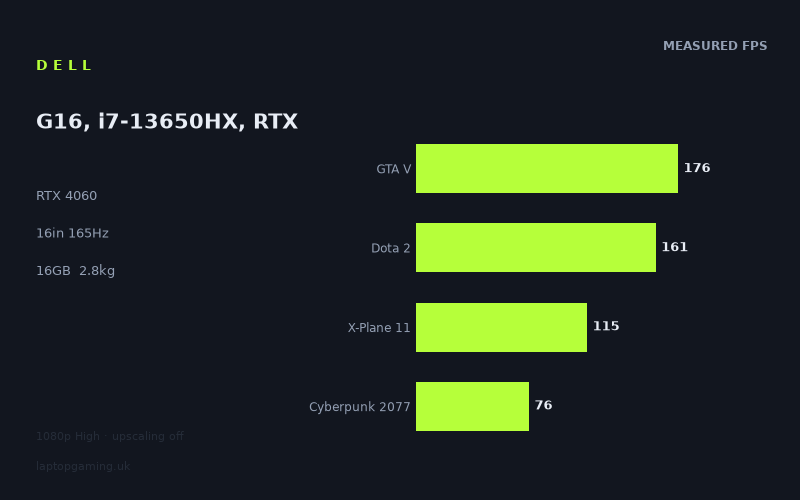
Frame rates
1920×1080, High preset, upscaling off.
Measured on this machine. Source: Notebookcheck, 2024-02-15.
Not scored: incomplete benchmark suite
Every scored laptop on this site is averaged over the same 5 games, and this one is short of Baldur's Gate 3. A mean over 4 games is not comparable to a mean over 5, so we publish the figures we have and leave the score blank rather than rank it against machines tested on a different set. The numbers below are real - the suite is just incomplete.
How these numbers were produced
Frame rates here are not measured by us, and we label how each one was arrived at. A figure marked measured comes from a published run on that exact machine. A figure marked representative is derived from the GPU and its power limit (TGP) and cross-referenced against published reviews - a sound estimate of what that configuration delivers, but not a measurement of that specific laptop. Unless stated otherwise, numbers are 1920x1080, High preset, upscaling off. Where a laptop ships in several power configurations we use the wattage of the exact SKU listed, because a 140W RTX 5070 and a 115W one are not the same product.
In use
The short version
The Dell G16 with a Core i7-13650HX and an RTX 4060 is a mainstream 16in gaming laptop with one specification that sets it apart from the rest of its class and one that undermines it. The distinguishing feature is the panel: 2560x1600 at 165Hz on an IPS screen, which is a genuinely good display for a machine at this level. The problem is that the graphics card behind it is a mid-tier part, and the measured frame rates were all taken at 1920x1080 — a resolution with roughly half the pixel count of the panel Dell has fitted.
On the numbers themselves, this is a solid performer. Notebookcheck's figures average 132fps across the four scoring-suite games we hold, with Strange Brigade at 228fps at the top and Cyberpunk 2077 at 76fps at the bottom. Every measured title clears 76fps at 1080p High with upscaling off. There is no game in this record that the machine struggles with at the resolution tested.
The comparison data makes the value case unusually vivid. Across the games they share, this machine averages 1fps ahead of an MSI Stealth 16 Studio that costs £3,012, and 1fps ahead of a Lenovo LOQ 15IRH8 that costs £999. Two machines separated by more than two thousand pounds, and at 1080p this one is level with both. That single fact tells you more about how to buy a gaming laptop than any amount of specification comparison, and it is worth unpacking properly rather than treating as a curiosity.
Buy it if you want a 16in machine with a genuinely good screen and solid mainstream performance, and you are willing to use DLSS to bridge the gap between the panel's resolution and the GPU's capability. Look elsewhere if you want to drive that 2560x1600 panel natively in demanding games, because the RTX 4060 cannot do it in the heavier titles on this record.
Why there is no score on this page
Every scored machine on this site is averaged across the same five games so the leaderboard is comparing like with like. For this configuration we hold four of them — GTA V, Dota 2, X-Plane 11 and Cyberpunk 2077 — and we have no Baldur's Gate 3 figure. A four-game average cannot be ranked against five-game averages without quietly distorting the comparison, so there is no score.
This is a gap in our data, not a verdict on the machine. Everything we do hold is below and it is a reasonable spread — including Cyberpunk 2077, which is the most demanding of the five and the one whose absence would matter most. If a Baldur's Gate 3 figure appears for this exact configuration, the score follows.
Performance
The measurements are Notebookcheck's, dated 15 February 2024, taken at 1920x1080 on the High preset with upscaling turned off. Eight games is a reasonable record, spanning a decade of releases from GTA V through to Cyberpunk 2077, and the spread across them is instructive.
The RTX 4060, and the power figure we do not have
The RTX 4060 is the volume part of Nvidia's RTX 40 mobile range — the GPU that most gaming laptops in the mainstream bracket ship with, and the one that most buyers end up choosing. It is a competent 1080p card with enough headroom for 1440p in lighter titles, and it brings the full RTX 40 feature set including DLSS and frame generation.
Our record does not list a GPU power limit for this configuration. We are not going to supply one from memory or inference. That is a real gap, because the mobile RTX 40 series is configurable across a wide power range and where a manufacturer sets that limit has a substantial effect on delivered performance — two laptops carrying the same GPU name can differ considerably. Where we hold a figure for a rival machine below, we quote it; where we do not, we say nothing rather than guess.
What that means for reading this review is that the measured frame rates are the primary evidence and the wattage is a missing explanatory variable. That is not as bad as it sounds. The frame rates are the outcome you actually care about; the power limit is only interesting because it predicts them, and here we have eight predictions and no need for the model.
The top of the record: 228, 176, 161
Strange Brigade returns 228fps, GTA V 176fps and Dota 2 161fps. These three sit clearly above everything else, and none of them is a serious test of a 2024 graphics card.
Strange Brigade at 228fps is the near-best-case rasterisation result. It is a well-optimised Vulkan title used across the industry precisely because it establishes what hardware can do when the software is not in the way, and it tells you about the ceiling rather than about anything you are likely to play.
GTA V at 176fps is more useful because of what limits it. GTA V has been bounded by single-thread CPU throughput and driver overhead for years rather than by the graphics card, so this figure is substantially a statement about the Core i7-13650HX. That is a desktop-derived HX-series processor with a meaningfully higher power budget than the thin-and-light chips that share its numbering, and 176fps confirms it is not the limiting component in this machine.
Dota 2 at 161fps is the most practically relevant. It is very close to the panel's 165Hz refresh rate, which means that in ordinary play the display, not the hardware, is what caps what you see. For competitive gaming — MOBAs, shooters, anything where consistency during busy moments matters more than peak fidelity — this machine is effectively refresh-limited and there is nothing more to say about it. That is the right answer.
The middle band: 141 down to 104
Far Cry 5 at 141fps, X-Plane 11 at 115fps, The Witcher 3 at 110fps and Final Fantasy XV at 104fps make up the middle of the record.
Far Cry 5 at 141fps is a strong figure for an open-world shooter and sits close enough to the panel's refresh that a small settings adjustment would push it there. Ubisoft's Dunia engine at that point in its life was efficient and well-threaded, and 141fps reflects that.
X-Plane 11 at 115fps is not a GPU result and should not be read as one. Flight simulators are dominated by single-threaded scenery and physics work, and this figure is another data point on the i7-13650HX rather than on the RTX 4060. It is a good number. It is also worth noting that X-Plane 11 is an older build, and the current generation of flight simulators behaves quite differently on the same hardware — if simulation is your primary use, do not read this figure as a prediction for a newer title.
The Witcher 3 at 110fps is the number in this band that is lower than the pattern would predict, and it is worth being straightforward about that rather than smoothing it over. On a machine returning 228fps in Strange Brigade and 176fps in GTA V, a decade-old open-world RPG returning 110fps is not what you would extrapolate. We hold it as an untagged Witcher 3 result — not one of the version-tagged runs that reflect the much heavier next-generation update, which we treat as an entirely separate workload and never merge into a comparison. Taken at face value it means The Witcher 3 sits closer to the modern titles on this machine than to the old ones. It is still a comfortable playing figure by a wide margin; it is simply lower than the rest of the record's shape suggests, and we would rather point that out than pretend the curve is smooth.
Final Fantasy XV at 104fps is the expected result. The PC port has always been inefficient in ways that were never fixed, leaning on the GPU harder than its visuals justify, and 104fps at High is a perfectly good outcome for it.
Cyberpunk 2077 at 76fps: the floor, and the most important number here
Cyberpunk 2077 returns 76fps and it is the lowest figure on the record. It is also the most informative, because Cyberpunk remains one of the heaviest pure-rasterisation workloads in common benchmarking use and it is the title that most cleanly separates GPU tiers.
76fps at 1920x1080 on High with upscaling off is a good result for an RTX 4060. It is comfortably above the 60fps line, it leaves genuine room to manoeuvre, and it means the machine has options rather than constraints in this game: you could raise settings, enable some ray tracing with DLSS carrying the resolution, or push the internal resolution higher and reconstruct. None of those are desperate measures.
But 76fps is also the number that governs everything in the screen section below, and it is the reason this review is more equivocal about the panel than the panel's specification deserves. A GPU producing 76fps at two million pixels is not going to produce a comfortable frame rate at four million pixels in the same game without help. That is the central tension in this laptop and it is worth holding in mind through the rest of this review.
Where the spread comes from
228fps at the top and 76fps at the bottom is a three-to-one range across eight games, and three separate mechanisms produce it.
The first is genuine rendering cost. Cyberpunk 2077 asks the GPU to do far more work per frame than Strange Brigade does, and no processor, memory configuration or driver update changes that. This dominates the bottom of the list.
The second is CPU-boundedness. GTA V, Dota 2 and X-Plane 11 are all limited by processor throughput and API overhead long before the graphics card saturates. Their figures reflect the i7-13650HX and would look broadly similar on a machine with a considerably more powerful GPU. This dominates the top of the list — and it is also the mechanism that explains the near-tie results in the comparison section, so it is worth understanding properly rather than skimming.
The third is optimisation quality independent of visual ambition. Far Cry 5 looks no better than Final Fantasy XV and runs considerably faster. Engine efficiency is a real and unpredictable variable, and it is why you cannot infer performance from screenshots.
The practical consequence is that the 132fps suite average is a leaderboard position, not a prediction. Two of the four contributing games are CPU-bound and one is a flight simulator that is also CPU-bound. Only Cyberpunk 2077 is a genuine modern GPU test, and it sits a long way below the average. If you want to know how this machine handles a game we have not measured, look at Cyberpunk if the game is a modern showcase title, and at GTA V and Dota 2 if it is competitive or older. Do not look at the mean.
16GB of memory and the rest of the platform
16GB is the standard specification for this class and it is adequate. Modern games are increasingly comfortable using more than 8GB of system memory, and 16GB provides reasonable headroom for a game plus a browser plus a voice client. It is not generous, and on a machine with a 2560x1600 panel that will spend some of its life doing productivity work, 32GB would have been a better fit for the screen. But the GPU runs out of capability before the memory runs out of capacity, so this is not the specification that limits the machine.
Our record does not list the storage configuration, so we are not going to characterise capacity or upgrade paths. Check the specific SKU.
The screen
16in, 2560x1600, IPS, 165Hz. This is a good panel specification and it is the single strongest reason to prefer this machine over the 1080p laptops it competes with. It is also the specification that requires the most careful thinking, because the GPU behind it cannot always feed it.
2560x1600 is nearly twice the pixel count of every figure above
2560x1600 is 4.1 million pixels. 1920x1080 is 2.07 million. The native panel therefore asks for almost exactly double the rendering work of everything measured in the performance section. That is the fact that reframes the whole record.
Rendering cost does not double when pixel count doubles — some per-frame work is resolution-independent, and the CPU-bound titles barely move at all — but for a GPU-bound game the direction and rough magnitude hold. The titles at the top of the record have enormous headroom and would remain fluid natively. Cyberpunk 2077 at 76fps would not: doubling the pixel count on the heaviest GPU-bound title in the set does not leave you at a comfortable frame rate. We have no measurements at 2560x1600 to quote, so this is reasoning rather than data and you should treat it as such — but the reasoning is not subtle.
The resolution of that tension is DLSS, and this is the GPU generation that made it a reasonable default rather than a compromise. Rendering internally at 1080p or thereabouts and reconstructing to 2560x1600 gets you the sharpness of the panel at something close to the frame rates in this record, and on a 16in screen at that pixel density the reconstruction artefacts are genuinely hard to see. That is not a workaround; it is how these machines are designed to be used. But it should be stated openly rather than hidden behind a specification list: the panel and the GPU are matched on the assumption that you will use upscaling in demanding games. If you object to that on principle, this is the wrong machine and a 1080p laptop with the same GPU would serve you better.
165Hz, and how much of it is reachable
165Hz is a genuine high-refresh specification, and unusually for a mainstream machine it is paired with a high-resolution panel rather than being the consolation prize for a 1080p one. That combination is uncommon at this level and it is a real advantage.
At 1080p, the measured record shows Dota 2 at 161fps effectively touching the ceiling and Strange Brigade at 228fps and GTA V at 176fps clearly past it. Everything else falls short, and Cyberpunk 2077 at 76fps falls a long way short. At the panel's native resolution, fewer titles still would approach it.
That is not an argument that the refresh rate is wasted. High refresh improves the display of frame rates well below its ceiling: with variable refresh, a game running at 104fps on a 165Hz panel is displayed with far less judder and tearing than the same 104fps on a 60Hz panel, and the improvement is immediately visible in ordinary use. It also makes the desktop feel quick — window dragging, scrolling, cursor movement — which matters every hour of the day rather than only in the evening.
The honest summary is that this is a display with two distinct modes of use. In competitive games, drop to 1080p or 1600x1000-class internal resolution and use the refresh rate; the frame rates support it. In single-player showcase titles, run at native resolution with upscaling and accept a lower frame rate for the sharper image. The panel supports both well. What it will not do is give you native 2560x1600 at 165fps in anything demanding, and no configuration setting changes that.
What we do not know about this panel
IPS is on record, which tells you something real about viewing angles and colour consistency relative to cheaper alternatives. We do not hold brightness, colour gamut coverage, contrast ratio or response time. Those are precisely the specifications where panels at this level vary most, and where a manufacturer can put "2560x1600 165Hz IPS" on a spec sheet while shipping something dim or slow. We have no measurements and will not characterise it. If panel quality specifically is what is drawing you to this machine, verify those figures independently before buying.
Build, size and portability
2.76kg for a 16in laptop with an 86Wh battery. That is a substantial machine and the weight deserves to be taken seriously rather than treated as a footnote.
2.76kg is at the level where a laptop stops being something you carry casually. It is entirely movable — room to room, home to halls, desk to sofa — but it is not a daily-commute weight, particularly once the power brick that any discrete-GPU gaming laptop requires is added to the bag. That figure is for the laptop alone.
The 16in screen size is part of the reason and part of the compensation. A 16in 16:10 panel gives meaningfully more usable area than a 15.6in 16:9 one, and the extra vertical space is worth real productivity — more lines of code, more timeline, more document. If you are buying a machine that will spend most of its life on a desk and you want screen area, 16in at 2560x1600 is a considerably better place to be than 15.6in at 1080p, and the weight is the price of that.
What the bulk also buys, structurally, is cooling volume. Larger heatsinks, longer fan blades that can move the same air at lower speed, and more thermal mass to absorb a sustained load. Everything else being equal, a 2.76kg 16in chassis holds a given power level more comfortably than a thin one does. We have no temperature or noise measurements on record for this machine, so we are not going to tell you how hot or how loud it gets — anyone doing so without measurements is guessing — but the physics runs in the machine's favour and it is the compensation for what you carry.
The 86Wh battery
86Wh is a large cell, close to the practical maximum for a machine of this type, and a good specification. We hold no measured runtime figure for this configuration and will not estimate one; battery life depends too heavily on brightness, workload and power profile for a guess to be worth anything.
What can be said structurally applies to every machine of this kind: gaming unplugged with a discrete GPU is short and compromised, because the GPU is power-limited away from the mains and the frame rates in this review will not apply. A large battery on a gaming laptop is there for productivity, browsing and video, and its size suggests Dell expected the machine to be used that way between sessions.
How it compares
Each comparison below is against a machine of the same GPU generation, computed only on games both machines hold, preferring the scoring suite. The four are chosen as a spread — the two closest, the machine this one beats by the widest margin, and the machine that beats it by the widest — because a single nearest-rival comparison gives you no way of telling whether a small difference is meaningful.
Against the MSI Thin GF63 (RTX 4050): +52fps across 4 shared games
This is the widest margin on record and it establishes the scale. 52fps averaged across four shared games is not run-to-run variance and it is not a driver artefact. It is a large, genuine difference, and it comes from two directions at once: a GPU one tier up, and a chassis with considerably more thermal and electrical headroom than a very thin budget 15in machine.
The Thin GF63 is not really a competitor to the G16 — it sits at a different level of the market and exists to get a discrete GPU into a low price bracket. Its value here is as a yardstick. When the same four-game shared-average method that reports this 52fps gap later reports a 1fps difference against two other machines, you know the method is capable of separating laptops that are genuinely different. The near-ties that follow are findings, not measurement failures.
Against the MSI Stealth 16 Studio (RTX 4070 at 105W, £3,012): +1fps across 3 shared games
The G16 averages 1fps ahead of a machine that costs £3,012 and carries a 105W RTX 4070. Three shared games is a thin sample and the figure should be treated with the caution that a thin sample deserves, but the direction is clear: at 1080p, in the titles both machines hold, they are level.
The mechanism is the one described in the performance section. At 1920x1080, a large fraction of any shared game set is not GPU-bound at all. GTA V, Dota 2 and X-Plane 11 are limited by processor throughput and API overhead rather than by the graphics card, and in those titles a 105W RTX 4070 and an RTX 4060 return similar numbers because neither GPU is the constraint. A three-game average weighted towards such titles compresses a genuine one-tier GPU gap to nothing.
That does not make the tie meaningless — it makes it specific. At 1080p, in these three games, the cheaper machine matches the £3,012 one. It also does not make it general. The Stealth 16 Studio's advantage would assert itself at higher resolutions and in GPU-bound work, which is exactly where this record shows the G16 at its weakest. And a £3,012 machine is not sold on frame rates alone; it is sold on chassis, materials, weight and finish, none of which appear in a benchmark.
The useful takeaway is narrower and more actionable than "buy the cheap one": if your gaming is 1080p and skews towards CPU-bound titles, GPU spending above the mid-tier buys you very little. That is a real finding and it should change how you shop.
Against the Lenovo LOQ 15IRH8 Core i7 (RTX 4050 at 95W, £999): +1fps across 3 shared games
And here is the same result from the opposite direction. The G16 averages 1fps ahead of a machine that costs £999 and carries a 95W RTX 4050 — a GPU a tier below its own.
Put the two previous comparisons side by side and the picture is genuinely striking. Across the games they share, this machine is level with a £3,012 laptop and level with a £999 laptop. Those two rivals are separated by over two thousand pounds and by two GPU tiers, and at 1080p in the shared titles all three land in the same place.
The explanation is the same in both cases and it is the single most important thing this section has to teach: at 1080p, the shared game sets are dominated by titles where the processor and the API set the ceiling. All three machines have capable HX-class or equivalent processors. All three therefore hit the same ceiling in the same games. The GPU differences are real but they have nowhere to express themselves in that particular set of measurements.
It is worth saying plainly what this does not mean. It does not mean an RTX 4050 equals an RTX 4060 equals an RTX 4070. The bottom of this machine's record — Cyberpunk 2077 at 76fps — is a GPU-bound result, and in games of that character the tiers separate exactly as you would expect. It also does not mean the LOQ 15IRH8 is the equal of the G16 as a product: this machine has a 2560x1600 panel and a 16in screen, and the shared-game tie says nothing about either.
What it does mean is that if you were choosing between these machines on 1080p frame rates alone, the £999 one wins on price and nothing else changes. Whether the G16's screen and size are worth the difference is a judgement you have to make, and we cannot make it for you here because we hold no confirmed UK price for this configuration.
Against the Asus ROG Strix Scar 17 (RTX 4090): −48fps across 3 shared games
The Strix Scar 17 averages 48fps more across the three games both machines hold. That is a large deficit and it is the proof that the near-ties above are not an artefact of an insensitive method.
Consider what the same three-game shared-average approach has now produced in this section: +52fps, +1fps, +1fps, −48fps. A method that returns two enormous numbers and two ties is a method that is working. The ties are what happens when machines genuinely land in the same performance band at the test resolution; the large numbers are what happens when they do not. If the comparison were simply blind to GPU differences, the 52fps and 48fps results would not exist.
The Strix Scar 17 is not a competitor to this machine in any practical sense. It is a large 17in laptop with a top-tier GPU, built to convert electricity into frames and unapologetic about the weight, size, power draw and price that entails. Its role here is to mark the ceiling, and it marks it a long way up. If maximum frame rate is your only criterion, the choice is not close and you should buy accordingly. If you want a 16in machine with a good screen that plays everything on this record above 76fps, that is a different purchase.
What the four comparisons say together
Against an RTX 4050 in a thin budget chassis: +52fps. Against a 105W RTX 4070 at £3,012: +1fps. Against a 95W RTX 4050 at £999: +1fps. Against an RTX 4090: −48fps.
The shape is a broad middle band at 1080p that contains a well-implemented RTX 4050, this RTX 4060, and a 105W RTX 4070, within which chassis quality and processor matter more than GPU tier. Below the band sits a poorly-fed implementation of the same entry silicon, 52fps back. Above it, at a considerable distance, sits the top tier.
This machine sits comfortably in the middle of that band. That is a good place to be, and the argument for buying it is not that it is faster than its rivals — the data says it is not — but that it delivers those frame rates alongside a 16in 2560x1600 165Hz panel. The performance question is a draw. The screen question is not.
Who it's for
Buy it if
You want a genuinely good screen on a mainstream gaming laptop. This is the core case. 16in at 2560x1600 with 165Hz on IPS is a considerably better display than the 1080p panels that dominate this bracket, and it is the reason to choose this machine over the ones it ties with on frame rates. It is better for work, better for reading, better for anything with text in it, and sharper in games.
You are comfortable using DLSS in demanding titles. This follows directly from the point above. The GPU cannot feed the panel natively in heavy games, and upscaling is how you reconcile them. That is a perfectly good answer and it is how this generation of hardware is designed to work — but it needs to be an answer you are happy with rather than a surprise.
Your gaming is mostly at 1080p and mostly competitive or mid-weight. Dota 2 at 161fps, GTA V at 176fps, Far Cry 5 at 141fps: for a large fraction of what people actually play, this machine is comfortably fast and the panel's refresh rate is reachable. The two 1fps comparisons say you would gain nothing by spending three times as much.
The machine will mostly live on a desk. At 2.76kg it moves but does not commute, and if that matches how you will use it, the weight costs nothing and the chassis volume buys cooling headroom.
Buy something else if
You want to drive 2560x1600 natively in demanding games. Cyberpunk 2077 at 76fps is measured at half the panel's pixel count. Doubling the rendering load from there does not land somewhere comfortable, and if native-resolution rendering without upscaling is a requirement, you need a substantially more powerful GPU than this.
You want the cheapest machine that delivers these frame rates. The +1fps against a £999 laptop is unambiguous. At 1080p in the shared titles, that machine is level with this one. If the screen and the 16in size do not matter to you, you are paying for things you do not want.
You carry a laptop daily. 2.76kg plus a gaming power adapter is a real burden five days a week. There are lighter machines with comparable 1080p performance and the weight saving is worth paying for if you will feel it.
You want our score today. We are missing the Baldur's Gate 3 figure and will not fill the gap with an estimate to produce a number. The eight measured games above tell you more than a score would, but the leaderboard position will have to wait.
The honest summary
The Dell G16 with an i7-13650HX and an RTX 4060 is a well-balanced mainstream gaming laptop whose most distinctive feature is its screen and whose most useful lesson is about how little GPU tier matters at 1080p. Every measured game clears 76fps at the test resolution. Two of them clear the panel's refresh rate. The bottom of the record is Cyberpunk 2077 at 76fps, which is a good result for this class of GPU and also the number that sets the machine's ceiling.
The comparison data is where it becomes genuinely interesting. Level with a £3,012 machine and level with a £999 machine, across the games each pair shares, at 1080p. Those results are real — the same method finds a 52fps gap and a 48fps gap when real gaps exist — and they should reshape how you think about what a gaming laptop's GPU badge is worth. What this machine offers over the £999 alternative is not speed. It is a 16in 2560x1600 165Hz panel and the chassis to go with it. That is a genuine and defensible reason to spend more. It is just not the reason the spec sheet implies.