Review
Asus Zenbook Pro 16X review
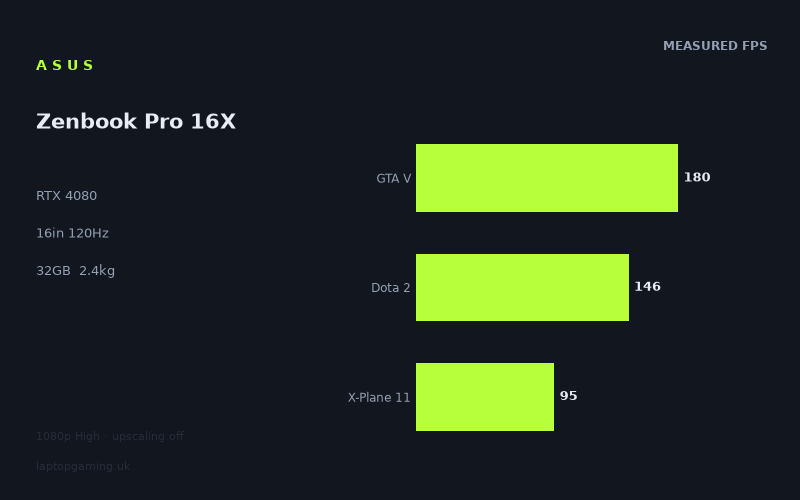
Frame rates
1920×1080, High preset, upscaling off.
Measured on this machine. Source: Notebookcheck, 2023-11-13.
Not scored: incomplete benchmark suite
Every scored laptop on this site is averaged over the same 5 games, and this one is short of Cyberpunk 2077, Baldur's Gate 3. A mean over 3 games is not comparable to a mean over 5, so we publish the figures we have and leave the score blank rather than rank it against machines tested on a different set. The numbers below are real - the suite is just incomplete.
How these numbers were produced
Frame rates here are not measured by us, and we label how each one was arrived at. A figure marked measured comes from a published run on that exact machine. A figure marked representative is derived from the GPU and its power limit (TGP) and cross-referenced against published reviews - a sound estimate of what that configuration delivers, but not a measurement of that specific laptop. Unless stated otherwise, numbers are 1920x1080, High preset, upscaling off. Where a laptop ships in several power configurations we use the wattage of the exact SKU listed, because a 140W RTX 5070 and a 115W one are not the same product.
In use
The short version
The Asus Zenbook Pro 16X (UX7602BZ-MY005W) is a creator laptop that happens to carry a gaming-class graphics card, and almost everything worth saying about it follows from that sentence. Our record lists an RTX 4080 alongside a Core i9-13905H, 32GB of memory, a 16in 3200x2000 OLED panel at 120Hz, a 96Wh battery and a 2.4kg chassis. That is a specification aimed squarely at people who render, grade, composite and edit — and who also want to play games on the same machine without owning two of them.
On the evidence available it does the second job well. Notebookcheck's measured figures, all at 1920x1080 on the High preset with upscaling off, run from 324fps in Strange Brigade down to 77fps in Alan Wake 2. That bottom figure is the one that matters most, because Alan Wake 2 is far and away the heaviest title in the set and the only one in which an RTX 4080 is genuinely being asked to work. Seventy-seven frames per second at native 1080p with no upscaling, in a game that humbled a great many machines on release, is a strong result and it is the clearest single piece of evidence that the graphics hardware here is properly fed.
The complication is what happens when you put those figures next to other laptops. Against a Schenker XMG Apex 15 (Late 23) carrying an RTX 4050 at 140W, the Zenbook is 61fps ahead across five shared games — an enormous margin, exactly the kind of separation you would expect between an RTX 4080 and the smallest card in the generation. Against a Lenovo Yoga Pro 7 14IRH G8, also an RTX 4050 but at 55W, it is 1fps ahead across three shared games. Against an MSI Katana 15 with an RTX 4050 at 105W, it is dead level across three. Those last two results are not a criticism of the Zenbook. They are a statement about the games in the overlap, and this review spends a good deal of space explaining why, because getting that explanation wrong is how people end up buying the wrong laptop.
There is no score on this page, and the reason is procedural. Our scoring suite is five games, identical for every laptop we rank, and we hold three of them for this machine: GTA V at 180fps, Dota 2 at 146fps and X-Plane 11 at 95fps, averaging 140fps. We have no Cyberpunk 2077 figure and no Baldur's Gate 3 figure. Averaging three games and ranking that against every other machine's five-game average would corrupt the leaderboard, so we leave the number blank rather than publish something misleading. In this particular case the omission is unusually costly, because the two missing titles are the two that lean hardest on the graphics card — the exact games in which this machine would have the most to prove.
We also hold no confirmed UK price for this configuration, so nothing below should be read as a value judgement. It is an analysis of what the measurements show and what they cannot show.
Buy it if you want one machine that handles a professional colour-critical workload and plays modern games at high frame rates, and you want that machine to weigh 2.4kg rather than three-and-a-half. Look elsewhere if you are buying it primarily to game, because a 3200x2000 OLED at 120Hz is a display specification chosen for photographers and colourists, not for competitive shooters, and you will be paying for panel characteristics that a gaming buyer has no use for.
Performance
The power limit we do not hold
Every review on this site starts the performance discussion in the same place, because in this GPU generation it is the single most predictive number available: the power limit the manufacturer chose. Nvidia sells the same silicon to every laptop maker with a configurable ceiling, and the manufacturer picks a point in that band based on how much heat the chassis can move, how much fan noise they consider acceptable and what price bracket the machine is chasing. The consequence is that the performance gap between a generously configured GPU and a conservatively configured one of the same model routinely exceeds the gap between adjacent model numbers. A well-fed RTX 4060 outrunning a starved RTX 4070 is not an anomaly; it is ordinary behaviour for this product stack.
Our record does not hold a power limit for the Zenbook Pro 16X's RTX 4080. That is a genuine gap and it is worth stating plainly rather than glossing over, because it removes the most useful predictor we have. Without it, the honest position is that we cannot tell you from the specification alone whether this card is running near the top of its configurable band or well down it, and we will not guess at a figure.
What we can do is reason from the rest of the machine and from the measurements. The chassis is 16in and weighs 2.4kg. Volume and mass are what buy cooling — fan diameter, heat-pipe cross-section, vapour-chamber area, the sheer thermal mass available to absorb a transient load — and 2.4kg across a 16in footprint is not a thick gaming chassis. It sits in the band occupied by serious mobile workstations and premium creator machines: enough room to move real heat, but plainly not the same engineering envelope as a three-kilo, 18in desktop replacement. The processor reinforces the point. A Core i9-13905H is an H-class mobile part, not one of the HX-series desktop-derived chips that show up in the heaviest gaming laptops, and the pairing of an H-class processor with an RTX 4080 tells you what the design brief was: sustained multi-threaded throughput and GPU acceleration for creative applications, in a package you can carry.
And then there is Alan Wake 2 at 77fps, which is the measurement that argues hardest against the idea that this GPU is badly starved. Alan Wake 2 at 1080p on High with upscaling off is one of the least forgiving workloads in the entire measured set, and machines with meaningfully throttled graphics hardware do not produce a figure like that. Taken together, the reasonable reading is a competently configured RTX 4080 in a chassis with real but not unlimited cooling headroom. That is a reading, not a record, and we would rather say so than invent a wattage.
The measured spread, top to bottom
Notebookcheck's figures for this machine, dated 13 November 2023, span eight games and run from 324fps to 77fps — a spread of well over four to one. That range is itself the most informative thing about the data set, because it tells you immediately that these eight titles are not asking the same question. Some of them barely engage the graphics card at all. One of them engages almost nothing else.
At the top, Strange Brigade at 324fps. Strange Brigade has been a fixture of benchmark suites for years precisely because it is a clean, well-optimised Vulkan title that scales predictably and puts very little unusual load on the processor. A figure north of 300fps is what a healthy, properly powered RTX 40-series card of this tier produces, and its main value here is as a sanity check: nothing is fundamentally wrong with the power delivery or the thermal solution. A machine with a badly compromised GPU configuration does not clear 300fps in Strange Brigade.
F1 23 at 227fps tells a similar story with a more modern engine. Codemasters' racing titles are well optimised and lean on the GPU in a straightforward way; 227fps at 1080p High is comfortably into the territory where the number stops having any practical meaning on a 120Hz panel and starts being a pure benchmark result.
Then the character of the data changes. GTA V at 180fps and Shadow of the Tomb Raider at 176fps sit close together, and they are close together for different reasons. Shadow of the Tomb Raider is a genuine if now-dated GPU test; 176fps is a strong showing. GTA V is a different animal entirely. It is an old game with a rendering path that leans heavily on single-thread processor performance, and at 1080p on High it stopped being limited by the graphics card on hardware of this class years ago. A GTA V figure of 180fps on an RTX 4080 is substantially a statement about the Core i9-13905H, not about the graphics card. Hold that thought, because it becomes the centre of the comparison argument later.
Final Fantasy XV at 153fps and Dota 2 at 146fps occupy the middle. Final Fantasy XV is a reasonable mid-weight GPU test with some well-known engine quirks. Dota 2 is not a demanding game for any card in this generation, and 146fps is a long way below what an RTX 4080 is theoretically capable of producing in it. That is not a fault. It is what happens when a game's frame rate is governed by how fast a single processor thread can prepare draw calls rather than by how fast the GPU can execute them. Dota 2 is in our scoring suite because a great many people play it, not because it stresses graphics hardware.
X-Plane 11 at 95fps is the same phenomenon in its purest form. X-Plane 11's simulation loop is notoriously processor-heavy and notoriously indifferent to how much graphics hardware you throw at it. Ninety-five frames per second on an RTX 4080 is not a disappointing GPU result; it is a result in which the GPU is largely a bystander. The figure is in the suite because flight simulation is a real category of software people buy powerful laptops to run, and its behaviour needs representing.
At the bottom, Alan Wake 2 at 77fps, and this is the only entry in the eight where the RTX 4080 is unambiguously the limiting component. Alan Wake 2 was among the most demanding releases of its year, built around a renderer that will consume every scrap of graphics performance available to it. Seventy-seven frames per second at native 1080p on High with no upscaling and no frame generation is a genuinely good number and it deserves more weight in the overall assessment than its position at the bottom of the table might suggest. This is the one measurement in the set that actually tests the thing the specification is selling you.
Why three of these numbers carry the scoring weight, and why that is a problem here
Our scoring suite exists so that machines can be compared on identical software rather than on whichever games a reviewer happened to run. For this laptop we hold three of the five: GTA V at 180fps, Dota 2 at 146fps and X-Plane 11 at 95fps, averaging 140fps. Read that list against the analysis above and the difficulty announces itself. All three of those titles are substantially processor-bound at 1080p on hardware of this class. Not one of them is a serious test of an RTX 4080.
The two we are missing — Cyberpunk 2077 and Baldur's Gate 3 — are the two in the suite that would have been. Cyberpunk 2077 in particular is the closest thing our five games have to a pure graphics test at 1080p: it will consume whatever GPU performance is put in front of it, and it is precisely the title in which a well-configured RTX 4080 has the clearest opportunity to separate itself from a smaller card. Baldur's Gate 3 is less extreme but still asks considerably more of the graphics hardware than Dota 2 or X-Plane 11 do, even accounting for its well-documented processor dependence in the later parts of the game.
So the three-game average of 140fps is not merely incomplete, it is systematically unrepresentative of this specific machine. It averages the three titles least able to demonstrate what an RTX 4080 does, and omits the two most able. Publishing that 140fps as a ranked score against other laptops' five-game averages would not just be statistically improper — it would actively understate the Zenbook. We would rather show the working and leave the score blank.
This is also the correct frame for reading the comparison section below. When you see this machine finishing level with laptops carrying an RTX 4050, remember that the games doing the comparing are the games in which the graphics card is not the constraint.
What the numbers mean if you are actually going to play on it
Strip out the benchmark politics and the practical position is simple and good. Every one of the eight measured titles runs above 77fps at 1080p on High with no upscaling. Six of the eight run above 140fps. If your library consists of competitive shooters, strategy games, older single-player titles or anything short of the very heaviest recent releases, this machine will produce frame rates beyond what the 120Hz panel can display, with headroom left over.
If your library is the heavy end — the Alan Wake 2 tier, and the titles that have followed it — you are looking at the 77fps band at 1080p. That is a comfortable, fully playable result and well clear of the point at which a game starts feeling sluggish, but it is not going to saturate a 120Hz display, and as games continue to get heavier it will move downwards. That is the normal and expected position for this GPU tier in this generation, and it is not a mark against the machine. It does mean, though, that the panel's refresh rate is aspirational for anything demanding, and that the resolution question below matters more than it usually would.
The measurement resolution problem
One caveat needs stating clearly, because it applies to this laptop far more than to most of the machines on this site. Every frame rate above was measured at 1920x1080. The panel is 3200x2000.
That is 6,400,000 pixels against 2,073,600 — a little over three times as many. Rendering cost does not scale perfectly with pixel count, and modern engines have overheads that do not grow with resolution, but the direction and rough magnitude are not in doubt. We do not hold any measurements at the panel's native resolution, and we are not going to estimate them, because an estimate presented as a number would be exactly the kind of thing this site exists not to do.
What we can say is directional and still useful. Titles at the top of the table — Strange Brigade, F1 23, Shadow of the Tomb Raider — have such enormous 1080p headroom that even a substantial native-resolution penalty leaves them comfortable. Titles at the bottom do not. A game measured at 77fps at 1080p is not going to be running at 77fps at 3200x2000, and anyone buying this machine to play heavy modern titles at the panel's native resolution should plan on either dropping the render resolution or using upscaling. Both are entirely normal things to do on a high-resolution laptop, and DLSS exists in large part for this exact situation. But the buyer should go in expecting it rather than discovering it.
The screen
3200x2000 OLED, and what that combination is for
Our record lists a 16in panel at 3200x2000, OLED, 120Hz. Each of those three attributes is doing something different, and only one of them is aimed at gaming.
The resolution is a creator specification. At 16in, 3200x2000 gives a pixel density well beyond the point where individual pixels are resolvable at normal viewing distance, which matters for typography, for fine detail in photographs, for pixel-accurate compositing and for viewing high-resolution video timelines without scaling artefacts. The 16:10 aspect ratio — 3200 by 2000 — gives vertical space that a 16:9 panel of the same width does not, and vertical space is the currency of every application with a timeline, a layer stack or a code file in it. None of that is a gaming benefit. Games do not care about aspect ratio beyond field-of-view handling, and at typical laptop viewing distances the practical visual gain from 3200x2000 over 2560x1600 in a fast-moving game is small compared with the rendering cost.
OLED is the attribute that cuts both ways. Per-pixel illumination gives true black, effectively unlimited contrast and colour behaviour that is genuinely superior to any IPS panel for content work — which is why colourists and photographers want it. In games the same properties produce a visibly better image in dark scenes than an IPS panel can manage, and OLED response times are extremely fast, which helps with motion clarity. The counterweights are the familiar ones and we are not going to pretend otherwise: static interface elements displayed for very long periods carry a burn-in risk that IPS does not have, and that is a real consideration for anyone who leaves a game HUD or an editing timeline on screen for eight hours a day. We hold no brightness, contrast, colour-gamut or response-time measurements for this panel, so everything in this paragraph is a statement about the panel technology rather than about this specific example of it.
120Hz, and whether the GPU can drive it
A 120Hz refresh rate is generous for a creator machine and modest for a gaming one. Dedicated gaming laptops in this generation routinely ship 165Hz, 240Hz or higher, and the practical difference between 120Hz and 240Hz is real for anyone playing competitive shooters at a decent level. For everything else, 120Hz is comfortable — it is well past the point where motion looks smooth, and it is a large improvement over 60Hz for desktop use as well as games.
The more interesting question is whether this GPU can actually feed it. At 1080p, in six of the eight measured titles, comfortably: Strange Brigade, F1 23, GTA V, Shadow of the Tomb Raider, Final Fantasy XV and Dota 2 all sit above 140fps, which means the panel is the limiting factor rather than the machine. X-Plane 11 at 95fps and Alan Wake 2 at 77fps fall short, and no amount of graphics power would have fixed the X-Plane 11 figure.
At the panel's native 3200x2000 the answer is less encouraging, for the reasons set out above, and we have no measurements to quantify it. The realistic expectation for a buyer is that light and mid-weight titles will hold high frame rates at native resolution while heavy ones will need upscaling to approach 120Hz — which, given that this is a machine with DLSS available and a panel chosen for reasons other than gaming, is a perfectly reasonable place to end up.
The mismatch worth naming
There is a coherent argument that this panel is the wrong panel for a gaming buyer and the right panel for the person the machine was actually built for. A gaming buyer at this level of graphics hardware would generally be better served by 2560x1600 at 165Hz or higher: lower rendering cost, higher refresh ceiling, no burn-in consideration, and a resolution the GPU can drive natively in demanding titles. What they would lose is the colour accuracy and contrast that a colourist or photographer is buying the machine for in the first place.
That is not a flaw in the Zenbook. It is the machine being honest about what it is. But it is the single most important thing for a prospective buyer to be clear-eyed about, because a display specification chosen for content work carries costs when you point games at it, and those costs are paid in frame rate.
Build, size and portability
2.4kg with a 96Wh battery
Our record lists the weight at 2.4kg and the battery at 96Wh. Those two numbers together describe the machine's intended life better than any other pair in the specification.
Ninety-six watt-hours is at or very near the ceiling for what can be carried on a commercial flight under standard airline rules, which is not an accident — it is the number laptop makers target when they expect the machine to travel. It is a large battery by any standard and substantially larger than most gaming laptops of comparable performance carry. We hold no battery-life measurement for this machine, so we cannot tell you how many hours it delivers, and we will not estimate it. What we can say is that the design intent is unmistakable: this is a machine meant to be used away from a socket for meaningful periods, which is not a claim most laptops carrying an RTX 4080 can make.
The weight tells the same story from the other direction. At 2.4kg across a 16in footprint, this is a machine you can genuinely carry in a rucksack every day without resenting it. It is not a thin-and-light — nothing with this specification is — but it is a long way from the 2.9 to 3.5kg territory that 16in and 17in gaming machines with comparable graphics hardware typically occupy. For anyone whose work involves moving between locations, that difference is not marginal. It is the difference between a laptop that travels and one that lives on a desk with a charger permanently attached.
There is a cost to it, and it is worth being explicit. Cooling capacity is broadly a function of internal volume, and a 2.4kg 16in chassis has less of it than a 3kg one. That is the physical reason a machine like this typically runs its GPU at a more conservative configuration than a heavier one would, and it is the reason we would particularly like to hold the power-limit figure that our record is missing. The measurements suggest the cooling is doing its job — Alan Wake 2 at 77fps is not the output of a badly thermally limited RTX 4080 — but a specification we do not hold is a specification we cannot check.
What our record does not contain
Several things a prospective buyer would reasonably want are simply absent, and it is more useful to list them than to write around them. We hold no storage capacity for this configuration, no chassis dimensions beyond the 16in screen size, no port complement, no keyboard or trackpad detail, no measured noise figures, no measured surface or component temperatures, and no confirmed UK price. Asus has historically fitted this line with distinctive input hardware, but our record does not describe what is on this particular unit and we are not going to work from memory of a product line when the specific machine's record is silent.
The price absence is the one with real consequences. Value is a substantial component of how this site ranks machines, and without a confirmed UK figure there is nothing to weigh the performance against. A machine with this graphics card, this processor, this much memory and this panel is not going to be inexpensive, but "not inexpensive" is not a number and we are not going to pretend otherwise.
How it compares
The four rivals below all come from the same GPU generation and are compared only on games both machines hold, with our scoring-suite titles preferred where available. They are deliberately a spread rather than a shortlist of the closest matches: the two machines nearest to this one, the one it beats by the widest margin, and the one that beats it by the widest.
Schenker XMG Apex 15 (Late 23) — RTX 4050 at 140W — Zenbook +61fps across 5 shared games
This is the result that establishes what the comparison data is capable of. Across five shared games the Zenbook averages 61 frames per second more than the Apex 15. Sixty-one is an enormous margin, and it is exactly the kind of separation you would expect between the largest and the smallest graphics card in a generation.
What makes it particularly instructive is that the Apex 15's RTX 4050 is running at 140W — a genuinely generous configuration for that card, at the top of the band it is sold in, and considerably more power than most machines give an RTX 4050. This is not a starved GPU losing to a healthy one. It is a well-fed small card losing to a big card, which is what should happen. The Apex 15 is not a bad machine and the size of the deficit is not an indictment of it; there is simply a lot of silicon between an RTX 4050 and an RTX 4080, and when the games in the overlap are capable of showing it, it shows.
The other thing to notice is the depth of the overlap. Five shared games is the widest of the four comparisons here, and it is not a coincidence that it is also the one producing the biggest margin. A wider overlap is more likely to include titles that actually load the graphics card, and titles that load the graphics card are the ones that separate machines.
Lenovo Yoga Pro 7 14IRH G8 — RTX 4050 at 55W — Zenbook +1fps across 3 shared games
Across three shared games the Zenbook is one frame per second ahead of a 14in laptop carrying an RTX 4050 configured at 55W. That is a dead heat with a machine running the smallest card in the generation at roughly a third of the power the Apex 15 gives the same silicon.
Taken at face value that result is absurd, and it should be treated as absurd rather than reported neutrally. An RTX 4080 is not one frame per second faster than a 55W RTX 4050 in any workload that meaningfully involves the graphics card. The correct conclusion is not that the Zenbook is slow. It is that the three games in this particular overlap are not measuring the graphics card.
We know a great deal about why from the analysis above. The Zenbook's own measured set is dominated by titles that are processor-bound at 1080p on hardware of this class: GTA V, Dota 2 and X-Plane 11 in particular, all three of which are in our scoring suite and all three of which are therefore the most likely candidates to appear in a narrow overlap with another machine. In those games the frame rate is governed by how quickly a single processor thread can feed the renderer. A 14in Yoga Pro 7 with a competent modern processor will feed the renderer at broadly the same rate as a Zenbook with a Core i9-13905H, and the graphics card sitting behind it — whether it is a 55W RTX 4050 or an RTX 4080 — spends its time waiting for work rather than being the constraint.
This is not a benchmark defect. Those games are in the suite because people play them, and knowing that a machine hits 180fps in GTA V is genuinely useful information. It just is not information about the graphics card.
MSI Katana 15 — RTX 4050 at 105W — dead level across 3 shared games
The same phenomenon, expressed even more starkly: across three shared games the two machines average identically. An RTX 4050 at 105W and an RTX 4080 produce the same mean.
The Katana 15 is a conventional 15in gaming laptop and its RTX 4050 at 105W is a reasonable mid-band configuration for that card — more power than the Yoga Pro 7's 55W, less than the Apex 15's 140W. Note what that means when you line up all three RTX 4050 machines: the Zenbook beats the 140W one by 61fps across five games, beats the 55W one by 1fps across three, and ties the 105W one across three. There is no relationship at all between the rival's power limit and the size of the margin. If the graphics hardware were the thing being measured, there would be one — the 55W machine should be the easiest to beat and the 140W machine the hardest, and the data says the exact opposite.
What does correlate is the depth of the overlap. Five shared games produces a 61fps margin. Three shared games produces roughly zero, twice. That is the signature of a narrow overlap concentrated in the processor-bound titles, and it is the single most important thing to understand about this machine's comparison data.
Asus ROG Strix Scar 17 — RTX 4090 — Zenbook -59fps across 3 shared games
And here is the result that stops the previous paragraph from being the whole story. Across three shared games — the same shallow depth that produced dead heats against two RTX 4050 machines — the Zenbook averages 59 frames per second behind an Asus ROG Strix Scar 17 carrying an RTX 4090.
This matters enormously for the integrity of the argument. A cynic reading the two ties above might reasonably conclude that a three-game overlap is simply incapable of distinguishing anything, and that all of these comparisons are noise. The Scar 17 result refutes that directly. A three-game overlap produced a 59fps gap here. The comparison method has plenty of dynamic range; it found a very large difference when a very large difference existed to find.
So what is different? Not the number of games. The answer is that the Scar 17 is not running into the same ceiling. In processor-bound titles the frame rate is set by the platform — the processor, its clock behaviour under load, the memory subsystem — and the Scar 17 is a large desktop-replacement gaming chassis paired with an RTX 4090. Whatever combination of components is producing its figures, it is clearing the ceiling that the Zenbook and the RTX 4050 machines all sit at. Our record does not hold a power limit for the Scar 17's RTX 4090, so we are not going to attribute the gap to a specific configuration, and we would not attribute a 59fps swing purely to the graphics card in any case given everything above.
The practical takeaway for a buyer is more measured than the raw number suggests. Fifty-nine frames per second is a large average gap, but it is an average across three games that this analysis has already established are not primarily GPU tests. If your workload is the heavy modern single-player tier — the Alan Wake 2 end — the gap between an RTX 4080 and an RTX 4090 is real but it is a different and generally smaller proportional difference than 59fps across three light titles implies. We do not hold a shared heavy-title comparison between these two machines, so that remains an inference rather than a measurement, and we flag it as one.
What the four results say together
Read as a set rather than individually, the comparison data supports three conclusions and refuses to support a fourth.
It supports the conclusion that the benchmark method can separate machines: a 61fps win at one end and a 59fps loss at the other are not the outputs of a blunt instrument.
It supports the conclusion that the overlaps in the middle are dominated by processor-bound titles: two dead heats against RTX 4050 machines, with no relationship between the rival's power limit and the margin, is not explicable any other way.
It supports the conclusion that the Zenbook's graphics card is genuinely capable, on the strength of the single unambiguous GPU test in its own measured set — Alan Wake 2 at 77fps — and on the 61fps margin over a well-configured RTX 4050 when the overlap was wide enough to show it.
What it does not support is a ranking. We hold three of five scoring-suite games, all three processor-bound, and no confirmed UK price. There is no honest way to turn that into a number, which is why this page does not print one.
Who it's for
Buy it if
You need colour-accurate work and games from the same machine. This is the case the Zenbook Pro 16X makes better than almost anything else in its class. A 3200x2000 OLED panel is a genuine professional tool, 32GB of memory is enough for serious project files, an RTX 4080 accelerates rendering and export in every application that knows how to use it, and the measured frame rates show it playing modern games at high rates at 1080p. Owning one machine instead of two has real value, and this is a credible attempt at it.
You move around and you care about weight. At 2.4kg with a 96Wh battery, this is portable in a way that machines with comparable graphics hardware generally are not. If you are carrying a laptop between sites, offices or clients several times a week, half a kilogram is not a rounding error, and a battery at the upper end of what airlines permit is a deliberate signal about where the designers expected it to be used.
Your games are not the very heaviest tier. Six of the eight measured titles clear 140fps at 1080p. If you play shooters, strategy games, racing titles or anything short of the current graphical showcases, this machine has performance to spare and the panel will be the limit rather than the hardware.
You value contrast in dark games. OLED's per-pixel illumination is not a marketing point; in a game with a lot of dark scenes it produces an image an IPS panel simply cannot match. If that matters to you more than refresh rate does, this panel is on your side.
Buy something else if
You are buying it to game and nothing else. This is the clearest case for looking elsewhere. Every design decision that makes the Zenbook attractive to a creator costs a gaming buyer something: the resolution costs frame rate, the 120Hz ceiling is modest by gaming-laptop standards, the OLED panel introduces a burn-in consideration for anyone who leaves a static HUD on screen for hours, and the thin-for-its-class chassis constrains the cooling envelope. A conventional gaming laptop with the same class of graphics card, a 2560x1600 panel and a higher refresh rate will give you more frames and more refresh headroom.
You play competitive shooters seriously. One hundred and twenty hertz is fine. It is not what a competitive player wants, and machines at 165Hz, 240Hz and above are widely available in this generation. If your play is at a level where refresh rate affects outcomes, this is the wrong panel.
You need to know exactly what you are getting before you commit. Our record for this machine has real gaps: no GPU power limit, no storage capacity, no measured battery life, no noise or temperature data, no confirmed UK price, and only three of five scoring-suite games. If you are the kind of buyer who wants every specification confirmed before spending, this page cannot give you that, and we would rather say so than fill the holes with plausible-sounding numbers.
You want the fastest thing available and price is secondary. The Strix Scar 17 comparison is unambiguous about where this machine sits relative to the top of the generation. Fifty-nine frames per second behind across three shared games, in titles that mostly do not stress the graphics card, is a large gap. If outright speed is the goal, a large gaming chassis with a bigger card and a heavier-duty cooling system will beat this, and it will do so while weighing considerably more and lasting considerably less time away from a socket. That trade is the entire point of the Zenbook, and whether it is a good trade depends entirely on which side of it you need.
The honest summary
The Asus Zenbook Pro 16X is a well-conceived machine with a specification that makes complete sense once you understand who it was built for, and a body of benchmark data that is unusually easy to misread. The dead heats against RTX 4050 laptops are real measurements and they are not evidence that the machine is slow; they are evidence that the games in those particular overlaps were waiting on the processor. The 61fps margin over a well-configured RTX 4050 across a wider set of games, and the 77fps in Alan Wake 2, are the measurements that describe the graphics hardware, and both of them are good.
What we cannot tell you is what it costs, what power limit its RTX 4080 runs at, how long the 96Wh battery lasts, or how it would rank against the rest of the field on our full five-game suite. Those are gaps in our record rather than judgements about the machine, and we would rather leave them visible than paper over them.