Details
Product prices and availability are accurate as of the date/time indicated and are subject to change. Any price and availability information displayed on Amazon.co.uk at the time of purchase will apply to the purchase of this product.Review
Asus ROG Strix Scar 16 review
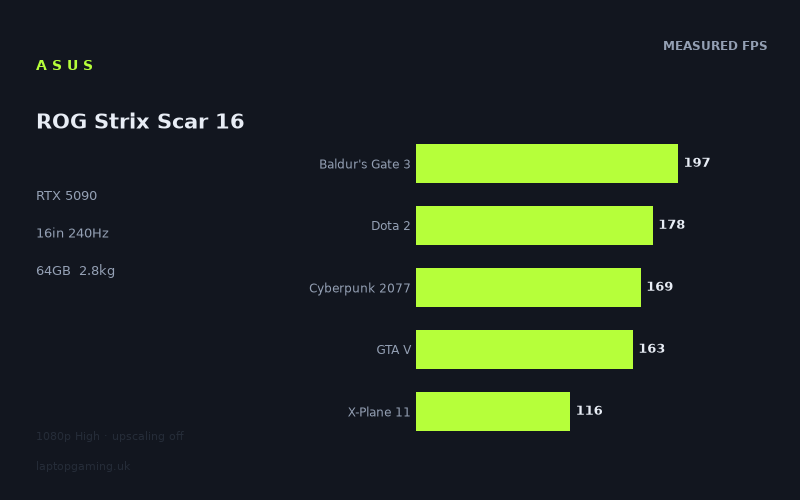
Frame rates
1920×1080, High preset, upscaling off. Averages 164fps across the 5 core benchmark games.
Measured on this machine. Source: Notebookcheck, 2025-05-09.
Not scored: no confirmed UK price
We have the full benchmark suite for this machine, so it ranks on the frame rate leaderboard like any other. What we don't have is a UK listing for this exact configuration - it's sold as a European review unit, or only in specifications that differ from the one tested. Since 30% of our score is value for money, scoring it would mean pretending price is no object, which would flatter it against every laptop you can actually buy. The frame rates below are real and comparable; there is just no buying recommendation to make yet.
How these numbers were produced
Frame rates here are not measured by us, and we label how each one was arrived at. A figure marked measured comes from a published run on that exact machine. A figure marked representative is derived from the GPU and its power limit (TGP) and cross-referenced against published reviews - a sound estimate of what that configuration delivers, but not a measurement of that specific laptop. Unless stated otherwise, numbers are 1920x1080, High preset, upscaling off. Where a laptop ships in several power configurations we use the wattage of the exact SKU listed, because a 140W RTX 5070 and a 115W one are not the same product.
In use
The short version
The Asus ROG Strix Scar 16 in this configuration is the most hardware you can put in a 16-inch gaming laptop right now: an RTX 5090 with 24GB of VRAM, a Core Ultra 9 275HX, 64GB of memory, a 2TB SSD and a 2560x1600 240Hz panel. On paper there is nothing above it. The measured frame rates are where the story gets more interesting, and rather less flattering, because they put this machine in the middle of the RTX 5090 field rather than at the top of it — and behind at least one RTX 5080 laptop that costs a confirmed £3,662.
Notebookcheck's numbers, taken at 1920x1080 on High presets with upscaling switched off, give a mean of 165fps across the five games in our scoring suite, with individual results running from 397fps in Strange Brigade down to 116fps in X-Plane 11. That is a fast machine by any absolute standard. It is not, however, a machine that pulls away from cheaper hardware in the way the badge on the box implies. Across ten shared games it averages 13fps behind the Schenker XMG Neo 16 E25 with an RTX 5090 running at 175W. Across eight shared games it averages 21fps behind the Lenovo Legion Pro 7i 16 Gen 10, which has an RTX 5080. And across seven shared games it is only 15fps ahead of a Lenovo Legion 5 Pro with an RTX 5070 Ti — a full two tiers of graphics card down.
So the honest positioning: this is a Strix Scar you buy for the whole package — 24GB of VRAM, 64GB of system memory, 2TB of storage, a 16:10 240Hz screen and Asus's chassis and support network — rather than for a frame-rate advantage over its RTX 5090 peers, because on the published measurements it doesn't have one. It beats the Razer Blade 16 with the same GPU by a comfortable 24fps average across eight shared games, so it is clearly not at the bottom of the class either. It sits in the middle, and where it sits within that middle depends almost entirely on what it costs.
Which brings us to the one thing we can't do here. We have no confirmed UK price for this exact configuration, so this review carries no score. Value accounts for 30% of our score and it cannot be computed without a price. That is not a comment on the machine — the benchmark suite is complete, every game in our scoring set has a measured result, and it ranks normally on our frame rate leaderboard. It simply means the arithmetic can't be finished. We're not going to guess at a figure, because a guess would propagate into a score that people spend thousands of pounds on the strength of. When a confirmed price appears, the page will score it.
Performance
The measured results in full
Every number below comes from Notebookcheck, measured on 9 May 2025 at 1920x1080, High preset, upscaling off:
- Strange Brigade — 397fps
- F1 24 — 324fps
- Baldur's Gate 3 — 197fps (scoring suite)
- Final Fantasy XV — 195fps
- Dota 2 — 178fps (scoring suite)
- Cyberpunk 2077 — 169fps (scoring suite)
- GTA V — 163fps (scoring suite)
- Indiana Jones and the Great Circle — 138fps
- Alan Wake 2 — 121fps
- X-Plane 11 — 116fps (scoring suite)
Mean across the five scoring-suite titles: 165fps.
The first thing worth saying about that list is that the top and bottom of it differ by a factor of roughly 3.4. Strange Brigade returns 397fps; X-Plane 11 returns 116fps. That is a much wider spread than you get on a mid-range machine, and it is diagnostic. On a laptop with a modest GPU, everything gets dragged down towards the graphics card and the spread compresses. On a laptop with an RTX 5090, the GPU stops being the limiting factor in a good half of the library, and what you're left measuring is the CPU, the game engine's threading, the API, and in some cases the frame-pacing ceiling the engine was written with in the first place.
Where the spread comes from
Split the ten results into three groups and the pattern is immediately legible.
The lightweight and throughput-friendly titles: Strange Brigade at 397fps and F1 24 at 324fps. Strange Brigade is an old benchmarking favourite precisely because it scales cleanly with GPU throughput and doesn't ask much of anything else; it is the closest thing in this list to a synthetic test of how much graphics horsepower is actually being allowed off the leash. F1 24 is a racing title with a highly optimised renderer and comparatively simple geometry per frame. Both clear the panel's 240Hz refresh at 1080p with room to spare. Neither tells you much about how the machine will feel in a modern open-world game, but they do tell you that when a workload is purely GPU-throughput bound and nothing else gets in the way, this hardware produces very large numbers.
The mid-band, which is where most of the library lives: Baldur's Gate 3 at 197fps, Final Fantasy XV at 195fps, Dota 2 at 178fps, Cyberpunk 2077 at 169fps, GTA V at 163fps. Five titles inside a 34fps band, spanning a decade of release dates, an isometric RPG, a JRPG, a MOBA, an open-world shooter and a 2013 crime game. That tight clustering is the signature of a system running into a shared ceiling rather than into each game's individual graphics demands. Cyberpunk 2077 at High without ray tracing is a genuinely heavy renderer and it lands at 169fps; GTA V, which is more than a decade older and vastly lighter on the GPU, lands at 163fps — below it. There is no sensible reading of that in which GTA V is the more graphically demanding game. What's happening is that GTA V's DirectX 11 renderer and its reliance on a small number of heavily loaded threads put a cap on it that no graphics card, including this one, can lift. The same logic applies to Dota 2 at 178fps: a Source-engine MOBA is not asking an RTX 5090 for anything difficult, and 178fps is a CPU and engine result, not a GPU result.
The genuinely heavy end: Indiana Jones and the Great Circle at 138fps, Alan Wake 2 at 121fps, and — for entirely different reasons — X-Plane 11 at 116fps. Alan Wake 2 is the modern reference point for a punishing raster workload with dense foliage, volumetrics and expensive lighting; 121fps at 1080p High with no upscaling is a strong result and also the lowest genuinely GPU-bound number on the sheet. Indiana Jones sits above it at 138fps. X-Plane 11 is the odd one out and shouldn't be read as a graphics result at all: flight simulators of that generation are draw-call and single-thread limited to a degree that renders the graphics card almost irrelevant past a certain point, and 116fps from a 275HX-class CPU is a CPU-and-API number that a much cheaper laptop could approach.
The CPU-bound half of the list matters more than people expect
This is the practical takeaway that a spec sheet will never give you. Of the five games in the scoring suite, at least three — Dota 2 at 178fps, GTA V at 163fps and X-Plane 11 at 116fps — are producing results that are very unlikely to be limited by the RTX 5090. If you play predominantly older or competitively oriented titles, the graphics card in this machine is doing a fraction of the work it's capable of, and you are paying a very large amount of money for silicon that spends most of its time waiting for the CPU to hand it something to draw.
The corollary is that the machine's headroom shows up somewhere else: at higher resolutions, at higher settings, with ray tracing on, and with the panel's native 2560x1600 rather than the 1080p the benchmarks use. That's the correct way to think about an RTX 5090 in a laptop — not as a device that makes everything faster, but as one that makes the heavy things playable at settings that would break lesser hardware, while leaving the light things exactly where a mid-range machine would leave them.
The power limit question, which we can't fully answer
Our fact sheet does not confirm a graphics power limit for this configuration of the Scar 16. It does confirm one for two of the rivals: the Schenker XMG Neo 16 E25 runs its RTX 5090 at 175W, and the Lenovo Legion Pro 7i 16 Gen 10 runs its RTX 5080 at 175W. Because we don't have the Scar's figure, anything we say about it has to be inference from the benchmark deltas rather than assertion, and we'll flag it as such.
Here is why it matters so much. In this generation, the same GPU part number can be configured across a wide power range, and the difference in delivered performance between the bottom and the top of that range is larger than the difference between adjacent GPU tiers. A graphics card given more power sustains higher clocks for longer before thermal and electrical limits pull it back; one given less power spends most of a benchmark run at clocks well below its peak. The name on the box tells you how many shader cores are present. The power limit tells you how hard they're allowed to work. Buyers routinely compare the first and ignore the second, and it is the single most expensive mistake you can make in this category.
The evidence on this machine points in one direction. Against the Schenker with a confirmed 175W RTX 5090, the Scar averages 13fps behind across ten shared games — and ten shared titles is a wide, well-populated comparison, not a fluke of one favourable benchmark. Against the Medion Erazer Beast 16 X1 Ultimate, also an RTX 5090, it averages 9fps behind across six shared games. Against the Lenovo Legion Pro 7i with a 175W RTX 5080, it averages 21fps behind across eight shared games. Three separate comparisons, three deficits, one of them to a lower-tier graphics card running at a known high power limit.
The most economical explanation is that this Scar configuration is not running its RTX 5090 anywhere near the top of the part's power envelope — either because the chassis is configured conservatively, or because it can't sustain the peak, or some combination. We can't distinguish between those causes from frame rates alone, and we're not going to pretend otherwise. What we can say is that the outcome is the same for the buyer whichever cause is responsible: on the published measurements, this machine's RTX 5090 does not deliver RTX-5090-leading frame rates, and one RTX 5080 laptop in our database comfortably outruns it.
The counterweight, and it is a real one, is the Razer Blade 16 comparison. That machine also has an RTX 5090, costs a confirmed £5,000, and the Scar averages 24fps ahead of it across eight shared games. Razer's chassis is the thinner, more design-led approach to a 16-inch gaming laptop, and the price of that is a graphics card that has less thermal and electrical room to work with. So the Scar is not at the bottom of the RTX 5090 spread. It is above the thin-and-light interpretation of the card and below the desktop-replacement interpretation of it. That is a coherent place for a machine of this weight to sit; it just isn't the place its badge implies.
What the 1080p figures mean at the panel's native resolution
All ten measurements are at 1920x1080. The screen is 2560x1600. That's 4,096,000 pixels against 2,073,600 — very nearly double. Running natively on this panel is close to twice the per-frame rasterisation work, before you account for the fact that GPU scaling is never perfectly linear and that CPU-limited titles will barely move at all.
We are not going to put numbers on native-resolution performance, because we don't have measured native-resolution numbers and inventing them would defeat the entire point of this site. What we can do is reason about which side of each result the pressure lands on.
The CPU-bound results — Dota 2 at 178fps, GTA V at 163fps, X-Plane 11 at 116fps — will lose relatively little at native resolution, because the thing limiting them isn't pixel throughput. Expect those to stay broadly in the same neighbourhood, with the caveat that "broadly" is doing real work in that sentence and we can't quantify it.
The genuinely GPU-bound results — Alan Wake 2 at 121fps, Indiana Jones at 138fps, Cyberpunk 2077 at 169fps — will fall substantially. Doubling the pixel count is a large ask. Alan Wake 2, already the lowest true graphics result on the sheet at 1080p, is the title most likely to end up somewhere that a 240Hz panel is entirely irrelevant to. That's not a failure of the machine; it's a heavy game rendering at a demanding native resolution with upscaling switched off, which is the hardest thing you can ask a laptop to do.
The lightweight titles have enormous room. Strange Brigade at 397fps and F1 24 at 324fps have so much 1080p headroom above the panel's 240Hz that even a large native-resolution penalty may leave them at or near refresh. Those two are the plausible candidates for actually using all 240 hertz at native resolution, and it's not a coincidence that they're also the two least representative of a modern graphics workload.
Upscaling and frame generation
The benchmark protocol here is deliberately upscaling-off, which is the right way to measure hardware because it isolates what the silicon does rather than what a reconstruction algorithm does. In real use, an owner of this machine will almost certainly turn DLSS on in the heavy titles, and the frame rates will rise — in some cases dramatically, particularly with frame generation in the mix.
We have no measured figures for this machine with upscaling enabled, so we won't estimate any. What we will say is how to reason about it. Upscaling helps most exactly where the raw numbers are lowest — Alan Wake 2, Indiana Jones, Cyberpunk 2077 at native resolution — because those are GPU-bound. It helps least, and can help essentially not at all, in the CPU-bound group: rendering fewer pixels does nothing for a game that is waiting on a single busy thread. So DLSS will meaningfully change the shape of the heavy end of this list and will leave Dota 2, GTA V and X-Plane 11 roughly where they are. If your library skews towards the second group, the presence of good upscaling doesn't rescue the value case for a top-tier GPU.
The 24GB frame buffer, and why it may be the real argument for this card
24GB is the largest VRAM allocation available in a laptop graphics card this generation, and it is the specification here that is genuinely hard to obtain elsewhere. Its relevance to gaming is real but bounded: at 2560x1600 with high texture settings, ray tracing enabled and modern asset streaming, memory pressure is a live concern in a handful of recent titles, and having headroom means you never have to think about it for the life of the machine. It is insurance more than it is speed.
Where 24GB stops being insurance and starts being the whole point is outside games. Local model inference, large scene work in 3D applications, high-resolution video timelines with heavy effects, GPU-accelerated simulation — these are workloads where a frame buffer either fits your job or doesn't, and where the difference between fitting and not fitting is not a percentage, it's a binary. Paired with 64GB of system memory and a 2TB SSD, this configuration is unusually well set up for someone whose machine has to be a workstation on weekdays and a games console at weekends. That combination — max VRAM, max sensible RAM, generous storage — is a much stronger justification for this specific configuration than the frame rates are, and buyers should be clear-eyed that it's the justification they're actually paying for.
The CPU
The Core Ultra 9 275HX is the top of Intel's mobile HX range, and it's the component doing the visible work in the lower half of the benchmark list. In games where the graphics card isn't the constraint — Dota 2's 178fps, GTA V's 163fps, X-Plane 11's 116fps — the CPU and memory subsystem are what's setting the ceiling, and those results are respectable ones. X-Plane 11 in particular rewards single-thread performance more than almost anything else in common benchmark use, and 116fps from a simulator of that vintage is a good showing.
For non-gaming work — compiles, renders, encodes, anything that scales across many cores — an HX-class chip with 64GB behind it is the configuration you'd specify if you were building a mobile workstation from scratch. We don't have measured productivity benchmark figures on our sheet for this machine, so we won't characterise its performance in those workloads with any precision. The specification is the right one; how it sustains under load in this particular chassis is something we can't speak to from frame rates alone.
The screen
Sixteen inches, 2560x1600, 240Hz. Our fact sheet does not confirm the panel technology, so we're not going to tell you whether it's IPS, mini-LED or OLED — that materially changes contrast, black level, response time and how the thing looks in a dark room, and guessing at it would be worse than useless. If that's a decision-critical factor for you, and it reasonably might be at this price bracket, confirm it against the specific SKU before you buy.
What we can assess is the match between the panel and the graphics card, and it's a mixed one.
At 1080p — the resolution the benchmarks use, and a resolution you might genuinely run in competitive titles to reduce latency — only two of the ten measured games clear 240fps: Strange Brigade at 397fps and F1 24 at 324fps. Baldur's Gate 3 at 197fps and Final Fantasy XV at 195fps get close-ish without arriving. Everything else sits between 116fps and 178fps. At the panel's native 2560x1600, with nearly double the pixels, the number of titles that saturate 240Hz will be smaller still.
That is not a criticism unique to this machine — it's true of essentially every 240Hz gaming laptop, because 240Hz panels are specified for esports titles at reduced settings rather than for High-preset AAA gaming. But it is worth being blunt about, because the marketing logic of "fastest GPU plus fastest panel" implies a pairing that the measured data doesn't support. If you bought this machine expecting Cyberpunk 2077 to fill a 240Hz screen at native resolution, the 169fps 1080p result should recalibrate that expectation immediately.
The refresh rate still earns its place, though, for two reasons. First, in the competitive titles the panel is actually aimed at — and Dota 2's 178fps is the relevant data point on our sheet — you're operating in a range where a 240Hz panel displays meaningfully more of what the GPU produces than a 165Hz one would, and where reduced settings would push you higher still. Second, high refresh improves motion clarity and input latency even when you're not hitting refresh, provided the display supports variable refresh synchronisation. Our fact sheet doesn't confirm whether this panel does, and every serious gaming laptop in this class has for several generations, but we'll note the gap rather than assert the answer.
The 16:10 aspect ratio is worth a line of its own. 2560x1600 gives you 1600 vertical pixels rather than 1440, which is a real gain in anything with a timeline, a code editor, a spreadsheet or a properties panel. For a machine that is plausibly going to be someone's only computer, the extra vertical space is a more consistent daily benefit than the refresh rate is.
Build, size and portability
The chassis weighs 2.776kg. We have not handled this machine — everything here is analysis of published specifications and third-party measurements — so we're not going to tell you how the keyboard feels, how stiff the lid is, or whether the fans whine. What we can do is take the number seriously, because 2.776kg is the specification that will shape how this laptop actually gets used.
For context, that's roughly a third heavier than a typical 16-inch thin-and-light and comfortably into the territory where you notice it every time you pick the bag up. A 2.776kg laptop is not a machine you carry casually between meetings. It's a machine you move deliberately: home to office, house to LAN, term-time to holidays. It will fit airline carry-on dimensions in almost any backpack rated for a 16-inch machine, but a shoulder bag becomes unpleasant quickly and a full day of walking with it is a chore rather than an inconvenience.
Our fact sheet doesn't include a power adapter weight, and we're not going to invent one. What's safe to say is that a laptop built around a top-tier graphics card and an HX-class processor needs a high-wattage supply, and high-wattage supplies are physically large. The travelling weight — machine plus brick plus cable — will therefore be meaningfully above 2.776kg, and anyone planning to move this thing regularly should budget for that rather than for the chassis figure alone. If the exact travel weight matters to your decision, weigh the retail bundle or find a source that lists the adapter specifically.
The battery is 90Wh, which is at the upper end of what's practical and comfortably inside the 100Wh threshold that airlines generally apply to lithium batteries in cabin baggage. We have no measured battery runtime for this machine, so we're not going to characterise it in hours. The structural point stands regardless: a 90Wh cell is a large battery being asked to feed a very power-hungry pair of chips, and gaming laptops in this class universally reduce GPU power substantially when unplugged, because there is no way for a battery to sustain the draw that the wall supplies. Whatever this machine does on battery, it will not be what it does on mains, and the frame rates above should be read as plugged-in figures throughout.
The practical conclusion is that this is a desktop replacement that can travel, not a portable machine. If your use pattern is "it lives on a desk, occasionally moves, and is always plugged in when it's doing anything demanding", the weight is a non-issue and the compensations — a 16-inch 16:10 screen, a large cooling volume, 2TB of storage, a full-size keyboard deck — are exactly what you want. If your use pattern involves carrying it daily or working away from power, this is the wrong category of machine and no amount of GPU will fix that.
One inference we can draw from the benchmark deltas rather than from the spec sheet: the machines that outrun this one in our database — the Schenker at 175W, the Medion, the Lenovo Legion Pro 7i at 175W — are all in the same broad desktop-replacement class. The Scar isn't losing to them because it's dramatically lighter or slimmer; it's not a thin machine. That makes the deficits harder to explain away as a portability trade-off, in the way the Razer Blade 16's deficit to this machine plainly is. The Blade gives up 24fps average across eight shared games in exchange for a chassis philosophy. It's less clear what the Scar is buying with its 13fps and 21fps deficits.
How it compares
A note on method before the numbers, because it affects how much weight each comparison deserves. Each figure below is the mean difference across only the games both machines have measured results for. A comparison drawn from ten shared titles is far more robust than one drawn from six, because a wider set dilutes the effect of any single game that happens to favour one architecture, driver version or memory configuration. All of these are third-party measurements, and measurement dates differ; drivers move, and a comparison taken across a few months carries some noise. None of that changes the direction of the results below, which is consistent across five separate rivals.
Schenker XMG Neo 16 E25, RTX 5090 at 175W — the cleanest read
This is the most complete comparison we have: ten shared games, and the Scar averages 13fps behind. Same GPU tier, same generation, and a confirmed 175W power limit on the Schenker side against an unconfirmed one on this machine's.
Scaled against this machine's 165fps scoring-suite mean, a 13fps deficit is roughly eight per cent — approximately, since the shared-game set isn't identical to the scoring set. Eight per cent is not a difference you will perceive in isolation. It is, however, a difference that tells you something structural: two laptops with the same graphics card, and the one with the confirmed high power limit is consistently ahead across ten separate titles. That's the pattern you'd expect if the Scar is running a lower or less well-sustained GPU power budget, and it's the strongest single piece of evidence on this page for that reading.
The Schenker has no confirmed UK price in our database either, so neither machine can currently be scored on value. If both prices land in the same region, the benchmark data favours the Schenker on raw gaming performance. What the Schenker comparison doesn't settle is the rest of the package — memory, storage and panel configuration differ between SKUs, and this Scar's 64GB and 2TB are a genuinely generous loadout that a cheaper-configured rival may not match.
Lenovo Legion Pro 7i 16 Gen 10, RTX 5080 at 175W, £3,662 — the one that hurts
Across eight shared games, this Scar averages 21fps behind a laptop with a lower-tier graphics card. That's roughly thirteen per cent against this machine's suite mean, and it is the most important comparison on this page for anyone weighing a purchase.
It's also the clearest possible demonstration of the point made earlier about power limits mattering more than GPU tier. The Legion Pro 7i's RTX 5080 runs at a confirmed 175W. An RTX 5080 given a generous power budget in a chassis that can sustain it beats an RTX 5090 that isn't, and the gap isn't marginal. If you are buying purely to play games and you evaluate on measured frame rates rather than on model numbers, the Legion Pro 7i is faster in the games both machines have been measured in, and it has a confirmed price of £3,662.
The counter-arguments are real but specific. Our fact sheet doesn't list the Legion's memory or storage configuration, so we can't compare those directly — but an RTX 5080 laptop will not have 24GB of VRAM, and if your workloads need a frame buffer that size, no amount of frame-rate advantage substitutes for it. This Scar's 64GB of system memory and 2TB SSD are also strong, and matching those on a rival will add to its price. So the fair statement is: for gaming alone, on the measured evidence, the Legion Pro 7i is the better machine and it has a price you can actually check. For gaming plus memory-hungry professional work, the Scar's configuration answers a question the Legion doesn't.
Medion Erazer Beast 16 X1 Ultimate, RTX 5090, £4,884 — effectively a draw
Across six shared games, the Scar averages 9fps behind. That's a single-figure gap on a smaller shared set, and it's approaching the level where measurement variance, driver versions and test-run conditions could account for a chunk of it. In practical terms, treat these two as performance equivalents.
Because they're equivalent on frame rates, the decision moves entirely to everything else: price, panel, build, warranty, support and the rest of the specification. The Medion has a confirmed £4,884 price, which means it can be scored on value and this Scar can't. That's not nothing — it means a buyer can actually assess whether the Medion is good value at the moment they're looking, and can't do the same here. If the Scar arrives materially below that figure with this memory and storage loadout, it's the better buy. Above it, the case gets difficult, because you'd be paying more for slightly fewer frames.
Razer Blade 16 Core Ultra 9, RTX 5090, £5,000 — the win
Across eight shared games, the Scar averages 24fps ahead — around fifteen per cent against its own suite mean. Same GPU tier, and a confirmed £5,000 price on the Razer.
This is the comparison that establishes the Scar isn't slow; it's mid-pack. The Blade 16 is the thin, industrially polished interpretation of a 16-inch gaming laptop, and thinness costs performance in a category where sustained power delivery is the whole game. If your shortlist is Scar versus Blade and the deciding factors are frame rates and money, the Scar wins on the first and the Blade has a confirmed £5,000 to beat on the second. If the deciding factor is that you want the thinnest, best-finished machine you can get and you'll accept a performance penalty for it, that's a legitimate preference and the Blade is the machine for it — but you should know you're paying £5,000 for a laptop that gives up 24fps on average to this one.
Lenovo Legion 5 Pro, RTX 5070 Ti — the awkward one
Across seven shared games, the Scar averages 15fps ahead of a machine with an RTX 5070 Ti. Two GPU tiers down, and the gap is roughly nine per cent against this machine's suite mean.
Sit with that for a moment, because it's the most instructive number in the whole comparison set. The difference between the top graphics card in the range and a card two tiers below it, as measured across seven shared games, is about nine per cent. Not double. Not fifty per cent. Nine.
There are legitimate reasons that gap is smaller than the specifications suggest. The CPU-bound titles in the list compress the difference — no graphics card helps GTA V or Dota 2 much, and if several of the shared games are in that group, the average narrows. The 1080p test resolution also flatters the lesser card, because lower resolutions shift the bottleneck away from the GPU; at 2560x1600 with ray tracing enabled, the gap would widen, and the 24GB frame buffer would start to matter in a way it doesn't at 1080p High. And the RTX 5070 Ti machine has no confirmed UK price in our database, so we can't quantify the money you'd save.
But the direction of travel is clear, and it's the argument against every halo-tier gaming laptop ever made: the last two tiers of graphics card cost a very large amount of money and deliver, in the games most people actually play at the resolutions they actually play them, a modest percentage. Anyone considering this Scar should look hard at that 15fps and ask honestly whether their library and settings are the kind that would convert the RTX 5090's extra capability into something they'd notice.
Where that leaves it
Five comparisons: behind the Schenker, behind the Legion Pro 7i, behind the Medion, ahead of the Razer, ahead of the Legion 5 Pro. That's a mid-table finish among high-end machines, with the notable blemish that one of the machines ahead of it has a lower-tier graphics card and a confirmed price nearly a thousand pounds below the cheapest confirmed price in this comparison set. Nothing here suggests a bad laptop. Everything here suggests a laptop whose graphics card is not being asked to do everything it could.
Who it's for
Buy it if
You need 24GB of VRAM and 64GB of system memory in a portable machine. This is the strongest case, and it's not really a gaming case. If your work involves local model inference, large 3D scenes, heavy video timelines or anything else where a frame buffer either fits or doesn't, the RTX 5090's 24GB is the reason to be here, and no RTX 5080 or 5070 Ti machine substitutes for it at any price. Add 64GB of memory and 2TB of storage and this is a mobile workstation that happens to game very well, which is a coherent and defensible thing to buy.
You want one machine that does everything and you keep it plugged in. The 16:10 2560x1600 panel is a good work display, the storage and memory are generous enough not to need touching for years, and 165fps across our scoring suite means every current game runs well. The 2.776kg weight is irrelevant to a machine that lives on a desk.