Review
MSI Crosshair 16 HX AI review
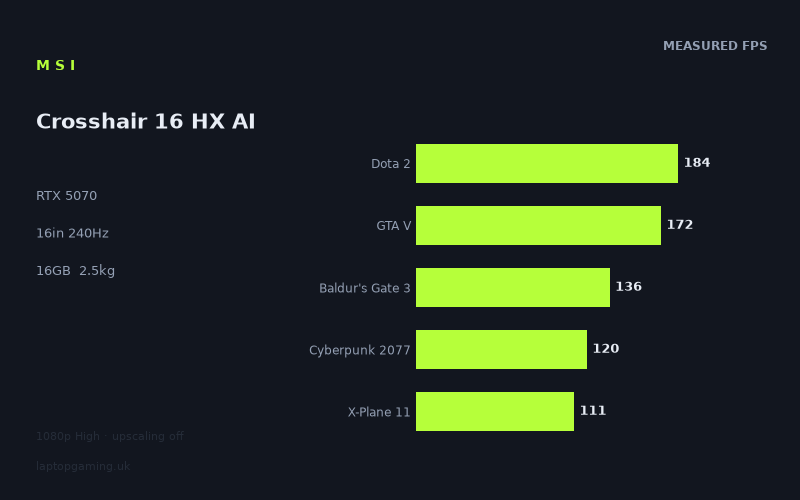
Frame rates
1920×1080, High preset, upscaling off. Averages 144fps across the 5 core benchmark games.
Measured on this machine. Source: Notebookcheck, 2025-11-12.
Not scored: no confirmed UK price
We have the full benchmark suite for this machine, so it ranks on the frame rate leaderboard like any other. What we don't have is a UK listing for this exact configuration - it's sold as a European review unit, or only in specifications that differ from the one tested. Since 30% of our score is value for money, scoring it would mean pretending price is no object, which would flatter it against every laptop you can actually buy. The frame rates below are real and comparable; there is just no buying recommendation to make yet.
How these numbers were produced
Frame rates here are not measured by us, and we label how each one was arrived at. A figure marked measured comes from a published run on that exact machine. A figure marked representative is derived from the GPU and its power limit (TGP) and cross-referenced against published reviews - a sound estimate of what that configuration delivers, but not a measurement of that specific laptop. Unless stated otherwise, numbers are 1920x1080, High preset, upscaling off. Where a laptop ships in several power configurations we use the wattage of the exact SKU listed, because a 140W RTX 5070 and a 115W one are not the same product.
In use
The short version
The MSI Crosshair 16 HX AI is a performance-focused 16in gaming laptop with a Core Ultra 9 275HX processor, an RTX 5070 graphics card, 8GB of VRAM, 16GB of memory, a 1024GB SSD and a 2560x1600 IPS display running at up to 240Hz. On the published Notebookcheck benchmark data, it is a very quick machine at 1920x1080 using High settings with upscaling disabled. It posts particularly strong results in lighter and well-optimised games, while still delivering clearly playable frame rates in demanding modern titles including Cyberpunk 2077, Battlefield 6 and Black Myth: Wukong.
The important point is that the Crosshair’s performance is not merely good for an RTX 5070 laptop in isolation. Against the closest systems in our database, it is effectively level with several machines carrying the nominally higher RTX 5070 Ti. It matches the Asus ROG Zephyrus G14 across the shared games, sits only just behind the Acer Predator Helios Neo 16S AI, and is fractionally ahead of the Lenovo Legion Pro 5 16IAX10, Asus ROG Strix G18 2025 and Alienware 16X Aurora in their respective shared-game comparisons. That makes this a serious RTX 5070 implementation rather than a compromised one.
There is one major caveat: the exact UK price for this MSI Crosshair 16 HX AI configuration is not confirmed. That means we cannot judge value responsibly or calculate an overall score, because price is a major part of the assessment. The performance evidence is complete and the machine ranks normally on the frame-rate leaderboard; what is missing is simply a confirmed UK price for this exact model. Until that appears, the right conclusion is not that the laptop is poor value or good value, but that its value position remains unproven.
If the eventual price is competitive with comparable RTX 5070 machines, the Crosshair 16 HX AI has a persuasive case for buyers who want strong 1080p High-preset performance, a high-refresh 16in display, a large 90Wh battery capacity and a fast modern Intel processor. It looks especially relevant for players whose regular games include esports titles, racing games, older AAA releases and broad-spectrum multiplayer games, where its measured figures can make meaningful use of a high-refresh screen.
It is less obviously the right answer for someone buying specifically for native-resolution gaming at 2560x1600 with every visual setting pushed as high as possible. The available measurements were taken at 1920x1080, not at the screen’s native resolution, and the more demanding games already show that even a quick RTX 5070 laptop does not turn every modern release into a 240Hz experience. The panel is a strength, but its resolution and refresh rate ask more of the graphics card than the benchmark configuration does.
The Crosshair also needs to be viewed as a substantial laptop rather than a lightweight travel machine. At 2.5kg, it belongs in the class of systems that can move between home, office, university accommodation and events, but are not especially appealing as an everyday carry alongside books, chargers and other equipment. MSI has paired that weight with a 90Wh battery, but battery capacity is not battery-life data: no measured runtime has been provided, so there is no basis for claims about unplugged gaming or work endurance.
The concise buying advice is therefore straightforward. Buy the Crosshair 16 HX AI if its confirmed UK price makes sense beside the Lenovo Legion Pro 5 16IAX10 and other RTX 5070 rivals, and if you want evidence of strong High-preset performance rather than an assumption based on component names. Hold off if you need a proven portable machine, verified battery life, native 2560x1600 gaming measurements, or a laptop whose value can be judged today. The benchmark data is encouraging. The missing price is the unresolved part of the decision.
Performance
What the measured figures show
Notebookcheck measured the MSI Crosshair 16 HX AI at 1920x1080, using the High preset with upscaling disabled. That is a useful and demanding test configuration because it shows the machine’s conventional rasterised performance without allowing an upscaling mode to inflate the result. It does not answer every question about how the laptop will behave at its native 2560x1600 resolution, but it does provide a clean view of the underlying performance available from the Core Ultra 9 275HX and RTX 5070 combination.
Across the five games used in the scoring suite, the Crosshair averages 145fps. That is a strong broad result, but the average needs context. Gaming laptops do not deliver a single universal frame rate. Different engines place different demands on the GPU, CPU, memory subsystem and video memory, while some titles are unusually sensitive to driver behaviour or scene complexity. A system that is excellent in a very light engine can still be limited in a highly demanding current AAA game. The Crosshair’s results demonstrate exactly that normal, meaningful spread.
At the top end, Strange Brigade runs at 302fps. F1 24 follows at 251fps, while F1 25 reaches 191fps. These are the games where the Crosshair can most plausibly exploit the spirit of its 240Hz panel, especially Strange Brigade and F1 24. They also show that the laptop has significant performance headroom when the game engine is comparatively accommodating. For players who spend a great deal of time in racing games or older, highly optimised titles, this is the sort of result that makes a high-refresh screen more than a paper specification.
Dota 2 runs at 184fps, GTA V reaches 172fps and Final Fantasy XV records 142fps. These are still strong figures, but they are more useful as a reminder that “high refresh” is not an on-or-off feature. The Crosshair can deliver visibly responsive gameplay well above conventional console-like frame rates in these titles, even where it does not fully reach 240fps. A 240Hz display does not become wasted simply because a game is running below 240fps; it can still present the frames that are available at its maximum refresh rate and avoids imposing a lower refresh ceiling. The key is to distinguish between being able to benefit from a fast panel and being able to saturate it continuously.
Baldur’s Gate 3 reaches 136fps, Cyberpunk 2077 records 120fps and X-Plane 11 delivers 111fps. These figures are important because they sit nearer to the reality of demanding games and simulation workloads. The Crosshair is not struggling here. A result of 120fps in Cyberpunk 2077 at 1920x1080 High with upscaling disabled is a good outcome, particularly because it was achieved without relying on an upscaling mode. But it also establishes a sensible limit to expectations: a laptop with this RTX 5070 is fast, not magically immune to demanding rendering workloads.
Battlefield 6 reaches 107fps, while Black Myth: Wukong records 86fps. Those results are still in playable territory and, in the case of Battlefield 6, strong enough for an enjoyable multiplayer experience. However, they are also the clearest evidence that the 240Hz panel should not be read as a promise of 240fps in every new demanding game. Black Myth: Wukong is the lowest measured result in the supplied set, and it is the best indication of what buyers should expect when modern visual complexity, heavy effects and high GPU demand converge.
This variation from 302fps in Strange Brigade to 86fps in Black Myth: Wukong is not a contradiction in the data. It is the data doing its job. A laptop review that quoted only the 145fps scoring-suite mean would miss the practical point: this machine is exceptionally fast in some games, very fast in many, and merely solid rather than screen-saturating in the toughest titles. That is a more useful conclusion than pretending that one average can describe every game a buyer might play.
The games most suited to the Crosshair’s high-refresh display
Strange Brigade is the clearest match for the display’s 240Hz capability. At 302fps, the measured figure is above the screen’s maximum refresh rate. The practical consequence is not that the display can show every frame beyond 240Hz simultaneously; it cannot. Rather, it means the system has enough rendering performance that the panel, rather than the game engine, becomes the limiting factor. For players who value rapid motion and low-latency feel in titles of this kind, there is plenty of performance available.
F1 24 is similarly well suited, with a measured 251fps. Racing games benefit from high refresh because the visual scene contains rapid lateral movement, fast camera motion and quickly changing track detail. The Crosshair’s figure suggests that F1 24 is one of the games in which the 240Hz screen specification is genuinely relevant rather than aspirational. F1 25, at 191fps, does not reach the panel maximum in the supplied result, but it remains a strong match for a high-refresh display and should still provide a distinctly fluid presentation compared with a lower-refresh panel.
Dota 2 at 184fps is another good outcome for the panel. Competitive games are not solely about the headline frame rate, but consistently high output can support responsiveness and motion clarity. The published figure does not prove how the laptop behaves in every match, every large team fight or every custom graphical setup, and it should not be interpreted as a guarantee of a fixed figure in all circumstances. It does show that the Crosshair has ample performance for Dota 2 at the tested settings.
GTA V at 172fps and Final Fantasy XV at 142fps sit in a comfortable middle area. These results do not fully exploit 240Hz, but they are far from disappointing. Buyers should avoid the simplistic idea that a 240Hz panel requires a permanently matched frame rate to be worthwhile. The Crosshair’s display remains useful for these games, and the measured figures leave room for players to make their own choices about visual settings if they prioritise higher frame rates over maximum image quality. The benchmark data itself, however, is specifically for High settings at 1920x1080 with upscaling disabled; it does not supply measured results for alternative settings.
The harder games are where expectations need to stay realistic
Baldur’s Gate 3 at 136fps and Cyberpunk 2077 at 120fps are good results, but they underline the difference between a high-refresh-capable laptop and a laptop that can drive every game at the screen’s maximum refresh rate. Cyberpunk 2077 in particular is useful as a reality check because it is a demanding modern AAA title. The Crosshair’s published result shows robust performance without upscaling at the tested configuration. It does not show that 240fps is available, and it should not be presented as though it does.
X-Plane 11 at 111fps adds another dimension. Simulation games can behave differently from conventional GPU-bound action games, often placing substantial demands on the processor and responding strongly to scene complexity. The Crosshair uses a Core Ultra 9 275HX, which is a high-end processor, but the supplied measurement should be treated as the relevant evidence rather than assuming performance from the CPU name alone. The published figure is healthy, yet it also shows that very high refresh gaming is not guaranteed simply because the laptop has a powerful processor and RTX 5070 graphics.
Battlefield 6 at 107fps is a similarly useful multiplayer-oriented result. It is above the level at which a fast display becomes pointless, but it is well short of 240Hz. For buyers focused on competitive shooters, this does not make the Crosshair unsuitable. It means that the chosen settings, game updates, map complexity and individual preferences will matter. The supplied benchmark uses High settings with upscaling off, which is a good quality-focused baseline. Players willing to change settings may reach different results, but there are no published figures here to quantify how much difference that would make.
Black Myth: Wukong at 86fps is the most demanding result in the list and arguably the most valuable one for buyers who play current graphically intensive single-player games. It confirms that the Crosshair can run the game at the tested settings, but it also makes clear that the laptop’s display specification is ahead of what the GPU can deliver in every modern title. That is not unique to MSI or to the RTX 5070; it is simply the consequence of pairing a high-resolution, high-refresh panel with a demanding category of games.
GPU power limit: what is known and what is not
The supplied fact sheet does not provide an RTX 5070 GPU power limit for this MSI Crosshair 16 HX AI. That matters because laptop graphics cards with the same RTX branding can perform differently depending on their configured power allowance, cooling design, firmware settings and system-level tuning. It would be wrong to claim that this Crosshair uses a high-power or low-power RTX 5070 without that figure.
What the benchmark data does establish is the real-world outcome of MSI’s implementation at the tested settings. The Crosshair is effectively tied with the RTX 5070 Ti-equipped Asus ROG Zephyrus G14 across their shared games, only narrowly behind the RTX 5070 Ti-equipped Acer Predator Helios Neo 16S AI, and marginally ahead of several RTX 5070 rivals. That does not reveal the exact power limit, but it does show that the implementation is not obviously underperforming within this comparison group.
There is a distinction worth preserving here. The power limit is a specification; the frame rates are observed results. The specification has not been supplied, while the results have. The sensible conclusion is therefore based on the results: this RTX 5070 performs competitively against the named alternatives in the shared-game data. Buyers interested in the exact GPU power configuration should seek confirmation from MSI or a detailed technical source before treating it as part of their purchase decision.
The lack of a stated power limit also means there is no basis to make claims about fan noise, temperatures, sustained clock behaviour or performance mode behaviour. No measured noise figures, thermal figures or long-duration stability measurements have been provided. The Crosshair may have an effective cooling system, but that cannot be confirmed from the material available here. Performance numbers alone should not be used to invent a cooling verdict.
Memory and VRAM considerations
The Crosshair is specified with 16GB of memory and 8GB of VRAM. For the tested games at 1920x1080 High with upscaling disabled, the supplied benchmarks show that this configuration is capable of strong performance. There is no evidence in the published frame-rate list that the laptop fails to run the tested games because of memory capacity or VRAM capacity.
That said, 8GB of VRAM is a meaningful specification for buyers considering the laptop’s 2560x1600 screen. Higher resolution increases the graphics workload, and demanding games can also become more demanding when texture quality, ray-traced effects or other memory-heavy settings are raised. The provided benchmarks do not include native-resolution results, ray tracing results or measurements using alternative texture settings. It is therefore sensible to avoid treating the 1920x1080 figures as a guarantee for every 2560x1600 configuration a buyer might choose.
The 16GB system memory capacity is likewise adequate for the evidence presented, but it is not an unlimited allowance for every possible use case. Buyers who combine demanding games with memory-heavy background applications, content creation workloads or large simulation setups should check whether the memory is upgradeable and what configuration options are available from the retailer. Those details are not included in the fact sheet, so they cannot be assumed.
The screen
The MSI Crosshair 16 HX AI has a 16in IPS display with a 2560x1600 resolution and a 240Hz refresh rate. On paper, that is an attractive combination for a gaming machine because it offers more vertical space than a conventional 1920x1080 panel while also providing the refresh rate needed for fast-moving games. The IPS panel designation is also useful, but the fact sheet does not provide brightness, contrast, colour coverage, response-time or adaptive-sync information. Those are important display characteristics, and they should not be guessed from panel type alone.
The central practical issue is the relationship between this display and the benchmark resolution. Notebookcheck’s figures were recorded at 1920x1080, while the panel’s native resolution is 2560x1600. Those are not the same aspect ratio or pixel count. As a result, the published frame rates are a reliable guide to the Crosshair’s tested 1080p High-preset performance, but not direct proof of native-resolution performance.
At 1920x1080, the laptop reaches 302fps in Strange Brigade and 251fps in F1 24, both figures that can fully challenge a 240Hz screen. F1 25 at 191fps and Dota 2 at 184fps also make good use of high refresh, even if they do not meet the panel maximum in the measured run. GTA V at 172fps, Final Fantasy XV at 142fps, Baldur’s Gate 3 at 136fps and Cyberpunk 2077 at 120fps remain comfortably above conventional frame-rate targets without reaching 240Hz.
The more demanding results are still important. X-Plane 11 at 111fps, Battlefield 6 at 107fps and Black Myth: Wukong at 86fps show that the panel is more capable than the GPU output in certain modern games at the tested settings. Again, that is not a flaw in the display. A 240Hz panel gives the system room to run faster where the game allows it, while lower frame-rate titles can still benefit from the panel’s quality if its other characteristics are good. The issue is simply that the specification should be understood honestly: 240Hz is a maximum refresh rate, not an all-games performance promise.
The 2560x1600 resolution is likely to appeal to buyers who use the laptop for more than games. The taller screen shape can be useful for documents, web browsing, coding and productivity work, although the fact sheet does not provide dimensions beyond the 16in screen size or any information about keyboard layout, webcam quality or ports. For gaming, the higher resolution can produce a sharper image than 1920x1080, but it also increases the work demanded of the RTX 5070.
For buyers who principally play competitive or older games, the Crosshair’s screen is arguably well matched to the available performance data. Dota 2, F1 24 and Strange Brigade all show the kind of frame rates that make a 240Hz panel meaningful. For players concentrating on visually demanding releases such as Cyberpunk 2077 or Black Myth: Wukong, the display should be thought of as a flexible high-quality target rather than a native-resolution, maximum-refresh destination in every game.
There are no measured figures for 2560x1600 High, 2560x1600 Ultra, ray tracing, or any upscaling mode. That gap matters more here than it would on a 1920x1080 laptop. A buyer choosing this machine for its native panel should regard the 1080p data as encouraging but incomplete. It shows the Crosshair has a strong foundation. It does not quantify the exact frame-rate trade-off required to game at the panel’s native resolution.
Build, size and portability
The MSI Crosshair 16 HX AI weighs 2.5kg. That is the clearest portability figure available, and it places the laptop firmly in the substantial gaming-laptop category. It is portable in the literal sense that it can be carried and moved between locations, but it is not a machine to treat like a thin everyday notebook. A 2.5kg laptop becomes more noticeable when combined with its power supply, accessories and whatever else a buyer needs to carry.
This makes the Crosshair best suited to a semi-mobile pattern of use. It should make sense for someone who mainly uses it at a desk but wants the option of moving it between rooms, taking it to university accommodation, travelling occasionally, or carrying it to a friend’s house or event when necessary. It is less naturally suited to a buyer who expects to carry it every day through a long commute or around campus alongside a full workload.
No chassis dimensions are included in the fact sheet. That means there is no basis for claims about how thin the Crosshair is, how deep it is on a desk, whether it fits easily into a particular bag, or how it compares physically with the 16in, 18in and 14in rivals listed. The 2.5kg weight is enough to establish the broad portability category, but not enough to make detailed claims about its footprint.
The 90Wh battery capacity is generous as a raw specification, but capacity is not the same as measured battery life. Gaming battery life, video playback time, web browsing endurance, charging speed and power-management behaviour are all unconfirmed here. It would be misleading to say that the Crosshair lasts all day, that it is suitable for extended unplugged gaming, or that the 90Wh pack offsets its performance hardware in any particular way. The only firm conclusion is that MSI has specified a 90Wh battery.
For a buyer who uses the Crosshair mainly plugged in, the lack of battery-runtime data may be less important than the performance figures. For someone who needs a laptop for lectures, travel, meetings or work away from a socket, it is much more important. The Core Ultra 9 275HX and RTX 5070 are performance-oriented components, but there are no supplied measurements showing how the system manages power away from mains power. This is a machine to buy for known plugged-in gaming performance, not for assumed mobility credentials.
The fact sheet also does not include build materials, keyboard quality, trackpad behaviour, speaker performance, webcam quality, port selection, upgrade access, SSD speed, fan noise or surface temperatures. These omissions should affect the buying decision. A gaming laptop can have excellent benchmark figures while still making compromises in everyday usability. Conversely, a heavier design can sometimes justify itself through cooling, connectivity or chassis rigidity. Neither case can be established here, so the Crosshair should be judged only on the published specifications and performance evidence.
How it compares
The Crosshair 16 HX AI’s closest competitors are unusually revealing because they include both RTX 5070 and RTX 5070 Ti systems. Shared-game comparisons are the right way to use this information: they compare only games tested on both machines, rather than pretending that different benchmark lists can be directly merged into a single universal result.
Against the Asus ROG Zephyrus G14
The Asus ROG Zephyrus G14 carries an RTX 5070 Ti and is listed at GBP 2,900. Across the shared games, the MSI Crosshair 16 HX AI averages +0fps against it. In plain terms, the two machines are level in this comparison.
That is a strong result for the MSI, because the Zephyrus G14’s RTX 5070 Ti branding might lead some buyers to assume a clear frame-rate advantage. The shared-game data does not support that assumption. It also does not prove that the Crosshair is better in every respect: the machines have different overall designs, and the fact sheet does not provide enough information to compare portability, display quality, battery life, noise or build. But on the available game results, the Crosshair gives up nothing to the Asus.
The GBP 2,900 price attached to the Zephyrus G14 should not be used to declare the MSI a bargain, because the Crosshair’s exact UK price is not confirmed. It does, however, establish the level of spending associated with one close rival. The MSI needs a confirmed price before buyers can decide whether equal shared-game performance arrives at a better, similar or worse cost.
Against the Acer Predator Helios Neo 16S AI
The Acer Predator Helios Neo 16S AI has an RTX 5070 Ti and is listed at GBP 2,679. Across the shared games, the Crosshair averages -1fps against it. That is a negligible gap in practical terms and another indication that MSI’s RTX 5070 configuration is competitive.
The result is particularly useful because it resists simplistic GPU tier assumptions. An RTX 5070 Ti laptop is not automatically faster by an amount that matters in every implementation and every game. The Crosshair is very close to the Acer in the shared data, despite the nominal GPU difference.
As with the Asus comparison, there is no confirmed Crosshair price, so there is no defensible value verdict. If the MSI is priced close to the Acer, buyers would need to look closely at non-performance features that are not present in this fact sheet. If it is priced well below the Acer, the frame-rate parity would become more compelling. If it is priced above it, the burden of proof would shift towards MSI. Those are decision frameworks, not price predictions.
Against the Lenovo Legion Pro 5 16IAX10
The Lenovo Legion Pro 5 16IAX10 uses an RTX 5070 and is listed at GBP 2,173. Across the shared games, the MSI Crosshair 16 HX AI averages +1fps against it. This is effectively a tie, with a marginal advantage for MSI in the available comparison.
For buyers cross-shopping conventional performance-focused 16in RTX 5070 laptops, this may be the most relevant comparison. The two systems sit in the same broad graphics category, and the shared-game result suggests that neither one has a meaningful benchmark lead. That means price, screen characteristics, memory configuration, storage options, chassis design, cooling behaviour and connectivity could be more decisive than raw performance.
The difficulty is that this exact MSI configuration has no confirmed UK price. The Lenovo’s GBP 2,173 listing is concrete, while the MSI’s price position is not. A buyer who needs to purchase immediately has a known reference point in the Lenovo. A buyer who is willing to wait for confirmed MSI retail pricing may find that the Crosshair becomes a compelling alternative, but only once that figure exists.
Against the Asus ROG Strix G18 2025
The Asus ROG Strix G18 2025 is another RTX 5070 system, and it has no confirmed UK price in the supplied data. The Crosshair averages +1fps against it across the shared games. Again, that is essentially a tie, with MSI holding a very small advantage in the benchmark comparison.
This is a useful pairing because it shows that the Crosshair does not need an RTX 5070 Ti badge to keep pace with prominent RTX 5070 gaming laptops. It also shows why buyers should avoid choosing purely by model name or screen size. The Asus is an 18in machine by name, while the MSI has a 16in screen, but the supplied information does not include enough physical details to make a thorough portability or display comparison.
Neither machine has a confirmed UK price in this data, so neither can currently be positioned properly on value. Their shared performance is close enough that confirmed retailer pricing would be highly influential.
Against the Alienware 16X Aurora
The Alienware 16X Aurora uses an RTX 5070 and is listed at GBP 2,569. Across the shared games, the Crosshair averages +1fps against it. That gives the MSI another marginal lead among the closest comparisons, although it should again be treated as practical parity rather than a decisive victory.
The useful conclusion is consistency. The Crosshair is not producing one isolated favourable comparison. It is level with the Asus ROG Zephyrus G14, nearly level with the Acer Predator Helios Neo 16S AI, and fractionally ahead of the Lenovo Legion Pro 5 16IAX10, Asus ROG Strix G18 2025 and Alienware 16X Aurora. Across the named systems, its benchmark position is strong.
The Alienware’s GBP 2,569 price is another useful market reference, but it cannot settle the MSI’s value argument without a Crosshair price. Buyers should not reverse-engineer a value verdict from rival prices alone. The machine needs to be judged against the actual price asked by UK retailers for the D2XWGKG configuration, not against an imagined price.
Who it’s for
The Crosshair 16 HX AI is for the buyer who wants a properly quick gaming laptop with published evidence behind its performance. The strongest case is for someone playing at 1920x1080 High settings, with upscaling disabled, who wants high frame rates in a broad range of games. Strange Brigade, F1 24, F1 25, Dota 2, GTA V, Final Fantasy XV, Baldur’s Gate 3 and Cyberpunk 2077 all show that the system has substantial performance available under the tested conditions.
It is particularly suitable for players who mix competitive games with single-player releases. Dota 2 at 184fps, F1 24 at 251fps and Strange Brigade at 302fps show why the 240Hz panel is not a pointless addition. At the same time, Cyberpunk 2077 at 120fps, Battlefield 6 at 107fps and Black Myth: Wukong at 86fps show that the laptop remains capable when the workload becomes much heavier.
It is also for buyers who want an RTX 5070 machine that does not appear disadvantaged against the closest competition. The shared-game comparisons make the Crosshair’s case clearly: it is level with one RTX 5070 Ti rival, only just behind another RTX 5070 Ti rival, and marginally ahead of the listed RTX 5070 competitors. That is good evidence that the machine belongs in a serious performance shortlist.
It is not the right laptop for the buyer who needs a confirmed value recommendation today. There is no confirmed UK price for this exact configuration. That is not a technical criticism, and it does not invalidate the benchmark results, but it is enough to prevent a responsible purchase recommendation based on value. A gaming laptop can be excellent hardware and still make little sense if sold at the wrong price.
It is also not the obvious choice for someone who wants a lightweight daily carry. At 2.5kg, this is a substantial laptop. Buyers who travel frequently, commute every day or want a machine that disappears into a bag should look carefully at lighter alternatives and seek verified dimensions, charger weight and battery-runtime testing before deciding.
Buyers focused on native 2560x1600 gaming should be cautious rather than dismissive. The screen specification is attractive, but the available benchmark data is at 1920x1080. The Crosshair’s 1080p numbers are strong enough to suggest a capable machine, but they do not establish exactly how it performs at the panel’s native resolution in each game. This matters most in demanding titles such as Cyberpunk 2077, Battlefield 6 and Black Myth: Wukong.
Finally, this is not the machine to choose on the assumption that the 90Wh battery guarantees long unplugged gaming or work sessions. The capacity is known; battery life is not. The same applies to fan noise, temperatures, keyboard quality and chassis construction. Buyers who care deeply about any of those areas should wait for properly sourced measurements or detailed specifications rather than treating performance results as a substitute.
The MSI Crosshair 16 HX AI has a convincing performance foundation. Notebookcheck’s figures show a fast RTX 5070 laptop that competes closely with named RTX 5070 and RTX 5070 Ti alternatives. Its 240Hz 2560x1600 IPS screen is ambitious, its Core Ultra 9 275HX and 16GB memory configuration are appropriately performance-oriented, and its 2.5kg weight makes clear that it is built for desk-first use rather than effortless daily travel. The remaining question is not whether it can game well. The data says that it can. The question is whether its eventual confirmed UK price turns that capability into a sensible purchase.