Details
Product prices and availability are accurate as of the date/time indicated and are subject to change. Any price and availability information displayed on Amazon.co.uk at the time of purchase will apply to the purchase of this product.Review
HP Omen 16-ap0091ng review
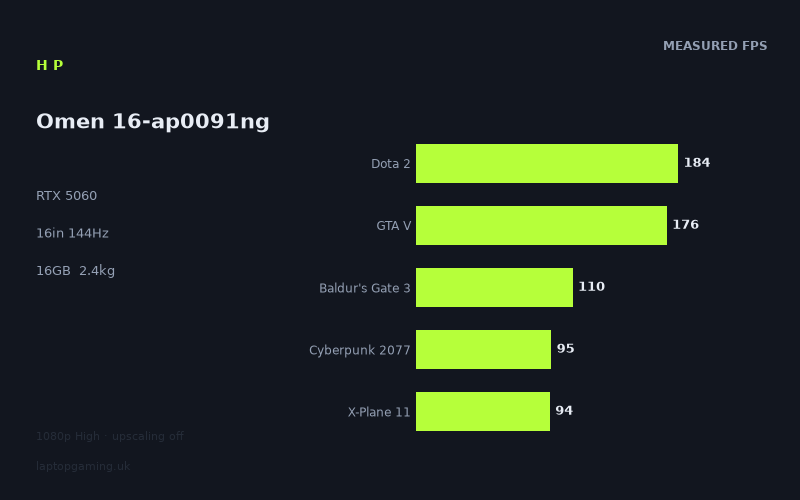
Frame rates
1920×1080, High preset, upscaling off. Averages 131fps across the 5 core benchmark games.
Measured on this machine. Source: Notebookcheck, 2025-10-13.
Not scored: no confirmed UK price
We have the full benchmark suite for this machine, so it ranks on the frame rate leaderboard like any other. What we don't have is a UK listing for this exact configuration - it's sold as a European review unit, or only in specifications that differ from the one tested. Since 30% of our score is value for money, scoring it would mean pretending price is no object, which would flatter it against every laptop you can actually buy. The frame rates below are real and comparable; there is just no buying recommendation to make yet.
How these numbers were produced
Frame rates here are not measured by us, and we label how each one was arrived at. A figure marked measured comes from a published run on that exact machine. A figure marked representative is derived from the GPU and its power limit (TGP) and cross-referenced against published reviews - a sound estimate of what that configuration delivers, but not a measurement of that specific laptop. Unless stated otherwise, numbers are 1920x1080, High preset, upscaling off. Where a laptop ships in several power configurations we use the wattage of the exact SKU listed, because a 140W RTX 5070 and a 115W one are not the same product.
In use
The short version
The Omen 16-ap0091ng is a 16-inch, 1920x1200, 144Hz IPS gaming laptop built around an RTX 5060 with 8GB of VRAM and a Ryzen 9 8940HX — an HX-class, desktop-derived processor rather than the thinner-and-cooler mobile parts you find in slimmer machines. On Notebookcheck's numbers it averages 132fps across the five games in our scoring suite at 1080p, High preset, upscaling off. That is a genuinely competent result for the hardware class, and more to the point it is a result that holds up against machines carrying a nominally faster GPU.
One piece of housekeeping first, and we will only say it once: we have no confirmed UK price for this exact configuration, so this machine does not carry a score. Value accounts for 30% of our score and there is no honest way to compute it without a price. Nothing is wrong with the laptop. The benchmark suite is complete, the data is sourced, and it ranks normally on our frame rate leaderboard alongside every other machine we track. It simply cannot be scored until a UK price for this SKU is confirmed. Configuration codes also move around between regions, so if a comparable Omen 16 reaches UK shelves it may do so with a different suffix and, potentially, a different memory or storage allocation — check the specification you are actually buying against the one measured here.
What the benchmark data supports is a fairly clear argument. This is a machine for someone who plays at the panel's native resolution and wants high frame rates in competitive and mid-weight titles, with enough headroom to run current AAA games at High settings at figures comfortably above 60fps. The measured spread runs from 238fps in Strange Brigade down to 94fps in X-Plane 11, and that range is the story: the ceiling is set by how much GPU there is, the floor is set by the engine and, in a couple of cases, by the processor. Every single measured title clears 90fps. None of them, apart from the four fastest, get near the panel's 144Hz refresh ceiling.
It is not a machine for someone chasing ray tracing at native resolution, for someone who intends to drive a high-resolution external display, or for anyone whose game library leans on large texture packs. The 8GB VRAM allocation is the single specification here most likely to age badly, and it is the reason we would treat this as a very good 1080p/1200p laptop rather than a machine with a long runway ahead of it.
Against the specific rivals in our database it is quietly impressive. It is ahead of an RTX 5070 in the Asus ProArt P16 by an average of 2fps across eight shared games, ahead of a 115W RTX 5070 in the ASUS TUF Gaming A18 by 3fps across eight shared games, and ahead of a 115W RTX 5060 in the Lenovo Legion 5 15AHP G10 by 4fps across eight shared games. It is level with the Lenovo Yoga Pro 9 16IAH G10 RTX, another RTX 5060 machine, at +2fps across eight games. The only machine here that beats it is the MSI Katana 17 HX, an RTX 5070 laptop at £2,312, and it beats the Omen by an average of just 3fps across the five games they share. We will get into why those deltas mean less than they look like they mean.
Performance
What the measured figures actually say
Here is the full set of measurements, all at 1920x1080, High preset, with upscaling switched off, sourced from Notebookcheck on 13 October 2025:
- Strange Brigade: 238fps
- Dota 2: 184fps
- GTA V: 176fps
- F1 25: 154fps
- Final Fantasy XV: 111fps
- Baldur's Gate 3: 110fps
- Cyberpunk 2077: 95fps
- X-Plane 11: 94fps
Five of those — Dota 2, GTA V, Baldur's Gate 3, Cyberpunk 2077 and X-Plane 11 — form our scoring suite, and they average 132fps. That mean is a useful summary number but it is not, on its own, a description of what the machine feels like to play on, because the individual figures sit in two clearly separated groups with almost nothing in between.
The top group — Strange Brigade, Dota 2, GTA V, F1 25 — runs from 154fps to 238fps. These are titles that either use a deliberately lightweight renderer designed to run fast on modest hardware, or are old enough that a current mid-range GPU has enormous headroom over what the engine was built to demand. The bottom group — Final Fantasy XV, Baldur's Gate 3, Cyberpunk 2077, X-Plane 11 — clusters tightly between 94fps and 111fps. That cluster is the honest indicator of what this machine does in a modern, visually heavy game with the settings up and no upscaling helping it along.
The gap between 154fps and 111fps is where the transition happens, and there is nothing measured in it. That is a common shape for a mid-range GPU's results, and it tells you something useful: this is not a machine that degrades gracefully across a smooth curve of increasingly demanding games. It has a large amount of surplus performance in the lighter half of most people's libraries and a much narrower margin in the heavier half. Whether that matters depends entirely on what you play, which is why we would push back on treating the 132fps mean as the headline. If your library is esports and older titles, the mean understates the machine badly. If your library is 2023-onward AAA, the mean overstates it.
Where the spread comes from
Strange Brigade at 238fps is best understood as a ceiling test rather than a game result. Its renderer is efficient to the point of being unrepresentative, and it is included in benchmark suites precisely because it isolates raw throughput without the engine getting in the way. A figure that high does not mean the machine will run anything else at 238fps. It means there is nothing in Strange Brigade's rendering path that this GPU struggles with, and it establishes that the GPU is not being throttled into the ground by the chassis — a 5060 that was severely power-constrained would not post 238fps here.
Dota 2 at 184fps and GTA V at 176fps sit close together, and in both cases the limiting factor at this resolution and settings level is more likely to be the processor and the engine's draw call handling than the graphics chip. Both are old engines with single-threaded characteristics that no amount of extra GPU solves. The fact that the Omen posts figures this high in both is a point in favour of the Ryzen 9 8940HX — an HX-class part has the clock speeds and the power budget to push these engines hard, and it shows. On a machine with a lower-power mobile CPU you would generally expect these two titles to sit lower while the GPU-bound titles stayed roughly where they are.
F1 25 at 154fps is the most encouraging single result in the set for anyone who plays racing games or anything else where frame pacing and input latency genuinely matter. 154fps is above the panel's refresh rate, which means the machine has margin — you can run with a frame cap slightly below refresh and hold it consistently rather than sitting right on the edge. That is a materially better experience than an uncapped 154fps average with dips, and it is the sort of thing a spare 10 or 20fps buys you.
Final Fantasy XV at 111fps is a DX11-era title with a lot of expensive effects work layered on top, and it behaves more like a modern game than its age suggests. 111fps is comfortable.
Baldur's Gate 3 at 110fps deserves a caveat that has nothing to do with this laptop. BG3's benchmark scenarios generally do not capture the game's worst case, which is dense urban areas late in the campaign where the load shifts heavily onto the CPU. A 110fps benchmark result does not guarantee 110fps in Act 3's busiest streets on any machine. What it does tell you is that the GPU side is not the bottleneck here, and that with an HX-class processor doing the heavy lifting this laptop is better placed than most in its bracket for the parts of that game that punish weaker CPUs.
Cyberpunk 2077 at 95fps is, for our money, the number to anchor on. High preset, native 1080p, no DLSS, no ray tracing. 95fps is a good result — it is comfortably above 60, it leaves headroom for the settings you would actually want to raise, and it means the machine is not scraping. Turn on upscaling, which almost everyone does in this game, and the figure would rise substantially. We do not have measurements with DLSS enabled, so we are not going to quote a number for it; the point is simply that 95fps is a floor established under the harshest realistic conditions, not a typical-use figure.
X-Plane 11 at 94fps is the lowest measured result and the one most likely to be misread. X-Plane 11 is notoriously bound by single-thread CPU performance rather than graphics throughput, and results in it correlate far more with processor clocks than with GPU tier. 94fps here, given that constraint, is a strong showing rather than a weak one, and it reinforces the picture painted by Dota 2 and GTA V: the CPU in this machine is not the thing holding it back anywhere.
Put those together and the shape of the machine becomes clear. This is a GPU-limited laptop with a processor that is comfortably ahead of it. In every title where the graphics chip is the constraint, the frame rate lands in the 94–111fps band. In every title where the engine or the CPU is the constraint, the frame rate is high. That is a sensible way to build a gaming laptop if you value consistency and you are not trying to chase the top of the leaderboard, and it means the machine has headroom for things other than games — streaming while playing, compiling, simulation workloads, anything that benefits from a serious CPU rather than a serious GPU.
The GPU power limit we cannot confirm
We do not have a confirmed graphics power limit figure for this specific machine, and we are not going to guess at one. That is a real gap, because on current-generation laptops the wattage a manufacturer allows the GPU to draw matters more than the model number printed on the box. Two laptops with the same RTX 5060 can differ by a substantial margin depending on chassis, cooling and how aggressively the vendor has configured the power envelope.
What we can do is reason backwards from the measurements, and the measurements are informative. The comparison set includes the Lenovo Legion 5 15AHP G10, which runs an RTX 5060 at a confirmed 115W. The Omen averages 4fps ahead of it across eight shared games. That is a small margin — small enough that it could be accounted for by CPU differences, driver versions, or ordinary run-to-run variance — but it does establish that this Omen's 5060 is being fed at least competitively with a 115W implementation. It is not a heavily cut-down configuration hiding behind a familiar model name.
The other end of the argument is more striking. The ASUS TUF Gaming A18 runs an RTX 5070 at a confirmed 115W, and the Omen is 3fps ahead of it across eight shared games. A 5060 matching and slightly exceeding a 5070 is only possible if the 5060 is being given a decent power allowance, the 5070 is being restricted, or both. This is the single most useful thing in the comparison data, and it is worth stating plainly: on the evidence here, GPU tier names are close to useless for predicting laptop performance without knowing the wattage. A well-fed 5060 and a constrained 5070 land in the same place. If you are shopping by GPU model alone you will make bad decisions, and this machine is a good illustration of why.
The practical implication of a well-supplied GPU power limit, beyond the raw frame rate, is that the machine is more likely to hold its measured performance over a long session rather than starting high and sagging. We do not have thermal throttling data, surface temperature measurements, or fan noise figures for this laptop, so we cannot make that claim as a measurement — only as an expectation consistent with a Strange Brigade result of 238fps, which a badly heat-limited configuration would struggle to produce. If sustained performance under load matters to you specifically, treat that as an open question until someone publishes long-run data.
Eight gigabytes of VRAM
This is the specification we would think hardest about before buying. 8GB is what the RTX 5060 ships with, it is not something HP has skimped on, and at 1080p High with upscaling off it is broadly sufficient — the measured results show no sign of a title falling off a cliff, which is what a VRAM shortfall usually looks like when it bites.
The concern is forward-looking rather than immediate. Several things push memory use past 8GB in current games: high-resolution texture options above the standard High preset, ray tracing (which adds its own memory cost on top of the base scene), frame generation (which requires buffering), and running at higher output resolutions than 1080p. Each of those is a thing a buyer might reasonably want to do on a machine with this much GPU throughput, and each of them makes 8GB tighter. Because the GPU here has genuine performance in reserve in the lighter half of the game library, there will be situations where you have the compute available to raise settings but not the memory to do it comfortably.
The measured data does not show this happening, because the measured data is at the settings and resolution where 8GB is fine. That is the correct way to benchmark and we are not criticising it. But it does mean the benchmark suite is testing the machine in its comfort zone with respect to memory, and buyers should understand that the numbers above are not evidence that 8GB will still be adequate for the games of 2027 at settings you would want to use. If you keep laptops for four or five years and you play new releases, this is the thing that will end the machine's useful life as a gaming device, not the GPU's raw speed.
The processor, and what it is doing here
The Ryzen 9 8940HX is an HX-class chip, which in AMD's naming means a desktop-derived processor with a higher power ceiling than the mainstream mobile parts. We do not have core counts, clock speeds or CPU benchmark data in front of us for this specific machine, so we are not going to quote any — but the gaming results tell us a fair amount indirectly.
The three most CPU-sensitive titles in the set are Dota 2, GTA V and X-Plane 11. All three post results that are strong relative to what a mid-range GPU alone would produce: 184fps, 176fps and 94fps. In the case of X-Plane 11 in particular, where GPU tier barely matters and single-thread performance dominates, 94fps is not the kind of number a weak CPU produces. The pattern across the suite — GPU-bound titles clustered in the 90s and 100s, CPU-influenced titles substantially higher — is exactly what you would expect from a configuration where the processor is the stronger half of the pairing.
That has real consequences for who should want this machine. If you play strategy games, simulators, large-scale multiplayer titles, or anything where the frame rate collapses because the CPU cannot keep up with the simulation rather than because the GPU cannot draw the scene, this pairing is more useful to you than a machine with a faster GPU and a weaker processor. It also means the laptop is more capable outside games than its GPU tier suggests: anything that scales with CPU rather than graphics — compilation, video encoding on the CPU path, running a game and a stream encoder simultaneously — has more room here than in a typical mid-range gaming laptop.
The counterweight is 16GB of system memory. Pairing an HX-class processor with 16GB is a conservative allocation in 2025, and it is the configuration decision most likely to bottleneck the machine in the workloads where the CPU would otherwise shine. Modern games routinely want more than 8GB of system RAM on their own, and once you add an operating system, a browser with a realistic number of tabs, a chat client and a game launcher, 16GB stops being generous. We do not have confirmation of whether memory is user-upgradeable on this particular chassis, so we cannot promise you a route out of it — but if you are configuring rather than buying a fixed SKU, more memory is where we would spend first.
1TB of SSD storage is the right amount for a gaming laptop in the sense that it is the minimum sensible amount. Three or four large modern installs will use most of it. It is not a complaint, just a planning note.
Frame rates versus the panel
The panel runs at 144Hz. Of the eight measured titles, four exceed that refresh rate and four do not. Strange Brigade (238fps), Dota 2 (184fps), GTA V (176fps) and F1 25 (154fps) all sit above it. Final Fantasy XV (111fps), Baldur's Gate 3 (110fps), Cyberpunk 2077 (95fps) and X-Plane 11 (94fps) all sit below.
That split is the practical definition of what this machine is. In the first group you have surplus — enough that you can cap the frame rate below refresh, hold it steadily, reduce power draw and heat, and get better frame pacing than an uncapped run would give you. In the second group you are using every frame the machine can produce and adaptive sync is doing the work of keeping the presentation smooth.
None of the second group are uncomfortable. 94fps is a good frame rate by any standard, and the practical difference between 94fps and 144fps in a single-player action or role-playing game is far smaller than the numbers suggest. Where it does matter is competitive shooters, and those are not represented in the measured set — but based on the Dota 2 and Strange Brigade results, a machine that posts figures like these will run typical competitive titles well above the panel's refresh rate at sensible settings. We do not have measurements to prove that, so treat it as an inference rather than a finding.
The screen
A 16-inch, 1920x1200, 144Hz IPS panel. Three things worth drawing out.
The resolution is the right choice for this GPU
1920x1200 is the resolution this GPU should be paired with. A 1440p-class panel on an RTX 5060 with 8GB would have produced a machine that could not drive its own screen properly in the heavier half of the library — you would be looking at meaningfully lower figures in Cyberpunk, Final Fantasy XV and anything comparable, and you would lean far harder on upscaling to compensate. As configured, the GPU and the panel are matched. Every measured title clears 90fps and the four fastest exceed the refresh rate. That is a coherent product, and coherence is worth more than a bigger number on a spec sheet.
There is a small piece of arithmetic to be honest about. The measurements are at 1920x1080; the panel is 1920x1200. That 16:10 aspect ratio carries roughly 11% more pixels than 16:9 at the same width — that is arithmetic from the two resolutions, not a measured result. In GPU-bound titles you should therefore expect native-panel frame rates to sit somewhat below the figures quoted above. The effect is not uniform: in the CPU-limited titles like Dota 2, GTA V and X-Plane 11 it will be close to nil, because adding pixels does not change what the processor is doing. In Cyberpunk 2077, where the GPU is the constraint, the difference will be more visible. We do not have native-resolution measurements, so we will not put a number on it — but if you are budgeting mentally, assume the 95fps Cyberpunk figure is a small amount optimistic for the screen you will actually be looking at, and that it is still comfortably above 60fps.
The extra vertical space is genuinely useful
16:10 on a 16-inch machine is the format we would pick for a laptop that has to do more than game. The additional vertical pixels are worth having in documents, code, spreadsheets, timelines and anything with a toolbar at the top and another at the bottom. Given that the processor in this machine is more capable than the GPU tier suggests, and given that a lot of buyers in this bracket use the laptop for work during the week and games at the weekend, the aspect ratio is a better fit for the machine's actual likely use than 16:9 would have been.
What we do not know about this panel
We have resolution, refresh rate, size and panel technology. We do not have brightness, colour gamut coverage, colour accuracy, contrast, response time or overshoot measurements, and we are not going to characterise the panel's quality without them. "IPS" covers an enormous range of real-world panels, from excellent to mediocre, and the label alone tells you only that you should expect reasonable viewing angles and not expect OLED-class contrast.
Two things follow. First, if colour accuracy matters to you for work, do not assume this panel is adequate on the strength of the specification line — look for measured coverage figures before committing. Second, response time is the specification most likely to undercut a 144Hz panel in practice: a slow IPS panel at 144Hz can produce visible smearing that partially wastes the refresh rate. We have no data either way on this one. It is a real gap in what we can tell you, and we would rather say so than fill it with assumptions.
Build, size and portability
The machine weighs 2.397kg and carries a 70Wh battery. We have not handled it, opened it or carried it, so everything here is reasoning from the published specifications rather than from experience with the machine.
2.397kg is a normal weight for a 16-inch gaming laptop with an HX-class processor and a 100W-class GPU. It is not light, and it is not unusually heavy for what it contains. In practical terms it is a machine you can move — from desk to sofa, to a friend's house, into a bag for a weekend — but not one you would choose to carry across a city every day. The 16-inch footprint compounds this: it will fit most laptop bags rated for 16-inch machines but it will dominate a smaller bag, and it needs a reasonable amount of desk depth to sit comfortably with the screen at a usable angle.
Worth remembering, though we have no figure for it here, is that a gaming laptop's real travel weight includes the power adapter, and adapters for machines in this power class are substantial. We do not have the charger's weight or the power supply's rating in our data, so we will not quote either — but budget mentally for the total being noticeably more than the 2.397kg figure.
The 70Wh battery is the specification that most shapes how this machine gets used. 70Wh is a moderate capacity for a 16-inch laptop, and it is being asked to feed an HX-class processor that is designed around a higher power ceiling than mainstream mobile parts. We have no measured battery runtime figures for this laptop, so we cannot tell you how long it lasts on a charge, in games or out of them — and we would treat anyone who quotes you a number without a measurement behind it with suspicion.
What we can say from the specifications is structural rather than numerical: a high-power processor with a mid-sized battery is a combination that favours mains use. Gaming on battery on machines of this class is generally a compromised experience regardless — the GPU power limit typically drops sharply when unplugged, and the frame rates measured above should be understood as plugged-in figures. If you need a laptop that games away from a socket, no machine in this category is going to satisfy you, and this one has no particular advantage.
The more relevant question is light-use endurance: browsing, documents, video. HX-class chips can idle efficiently, but they are not the natural choice for all-day unplugged work. If your pattern is a full day of untethered meetings and note-taking, look for measured runtime data before you buy this specific machine, because the specification combination does not inspire confidence and we have no numbers to reassure you with.
We also have no data on chassis materials, keyboard layout and travel, trackpad size, port selection or port placement, hinge behaviour, or how loud the fans get under load. These are meaningful factors in living with a laptop, and their absence from our data is a real limitation on this review. We analyse published measurements and specifications; where those do not exist, we would rather leave a gap than invent an impression.
How it compares
Before the individual comparisons, a note on how to read them. Our rival comparisons are computed only across games that both machines have measured results for, which keeps them honest but means the sample size varies. More importantly, differences of two to four frames per second across a benchmark suite are not real differences. They fall within the range that driver versions, background processes, ambient temperature and ordinary run-to-run variance can produce. Every single one of the five comparisons below falls in that band. The correct conclusion from that is not "the Omen wins four out of five" — it is "these six machines are, on frame rates, essentially the same machine."
That is a genuinely useful finding, because several of these laptops carry different GPU tiers and, where we have prices, very different ones.
Lenovo Yoga Pro 9 16IAH G10 RTX — RTX 5060, no confirmed UK price
The most direct comparison in the set: same GPU tier, and the Omen averages 2fps ahead across eight shared games. Eight games is a decent sample and the answer it gives is unambiguous — these two produce the same frame rates. Neither has a confirmed UK price in our database, so we cannot separate them on value either.
Which means the decision between them turns entirely on factors our frame rate data cannot address: screen quality, chassis, keyboard, thermals, port selection, warranty and, most of all, price when both are known. We are not going to invent a preference. If you are choosing between these two, the frame rate question is settled — it is a tie — and you should spend your research time on everything else.
Asus ProArt P16 — RTX 5070, no confirmed UK price
This is the comparison that most rewards attention. The ProArt carries an RTX 5070, a tier above the Omen's 5060, and the Omen is 2fps ahead across eight shared games. A full GPU tier of nominal advantage produces, in measured practice, nothing.
The explanation is power. A 5070 in a chassis that is not primarily built around sustained gaming load will be configured with a power limit that gives up most of the tier advantage, and once that happens the model number is doing no work at all. We do not have the ProArt's GPU wattage confirmed, so we are describing a mechanism rather than reporting a figure — but the outcome is measured and it is unambiguous.
The lesson generalises well beyond these two machines. If you are comparing laptops by GPU model number, you are comparing marketing rather than performance. A 5060 in a machine designed to feed it will match or beat a 5070 in a machine that is not. Ask for the wattage, and where you cannot get the wattage, ask for measured frame rates.
MSI Katana 17 HX — RTX 5070, £2,312
The only machine in the comparison set that is faster, and it is faster by 3fps across five shared games. Two caveats stack here: three frames per second is noise, and five shared games is the smallest sample in the set, which makes the signal weaker still. Our honest reading is that these two machines produce the same frame rates and the Katana's nominal lead should not influence a purchase decision.
What makes this comparison useful is that the Katana has a confirmed UK price of £2,312. That gives you a hard anchor: £2,312 currently buys an RTX 5070 gaming laptop that is, on the games we can compare, level with this Omen. It is a 17-inch machine rather than a 16-inch one, which is a different proposition for portability and desk space, and we do not have its weight in our data to quantify that. But as a reference point for what performance in this bracket costs, it is the most concrete figure in the set. When a UK price for the Omen is confirmed, this is the number to measure it against.
ASUS TUF Gaming A18 — RTX 5070 at 115W, £1,489
The most informative comparison in the group, because we have both the wattage and the price. The TUF runs an RTX 5070 at a confirmed 115W and costs £1,489, and the Omen is 3fps ahead across eight shared games.
Read that carefully, because it cuts two ways. First, it is further evidence that the Omen's 5060 is being fed properly — matching a 115W 5070 across eight games is not something a starved GPU does. Second, and more relevant to your wallet, £1,489 buys frame rates that are indistinguishable from this Omen's. That is the benchmark this machine has to beat commercially, and until we have a confirmed UK price we cannot tell you whether it does.
The A18 is an 18-inch machine, which is a materially different thing to live with than a 16-inch one — bigger footprint, bigger bag, more desk. If portability matters to you at all, that difference is worth real money, and the Omen's 16-inch, 2.397kg configuration is the more sensible travelling companion. But the frame rates are the frame rates, and the frame rates say these machines perform the same.
Lenovo Legion 5 15AHP G10 — RTX 5060 at 115W, no confirmed UK price
Same GPU as the Omen, at a confirmed 115W, and the Omen averages 4fps ahead across eight shared games — the largest margin in the comparison set, and still within the range we would call noise. This is the closest thing we have to a controlled comparison: same GPU tier, same nominal class, and a 4fps difference that is more likely to reflect the processor pairing and driver versions than any meaningful gap in graphics performance.
The practical distinction is size. The Legion is a 15-inch machine and the Omen is a 16-inch one, and that difference brings the screen real estate question into play alongside the portability question. Neither has a confirmed UK price, so again the frame rate comparison is settled — a tie — and the decision belongs elsewhere.
What the comparison set adds up to
Six machines, three different GPU tiers between them, and a total spread of seven frames per second from the slowest comparison to the fastest. The RTX 5070 machines are not meaningfully faster than the RTX 5060 machines. The 115W machines are not meaningfully faster than the machines whose wattage we cannot confirm. Where we have prices, they range from £1,489 to £2,312 for performance that is, within measurement noise, identical.
That is the single most actionable thing in this review. In this performance bracket, the frame rate question is largely settled before you start, and what you are actually buying with the price difference is screen quality, chassis, cooling behaviour, keyboard, ports, size, weight and warranty. Anyone paying a premium specifically for a higher GPU tier in this class, without checking the wattage and the measured results, is paying for a model number.
Who it's for
On the evidence available, this machine suits a fairly well-defined buyer.
- Someone who plays at 1920x1200 and intends to keep playing at 1920x1200. The GPU and the panel are properly matched. Every measured title clears 90fps and four exceed the refresh rate. There is no configuration mismatch here to work around.
- Someone whose library mixes competitive and single-player titles. The 154–238fps group covers esports and older engines with room to spare; the 94–111fps group covers modern AAA at High comfortably. Both halves are served.
- Someone who plays CPU-heavy games. Strategy, simulation, large multiplayer, anything where the frame rate is governed by simulation rather than rendering. The Dota 2, GTA V and X-Plane 11 results all point the same way: the processor here is the stronger half of the pairing, and that is unusual enough in this bracket to be a genuine reason to choose this machine over a rival with a nominally better GPU.
- Someone who needs the laptop to work as well as play. The 16:10 panel and the HX-class processor make this a better weekday machine than most gaming laptops of this size, provided you address the 16GB memory allocation.
- Someone who wants a 16-inch machine specifically. Two of the closest rivals are 15-inch and 17/18-inch alternatives. At 2.397kg with a 16-inch screen, this sits in the middle of the range — more screen than a 15, considerably more portable than an 18.
And, just as concretely, the people who should buy something else:
- Anyone planning to game at 1440p or above, on this screen's successor or an external monitor. The measured figures are 1080p figures, the panel is 1200p, and 8GB of VRAM plus an RTX 5060 is not a high-resolution combination. You would be relying on upscaling permanently and running into memory limits at settings you would want to use. Buy more GPU and more VRAM.
- Anyone whose priority is ray tracing at native resolution. Cyberpunk 2077 at 95fps is with ray tracing off. Enabling it costs a
How it compares