Details
Product prices and availability are accurate as of the date/time indicated and are subject to change. Any price and availability information displayed on Amazon.co.uk at the time of purchase will apply to the purchase of this product.Review
Medion Erazer Beast 16 X1 Ultimate review
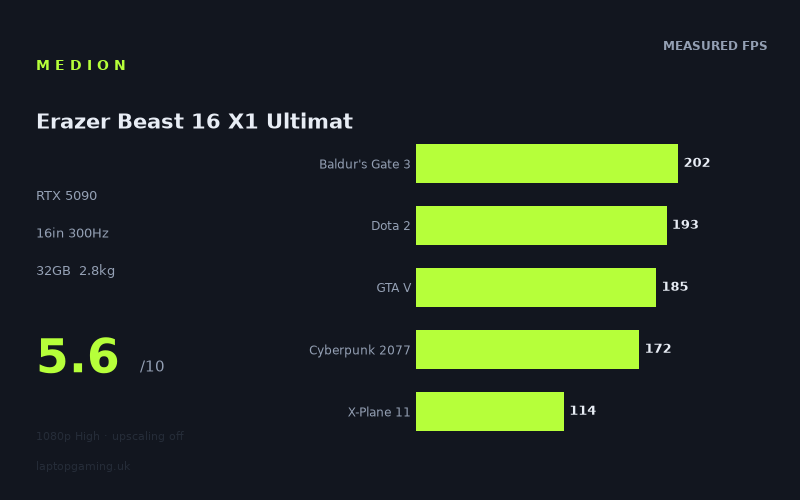
Frame rates
1920×1080, High preset, upscaling off. Averages 173fps across the 5 core benchmark games.
Measured on this machine. Source: Notebookcheck, 2025-06-01.
Not scored: no confirmed UK price
We have the full benchmark suite for this machine, so it ranks on the frame rate leaderboard like any other. What we don't have is a UK listing for this exact configuration - it's sold as a European review unit, or only in specifications that differ from the one tested. Since 30% of our score is value for money, scoring it would mean pretending price is no object, which would flatter it against every laptop you can actually buy. The frame rates below are real and comparable; there is just no buying recommendation to make yet.
How these numbers were produced
Frame rates here are not measured by us, and we label how each one was arrived at. A figure marked measured comes from a published run on that exact machine. A figure marked representative is derived from the GPU and its power limit (TGP) and cross-referenced against published reviews - a sound estimate of what that configuration delivers, but not a measurement of that specific laptop. Unless stated otherwise, numbers are 1920x1080, High preset, upscaling off. Where a laptop ships in several power configurations we use the wattage of the exact SKU listed, because a 140W RTX 5070 and a 115W one are not the same product.
In use
The short version
The Medion Erazer Beast 16 X1 Ultimate is one of the fastest laptops in our database, and one of the hardest to recommend at its UK price. Those two things are not in tension — they are the whole story. Notebookcheck's measured figures put it at 173fps averaged across the five games we use for scoring, with a median across the full fifteen-game set of 166fps, all at 1920x1080 on High presets with upscaling switched off. That is elite-tier throughput. It is also throughput you can buy for substantially less money, from a machine with a smaller GPU, sitting in the same database.
The specification reads like a wishlist: an RTX 5090 with 24GB of VRAM, a Core Ultra 9 275HX, a 16in 2560x1600 panel running at 300Hz, 2TB of SSD, and a 99Wh battery — the largest a passenger is permitted to carry onto an aircraft. The parts are right. The problem is the £4,884 asking price and what the comparative benchmark data does to it. The Lenovo Legion Pro 7i 16 Gen 10, an RTX 5080 machine at £3,662, comes out 9fps ahead of this Medion on average across the five games both machines have measured figures for. That is £1,222 saved for, on the evidence available, slightly more frames. There is no reading of that comparison that flatters the Beast.
So who should buy it? Someone who wants a 5090-class laptop, has looked at the RTX 5090 competition specifically rather than the wider market, and finds this the one they can actually order at a confirmed UK price. That last point matters more than it should. Two of the three RTX 5090 rivals in our comparison set — the Schenker XMG Neo 16 E25 and both Asus ROG Strix Scar models — have no confirmed UK price in our data, which makes them hard to hold up as alternatives even when their measured frame rates are competitive. The one 5090 rival with a firm UK price, the Razer Blade 16 with the same Core Ultra 9, costs £5,000 and is 22fps slower on average across six shared games. Against that specific machine, the Medion is both cheaper and faster, and the argument for it becomes straightforward.
Everyone else should think hard. If you want the highest frames per pound, the Legion Pro 7i undercuts it decisively. If you want something you carry regularly, 2.834kg before you add a charger capable of feeding a 5090 is a lot of laptop. If you want to drive that 300Hz panel at its ceiling, the measured numbers say no game in the set gets close — the fastest result, F1 25 at 241fps, is roughly 60fps short, and that is at 1080p rather than the panel's native 2560x1600. The Beast is a superb performance chassis wrapped in a price that undoes most of the good work. Buy it if the RTX 5090 badge is non-negotiable and you have compared it against the other machines that carry it. Do not buy it because it is the fastest thing on the page, because on the numbers below, it is not.
Performance
What the numbers actually represent
Every frame rate quoted here comes from Notebookcheck's testing, recorded on 1 June 2025, at 1920x1080, High preset, with upscaling disabled. That test point is deliberate and it is worth understanding before reading any of the figures. Running at 1080p with DLSS off strips out the variables that make cross-machine comparison meaningless — different upscaler versions, different quality modes, different frame generation behaviour — and gives you a clean index of how much raw work the GPU and CPU can do together. It is a measuring instrument, not a simulation of your evening.
What it is not is a prediction of what appears on this machine's own display. The built-in panel is 2560x1600, which is just under double the pixel count of 1920x1080 — 4,096,000 pixels against 2,073,600. Native rendering at the panel's resolution asks for close to twice the pixel work, and while the relationship between pixel count and frame rate is never linear, it is directional enough that you should read every figure below as a ceiling rather than an expectation. We do not have measured native-resolution numbers for this machine and will not invent them. What we can say with confidence is the ordering: the games that are comfortable at 1080p have the most headroom to remain comfortable at 1600p, and the games that are already struggling at 1080p will need upscaling, settings reductions, or both.
The top of the chart
Eight of the fifteen measured titles clear 144fps. F1 25 leads at 241fps, followed by Civilization 7 at 225fps, Final Fantasy XV at 205fps, Baldur's Gate 3 at 202fps, Dota 2 at 193fps, GTA V at 185fps, Cyberpunk 2077 at 172fps and Kingdom Come: Deliverance 2 at 166fps.
Two observations follow from that list. The first is that at this test point, the games at the very top are almost certainly not being limited by the GPU. F1 25, Civilization 7, Dota 2 and GTA V at 1080p on a 5090 are, in every practical sense, a test of the Core Ultra 9 275HX, the memory subsystem and the game's own engine ceiling. A faster graphics card does very little for a title that is waiting on a draw-call-heavy render thread. This is why the gap between an RTX 5090 machine and an RTX 5080 machine compresses so sharply at the top of the chart, and it is the single most important mechanism behind the Legion Pro 7i comparison discussed later.
The second is that Cyberpunk 2077 at 172fps is genuinely impressive, and more informative than the higher numbers above it. Cyberpunk on High is a real graphics workload — it responds to GPU power in a way that Dota 2 does not — and 172fps at 1080p means substantial headroom exists for the resolution increase to native, or for pushing settings up towards Ultra, or for enabling some ray tracing. It does not mean all three at once. But of the entire set, Cyberpunk's figure is the one that best demonstrates what a 5090-class GPU is actually delivering in this chassis.
Kingdom Come: Deliverance 2 at 166fps sits at the boundary. It is a modern, heavy, open-world title, and 166fps at 1080p is a strong result that suggests it remains a high-refresh experience at native resolution with sensible settings.
The middle
Five titles land between 100 and 144fps: Doom: The Dark Ages at 114fps, X-Plane 11 at 114fps, The Elder Scrolls IV: Oblivion Remastered at 104fps, Space Marine 2 at 102fps and Until Dawn at 102fps.
This band is where the machine's character becomes clear. These are the current-generation graphics workloads — heavy lighting, dense geometry, modern engines — and the 5090 is doing real work rather than idling behind the CPU. A hundred-plus frames per second in this class of title is excellent, and it is the difference between a machine that runs 2025 games well and one that merely runs them.
X-Plane 11 in the same band is a different animal entirely and deserves separate comment, because it is easy to misread. It is an old flight simulator with a rendering path that is famously bound by single-threaded CPU performance rather than graphics throughput. Its presence at 114fps on a machine that can push F1 25 to 241fps is a useful reminder that the most expensive GPU available does not fix a title that is not asking the GPU for anything. If you fly sims — and a meaningful number of people who buy machines like this do — the lesson is that your frame rate is governed by CPU clocks and engine design, not by the badge on the graphics card. The 275HX is a strong chip and the result reflects that. It is not a result you should expect to improve by buying a bigger GPU.
Doom: The Dark Ages at 114fps is worth flagging for the opposite reason. It is a title built around ray-traced lighting as a baseline rather than an option, and it is one of the clearest indicators in the set of how the machine handles the direction the industry is moving in. 114fps at 1080p is a comfortable, high-refresh result for a game of that construction, and it suggests reasonable headroom for native resolution with upscaling in play.
The bottom, and where the spread comes from
Two games fall below 100fps: Stalker 2 at 93fps and Star Wars Outlaws at 73fps. Outlaws is the floor of the entire set, and the spread it defines is dramatic: the fastest measured title runs at more than three times the frame rate of the slowest, and Outlaws manages under 42% of Cyberpunk's figure despite both being open-world action games measured on the same machine, on the same day, at the same settings.
That spread is not noise and it is not a measurement problem. It is the defining fact about how modern PC games behave, and it is why any single "average frame rate" figure for a gaming laptop — including the 173fps scoring-suite mean quoted at the top of this review — should be treated as an index for comparing machines, never as a promise about a specific game.
The mechanism has three parts. First, ray tracing. Titles that lean on ray-traced global illumination, reflections or shadows as a core part of their look, rather than as a toggle, impose a cost that scales with GPU capability but never disappears. Second, engine architecture: Unreal Engine 5 games with software or hardware Lumen and Nanite geometry ask a fundamentally different question of the hardware than a DirectX 11-era title, and the answer is always a smaller number. Third, the CPU ceiling at the top end, which caps the fast games well below what the GPU could theoretically produce and therefore compresses the top of the chart while leaving the bottom untouched.
The practical consequence for a buyer is this: your experience of this machine will be defined almost entirely by which games you play. If your library is competitive shooters, strategy, racing and older RPGs, the Beast will feel absurdly fast and you will spend most of your time above 150fps. If your library is the current crop of heavy single-player releases with ray tracing on by default, you will spend most of your time somewhere between 70 and 120fps at 1080p, and rather lower than that at the panel's native resolution without upscaling. Both are true simultaneously. Neither is a criticism of the hardware.
The GPU power limit, and what we can and cannot say about it
We do not have a confirmed graphics power limit for this specific configuration, and we are not going to state one. That is a real gap, because on current-generation mobile GPUs the power limit matters more than the chip name. An RTX 5090 restricted to a low wattage in a slim chassis and an RTX 5090 given full headroom in a thick one are not the same product, and the difference between them is routinely larger than the difference between adjacent GPU tiers.
What we can do is infer from the comparative data, and label the inference as inference. Three of the rivals in our comparison set are known to be RTX 5090 machines, and two of those — the Schenker XMG Neo 16 E25 and the Asus ROG Strix Scar 18 — are recorded at 175W. The Medion runs 2fps ahead of the Schenker across six shared games and 9fps behind the Scar 18 across eight shared games. Against the Asus ROG Strix Scar 16, also an RTX 5090, it is 9fps ahead across six shared games.
That places it squarely in the middle of the 5090 field. It is not the outlier that a severely power-restricted card would produce, and it is not clearly at the top either. The most reasonable reading is that this GPU is being run at a competitive but not class-leading power budget, and that the larger-chassis Scar 18 is extracting slightly more from the same silicon — which is exactly what you would expect from a machine with more volume to dissipate heat into. The margins involved are small: 9fps on an average that sits around 173fps is roughly a 5% difference, which is at the edge of what most people would notice without a counter on screen.
The honest summary is that the Beast performs like a properly configured RTX 5090 laptop and not like a compromised one. If you need to know the exact wattage before committing £4,884, ask the retailer for it in writing, because it is the single specification most likely to vary between SKUs carrying the same model name.
VRAM, system memory and storage
The 24GB of VRAM is the specification here with the longest useful life. Texture budgets in current releases have grown to the point where 12GB cards are making visible compromises at high settings, and 24GB removes that concern for the foreseeable future — including at native 2560x1600 with high-resolution texture packs and ray tracing enabled simultaneously. It also opens the machine up to work that has nothing to do with games: local model inference, video editing with large timelines, 3D rendering. If you have a non-gaming reason to want a laptop GPU, the VRAM capacity is a large part of why.
The 32GB of system memory is the specification we would push back on hardest. It is enough — comfortably so for gaming, adequately so for most creative work — but it is not generous for a machine at this price, and it is the one line on the spec sheet that a £4,884 laptop should not be matching a £2,000 one on. We cannot confirm whether it is upgradeable in this chassis; we analyse published measurements and specifications rather than opening machines, and the fact sheet does not state the memory configuration. If you intend to keep this laptop for four or five years and you do work that touches large datasets, establish before purchase whether the memory is socketed. If it is soldered, 32GB is the number you live with for the life of the machine.
The 2TB SSD is appropriate rather than remarkable. Current game installs being what they are, it holds a reasonable working library without constant management. At this price we would not have complained about more, but 2TB is not a limitation you will fight with weekly.
The screen
The panel is 16in, 2560x1600, at a 300Hz refresh rate. That is a strong specification on paper, and the resolution in particular is the right choice for this class of machine. 2560x1600 at 16in gives you a genuinely sharp image with a 16:10 aspect ratio that returns vertical space for anything that is not a game — code, documents, timelines — without demanding the pixel-pushing overhead of a 4K panel that a mobile GPU would struggle to feed at high frame rates. It is the sensible middle, and most manufacturers have converged on it for good reasons.
We do not have a confirmed panel type, brightness figure, response time, or colour gamut coverage in our data for this machine, and we are not going to guess at any of them. Those are exactly the specifications that separate an excellent 2560x1600 panel from a merely adequate one, and if the display quality is central to your purchase — colour work, HDR content, or simply not wanting to look at a mediocre screen for four years — they are worth chasing down from the manufacturer's own documentation before you order.
Can the GPU drive it?
This is where the measured data earns its keep, and the answer is more nuanced than the headline specification suggests.
At the panel's own resolution, no. Nothing in the measured set gets near 300fps even at 1080p, which is a substantially lighter workload than the display's native output. The fastest result in the entire fifteen-game set, F1 25 at 241fps, falls around 60fps short of the refresh ceiling, and it does so at roughly half the pixel count. The gap widens for everything below it. Anyone imagining that a 300Hz panel and an RTX 5090 combine to produce 300 frames per second in modern games at native resolution should recalibrate: the measured numbers do not support it, and the CPU ceilings visible at the top of the chart suggest they would not support it even with a hypothetically infinite GPU.
Where the 300Hz panel does earn its place is in competitive titles at reduced settings, which is precisely the use case high-refresh panels were designed for. Dota 2 measures 193fps at 1080p on High — a setting nobody playing competitively actually uses. Dropping to competitive settings, in a game engine that responds well to it, is exactly the scenario where a 300Hz panel stops being a marketing number. We do not have measured figures for these games at competitive presets and will not extrapolate a specific number, but the direction is not in doubt: the headroom exists, and the panel is there to capture it.
For everything else, the honest framing is that 300Hz is insurance rather than a target. A high-refresh panel with variable refresh handles a fluctuating 90-140fps far more gracefully than a 165Hz panel does, and the difference between 240Hz and 300Hz in that regime is essentially irrelevant. You are not being sold something useless. You are being sold something whose top end this GPU cannot reach in any of the games measured, and the value of the panel lies in what it does below its ceiling.
Practically, for the heavy titles in the set — Star Wars Outlaws at 73fps, Stalker 2 at 93fps, Space Marine 2 and Until Dawn at 102fps each, all at 1080p — native 2560x1600 without upscaling will bring those figures down meaningfully. DLSS at Quality is the obvious answer and this GPU has the VRAM and the throughput to make it a good one. It is worth being clear-eyed that a machine at this price will still be using upscaling in demanding games at its own native resolution. That is true of every gaming laptop currently sold; it is not a specific failing of this one.
Build, size and portability
The Beast weighs 2.834kg. We have not handled it, carried it, or lived with it, and we are not going to describe how it feels in a bag. What we can do is be precise about what that number means, because it is the specification that will determine how the machine actually gets used more than any other.
Just under 2.9kg puts this at the heavy end of 16in gaming laptops. For context on how that plays out day to day: it is a machine you move between rooms, not a machine you commute with. It goes in the car and onto a desk. It does not go in a backpack alongside a day's other equipment without you noticing on the walk from the station. Adding the power supply — and a laptop feeding an RTX 5090 and a Core Ultra 9 275HX needs a substantial one, though we do not have a confirmed figure for its weight or wattage — pushes the travel load higher still.
There is a coherent design philosophy behind that weight, and it is not laziness. Dissipating the heat that a 5090-class GPU and a 24-core-class HX processor generate requires volume: larger heatsinks, bigger fans, longer vapour chambers, more chassis to radiate into. The Asus ROG Strix Scar 18 comparison earlier in this review — 9fps ahead of the Medion across eight shared games, on the same GPU at 175W — is a direct illustration of the principle that more chassis buys more sustained performance. Machines that cut weight aggressively pay for it in clocks. The Razer Blade 16, which trades on being a slimmer design, is 22fps behind this Medion across six shared games despite carrying the same GPU and the same processor. That is the largest performance gap in our entire comparison set, and it lines up with the physics.
So the weight is a purchase, not a defect. The question is whether you want what it buys. If the laptop lives on a desk and its portability amounts to moving house occasionally or taking it to a friend's place for a weekend, 2.834kg costs you nothing and the thermal headroom is a genuine benefit. If you are a student carrying it across campus daily, or you fly frequently, the calculus changes completely and you should be looking at a different class of machine — accepting the performance penalty that comes with it.
The battery
The 99Wh battery is the largest capacity permitted in aircraft cabin baggage under standard international rules, and manufacturers who fit exactly 99Wh are making a deliberate statement: they have taken every watt-hour available to them. That is the right decision and it deserves credit.
We do not have a measured battery runtime figure for this machine, and we are not going to estimate one, because estimates for gaming laptops are worth nothing. Runtime on a machine like this is governed by whether the display is running at 300Hz or a lower refresh, whether the discrete GPU is being bypassed by the integrated graphics through a MUX or hybrid mode, what the display brightness is, and what the workload is. The range between "browsing at low brightness on integrated graphics" and "gaming unplugged" on a machine of this class is enormous.
What is safe to say: a 99Wh cell is the best starting position available, and it means the light-workload runtime will be as good as the platform's efficiency allows. It also means nothing whatsoever about gaming away from mains power, which on any RTX 5090 laptop involves substantial performance reduction and a battery that empties quickly. Nobody buys a machine like this to game on battery, and it would be dishonest to imply the capacity changes that.
How it compares
All comparisons below use only games for which we have measured figures on both machines. The number of shared titles varies and is stated in each case, because a five-game comparison carries less weight than an eight-game one and you should be able to see the difference.
Lenovo Legion Pro 7i 16 Gen 10 — RTX 5080 at 175W, £3,662
This is the comparison that defines the Medion's value proposition, and it does not go well. The Legion carries an RTX 5080 rather than a 5090, costs £1,222 less, and comes out 9fps ahead of the Beast on average across the five games both machines have been measured in.
Read that again, because it is counter-intuitive and it is the most important sentence in this review. A cheaper machine with a smaller GPU is, on the shared measured data, marginally faster. The mechanism is the one described in the performance section: at 1080p, a substantial portion of the test suite is limited by the CPU and the game engine rather than by graphics throughput, and in that regime the extra shader count of a 5090 delivers little. Where GPU capability does bind, the wattage available matters as much as the chip: an RTX 5080 with a generous power budget can meet or exceed an RTX 5090 that is running with less headroom.
Two honest caveats. The sample is five shared games, which is the smallest in this comparison set, and a 9fps difference on an average in the region of 170fps is around 5% — a margin that could plausibly shift with a different game selection. And the Medion's 24GB of VRAM is a real, if presently latent, advantage over what a 5080 carries: at native 2560x1600 with maximum textures and ray tracing, or in professional workloads, the larger frame buffer will matter in ways the 1080p test suite cannot show.
Neither caveat is worth £1,222. If you are choosing between these two machines purely on gaming and purely on the evidence available, the Legion is the better buy by a wide margin, and it is not close enough to require deliberation. The Beast has to justify that gap on VRAM capacity, panel specification, chassis and warranty — and £1,222 is a great deal to ask of those.
Razer Blade 16 with Core Ultra 9 — RTX 5090, £5,000
The mirror image. The Blade costs £116 more and is 22fps slower on average across six shared games — the largest gap in the comparison set, and one that runs firmly in the Medion's favour. Same GPU class, same processor family, worse measured throughput, higher price.
The Blade's counter-argument has never been frame rates; it is a design and portability proposition, and buyers who want that proposition understand what they are paying for. We do not have a confirmed weight for the Blade in this comparison and are not going to assert one. What the data does support is a clear statement: if you are choosing between these two purely on gaming performance per pound, the Medion wins outright and the margin is substantial. The Beast at £4,884 is the cheaper and faster machine. That is a genuinely strong position, and it is the single most persuasive argument in this review for buying it.
Schenker XMG Neo 16 E25 — RTX 5090 at 175W, no confirmed UK price
The closest match in the set. Same GPU class, same 16in form factor, and a measured difference of 2fps in the Medion's favour across six shared games — which is, for practical purposes, no difference at all. Two machines this close in throughput are separated by chassis, panel, keyboard, warranty, support and price, not by benchmarks.
We do not have a confirmed UK price for the Schenker, which makes the most decisive of those factors impossible to weigh. Schenker machines have historically been sold in the UK through configurable channels, so a like-for-like configuration may or may not undercut the Medion depending on how you specify it. If you are seriously considering the Beast, the Neo 16 is the machine we would most want to see a firm UK quote for before committing — the performance is equivalent, so the entire decision would come down to what it costs.
Asus ROG Strix Scar 16 — RTX 5090, no confirmed UK price
The Medion is 9fps ahead across six shared games, which on averages in this region is a modest but consistent advantage — roughly the same margin, in the opposite direction, as the Legion comparison. Two RTX 5090 machines separated by around 5% is what a well-implemented cooling solution and a slightly different power budget look like in practice.
Without a confirmed UK price, there is not much more to say. The Scar 16 is a credible alternative on performance and the Medion holds a small edge. Whether that edge is worth anything depends entirely on a number we do not have.
Asus ROG Strix Scar 18 — RTX 5090 at 175W, no confirmed UK price
The strongest performer among the rivals here: 9fps ahead of the Medion across eight shared games, and with the largest shared-game sample in the set, which gives that figure more weight than the five- and six-game comparisons above. The Scar 18 is an 18in machine, and the extra chassis volume that implies is the most likely explanation for the gap — more room for heatsinks and airflow generally translates into higher sustained clocks under load.
It is also, by definition, a larger and heavier machine than the Beast, and it is aimed at a buyer who has already decided that portability is irrelevant. If you were already at 2.834kg and considering a 16in machine you rarely move, stepping up to 18in for a small performance gain is a reasonable thought — but again, with no confirmed UK price, it is a thought rather than a recommendation.
What the comparison set tells you overall
Across five rivals, the Medion is faster than three and slower than two, with every single margin falling within roughly 5% except the Razer, which is well outside it. That is the signature of a machine sitting comfortably in the middle of a tightly-packed performance field. The RTX 5090 laptops all perform within a narrow band of each other, and the one RTX 5080 machine in the set performs within that same band despite a smaller GPU.
The consequence is uncomfortable for the Beast: if performance differences between machines in this class are this small, price becomes the dominant variable, and on price the Medion is beaten badly by the Legion Pro 7i. It is poor value at £4,884, and the frame rates above show exactly why — you are paying a very large premium for throughput that a cheaper machine in our database matches or exceeds.
Who it's for
Buy it if
You have specifically decided you want an RTX 5090 laptop and you need to buy it in the UK today. This is the strongest case. Of the four RTX 5090 rivals we compared it against, three have no confirmed UK price in our data. The one that does — the Razer Blade 16 — costs more and is measurably slower across six shared games. If the 5090 is the requirement and a confirmed UK price is the constraint, the Beast is a defensible answer and the frame rate data supports the decision.
You need the 24GB frame buffer for something other than games. Local model work, high-resolution video editing, GPU rendering, large scientific workloads. The 1080p gaming suite that generates our frame rate data cannot show the value of 24GB of VRAM, but that value is real and it is the clearest technical justification for choosing this over an RTX 5080 machine. If your work has a VRAM ceiling that a smaller card hits, the Legion comparison stops being decisive and the Medion becomes the sensible choice.
The machine will live on a desk. At 2.834kg, this is a desktop replacement in the literal sense, and the chassis mass buying thermal headroom is a straightforwardly good trade if you never lift it. Paired with an external display, it is a very capable primary computer.
You play a broad library and want everything to run well. The measured spread is the honest argument here: eight of fifteen titles above 144fps, thirteen above 100fps, and a floor of 73fps in the single heaviest game in the set — all at 1080p on High with no upscaling. That is a machine that does not have a category of game it handles badly.
Buy something else if
You care about frames per pound. The Lenovo Legion Pro 7i 16 Gen 10 at £3,662 is 9fps faster across their five shared games and costs £1,222 less. Unless you have a specific reason to need the larger frame buffer, that is the machine to buy, and the argument is not finely balanced. The £1,222 buys a very good monitor, a peripheral set and a substantial games library, or it simply stays in your account.
You carry your laptop regularly. 2.834kg plus a high-wattage charger is a genuine daily burden. There are lighter machines with capable graphics, and they will cost you performance — but a slower laptop you actually take with you beats a faster one you leave at home. Be honest about which you are.
You bought the 300Hz panel expecting to feed it. No measured game in the set exceeds 241fps even at 1080p, and the panel is 2560x1600. The refresh rate is useful headroom for competitive titles at reduced settings and it makes fluctuating frame rates smoother, but if you were expecting 300fps in modern games, the data does not support that expectation on this or any comparable machine.
You need certainty about the fine details before spending nearly £5,000. We do not have a confirmed GPU power limit, panel type, brightness, colour coverage, fan noise level, surface temperature, measured battery runtime, or memory upgradeability for this configuration, and we will not publish figures we do not have. At this price those things matter, and you should get them in writing from the retailer or manufacturer before ordering. That is not a criticism of the machine — it is a gap in the published record.
What we know and what we don't
Everything quantitative in this review comes from two places: the specification for this configuration, and Notebookcheck's measured frame rates recorded on 1 June 2025 at 1920x1080, High preset, upscaling off. The rival comparisons draw on our own database, restricted in each case to titles for which both machines have measured figures.
We do not have, and therefore have not commented on: the exact GPU power limit for this SKU; panel technology, response time, peak brightness, contrast or colour gamut coverage; measured fan noise under load; measured surface or component temperatures; measured battery runtime under any workload; keyboard, trackpad and port layout; and whether memory or storage can be upgraded after purchase. Several of those would change the recommendation at the margins, and one of them — the power limit — could change it more than that.
The conclusion the available data does support is firm enough. The Medion Erazer Beast 16 X1 Ultimate is a properly quick RTX 5090 laptop, comfortably within the leading group on measured throughput, with a sensible panel resolution, a large frame buffer and a chassis heavy enough to keep it fed. Against the RTX 5090 competition it holds its own, and against the one 5090 rival with a confirmed UK price it wins clearly on both speed and cost. Against the wider market it is beaten on value by a cheaper machine with a smaller GPU that measures faster in the games they share, and no amount of specification enthusiasm gets around that. At £4,884, this is a machine for someone who has decided that only a 5090 will do — and if that is not you, the comparison data points somewhere else.