Review
Alienware m15 R5 Ryzen Edition review
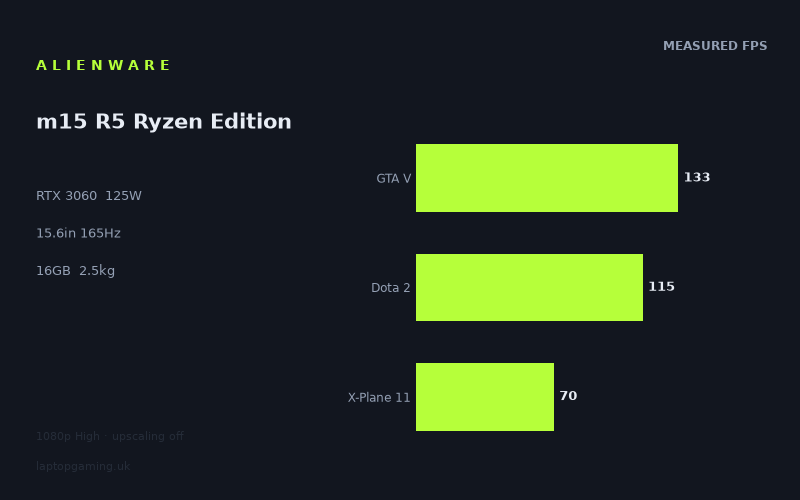
Frame rates
1920×1080, High preset, upscaling off.
Measured on this machine. Source: Notebookcheck, 2021-06-23.
Not scored: incomplete benchmark suite
Every scored laptop on this site is averaged over the same 5 games, and this one is short of Cyberpunk 2077, Baldur's Gate 3. A mean over 5 games is not comparable to a mean over 5, so we publish the figures we have and leave the score blank rather than rank it against machines tested on a different set. The numbers below are real - the suite is just incomplete.
How these numbers were produced
Frame rates here are not measured by us, and we label how each one was arrived at. A figure marked measured comes from a published run on that exact machine. A figure marked representative is derived from the GPU and its power limit (TGP) and cross-referenced against published reviews - a sound estimate of what that configuration delivers, but not a measurement of that specific laptop. Unless stated otherwise, numbers are 1920x1080, High preset, upscaling off. Where a laptop ships in several power configurations we use the wattage of the exact SKU listed, because a 140W RTX 5070 and a 115W one are not the same product.
In use
The short version
The Alienware m15 R5 Ryzen Edition is a capable 1080p gaming laptop built around a Ryzen 7 5800H and an RTX 3060 running at a substantial 125W GPU power limit. The important result is not simply that it has an RTX 3060 badge. It is that Notebookcheck’s measured figures show a machine that can deliver high-refresh gaming in lighter and older titles, while still keeping demanding modern games comfortably playable at the High preset without upscaling.
At 1920x1080 with the High preset and upscaling disabled, the benchmark data ranges from 151fps in F1 2020 to 63fps in Cyberpunk 2077 1.0. That is a wide spread, but it is the normal and useful kind of spread: less demanding games can run close to, or beyond, the panel’s 165Hz refresh rate, while more demanding games ask the RTX 3060 to settle into a more conventional 60fps-to-100fps range. There is enough performance here for a good 1080p experience, but not enough evidence to present it as a laptop that will automatically fill a 165Hz panel in every new AAA release at High settings.
The 165Hz IPS display makes sense for the games where the system can move well beyond 100fps. F1 2020, Strange Brigade, The Witcher 3 and GTA V all produce figures that make a high-refresh screen worthwhile. Dota 2 is also well placed for responsive play at 115fps. The more graphically demanding games tell a different story. Final Fantasy XV records 78fps, X-Plane 11 reaches 70fps and Cyberpunk 2077 1.0 records 63fps. Those are still playable figures, but they are far from the panel’s maximum refresh rate and should be read as a reminder that 165Hz is a ceiling, not a guarantee.
This is therefore best understood as a fairly muscular RTX 3060 laptop rather than a cheap-and-light 3060 implementation. The 125W power limit matters because laptop GPUs with the same name can perform very differently depending on their allowed power. The published figures suggest that Alienware’s configuration has enough room to give the GPU a proper role in 1080p gaming, especially in games where graphics performance remains the main limit. It does not turn the RTX 3060 into a higher-tier GPU, and it does not eliminate the impact of demanding game engines, but it gives this configuration a sound foundation.
The main caution is not performance. It is buying context. There is no confirmed UK price for this exact configuration, so a value judgement cannot be calculated. That is not a criticism of the laptop or an indication that anything is wrong with the benchmark set; it simply means there is no reliable basis for deciding whether its performance is a bargain, fair or overpriced.
Buy it if you want a 15.6in laptop for 1080p gaming, value a 165Hz IPS screen, and mostly play a mixture of competitive, older, well-optimised or moderately demanding games alongside newer AAA releases. It is particularly sensible for someone who understands that high refresh is most useful in the games that can actually reach it. Look elsewhere if your priority is maximum performance in the most demanding titles, if you want a much lighter travel machine, or if you expect every modern game to run anywhere near 165fps at High settings without lowering detail or using upscaling.
Performance
A 125W RTX 3060 is more meaningful than the name alone
Gaming laptops are unusually difficult to judge from component names alone. “RTX 3060” describes the GPU family, but it does not fully describe the laptop’s gaming performance. GPU power limits, cooling capacity, processor choice, memory configuration, display resolution and game engine behaviour all influence the result. In this Alienware, the RTX 3060 is specified at 125W. That is an important specification because it indicates that the GPU is not being treated as a low-power compromise intended primarily for a thin chassis.
The available Notebookcheck data does not provide a direct watt-for-watt efficiency comparison, so it would be wrong to claim exactly how much performance the 125W limit contributes in any individual game. What it does provide is the practical outcome: this system reaches strong figures in a broad selection of 1080p games at High settings with upscaling switched off. That is the useful evidence for a buyer. The power limit is not an abstract specification here; it is part of the reason this laptop should be judged as a serious 1080p gaming machine rather than an RTX 3060 system that only looks convincing on a specification sheet.
The Ryzen 7 5800H is also relevant. At 1080p, especially in lighter games and games chasing high frame rates, processor performance can become as important as graphics performance. When a game is limited more by CPU processing, game logic, draw calls or engine behaviour than by the GPU, differences between graphics chips can become compressed. That matters when reading both this laptop’s own figures and its small gaps against some rivals. A narrow difference does not necessarily mean the GPUs are equally capable in every scenario. It can mean that the shared games are not exposing the full GPU gap at this resolution and these settings.
The system includes 16GB of memory and a 512GB SSD. The supplied information does not state memory speed, memory layout, storage performance, upgrade options or the amount of free space available after software installation, so those areas cannot be assessed from the fact sheet. For gaming performance, the more useful known quantities are the processor, the GPU power limit and the measured frame rates.
The benchmark spread
Notebookcheck measured the Alienware m15 R5 Ryzen Edition at 1920x1080, using the High preset with upscaling disabled. That last point matters. The figures are not assisted by a resolution reconstruction mode that can raise frame rates by reducing the amount of native rendering work. They therefore give a relatively straightforward picture of what the hardware can achieve at the screen’s native resolution and a demanding but not maximum-detail preset.
Across the five scoring-suite games, the measured mean is 108fps. That is a healthy result for a 1080p gaming laptop, but the mean needs context. Averages are useful for comparing machines, yet they can hide the difference between a game that flies beyond 140fps and a game that sits closer to 70fps. The individual figures are what tell a buyer whether the panel, GPU and preferred games are a good match.
At the top end, F1 2020 records 151fps. That is the closest measured result to the screen’s 165Hz refresh rate. It does not quite match the panel’s full refresh ceiling, but it is close enough that the 165Hz display is clearly doing useful work. Fast racing games benefit from smoother motion and reduced time between displayed frames when the frame rate is high, and 151fps is firmly in high-refresh territory. There is no need to imply that 165Hz is wasted simply because the recorded figure is below 165fps. The gain from a high-refresh screen is not an all-or-nothing threshold.
Strange Brigade reaches 146fps in the scoring suite. This is another result that sits close to the screen’s maximum refresh rate. In a game with this level of performance, the Alienware has enough headroom for smooth high-refresh play at the tested settings. It is also an example of why the m15 R5 should not be described merely as a 60fps machine. The RTX 3060 at 125W can clearly push much higher frame rates when a game’s rendering demands allow it.
The Witcher 3 records 142fps. That is a similarly strong outcome and one that makes the 165Hz panel a reasonable pairing. A frame rate in this region offers a distinctly different experience from a 60fps target, particularly in camera movement and responsiveness. The result also demonstrates that a visually rich game does not automatically have to be limited to a conventional console-like frame rate on this laptop. The caveat is simply that this is one game, at one preset, in one tested version. It should not be turned into a blanket promise for every open-world game.
GTA V produces 133fps in the scoring suite. Again, that is beneath 165fps but high enough to make use of the display’s higher refresh capability. GTA V is also relevant to the broader point about CPU limits. At 1080p and high frame rates, games can become increasingly dependent on processor and engine behaviour rather than being a pure test of GPU horsepower. The Ryzen 7 5800H helps the Alienware remain in a strong position here, but this type of result should not be used to predict performance in a substantially heavier modern game.
Dota 2 records 115fps in the scoring suite. That figure is lower than the results in F1 2020, Strange Brigade, The Witcher 3 and GTA V, but it is still well above 100fps and remains a good match for a 165Hz display. For a player who spends most of their time in multiplayer games, a result around this level is meaningful because it can provide smoother movement and lower frame-time spacing than a 60fps experience. It is not the full 165Hz ceiling, but it is enough to justify wanting a high-refresh panel rather than a basic 60Hz screen.
Far Cry 5 sits at 100fps. This is an important middle-ground result. It is clearly above the traditional 60fps comfort line, but it is also far enough below 165fps to show that the screen’s maximum refresh is not the machine’s normal performance level in every game. Around 100fps is still a strong outcome for single-player action gaming at High settings, particularly with upscaling off, but it is better described as high-frame-rate gaming than as full-panel-refresh gaming.
Final Fantasy XV reaches 78fps. That remains playable and comfortably beyond 60fps, but it is a much more restrained result than the figures seen in the lighter or more favourable games. This is where the laptop’s position becomes clearer. The Alienware can deliver a good 1080p experience in a demanding title, but someone buying specifically for a 165Hz screen should not assume that demanding games will look as fluid as F1 2020 or Strange Brigade at the same settings. Game demands matter, and they matter a great deal.
X-Plane 11 records 70fps in the scoring suite. Flight simulation workloads often behave differently from conventional action games, with CPU demands, world complexity and simulation requirements potentially becoming major constraints. The result is still above 60fps, but it is another case where the 165Hz panel is not the limiting factor. The laptop has more display refresh capability available than the game is able to use under the tested conditions. For a flight-simulation buyer, the relevant lesson is not that 70fps is poor; it is that a fast panel alone does not solve the heavy workload of simulation software.
Cyberpunk 2077 1.0 reaches 63fps. This is the most demanding figure in the supplied list and gives the clearest indication of where an RTX 3060 laptop sits in newer, graphically intensive gaming. At High settings and native 1080p without upscaling, 63fps is playable. It is also only modestly above 60fps, which means there is limited margin if a player wants to pursue higher settings, heavier scenes or a more aggressive frame-rate target. The Alienware is not failing here; Cyberpunk 2077 1.0 is simply showing the point at which a mid-range mobile GPU stops being a high-refresh solution and becomes a sensible 60fps-class solution.
What the figures say about real game choice
The most useful way to read this laptop’s performance is by category rather than by pretending every game behaves the same way. Lighter, older or more scalable titles can reach well into high-refresh territory. F1 2020 at 151fps, Strange Brigade at 146fps, The Witcher 3 at 142fps and GTA V at 133fps all support that conclusion. These are the games in which the 165Hz screen makes an immediate practical difference. A buyer who mainly plays racing games, esports-adjacent games, established multiplayer titles or older AAA releases has a good reason to want this panel and this level of GPU performance together.
The middle tier is represented by Dota 2 at 115fps and Far Cry 5 at 100fps. These figures are still strong. They may not fully occupy every refresh cycle of the panel, but they provide a smooth, responsive experience that is materially different from a machine limited around 60fps. A 165Hz display is still useful here because it can display the frames the laptop produces without imposing a lower refresh ceiling. The fact that the panel can refresh faster than the game’s measured output is not a problem. It simply means there is no artificial display bottleneck.
The demanding tier is represented by Final Fantasy XV at 78fps, X-Plane 11 at 70fps and Cyberpunk 2077 1.0 at 63fps. In this group, the system still clears a broadly comfortable 60fps level, but the GPU is being asked to do substantially more work. These are the games where settings management becomes relevant. The benchmark data only covers High settings with upscaling off, so it does not establish how much performance might change with different detail settings or rendering methods. What it does establish is that native-resolution High settings are viable, but that the resulting frame rates are not close to the panel’s maximum refresh.
This is why the m15 R5 should be bought with realistic expectations. It is not a machine for treating 165fps as a minimum standard in new AAA games. It is a machine for enjoying a 165Hz panel when the game is light enough, scalable enough or old enough to reach high frame rates, while still playing more demanding releases at sensible figures. That is a more balanced and more accurate description of an RTX 3060 laptop at 1080p.
Why the average is useful but incomplete
The 108fps mean across the five scoring-suite games is a useful leaderboard figure because it gives one compact indication of performance across several titles. It shows that the Alienware is not relying on one unusually favourable benchmark to look good. However, the average should not be confused with a promised experience in every game. None of the supplied results says that every game runs at 108fps, and the individual figures make that clear.
The average is lifted by high results in Strange Brigade and GTA V, while X-Plane 11 is much lower. That does not make the average misleading; it makes the game-by-game breakdown essential. Someone who plays GTA V regularly may see this laptop as a strong high-refresh option. Someone focused on X-Plane 11 or Cyberpunk 2077 1.0 should regard it as a competent 60fps-plus machine rather than a 165Hz machine in practice. Both readers can use the same benchmark data, but they will reach different buying conclusions because their game libraries are different.
This is also why generic claims such as “great for all games” are not helpful. The m15 R5 is good for a broad range of 1080p gaming, but the exact quality of that experience depends on whether the game behaves more like F1 2020 or more like Cyberpunk 2077 1.0. The benchmark spread is not a flaw in the laptop. It is evidence that game engines, rendering workloads and CPU demands shape performance as much as a specification list does.
The screen
A sensible 1080p, 165Hz pairing
The Alienware uses a 15.6in IPS display with a 1920x1080 resolution and a 165Hz refresh rate. This is a pragmatic specification for the hardware. A higher-resolution panel would ask more of the RTX 3060, reducing frame rates in games that are already demanding. A 1080p panel keeps the GPU focused on the resolution at which it can deliver its strongest results, particularly in the titles where the frame rate rises above 100fps.
The 165Hz refresh rate is ambitious for an RTX 3060 laptop, but not unreasonable. It is important to distinguish between a panel being capable of 165Hz and every game achieving 165fps. The screen can display up to 165 refreshes each second, while the game’s actual frame rate varies according to workload. In the measured results, F1 2020 at 151fps and Strange Brigade at 146fps come close enough to make the screen’s refresh rate genuinely relevant. The Witcher 3 at 142fps and GTA V at 133fps are also strong enough to benefit from the panel.
Even Dota 2 at 115fps and Far Cry 5 at 100fps make a good case for a high-refresh screen. They do not reach the display’s maximum rate, but they are high enough that a 165Hz panel is still a better fit than a basic low-refresh screen. The advantage is not limited to hitting one exact number. A higher-refresh display can show the output available from the laptop without capping it at a lower level.
The demanding games show the other side of the equation. Final Fantasy XV at 78fps, X-Plane 11 at 70fps and Cyberpunk 2077 1.0 at 63fps will not make full use of 165Hz at the tested settings. In those titles, the screen is effectively future-facing or useful for other games rather than being fully utilised in the moment. That is acceptable because a gaming laptop is usually used across many titles, but it should be part of the buying decision. If a buyer mostly plays visually heavy recent games, a 165Hz label should not outweigh the importance of raw GPU performance.
IPS is the known panel technology; other display qualities are not confirmed
The panel is specified as IPS. That identifies the display technology, but the fact sheet does not provide measured brightness, contrast, colour coverage, response times, backlight behaviour, adaptive-sync support or outdoor visibility. It would therefore be wrong to make claims about image quality beyond the known resolution, refresh rate and panel type.
For gaming purposes, the most concrete conclusion is that the display specification is well matched to the laptop’s strongest workloads. A 15.6in 1080p panel avoids wasting GPU performance on extra pixels, and 165Hz gives the system room to show its best results in high-frame-rate games. The screen is not the reason Cyberpunk 2077 1.0 runs at 63fps; that is a game-performance limit. Equally, the screen does not prevent F1 2020 from reaching 151fps. The pairing is coherent because the display supports both the high-refresh end of the machine’s capability and the more ordinary 60fps-plus end.
Build, size and portability
The m15 R5 weighs 2.459kg. That puts it firmly in the category of a portable gaming laptop rather than an ultraportable computer that happens to have gaming hardware. It can be moved between rooms, taken to a friend’s house, carried to work or university when necessary, and used as a machine that does not have to remain permanently on one desk. But the weight means it should not be treated as effortless everyday carry.
A 2.459kg laptop is likely to be most comfortable when it has a clear destination: desk to desk, home to office, home to accommodation, or occasional travel. It is less naturally suited to someone who wants a machine they barely notice in a bag throughout a full day. The supplied information does not include the power-adapter weight, chassis dimensions or thickness, so the total travel burden and physical footprint cannot be assessed precisely. Those omissions matter because a gaming laptop’s practical portability depends on more than the laptop’s own mass.
The 15.6in screen size is a familiar gaming-laptop format. It offers more room than a compact ultraportable display without moving into the larger class of desktop-replacement machines. Combined with the 1080p resolution, it should make sense for someone who wants a focused gaming system that can still be transported. The available information does not support claims about keyboard quality, trackpad size, port selection, webcam quality, chassis rigidity, cooling noise or surface temperatures, so those are areas that require separate evidence before purchase.
The laptop includes an 86Wh battery. Capacity alone does not establish battery life. Gaming battery runtime, video playback runtime, web-browsing runtime and idle behaviour can vary widely depending on display settings, GPU behaviour, software profiles and workload. There are no measured battery-life figures in the fact sheet, so no runtime should be assumed. For gaming use, the sensible expectation is simply that published mains-powered frame rates should not be treated as evidence of unplugged performance.
The 512GB SSD is adequate as a starting point for an operating system and a game library, but storage needs are intensely personal and modern game installations can consume substantial space. The fact sheet does not say whether the SSD is replaceable, whether there are additional storage slots, or how much usable capacity is available. Buyers with large installed libraries should verify those details rather than assuming that a 512GB specification will remain comfortable over time.
How it compares
Against the Acer Aspire Nitro 5
The closest listed comparison is the Acer Aspire Nitro 5 with an RTX 3060. Across five shared games, the Alienware averages 3fps ahead. That is a small difference, and it should be interpreted honestly. It does not establish that the m15 R5 is decisively faster in every game, nor does it make the Aspire Nitro 5 irrelevant. It says that, in the shared benchmark set, the Alienware holds a slight performance advantage.
The narrow gap is also a useful reminder that RTX 3060 laptops can converge in some 1080p game sets. When lighter titles are included, frame rates may become increasingly CPU-bound, meaning that the GPU has less opportunity to show a large difference. A game can reach a point where the processor, game engine or other system behaviour limits performance before the graphics chip reaches its full potential. In that situation, two laptops with broadly similar hardware can post closely grouped results even if their GPU configurations are not identical.
For a buyer choosing only on the shared-game benchmark data, the Alienware has the edge, but it is not an edge that justifies ignoring every other consideration. Display specifications, physical size, memory arrangement, storage, ports, warranty terms and confirmed retail pricing would all matter. Since there is no confirmed UK price for either exact configuration in the supplied comparison, performance is the only firm basis for comparison here, and the performance gap is small.
Against the HP Victus 15 fa0020nr
The comparison with the HP Victus 15 fa0020nr is more surprising on paper. The HP uses an RTX 3050 Ti at 75W, while the Alienware uses an RTX 3060 at 125W. Yet across five shared games, the Alienware averages only 1fps ahead. This is exactly the sort of result that should not be dismissed simply because the specification labels suggest a larger gap.
A near-zero result can be real, especially at 1080p in a shared set containing lighter titles. If games are limited by CPU performance or engine constraints rather than graphics throughput, the advantage of a higher-tier GPU can be compressed sharply. The benchmark result therefore does not prove that the RTX 3060 and RTX 3050 Ti are interchangeable in all games or settings. It means that, in these particular five shared games, the tested performance was effectively level.
The individual Alienware results provide the wider context. It reaches 151fps in F1 2020, 146fps in Strange Brigade, 142fps in The Witcher 3 and 133fps in GTA V. Numbers at this level are exactly where CPU and game-engine limits can influence the comparison as much as GPU capability. Buyers should take the shared-game result seriously, but should not reduce the m15 R5’s 125W RTX 3060 to “the same as a 75W RTX 3050 Ti”. The comparison is narrow because the workloads are narrow.
Against the MSI Prestige 15
The MSI Prestige 15 uses an RTX 3050 Ti at 105W. Against it, the Alienware averages 45fps ahead across four shared games. This is a much clearer advantage than the close results against the Acer Aspire Nitro 5 and HP Victus 15 fa0020nr. The m15 R5’s stronger result here supports the expectation that the RTX 3060 at 125W has more gaming capacity than an RTX 3050 Ti implementation when the benchmark selection allows that gap to appear.
A 45fps average advantage is significant because it is large enough to change how a game feels and how much room a player has for higher settings or more demanding scenes. It can separate a standard playable result from a high-refresh result, or turn a frame rate close to 60fps into one that feels substantially smoother. The exact impact depends on the games in the shared set, so it should not be converted into a universal promise. But the direction is clear: the Alienware is materially stronger in this comparison.
This also helps explain why the m15 R5 should be considered a performance-focused 15.6in laptop rather than simply a machine with mid-range branding. The comparison against the Prestige 15 shows that the GPU class and power limit can matter substantially when the workload is sufficiently graphics-limited. The Alienware’s heavier gaming orientation is reflected in the outcome.
Against the MSI Raider GE77 HX
The MSI Raider GE77 HX represents the other end of the comparison spread. It uses an RTX 3080 Ti at 175W and averages 61fps ahead of the Alienware across five shared games. That is a substantial deficit for the m15 R5, but it is also an expected one. The Raider combines a higher-tier GPU with a much higher power limit, so it sits in a different performance class.
The important buying lesson is that the Alienware’s 125W RTX 3060 is strong for its category, not that it can challenge the most powerful laptops from the same GPU generation. In games where the GPU workload is heavy enough to expose the difference, the Raider’s extra graphics capacity has a clear practical effect. A buyer whose goal is the highest possible frame rates in demanding games, or the greatest margin for future titles, should favour the more powerful class of machine represented by the Raider.
That does not make the Alienware a poor choice. It simply defines its role. The m15 R5 is suited to 1080p High gaming with a good mix of high-refresh and 60fps-plus results. The Raider is for someone prioritising substantially higher graphics performance. These are not interchangeable products aimed at the same buyer, even though both are gaming laptops from the same GPU generation.
Who it’s for
The Alienware m15 R5 Ryzen Edition is for the buyer who wants a 15.6in gaming laptop with a credible 1080p performance base and understands why the 125W RTX 3060 matters. It is for someone who wants F1 2020 at 151fps, Strange Brigade at 146fps, The Witcher 3 at 142fps and GTA V at 133fps, because those are the results that make the 165Hz screen feel purposeful rather than decorative.
It is also for players whose libraries mix lighter competitive titles, older AAA games and newer demanding releases. The laptop can serve both types of game, but not in the same way. Lighter games can take advantage of the high-refresh display. Demanding games such as Final Fantasy XV, X-Plane 11 and Cyberpunk 2077 1.0 remain playable at 78fps, 70fps and 63fps respectively, but should be approached as good 60fps-plus experiences rather than 165fps experiences.
It suits someone who mainly plays at the built-in screen’s 1920x1080 resolution. The measured figures are specifically for that resolution, High settings and no upscaling. That is the environment in which the laptop’s balance makes the most sense. The 1080p panel avoids placing unnecessary extra rendering load on the GPU, and the 165Hz refresh rate gives the system room to show its faster results.
It is a reasonable fit for a buyer who moves their laptop occasionally but does not expect an ultralight machine. At 2.459kg, the m15 R5 is portable in the practical gaming-laptop sense: it can travel, but it is not a featherweight device for constant carrying. The 86Wh battery may appeal on a specification sheet, but there is no measured runtime data here, so it should not be selected on battery-life assumptions.
Someone should buy something else if their main priority is the best possible performance in demanding AAA games. Cyberpunk 2077 1.0 at 63fps demonstrates that this laptop can play a heavy title well at the tested settings, but it does not demonstrate ample high-refresh headroom. The MSI Raider GE77 HX comparison is particularly relevant for that buyer: its RTX 3080 Ti at 175W averages 61fps ahead across the shared games. If maximum graphics performance matters more than size, weight or class positioning, the Alienware is not the top option in this comparison group.
Buy something else if you expect the 165Hz label to mean every game will run at 165fps. The available evidence says otherwise. The panel is well used in F1 2020, Strange Brigade, The Witcher 3 and GTA V, but Final Fantasy XV, X-Plane 11 and Cyberpunk 2077 1.0 sit far below that ceiling. That is not unusual for an RTX 3060 laptop, but it needs to be understood before buying.
Buy something else if daily mobility is the overriding concern. A 2.459kg laptop can be carried, but it is still substantial. Without chassis dimensions or adapter weight, it is impossible to say exactly how awkward it will be in a particular bag, but it is clearly not aimed at the same use case as a lightweight ultraportable.
Finally, buy something else if you need a laptop chosen primarily on confirmed value. The performance case is clear enough: this is a good 1080p gaming machine with a strong RTX 3060 power limit and a display specification that fits its best results. But without a confirmed UK price for this exact configuration, there is no responsible way to say whether it represents good buying value. The correct conclusion is not to guess. It is to treat the Alienware as a performance-led option and compare its confirmed selling price with alternatives only when that price is available.