Review
Acer Swift X review
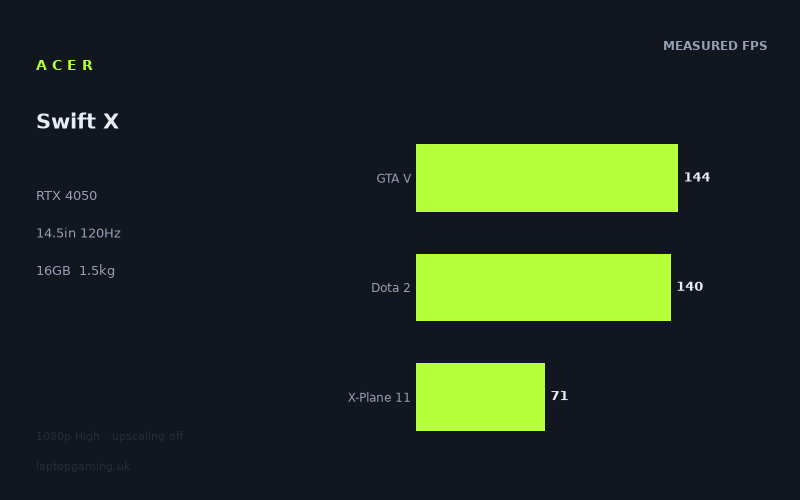
Frame rates
1920×1080, High preset, upscaling off.
Measured on this machine. Source: Notebookcheck, 2023-07-06.
Not scored: incomplete benchmark suite
Every scored laptop on this site is averaged over the same 5 games, and this one is short of Cyberpunk 2077, Baldur's Gate 3. A mean over 3 games is not comparable to a mean over 5, so we publish the figures we have and leave the score blank rather than rank it against machines tested on a different set. The numbers below are real - the suite is just incomplete.
How these numbers were produced
Frame rates here are not measured by us, and we label how each one was arrived at. A figure marked measured comes from a published run on that exact machine. A figure marked representative is derived from the GPU and its power limit (TGP) and cross-referenced against published reviews - a sound estimate of what that configuration delivers, but not a measurement of that specific laptop. Unless stated otherwise, numbers are 1920x1080, High preset, upscaling off. Where a laptop ships in several power configurations we use the wattage of the exact SKU listed, because a 140W RTX 5070 and a 115W one are not the same product.
In use
The short version
The Acer Swift X SFX14-71G is not a gaming laptop, and reading it as one will lead you to the wrong conclusion about almost everything in the benchmark data below. It is a 1.529kg, 14.5-inch creator-class machine with a 2880x1800 OLED panel, a Core i7-13700H, and an RTX 4050 tucked into a chassis built to a weight target rather than a thermal one. That ordering matters. The weight came first, the screen came second, and the graphics card had to fit into whatever was left over.
What that produces is the lightest kind of machine that can still run modern games properly. Not the fastest, not the most sensible frames-per-pound proposition, but the one that will genuinely disappear into a bag and still let you play something demanding when you get where you are going. Every compromise in the measured figures follows from the weight, and if you understand that, the results stop looking uneven and start looking entirely predictable.
The benchmark data itself is strikingly top-heavy. Notebookcheck measured ten games at 1920x1080 on the High preset with upscaling switched off, and the results run from 144fps at the top down to 51fps at the bottom — close to a three-to-one spread across an identical resolution and an identical preset. Four titles sit at or above the panel's 120Hz refresh. Four sit below 75fps. There is very little in the middle, and the shape of that distribution tells you more about this machine than any single headline figure could.
Two things have to be said before anything else, because both of them constrain how the rest of this review can be read.
We have no confirmed UK price for this configuration. No value judgement is therefore possible — not a favourable one, not a critical one. A laptop of this kind is a price-performance product before it is anything else, and without the price the most important half of the argument is simply missing. Everything below concerns what the hardware does, not what it is worth paying.
The second is scoring. Ranked laptops on this site are averaged across the same five-game suite, so that a position in the table means something specific rather than something vague. For the Swift X there are three of those five games in the data — the mean across them is 118fps — but no figures for Cyberpunk 2077 at the current build or for Baldur's Gate 3. Averaging three games against a table built on five would produce a number that looks comparable and is not, so this machine sits outside the ranking. That is a gap in the data, stated plainly. It is not a judgement on the laptop.
Who it suits, in one line: someone who wants a single light machine for work, photo or video editing and evening gaming, who values the OLED panel and the sub-1.6kg weight above raw frame rates, and who accepts that the heaviest modern titles will need settings compromises rather than brute force.
Performance
An RTX 4050 in a chassis that was never designed around it
The first question anyone asks about a laptop GPU is what power it runs at, because the same chip can be configured across a wide band and the difference between the bottom and the top of that band is large enough to separate two machines with identical spec sheets. We do not hold a confirmed total board power figure for the Swift X, and this review is not going to invent one or reason backwards from the frame rates to a number.
What can be said is what the chassis implies. A 1.529kg 14.5-inch machine has a fixed and rather small volume in which to move heat, and it has to move the CPU's heat through the same system. Nothing about that arrangement suggests a graphics card being allowed to run at the top of its configurable range. Thin-and-light designs of this kind generally sit somewhere in the lower half of the band, because the alternative is a fan curve nobody would tolerate in a machine intended for a desk in an office. That is a reasoned expectation about the class of product, not a measurement, and it should be treated as such.
It is worth being clear about why this matters more here than it would on a thicker machine. A GPU that is comfortably within its thermal budget produces a wide spread of results across a benchmark list, because each game gets whatever it can extract from the hardware. A GPU that runs into a ceiling early produces a compressed set, with the fast games slower than they ought to be. The measured spread here is wide — 144fps down to 51fps — which argues that the graphics card is not being universally throttled into a flat line. But a wide spread is also exactly what you get when the games themselves differ enormously in what they ask for, which is the more likely explanation given what is in the list.
The honest position is that the power configuration is an unknown, and it is one of the two or three things most worth establishing before buying. Thermals and acoustics under sustained load are unmeasured here too. For a machine this thin running a discrete GPU alongside a 13th-generation H-series processor, those are not trivia — they are among the things most likely to determine whether you enjoy owning it.
The top of the list: four games that meet the panel
Four titles in the measured set reach or exceed the display's 120Hz refresh rate at 1080p High with no upscaling.
- GTA V — 144fps. One of the three scoring-suite games available for this machine. GTA V is old, well understood, and notably sensitive to processor throughput in dense areas. A result at this level says as much about the i7-13700H and the engine's threading as it does about the graphics card.
- Dota 2 — 140fps. The other high scoring-suite result, and a title that no modern discrete GPU finds difficult in any rendering sense. The frame rate here is being set by the game's own simulation and draw-call pattern and by the single-thread performance available to service it, not by the RTX 4050.
- Strange Brigade — 135fps. This game appears in laptop benchmark suites precisely because it is a low-overhead, well-behaved renderer that acts as a ceiling test. 135fps tells you what this hardware can do when very little is standing in its way.
- The Witcher 3 — 123fps. A large, dense open world with heavy foliage and long draw distances, running above the panel's refresh rate on a thin-and-light machine. That is a statement about a mature engine on modern silicon more than about this laptop specifically, but it is a genuinely useful thing to be able to say.
Add F1 2021 at 112fps and you have five games that are either at the panel's ceiling or close enough that the difference would not register in play. For that group the practical position is straightforward: at 1080p you are refresh-limited rather than GPU-limited, and the surplus is available to spend on image quality rather than on frames you cannot see.
What unites those five is instructive. They are the older, lighter and more CPU-sensitive titles in the list. Not one of them is a recent release with a heavyweight modern renderer. That pattern is the key to the whole data set, and it becomes decisive later when the rival comparisons are examined.
The collapse: where the demanding games land
The bottom half of the measured list is a different machine entirely.
- F1 22 — 94fps. The step down from F1 2021 at 112fps to its immediate successor at 94fps is the first visible sign of the GPU beginning to matter. Racing engines are typically well optimised and predictable, so an 18-frame drop between consecutive annual releases of the same series is a reasonable proxy for what one generation of added rendering work costs on this hardware.
- X-Plane 11 — 71fps. The third scoring-suite result, and the one least about the graphics card. X-Plane 11 uses an old-generation renderer that issues an enormous number of individual draw calls per frame, all of which the processor has to prepare before the GPU sees any of them. It is a classic draw-call-bound workload. A faster graphics card would do very little for it; faster single-thread processing would do a great deal.
- Final Fantasy XV — 65fps. An expensive renderer with heavy post-processing and effects work. This is roughly where a genuinely GPU-bound title of its era lands on this hardware, and it is the first result where the answer to "is this comfortable?" becomes "yes, but only just, and only at these settings".
- Cyberpunk 2077 — 52fps. More on this figure below, because it carries an important qualification.
- Far Cry 5 — 51fps. The slowest result in the set, and the most surprising one on the face of it. Far Cry 5 is not a new game, and on paper it should not be the hardest thing here. Dunia is an engine with a well-documented appetite for both processor work in dense vegetation and memory bandwidth for its streaming, and the combination appears to be the thing this configuration handles least well.
Four of the ten measured games therefore sit below 75fps, and two of those sit barely above 50fps. Against a 120Hz panel, that is roughly half the refresh rate and below. Nobody should read those numbers as unplayable — 51fps at 1080p High with upscaling entirely disabled is a perfectly serviceable single-player experience, and the machine has DLSS available in the many titles that support it. But it is a long way from the top of the list, and the distance is the whole point.
Where the spread actually comes from
Ten games, one resolution, one preset, and a fastest result close to three times the slowest. That spread is the most instructive feature of this data set and it has two separate causes working in the same direction.
The first is the composition of the list. The fast group is dominated by older engines and competitive titles where the processor and the game's own internal limits set the pace. The slow group contains the titles with expensive modern renderers and heavy memory traffic. Those are not the same workload wearing different names; they are asking the hardware for fundamentally different things, and the hardware answers accordingly. GTA V at 144fps and Far Cry 5 at 51fps are not slow and fast versions of one measurement.
The second cause is the specific character of the GPU. The RTX 4050 is the entry point of its generation's mobile line, and the way it is cut down relative to its siblings is not evenly distributed across the things that determine frame rate. It carries fewer shader units than the tiers above it, which sets a hard ceiling on how much per-pixel work it can complete in a frame. More consequentially, it carries a narrower memory bus and a smaller pool of video memory than the 4060 and 4070 parts, which means that the moment a game's working set grows — large textures, dense geometry streaming, expensive post-processing passes reading and writing full-resolution buffers — the card is starved of bandwidth long before it runs out of raw arithmetic.
That is the mechanism behind the shape of this list. In a title that leans lightly on the GPU, the narrow bus is invisible, because nothing is queuing for it. In a title that genuinely leans on the GPU, it becomes the limiting factor, and no amount of processor speed compensates. The measured figures show exactly that transition: the light games are set free by a strong processor, the heavy games are pulled back by a constrained graphics card, and there is almost nothing in between.
The practical consequence is that a single headline number for this machine would be close to meaningless. The mean across the three scoring-suite games sits at 118fps, which is arithmetically tidy and practically useless, because no game in the list actually behaves like the average. Five games are well above it and five are well below. What you play determines what you get, to a degree that swamps most of the differences between comparable laptops.
The Cyberpunk figure carries a date stamp
The Cyberpunk 2077 result of 52fps was measured on version 1.6 of the game, an older build. That needs stating clearly rather than buried, because Cyberpunk has been through substantial engine and rendering changes since, and a number attached to a specific build is a snapshot of that build rather than a permanent property of the hardware.
The direction of any change is not something this review can predict. Patches have altered both rendering cost and CPU behaviour in that game more than once, and the practical result on a given configuration could plausibly move either way. What is certain is that the figure cannot be compared against a Cyberpunk result measured on a current build, and that is precisely why this machine's scoring suite is treated as incomplete. The suite requires the current build; version 1.6 is not it.
The wider point applies to the whole set. These figures were measured on 6 July 2023. Games get patched and drivers get updated, and any benchmark run is a snapshot of a particular date. The relative picture — which titles are fast, which are slow, where the constraints lie — is durable. The exact digits are less so.
The i7-13700H, and why the top of the list looks the way it does
The processor here is a Core i7-13700H, a hybrid-architecture 13th-generation mobile part with a strong single-thread showing for its era. In the GPU-bound half of the measured list it is almost irrelevant, because the graphics card is the thing setting the pace. In the CPU-bound half it is the reason those numbers are as high as they are.
Look at which games sit in the fast group: GTA V, Dota 2, Strange Brigade, The Witcher 3, F1 2021. These are exactly the titles whose frame rates are most sensitive to how quickly a processor can prepare and submit work. A machine with the same RTX 4050 and a weaker processor would be expected to fall behind specifically in that group and almost nowhere else. There are no comparative CPU measurements here to put a size on that gap, so this is a directional argument rather than a numerical one — but it is the correct lens for reading the top half of the table.
There is a real buying implication in that. This is an unusually well-matched pairing for a particular kind of player. If your library is weighted towards competitive titles, simulators, strategy games and older open-world engines, the strong processor is doing the work that matters and the modest GPU is not holding you back. If your library is weighted towards recent single-player releases with expensive renderers, the balance is the wrong way round for you, and the money would have been better spent on a machine with more graphics card and less portability.
The X-Plane 11 result is the exception that proves the rule and deserves a note of its own. At 71fps it is the second-slowest figure in the list, which looks contradictory next to a strong processor. It is not. X-Plane 11's renderer is old enough that it bottlenecks on draw-call submission in a way modern engines specifically avoid, and that submission cost is not something even a good 13th-generation part sails through. It is slow for a processor reason while Far Cry 5 is slow for a graphics reason, and the two sit next to each other in the table looking superficially alike.
What the measured set deliberately leaves out
Three conditions apply to every figure quoted above, and each changes how they should be read.
Upscaling is off. Every result is native rendering with no assistance. The RTX 4050 has DLSS available across a large and growing list of titles, and in the heavy games at the bottom of this table that is a meaningful uplift. The measured set is therefore a floor rather than a ceiling for a real session — it is the number you get with everything switched off. Isolating the hardware that way is the right methodological choice, but it means the practical experience in supported games sits above these figures rather than at them. For a GPU at this tier, that matters more than it would higher up the range, because the heavy titles are exactly where the margin is thinnest.
The preset is High, not Ultra or Maximum. High is a sensible, widely used setting and it is identical across every machine in the database, which is what makes cross-machine comparison valid at all. It is not the top preset in most of these games. If you habitually max everything out, subtract accordingly — by how much is not something the data supports quantifying.
These are averages. There is no 1% low or frame-time consistency data here. Average frame rate is the crudest of the useful metrics, and two machines with identical averages can feel quite different if one of them stutters. Nothing in this data set speaks to that in either direction. On a thin machine with an unknown power configuration, frame-time consistency under sustained load is a fair thing to want measurements for before committing money.
The screen
2880x1800 is the panel; 1920x1080 is the data
The Swift X has a 14.5-inch OLED panel at 2880x1800 running at 120Hz. Every frame rate quoted in this review was measured at 1920x1080. That mismatch is the single most important thing to understand about this machine's performance, and it needs saying without hedging: there is no measured data for this laptop at its own native resolution. Anything said about native-resolution gaming here is inference, not measurement, and it will be labelled as such throughout.
The arithmetic of the two resolutions is not in dispute. 2880x1800 is 5,184,000 pixels; 1920x1080 is 2,073,600. The native panel therefore carries exactly two and a half times the pixel workload of the resolution these games were measured at. That is a large multiple — larger than the 1600p panels that dominate 16-inch gaming laptops, and it is being asked of the entry-tier GPU in its generation.
What that multiple does to frame rates is not a simple division, and anyone who converts it into one is guessing. Scaling with resolution depends on how much of a game's frame time is spent on per-pixel work as against geometry, processor preparation and everything else that does not care how many pixels there are. In a draw-call-bound title like X-Plane 11, or a simulation-bound one like Dota 2, raising the resolution costs relatively little because the constraint sits elsewhere. In a bandwidth-hungry title like Far Cry 5 or an effects-heavy one like Final Fantasy XV, it costs a great deal more — and those are precisely the games with the least headroom to give away in the first place.
So the honest position is this. The data supports firm conclusions about 1080p and no numerical conclusions whatsoever about 2880x1800. Qualitatively you can reason about the shape: the group already clearing 120fps has a large surplus and will absorb a resolution increase far better than the group in the 50s and 60s, which has essentially none. That is a shape, not a set of numbers, and it should not be turned into one.
What upscaling would have to do at native resolution is worth spelling out, because it is the realistic way this machine gets used. Reconstructing a 2880x1800 image from a substantially lower internal render target is exactly the job DLSS was built for, and on a panel with this pixel density the artefacts that upscaling introduces are less visible than they would be on a coarser display. The practical expectation for a demanding modern title on this hardware is native output resolution with a fairly aggressive upscaling preset, rather than native rendering. That is an expectation grounded in the hardware class and in the measured 1080p floor, not a measurement of this machine, and it is offered as reasoning rather than as a finding.
120Hz, and what actually reaches it
Of the ten measured games, four sit at or above 120fps: GTA V at 144, Dota 2 at 140, Strange Brigade at 135 and The Witcher 3 at 123. F1 2021 at 112 is close enough that the difference would not be perceived. The remaining five sit below, two of them at roughly half the refresh rate.
That is not a criticism of the panel specification. A 120Hz display on a machine of this weight is well judged: it is high enough that the light and competitive titles get real benefit from it, and not so high that most of its capability is wasted. A 165Hz or 240Hz panel here would have been a marketing number rather than a useful one, given what the GPU produces in anything demanding. 120Hz is the honest choice.
Where it earns itself is in the gap between the two groups. A display running at 120Hz driven by hardware that produces 144fps in one title and 51fps in another gives you a screen that never becomes the bottleneck at the top and never wastes what it is given at the bottom. On a 60Hz panel, half the measured results would be thrown away entirely.
It is worth adding that the games most likely to be played on a machine like this — a light laptop bought partly for work — skew towards the top group rather than the bottom. Competitive shooters, strategy titles, older favourites and the enormous back catalogue that runs well on modest hardware are exactly the titles that clear 120fps here. The panel is specified for the way this machine will actually be used, which is not something every gaming-adjacent laptop can claim.
OLED, and the panel figures that are missing
The panel type is the reason a lot of people will look at this machine at all, and it deserves discussing on its own terms rather than as a footnote to the frame rates.
OLED's advantages over the IPS displays that dominate this class are structural rather than marginal. Each pixel emits its own light, so black is genuinely black rather than a backlight leaking through a closed shutter, and the contrast that follows from that is not something an IPS panel can approach regardless of how good its backlight is. Pixel response is also in a different league — the transition from one state to another happens fast enough that the smearing visible on slower panels in dark scenes essentially disappears. For anything with a lot of dark content, whether that is a horror game, a night scene in an open world or a colour-graded video timeline, the difference is immediately obvious rather than something you have to look for.
For the creator half of this machine's brief, that combination is the point. A 2880x1800 OLED at 14.5 inches is a genuinely good screen for photo work, video editing and any task where you are judging tone and colour rather than counting frames. The pixel density is high, the contrast is real, and the panel is the component that most justifies whatever this machine ends up costing.
Two honest caveats. There are no measured panel figures in this data set — no brightness in nits, no colour accuracy measurement, no contrast measurement, no response-time figure, and no confirmation of whether variable refresh is present. Panel quality varies between configurations of the same model, and colour accuracy in particular is the sort of thing a manufacturer either attends to at the factory or does not. If you intend to do colour-critical work on this machine, treat those as open questions to resolve rather than assumptions to make, and expect to profile the display yourself.
The second caveat is the one that applies to every OLED laptop: static interface elements displayed for thousands of hours carry a retention risk that an IPS panel does not have. Manufacturers mitigate it with pixel shifting and taskbar dimming, and modern panels are considerably better than early ones, but it remains a real consideration for a machine that will spend its working life showing the same toolbars in the same places.
Build, size and portability
1.529kg with a 76Wh battery in a 14.5-inch chassis is the actual product here, and it is worth treating those figures as the headline specification rather than the GPU.
Under 1.6kg is the weight at which a laptop stops being a thing you decide whether to bring and starts being a thing that is simply in the bag. That threshold is not arbitrary — it is roughly where the daily commute stops registering the machine as a burden. Almost nothing with a discrete graphics card sits below it. The great majority of laptops carrying an RTX 4050 or above are between two and three kilogrammes, which is a fundamentally different proposition: a machine that moves between rooms, or gets taken home at the end of term, rather than one that travels every day.
So the Swift X occupies a genuinely narrow position. It is portable in the way a business ultrabook is portable, and it can run modern games in a way a business ultrabook cannot. Whether that combination is worth its costs is the entire buying decision, and the costs are real.
The first cost is the one the benchmark data shows directly. A GPU in a chassis of this size cannot be fed the power a GPU in a 2.5kg chassis can, and the bottom of the measured list is where that shows. The second is thermal and acoustic behaviour under sustained load, which is unmeasured here but which physics constrains: a small volume shedding the combined heat of an H-series processor and a discrete graphics card has fewer options than a large one, and the usual outcome is either more noise, lower sustained clocks, or both.
We have no confirmed dimensions for this chassis, so nothing here rests on thickness or footprint. The weight and the screen size are the specifications available, and they are the two that matter most for how a machine gets carried and used.
The 76Wh battery is a good size for a 14.5-inch laptop — comfortably below the 100Wh cabin-baggage limit that caps what manufacturers can fit, and towards the larger end of what a machine of this weight typically carries. There is no measured battery-life figure in this data set, in gaming or in light use, so how long it actually lasts is not something this review can tell you.
What can be said as a general truth about the hardware class rather than as a measurement is that a discrete GPU cannot be driven at full power from a laptop battery. No machine of this type runs at its plugged-in performance level unplugged; the power delivery will not allow it and the firmware will not attempt it. The 76Wh cell is there for the other four-fifths of this machine's life — the work, the browsing, the editing, the travelling — and for that it is a genuinely useful size on a panel this efficient in dark content. It is not there so you can play Far Cry 5 on a train.
Memory and storage are 16GB and 1TB. The 1TB SSD is the right call and increasingly the practical minimum given modern install sizes; it is good to see it as standard rather than as a paid upgrade. 16GB is the mainstream figure and adequate today, but it is the specification most likely to feel constrained first over a multi-year ownership period — particularly on a machine whose second job is content creation, where memory pressure arrives sooner than it does in games. Whether this configuration permits a memory upgrade is not confirmed here, and on thin machines of this era the answer is frequently no. It is worth checking before buying if long-term headroom matters to you.
One further point about the 14.5-inch size. It is an unusual and rather sensible number. Fourteen inches is comfortable to carry but cramped for editing work; sixteen is comfortable to work on but awkward on a train tray table. 14.5 inches with a 2880x1800 panel gives you a lot of usable desktop area in a footprint that still behaves like a small laptop, and the high pixel density means interface scaling gives you real estate rather than just sharpness.
How it compares
Four machines from the same GPU generation share enough measured games with the Swift X for a like-for-like comparison. The four results together are far more interesting than any of them is individually, because the contradiction between them is the most useful thing in this review.
MSI Thin GF63 — the same GPU tier, comprehensively beaten
The GF63 also runs an RTX 4050, and across the three games the two machines have in common the Swift X averages 31fps ahead. That is not a rounding error or a margin that could be explained away by driver versions. It is a decisive result between two machines carrying the same graphics card on the spec sheet.
Two things plausibly account for it, and the data does not separate them. One is the processor: the shared three lean on the scoring-suite titles, which are the CPU-sensitive end of the list, and the i7-13700H is a strong part for its generation. The other is the GPU's power configuration, which is unknown on both machines. What the result establishes beyond doubt is that "RTX 4050" on a specification sheet does not describe a performance level. It describes a chip, and what a manufacturer does with that chip in a particular chassis, alongside a particular processor, is worth a very large number of frames.
There is no confirmed UK price for the GF63 either, so the choice between them cannot be settled on cost here. On the measured evidence, the Swift X is the faster machine on the games they share, and it is also the lighter one with the better panel. That is an unusually one-sided comparison for two laptops of the same GPU tier.
Acer Nitro 16 — an RTX 4070 at 140W, and no gap at all
This is the result that requires the most careful handling. The Nitro 16 runs an RTX 4070 at a 140W total board power — the top of the configurable range for a considerably more capable chip — and across the three games the two machines share, the average difference between them is nil. Level. Not close: identical, to the frame.
The temptation is to read that as the Swift X being as fast as a full-power RTX 4070 laptop. It is not, and the data does not say that. What it says is that on those three particular games, at 1920x1080 with a High preset, neither machine's graphics card was the thing setting the frame rate.
The three-game overlap draws on the scoring-suite titles, and those are dominated by exactly the workloads described earlier in this review: older engines, competitive titles and a flight simulator whose renderer bottlenecks on draw-call submission. In that company, a graphics card only has to be good enough. Once it clears that bar, adding more of it produces nothing, because the frame rate is being determined by processor throughput and by the games' own internal limits. Both machines clear the bar comfortably. Both therefore hit the same ceiling, and the far larger GPU in the Nitro 16 has nothing to do with the frames it is not being asked to render.
A comparison across only shared games is a comparison of that subset, not of the machines. When the subset is three titles and all three sit at the CPU-bound end, genuine hardware gaps get compressed to nothing. That is a limitation of the method, and being explicit about it is more honest than pretending the flat result means what it superficially appears to mean.
MSI Katana A15 AI — an RTX 4070 at 105W, and the same flat outcome
The Katana runs the same GPU tier as the Nitro at a lower 105W configuration, and across its three shared games with the Swift X the average difference is again nil — this time fractionally the other way, which is to say not a difference at all.
Two rivals with a substantially superior graphics card, configured 35W apart from each other, both landing level with a thin-and-light RTX 4050 machine is not two coincidences. It is one finding restated. On the small set of shared, mostly CPU-bound titles that these three machines have in common, the graphics card has stopped being the variable. If the GPU were setting the pace, the 140W machine would beat the 105W machine and both would beat the 4050. Neither happens, which is about as clean a demonstration as this data offers that something other than the graphics card is in charge of these particular numbers.
Take one useful buying lesson from that pair. If your library sits in the CPU-bound group, paying for a larger GPU buys you nothing measurable, and you would be better served putting the money towards weight, screen quality or battery — all three of which the Swift X has in its favour against both of these machines.
Alienware x16 R2 — an RTX 4080, and what the gap really looks like
Then there is the comparison that puts the previous two into perspective, and it is the most important paragraph in this section.
The x16 R2 runs an RTX 4080, and the two machines share seven measured games rather than three. Across those seven, the Swift X averages 87fps behind. That is not a compressed margin or an ambiguous result. It is a rout.
Set the three comparisons side by side and the mechanism becomes unmistakable. Against two RTX 4070 machines on three shared games, the Swift X is level. Against one RTX 4080 machine on seven shared games, it is 87fps adrift. The variable that changed is not only the rival's graphics card — it is the breadth of the shared list. Three games drawn from the CPU-bound end of the suite hide the gap entirely. Seven games, necessarily reaching further into the demanding titles where the GPU actually determines the frame rate, expose it at full size.
That contrast is the single most useful thing in this review for anyone deciding what to buy. The flat results against the 4070 machines are real measurements and they are not wrong, but they measure a situation rather than a capability. The 4080 result measures the capability, because the list it is averaged over is broad enough to include the games that ask the hardware a real question. Anyone who reads the first two comparisons and concludes that GPU tier does not matter has been misled by the sample, and the third comparison is the correction.
It also, incidentally, tells you what the Swift X is not. It is not a machine that will hold its own in the heaviest modern titles against properly cooled hardware two tiers above it, and it was never built to. The x16 R2 is a large, powerful, heavily cooled laptop and it behaves like one. The Swift X weighs 1.529kg. Those are not competing products; they are answers to different questions.
What this review cannot tell you
An honest review is partly a list of the questions it cannot answer, and there are several here.
No price. There is no confirmed UK price for this configuration, so no value verdict appears anywhere in this review. That is not a hedge — it is the absence of the single most important input to the decision. A machine like this lives or dies on what it costs against both the cheaper gaming laptops that will beat it in heavy titles and the lighter ultrabooks that will match it everywhere except games.
No ranked position. Three of the five scoring-suite games are present, averaging 118fps between them. Cyberpunk 2077 at the current build and Baldur's Gate 3 are absent, and the Cyberpunk figure that does exist is from version 1.6 and cannot substitute. The Swift X therefore stays outside the ranked table until the suite is complete.
No power configuration. The graphics card's total board power in this chassis is not confirmed here, and it is the specification that would most sharpen every conclusion above.
No native-resolution data. Every figure is 1920x1080. The panel is 2880x1800 — two and a half times the pixels. No frame rate at the native resolution appears anywhere in this review because none exists in the data.
No thermals, no acoustics, no battery runtime, no panel measurements, no dimensions. Temperature and fan noise under load, how long the 76Wh cell lasts, how bright and how accurate the OLED panel is, and how thick the chassis is are all unmeasured here. On a machine this thin, the first two are not incidental.
No frame-time data. Averages only. Nothing about 1% lows or stutter, which is the metric most likely to differ between a thin chassis and a thick one running comparable averages.
Who it's for
The Swift X makes clear sense for several specific buyers, and the case for each is grounded in something measured.
The person who wants one machine for everything. This is the core buyer and the reason the product exists. If your day involves a bag, a desk somewhere else, some photo or video work, and a few hours of gaming in the evening, there is a very short list of machines that do all four properly. 1.529kg makes the carrying painless, the OLED panel makes the creative work genuinely pleasant, the i7-13700H handles the export and compile workloads, and the RTX 4050 means the evening is not restricted to indie titles. No single element is class-leading. The combination is rare.
The player whose library sits in the top half of that table. Competitive shooters, MOBAs, strategy games, older open-world titles and the vast back catalogue: these are the games measured at 123fps and above here, and this machine plays them at the panel's refresh rate. If that describes what you actually play rather than what you tell yourself you will play, the modest GPU costs you nothing you would notice, and the comparisons against two RTX 4070 laptops demonstrate that directly.
The creator who wants an occasional games machine rather than the reverse. A 2880x1800 OLED at 14.5 inches is a legitimately good editing display, and the discrete GPU accelerates video work as well as it renders games. If gaming is the secondary use rather than the primary one, the priorities in this design are ordered the way you would order them yourself.
The buyer who values weight above frame rates and knows it. Portability is a feature you use every day; a heavy title running at 51fps instead of 90fps is a compromise you meet occasionally. Plenty of people buy the heavier machine and then never carry it. If you have been honest with yourself about which of those you are, this is the shape of laptop the honest answer points at.
The upscaling-comfortable player. Every figure here is native rendering with all assistance disabled, which is the correct way to measure and a pessimistic picture of real use. If you are content to enable DLSS in the demanding games — and on a panel this dense the visible cost of doing so is low — the floor established by these figures is a reasonable place to start from.
Who should buy something else
Anyone who needs a price-based decision today. With no confirmed UK price, whether this represents sensible spending cannot be assessed here. If value is the question you need answered, compare against machines whose prices are confirmed.
Anyone whose library is the bottom half of that table. Far Cry 5 at 51fps, Cyberpunk on an old build at 52fps and Final Fantasy XV at 65fps are the measured reality for demanding titles at 1080p with no upscaling, on a panel carrying two and a half times that resolution. If big modern single-player releases at high settings are the main event for you, a heavier machine with a properly cooled, higher-tier GPU is the correct purchase, and the 87fps deficit against the RTX 4080 rival across seven shared games shows how much is on the table.
Anyone who wants native-resolution gaming without upscaling. No data exists to say what this machine does at 2880x1800, and this review will not invent it. What can be said is that the pixel workload is two and a half times what was measured, and the games at the bottom of the list have no surplus to spend. If native rendering at the panel's own resolution is a hard requirement, you need measurements at that resolution before committing — from this machine or any other.
Anyone for whom noise or sustained clocks are deciding factors. A thin chassis with a discrete GPU and an H-series processor has a difficult thermal job, and there are no acoustic or temperature measurements here. If you play in a shared room, or record audio, or simply cannot tolerate fan noise, treat that as unresolved rather than assuming it will be fine.
Anyone who needs long unplugged sessions of anything demanding. A 76Wh battery is a good size, but no discrete GPU runs at full power from a battery, and there is no measured runtime figure here in any case.
Anyone who needs a ranked position. The incomplete suite means this machine cannot be placed against the fully measured field. If you want to know exactly where it falls in a list, that list does not currently include it, and padding out the average with three games instead of five would be a worse answer than no answer.
The bottom line
Stripped of everything unverifiable, this is what the data supports. The Acer Swift X SFX14-71G pairs an RTX 4050 of unconfirmed power configuration with a Core i7-13700H, 16GB of memory, a 1TB SSD and a 14.5-inch 2880x1800 OLED panel at 120Hz, in a 1.529kg chassis with a 76Wh battery.
Across ten games measured by Notebookcheck on 6 July 2023 at 1920x1080 and High with upscaling off, the results ran from 144fps in GTA V down to 51fps in Far Cry 5, with a three-game scoring-suite mean of 118fps. Four titles reach the panel's 120Hz refresh. Four sit below 75fps. The distribution is unusually polarised, and the reason is that the fast group is limited by the processor while the slow group is limited by a graphics card with fewer shader resources and a narrower memory path than the tiers above it.
Against a same-tier MSI Thin GF63 it is 31fps clear across three shared games, which is a reminder that a GPU model number is not a performance level. Against two RTX 4070 machines it is level across three shared games each — a result about the narrowness of those shared lists rather than about the hardware. Against an RTX 4080 machine across seven shared games it is 87fps behind, and that is what the real gap looks like when the comparison is broad enough to include games that genuinely lean on the GPU.
The most useful way to hold all of that at once is this: the Swift X is the lightest kind of machine that can still run modern games, and every compromise in its results is the price of that weight. It is not the best gaming laptop at any conceivable price, and it is not trying to be. It is a very good portable computer with a very good screen that also plays games, which is a rarer and, for the right buyer, more useful thing.
Without a confirmed UK price and with an incomplete benchmark suite, no score and no value verdict appear in this review. Both of those absences are stated once, plainly, and neither is a criticism of the machine.