Details
Product prices and availability are accurate as of the date/time indicated and are subject to change. Any price and availability information displayed on Amazon.co.uk at the time of purchase will apply to the purchase of this product.Review
Aorus Master 18 review
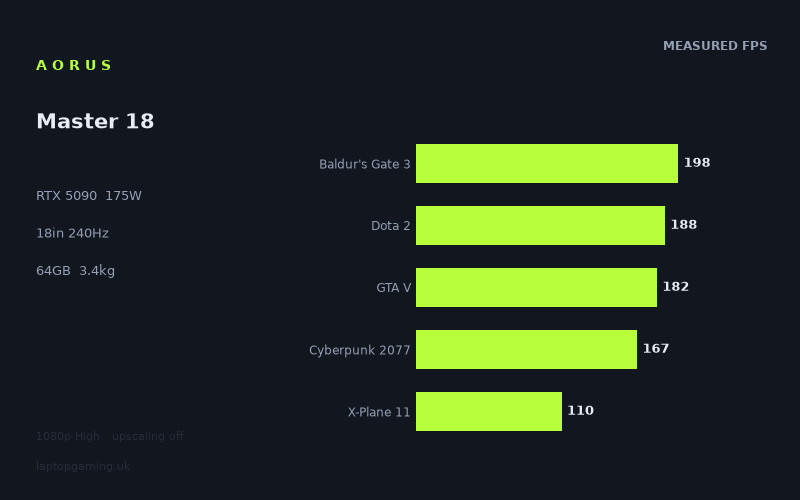
Frame rates
1920×1080, High preset, upscaling off. Averages 169fps across the 5 core benchmark games.
Measured on this machine. Source: Notebookcheck, 2025-05-01.
Not scored: no confirmed UK price
We have the full benchmark suite for this machine, so it ranks on the frame rate leaderboard like any other. What we don't have is a UK listing for this exact configuration - it's sold as a European review unit, or only in specifications that differ from the one tested. Since 30% of our score is value for money, scoring it would mean pretending price is no object, which would flatter it against every laptop you can actually buy. The frame rates below are real and comparable; there is just no buying recommendation to make yet.
How these numbers were produced
Frame rates here are not measured by us, and we label how each one was arrived at. A figure marked measured comes from a published run on that exact machine. A figure marked representative is derived from the GPU and its power limit (TGP) and cross-referenced against published reviews - a sound estimate of what that configuration delivers, but not a measurement of that specific laptop. Unless stated otherwise, numbers are 1920x1080, High preset, upscaling off. Where a laptop ships in several power configurations we use the wattage of the exact SKU listed, because a 140W RTX 5070 and a 115W one are not the same product.
In use
The short version
The Aorus Master 18 is a full-fat desktop replacement built around the fastest mobile GPU Nvidia currently ships, and the measured frame rates confirm that it behaves like one. Across the five games that make up our scoring suite it averages 169fps at 1080p on High with upscaling switched off, and the full twenty-one-game set that Notebookcheck ran on it stretches from 450fps in Strange Brigade down to 77fps in Senua's Saga: Hellblade 2. That is the signature of a machine with enough GPU headroom that the limiting factor shifts, title by title, between the graphics card, the processor and the game engine itself.
The configuration on our record is the unapologetic one: an RTX 5090 with 24GB of VRAM running at a 175W power limit, a Core Ultra 9 275HX, 64GB of memory, a 2TB SSD, and an 18in 2560x1600 panel at 240Hz. The trade-off is arithmetic and unavoidable — 3.438kg of laptop, plus whatever the power brick weighs, which our record does not state. This is a machine you put on a desk and leave there.
Two things are worth flagging before the detail, because they change how you should read the rest of this page. First, we have no confirmed UK price for this exact configuration, so the page carries no score. That is not a mark against the machine — the benchmark suite is complete, it ranks normally on the frame rate leaderboard, and every performance judgement below is made on the same evidence we apply to everything else. Value is 30% of our score and cannot be calculated from a blank. We will not guess at what it costs. Second, our record does not include a panel technology for this machine. Earlier data we held on this point turned out to be a parsing artefact rather than a real specification, and we have removed it rather than repeat something we cannot stand behind. Resolution and refresh rate we are confident about; the underlying panel type we simply do not have, and if that matters to you — and on an 18in screen at this class of spend it should — check the specific listing before you commit.
Buy it if you want a portable-in-name-only workstation-cum-gaming machine with the largest VRAM pool available on mobile and enough system memory to stop worrying about it. Look elsewhere if you intend to move it regularly, if you play mostly competitive titles where a cheaper machine already saturates your monitor, or if you need a confirmed price to sanity-check the outlay — because at this tier, as the rival comparisons below show, near-identical frame rates are available across a very wide range of asking prices.
Performance
What 175W actually buys you
The single most useful number on the spec sheet is not the GPU model, it is the 175W power limit. Mobile GPUs of the same name are configured across a broad wattage band by whoever builds the chassis, and the difference between the bottom and the top of that band is far larger than most buyers expect. A given GPU model tells you which silicon is inside; the TGP tells you how hard the manufacturer is willing to run it, which is a function of how much heat the cooling design can move and how much noise the designer is prepared to tolerate.
175W is a high figure and it is the same figure our record holds for the Asus Strix Scar 18 in the RTX 5090 comparison below. That matters, because it gives us something rare in laptop analysis: two machines with the same GPU at the same declared power limit, benchmarked by the same outlet on the same test methodology. The result is that the Aorus lands within 1fps of the Scar across their three shared games. When two implementations of the same silicon at the same power ceiling produce results that close, the honest reading is that the power limit is doing the work and the chassis around it is doing very little to differentiate the outcome, at least in the short benchmark runs that produce these numbers.
What a high TGP buys in practice is sustained clocks. A GPU held at a lower power ceiling will spike to a high clock, hit its limit and settle back; a GPU with more headroom holds a higher steady state. This shows up most clearly in the heavier, GPU-bound titles at the bottom of the list — Hellblade 2 at 77fps, Star Wars Outlaws at 83fps, Stalker 2 at 88fps — where nothing else in the system is standing in the way. Those are the numbers that separate a well-fed RTX 5090 from a throttled one. The 450fps in Strange Brigade tells you almost nothing about the GPU, because at that frame rate the GPU has long since stopped being the constraint.
The games that outrun the panel
Four titles in the measured set exceed the 240Hz refresh rate of the built-in display outright:
- Strange Brigade — 450fps. Nearly double the panel's refresh rate.
- Prince of Persia: The Lost Crown — 358fps.
- Counter-Strike 2 — 327fps.
- F1 24 — 305fps.
In each of those, the display is the bottleneck rather than the hardware. That has a practical implication people often miss: on this machine, in these games, buying more GPU would change nothing you could see on the internal screen. If your library is dominated by competitive shooters and older or lighter engines, an enormous amount of the silicon you are paying for sits idle behind a refresh-rate ceiling. Counter-Strike 2 at 327fps against a 240Hz panel is a 36% surplus that only becomes useful if you attach an external display with a higher refresh rate — and our record does not state what external display output this machine has, so that is something to verify rather than assume.
It is worth being precise about what these very high numbers do and do not indicate. Strange Brigade is a long-standing benchmark staple precisely because it scales cleanly and runs fast; at 450fps it is measuring the combined throughput of CPU, memory subsystem and driver overhead far more than it is measuring the RTX 5090's shader performance. The same applies to Counter-Strike 2, an engine built to run at absurd frame rates on modest hardware. Treat these entries as evidence that nothing in the system is broken, not as evidence of GPU class.
The middle band, and where the scoring suite sits
The bulk of the measured set clusters between roughly 150 and 210fps, and this is where most of the scoring suite lives:
- Civilization 7 — 203fps
- Final Fantasy XV — 201fps
- Baldur's Gate 3 — 198fps (scoring suite)
- Dota 2 — 188fps (scoring suite)
- GTA V — 182fps (scoring suite)
- Cyberpunk 2077 — 167fps (scoring suite)
- Helldivers 2 — 157fps
- Kingdom Come: Deliverance 2 — 152fps
Three of the five scoring-suite games — Baldur's Gate 3, Dota 2 and GTA V — sit inside a 16fps window. That tight grouping is itself informative. Those three titles are, in different ways, all sensitive to processor and memory performance: Baldur's Gate 3 in dense combat encounters with many simultaneous actors, Dota 2 in its perpetually CPU-limited engine, GTA V because it is a game from 2013 that no modern GPU has to strain against. When three games with very different rendering workloads converge on the same rough number, you are looking at a system-level ceiling, not a graphics one.
Cyberpunk 2077 at 167fps is the most useful single figure in the whole set for a buyer. It is the most demanding of the five scoring games, it is genuinely GPU-bound at High settings, and it remains the standard reference point for "can this thing actually push a modern open world". 167fps at 1080p with upscaling off is a large number — comfortably above the 144Hz that most external gaming monitors run at, and with enough margin that turning settings up rather than down is the obvious move.
The scoring-suite mean of 169fps is the number that would place this machine on our leaderboard if we had a price to complete the calculation. It is a top-tier figure. The mean is not the whole story — it is deliberately averaged over the same five games for every machine we score, so that the comparison is apples-to-apples rather than a function of which games each reviewer happened to run — but as a single summary of how a machine performs across a mixed workload it is the most defensible one available.
The heavy end, where the GPU earns its keep
The bottom third of the list is where an RTX 5090 at 175W distinguishes itself from cheaper hardware, and it is worth reading carefully:
- Horizon Forbidden West — 122fps
- Ghost of Tsushima — 115fps
- X-Plane 11 — 110fps (scoring suite)
- Space Marine 2 — 103fps
- Dragon's Dogma 2 — 99fps
- Until Dawn — 97fps
- Stalker 2 — 88fps
- Star Wars Outlaws — 83fps
- Senua's Saga: Hellblade 2 — 77fps
Note the character of these titles. Horizon Forbidden West and Ghost of Tsushima are dense open worlds with heavy foliage and long draw distances. Space Marine 2 renders enormous numbers of on-screen entities. Dragon's Dogma 2 has a well-earned reputation for being punishing on hardware in its populated areas. Stalker 2, Star Wars Outlaws and Hellblade 2 are Unreal Engine 5 titles leaning on the engine's more expensive lighting and geometry systems. That last group is the clearest signal in the data: three UE5 games occupy three of the four lowest positions, which is exactly what you would expect and exactly why they belong in a benchmark set. They are the games that will define the next several years of PC performance requirements.
Hellblade 2 at 77fps is the machine's floor, and it is a floor worth putting in context. A 77fps minimum across a twenty-one-game set means there is no title in the measured library that this machine cannot run at above 60fps at 1080p High. For a 2025-era benchmark run including several of the heaviest UE5 releases available, that is a strong result. It also tells you what the ceiling of the current generation looks like: even the fastest mobile GPU on the market, given a generous 175W to work with, is producing double-digit frame rates in the hardest modern titles at a resolution well below the panel's native one.
X-Plane 11 at 110fps deserves a note of its own because it sits inside the scoring suite and behaves unlike the others. It is a flight simulator with an old, heavily CPU-dependent renderer; it does not scale with GPU power the way the other four do. Its presence in the suite is deliberate — it stops the average being purely a GPU shootout and rewards machines with strong processors and good sustained thermal behaviour under mixed load. On this machine it lands as the lowest of the five scoring games, which is the normal pattern for a high-end GPU paired with a fast processor.
The resolution caveat, and it is a significant one
Every frame rate above was measured at 1920x1080. The panel is 2560x1600. That is roughly twice the pixel count, and it is the most important thing to understand about how these numbers translate to real use.
We do not have measured figures at native resolution for this machine, and we will not manufacture them by applying a scaling estimate — that would be exactly the sort of invented number this site exists to avoid. What can be said honestly is directional and still useful: in the titles that are clearly GPU-bound at 1080p, running at the panel's native resolution will cost a substantial amount of performance, and the games at the bottom of the list are the ones where that cost bites hardest. Hellblade 2 at 77fps at 1080p is not going to be a 77fps experience at 1600p. Conversely, the titles at the top — Strange Brigade, Counter-Strike 2, Prince of Persia — are constrained by something other than pixel-pushing, so they will lose proportionally less and in some cases very little.
This is where DLSS and frame generation stop being marketing bullet points and start being the actual answer, and it is also why the "upscaling off" qualifier on the benchmark data matters so much. The measured figures are the honest floor: what the hardware does with no assistance. In practice, anyone running a 2560x1600 panel on this machine will turn upscaling on in the heavy titles, and the RTX 5090 has the full current-generation feature set to do it with. But we can only report what was measured, and what was measured is a 1080p native result.
The practical guidance: judge this machine's heavy-title performance by the bottom of the list, not the top, and assume that native-resolution play in those titles will require either upscaling or settings compromises. That is not a criticism specific to this laptop — it applies to every high-resolution gaming laptop on the market — but it is the difference between a realistic expectation and a disappointed one.
What 24GB of VRAM is for
24GB is the largest VRAM allocation available on a mobile GPU, and for pure gaming at the resolutions this machine will actually be used at, it is more than any current title requires. Its value lies elsewhere, and it is genuine value rather than a spec-sheet trophy.
The obvious case is local AI work. Model size in memory is the hard constraint on what you can run on-device, and the gap between a 16GB card and a 24GB card is the gap between a lot of models fitting and not fitting. Combined with the 64GB of system memory on our record, this is a configuration that can hold considerably more in play at once than a typical gaming laptop. The second case is content creation — high-resolution video timelines, large 3D scenes, texture-heavy work — where VRAM exhaustion produces not a slightly lower frame rate but a hard stall.
The third case is longevity, and it is the one most relevant to a gaming buyer. Texture memory requirements have risen faster than raw GPU throughput requirements over the last several hardware generations. A machine with an enormous VRAM pool is insulated against the specific failure mode where a game runs acceptably in every respect except that it cannot hold its assets, which produces stuttering rather than a clean frame rate drop and is much more unpleasant to play through. Buying 24GB today is buying against that.
The 64GB of system memory and 2TB of storage complete a picture that is not really a gaming specification at all. It is a mobile workstation that happens to have the fastest gaming GPU in it. If you only game, you are paying for capacity you will not use; if you do anything else demanding alongside gaming, this is the configuration that stops you having to think about it.
The screen
What our record holds — and what it does not
The panel is 18in at 2560x1600 with a 240Hz refresh rate. Those three specifications we are confident about. Our record does not contain a panel technology for this machine.
That gap is deliberate. We previously held a panel type for this laptop that turned out to be an artefact of a parsing fault in how we ingested the source data rather than a genuine specification, and we have removed it rather than continue publishing something we cannot substantiate. We would rather tell you plainly that we do not know than tell you something that might be wrong — the entire premise of this site is that what we publish is attributable, and that has to apply to the specifications as much as the frame rates.
This is not a trivial omission. On an 18in display at this class of machine, the underlying panel technology drives contrast, black level, response time, viewing angles, brightness behaviour in HDR content, and how the screen holds up in a bright room. Two 18in 2560x1600 240Hz panels using different technologies can look meaningfully different side by side. If display quality is a significant part of your buying decision — and on a machine whose entire purpose is to be looked at for hours at a time, it probably should be — confirm the panel specification on the specific SKU you are buying before you order. Retailer listings and the manufacturer's own product page for the exact model number are the places to check.
Resolution and refresh rate, and whether the GPU can keep up
2560x1600 on an 18in diagonal is a sensible pairing. It is a 16:10 aspect ratio, which gives more vertical space than 16:9 — useful for anything that is not a game, and unobtrusive in games that support it properly. At that physical size the pixel density is high enough that text is clean without needing aggressive scaling, and low enough that the GPU is not being asked to do something absurd.
The 240Hz refresh rate is where the interesting analysis is. Reading the measured figures against it:
- Four titles exceed 240fps at 1080p and are therefore capped by the panel: Strange Brigade, Prince of Persia, Counter-Strike 2 and F1 24.
- Eight more sit between 150 and 210fps — comfortably into high-refresh territory even if not saturating the panel, and this is where the scoring suite mostly lives.
- Nine titles fall below 125fps, which is still smooth by any reasonable standard but a long way from the panel's ceiling.
And all of that is at 1080p, on a panel with roughly twice as many pixels. The realistic assessment is that the 240Hz refresh rate will be fully exploited only in lighter and competitive titles, and that in modern single-player games the panel will be running well below its maximum. That is not a flaw. A high-refresh panel costs you nothing when a game does not saturate it, and it is exactly the right specification for a machine that will also be used for esports titles where frame rate is the whole point. But if you are choosing between this and a machine with a lower refresh rate and some other advantage, be honest with yourself about which games you actually play.
There is one genuine benefit to a 240Hz panel that applies regardless of frame rate: everything on the desktop moves more smoothly, and the reduction in perceived motion blur applies to window dragging and text scrolling as much as it does to a firefight. It is a quality-of-life specification, not just a competitive one.
Build, size and portability
3.438kg, and what it dictates
3.438kg is the number that determines how this machine gets used, and it is worth sitting with rather than skimming past. That is the laptop alone. Our record does not state the mass of the power supply, and an 18in machine feeding a 175W GPU plus a Core Ultra 9 HX processor needs a substantial one, so the real travelling weight is higher than the figure quoted — by how much, we cannot say, and will not guess.
The practical consequences are straightforward. This does not go in a normal backpack alongside anything else. It does not get used on a lap for any length of time comfortably. It does not get carried through an airport as an afterthought. It goes on a desk, gets plugged in, and stays there — and the sensible way to think about it is as a small-form-factor desktop with a built-in display and battery, one that can be relocated between rooms or taken to a LAN event when required, rather than as a portable computer in the way a 14in machine is portable.
Set against that, the 18in class exists for good reasons that go beyond screen size. A larger chassis has more internal volume for heatsinks, more surface area for exhaust, and more room for fans that can move air at lower rotational speed for the same airflow. That is the physical basis on which a 175W GPU power limit is achievable at all. You cannot get this class of sustained performance out of a thin chassis; the thermodynamics do not permit it. The weight is not a design failure, it is the price of the performance figures at the top of this page.
The 99Wh battery
99Wh is the largest battery you will find in a laptop, and the reason is regulatory rather than technical: 100Wh is the ceiling above which lithium batteries generally cannot be carried aboard a commercial flight without special arrangement, so manufacturers building large machines converge on 99Wh precisely to stay under it. Fitting one here is the right call and it is a genuine point in the machine's favour.
We have no measured battery runtime figures for this machine on our record, so we cannot tell you how long it lasts. What can be said without inventing anything is structural: a 175W GPU and an HX-class processor cannot be fed from a battery at anything close to their full draw, so gaming unplugged on any machine of this configuration means running at substantially reduced performance. Every measured frame rate above was produced on mains power. Treat the battery as a facility for moving between desks, working on light tasks away from an outlet, and surviving a power cut mid-session — not as a way to game away from the wall.
Memory, storage and what they say about the intended buyer
64GB of memory and a 2TB SSD is not a gaming configuration. Games do not need 64GB and, with rare exceptions, do not benefit from it. This is a specification chosen for people who compile, render, run virtual machines, edit long-form video, or keep a great many demanding applications open simultaneously — and who also want to play games at the highest tier available.
2TB is the right storage size for this machine, and it is worth saying why in concrete terms: modern AAA installations routinely run to 100GB and beyond, and a 1TB drive fills uncomfortably quickly once an operating system, a creative suite and a handful of large games are on it. 2TB gives genuine breathing room. Our record does not state how many drive bays the chassis has or whether the memory is socketed, both of which affect upgrade paths, so those are questions to put to the retailer if they matter to you.
Taken together — 24GB VRAM, 64GB system memory, 2TB storage, a top-tier GPU at a high power limit, an 18in high-refresh screen — this reads as a machine specified without compromise in any direction except portability, which was traded away completely. That is a coherent design. It is just a design that suits a narrower group of people than the spec sheet's headline numbers might suggest.
How it compares
The four machines below are all from the same GPU generation, chosen to give a spread rather than only the nearest neighbours: the two closest results, the machine this one beats by the largest margin, and the machine that beats it by the largest margin. Every comparison uses only games both machines hold, preferring the scoring suite where possible, because comparing across different game sets produces numbers that look precise and mean nothing.
Asus Strix Scar 18 — the same GPU, the same power limit, £5,300
Our record has the Strix Scar 18 with an RTX 5090 at 175W — identical GPU, identical declared power ceiling — at a UK price of £5,300. Across the three games both machines hold, the Aorus averages 1fps behind.
One frame per second across three games is, for all practical purposes, a tie. It is well within the range that run-to-run variance, ambient temperature, driver version and background system state can account for. Neither machine is faster than the other in any sense a buyer could perceive.
That result is not a surprise; it is what the physics predicts. Same silicon, same power budget, benchmarked by the same outlet on the same methodology — and at 1080p on the lighter end of the shared set, where the processor and engine are frequently the binding constraint rather than the GPU. When both machines have far more graphics performance than a title can absorb, both machines produce the same number, and the comparison stops measuring the GPU at all. The three-game shared set is also small, which limits how much weight the average can carry.
What this comparison genuinely establishes is a pricing reference point. The Scar 18 asks £5,300. We do not know what the Aorus asks. If it lands below the Scar, the frame rate data says you are giving up nothing measurable for the saving. If it lands above, the burden of justification falls on the parts of the machine the benchmarks do not capture — build quality, keyboard, thermals under long load, service and warranty, and the panel specification we do not hold. Those are real considerations and this data cannot arbitrate them. What it can tell you is that the frame rates are not the reason to pay more.
Schenker XMG Neo 16 E25 — the same story, a different chassis
The Neo 16 E25 also carries an RTX 5090 at 175W. We have no confirmed UK price for it. Across five shared games the Aorus averages 2fps behind.
Two frames across five games, again, is a tie. But this comparison is more informative than the Scar one for a simple reason: the shared set is five games rather than three. A five-game average is meaningfully more robust than a three-game one, and it reinforces the same conclusion from a stronger evidential base. Three RTX 5090 implementations at 175W — the Aorus, the Scar and the Neo E25 — all land within a couple of frames of each other.
That consistency is the strongest single piece of evidence in this whole comparison set for how mobile GPU performance actually works. The power limit is the specification that determines the result. Not the brand, not the chassis size, not the marketing tier. If you are shopping in this bracket, the number to interrogate is the TGP, and you should treat any manufacturer who does not publish it as telling you something by omission.
The Neo E25 is a 16in machine against this one's 18in. Our record does not give its weight, so we cannot quantify the portability difference, but the class difference is real: a 16in chassis is a materially easier thing to move around than an 18in one. If two machines deliver the same frames, the smaller one has an argument that the frame rate data cannot answer.
Schenker XMG Neo 16 A25 — the one that beats it
The Neo 16 A25 carries an RTX 5090, with no confirmed UK price on our record. Across five shared games the Aorus averages 32fps behind.
This is the only rival in the set that separates itself, and 32fps across five games is a real gap — not noise, not variance, not a methodology artefact. It is the sort of margin that shows up as a genuinely different experience in the heavier titles.
The obvious question is why. Our record does not state a GPU power limit for the A25, which is frustrating because it is almost certainly the answer. Given that three machines with a declared 175W ceiling cluster within two frames of each other, a fourth machine with the same GPU pulling 32fps clear is the strongest possible circumstantial evidence that it is running at a higher power limit. Other explanations exist — a faster processor, more aggressive memory configuration, a different test date with different drivers — and we cannot rule them out from the data we hold. But the pattern is hard to read any other way.
For a buyer, the actionable point is this: if you are paying top-of-range money for an RTX 5090, find out what wattage it runs at. The gap between this machine and the A25 is 32fps across five shared games, from the same GPU model. That is a larger difference than many buyers imagine exists within a single GPU tier, and it is entirely invisible on a spec sheet that lists only "RTX 5090". This comparison is the single most useful thing on this page for anyone shopping the top end.
It also complicates the case for the Aorus in a way worth stating plainly. Without a price for either machine, we cannot say which represents better value. What we can say is that on measured frame rates, the A25 is the faster machine, and any buyer choosing between them should establish both prices and both power limits before deciding.
MSI Cyborg 15 — the far end of the range, at £984
The Cyborg 15 carries an RTX 5050 and sells for £984. Across five shared games the Aorus averages 81fps ahead.
This is included not because anyone is cross-shopping these two machines but because it establishes something important about the benchmark itself: it can separate machines by very large margins when a real difference exists. The 1fps and 2fps results above are not the methodology failing to resolve differences. The same five-game comparison that produces a 2fps gap between two 175W RTX 5090 machines produces an 81fps gap here. When the hardware differs, the numbers differ, and they differ enormously.
That is the correct way to read a set of near-ties. They are not evidence of an insensitive test. They are evidence that the machines being compared are, in fact, near-identical performers — and the Cyborg comparison is the control that proves it.
The other thing this comparison does is frame the value question that we cannot answer directly. £984 buys a machine that is 81fps slower across those five games. Whether the additional performance is worth the difference depends entirely on the Aorus's price, which we do not have. But it is worth noting that the Cyborg's frame rates are not zero, and for a great many players a machine at that price is entirely sufficient. The top of the range exists for people whose requirements genuinely extend beyond it — high-refresh competitive play, native-resolution modern titles, VRAM-hungry professional work — and not everyone's do.
Reading the spread as a whole
Putting the four comparisons in a row produces a clear picture:
- Against an RTX 5050 machine: 81fps ahead across five games.
- Against a 175W RTX 5090 (Scar 18): 1fps behind across three games.
- Against another 175W RTX 5090 (Neo E25): 2fps behind across five games.
- Against an RTX 5090 of unstated wattage (Neo A25): 32fps behind across five games.
Three conclusions follow. First, this machine performs exactly as an RTX 5090 at 175W should — it is indistinguishable from its direct peers, which is what you want from a benchmark result. Second, the GPU tier gap is vast and the within-tier gap is not, unless power limits differ. Third, at 1080p a great many of these titles are constrained by something other than the graphics card, which compresses the differences between high-end machines and makes the wide margins against lower-tier hardware the more informative comparison.
That last point deserves emphasis because it is easy to misread. The near-ties at the top are partly a property of testing at 1080p: in the lighter shared titles the processor and engine become the limit and every capable GPU converges. Test the same machines at native 2560x1600 in the heavy titles and the picture might separate further — but we do not hold that data, so this is an observation about the limits of the comparison rather than a claim about what those results would show.
The missing price, and why this page carries no score
Our scoring model weights value at 30%, and value cannot be computed without a confirmed UK price for the exact configuration being reviewed. We do not have one for this machine, so there is no score on this page.
To be unambiguous about what that does and does not mean: it is not a criticism of the laptop. The benchmark suite is complete — all five scoring games are present, which is more than can be said for several machines we do score — and it ranks normally on our frame rate leaderboard. The performance evidence is as strong as it is for anything else on this site. What is missing is one input to an arithmetic calculation, and we would rather publish no number than publish one built on a guess.
We are not going to speculate about what it costs. Anyone who wants to complete the picture can check current UK retailer listings for the exact model and read the value question themselves, with the £5,300 Strix Scar 18 and the £984 Cyborg 15 as the two anchors this page provides. If a confirmed price appears, the score appears with it, recomputed from live pricing.
Who it's for
This machine suits a specific and identifiable buyer, and the specification is coherent enough that it is worth naming them precisely.
The desk-bound performance buyer. If the laptop form factor is about consolidation rather than mobility — one machine instead of a desktop plus a laptop, occasionally moved between home and an office or a LAN event but overwhelmingly used in one place — then the 3.438kg is a non-issue and everything above it is upside. This is the core case.
Anyone who needs VRAM. 24GB is the ceiling of what mobile silicon offers, and if local model inference, large 3D scenes, or high-resolution video work is part of your day, that number is not a luxury. Paired with 64GB of system memory, this is a configuration that removes memory as a constraint on what you can attempt.
Players of heavy modern single-player games at high settings. Cyberpunk 2077 at 167fps, Horizon Forbidden West at 122fps and Hellblade 2 at 77fps at 1080p High with no upscaling describe a machine with real headroom in the titles that actually stress hardware. Turn upscaling on and native-resolution play at good settings becomes realistic across the library.
People who intend to attach an external display. Four titles already exceed the internal panel's 240Hz. If your setup involves a large external monitor, this machine has performance in reserve for it — though check the display outputs on the specific SKU, since our record does not list them.
Who should buy something else
Anyone who carries their laptop regularly. 3.438kg plus an unstated power supply weight is a commitment. If your machine moves daily, this is the wrong class of computer and no amount of performance compensates for it. A 16in machine — the Neo 16 E25 in this comparison set delivers effectively identical frame rates in a smaller chassis — is the obvious alternative direction.
Competitive players on a budget. If your library is Counter-Strike 2, Dota 2 and similar, this machine's 327fps and 188fps in those titles are impressive but far beyond what your monitor can display, and much cheaper hardware clears the same bar. The 81fps average advantage over the £984 Cyborg 15 comes overwhelmingly from heavy single-player titles you may not play.
Anyone shopping strictly on frames per pound. Without a price we cannot make that judgement for you, but the structure of the comparison set is a warning: near-identical performance is available across an enormous price range at this GPU tier, and one rival with the same GPU model is 32fps clear. Establish the price and the power limit of everything on your shortlist before committing.
Buyers for whom the display is decisive. Our record does not hold a panel technology for this machine, and we are not going to pretend otherwise. If contrast, black level and HDR behaviour are central to your decision, either confirm the panel specification directly with the retailer or choose a machine whose panel is documented.
The bottom line
The Aorus Master 18 is what an RTX 5090 at 175W looks like when nothing else in the specification has been compromised to save weight or money. A scoring-suite mean of 169fps, a floor of 77fps across twenty-one measured titles including three demanding Unreal Engine 5 games, 24GB of VRAM, 64GB of memory and a 99Wh battery add up to a machine with no obvious weakness in what it was built to do.
The caveats are honest ones and they are about our record rather than the hardware. We do not have a confirmed UK price, so there is no score and no value judgement. We do not have a panel technology, so the display's character is a question you should resolve before buying. And the one rival in the comparison set that beats it — by 32fps across five shared games, from the same GPU model — is a reminder that at this end of the market the wattage figure matters more than the GPU name, and that anyone spending this kind of money owes it to themselves to check.
Judged on the performance evidence alone, it is a top-tier machine that does exactly what its specification promises. Judged as a purchase, it has one blank that only a current retail listing can fill.