Review
Asus ROG Zephyrus G16 2024 review
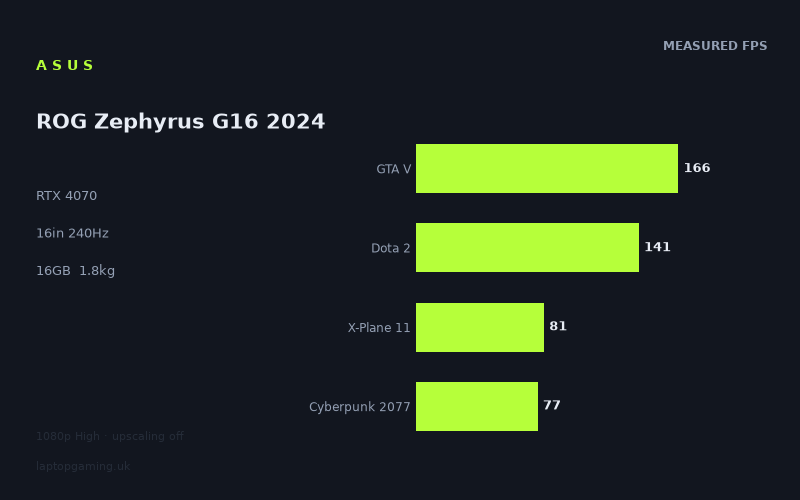
Frame rates
1920×1080, High preset, upscaling off.
Measured on this machine. Source: Notebookcheck, 2024-02-06.
Not scored: incomplete benchmark suite
Every scored laptop on this site is averaged over the same 5 games, and this one is short of Baldur's Gate 3. A mean over 4 games is not comparable to a mean over 5, so we publish the figures we have and leave the score blank rather than rank it against machines tested on a different set. The numbers below are real - the suite is just incomplete.
How these numbers were produced
Frame rates here are not measured by us, and we label how each one was arrived at. A figure marked measured comes from a published run on that exact machine. A figure marked representative is derived from the GPU and its power limit (TGP) and cross-referenced against published reviews - a sound estimate of what that configuration delivers, but not a measurement of that specific laptop. Unless stated otherwise, numbers are 1920x1080, High preset, upscaling off. Where a laptop ships in several power configurations we use the wattage of the exact SKU listed, because a 140W RTX 5070 and a 115W one are not the same product.
In use
The short version
The 2024 Zephyrus G16 is the clearest example in our data of a machine sold on a GPU name that its chassis is not built to exploit. The specification says RTX 4070. The measured frame rates say something more complicated: across three shared games it finishes level with a Lenovo Legion Slim 7 carrying an RTX 4060 at 140W, and one frame behind a Legion Slim 5 carrying an RTX 4060 at 60W. Against an RTX 4050 machine it is ahead by 36fps across four games, and against an RTX 4090 machine it is behind by 70fps across three. So the benchmark is perfectly capable of separating hardware. It just does not separate this machine from a pair of RTX 4060 laptops.
That headline needs immediate qualification, and the qualification is genuinely important rather than a hedge — the section on comparisons below works through it properly. But it is the first thing a buyer should know, because the G16's price positioning follows the GPU name and its measured performance does not obviously follow the price.
What the G16 unambiguously is, and what makes it worth taking seriously, is a 16in gaming laptop weighing 1.817kg with a 2560x1600 OLED panel at 240Hz and a 90Wh battery. That is a genuinely portable machine with a display better than almost anything else in the category, and the frame rates it produces — 166fps in GTA V, 141fps in Dota 2, 77fps in Cyberpunk 2077, all at 1080p on High with upscaling off — are perfectly respectable for something you can carry all day. The question is not whether it is fast enough. It is whether you are paying a 4070 premium for 4060-class results, and buying the portability and the screen with the change.
Two structural notes before the detail. Our record does not hold a GPU power limit for this machine, which is unfortunate given that the power limit is the single most likely explanation for everything odd in the comparison data. And this page carries no score, because our scoring suite is five games and we hold four of them here — Dota 2, GTA V, X-Plane 11 and Cyberpunk 2077, but not Baldur's Gate 3. A four-game average cannot be ranked against five-game averages without quietly corrupting the leaderboard, so we do not publish one.
Buy it if you want the best portable 16in gaming laptop screen available in this generation and you will use the portability. Look elsewhere if you want maximum frames for the money, if you play heavy single-player titles at the panel's native resolution, or if the GPU name is a large part of what you think you are paying for.
Performance
The power limit we don't have, and why it is the central question here
Nvidia allows laptop manufacturers to configure the same mobile GPU across a wide band of power limits. The gap between the bottom and the top of that band is routinely larger than the gap between adjacent GPU tiers, which is why an RTX 4060 at 140W can beat an RTX 4070 configured conservatively, and why the model number on the box is an incomplete description of what you are buying.
Our record holds no power limit for the G16. It does hold one for two of the rivals: 140W for the Legion Slim 7's RTX 4060 and 60W for the Legion Slim 5's. That asymmetry is frustrating, because the comparison data below is exactly the kind that a TGP figure would explain in one line.
We will not estimate it. What can be said without estimating is contextual and it points in one direction. This is a 16in machine weighing 1.817kg. Cooling capacity is a function of the volume available for fans, heat pipes and exhaust, and a chassis that light has less of all three than a 2.5kg or 3kg machine. Every thin gaming laptop ever built has faced the same physics, and the standard resolution is to configure the GPU below its maximum. That is not a criticism of Asus specifically — it is the only way a laptop this light can exist — but it does mean that reading "RTX 4070" and expecting the performance of an RTX 4070 in a large chassis is a mistake.
The practical instruction is the same one we would give for any thin gaming laptop: find the TGP for the exact listing before you buy, and treat its absence as information. The comparison figures below are what the measurements say. A confirmed power limit would tell you why.
Working through the measured figures
Notebookcheck's numbers at 1920x1080 on High with upscaling disabled run from 221fps in The Witcher 3 down to 65fps in Star Wars Jedi Survivor. That is a spread of well over three to one across thirteen titles, and the shape of it is as informative as the endpoints.
The top of the chart — The Witcher 3 at 221fps, F1 2021 at 220fps, Strange Brigade at 211fps — is a cluster of older, lighter engines. At 1080p on High, none of these games is asking enough of a modern GPU to keep it busy. The frame rate settles at whatever the processor, the engine's internal limits and driver overhead permit. Those three results are therefore mostly a statement about the Core Ultra 7 155H rather than about the RTX 4070, and it is worth being clear about what kind of processor that is: a mainstream mobile part designed for efficiency in a thin chassis, not one of the desktop-derived HX-class chips that the biggest gaming laptops use. In CPU-bound titles that difference shows, and the ceiling it imposes is why the top of this chart sits where it does rather than several hundred frames higher.
F1 22 at 168fps, GTA V at 166fps and F1 23 at 165fps form a tight middle band. GTA V is one of our scoring-suite games and 166fps is a strong result in it — comfortably above what the more common gaming refresh rates can display, and enough that the frame rate has somewhere to fall in a busy scene without becoming a problem. The three F1 titles landing at 220, 168 and 165 across successive years is a reasonable illustration of engines getting heavier over time, though as always a benchmark table assembled across different driver versions and game patches is not a controlled experiment and the ordering between titles should not be over-read.
Dota 2 at 141fps is the second scoring-suite result and it is the one worth pausing on, because it is lower than people expect. Dota 2 is a light game. A figure of 141fps means the machine does not saturate its own 240Hz panel in one of the least demanding titles in the entire set. That is not a GPU problem — no graphics card is the constraint in Dota 2 at 1080p — it is a processor and platform result, and it reinforces the point about the 155H. If competitive titles at very high refresh rates are your priority, this is the number that should give you pause, not the Cyberpunk figure.
Far Cry 5 at 121fps and Final Fantasy XV at 101fps take us into territory where the graphics card is doing real work. Both are comfortably playable and both stay in triple figures, which is roughly where most people find a high-refresh experience starts to feel genuinely smooth.
Then the bottom of the chart, which is where the machine's limits are visible. X-Plane 11 at 81fps, Cyberpunk 2077 at 77fps, Avatar: Frontiers of Pandora at 66fps and Star Wars Jedi Survivor at 65fps.
X-Plane 11 at 81fps is a scoring-suite game and a processor-bound one; flight simulation loads the CPU with work no graphics card can take over, so this result is another data point about the platform rather than the GPU. Cyberpunk 2077 at 77fps is the fourth suite game and it is the most useful single number on this page for judging the machine, because Cyberpunk is the closest thing the industry has to a standard yardstick for heavy rendering. Seventy-seven frames per second at native 1080p on High is solidly playable. It is not a figure that suggests headroom.
Avatar and Jedi Survivor at 66 and 65fps are the hardest results in the set, and they define the machine's floor. Both are above the sixty-frame threshold, which matters — but only just. This is a machine that will run demanding 2023-and-later titles at native 1080p at around sixty frames, and heavier releases will go below that.
The mean across the four scoring-suite games we hold is 116fps. Treat that as a description rather than a ranking, for the reasons set out above.
The role of upscaling, stated honestly
Every figure on this page was measured with upscaling switched off. That is the correct way to benchmark, because it measures the hardware rather than the reconstruction algorithm, and because upscaling implementations differ between games in ways that make cross-title comparison meaningless.
It is not, however, how most people will play. DLSS is available on this generation of Nvidia hardware and it works well. Turning it on would raise the Cyberpunk, Avatar and Jedi Survivor figures materially. We do not have measurements of by how much and we will not invent them, but the direction is not in question and it changes the practical assessment of the bottom of this chart considerably. A machine that manages 65fps natively in a heavy title has genuine options once upscaling is enabled — which is exactly the argument for why a native-resolution number in the sixties is not the disqualification it might once have been.
The reason we still report native figures is that they are the only honest basis for comparing machines. If one laptop is measured with upscaling and another without, the comparison is worthless. Everything on this page and on every other page of this site is measured the same way, so the comparisons hold.
The screen
A 16in 2560x1600 OLED panel at 240Hz. On specification alone this is the best display in our RTX 40-generation data, and it is the strongest single reason to want this machine.
What OLED at 240Hz actually gives you
OLED panels light each pixel individually, so black is genuinely black rather than a backlight leaking through a closed shutter. In games that means shadow detail and contrast that an IPS panel cannot match at any price, and it is most obvious in exactly the kind of atmospheric single-player titles this machine will be used for. Pixel response is also effectively instantaneous, which removes the smearing that even good IPS gaming panels show in fast motion. Combine that with a 240Hz refresh rate and you have a display whose motion clarity is in a different category from the norm.
The trade-offs are real and worth knowing. OLED panels are susceptible to burn-in from static elements displayed for very long periods — game HUDs, taskbars, editor toolbars. Modern implementations include mitigations and the risk over a typical ownership period is low, but it is not zero, and it is higher for someone who leaves the same interface on screen for eight hours a day than for someone who games in the evenings. Our record holds no brightness, contrast or colour measurements for this specific panel, so we are describing the technology rather than this implementation of it, and we are not going to characterise its HDR performance without data.
The resolution problem
Here is the awkward part, and it is the most important thing on this page after the comparison data.
Every measured figure quoted above was recorded at 1920x1080. The panel is 2560x1600. That is very close to double the pixels per frame — a 16:10 1600p panel is a substantially heavier workload than a 1440p one, and dramatically heavier than 1080p. We do not hold native-resolution measurements for this machine, so we cannot tell you what it does at 1600p. What we can tell you is the direction and the rough shape of the effect, and it is not favourable.
In the CPU-bound titles at the top of the chart — The Witcher 3, F1 2021, Strange Brigade, Dota 2 — the drop will be modest, because the graphics card was not the constraint. In the GPU-bound titles at the bottom, it will be severe, because doubling the pixel count lands entirely on the component that was already the bottleneck. Cyberpunk 2077 at 77fps, Avatar at 66fps and Jedi Survivor at 65fps are the three results where that matters most, and all three are titles where native 1600p on this hardware is unlikely to be a comfortable experience.
This is where upscaling stops being a nice-to-have and becomes the intended operating mode. A 1600p OLED panel driven by a GPU in this class is a design that assumes DLSS is on — render at a lower internal resolution, reconstruct to the panel's native grid, and get the sharpness of the display without paying the full pixel cost. That is a legitimate and increasingly standard way to build a laptop, and it works. But it should be named for what it is, because a buyer who expects the frame rates on this page at the resolution of the screen in front of them will be disappointed, and the gap between those two things is larger on this machine than on almost any other in our data.
Is the 240Hz useful?
Partly. Taking the 1080p figures at face value, no measured title reaches 240fps — the highest is The Witcher 3 at 221fps. Seven of the thirteen clear 141fps or better. Two sit between 101fps and 121fps. The remaining four are between 65fps and 81fps.
So the refresh rate is not going to be saturated by this GPU in any of the games measured, at any resolution. Its value is different: a high-refresh panel with variable refresh support smooths out the experience at any frame rate, and OLED's instant pixel response means the motion clarity benefit is real even well below the panel's ceiling. It is a better display running well short of its ceiling than a lower-refresh IPS panel running at its own. Just do not buy it expecting to feed it 240 frames a second.
Build, size and portability
1.817kg for a 16in gaming laptop with a 90Wh battery is the whole argument for this machine, and it deserves to be taken as seriously as the frame rates.
To put it in context using our own data: the Asus ROG Strix Scar 17 in the comparison set below weighs 2.935kg. That is over a kilogramme more, and a kilogramme is not a rounding error in a bag you carry every day. The G16 is close to the weight of a mainstream 15in productivity laptop while offering a 16in screen and dedicated gaming graphics. In the RTX 40 generation, very few machines managed that.
The consequence, though, is the thing this entire review keeps returning to. A chassis that light has limited volume for cooling. Every design decision that produces 1.817kg — thinner heat pipes, smaller fans, less exhaust area, a smaller vapour chamber if there is one at all — reduces the amount of heat the machine can move, and the amount of heat it can move sets the ceiling on how hard the GPU can be run. The comparison data below, where this machine's RTX 4070 does not separate itself from RTX 4060 laptops, is exactly what you would expect from a thermally constrained design. We cannot confirm that explanation because we do not hold the power limit, but the physics is not mysterious and the pattern is familiar.
This is not a flaw so much as a purchase decision that has already been made for you. You cannot have a 1.817kg 16in laptop and the sustained performance of a 3kg one. If the weight is what you want, you are accepting the performance that comes with it, and the honest framing is that you are buying a superb portable machine with competent gaming performance rather than a fast gaming machine that happens to be light.
The 90Wh battery is close to the maximum size airlines generally allow in cabin baggage, and on a machine this efficient outside of gaming it is a sensible pairing — an efficiency-focused Intel processor and a large battery is the combination that makes a gaming laptop usable as a normal laptop. We hold no battery-life measurement for it, so we will not tell you how long it lasts. What is true of every machine in this class is that gaming on battery is not a realistic proposition: the power draw under load exceeds what a battery of this size can sustain, and the machine will reduce performance sharply when unplugged.
Our record holds no dimensions beyond the screen size, no thermal or acoustic measurements, no keyboard assessment and no storage capacity for this configuration. Noise in particular is a gap worth flagging on a thin machine: small fans moving a lot of air tend to do it at a higher pitch than large ones, and that is a real quality-of-life factor. We do not have the data, so we are not going to characterise it.
How it compares
The rival set is drawn from the same GPU generation, compared only on games both machines hold. It contains one comfortable win, two near-ties, and one heavy defeat, and the four together tell a more coherent story than any one of them does alone.
Against the Lenovo Legion Slim 7 — RTX 4060 at 140W — level across three games
This is the comparison that should shape your thinking. A machine with an RTX 4060 configured at a high 140W power limit produces, across three shared games, an average within a frame of this one. Our record shows the G16 fractionally behind — the difference rounds to nothing in either direction, which is to say the two machines are indistinguishable on this evidence.
There are two explanations and both are partly true.
The first is the one the comparison note flags: at 1080p, the lighter titles in a shared set are limited by the processor rather than the graphics card, and that compresses genuine GPU differences. If the three games these two machines share are drawn from the lighter end — and with a three-game sample that is likely — then neither GPU was working at capacity in much of the test, and the result measures the platforms rather than the graphics cards. That is not a flaw in the benchmark, it is what benchmarking at a low resolution does, and it is why three-game comparisons should be read more cautiously than seven-game ones.
The second is that the G16's RTX 4070 may genuinely not be far ahead of a well-fed RTX 4060, because a 1.817kg chassis cannot run a 4070 the way a heavier machine can. We cannot confirm this without the power limit. But the two explanations are not in competition — both effects can be present simultaneously, and the honest position is that this comparison does not let you distinguish between them.
Against the Lenovo Legion Slim 5 — RTX 4060 at 60W — one frame behind across three games
This is the result that makes the previous one interpretable, and it is the most analytically useful line in the whole set.
The Legion Slim 5 runs its RTX 4060 at 60W. The Legion Slim 7 runs the same GPU at 140W. That is more than a doubling of the power budget for identical silicon — a difference that, in GPU-limited work, produces a very large performance gap. And yet across their respective three-game comparisons with the G16, both Lenovos land in essentially the same place.
Think about what that means. If the shared games were GPU-limited, a 60W RTX 4060 and a 140W RTX 4060 could not possibly finish within a frame or two of each other. They did. Therefore the shared sample is substantially CPU-bound, and the comparison is not measuring what a naive reading suggests it measures. It is not telling you the G16's graphics card is no better than a 60W RTX 4060. It is telling you that in these particular titles at this particular resolution, none of the three graphics cards was the limiting factor.
That is a genuinely important correction, and it is why we lay the rival data out in a spread rather than quoting a single nearest competitor. A one-frame gap looks damning in isolation. Set against the fact that a 60W and a 140W version of the same GPU also produced no gap, it becomes evidence about the test conditions rather than about this machine.
It does not, however, get the G16 entirely off the hook. What we can say is that on the evidence available, this machine's RTX 4070 has not been shown to outperform an RTX 4060 in the titles where they have both been measured. Absence of evidence is not evidence of absence — but if you are paying for a 4070, the burden of proof is on the specification, and our data does not discharge it.
Against the MSI Thin GF63 — RTX 4050 — ahead by 36fps across four games
Here the benchmark does separate machines, and by a wide margin. Across four shared games — a larger and more reliable sample than the three-game comparisons above — the G16 is ahead by an average of 36fps.
Thirty-six frames is a substantial, clearly visible difference. It confirms that the methodology is not insensitive: run the same tests against genuinely weaker hardware and the gap appears. The GF63 is a budget machine and the RTX 4050 is the entry point of the generation, so this is roughly what you would expect, but it is worth having on the record. When a benchmark that can produce a 36fps separation reports no separation between two machines, the absence is meaningful rather than a measurement failure.
It also tells you what the G16 is for. If your alternative is an entry-level gaming laptop, this machine is meaningfully faster as well as far better built and far better screened. The doubt is about whether it is faster than the mid-tier, not about whether it is faster than the bottom.
Against the Asus ROG Strix Scar 17 — RTX 4090 — behind by 70fps across three games
And here is the other end. Across three shared games the G16 is behind by 70fps.
Note carefully what this does to the earlier argument. Three shared games — the same small-sample condition that produced a one-frame gap against the Legion Slim 5 — produce a seventy-frame gap against the Scar 17. So a three-game comparison is not inherently incapable of separating machines. It separated these two decisively. The compression effect is real, but it is not so overwhelming that it flattens everything, and a machine that is genuinely much faster still shows up as much faster.
That said, the Scar 17 comparison is not a like-for-like purchase decision. That machine weighs 2.935kg to this one's 1.817kg, carries a 17.3in chassis rather than a 16in one, and sits at the top of the generation's price structure. Nobody is genuinely choosing between them. The comparison is useful as calibration — it shows what the top of the range looks like from here — rather than as a shopping recommendation.
Reading the spread as a whole
Line the four comparisons up: ahead by 36 against a 4050, level against a 140W 4060, one frame behind a 60W 4060, seventy behind a 4090. The pattern is that this machine sits somewhere in the middle of the RTX 40 stack in measured performance, closer to the 4060 tier than to the 4070 name would suggest, and a long way below the top.
Whether that is a problem depends entirely on what you are buying. If you want frames per pound, the data does not favour this machine and the Legion Slim 5 comparison is the reason. If you want a 1.817kg 16in laptop with a 240Hz OLED screen that plays modern games at native 1080p at sixty-five frames and above, nothing in the comparison set offers that combination, and the performance shortfall is the price of admission.
Who it's for
The buyer who genuinely carries their laptop. This is the case that holds up. If your machine moves between home, an office, a campus and a train several times a week, 1.817kg versus 2.5kg or 3kg is not a specification detail, it is the difference between a laptop you take with you and one you leave behind. The G16 plays modern games properly and weighs about what a non-gaming 15in machine weighs. That is a rare combination and it is worth paying for if it matches your life.
The buyer who values the screen above the frame rate. A 2560x1600 OLED at 240Hz is an exceptional display for content, for creative work and for atmospheric single-player games. If you watch films on your laptop, edit photographs, or simply care more about how a game looks than how many frames it produces, this panel is a genuine differentiator and the OLED contrast is something no IPS rival in the comparison set can match at any price.
The buyer who plays at 1080p or with upscaling enabled. The measured figures are 1080p figures, and at that resolution this machine is comfortable everywhere: 77fps in Cyberpunk 2077, 66fps in Avatar, 65fps in Jedi Survivor, and 121fps or better in the lighter titles. Play at the panel's native resolution with DLSS doing the heavy lifting and you get the sharpness of the screen at frame rates the GPU can sustain. That is how this machine is designed to be used.
The buyer who wants one machine for work and games. An efficiency-oriented Intel processor, 16GB of memory, a 90Wh battery and a colour-capable OLED panel make more sense as a general-purpose computer than most gaming laptops do. The compromises that hurt it in the benchmark table are the same ones that make it tolerable to own.
Who should buy something else
Anyone optimising for frames per pound. The evidence on this page is that an RTX 4060 machine — even one configured at 60W — produces comparable results in the titles where both have been measured. If performance per pound is your criterion, the Legion Slim 5 and Legion Slim 7 comparisons are the ones to act on, and they do not favour paying a 4070 premium for this chassis.
Anyone who plays heavy titles at native panel resolution and dislikes upscaling. The measured 1080p figures for Cyberpunk, Avatar and Jedi Survivor are in the sixties and seventies. The panel has close to twice as many pixels as the test resolution. If you insist on native rendering in demanding games, this pairing of GPU and screen will frustrate you, and a machine with a lower-resolution panel and the same GPU would serve you better.
Anyone who plays competitive titles at very high refresh rates. Dota 2 at 141fps is the number to look at, not the 240Hz on the box. This machine does not saturate its own panel in one of the lightest games in the set. If your priority is maximising frames in esports titles, a machine with a desktop-derived processor will serve you considerably better, and it will probably cost less.
Anyone whose laptop lives on a desk. If the machine is not going to move, you are paying a large premium for engineering that solves a problem you do not have. A heavier machine at the same price will be faster, run cooler and almost certainly be quieter, because it has the volume to do so. Portability is the G16's central proposition; if you do not need it, the argument for the machine largely collapses.
Anyone who needs a value judgement before committing. We hold no confirmed UK price for this configuration and we will not speculate about one, which is why this page carries no score and why every judgement above is about measured performance rather than worth. The G16's case rests heavily on whether the premium it commands over an RTX 4060 machine is justified by the weight and the screen. That is a question about the price tag in front of you, and it is a genuinely close call rather than an obvious yes or an obvious no.
What we hold, and what we don't
Our record for this machine holds the full specification — GPU, processor, memory, screen size, resolution, refresh rate, panel technology, weight and battery capacity — and thirteen measured game results from Notebookcheck at 1920x1080 on High with upscaling disabled.
It does not hold a GPU power limit, a confirmed UK price, a storage capacity for this configuration, any native-resolution frame rates, any battery-life measurement, any display brightness or colour data, and no thermal or acoustic measurements.
Three of those gaps are load-bearing here. The power limit matters more on this machine than on almost any other in our data, because the comparison results are exactly what a thermally constrained GPU would produce and we cannot confirm the mechanism. The absence of 1600p figures matters because the panel has close to double the pixels of the test resolution, so the headline numbers describe a workload considerably lighter than the machine's own screen presents. And the absence of a price means there is no value verdict here — only an account of how fast it is, and against what.