Details
Product prices and availability are accurate as of the date/time indicated and are subject to change. Any price and availability information displayed on Amazon.co.uk at the time of purchase will apply to the purchase of this product.Review
HP Omen 17z-db100 review
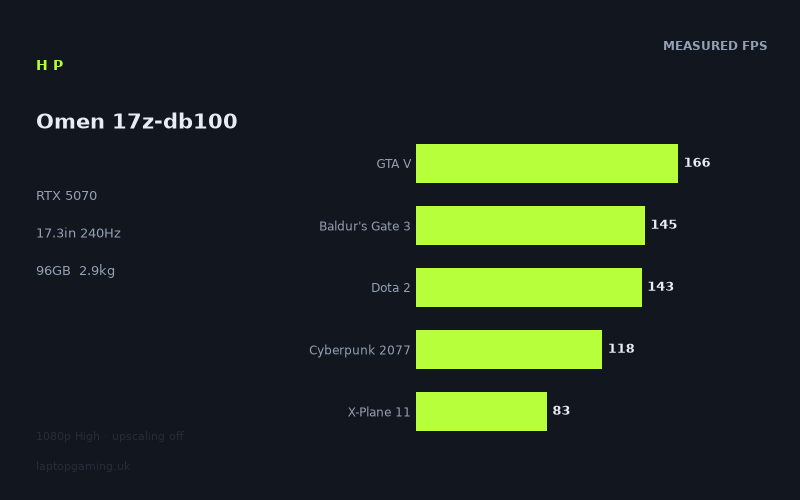
Frame rates
1920×1080, High preset, upscaling off. Averages 131fps across the 5 core benchmark games.
Measured on this machine. Source: Notebookcheck, 2025-10-28.
Not scored: no confirmed UK price
We have the full benchmark suite for this machine, so it ranks on the frame rate leaderboard like any other. What we don't have is a UK listing for this exact configuration - it's sold as a European review unit, or only in specifications that differ from the one tested. Since 30% of our score is value for money, scoring it would mean pretending price is no object, which would flatter it against every laptop you can actually buy. The frame rates below are real and comparable; there is just no buying recommendation to make yet.
How these numbers were produced
Frame rates here are not measured by us, and we label how each one was arrived at. A figure marked measured comes from a published run on that exact machine. A figure marked representative is derived from the GPU and its power limit (TGP) and cross-referenced against published reviews - a sound estimate of what that configuration delivers, but not a measurement of that specific laptop. Unless stated otherwise, numbers are 1920x1080, High preset, upscaling off. Where a laptop ships in several power configurations we use the wattage of the exact SKU listed, because a 140W RTX 5070 and a 115W one are not the same product.
In use
The short version
The Omen 17z-db100 is a 17.3-inch desktop replacement built around an RTX 5070 with 8GB of VRAM, a Ryzen AI 7 350, a 2560x1440 240Hz IPS panel, and a configuration that looks like someone ticked every box on the memory and storage page: 96GB of RAM and a 4TB SSD. The measured frame rates put it squarely in the middle of the RTX 5070 laptop field — faster than the thinner, power-limited 5070 machines in our database, slightly behind the ones paired with HX-class processors. Across the five games in our scoring suite it averages 131fps at 1080p on the High preset with upscaling off, which is a comfortable, unremarkable, entirely respectable result for the class.
The interesting part of this machine is not the average. It is the spread. Notebookcheck's numbers run from 294fps in Strange Brigade down to 32fps in Assassin's Creed Shadows — a range of more than nine to one across twelve titles. Some of that is the normal gap between a 2018 Vulkan showcase and a 2025 open-world game. But the two lowest results, Assassin's Creed Shadows at 32fps and Indiana Jones and the Great Circle at 39fps, are precisely the two titles in the list most likely to be constrained by video memory rather than shader throughput. That is the story of this laptop: the GPU core is fine, the 8GB frame buffer attached to it is the thing that will decide how this machine ages.
We have no confirmed UK price for this exact configuration, so we have not scored it. That is not a comment on the machine — the benchmark suite is complete and it ranks normally on our frame rate leaderboard. Value accounts for 30% of the score in our model and there is no honest way to compute it without a price, so the page shows no score rather than a made-up one. We are not going to speculate about what it costs either.
Who should be interested: someone who wants a large-screen machine that will also carry a serious workload — the 96GB of memory and 4TB of storage are not gaming specifications, they are workstation specifications, and they are the reason to look at this particular build rather than a cheaper 5070 laptop. Someone who plays a broad library at 1080p or 1440p with upscaling on, and who does not need every new release to run at maximum texture settings on day one, will get a lot out of it.
Who should look elsewhere: anyone buying primarily to play the newest, heaviest releases at native resolution with textures cranked. The 8GB frame buffer is the wrong end of the market for that in 2025, and the two worst results in the benchmark data are the warning. Anyone who needs to carry the machine daily should also stop reading here — at 2.885kg plus a charger, this is a laptop that moves between rooms, not between cities.
Performance
The shape of the benchmark spread
Twelve games, measured by Notebookcheck at 1920x1080 on the High preset with upscaling switched off, on 28 October 2025:
- Strange Brigade — 294fps
- F1 24 — 228fps
- GTA V — 166fps
- Baldur's Gate 3 — 145fps
- Dota 2 — 143fps
- Final Fantasy XV — 141fps
- Cyberpunk 2077 — 118fps
- X-Plane 11 — 83fps
- Alan Wake 2 — 69fps
- Black Myth: Wukong — 65fps
- Indiana Jones and the Great Circle — 39fps
- Assassin's Creed Shadows — 32fps
Five of those — GTA V, Baldur's Gate 3, Dota 2, Cyberpunk 2077 and X-Plane 11 — make up our scoring suite, and their mean is 131fps. We use a fixed suite so that machines are compared on identical work; the other seven results are useful context but they do not move the ranking.
The first thing worth saying about this list is that it does not have a single shape. There are three distinct populations in it. At the top, two titles built on engines that were designed to run absurdly fast and that have had years of driver attention. In the middle, a broad band of seven games between 141fps and 65fps, which is where the vast majority of PC gaming actually lives. And at the bottom, two 2024-25 releases that fall off a cliff. Reading the average alone — 131fps, sounds great — tells you almost nothing useful about what buying this machine would feel like.
The top of the chart
Strange Brigade at 294fps and F1 24 at 228fps are the two results that tell you the GPU is not being strangled. Strange Brigade is the standard sanity check in this suite: a Vulkan title with an exceptionally well-optimised renderer that scales almost linearly with GPU power and asks very little of anything else. When a laptop's Strange Brigade number comes in low relative to its class, you are almost always looking at a hard power limit or a thermal problem. That is not happening here. 294fps is a clean, unconstrained result.
F1 24 at 228fps is the same story with a more modern engine. Racing games are latency-sensitive and this is the one genre where a 240Hz panel is genuinely worth having, so it is worth noting that F1 24 gets close to but does not exceed the panel's refresh rate at the High preset. Drop to Medium and you would almost certainly clear it, though we have no measured figures at settings other than High and will not invent them.
Final Fantasy XV at 141fps belongs in this group conceptually — an older, heavily GPU-bound title that runs well — but it lands in the middle band because it was never a light game to begin with. It is a useful data point mostly because it shows the GPU handling a large open world without the frame rate collapsing.
The middle: where the machine actually lives
GTA V at 166fps, Baldur's Gate 3 at 145fps, Dota 2 at 143fps, Final Fantasy XV at 141fps and Cyberpunk 2077 at 118fps. This is the band that matters, because it covers the games most people own. Every one of these is comfortably above 100fps at 1080p High without upscaling, and every one of them would still be a good experience at 1440p once you enable DLSS — though again, all of these figures are native, upscaling off, and we do not have measured DLSS numbers to quantify that with.
Cyberpunk 2077 at 118fps is the single most informative number on the list. It is the game the entire industry uses as a rough proxy for "modern rasterised open world with expensive lighting", and 118fps at 1080p High is a strong result for a 5070-class part. It also gives you a reasonable mental model for the rest of your library: if a game is roughly as demanding as Cyberpunk and does not have unusual VRAM appetites, this machine will run it well above 60fps at native 1080p and, with sensible upscaling, above 60fps at the panel's native 1440p.
Dota 2 at 143fps is the number that should give you pause, and not because 143fps is bad. It is because Dota 2 is a fifteen-year-old Source engine game and a machine capable of 294fps in Strange Brigade should be running it far, far faster. When an esports title lands well below where the GPU's raw capability suggests, the ceiling is somewhere other than the graphics card — the CPU, the engine's own limits, or the specific scene being measured. This matters for a laptop sold with a 240Hz screen: the games most likely to benefit from 240Hz are exactly the ones where the graphics card is not the bottleneck, and 143fps does not fill a 240Hz panel.
X-Plane 11 at 83fps reinforces that reading. X-Plane 11 is notoriously single-thread-bound and driver-sensitive; it is in our scoring suite specifically because it punishes machines that pair a good GPU with a modest CPU. 83fps is the lowest of the five scoring games by a wide margin and it pulls the 131fps average down noticeably. If you fly simulators, this is your number, not the average.
The bottom: Indiana Jones and Assassin's Creed Shadows
Indiana Jones and the Great Circle at 39fps and Assassin's Creed Shadows at 32fps are the results that define this machine's limits, and they deserve to be read carefully rather than dismissed as "new games are heavy".
These are not just the two newest titles in the suite. They are the two titles whose High presets are most likely to exceed 8GB of video memory at 1080p. Indiana Jones uses an always-on ray-traced global illumination pass and streams very large texture sets; Assassin's Creed Shadows combines dense foliage, expensive lighting and high-resolution assets. When a game's working set does not fit in the frame buffer, the symptom is not a graceful, proportional slowdown — it is a disproportionate collapse, because the card starts moving data across the PCIe bus mid-frame.
Look at the ratio. Cyberpunk 2077, a genuinely demanding game, runs at 118fps. Alan Wake 2, which is arguably the most visually expensive game in the entire list on a per-pixel basis, runs at 69fps. Black Myth: Wukong, an Unreal Engine 5 title with Lumen lighting, runs at 65fps. Then Indiana Jones drops to 39fps and Shadows to 32fps. The gap between Wukong and Shadows is a factor of two. Shader throughput does not vary by a factor of two between those two games; something else is happening, and the most plausible candidate — given identical GPU silicon and a small frame buffer — is memory pressure.
We want to be precise about the confidence level here: we cannot prove this from frame rate numbers alone. We do not have VRAM allocation traces, and it is entirely possible that both games are simply extremely heavy on this class of hardware. But the pattern is consistent with what 8GB cards have been doing across the industry for the past two years, and the two games that fall off are exactly the two you would predict.
What 8GB of VRAM actually costs you
The practical consequence is straightforward. On this machine, texture quality is the setting you will be turning down first, and it will often be the only setting you need to turn down. That is a genuinely annoying trade-off, because texture resolution is close to free on a card with enough memory and is one of the settings with the largest visual impact per unit of performance. Reducing shadows or volumetrics costs you something subtle; reducing textures makes the game look worse in a way you notice immediately.
Upscaling helps here in a way that goes beyond the usual performance benefit. Rendering at a lower internal resolution reduces the size of the frame buffers and intermediate render targets, which reduces total memory pressure, not just shading cost. So DLSS on a 8GB card is doing double duty. We have no measured figures with upscaling enabled for this machine, so we are not going to put a number on how much it recovers — but the mechanism is real and it is the reason an 8GB 5070 remains usable in 2025 rather than being written off.
The uncomfortable long-term point is that this is a laptop whose CPU-side memory configuration is 96GB and whose GPU-side memory configuration is 8GB. Whatever the merits of that as a product decision, it means the component most likely to force you into a compromise in three years' time is the one you cannot upgrade. If you buy this machine, buy it understanding that the frame buffer is the ceiling.
The GPU power limit question
Our fact sheet does not state the total graphics power the RTX 5070 runs at in this chassis, and we are not going to guess at a wattage. But we can say something useful about it by triangulating from the comparison data, because two of the rivals in our database are documented at 115W.
Against the Razer Blade 14 with its 5070 at 115W, this machine averages 6fps faster across eleven shared games. Against the ASUS TUF Gaming A18, also with a 115W 5070, it averages 7fps faster across nine shared games. Those are small margins, but they are consistent in direction and they come from reasonably large shared-game samples. A 17.3-inch chassis at 2.885kg has considerably more room for heatsink volume and fan area than a 14-inch machine, and the Strange Brigade result of 294fps confirms the card is allowed to stretch its legs when a game asks it to.
The read, then, is that this Omen is running its 5070 somewhere above the 115W tier, but not at a level that produces a decisive advantage. Six or seven frames per second across a broad suite is the difference between a card running at a moderate power limit and one running at a slightly higher moderate power limit. It is not the difference between a constrained thin-and-light and a fully unlocked desktop replacement — if it were, the margins would be much larger than single digits.
What this means in practice: the power limit is not the thing that will limit you. The frame buffer is, and in some titles the processor is. If you were choosing between this machine and another 5070 laptop purely on GPU headroom, the frame rate spread suggests you would struggle to feel the difference in most games.
We also have no measured fan noise or surface temperature data for this machine, so we cannot tell you what that power level sounds like in a quiet room, and we are not going to characterise it from the specification sheet. That is a real gap in what we can tell you about a 17-inch gaming laptop, and it is worth weighing if acoustics matter to you.
The CPU's role
The Ryzen AI 7 350 is a mainstream mobile processor rather than one of the high-power HX-class parts that typically appear in 17- and 18-inch gaming chassis. That distinction shows up in the data in a specific and predictable way.
In the two comparisons where this machine loses — the MSI Crosshair 18 HX AI, where it is 4fps behind across nine shared games, and the MSI Katana 17 HX, where it is 6fps behind across six shared games — both rivals carry the same RTX 5070 and both have HX-class processors, as the model names indicate. In the three comparisons where this machine wins, it is against machines with either lower GPU power limits or thinner chassis. The pattern is clean: same GPU, better CPU, slightly better frame rates.
Where does that manifest? Almost certainly in the CPU-limited titles. Dota 2 at 143fps and X-Plane 11 at 83fps are the two most obviously processor-bound results in the suite, and GTA V at 166fps is a title that has always responded to single-thread performance. In genuinely GPU-bound work — Alan Wake 2, Black Myth: Wukong, Cyberpunk 2077 — a stronger processor would buy you very little. We should be clear that this is inference from the shape of the results rather than a direct measurement of per-title CPU scaling, but it is the most parsimonious explanation for gaps of four to six frames per second between machines running identical graphics silicon.
The practical consequence is narrow but real. If your library is dominated by simulation, strategy, MMOs or esports titles — the genres where the processor does the heavy lifting — the Ryzen AI 7 350 is the weaker half of this machine and the HX-equipped alternatives will be meaningfully better. If your library is dominated by modern single-player games with expensive rendering, the processor choice is close to irrelevant and you are better off spending the difference elsewhere.
What this means at 1440p
Everything above is measured at 1920x1080. The panel in this laptop is 2560x1440. That is 3,686,400 pixels against 2,073,600 — roughly 78% more work per frame for the rasteriser, and a corresponding increase in the memory required for render targets and buffers.
We do not have measured 1440p figures for this machine, and we are not going to extrapolate a number, because GPU scaling with resolution is not linear and varies substantially by engine. What we can say with confidence is directional, and it is the most important practical point in this review:
- The games at the top of the list — Strange Brigade, F1 24, GTA V, Baldur's Gate 3, Dota 2, Final Fantasy XV — have enough headroom at 1080p that native 1440p should remain a comfortable, high-frame-rate experience.
- Cyberpunk 2077 at 118fps has enough margin that native 1440p should still land well above 60fps, and with upscaling it should be genuinely fast.
- Alan Wake 2 at 69fps and Black Myth: Wukong at 65fps have very little margin. At native 1440p these become upscaling-required games. That is not a criticism — that is how these two titles behave on almost all hardware — but you should plan for it.
- Indiana Jones at 39fps and Assassin's Creed Shadows at 32fps are already below a comfortable frame rate at 1080p High. At native 1440p they will not be playable at these settings. You will be using upscaling, reduced textures, or both.
This is a machine whose panel resolution outruns its graphics card in the hardest games available. Again, that is true of most laptops in this class — but it is worth stating plainly rather than implying that a 1440p panel means 1440p gaming everywhere.
The screen
Resolution and refresh
17.3 inches, 2560x1440, 240Hz, IPS. On paper that is close to the ideal specification for a large gaming laptop in 2025. 1440p across 17.3 inches gives a pixel density that is a clear step up from 1080p at that size without demanding the GPU load of 4K, and it is the resolution the current mid-range mobile GPUs are best suited to. If you have used a 17-inch 1080p gaming laptop, the difference in text and UI sharpness here is immediately obvious.
240Hz is where the specification and the measured performance part company. Of the twelve games in the benchmark data, exactly one — Strange Brigade at 294fps — exceeds 240fps at 1080p on High. F1 24 at 228fps comes close. Everything else is below, most of it well below, and all of those figures are at a resolution lower than the panel's native.
That is not a reason to avoid the machine, but it does change what the 240Hz panel is for. A high refresh rate is still worth having when you are not saturating it: with variable refresh rate, higher panel refresh reduces the granularity of frame pacing and lowers the display's own latency contribution. A 143fps Dota 2 on a 240Hz panel feels better than 143fps on a 144Hz panel. But you should not buy this laptop expecting to see 240fps regularly. You would see it in older esports titles at reduced settings, and we have no measured data at those settings to confirm how often.
The mismatch is sharpest in the games you would most want it for. Competitive shooters live at low settings and high frame rates, and this machine has the GPU capability for that — but the Dota 2 result suggests the processor may become the ceiling before the panel does. If maximum competitive frame rate is your priority, one of the HX-equipped rivals is a better fit for the same graphics card.
IPS, and what we cannot tell you
The panel is IPS. That is a meaningful choice in a market where OLED has become common at this size and price tier, and it is a trade rather than a straightforward downgrade. IPS gives you no risk of burn-in on static HUD elements — genuinely relevant on a machine you might use for eight hours of the same game or the same spreadsheet — and typically better sustained full-screen brightness. OLED gives you black levels and response times that IPS cannot match.
For a 17-inch machine that appears to be built as much for work as for play, given the 96GB of memory, IPS is a defensible choice. Static interface elements from productivity software are the classic burn-in risk, and this configuration looks like it will see plenty of them.
What we do not have is any measured panel data: no brightness figure, no contrast ratio, no colour gamut coverage, no response time. Those numbers matter — the gap between a mediocre IPS panel and a good one is large, and "IPS" on a specification sheet tells you almost nothing about which you are getting. Our fact sheet does not include them, so we are not going to characterise the panel's quality. If colour accuracy matters for your work, treat that as an open question to resolve before buying, not an assumption.
Build, size and portability
What 2.885kg means
2.885kg is the specified weight of the laptop. It does not include the power supply, and a gaming laptop's charger is not a trivial addition — we do not have a figure for this machine's adapter, so treat the real travel weight as meaningfully higher than the number on the spec sheet.
In context: for a 17.3-inch gaming laptop, just under 2.9kg is on the reasonable side. Machines in this size class routinely go well past 3kg once the cooling gets serious, and the fact that this one lands where it does while still delivering 294fps in Strange Brigade suggests HP has not simply thinned the chassis at the cost of thermal capacity. But "reasonable for a 17-inch gaming laptop" and "portable" are different claims, and only the first one applies.
Practically, this is a machine that has a home. It sits on a desk. It gets carried to another room, or into the boot of a car, or occasionally to a friend's house for a weekend. It is not a laptop you take on a train with a bag of other things, and it is not a laptop you open on an economy tray table — the footprint of a 17.3-inch chassis makes that awkward regardless of weight. If your use case involves moving the machine more than a few times a week, the size is going to wear on you long before the weight does.
The flip side is that large chassis buy you things beyond cooling. A 17.3-inch deck typically has room for a full keyboard layout including a number pad, which matters more than people admit for spreadsheet work and for games with large keybind sets. And a 17.3-inch 1440p screen is a genuinely usable primary display — you can put two documents side by side without squinting, which is not true of a 14-inch machine at any resolution. We have not handled this laptop and cannot comment on the keyboard feel, the trackpad, the hinge or the chassis rigidity; those are things you should check in person or find in a hands-on review.
The 83Wh battery
83Wh is a large battery by general laptop standards and a normal-to-generous one for a 17-inch gaming machine. It sits comfortably below the capacity threshold airlines apply to lithium batteries in cabin baggage, for whatever that is worth on a machine this size.
We have no measured battery life figures for this laptop, so we cannot tell you how long it runs. What we can tell you is structural and applies to every machine in this category: gaming laptops with discrete GPUs draw far more power than their batteries can sustain under load, and manufacturers respond by aggressively reducing GPU and CPU power limits when unplugged. Gaming on battery on a machine like this is a fallback, not a mode of operation, and the frame rates in this review were measured on mains power. Do not read 131fps as something you will see away from a socket.
For light use — browsing, documents, video — the Ryzen AI 7 350 is a modern efficiency-focused mobile part paired with a large battery, which is a promising combination on paper. But 17.3 inches of 1440p at high refresh is a substantial power draw in its own right, and without measured data we are not going to tell you it lasts a working day. We do not know.
96GB of memory and 4TB of storage
These two specifications are the reason this configuration exists, and they deserve more attention than gaming reviews usually give them.
96GB of RAM is not a gaming specification. No game in the measured suite, and no game shipping today, benefits from more than a fraction of that. If you are buying purely to play games, this memory capacity buys you nothing and you should look for a configuration with less of it. What 96GB does buy you is the ability to run virtual machines, keep very large datasets in memory, work with high-resolution video timelines, run local language models, or simply keep an absurd number of applications open without ever thinking about it. It is a workstation capacity in a gaming chassis.
96GB is also an unusual number, and in practice it typically comes from a pair of 48GB modules rather than a soldered configuration. If that is the case here it would imply socketed, user-serviceable memory, which is a genuine advantage on a machine you intend to keep. Our fact sheet does not confirm the memory type or whether it is socketed, so we are flagging that as a likely inference rather than stating it as fact — check before you buy if it matters to you.
4TB of SSD storage is more directly useful for gaming than the memory is. Modern game installs have grown to the point where a 1TB drive means constant curation, and a 2TB drive means occasional curation. 4TB largely ends the problem for a normal library. Combined with the memory capacity, it also makes this a credible machine for video work or any workflow that involves large scratch files. We have no measured sequential or random read figures for the drive and no information on whether there are additional free M.2 slots, so we cannot comment on load times or expandability.
The combination — modest GPU memory, enormous system memory, enormous storage — tells you what this build is. It is aimed at someone whose computer has to do two jobs, and whose second job is more demanding than gaming is.
How it compares
All of the comparisons below are drawn only from games both machines have measured results for, which is why the sample sizes differ. A margin computed across eleven shared titles is a more reliable signal than one computed across six.
MSI Crosshair 18 HX AI — RTX 5070, £2,095
Across nine shared games, the Omen averages 4fps slower. That is, for practical purposes, a tie. Four frames per second on a suite that spans from 32fps to 294fps is inside the range where run-to-run variance, driver versions and test conditions can account for the difference. If you are choosing between these two, do not choose on frame rate.
Choose instead on the things that actually differ. The Crosshair is an 18-inch machine, which means a larger footprint again and, in all likelihood, more weight — though we do not have its weight in front of us and will not guess. Its HX-class processor should be stronger in CPU-bound work, and the small measured deficit here is consistent with that. Against it, the Omen offers a 17.3-inch chassis that is at least somewhat easier to live with, and this specific configuration's memory and storage capacity.
The Crosshair has a confirmed price of £2,095 and this Omen configuration does not, which is a meaningful practical advantage for the MSI: you can actually work out what you are getting for your money.
MSI Katana 17 HX — RTX 5070, £2,312
Across six shared games, the Omen averages 6fps slower. This is the largest deficit in the comparison set, but it is also the smallest sample — six shared titles is enough to indicate a direction and not enough to be confident about the magnitude. If the six shared games happen to skew towards CPU-bound titles, the gap would be exaggerated; if they skew towards GPU-bound ones, understated.
What is clear is that both MSI machines with HX processors come out ahead of this Omen on the same graphics card, by similar small margins, which strengthens the read that the processor is the differentiator. The Katana is also a 17-inch machine, making it the closest direct format comparison in this list, and it carries the highest confirmed price of the group at £2,312.
If you are choosing on gaming frame rate alone, the Katana is the faster machine on this evidence. If you need the memory and storage capacity in this Omen configuration, that is not a comparison the Katana can win, and you would need to price up equivalent upgrades.
ASUS TUF Gaming A18 — RTX 5070 at 115W, £1,489
Across nine shared games, the Omen averages 7fps faster. This is the most instructive comparison in the set, because we know the TUF's GPU power limit and we have a solid nine-game sample.
Seven frames per second is a real but modest advantage, and it comes at what is presumably a substantial price difference — the TUF is confirmed at £1,489, which is £600 below the Crosshair and over £800 below the Katana. Whether the Omen's advantage is worth paying for depends entirely on a price we do not have, but the general point stands: the performance gap between a 115W 5070 and a higher-power 5070 is small enough that the cheaper machine is often the smarter purchase.
The TUF is an 18-inch machine, so it is larger than this Omen despite being the budget option, and its build quality expectations are different. But if raw frames per pound is your metric, the A18 at £1,489 sets a bar that anything else with an RTX 5070 has to justify clearing.
Razer Blade 14 — RTX 5070 at 115W, no confirmed UK price
Across eleven shared games — the largest sample in this comparison set, and therefore the most trustworthy margin — the Omen averages 6fps faster. Six frames per second in exchange for going from a 14-inch chassis to a 17.3-inch one is, frankly, a poor trade if portability matters at all to you.
This comparison is the clearest illustration of how flat the RTX 5070 laptop field currently is. A 14-inch machine that will fit in a normal bag gives up single-digit frame rates to a 17.3-inch desktop replacement running the same GPU family. Whatever thermal advantage the larger chassis provides, it is not translating into a performance difference anyone would notice mid-game.
These two machines are aimed at completely different people and the frame rate comparison should not be the deciding factor. The Blade is a machine you carry; this Omen is a machine you place. Choose on that, not on six frames.
Asus ProArt P16 — RTX 5070, no confirmed UK price
Across ten shared games, the Omen averages 10fps faster — the largest margin in the set, from a healthy sample. That is unsurprising: the ProArt is a creator-focused machine where thermal design and acoustics are optimised for sustained professional workloads rather than peak gaming performance, and it is a considerably smaller chassis.
The ProArt is the most interesting comparison conceptually, though, because it is the machine closest to this Omen configuration in intent. Both are trying to serve a user who does serious non-gaming work and also plays games. The Omen approaches it from the gaming side with workstation-grade memory and storage bolted on; the ProArt approaches it from the creator side. The Omen is faster in games by a margin that would actually be visible — ten frames per second across ten titles is enough to matter in the heavier games — but the ProArt is smaller and better suited to being carried to a client's office.
The pattern across all five
Put the five comparisons together and a consistent picture emerges. This machine is mid-pack among RTX 5070 laptops: 4-6fps behind the two machines pairing the same GPU with HX-class processors, 6-10fps ahead of the thinner or lower-power machines. The total span from the fastest rival to the slowest is around 17fps across differently-sampled comparisons, which on a suite averaging 131fps is a spread of roughly 13% between the best and worst RTX 5070 laptops in our database.
That is the single most useful thing to take away from this section. The choice of RTX 5070 laptop is not really a performance choice. All of these machines are close enough that you will not perceive the difference in most games. The choice is about price, screen size, portability, panel quality, keyboard, noise and — in this configuration's case — memory and storage capacity. Buying the fastest 5070 laptop and discovering it is 5% quicker than the one you actually wanted to use is a bad outcome.
Who it's for
Buy this if
You need a single machine that does professional work and gaming, and the work side is memory-hungry. This is the strongest case for this specific configuration. 96GB of RAM and 4TB of storage in a machine that also runs Cyberpunk 2077 at 118fps is a rare combination. If you compile large projects, run multiple virtual machines, work with large datasets or edit high-resolution video, and you also want to play games in the evening, this configuration solves a real problem. The workstation alternatives with equivalent memory generally have worse GPUs; the gaming alternatives with equivalent GPUs generally have far less memory.
You want a large screen and the machine will mostly stay put. A 17.3-inch 1440p panel is a genuinely better place to spend your time than a 15- or 16-inch one, and if the laptop lives on a desk, the 2.885kg weight is irrelevant. In that scenario this is simply a desktop with a built-in UPS and the ability to move rooms.
Your library is broad rather than bleeding-edge. Nine of the twelve measured games run above 60fps at 1080p